
Emoji-Driven Development with Amazon Q Developer CLI agent
When your AI assistant really understands your intent, do you even need words? See how I built 5 Python apps using "Emoji-Driven Development" and Amazon Q Developer CLI.

Have you ever tried to explain a complex workflow with just a few pictures? Or found yourself sketching out an application architecture using simple icons? There's something powerful about visual communication - it crosses language barriers and condenses complex ideas into digestible chunks. But would you believe me if I told you that Amazon Q Developer CLI agent is now so intelligent that it can build entire applications from emoji sequences?
This morning, I got to the office and in a pre-coffee daze I started experimenting with what I'm now calling "Emoji-Driven Development" - using of emojis to describe entire application workflows - and I was absolutely blown away by the results. Let me show you what happened!
How Amazon Q Developer CLI agent Takes Understanding to the Next Level
First, a quick refresher: Amazon Q Developer CLI agent launched at the start of March, and is the command line-based version of Amazon Q Developer that goes way beyond just answering questions. Powered by Anthropic's Claude 3.7 Sonnet model via Amazon Bedrock , it can actually execute commands, read and write files, and interact with tools on your system - from package managers to git to the AWS CLI .
What makes it special is that it doesn't just tell you what commands to run - it can run them for you, right there in your terminal. For example - instead of having to say
python filename.py to run a file (and then having to go back and change it to python3 filename.py to get it to work) you can just say "run my file" when you're building, and it will decide what command you need, and then run the command for you.But could it understand something as nonsensical as emojis? That's what I wanted to find out.
The Emoji-Driven Development Experiment
Let's dive in! The concept is simple but powerful: use a sequence of emojis to represent the entire workflow of an application, and see if Amazon Q Developer CLI agent can translate that visual thinking into complete, working code.
I started by launching the agent with a simple
q chat command in my terminal, then created five different projects using nothing but emoji sequences to describe what I wanted. Here's what happened:1. Web Scraper: 🌐 → 📝 → 🔍 → 📊 → 💾
For my first experiment, I prompted Amazon Q Developer CLI agent with:
1
Create a Python web scraper that does: 🌐 → 📝 → 🔍 → 📊 → 💾
Without hesitation, it generated a
requirements.txt with all necessary web scraping libraries, an emoji_web_scraper.py implementing the complete workflow, and a README.md with documentation.The web scraper followed my emoji pattern:
- 🌐 Fetch web content from specified URLs
- 📝 Parse and extract relevant information
- 🔍 Analyze the extracted data
- 📊 Visualize the results
- 💾 Store data in various formats
No additional explanation needed - it just understood what I meant, and got straight to building.
2. ML Image Classifier: 🖼️ → 🔄 → 🧠 → 🏷️ → 📈
Feeling confident, I asked for something more complex:
1
Write a Python program that implements: 🖼️ → 🔄 → 🧠 → 🏷️ → 📈
Amazon Q Developer CLI agent delivered a complete TensorFlow-based neural network that:
- 🖼️ Loads and organizes image data
- 🔄 Preprocesses and augments images
- 🧠 Trains a neural network model
- 🏷️ Classifies new images
- 📈 Evaluates and visualizes results
It even created appropriate documentation and requirements. Almost all of my study notes from when I was first learning AI/ML years ago are full of emojis (can you tell I am a visual learner?) so it’s really nice to see a full machine learning workflow coming together in my command line, just from 5 emojis.
3. Real-Time Data Dashboard: 📡 → ⏱️ → 📊 → 🔔 → 🖥️
Next up:
1
Create a Python application that: 📡 → ⏱️ → 📊 → 🔔 → 🖥️
This one seems a bit ridiculous now that I’m typing it out again, but it worked really well! This time, Amazon Q Developer CLI agent broke the application into multiple components:
data_fetcher.py(📡) for retrieving datareal_time_processor.py(⏱️) for processing data streamsdata_visualizer.py(📊) for creating visualizationsalert_manager.py(🔔) for monitoring and alertsdashboard_app.py(🖥️) for the web interface
Plus supporting files to tie everything together. It even organized the code into a modular architecture that made perfect sense for a dashboard application!
4. Text Adventure Game: 🗺️ → 👤 → 🎒 → 👾 → 🏆
Time for something fun:
1
Write a Python text adventure game with: 🗺️ → 👤 → 🎒 → 👾 → 🏆
Amazon Q Developer CLI agent created a complete game architecture:
game_world.py(🗺️) for locations and navigationcharacter.py(👤) for player attributes and statsinventory.py(🎒) for items and equipmentencounters.py(👾) for enemies and NPCsachievements.py(🏆) for quests and rewards
Plus the main game file, docs and requirements. I could immediately run the game and play! The structure followed standard game development patterns - all from just five emojis.
5. Automated File Organizer: 📁 → 🔍 → 📋 → 📂 → ✉️
Finally, I tried:
1
Develop a Python script for: 📁 → 🔍 → 📋 → 📂 → ✉️
Amazon Q Developer CLI agent created a complete file organization system:
file_scanner.py(📁) for scanning directoriesfile_analyzer.py(🔍) for analyzing file contentfile_categorizer.py(📋) for categorizing filesfile_organizer.py(📂) for moving filesnotifier.py(✉️) for reports and notifications
Plus a main script, configuration file, and documentation. The system could scan folders, analyze files, categorize them, reorganize them, and then send a report - exactly what the emoji sequence suggested, and exactly what I would normally be too lazy to build myself.
Why Emoji-Driven Development Is Actually Pretty Cool
This isn't just a fun party trick - there are some real advantages to this approach:
- Visual clarity: Emojis provide a quick visual representation of complex workflows
- Conceptual chunking: Breaking applications into clear, memorable steps
- Memorable architecture: Using visual metaphors to understand system components
- Consistent structure: Enforcing logical flow from input to output
- It's just fun: Adding a bit of joy to the development process never hurts!
What impresses me most is how this showcases the deep understanding that Amazon Q Developer CLI agent has developed. It's not just pattern-matching or following instructions - it's truly comprehending my intent and translating these abstract visual concepts into working code.
The power here isn't just in the novelty - it's about how you can work in your natural workflow and communicate in the way that makes sense to you. Whether that's detailed technical specifications or, apparently, just a string of emojis!
Your Emoji-Driven Development Cheat Sheet
If you want to get started, I've made a reference guide to the most useful emojis for representing common programming concepts:
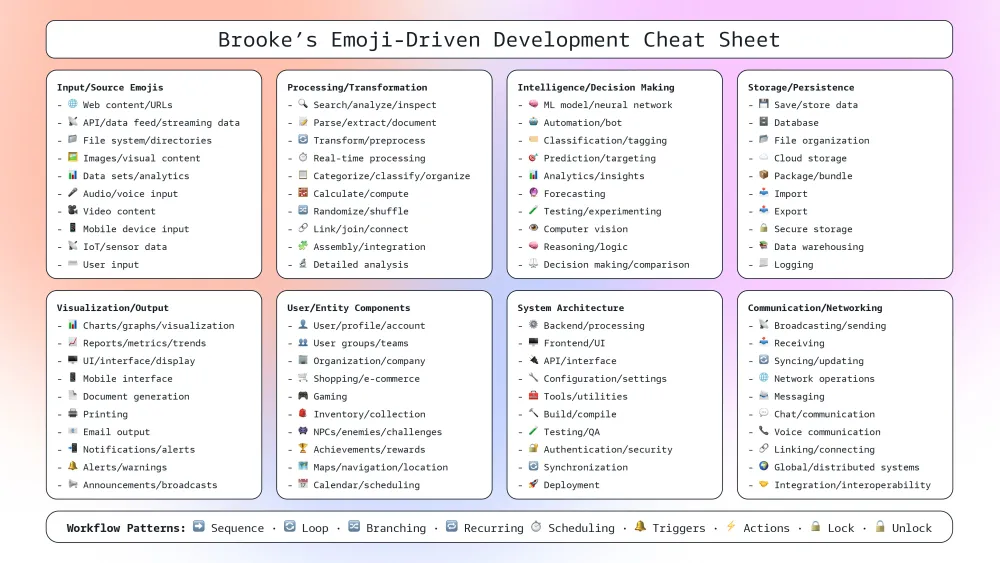
The key for this is finding emojis that intuitively represent the concepts in your specific domain. Remember, the best emoji sequences tell a clear story about your application's data flow.
Try It Yourself!
Amazon Q Developer CLI agent is available on both Free and Pro tiers in all regions where Amazon Q Developer is available. If you're curious about pushing the boundaries of AI understanding in your dev workflow, I'd love to see what you create!
Let me know in the comments below if you try Emoji-Driven Development - I can't wait to see what emoji sequences you come up with and what applications they turn into!
See you next time,
- Brooke
- Brooke
P.S. For those wondering - yes, I was genuinely surprised this worked so well! I expected to need to provide a lot more context, but it just... got it. The future of development is looking pretty exciting!
Enjoyed reading this content? Let the author know!
Your likes, comments, shares, and saves help creators reach more builders.

Loading recommendations
Loading article