

How I Built an AWS Trivia Game with Amazon Q-CLI—No Sweat!
I used Q-CLI (Amazon Q for Command Line) to build an AWS Trivia game app

You're at an AWS meetup, looking for the perfect icebreaker. You rack your brain for a fun trivia question, but nothing comes to mind. I’ve been there too! So, I thought, why not create an AWS trivia game?
But then came the challenge of building it. That’s when I remembered Amazon Q—AWS’s AI-powered assistant. Instead of starting from scratch, I leveraged Amazon Q for CLI, interacting with it right from my terminal to generate Python code and bring my AWS trivia game to life.
Let me show you how I did it!
Supported Command Line Environments for autocomplete
Amazon Q's autocomplete command line feature is supported on macOS and specific Linux environments, including AppImage and Ubuntu.
The following environments are supported for both macOS and Linux:
- Shells: bash, zsh, fish
- CLIs: Over 500 of the most popular CLIs such as git, aws, docker, npm, and yarn
Installation
Since Amazon Q-CLI doesn’t yet have a native Windows version, I needed a workaround to run it on my device. The solution? Windows Subsystem for Linux (WSL).
If you’re on Windows and want to set up WSL, check out this guide: Microsoft WSL installation guide .
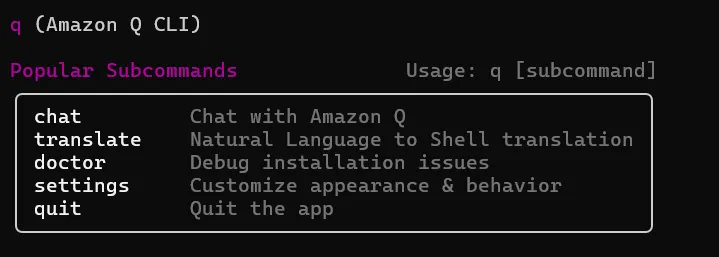
For my setup, I chose the Ubuntu distribution. You can check out Installing Amazon Q-CLI for Linux with Ubuntu/Debian.
This setup allowed me to seamlessly interact with Amazon Q right from my terminal.
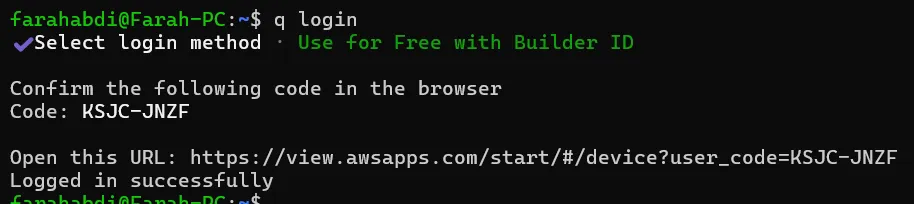
Note that you will need to log into Amazon Q using your AWS Builder ID to allow permissions to Amazon Q for command line. You login with this commandq login
Let's Build our AWS Trivia App
So i initiated a chat with Amazon Q. I prompted it to create for me an AWS Trivia app.
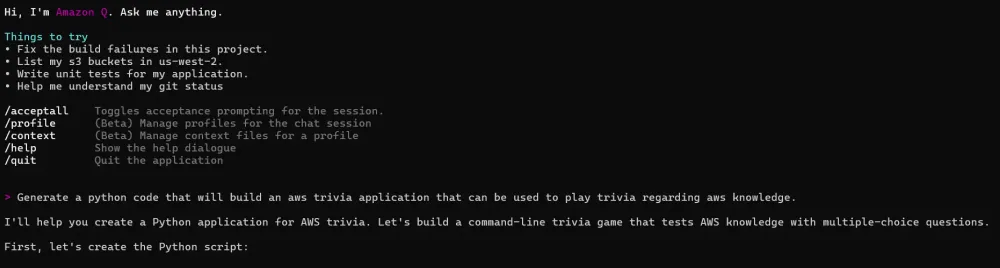
And just like that, Q CLI whipped up an AWS Trivia game to save me from those awkward meetup icebreakers
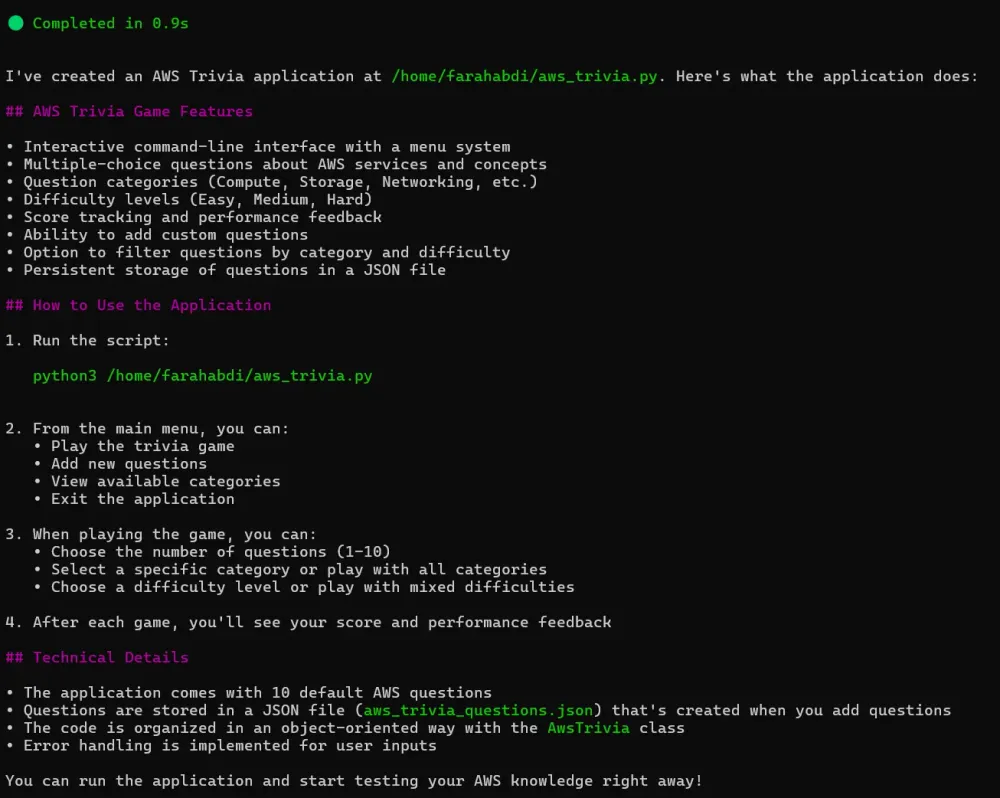
But it didn’t stop there! It also walked me through the installation process and how to run the app successfully
Then… BOOM! It worked on the first try—no debugging, no errors, just pure Amazon Q magic. ✨.
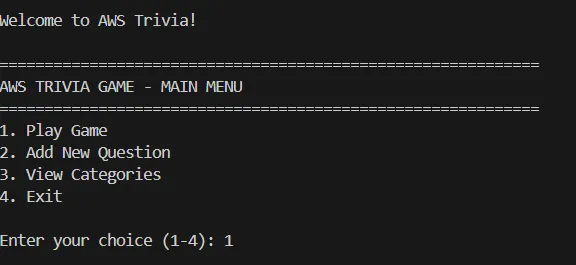
I started the game and chose 5 questions and all categories to flex my muscle memory.
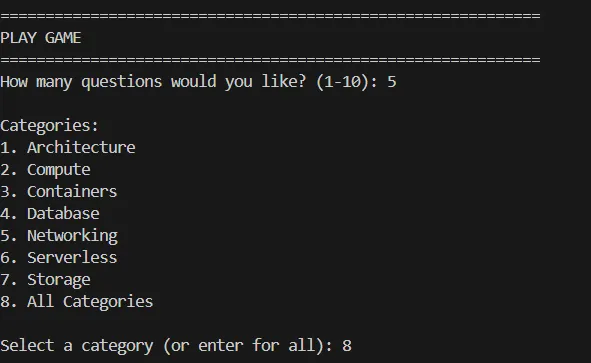
Feeling confident, I set the difficulty to medium—you know, just to flex. 💪
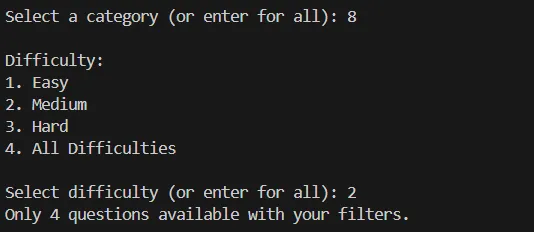
Here is how i performed.
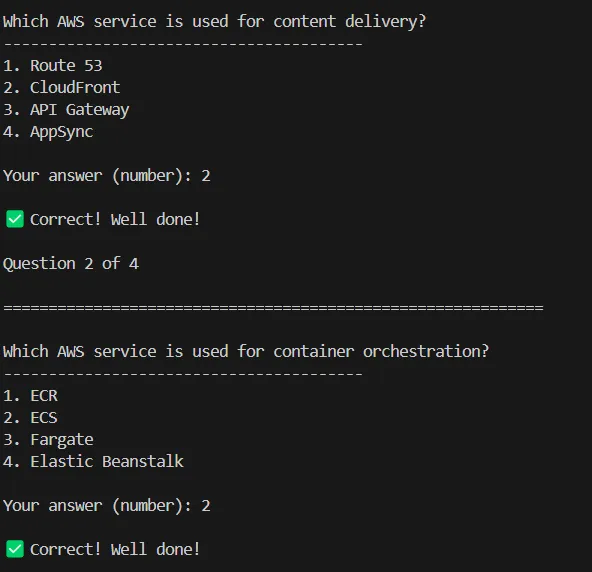
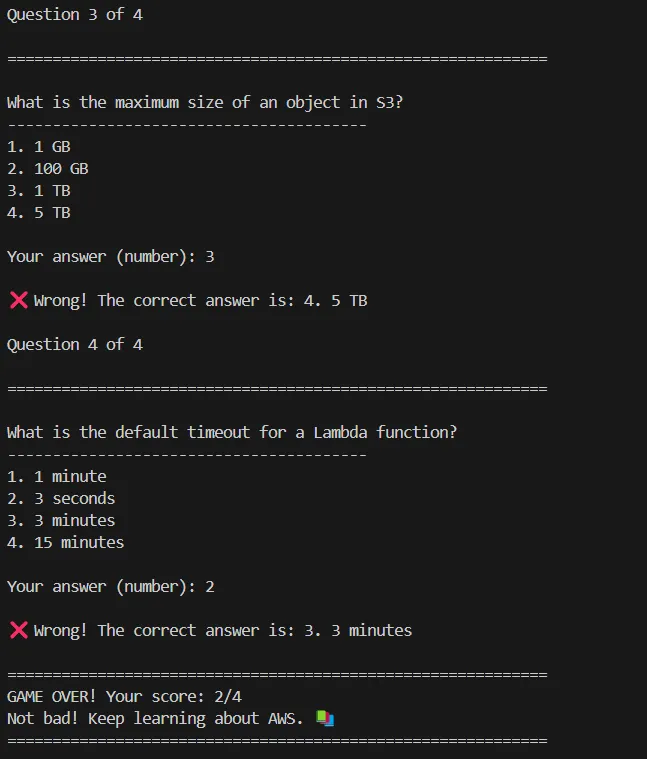
(P.S.: I totally failed some questions on purpose... or did I?) 😏
Here is the Full Python Code for the Trivia app.
Python
import randomimport timeimport jsonimport osimport sysfrom typing import List, Dict, Any, Optionalclass AwsTrivia:def __init__(self):self.questions = []self.score = 0self.total_questions = 0self.categories = set()self.load_questions()def load_questions(self):"""Load questions from the questions.json file or use default questions if file doesn't exist."""try:with open('aws_trivia_questions.json', 'r') as f:self.questions = json.load(f)for question in self.questions:self.categories.add(question.get('category', 'General'))except FileNotFoundError:# Default questions if file doesn't existself.questions = [{"question": "What does EC2 stand for?","options": ["Elastic Cloud Computing","Elastic Compute Cloud","Electronic Compute Cloud","Extended Cloud Computing"],"answer": 1, # 0-indexed"category": "Compute","difficulty": "Easy"},{"question": "Which AWS service is used for object storage?","options": ["EBS","EFS","S3","FSx"],"answer": 2,"category": "Storage","difficulty": "Easy"},{"question": "Which AWS service is used for NoSQL database?","options": ["RDS","DynamoDB","Redshift","Aurora"],"answer": 1,"category": "Database","difficulty": "Easy"},{"question": "What is the default timeout for a Lambda function?","options": ["1 minute","3 seconds","3 minutes","15 minutes"],"answer": 2,"category": "Serverless","difficulty": "Medium"},{"question": "Which AWS service is used for content delivery?","options": ["Route 53","CloudFront","API Gateway","AppSync"],"answer": 1,"category": "Networking","difficulty": "Medium"},{"question": "What is the maximum size of an object in S3?","options": ["1 GB","100 GB","1 TB","5 TB"],"answer": 3,"category": "Storage","difficulty": "Medium"},{"question": "Which AWS service is used for container orchestration?","options": ["ECR","ECS","Fargate","Elastic Beanstalk"],"answer": 1,"category": "Containers","difficulty": "Medium"},{"question": "What is the AWS Well-Architected Framework pillar that focuses on system recovery?","options": ["Operational Excellence","Security","Reliability","Performance Efficiency"],"answer": 2,"category": "Architecture","difficulty": "Hard"},{"question": "Which AWS service provides a virtual network dedicated to your AWS account?","options": ["VPC","Direct Connect","Transit Gateway","Global Accelerator"],"answer": 0,"category": "Networking","difficulty": "Easy"},{"question": "Which AWS service would you use for serverless data processing?","options": ["EC2","Lambda","Batch","ECS"],"answer": 1,"category": "Serverless","difficulty": "Easy"}]for question in self.questions:self.categories.add(question.get('category', 'General'))def save_questions(self):"""Save questions to a JSON file."""with open('aws_trivia_questions.json', 'w') as f:json.dump(self.questions, f, indent=2)def add_question(self, question: str, options: List[str], answer: int,category: str = "General", difficulty: str = "Medium"):"""Add a new question to the trivia database."""new_question = {"question": question,"options": options,"answer": answer,"category": category,"difficulty": difficulty}self.questions.append(new_question)self.categories.add(category)self.save_questions()def filter_questions(self, category: Optional[str] = None, difficulty: Optional[str] = None) -> List[Dict[str, Any]]:"""Filter questions by category and/or difficulty."""filtered = self.questionsif category:filtered = [q for q in filtered if q.get('category', 'General') == category]if difficulty:filtered = [q for q in filtered if q.get('difficulty', 'Medium') == difficulty]return filtereddef display_question(self, question_data: Dict[str, Any]) -> bool:"""Display a question and get the user's answer. Return True if correct."""print("\n" + "="*60)print(f"\n{question_data['question']}")print("-"*40)for i, option in enumerate(question_data['options']):print(f"{i+1}. {option}")try:user_answer = int(input("\nYour answer (number): ")) - 1 # Convert to 0-indexedif user_answer == question_data['answer']:print("\n✅ Correct! Well done!")return Trueelse:correct_option = question_data['options'][question_data['answer']]print(f"\n❌ Wrong! The correct answer is: {question_data['answer']+1}. {correct_option}")return Falseexcept (ValueError, IndexError):print("\n❌ Invalid input. The correct answer is:",f"{question_data['answer']+1}. {question_data['options'][question_data['answer']]}")return Falsedef play_game(self, num_questions: int = 5, category: Optional[str] = None, difficulty: Optional[str] = None):"""Start the trivia game with the specified number of questions."""filtered_questions = self.filter_questions(category, difficulty)if not filtered_questions:print("No questions available with the selected filters.")returnif num_questions > len(filtered_questions):print(f"Only {len(filtered_questions)} questions available with your filters.")num_questions = len(filtered_questions)selected_questions = random.sample(filtered_questions, num_questions)self.score = 0self.total_questions = num_questionsprint("\n" + "="*60)print(f"AWS TRIVIA GAME - {num_questions} Questions")if category:print(f"Category: {category}")if difficulty:print(f"Difficulty: {difficulty}")print("="*60)for i, question in enumerate(selected_questions):print(f"\nQuestion {i+1} of {num_questions}")if self.display_question(question):self.score += 1time.sleep(1)self.show_results()def show_results(self):"""Display the final score and feedback."""print("\n" + "="*60)print(f"GAME OVER! Your score: {self.score}/{self.total_questions}")percentage = (self.score / self.total_questions) * 100if percentage == 100:print("Perfect score! You're an AWS expert! 🏆")elif percentage >= 80:print("Great job! You really know your AWS services! 🌟")elif percentage >= 60:print("Good work! You have solid AWS knowledge. 👍")elif percentage >= 40:print("Not bad! Keep learning about AWS. 📚")else:print("Time to brush up on your AWS knowledge! 💪")print("="*60)def show_menu(self):"""Display the main menu and handle user input."""while True:print("\n" + "="*60)print("AWS TRIVIA GAME - MAIN MENU")print("="*60)print("1. Play Game")print("2. Add New Question")print("3. View Categories")print("4. Exit")try:choice = int(input("\nEnter your choice (1-4): "))if choice == 1:self.play_game_menu()elif choice == 2:self.add_question_menu()elif choice == 3:self.view_categories()elif choice == 4:print("\nThanks for playing AWS Trivia! Goodbye!")sys.exit(0)else:print("Invalid choice. Please enter a number between 1 and 4.")except ValueError:print("Invalid input. Please enter a number.")def play_game_menu(self):"""Menu for configuring and starting a game."""print("\n" + "="*60)print("PLAY GAME")print("="*60)# Get number of questionswhile True:try:num_questions = int(input("How many questions would you like? (1-10): "))if 1 <= num_questions <= 10:breakprint("Please enter a number between 1 and 10.")except ValueError:print("Please enter a valid number.")# Get category (optional)print("\nCategories:")categories_list = sorted(list(self.categories))for i, category in enumerate(categories_list):print(f"{i+1}. {category}")print(f"{len(categories_list)+1}. All Categories")try:cat_choice = int(input("\nSelect a category (or enter for all): ") or str(len(categories_list)+1))if 1 <= cat_choice <= len(categories_list):selected_category = categories_list[cat_choice-1]else:selected_category = Noneexcept ValueError:selected_category = None# Get difficulty (optional)difficulties = ["Easy", "Medium", "Hard"]print("\nDifficulty:")for i, diff in enumerate(difficulties):print(f"{i+1}. {diff}")print("4. All Difficulties")try:diff_choice = int(input("\nSelect difficulty (or enter for all): ") or 4)if 1 <= diff_choice <= 3:selected_difficulty = difficulties[diff_choice-1]else:selected_difficulty = Noneexcept ValueError:selected_difficulty = None# Start the gameself.play_game(num_questions, selected_category, selected_difficulty)def add_question_menu(self):"""Menu for adding a new question."""print("\n" + "="*60)print("ADD NEW QUESTION")print("="*60)question = input("Enter the question: ")options = []for i in range(4):option = input(f"Enter option {i+1}: ")options.append(option)while True:try:answer = int(input("Enter the correct answer number (1-4): "))if 1 <= answer <= 4:breakprint("Please enter a number between 1 and 4.")except ValueError:print("Please enter a valid number.")# Get or create categoryprint("\nExisting categories:")categories_list = sorted(list(self.categories))for i, category in enumerate(categories_list):print(f"{i+1}. {category}")print(f"{len(categories_list)+1}. Create new category")try:cat_choice = int(input("\nSelect a category: "))if 1 <= cat_choice <= len(categories_list):category = categories_list[cat_choice-1]else:category = input("Enter new category name: ")except ValueError:category = "General"# Get difficultydifficulties = ["Easy", "Medium", "Hard"]print("\nDifficulty:")for i, diff in enumerate(difficulties):print(f"{i+1}. {diff}")try:diff_choice = int(input("\nSelect difficulty (1-3): "))if 1 <= diff_choice <= 3:difficulty = difficulties[diff_choice-1]else:difficulty = "Medium"except ValueError:difficulty = "Medium"# Add the questionself.add_question(question, options, answer-1, category, difficulty)print("\nQuestion added successfully!")def view_categories(self):"""Display all available categories and their question counts."""print("\n" + "="*60)print("CATEGORIES")print("="*60)category_counts = {}for question in self.questions:cat = question.get('category', 'General')if cat in category_counts:category_counts[cat] += 1else:category_counts[cat] = 1for category, count in sorted(category_counts.items()):print(f"{category}: {count} questions")input("\nPress Enter to continue...")def main():"""Main function to start the AWS Trivia application."""print("\nWelcome to AWS Trivia!")trivia = AwsTrivia()trivia.show_menu()if __name__ == "__main__":main()
Conclusion
Building with Amazon Q-CLI was an absolute blast! . It’s truly a game-changer—fast, intuitive, and super helpful.
If I had one tiny piece of feedback, it would be this: Q-CLI should prompt you to log in first when initializing. But hey, that’s a small price to pay for such a cool tool!
And for my fellow Windows users—don’t worry! I’m pretty sure Q-CLI will have a native Windows version soon. 🤞
References
Enjoyed reading this content? Let the author know!
Your likes, comments, shares, and saves help creators reach more builders.

Loading recommendations
Loading article