
Compiling 70B+ LLMs with NxDI on AWS Trainium using EKS
Step by step guide to compile large models like DeepSeek-R1-Distill-Llama-70B on AWS Trainuim instances via EKS.

A customer aiming to serve models with tens of billions of parameters—while saving up to 50% on accelerated compute costs—can use EC2 Trainium alongside EKS for scalable, efficient container orchestration and seamless AWS integration, and leverage real-time monitoring and proactive troubleshooting with services like CloudWatch or OpenTelemetry. Model compilation is memory intensive and requires optimal configuration to maximize resources while ensuring sufficient capacity for monitoring tools. This post demonstrates how to compile the DeepSeek R1 70B distilled model on a
trn1.32xlarge EC2 instance with optimal tensor parallelism and NxDI compilation, while monitoring progress using CloudWatch ContainerInsights. We recommend reviewing " Get started with DeepSeek R1 on AWS Inferentia and Trainium " before reading this guide. For more details on NxDI, please refer to the NxDI Overview .- Deploy NodePool and EC2NodeClass that provisions
trn1.32xlarge
YAML
apiVersion: karpenter.sh/v1beta1kind: NodePoolmetadata:name: amd-neuron-trn1spec:template:spec:requirements:- key: kubernetes.io/archoperator: Invalues: ["amd64"]- key: karpenter.k8s.aws/instance-familyoperator: Invalues: ["trn1"]...
Also configure
EC2NodeClass that uses the EKS-managed DLAMI and allocate large disks-space to store the compiled model artifacts (graph and weights)YAML
apiVersion: karpenter.k8s.aws/v1beta1kind: EC2NodeClassmetadata:name: amd-neuronspec:amiFamily: AL2role: "KarpenterNodeRole-myrole"subnetSelectorTerms:- tags:karpenter.sh/discovery: "mycluster"securityGroupSelectorTerms:- tags:karpenter.sh/discovery: "mycluster"blockDeviceMappings:- deviceName: /dev/xvdaebs:volumeSize: 900GivolumeType: gp3encrypted: true
- Build an OCI image based on the latest Neuron Containers that includes n
euronx_distributed_inferenceand a script that will compile the model:
Python
import osfrom huggingface_hub import create_repo,upload_folder,loginhf_token = os.environ['HUGGINGFACE_TOKEN'].strip()max_model_len=int(os.environ['MAX_MODEL_LEN'])max_num_seqs=int(os.environ['MAX_NUM_SEQS'])tensor_parallel_size=int(os.environ['TENSOR_PARALLEL_SIZE'])model_name=os.environ['MODEL_NAME']compiled_model_name=os.environ['COMPILED_MODEL_NAME']os.environ['VLLM_NEURON_FRAMEWORK'] = "neuronx-distributed-inference"os.environ['NEURON_COMPILED_ARTIFACTS']=model_namelogin(hf_token,add_to_git_credential=True)def push_compiled_model_to_hf(local_dir: str,repo_id: str,commit_message: str,token: str = None,):create_repo(repo_id=repo_id,token=token,exist_ok=True,private=False)upload_folder(folder_path=local_dir,path_in_repo="",repo_id=repo_id,commit_message=commit_message)from vllm import LLM, SamplingParamsllm = LLM(model=model_name,max_num_seqs=max_num_seqs,max_model_len=max_model_len,device="neuron",override_neuron_config={},tensor_parallel_size=tensor_parallel_size)prompts = ["The president of the United States is",]sampling_params = SamplingParams(top_k=10, temperature=0.8, top_p=0.95)outputs = llm.generate(prompts, sampling_params)for output in outputs:prompt = output.promptgenerated_text = output.outputs[0].textprint(f"Prompt: {prompt!r}, Generated text: {generated_text!r}")push_compiled_model_to_hf(local_dir=model_name,repo_id=compiled_model_name,commit_message=f"Add NxD compiled model {compiled_model_name} from {model_name} for vLLM; max_num_seqs={max_num_seqs},max_model_len={max_model_len},tensor_parallel_size={tensor_parallel_size}"
- Deploy a Kubernetes Job that uses the nodepool, DLAMI and the NeuronContainers, and compile script
YAML
apiVersion: batch/v1kind: Jobmetadata:name: compile-jobspec:template:spec:restartPolicy: OnFailurenodeSelector:karpenter.sh/nodepool: amd-neuron-trn1serviceAccountName: appsimulatorschedulerName: my-schedulercontainers:- name: appimage: myaccountid.dkr.ecr.us-west-2.amazonaws.com/myociimage:mylecrtagimagePullPolicy: AlwaysvolumeMounts:- name: dshmmountPath: /dev/shmcommand:- /bin/bash- "-exc"- |set -xpip install --upgrade pippip config set global.extra-index-url https://pip.repos.neuron.amazonaws.compip install --upgrade neuronx-cc transformers_neuronx neuronx_distributed sentence_transformers transformers torch-neuronx accelerate triton protobuf# Temporary clone: in the future, this repository will be included as a dependency, eliminating the need for cloning; more info in https://awsdocs-neuron.readthedocs-hosted.com/en/latest/libraries/nxd-inference/developer_guides/vllm-user-guide.html#setupgit clone -b v0.6.x-neuron https://github.com/aws-neuron/upstreaming-to-vllm.gitcd upstreaming-to-vllmpip install -r requirements-neuron.txtVLLM_TARGET_DEVICE="neuron" && pip install -e .python /compile-vllm.pyresources:limits:memory: "465Gi"aws.amazon.com/neuron: "16"requests:memory: "465Gi"aws.amazon.com/neuron: "16"env:- name: PYTHONWARNINGSvalue: "ignore::UserWarning"- name: MODEL_NAMEvalue: "deepseek-ai/DeepSeek-R1-Distill-Llama-70B"- name: MAX_MODEL_LENvalue: "128"- name: MAX_NUM_SEQSvalue: "1"- name: TENSOR_PARALLEL_SIZEvalue: "32"- name: COMPILED_MODEL_NAMEvalue: "myhfuser/DeepSeek-R1-Distill-Llama-70B-nxd-tp32-len128-bs1"- name: HUGGINGFACE_TOKENvalueFrom:secretKeyRef:name: hf-secretskey: HUGGINGFACE_TOKENvolumes:- name: dshmemptyDir:medium: Memory
Note that setting resources.limits.memory to "465Gi" is crucial because the default memory requests are much lower than what the compilation process requires. In Kubernetes, the admission controller and kubelet eviction logic monitor memory usage closely. If a pod exceeds its allocated memory or if node-level memory pressure is detected, the kubelet’s eviction manager may terminate the pod to reclaim resources. This high limit ensures that the model compilation process—which involves memory-intensive operations—is not preempted by other processes (like monitoring applications) competing for resources, thereby preventing unwanted evictions by the control plane.
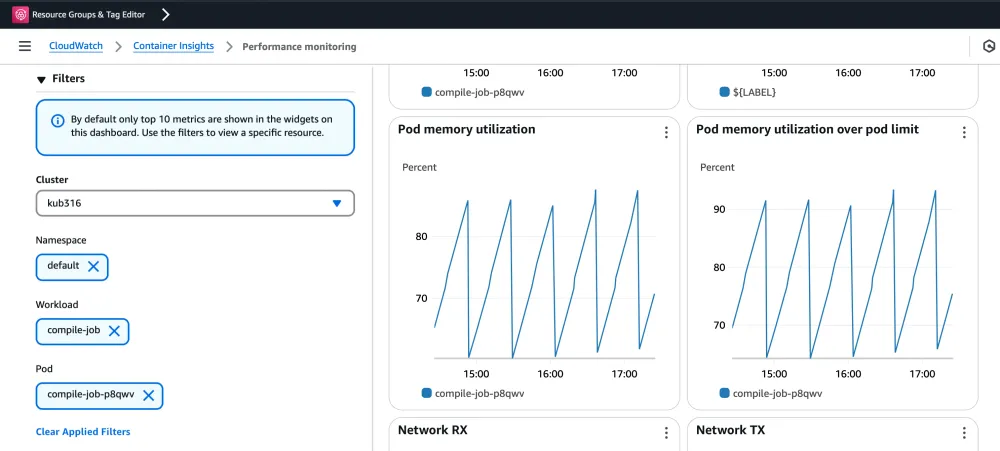
- Discover the memory consumption by the compile job in CloudWatch ContainerInsight. In the plot below
-
The number of spikes in the memory utilization expected be as the value of the configured
TENSOR_PARALLEL_SIZE
By the end pf this job expects to see the model in your HuggingFace user.You can also track the progress via kubectl:
Bash
$kubectl logs compile-job-p8qwv| grep "initializing tensor model parallel"| wc -l6
- Now you can run another job that download the compiled model from the HuggingFace repo and invoke the model without waiting for the model to be compiled.
Learn more:
- For details on the configuration parameters for vLLM, refer the Neuron continuous batching guide .
- For a full code sample on serving models with vLLM or HuggingFace pipelines, please refer to our published AWS sample . We’re showcasing specific examples like this one and welcome your feedback on adding more.
Enjoyed reading this content? Let the author know!
Your likes, comments, shares, and saves help creators reach more builders.

Loading recommendations
Loading article