
Pull Request Code Suggestions with Amazon Q Developer
Using the /review workflow put code suggestions on your GitHub pull requests!


Amazon Q Developer comes with many powerful commands, and one of the most useful is the
/review command. This feature allows Amazon Q Developer to review and fix code directly in your IDE before you commit changes. However, as demonstrated in a previous post, it can also be integrated into CI/CD pipelines to automatically comment on pull requests—providing valuable feedback on code changes.Automated PR Reviews with Amazon Q Developer
One of the standout features is that Amazon Q Developer can analyze diffs and leave comments on pull requests. This means developers can get automated feedback on their code before merging changes, improving collaboration and code quality.
Sample Prompt for Structured Code suggestions.
To achieve this, I structured the review comments in JSON format and used GitHub’s Octokit library to post them on the pull request. Here’s the prompt I used to generate the structured review comments:
plaintext
Do a review of the files in changes.txt for any CRITICAL or HIGH issues.Put any review comments in seperate json files under the 'amazon-q/review' directory the json files must be in the format{"filepath": <relative path to the file>,"comment": <The review comment>,"suggested_change": <the suggested code change>,"start_line": <the start line of the suggestion>,"end_line": <the end line of the suggestion>}
This prompt instructs Amazon Q Developer to review the files listed in
changes.txt and flag any CRITICAL or HIGH issues, outputting review comments in the amazon-q/review directory. It works pretty well!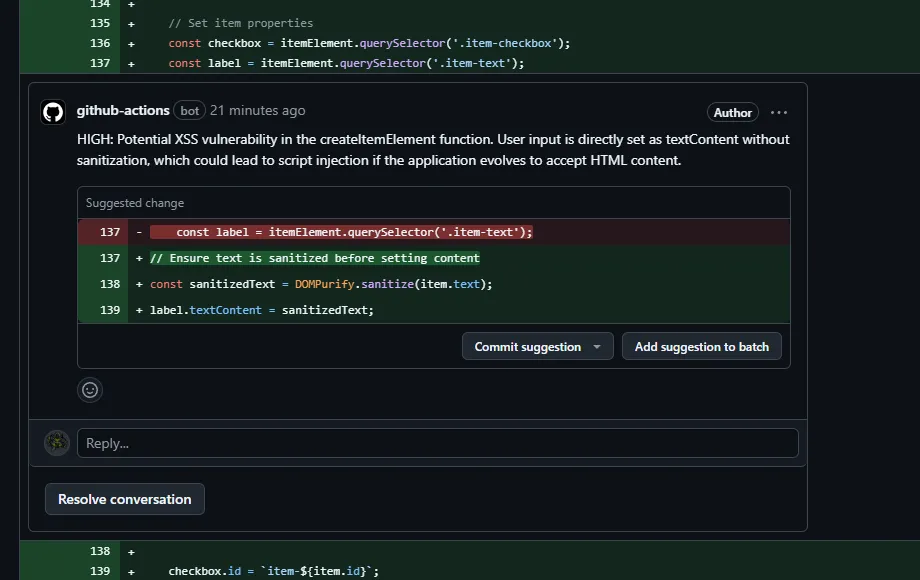
Implementation Details
I didn't have much success getting Q to put the diffs on the Pull request for me, so to implement this, I extended my existing Amazon Q code review pipeline by:
- Installing Node.js and Octokit.
- Running a script to parse the Amazon Q Developer review output and post the comments to the pull request.
here's the script!
js
// Import required Node.js modulesimport fs from 'fs';import { Octokit } from '@octokit/rest';import path from 'path';import { fileURLToPath } from 'url';// Configure logging utility to add timestamps to log messagesconst logger = {info: (msg) => console.log(`INFO: ${new Date().toISOString()} - ${msg}`)};async function addPrLineComments(repoName, prNumber, directoryPath, githubToken) {/*** Add line-specific review comments to a GitHub PR for files in a directory* @param {string} repoName - GitHub repository in format owner/repo* @param {number} prNumber - Pull request number* @param {string} directoryPath - Path to directory containing review files* @param {string} githubToken - GitHub authentication token*/// Initialize GitHub API client with auth tokenlogger.info(`Initializing GitHub client for repo ${repoName}`);const octokit = new Octokit({ auth: githubToken });// Split repository name into owner and repo partslogger.info(`Getting repository ${repoName}`);const [owner, repo] = repoName.split('/');logger.info(`Getting PR #${prNumber}`);// Get list of files in the specified directorylogger.info(`Processing files in directory: ${directoryPath}`);const files = fs.readdirSync(directoryPath);// Process each file in the directoryfor (const filename of files) {const filePath = path.join(directoryPath, filename);// Only process regular files, not directoriesif (fs.statSync(filePath).isFile()) {try {logger.info(`Processing file: ${filename}`);// Read and parse the review data JSON fileconst content = fs.readFileSync(filePath, 'utf8');const reviewData = JSON.parse(content);// Get the latest commit SHA from the pull requestconst { data: pullRequest } = await octokit.pulls.get({owner,repo,pull_number: prNumber});const commitSha = pullRequest.head.sha;// Determine if comment spans multiple lineslet multiLine = true;if (reviewData.start_line == reviewData.end_line)multiLine = false;// Log the comment being addedlogger.info(`Adding review comment to ${filename} at line ${reviewData.end_line}`);// Create GitHub review comment - different API calls for single vs multi-lineif (multiLine) {// Multi-line comment requires start_line and start_side parametersawait octokit.pulls.createReviewComment({owner,repo,pull_number: prNumber,body: `${reviewData.comment}\n\n\`\`\`suggestion\n${reviewData.suggested_change}\n\`\`\``,commit_id: commitSha,path: reviewData.filepath,line: reviewData.end_line,start_line: reviewData.start_line,start_side: 'RIGHT',side: 'RIGHT'});}else {// Single line comment has simpler parametersawait octokit.pulls.createReviewComment({owner,repo,pull_number: prNumber,body: `${reviewData.comment}\n\n\`\`\`suggestion\n${reviewData.suggested_change}\n\`\`\``,commit_id: commitSha,path: reviewData.filepath,line: reviewData.end_line,side: 'RIGHT'});}logger.info(`Successfully added comment to ${filename}`);} catch (error) {// Log any errors that occur during processinglogger.info(`Failed to process review comment for file ${filename}: ${error.message}`);console.error(`Error details:`, error);}}}}// Get the current file name using ES modulesconst __filename = fileURLToPath(import.meta.url);// Check if this file is being run directlyif (import.meta.url === `file://${__filename}`) {// Load configuration from environment variablesconst GITHUB_TOKEN = process.env.GITHUB_TOKEN;const REPO_NAME = process.env.GITHUB_REPOSITORY;const PR_NUMBER = parseInt(process.env.PR_NUMBER);const DIRECTORY_PATH = process.env.DIRECTORY_PATH || "amazon-q/review";// Execute the main functionlogger.info("Starting PR comment process");addPrLineComments(REPO_NAME, PR_NUMBER, DIRECTORY_PATH, GITHUB_TOKEN).then(() => logger.info("Completed PR comment process")).catch(error => console.error("Error:", error));}
Enjoyed reading this content? Let the author know!
Your likes, comments, shares, and saves help creators reach more builders.

Loading recommendations
Loading article