
How to build an API-Driven front-end app using Amazon Q CLI
Building and deploying a front-end application that consumes a public API solely through prompts.

When I was presenting about Amazon Q Developer at an event, someone from the audience challenged me. They asked if Amazon Q Developer could create an application only using prompt if we pointed to an API documentation. Naturally, I accepted the challenge and asked them to give me a few hours after I finished the event.
It took me longer to find a public API that I could use than it did to work on the prompt. I used the prompt below with Q Dev in VSCode, utilizing the agent for software development
/dev. After Q Dev created the application, I manually deployed it to AWS. This time, I included a final sentence stating that I wanted to deploy the application to AWS.> Using Flask, build a user interface (UI) that allows users to search for an activity and shows which parks offer that activity by connecting to the National Park Service API (developer.nps.gov/api/v1). The application should query activity IDs and activities in parks based on the returned IDs. I want to deploy this application to AWS.Spoiler alert: the deployment had two hiccups, but I refused to edit or configure anything in the code or on AWS. Instead, I decided to use the Amazon Q CLI throughout the entire process. In the end, the Amazon Q CLI did not disappoint, as usual.
This is what Q Dev CLI built
Application Structure
1
2
3
4
5
6
7
8
9
10
11
12
nps-activity-finder/
├── app.py                 # Main Flask application
├── static/
│   ├── style.css          # CSS styling
│   └── script.js          # Frontend JavaScript
├── templates/
│   └── index.html         # Main HTML template
├── .env.example           # Example environment variables
├── requirements.txt       # Python dependencies
├── Dockerfile             # For containerization
├── deploy.sh              # AWS deployment script
└── README.md              # Documentation
Features
- Search interface to select activities from the NPS API
- Display of national parks that offer the selected activity
- Links to official park websites
- Responsive design that works on mobile and desktop
How It Works
1. The Flask backend provides two API endpoints:
- /activities - Fetches all available activities from the NPS API
- /parks_by_activity?id={activity_id} - Fetches parks that offer a specific activity
2. The frontend JavaScript:
- Loads activities into a dropdown menu
- When a user selects an activity, it fetches and displays parks that offer that activity
Deployment to AWS
It included a deployment script (deploy.sh) that will:
- Create an Amazon ECR repository for the Docker image
- Build and push the Docker image to ECR
- Deploy the application to AWS App Runner
Deployment Steps
1. First, get an API key from the National Park Service at https://developer.nps.gov/
2. Create a .env file with your NPS API key:
1
2
cp .env.example .env
nano .env  # Add your API key
3. Run the deployment script:
1
2
export NPS_API_KEY=your_nps_api_key_here
./deploy.sh
Running the deployment
I thought that the Q Dev CLI would automatically deploy the application to AWS. Perhaps I needed to be more specific in my prompt, and next time I will provide instructions on how and which services to use. For now, let's follow the original deployment.
1
2
3
4
5
6
7
8
9
10
11
12
13
14
15
16
17
18
19
20
21
22
23
24
25
26
27
28
29
30
31
32
33
34
35
36
37
38
39
40
41
42
43
44
45
46
47
48
49
50
51
52
53
54
~/dev/nps-activity-finder via v3.12.9 ./deploy.sh
Creating ECR repository if it doesn't exist...
An error occurred (RepositoryNotFoundException) when calling the
DescribeRepositories operation: The repository with name 'nps-activity-finder'
does not exist in the registry with id '1234567890'
Logging in to ECR...
WARNING! Your password will be stored unencrypted in /home/arturlr/.docker/config.json.
Configure a credential helper to remove this warning. See
https://docs.docker.com/engine/reference/commandline/login/#credentials-store
Login Succeeded
Building and tagging Docker image...
DEPRECATED: The legacy builder is deprecated and will be removed in a future release.
Install the buildx component to build images with BuildKit:
https://docs.docker.com/go/buildx/
Sending build context to Docker daemon 24.58kB
Step 1/9 : FROM python:3.9-slim
3.9-slim: Pulling from library/python
6e909acdb790: Pull complete
cec49b84de9d: Pull complete
(...)
Successfully installed Jinja2-3.1.6 MarkupSafe-3.0.2 Werkzeug-3.1.3 blinker-1.9.0
certifi-2025.1.31 charset-normalizer-3.4.1 click-8.1.8 flask-2.3.3 gunicorn-21.2.0
idna-3.10 importlib-metadata-8.6.1 itsdangerous-2.2.0 packaging-24.2 python-dotenv-1.0.0
requests-2.31.0 urllib3-2.3.0 zipp-3.21.0
(...)
Step 6/9 : ENV FLASK_APP=app.py
---> Running in c09d9e707443
---> Removed intermediate container c09d9e707443
---> 7b9f8e7de23c
Step 7/9 : ENV FLASK_ENV=production
---> Running in 90da7c93d55a
---> Removed intermediate container 90da7c93d55a
---> 665059d4ccbf
Step 8/9 : EXPOSE 8080
---> Running in 717250bc5592
---> Removed intermediate container 717250bc5592
---> 31518592201e
Step 9/9 : CMD ["gunicorn", "--bind", "0.0.0.0:8080", "app:app"]
---> Running in d05cac9ffcd8
---> Removed intermediate container d05cac9ffcd8
---> 79be17083805
Successfully built 79be17083805
Successfully tagged nps-activity-finder:latest
Pushing image to ECR...
The push refers to repository [1234567890.dkr.ecr.us-east-1.amazonaws.com/nps-activity-finder]
4706216727b9: Pushed
(...)
Updating App Runner service...
An error occurred (InvalidRequestException) when calling the UpdateService operation:
Error in getting resource arn from request: Provided app runner resource arn is invalidHiccup #1
It seemed that the
deploy.sh script had trouble determining whether it needed to create a new AppRunner service or update an existing one. I reported this error to the Q Dev CLI, requested a fix, and suggested to the Q CLI that it might be a good idea to run it.> I am getting this error: An error occurred (InvalidRequestException) when calling the UpdateService operation: Error in getting resource arn from request: Provided app runner resource arn is invalid when executing deploy.sh. Why don't you deploy it based on the deploy.sh?It actually did it. It not only fixed the script but this time executed the script and made sure the deployment was successful.
1
2
3
4
5
6
7
8
9
10
11
12
13
14
15
16
17
18
19
20
21
22
23
24
25
26
27
28
29
30
I'll help you troubleshoot the "InvalidRequestException" error you're getting with the App Runner service.
Let's first look at your deploy.sh script to understand what's happening, then try to deploy it properly.

 (...)

Deployment completed successfully!
Your application will be available at the App Runner service URL once deployment is complete.
You can check the status and get the URL with:
aws apprunner describe-service --service-arn $(aws apprunner list-services --region us-east-1 --query "serviceList[?serviceName=='nps-activity-finder'].serviceArn" --output text) --region us-east-1

🟢 Completed in 32.312s

Great! The deployment is now working successfully. I fixed the issue in your deploy.sh script by modifying the
logic to handle the case when the App Runner service doesn't exist yet.

Here's what happened:
1. The script was trying to update a service that didn't exist, causing the "InvalidRequestException" error
2. I modified the script to check if the service ARN is empty or "None", and if so, create a new service
instead of trying to update it

The deployment is now in progress. Your application will be available at the URL:
psnhjvmunr.us-east-1.awsapprunner.com once the deployment is complete.

You can check the status of your deployment with:

bash
aws apprunner describe-service --service-arn $(aws apprunner list-services --region us-east-1 --query "serviceList[?serviceName=='nps-activity-finder'].serviceArn" --output text) --region us-east-1

The App Runner service is currently in "OPERATION_IN_PROGRESS" status, which means it's being created. It
should be available in a few minutes.
Hiccup #2
Well, as we all know, successful deployment does not necessarily mean that the application is up and running. I logged into my AWS account and checked the AppRunner deployment, where I noticed that the service has a permission issue with the ECR image.
In order to fix it, I informed Q Dev CLI my observations. Hoping that it would be enough to get it fixed.
> The deploy.sh worked, but I am now getting the following error: [AppRunner] Failed to pull your application image. Reason: Invalid Access Role in AuthenticationConfiguration.These are a summary of the logs:
1
2
3
4
5
6
7
8
9
10
11
12
13
14
15
16
17
18
19
20
21
22
23
24
25
26
27
28
29
30
31
32
33
34
35
36
37
I'll help you troubleshoot this AppRunner error.
The error message indicates there's an issue with the access role in your AppRunner service's authentication configuration, which is preventing it from pulling your application image.
Let's first check your AppRunner service configuration to understand what might be causing this issue.
I'll help you fix the error in your deploy.sh script.
Let's first examine the script to understand what's happening with the App Runner service update.

 (...)

🟢 Completed in 30.774s

Great! I've fixed the issue with your App Runner service. Here's what I did:

1. Created the proper IAM role for App Runner:
   • Created a new IAM role named AppRunnerECRAccessRole with the correct trust policy that allows App Runner
to assume the role
   • Attached the AWS managed policy AWSAppRunnerServicePolicyForECRAccess to the role, which gives it the
necessary permissions to pull images from ECR

2. Updated your deploy.sh script:
   • Changed the role path from /service-role/AppRunnerECRAccessRole to just /AppRunnerECRAccessRole to match
the role we created
   • This ensures App Runner can properly authenticate to pull your container image from ECR

3. Deleted the failed App Runner service and created a new one:
   • The previous service was in a CREATE_FAILED state
   • Running the updated deploy.sh script created a new service with the correct configuration

Your deployment has completed successfully! The App Runner service is now being created with the proper IAM
role configuration. Your application will be available at:
https://pzhammqyeh.us-east-1.awsapprunner.com

You can check the status of your service with:
bash
aws apprunner describe-service --service-arn $(aws apprunner list-services --region us-east-1 --query "serviceList[?serviceName=='nps-activity-finder'].serviceArn" --output text) --region us-east-1

The service is currently in OPERATION_IN_PROGRESS state, which means it's still being created. It should be
available in a few minutes.
Happy ending
1
2
The application is ready to be deployed to your AWS account.
The deployment uses AWS App Runner for a serverless container deployment that's easy to manage and scales automatically.
This is really amazing. Sure, there were two minor issues, but they were all addressed by the agent, who fixed them and made all the necessary changes. If it were up to me to do all those steps manually, including the mistakes, because I sometimes forget to add permissions or mess up my scripts, it would take much longer than using the Amazon Q Dev CLI.
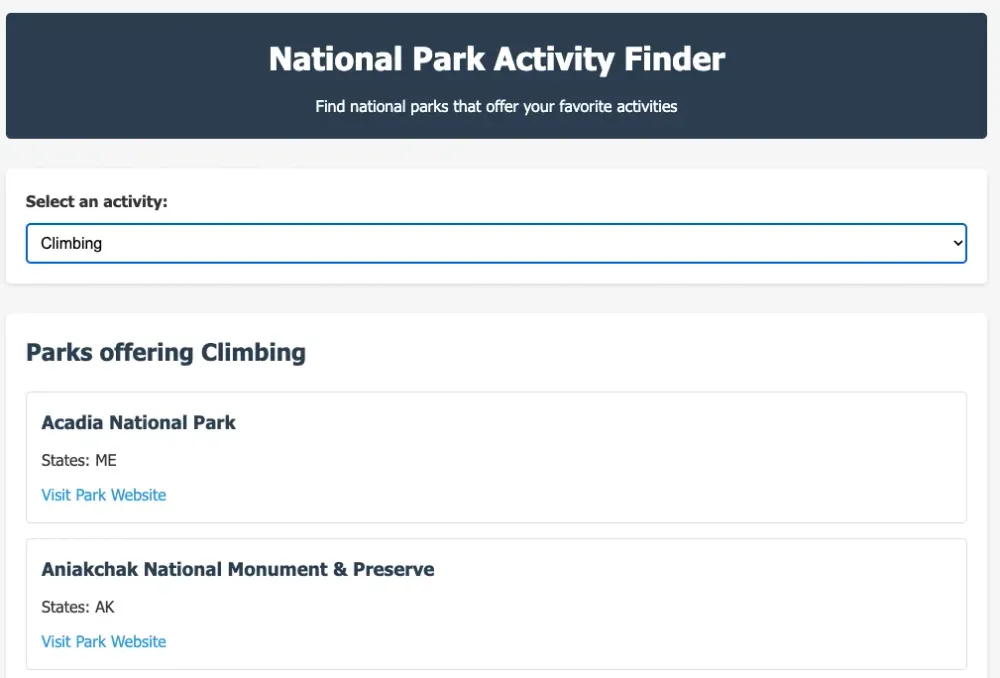
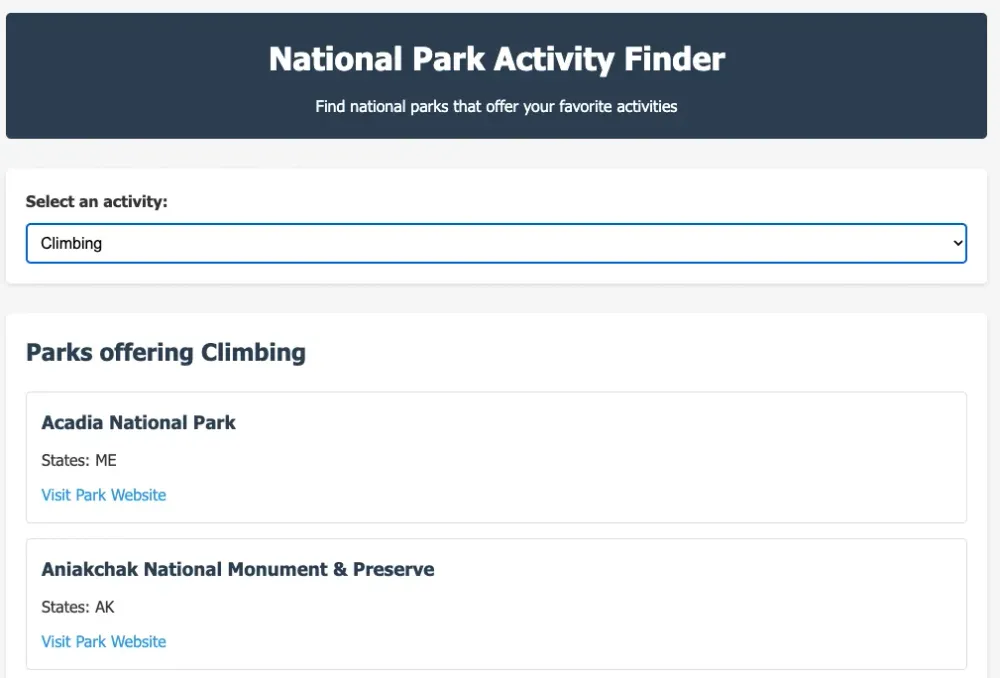
I delete the application as I don't want the National Parks crew to go after me, but I have the screenshot to prove that it worked.
Enjoyed reading this content? Let the author know!
Your likes, comments, shares, and saves help creators reach more builders.

Loading recommendations
Loading article