
Build Serverless GenAI Apps Faster with Amazon Q Developer CLI Agent
Discover how Amazon Q Developer CLI Agent revolutionizes cloud development by building a complete serverless GenAI application in minutes instead of days. With just a single prompt, Amazon Q Developer CLI Agent generated all necessary infrastructure code in TypeScript, created a Python Lambda function, and seamlessly integrated with Claude 3 Haiku on Amazon Bedrock. This step-by-step walkthrough demonstrates the entire process from concept to deployment, showcasing how developers can now focus on innovation


In this blog post, I demonstrate how Amazon Q Developer CLI Agent helps developers accelerate their work by generating a complete, functional serverless application. While AI cannot and should not replace human developers, it can significantly speed up the initial development process and help us build faster. Every line of code was generated by Amazon Q, compiled perfectly, and deployed with complete accuracy, allowing developers to focus on customization and business logic rather than boilerplate setup.
I completed in nearly 10 minutes with a few simple prompts what would typically take days of reading documentation, writing code, troubleshooting, and manual work. Amazon Q Developer CLI Agent transforms how developers build cloud applications by dramatically accelerating the development process from concept to deployment.
Starting with just a high-level description of what I wanted to build, Amazon Q Developer CLI Agent guided me through the entire process - generating all necessary code, deploying the infrastructure, troubleshooting issues, and creating comprehensive documentation.
I found most impressive how Amazon Q Developer CLI Agent handled the entire development lifecycle with minimal input from me. This level of assistance makes complex AWS architectures accessible to developers of all skill levels, allowing me to focus on innovation rather than implementation details.
The Initial Prompt to Amazon Q Developer CLI Agent
I began my journey with this single prompt to Amazon Q Developer CLI Agent:
Bash
I want to build a serverless applicationwith an API Gateway on the frontend receiving user inputs,Lambda function to process the input andpassing it to Claude 3 Haiku model on Amazon Bedrock.I want to build the AWS infrastructure using CDK in TypeScriptand Lambda Function in Python.
That's it. From this conceptual description, Amazon Q CLI Agent:
- Understood the architecture I wanted to create
- Generated all the necessary code files
- Structured the project appropriately
- Implemented the integration with AWS Bedrock
- Created the CDK infrastructure in TypeScript
- Wrote the Lambda function in Python
- Guided me through deployment
- Created comprehensive documentation
The Amazon Q Developer CLI Agent Conversation
Here's how the actual conversation flowed with the Amazon Q Developer CLI Agent:
Bash
$ q chatHi, I'm Amazon Q. Ask me anything.Things to try• Fix the build failures in this project.• List my s3 buckets in us-west-2.• Write unit tests for my application.• Help me understand my git status/acceptall Toggles acceptance prompting for the session./help Show the help dialogue/quit Quit the application> pwdThe current working directory is:Execute shell command▔▔▔▔▔▔▔▔▔▔▔▔▔▔▔▔▔▔▔▔▔▔▔▔▔▔▔▔▔▔▔▔▔▔▔▔▔▔▔▔▔▔▔▔▔▔▔▔▔▔▔▔▔▔▔▔▔▔▔▔▔▔▔▔▔▔▔▔▔▔▔▔▔▔▔▔▔▔▔▔▔▔▔▔▔▔▔▔▔▔▔▔▔▔▔▔▔▔▔▔▔▔▔▔▔▔▔▔▔▔▔▔▔▔▔▔▔▔▔▔▔▔▔▔▔▔▔▔▔▔▔▔▔▔▔▔▔▔▔▔▔▔▔▔▔▔▔▔▔▔▔▔▔▔▔▔▔▔▔▔▔▔▔▔▔▔▔▔▔▔▔▔▔▔▔▔▔▔▔▔▔▔▔▔▔▔▔▔▔▔▔▔▔▔▔▔▔▔▔▔▔▔▔▔▔▔▔▔▔▔▔▔▔▔▔▔▔▔▔▔I will run the following shell command: pwdExecuting `pwd`...▔▔▔▔▔▔▔▔▔▔▔▔▔▔▔▔▔▔▔▔▔▔▔▔▔▔▔▔▔▔▔▔▔▔▔▔▔▔▔▔▔▔▔▔▔▔▔▔▔▔▔▔▔▔▔▔▔▔▔▔▔▔▔▔▔▔▔▔▔▔▔▔▔▔▔▔▔▔▔▔▔▔▔▔▔▔▔▔▔▔▔▔▔▔▔▔▔▔▔▔▔▔▔▔▔▔▔▔▔▔▔▔▔▔▔▔▔▔▔▔▔▔▔▔▔▔▔▔▔▔▔▔▔▔▔▔▔▔▔▔▔▔▔▔▔▔▔▔▔▔▔▔▔▔▔▔▔▔▔▔▔▔▔▔▔▔▔▔▔▔▔▔▔▔▔▔▔▔▔▔▔▔▔▔▔▔▔▔▔▔▔▔▔▔▔▔▔▔▔▔▔▔▔▔▔▔▔▔▔▔▔▔▔▔▔▔▔▔▔▔/private/tmp/project/QDeveloperBuildOnAWS🟢 Completed in 0.11s/private/tmp/project/QDeveloperBuildOnAWS> I want to build a serverless application with with an API Gateway on the frontend receiving user inputs, Lambda function to process the input and passing it to Claude 3 Haiku model on Bedrock. I want to build the AWS infrastructure using CDK in Typescript and Lambda Function in Python.I'll help you build a serverless application with API Gateway, Lambda, and Amazon Bedrock's Claude 3 Haiku model using CDK in TypeScript and Lambda in Python. Let's break this down into steps:## Step 1: Set up the project structureLet's first check if CDK is installed and create our project structure:Execute shell command▔▔▔▔▔▔▔▔▔▔▔▔▔▔▔▔▔▔▔▔▔▔▔▔▔▔▔▔▔▔▔▔▔▔▔▔▔▔▔▔▔▔▔▔▔▔▔▔▔▔▔▔▔▔▔▔▔▔▔▔▔▔▔▔▔▔▔▔▔▔▔▔▔▔▔▔▔▔▔▔▔▔▔▔▔▔▔▔▔▔▔▔▔▔▔▔▔▔▔▔▔▔▔▔▔▔▔▔▔▔▔▔▔▔▔▔▔▔▔▔▔▔▔▔▔▔▔▔▔▔▔▔▔▔▔▔▔▔▔▔▔▔▔▔▔▔▔▔▔▔▔▔▔▔▔▔▔▔▔▔▔▔▔▔▔▔▔▔▔▔▔▔▔▔▔▔▔▔▔▔▔▔▔▔▔▔▔▔▔▔▔▔▔▔▔▔▔▔▔▔▔▔▔▔▔▔▔▔▔▔▔▔▔▔▔▔▔▔▔▔I will run the following shell command:npm list -g aws-cdk || echo "CDK not found globally"Enter y to run this tool, otherwise continue chatting.> yExecuting `npm list -g aws-cdk || echo "CDK not found globally"`...▔▔▔▔▔▔▔▔▔▔▔▔▔▔▔▔▔▔▔▔▔▔▔▔▔▔▔▔▔▔▔▔▔▔▔▔▔▔▔▔▔▔▔▔▔▔▔▔▔▔▔▔▔▔▔▔▔▔▔▔▔▔▔▔▔▔▔▔▔▔▔▔▔▔▔▔▔▔▔▔▔▔▔▔▔▔▔▔▔▔▔▔▔▔▔▔▔▔▔▔▔▔▔▔▔▔▔▔▔▔▔▔▔▔▔▔▔▔▔▔▔▔▔▔▔▔▔▔▔▔▔▔▔▔▔▔▔▔▔▔▔▔▔▔▔▔▔▔▔▔▔▔▔▔▔▔▔▔▔▔▔▔▔▔▔▔▔▔▔▔▔▔▔▔▔▔▔▔▔▔▔▔▔▔▔▔▔▔▔▔▔▔▔▔▔▔▔▔▔▔▔▔▔▔▔▔▔▔▔▔▔▔▔▔▔▔▔▔▔▔/Users/test/.local/share/mise/installs/node/20.12.1/lib└── aws-cdk@2.1003.0🟢 Completed in 1.746sGreat! CDK is already installed. Let's create our project structure:Execute shell command▔▔▔▔▔▔▔▔▔▔▔▔▔▔▔▔▔▔▔▔▔▔▔▔▔▔▔▔▔▔▔▔▔▔▔▔▔▔▔▔▔▔▔▔▔▔▔▔▔▔▔▔▔▔▔▔▔▔▔▔▔▔▔▔▔▔▔▔▔▔▔▔▔▔▔▔▔▔▔▔▔▔▔▔▔▔▔▔▔▔▔▔▔▔▔▔▔▔▔▔▔▔▔▔▔▔▔▔▔▔▔▔▔▔▔▔▔▔▔▔▔▔▔▔▔▔▔▔▔▔▔▔▔▔▔▔▔▔▔▔▔▔▔▔▔▔▔▔▔▔▔▔▔▔▔▔▔▔▔▔▔▔▔▔▔▔▔▔▔▔▔▔▔▔▔▔▔▔▔▔▔▔▔▔▔▔▔▔▔▔▔▔▔▔▔▔▔▔▔▔▔▔▔▔▔▔▔▔▔▔▔▔▔▔▔▔▔▔▔▔I will run the following shell command:mkdir -p bedrock-serverless-app/lambdaEnter y to run this tool, otherwise continue chatting.> yExecuting `mkdir -p bedrock-serverless-app/lambda`...▔▔▔▔▔▔▔▔▔▔▔▔▔▔▔▔▔▔▔▔▔▔▔▔▔▔▔▔▔▔▔▔▔▔▔▔▔▔▔▔▔▔▔▔▔▔▔▔▔▔▔▔▔▔▔▔▔▔▔▔▔▔▔▔▔▔▔▔▔▔▔▔▔▔▔▔▔▔▔▔▔▔▔▔▔▔▔▔▔▔▔▔▔▔▔▔▔▔▔▔▔▔▔▔▔▔▔▔▔▔▔▔▔▔▔▔▔▔▔▔▔▔▔▔▔▔▔▔▔▔▔▔▔▔▔▔▔▔▔▔▔▔▔▔▔▔▔▔▔▔▔▔▔▔▔▔▔▔▔▔▔▔▔▔▔▔▔▔▔▔▔▔▔▔▔▔▔▔▔▔▔▔▔▔▔▔▔▔▔▔▔▔▔▔▔▔▔▔▔▔▔▔▔▔▔▔▔▔▔▔▔▔▔▔▔▔▔▔▔▔🟢 Completed in 0.23sExecute shell command▔▔▔▔▔▔▔▔▔▔▔▔▔▔▔▔▔▔▔▔▔▔▔▔▔▔▔▔▔▔▔▔▔▔▔▔▔▔▔▔▔▔▔▔▔▔▔▔▔▔▔▔▔▔▔▔▔▔▔▔▔▔▔▔▔▔▔▔▔▔▔▔▔▔▔▔▔▔▔▔▔▔▔▔▔▔▔▔▔▔▔▔▔▔▔▔▔▔▔▔▔▔▔▔▔▔▔▔▔▔▔▔▔▔▔▔▔▔▔▔▔▔▔▔▔▔▔▔▔▔▔▔▔▔▔▔▔▔▔▔▔▔▔▔▔▔▔▔▔▔▔▔▔▔▔▔▔▔▔▔▔▔▔▔▔▔▔▔▔▔▔▔▔▔▔▔▔▔▔▔▔▔▔▔▔▔▔▔▔▔▔▔▔▔▔▔▔▔▔▔▔▔▔▔▔▔▔▔▔▔▔▔▔▔▔▔▔▔▔▔I will run the following shell command:cd bedrock-serverless-app && cdk init app --language typescriptEnter y to run this tool, otherwise continue chatting.> yExecuting `cd bedrock-serverless-app && cdk init app --language typescript`...▔▔▔▔▔▔▔▔▔▔▔▔▔▔▔▔▔▔▔▔▔▔▔▔▔▔▔▔▔▔▔▔▔▔▔▔▔▔▔▔▔▔▔▔▔▔▔▔▔▔▔▔▔▔▔▔▔▔▔▔▔▔▔▔▔▔▔▔▔▔▔▔▔▔▔▔▔▔▔▔▔▔▔▔▔▔▔▔▔▔▔▔▔▔▔▔▔▔▔▔▔▔▔▔▔▔▔▔▔▔▔▔▔▔▔▔▔▔▔▔▔▔▔▔▔▔▔▔▔▔▔▔▔▔▔▔▔▔▔▔▔▔▔▔▔▔▔▔▔▔▔▔▔▔▔▔▔▔▔▔▔▔▔▔▔▔▔▔▔▔▔▔▔▔▔▔▔▔▔▔▔▔▔▔▔▔▔▔▔▔▔▔▔▔▔▔▔▔▔▔▔▔▔▔▔▔▔▔▔▔▔▔▔▔▔▔▔▔▔▔NOTICES (What's this? https://github.com/aws/aws-cdk/wiki/CLI-Notices)32775 (cli): CLI versions and CDK library versions have divergedOverview: Starting in CDK 2.179.0, CLI versions will no longer be inlockstep with CDK library versions. CLI versions will now bereleased as 2.1000.0 and continue with 2.1001.0, etc.Affected versions: cli: >=2.0.0 <=2.1005.0More information at: https://github.com/aws/aws-cdk/issues/32775If you don’t want to see a notice anymore, use "cdk acknowledge <id>". For example, "cdk acknowledge 32775".`cdk init` cannot be run in a non-empty directory!🟢 Completed in 1.178sLet's create a new directory and initialize the CDK project:Execute shell command▔▔▔▔▔▔▔▔▔▔▔▔▔▔▔▔▔▔▔▔▔▔▔▔▔▔▔▔▔▔▔▔▔▔▔▔▔▔▔▔▔▔▔▔▔▔▔▔▔▔▔▔▔▔▔▔▔▔▔▔▔▔▔▔▔▔▔▔▔▔▔▔▔▔▔▔▔▔▔▔▔▔▔▔▔▔▔▔▔▔▔▔▔▔▔▔▔▔▔▔▔▔▔▔▔▔▔▔▔▔▔▔▔▔▔▔▔▔▔▔▔▔▔▔▔▔▔▔▔▔▔▔▔▔▔▔▔▔▔▔▔▔▔▔▔▔▔▔▔▔▔▔▔▔▔▔▔▔▔▔▔▔▔▔▔▔▔▔▔▔▔▔▔▔▔▔▔▔▔▔▔▔▔▔▔▔▔▔▔▔▔▔▔▔▔▔▔▔▔▔▔▔▔▔▔▔▔▔▔▔▔▔▔▔▔▔▔▔▔▔I will run the following shell command:mkdir -p bedrock-api && cd bedrock-api && cdk init app --language typescriptEnter y to run this tool, otherwise continue chatting.> yExecuting `mkdir -p bedrock-api && cd bedrock-api && cdk init app --language typescript`...▔▔▔▔▔▔▔▔▔▔▔▔▔▔▔▔▔▔▔▔▔▔▔▔▔▔▔▔▔▔▔▔▔▔▔▔▔▔▔▔▔▔▔▔▔▔▔▔▔▔▔▔▔▔▔▔▔▔▔▔▔▔▔▔▔▔▔▔▔▔▔▔▔▔▔▔▔▔▔▔▔▔▔▔▔▔▔▔▔▔▔▔▔▔▔▔▔▔▔▔▔▔▔▔▔▔▔▔▔▔▔▔▔▔▔▔▔▔▔▔▔▔▔▔▔▔▔▔▔▔▔▔▔▔▔▔▔▔▔▔▔▔▔▔▔▔▔▔▔▔▔▔▔▔▔▔▔▔▔▔▔▔▔▔▔▔▔▔▔▔▔▔▔▔▔▔▔▔▔▔▔▔▔▔▔▔▔▔▔▔▔▔▔▔▔▔▔▔▔▔▔▔▔▔▔▔▔▔▔▔▔▔▔▔▔▔▔▔▔▔Applying project template app for typescript# Welcome to your CDK TypeScript projectThis is a blank project for CDK development with TypeScript.The `cdk.json` file tells the CDK Toolkit how to execute your app.## Useful commands* `npm run build` compile typescript to js* `npm run watch` watch for changes and compile* `npm run test` perform the jest unit tests* `npx cdk deploy` deploy this stack to your default AWS account/region* `npx cdk diff` compare deployed stack with current state* `npx cdk synth` emits the synthesized CloudFormation templateInitializing a new git repository...hint: Using 'master' as the name for the initial branch. This default branch namehint: is subject to change. To configure the initial branch name to use in allhint: of your new repositories, which will suppress this warning, call:hint:hint: git config --global init.defaultBranch <name>hint:hint: Names commonly chosen instead of 'master' are 'main', 'trunk' andhint: 'development'. The just-created branch can be renamed via this command:hint:hint: git branch -m <name>The following files have been added, modified, moved, or removed:********************************************************************A .gitignoreA .npmignoreA README.mdA bin/bedrock-api.tsA cdk.jsonA jest.config.jsA lib/bedrock-api-stack.tsA package.jsonA test/bedrock-api.test.tsA tsconfig.json********************************************************************Executing npm install...npm WARN deprecated inflight@1.0.6: This module is not supported, and leaks memory. Do not use it. Check out lru-cache if you want a good and tested way to coalesce async requests by a key value, which is much more comprehensive and powerful.npm WARN deprecated glob@7.2.3: Glob versions prior to v9 are no longer supported✅ All done!NOTICES (What's this? https://github.com/aws/aws-cdk/wiki/CLI-Notices)32775 (cli): CLI versions and CDK library versions have divergedOverview: Starting in CDK 2.179.0, CLI versions will no longer be inlockstep with CDK library versions. CLI versions will now bereleased as 2.1000.0 and continue with 2.1001.0, etc.Affected versions: cli: >=2.0.0 <=2.1005.0More information at: https://github.com/aws/aws-cdk/issues/32775If you don’t want to see a notice anymore, use "cdk acknowledge <id>". For example, "cdk acknowledge 32775".🟢 Completed in 25.185s## Step 2: Install required dependenciesExecute shell command▔▔▔▔▔▔▔▔▔▔▔▔▔▔▔▔▔▔▔▔▔▔▔▔▔▔▔▔▔▔▔▔▔▔▔▔▔▔▔▔▔▔▔▔▔▔▔▔▔▔▔▔▔▔▔▔▔▔▔▔▔▔▔▔▔▔▔▔▔▔▔▔▔▔▔▔▔▔▔▔▔▔▔▔▔▔▔▔▔▔▔▔▔▔▔▔▔▔▔▔▔▔▔▔▔▔▔▔▔▔▔▔▔▔▔▔▔▔▔▔▔▔▔▔▔▔▔▔▔▔▔▔▔▔▔▔▔▔▔▔▔▔▔▔▔▔▔▔▔▔▔▔▔▔▔▔▔▔▔▔▔▔▔▔▔▔▔▔▔▔▔▔▔▔▔▔▔▔▔▔▔▔▔▔▔▔▔▔▔▔▔▔▔▔I will run the following shell command:cd bedrock-api && npm install aws-cdk-lib constructs @aws-cdk/aws-apigatewayv2-alpha @aws-cdk/aws-apigatewayv2-integrations-alphaEnter y to run this tool, otherwise continue chatting.> yExecuting `cd bedrock-api && npm install aws-cdk-lib constructs @aws-cdk/aws-apigatewayv2-alpha @aws-cdk/aws-apigatewayv2-integrations-alpha`...▔▔▔▔▔▔▔▔▔▔▔▔▔▔▔▔▔▔▔▔▔▔▔▔▔▔▔▔▔▔▔▔▔▔▔▔▔▔▔▔▔▔▔▔▔▔▔▔▔▔▔▔▔▔▔▔▔▔▔▔▔▔▔▔▔▔▔▔▔▔▔▔▔▔▔▔▔▔▔▔▔▔▔▔▔▔▔▔▔▔▔▔▔▔▔▔▔▔▔▔▔▔▔▔▔▔▔▔▔▔▔▔▔▔▔▔▔▔▔▔▔▔▔▔▔▔▔▔▔▔▔▔▔▔▔▔▔▔▔▔▔▔▔▔▔▔▔▔▔▔▔▔▔▔▔▔▔▔▔▔▔▔▔▔▔▔▔▔▔▔▔▔▔▔▔▔▔▔▔▔▔▔▔▔▔▔▔▔▔▔▔▔▔▔added 3 packages, and audited 339 packages in 2s35 packages are looking for fundingrun `npm fund` for detailsfound 0 vulnerabilities🟢 Completed in 2.864sExecute shell command▔▔▔▔▔▔▔▔▔▔▔▔▔▔▔▔▔▔▔▔▔▔▔▔▔▔▔▔▔▔▔▔▔▔▔▔▔▔▔▔▔▔▔▔▔▔▔▔▔▔▔▔▔▔▔▔▔▔▔▔▔▔▔▔▔▔▔▔▔▔▔▔▔▔▔▔▔▔▔▔▔▔▔▔▔▔▔▔▔▔▔▔▔▔▔▔▔▔▔▔▔▔▔▔▔▔▔▔▔▔▔▔▔▔▔▔▔▔▔▔▔▔▔▔▔▔▔▔▔▔▔▔▔▔▔▔▔▔▔▔▔▔▔▔▔▔▔▔▔▔▔▔▔▔▔▔▔▔▔▔▔▔▔▔▔▔▔▔▔▔▔▔▔▔▔▔▔▔▔▔▔▔▔▔▔▔▔▔▔▔▔▔▔▔I will run the following shell command:cd bedrock-api && mkdir -p lambdaEnter y to run this tool, otherwise continue chatting.> yExecuting `cd bedrock-api && mkdir -p lambda`...▔▔▔▔▔▔▔▔▔▔▔▔▔▔▔▔▔▔▔▔▔▔▔▔▔▔▔▔▔▔▔▔▔▔▔▔▔▔▔▔▔▔▔▔▔▔▔▔▔▔▔▔▔▔▔▔▔▔▔▔▔▔▔▔▔▔▔▔▔▔▔▔▔▔▔▔▔▔▔▔▔▔▔▔▔▔▔▔▔▔▔▔▔▔▔▔▔▔▔▔▔▔▔▔▔▔▔▔▔▔▔▔▔▔▔▔▔▔▔▔▔▔▔▔▔▔▔▔▔▔▔▔▔▔▔▔▔▔▔▔▔▔▔▔▔▔▔▔▔▔▔▔▔▔▔▔▔▔▔▔▔▔▔▔▔▔▔▔▔▔▔▔▔▔▔▔▔▔▔▔▔▔▔▔▔▔▔▔▔▔▔▔▔▔🟢 Completed in 0.23s## Step 3: Create the Lambda functionLet's create a Python Lambda function that will process user input and call the Bedrock model:Write to filesystem▔▔▔▔▔▔▔▔▔▔▔▔▔▔▔▔▔▔▔▔▔▔▔▔▔▔▔▔▔▔▔▔▔▔▔▔▔▔▔▔▔▔▔▔▔▔▔▔▔▔▔▔▔▔▔▔▔▔▔▔▔▔▔▔▔▔▔▔▔▔▔▔▔▔▔▔▔▔▔▔▔▔▔▔▔▔▔▔▔▔▔▔▔▔▔▔▔▔▔▔▔▔▔▔▔▔▔▔▔▔▔▔▔▔▔▔▔▔▔▔▔▔▔▔▔▔▔▔▔▔▔▔▔▔▔▔▔▔▔▔▔▔▔▔▔▔▔▔▔▔▔▔▔▔▔▔▔▔▔▔▔▔▔▔▔▔▔▔▔▔▔▔▔▔▔▔▔▔▔▔▔▔▔▔▔▔▔▔▔▔▔▔▔▔Path: /private/tmp/project/QDeveloperBuildOnAWS/bedrock-api/lambda/bedrock_handler.py+ 1: import json+ 2: import boto3+ 3: import os+ 4:+ 5: # Initialize Bedrock client+ 6: bedrock_runtime = boto3.client('bedrock-runtime')+ 7:+ 8: def handler(event, context):+ 9: try:+ 10: # Parse the request body from API Gateway+ 11: body = json.loads(event.get('body', '{}'))+ 12: user_input = body.get('prompt', '')+ 13:+ 14: if not user_input:+ 15: return {+ 16: 'statusCode': 400,+ 17: 'headers': {+ 18: 'Content-Type': 'application/json',+ 19: 'Access-Control-Allow-Origin': '*'+ 20: },+ 21: 'body': json.dumps({'error': 'No prompt provided'})+ 22: }+ 23:+ 24: # Prepare the request for Claude 3 Haiku+ 25: request_body = {+ 26: "anthropic_version": "bedrock-2023-05-31",+ 27: "max_tokens": 1000,+ 28: "messages": [+ 29: {+ 30: "role": "user",+ 31: "content": user_input+ 32: }+ 33: ]+ 34: }+ 35:+ 36: # Call the Bedrock model (Claude 3 Haiku)+ 37: response = bedrock_runtime.invoke_model(+ 38: modelId='anthropic.claude-3-haiku-20240307-v1:0', # Claude 3 Haiku model ID+ 39: body=json.dumps(request_body)+ 40: )+ 41:+ 42: # Parse the response+ 43: response_body = json.loads(response.get('body').read())+ 44: model_response = response_body.get('content', [{}])[0].get('text', '')+ 45:+ 46: # Return the response+ 47: return {+ 48: 'statusCode': 200,+ 49: 'headers': {+ 50: 'Content-Type': 'application/json',+ 51: 'Access-Control-Allow-Origin': '*'+ 52: },+ 53: 'body': json.dumps({+ 54: 'response': model_response+ 55: })+ 56: }+ 57:+ 58: except Exception as e:+ 59: print(f"Error: {str(e)}")+ 60: return {+ 61: 'statusCode': 500,+ 62: 'headers': {+ 63: 'Content-Type': 'application/json',+ 64: 'Access-Control-Allow-Origin': '*'+ 65: },+ 66: 'body': json.dumps({+ 67: 'error': str(e)+ 68: })+ 69: }Enter y to run this tool, otherwise continue chatting.> yWriting to filesystem...▔▔▔▔▔▔▔▔▔▔▔▔▔▔▔▔▔▔▔▔▔▔▔▔▔▔▔▔▔▔▔▔▔▔▔▔▔▔▔▔▔▔▔▔▔▔▔▔▔▔▔▔▔▔▔▔▔▔▔▔▔▔▔▔▔▔▔▔▔▔▔▔▔▔▔▔▔▔▔▔▔▔▔▔▔▔▔▔▔▔▔▔▔▔▔▔▔▔▔▔▔▔▔▔▔▔▔▔▔▔▔▔▔▔▔▔▔▔▔▔▔▔▔▔▔▔▔▔▔▔▔▔▔▔▔▔▔▔▔▔▔▔▔▔▔▔▔▔▔▔▔▔▔▔▔▔▔▔▔▔▔▔▔▔▔▔▔▔▔▔▔▔▔▔▔▔▔▔▔▔▔▔▔▔▔▔▔▔▔▔▔▔▔▔Creating: /private/tmp/project/QDeveloperBuildOnAWS/bedrock-api/lambda/bedrock_handler.py🟢 Completed in 0.0sWrite to filesystem▔▔▔▔▔▔▔▔▔▔▔▔▔▔▔▔▔▔▔▔▔▔▔▔▔▔▔▔▔▔▔▔▔▔▔▔▔▔▔▔▔▔▔▔▔▔▔▔▔▔▔▔▔▔▔▔▔▔▔▔▔▔▔▔▔▔▔▔▔▔▔▔▔▔▔▔▔▔▔▔▔▔▔▔▔▔▔▔▔▔▔▔▔▔▔▔▔▔▔▔▔▔▔▔▔▔▔▔▔▔▔▔▔▔▔▔▔▔▔▔▔▔▔▔▔▔▔▔▔▔▔▔▔▔▔▔▔▔▔▔▔▔▔▔▔▔▔▔▔▔▔▔▔▔▔▔▔▔▔▔▔▔▔▔▔▔▔▔▔▔▔▔▔▔▔▔▔▔▔▔▔▔▔▔▔▔▔▔▔▔▔▔▔▔Path: /private/tmp/project/QDeveloperBuildOnAWS/bedrock-api/lambda/requirements.txt+ 1: boto3>=1.28.0Enter y to run this tool, otherwise continue chatting.> yWriting to filesystem...▔▔▔▔▔▔▔▔▔▔▔▔▔▔▔▔▔▔▔▔▔▔▔▔▔▔▔▔▔▔▔▔▔▔▔▔▔▔▔▔▔▔▔▔▔▔▔▔▔▔▔▔▔▔▔▔▔▔▔▔▔▔▔▔▔▔▔▔▔▔▔▔▔▔▔▔▔▔▔▔▔▔▔▔▔▔▔▔▔▔▔▔▔▔▔▔▔▔▔▔▔▔▔▔▔▔▔▔▔▔▔▔▔▔▔▔▔▔▔▔▔▔▔▔▔▔▔▔▔▔▔▔▔▔▔▔▔▔▔▔▔▔▔▔▔▔▔▔▔▔▔▔▔▔▔▔▔▔▔▔▔▔▔▔▔▔▔▔▔▔▔▔▔▔▔▔▔▔▔▔▔▔▔▔▔▔▔▔▔▔▔▔▔▔Creating: /private/tmp/project/QDeveloperBuildOnAWS/bedrock-api/lambda/requirements.txt🟢 Completed in 0.6sWrite to filesystem▔▔▔▔▔▔▔▔▔▔▔▔▔▔▔▔▔▔▔▔▔▔▔▔▔▔▔▔▔▔▔▔▔▔▔▔▔▔▔▔▔▔▔▔▔▔▔▔▔▔▔▔▔▔▔▔▔▔▔▔▔▔▔▔▔▔▔▔▔▔▔▔▔▔▔▔▔▔▔▔▔▔▔▔▔▔▔▔▔▔▔▔▔▔▔▔▔▔▔▔▔▔▔▔▔▔▔▔▔▔▔▔▔▔▔▔▔▔▔▔▔▔▔▔▔▔▔▔▔▔▔▔▔▔▔▔▔▔▔▔▔▔▔▔▔▔▔▔▔▔▔▔▔▔▔▔▔▔▔▔▔▔▔▔▔▔▔▔▔▔▔▔▔▔▔▔▔▔▔▔▔▔▔▔▔▔▔▔▔▔▔▔▔▔Path: bedrock-api/lib/bedrock-api-stack.ts1, 1: import * as cdk from 'aws-cdk-lib';2, 2: import { Construct } from 'constructs';- 3 : // import * as sqs from 'aws-cdk-lib/aws-sqs';+ 3: import * as lambda from 'aws-cdk-lib/aws-lambda';+ 4: import * as apigw from 'aws-cdk-lib/aws-apigateway';+ 5: import * as iam from 'aws-cdk-lib/aws-iam';+ 6: import * as path from 'path';4, 7:5, 8: export class BedrockApiStack extends cdk.Stack {6, 9: constructor(scope: Construct, id: string, props?: cdk.StackProps) {7, 10: super(scope, id, props);8, 11:- 9 : // The code that defines your stack goes here+ 12: // Create IAM role for Lambda with Bedrock permissions+ 13: const lambdaRole = new iam.Role(this, 'BedrockLambdaRole', {+ 14: assumedBy: new iam.ServicePrincipal('lambda.amazonaws.com'),+ 15: managedPolicies: [+ 16: iam.ManagedPolicy.fromAwsManagedPolicyName('service-role/AWSLambdaBasicExecutionRole'),+ 17: ],+ 18: });+ 19:+ 20: // Add Bedrock permissions+ 21: lambdaRole.addToPolicy(new iam.PolicyStatement({+ 22: actions: [+ 23: 'bedrock:InvokeModel',+ 24: ],+ 25: resources: ['*'], // In production, scope this down to specific model ARNs+ 26: }));+ 27:+ 28: // Create Lambda function+ 29: const bedrockFunction = new lambda.Function(this, 'BedrockFunction', {+ 30: runtime: lambda.Runtime.PYTHON_3_9,+ 31: handler: 'bedrock_handler.handler',+ 32: code: lambda.Code.fromAsset(path.join(__dirname, '../lambda'), {+ 33: bundling: {+ 34: image: lambda.Runtime.PYTHON_3_9.bundlingImage,+ 35: command: [+ 36: 'bash', '-c', [+ 37: 'pip install -r requirements.txt -t /asset-output',+ 38: 'cp bedrock_handler.py /asset-output',+ 39: ].join(' && '),+ 40: ],+ 41: },+ 42: }),+ 43: timeout: cdk.Duration.seconds(30),+ 44: memorySize: 256,+ 45: role: lambdaRole,+ 46: });+ 47:+ 48: // Create API Gateway+ 49: const api = new apigw.RestApi(this, 'BedrockApi', {+ 50: restApiName: 'Bedrock Claude 3 Haiku API',+ 51: description: 'API Gateway for Bedrock Claude 3 Haiku model',+ 52: defaultCorsPreflightOptions: {+ 53: allowOrigins: apigw.Cors.ALL_ORIGINS,+ 54: allowMethods: apigw.Cors.ALL_METHODS,+ 55: },+ 56: });+ 57:+ 58: // Create API Gateway resource and method+ 59: const bedrockResource = api.root.addResource('generate');+ 60: bedrockResource.addMethod('POST', new apigw.LambdaIntegration(bedrockFunction));10, 61:- 11 : // example resource- 12 : // const queue = new sqs.Queue(this, 'BedrockApiQueue', {- 13 : // visibilityTimeout: cdk.Duration.seconds(300)- 14 : // });+ 62: // Output the API Gateway URL+ 63: new cdk.CfnOutput(this, 'ApiUrl', {+ 64: value: api.url,+ 65: description: 'URL of the API Gateway',+ 66: });15, 67: }- 16 : }+ 68: }Enter y to run this tool, otherwise continue chatting.> yWriting to filesystem...▔▔▔▔▔▔▔▔▔▔▔▔▔▔▔▔▔▔▔▔▔▔▔▔▔▔▔▔▔▔▔▔▔▔▔▔▔▔▔▔▔▔▔▔▔▔▔▔▔▔▔▔▔▔▔▔▔▔▔▔▔▔▔▔▔▔▔▔▔▔▔▔▔▔▔▔▔▔▔▔▔▔▔▔▔▔▔▔▔▔▔▔▔▔▔▔▔▔▔▔▔▔▔▔▔▔▔▔▔▔▔▔▔▔▔▔▔▔▔▔▔▔▔▔▔▔▔▔▔▔▔▔▔▔▔▔▔▔▔▔▔▔▔▔▔▔▔▔▔▔▔▔▔▔▔▔▔▔▔▔▔▔▔▔▔▔▔▔▔▔▔▔▔▔▔▔▔▔▔▔▔▔▔▔▔▔▔▔▔▔▔▔▔▔Replacing: bedrock-api/lib/bedrock-api-stack.ts🟢 Completed in 0.1sWrite to filesystem▔▔▔▔▔▔▔▔▔▔▔▔▔▔▔▔▔▔▔▔▔▔▔▔▔▔▔▔▔▔▔▔▔▔▔▔▔▔▔▔▔▔▔▔▔▔▔▔▔▔▔▔▔▔▔▔▔▔▔▔▔▔▔▔▔▔▔▔▔▔▔▔▔▔▔▔▔▔▔▔▔▔▔▔▔▔▔▔▔▔▔▔▔▔▔▔▔▔▔▔▔▔▔▔▔▔▔▔▔▔▔▔▔▔▔▔▔▔▔▔▔▔▔▔▔▔▔▔▔▔▔▔▔▔▔▔▔▔▔▔▔▔▔▔▔▔▔▔▔▔▔▔▔▔▔▔▔▔▔▔▔▔▔▔▔▔▔▔▔▔▔▔▔▔▔▔▔▔▔▔▔▔▔▔▔▔▔▔▔▔▔▔▔▔Path: bedrock-api/bin/bedrock-api.ts1, 1: #!/usr/bin/env node+ 2: import 'source-map-support/register';2, 3: import * as cdk from 'aws-cdk-lib';3, 4: import { BedrockApiStack } from '../lib/bedrock-api-stack';4, 5:5, 6: const app = new cdk.App();6, 7: new BedrockApiStack(app, 'BedrockApiStack', {7, 8: /* If you don't specify 'env', this stack will be environment-agnostic.8, 9: * Account/Region-dependent features and context lookups will not work,9, 10: * but a single synthesized template can be deployed anywhere. */10, 11:11, 12: /* Uncomment the next line to specialize this stack for the AWS Account12, 13: * and Region that are implied by the current CLI configuration. */13, 14: // env: { account: process.env.CDK_DEFAULT_ACCOUNT, region: process.env.CDK_DEFAULT_REGION },14, 15:15, 16: /* Uncomment the next line if you know exactly what Account and Region you16, 17: * want to deploy the stack to. */17, 18: // env: { account: '123456789012', region: 'us-east-1' },18, 19:19, 20: /* For more information, see https://docs.aws.amazon.com/cdk/latest/guide/environments.html */20, 21: });Enter y to run this tool, otherwise continue chatting.> yWriting to filesystem...▔▔▔▔▔▔▔▔▔▔▔▔▔▔▔▔▔▔▔▔▔▔▔▔▔▔▔▔▔▔▔▔▔▔▔▔▔▔▔▔▔▔▔▔▔▔▔▔▔▔▔▔▔▔▔▔▔▔▔▔▔▔▔▔▔▔▔▔▔▔▔▔▔▔▔▔▔▔▔▔▔▔▔▔▔▔▔▔▔▔▔▔▔▔▔▔▔▔▔▔▔▔▔▔▔▔▔▔▔▔▔▔▔▔▔▔▔▔▔▔▔▔▔▔▔▔▔▔▔▔▔▔▔▔▔▔▔▔▔▔▔▔▔▔▔▔▔▔▔▔▔▔▔▔▔▔▔▔▔▔▔▔▔▔▔▔▔▔▔▔▔▔▔▔▔▔▔▔▔▔▔▔▔▔▔▔▔▔▔▔▔▔▔▔Replacing: bedrock-api/bin/bedrock-api.ts🟢 Completed in 0.0sWrite to filesystem▔▔▔▔▔▔▔▔▔▔▔▔▔▔▔▔▔▔▔▔▔▔▔▔▔▔▔▔▔▔▔▔▔▔▔▔▔▔▔▔▔▔▔▔▔▔▔▔▔▔▔▔▔▔▔▔▔▔▔▔▔▔▔▔▔▔▔▔▔▔▔▔▔▔▔▔▔▔▔▔▔▔▔▔▔▔▔▔▔▔▔▔▔▔▔▔▔▔▔▔▔▔▔▔▔▔▔▔▔▔▔▔▔▔▔▔▔▔▔▔▔▔▔▔▔▔▔▔▔▔▔▔▔▔▔▔▔▔▔▔▔▔▔▔▔▔▔▔▔▔▔▔▔▔▔▔▔▔▔▔▔▔▔▔▔▔▔▔▔▔▔▔▔▔▔▔▔▔▔▔▔▔▔▔▔▔▔▔▔▔▔▔▔▔Path: bedrock-api/README.md- 1 : # Welcome to your CDK TypeScript project+ 1: # Serverless Bedrock API Application+ 2:+ 3: This project creates a serverless application with:+ 4: - API Gateway to receive user inputs+ 5: - Lambda function to process the input+ 6: - Integration with Amazon Bedrock's Claude 3 Haiku model+ 7:+ 8: ## Architecture+ 9:+ 10: ```+ 11: ┌─────────────┐ ┌─────────────┐ ┌─────────────┐+ 12: │ │ │ │ │ │+ 13: │ API Gateway │────▶│ Lambda │────▶│ Bedrock │+ 14: │ │ │ │ │ │+ 15: └─────────────┘ └─────────────┘ └─────────────┘+ 16: ```+ 18: ## Prerequisites+ 19:+ 20: - AWS CLI configured with appropriate permissions+ 21: - Node.js and npm installed+ 22: - AWS CDK installed (`npm install -g aws-cdk`)+ 23:+ 24: ## Deployment Instructions+ 25:+ 26: 1. Install dependencies:+ 27: ```+ 28: npm install+ 29: ```+ 30:+ 31: 2. Build the TypeScript code:+ 32: ```+ 33: npm run build+ 34: ```+ 35:+ 36: 3. Deploy the stack:+ 37: ```+ 38: cdk deploy+ 39: ```+ 40:+ 41: 4. After deployment, the API Gateway URL will be displayed in the outputs.+ 42:+ 43: ## API Usage+ 44:+ 45: Send a POST request to the `/generate` endpoint with a JSON body:2, 46:- 3 : This is a blank project for CDK development with TypeScript.+ 47: ```json+ 48: {+ 49: "prompt": "Your prompt for the model here"+ 50: }+ 51: ```4, 52:- 5 : The `cdk.json` file tells the CDK Toolkit how to execute your app.+ 53: Example using curl:+ 54: ```bash+ 55: curl -X POST \+ 56: https://your-api-id.execute-api.region.amazonaws.com/prod/generate \+ 57: -H 'Content-Type: application/json' \+ 58: -d '{"prompt": "Tell me about AWS Bedrock"}'+ 59: ```6, 60:- 7 : ## Useful commands+ 61: ## Clean Up8, 62:- 9 : * `npm run build` compile typescript to js- 10 : * `npm run watch` watch for changes and compile- 11 : * `npm run test` perform the jest unit tests- 12 : * `npx cdk deploy` deploy this stack to your default AWS account/region- 13 : * `npx cdk diff` compare deployed stack with current state- 14 : * `npx cdk synth` emits the synthesized CloudFormation template+ 63: To remove all resources created by this stack:+ 64: ```+ 65: cdk destroy+ 66: ```Enter y to run this tool, otherwise continue chatting.> yWriting to filesystem...▔▔▔▔▔▔▔▔▔▔▔▔▔▔▔▔▔▔▔▔▔▔▔▔▔▔▔▔▔▔▔▔▔▔▔▔▔▔▔▔▔▔▔▔▔▔▔▔▔▔▔▔▔▔▔▔▔▔▔▔▔▔▔▔▔▔▔▔▔▔▔▔▔▔▔▔▔▔▔▔▔▔▔▔▔▔▔▔▔▔▔▔▔▔▔▔▔▔▔▔▔▔▔▔▔▔▔▔▔▔▔▔▔▔▔▔▔▔▔▔▔▔▔▔▔▔▔▔▔▔▔▔▔▔▔▔▔▔▔▔▔▔▔▔▔▔▔▔▔▔▔▔▔▔▔▔▔▔▔▔▔▔▔▔▔▔▔▔▔▔▔▔▔▔▔▔▔▔▔▔▔▔▔▔▔▔▔▔▔▔▔▔▔▔Replacing: bedrock-api/README.md🟢 Completed in 0.0sWrite to filesystem▔▔▔▔▔▔▔▔▔▔▔▔▔▔▔▔▔▔▔▔▔▔▔▔▔▔▔▔▔▔▔▔▔▔▔▔▔▔▔▔▔▔▔▔▔▔▔▔▔▔▔▔▔▔▔▔▔▔▔▔▔▔▔▔▔▔▔▔▔▔▔▔▔▔▔▔▔▔▔▔▔▔▔▔▔▔▔▔▔▔▔▔▔▔▔▔▔▔▔▔▔▔▔▔▔▔▔▔▔▔▔▔▔▔▔▔▔▔▔▔▔▔▔▔▔▔▔▔▔▔▔▔▔▔▔▔▔▔▔▔▔▔▔▔▔▔▔▔▔▔▔▔▔▔▔▔▔▔▔▔▔▔▔▔▔▔▔▔▔▔▔▔▔▔▔▔▔▔▔▔▔▔▔▔▔▔▔▔▔▔▔▔▔▔Path: bedrock-api/test/bedrock-api.test.ts- 1 : // import * as cdk from 'aws-cdk-lib';- 2 : // import { Template } from 'aws-cdk-lib/assertions';- 3 : // import * as BedrockApi from '../lib/bedrock-api-stack';+ 1: import * as cdk from 'aws-cdk-lib';+ 2: import { Template } from 'aws-cdk-lib/assertions';+ 3: import * as BedrockApi from '../lib/bedrock-api-stack';+ 4:+ 5: test('API Gateway and Lambda Created', () => {+ 6: const app = new cdk.App();+ 7: // WHEN+ 8: const stack = new BedrockApi.BedrockApiStack(app, 'MyTestStack');+ 9: // THEN+ 10: const template = Template.fromStack(stack);+ 11:+ 12: // Verify Lambda function is created+ 13: template.hasResourceProperties('AWS::Lambda::Function', {+ 14: Runtime: 'python3.9',+ 15: Handler: 'bedrock_handler.handler',+ 16: });4, 17:- 5 : // example test. To run these tests, uncomment this file along with the- 6 : // example resource in lib/bedrock-api-stack.ts- 7 : test('SQS Queue Created', () => {- 8 : // const app = new cdk.App();- 9 : // // WHEN- 10 : // const stack = new BedrockApi.BedrockApiStack(app, 'MyTestStack');- 11 : // // THEN- 12 : // const template = Template.fromStack(stack);+ 18: // Verify API Gateway is created+ 19: template.hasResourceProperties('AWS::ApiGateway::RestApi', {+ 20: Name: 'Bedrock Claude 3 Haiku API',+ 21: });13, 22:- 14 : // template.hasResourceProperties('AWS::SQS::Queue', {- 15 : // VisibilityTimeout: 300- 16 : // });- 17 : });+ 23: // Verify IAM role with Bedrock permissions+ 24: template.hasResourceProperties('AWS::IAM::Policy', {+ 25: PolicyDocument: {+ 26: Statement: [+ 27: {+ 28: Action: 'bedrock:InvokeModel',+ 29: Effect: 'Allow',+ 30: Resource: '*',+ 31: },+ 32: ],+ 33: },+ 34: });+ 35: });Enter y to run this tool, otherwise continue chatting.> yWriting to filesystem...▔▔▔▔▔▔▔▔▔▔▔▔▔▔▔▔▔▔▔▔▔▔▔▔▔▔▔▔▔▔▔▔▔▔▔▔▔▔▔▔▔▔▔▔▔▔▔▔▔▔▔▔▔▔▔▔▔▔▔▔▔▔▔▔▔▔▔▔▔▔▔▔▔▔▔▔▔▔▔▔▔▔▔▔▔▔▔▔▔▔▔▔▔▔▔▔▔▔▔▔▔▔▔▔▔▔▔▔▔▔▔▔▔▔▔▔▔▔▔▔▔▔▔▔▔▔▔▔▔▔▔▔▔▔▔▔▔▔▔▔▔▔▔▔▔▔▔▔▔▔▔▔▔▔▔▔▔▔▔▔▔▔▔▔▔▔▔▔▔▔▔▔▔▔▔▔▔▔▔▔▔▔▔▔▔▔▔▔▔▔▔▔▔▔Replacing: bedrock-api/test/bedrock-api.test.ts🟢 Completed in 0.1s## Step 4: Create a simple HTML client (optional)Write to filesystem▔▔▔▔▔▔▔▔▔▔▔▔▔▔▔▔▔▔▔▔▔▔▔▔▔▔▔▔▔▔▔▔▔▔▔▔▔▔▔▔▔▔▔▔▔▔▔▔▔▔▔▔▔▔▔▔▔▔▔▔▔▔▔▔▔▔▔▔▔▔▔▔▔▔▔▔▔▔▔▔▔▔▔▔▔▔▔▔▔▔▔▔▔▔▔▔▔▔▔▔▔▔▔▔▔▔▔▔▔▔▔▔▔▔▔▔▔▔▔▔▔▔▔▔▔▔▔▔▔▔▔▔▔▔▔▔▔▔▔▔▔▔▔▔▔▔▔▔▔▔▔▔▔▔▔▔▔▔▔▔▔▔▔▔▔▔▔▔▔▔▔▔▔▔▔▔▔▔▔▔▔▔▔▔▔▔▔▔▔▔▔▔▔▔Path: /private/tmp/project/QDeveloperBuildOnAWS/bedrock-api/client/index.html+ 1: <!DOCTYPE html>+ 2: <html lang="en">+ 3: <head>+ 4: <meta charset="UTF-8">+ 5: <meta name="viewport" content="width=device-width, initial-scale=1.0">+ 6: <title>Bedrock Claude 3 Haiku Demo</title>+ 7: <style>+ 8: body {+ 9: font-family: Arial, sans-serif;+ 10: max-width: 800px;+ 11: margin: 0 auto;+ 12: padding: 20px;+ 13: }+ 14: .container {+ 15: display: flex;+ 16: flex-direction: column;+ 17: gap: 20px;+ 18: }+ 19: textarea {+ 20: width: 100%;+ 21: height: 150px;+ 22: padding: 10px;+ 23: border-radius: 5px;+ 24: border: 1px solid #ccc;+ 25: }+ 26: button {+ 27: padding: 10px 20px;+ 28: background-color: #ff9900;+ 29: color: white;+ 30: border: none;+ 31: border-radius: 5px;+ 32: cursor: pointer;+ 33: }+ 34: button:hover {+ 35: background-color: #e68a00;+ 36: }+ 37: .response {+ 38: white-space: pre-wrap;+ 39: padding: 15px;+ 40: background-color: #f5f5f5;+ 41: border-radius: 5px;+ 42: min-height: 100px;+ 43: }+ 44: .loading {+ 45: display: none;+ 46: }+ 47: </style>+ 48: </head>+ 49: <body>+ 50: <div class="container">+ 51: <h1>Bedrock Claude 3 Haiku 3 Demo</h1>+ 52: <p>Enter your prompt below to interact with Claude 3 Haiku model:</p>+ 53:+ 54: <textarea id="prompt" placeholder="Enter your prompt here..."></textarea>+ 55:+ 56: <button id="submit">Generate Response</button>+ 57:+ 58: <div class="loading" id="loading">Processing...</div>+ 59:+ 60: <div>+ 61: <h3>Response:</h3>+ 62: <div class="response" id="response"></div>+ 63: </div>+ 64: </div>+ 65:+ 66: <script>+ 67: document.getElementById('submit').addEventListener('click', async () => {+ 68: const promptText = document.getElementById('prompt').value;+ 69: const responseElement = document.getElementById('response');+ 70: const loadingElement = document.getElementById('loading');+ 71:+ 72: if (!promptText) {+ 73: responseElement.textContent = "Please enter a prompt.";+ 74: return;+ 75: }+ 76:+ 77: // Replace with your actual API Gateway URL after deployment+ 78: const apiUrl = 'YOUR_API_GATEWAY_URL/generate';+ 79:+ 80: responseElement.textContent = '';+ 81: loadingElement.style.display = 'block';+ 82:+ 83: try {+ 84: const response = await fetch(apiUrl, {+ 85: method: 'POST',+ 86: headers: {+ 87: 'Content-Type': 'application/json'+ 88: },+ 89: body: JSON.stringify({ prompt: promptText })+ 90: });+ 91:+ 92: const data = await response.json();+ 93:+ 94: if (response.ok) {+ 95: responseElement.textContent = data.response;+ 96: } else {+ 97: responseElement.textContent = `Error: ${data.error || 'Unknown error occurred'}`;+ 98: }+ 99: } catch (error) {+ 100: responseElement.textContent = `Error: ${error.message}`;+ 101: } finally {+ 102: loadingElement.style.display = 'none';+ 103: }+ 104: });+ 105: </script>+ 106: </body>+ 107: </html>Enter y to run this tool, otherwise continue chatting.> yWriting to filesystem...▔▔▔▔▔▔▔▔▔▔▔▔▔▔▔▔▔▔▔▔▔▔▔▔▔▔▔▔▔▔▔▔▔▔▔▔▔▔▔▔▔▔▔▔▔▔▔▔▔▔▔▔▔▔▔▔▔▔▔▔▔▔▔▔▔▔▔▔▔▔▔▔▔▔▔▔▔▔▔▔▔▔▔▔▔▔▔▔▔▔▔▔▔▔▔▔▔▔▔▔▔▔▔▔▔▔▔▔▔▔▔▔▔▔▔▔▔▔▔▔▔▔▔▔▔▔▔▔▔▔▔▔▔▔▔▔▔▔▔▔▔▔▔▔▔▔▔▔▔▔▔▔▔▔▔▔▔▔▔▔▔▔▔▔▔▔▔▔▔▔▔▔▔▔▔▔▔▔▔▔▔▔▔▔▔▔▔▔▔▔▔▔▔▔Creating: /private/tmp/project/QDeveloperBuildOnAWS/bedrock-api/client/index.html🟢 Completed in 0.1sNow that we've created all the necessary files, let's go through what we've built and how to deploy it:## Project OverviewI've created a complete serverless application with the following components:1. CDK Infrastructure (TypeScript):• API Gateway to receive user requests• Lambda function with appropriate IAM permissions• Integration with Amazon Bedrock's Claude 3 Haiku model2. Lambda Function (Python):• Processes incoming requests from API Gateway• Calls the Bedrock model with the user's prompt• Returns the model's response3. Simple HTML Client:• Basic web interface to interact with your API• You'll need to update the API URL after deployment## Deployment Instructions1. Navigate to the project directory:bashcd bedrock-api2. Install dependencies:bashnpm install3. Build the TypeScript code:bashnpm run build4. Deploy the stack:bashcdk deploy5. After deployment, note the API Gateway URL from the outputs and update it in the client/index.html file.## How It Works1. The user sends a request to the API Gateway endpoint with their prompt.2. API Gateway forwards the request to the Lambda function.3. The Lambda function:• Extracts the prompt from the request• Formats it for the Bedrock model• Calls the Claude 3 Haiku model via the Bedrock API• Returns the model's response4. API Gateway returns the response to the client## Important Notes1. Bedrock Access: Ensure your AWS account has access to the Claude 3 Haiku model in Bedrock.2. IAM Permissions: The stack creates the necessary IAM role with permissions to invoke Bedrock models.3. Region Consideration: Bedrock is not available in all AWS regions. Make sure to deploy to a region where Bedrock is available (e.g., us-east-1, us-west-2).4. Cost Management: Be aware that using Bedrock models incurs costs based on the number of input and output tokens.5. Production Readiness: For production use, consider adding:• Authentication and authorization• Request validation• Rate limiting• More specific IAM permissions• Error handling and monitoringWould you like me to explain any specific part of the implementation in more detail?
Project Structure
Amazon Q Developer CLI Agent organized the project with the following essential structure, automatically creating all necessary files and directories:
Bash
bedrock-api/├── bin/│ └── bedrock-api.ts # Entry point for CDK app├── lib/│ └── bedrock-api-stack.ts # Main CDK stack definition├── lambda/│ ├── bedrock_handler.py # Python Lambda function│ └── requirements.txt # Python dependencies├── client/│ └── index.html # Simple web client for testing├── architecture-diagram.drawio # Architecture diagram (draw.io format)├── architecture-diagram.jpg # Architecture diagram (JPEG image)├── architecture-diagram-ascii.txt # ASCII art version of diagram├── README.md # Project documentation├── cdk.json # CDK configuration├── package.json # Node.js dependencies└── tsconfig.json # TypeScript configuration
This structure follows AWS best practices with clear separation of:
- Infrastructure code (CDK TypeScript in
/lib)
- Lambda function code (Python in
/lambda)
- Client application (HTML/JS in
/client)
- Documentation (diagrams and README)
Deployment and Testing with Amazon Q Developer CLI Agent
After setting up the infrastructure code and Lambda function, it was time to deploy the application. Let's walk through the deployment process and testing of the serverless GenAI application.
When it came time to deploy, I simply told Amazon Q:
Bash
let us deploy
Amazon Q immediately recognized the next steps and guided me through the deployment process:
Building the Application
Amazon Q knew to build the TypeScript code first:
Bash
cd bedrock-api && npm run build
AWS Profile Configuration
When it detected an issue with AWS credentials, Amazon Q prompted me for the correct profile. I only needed to provide:
Bash
use profile aws-demo-profile
Successful Deployment
With the build complete and AWS profile configured, Amazon Q executed the deployment:
Bash
cd bedrock-api && AWS_PROFILE=aws-demo-profile cdk deploy
The deployment created all necessary AWS resources, and Amazon Q captured the important output:
Bash
Outputs:BedrockApiStack.ApiUrl = https://<unique-string>.execute-api.us-east-1.amazonaws.com/prod/
Configuring the Client
Amazon Q automatically updated the client HTML file with the actual API Gateway URL:
Bash
const apiUrl = 'https://<unique-string>.execute-api.us-east-1.amazonaws.com/prod/generate';
Testing the Deployment
Amazon Q then tested the deployment in two ways:
Direct Lambda invocation:
Bash
Execute shell command▔▔▔▔▔▔▔▔▔▔▔▔▔▔▔▔▔▔▔▔▔▔▔▔▔▔▔▔▔▔▔▔▔▔▔▔▔▔▔▔▔▔▔▔▔▔▔▔▔▔▔▔▔▔▔▔▔▔▔▔▔▔▔▔▔▔▔▔▔▔▔▔▔▔▔▔▔▔▔▔▔▔▔▔▔▔▔▔▔▔▔▔▔▔▔▔▔▔▔▔▔▔▔▔▔▔▔▔▔▔▔▔▔▔▔▔▔▔▔▔▔▔▔▔▔▔▔▔▔▔▔▔▔▔▔▔▔▔▔▔▔▔▔▔▔▔▔▔▔▔▔▔▔▔▔▔▔▔▔▔▔▔▔▔▔▔▔▔▔▔▔▔▔▔▔▔▔▔▔▔▔▔▔▔▔▔▔▔I will run the following shell command:cd bedrock-api && AWS_PROFILE=aws-demo-profile aws lambda invoke --function-name BedrockApiStack-BedrockFunctionADEDD58A-g7Hd22vs8fS7 --payload '{"body": "{\"prompt\": \"Hello, how are you?\"}"}' --region us-east-1 --cli-binary-format raw-in-base64-out response.jsonEnter y to run this tool, otherwise continue chatting.> yExecuting `cd bedrock-api && AWS_PROFILE=aws-demo-profile aws lambda invoke --function-name BedrockApiStack-BedrockFunctionADEDD58A-g7Hd22vs8fS7 --payload '{"body": "{\"prompt\": \"Hello, how are you?\"}"}' --region us-east-1 --cli-binary-format raw-in-base64-out response.json`...▔▔▔▔▔▔▔▔▔▔▔▔▔▔▔▔▔▔▔▔▔▔▔▔▔▔▔▔▔▔▔▔▔▔▔▔▔▔▔▔▔▔▔▔▔▔▔▔▔▔▔▔▔▔▔▔▔▔▔▔▔▔▔▔▔▔▔▔▔▔▔▔▔▔▔▔▔▔▔▔▔▔▔▔▔▔▔▔▔▔▔▔▔▔▔▔▔▔▔▔▔▔▔▔▔▔▔▔▔▔▔▔▔▔▔▔▔▔▔▔▔▔▔▔▔▔▔▔▔▔▔▔▔▔▔▔▔▔▔▔▔▔▔▔▔▔▔▔▔▔▔▔▔▔▔▔▔▔▔▔▔▔▔▔▔▔▔▔▔▔▔▔▔▔▔▔▔▔▔▔▔▔▔▔▔▔▔▔{"StatusCode": 200,"ExecutedVersion": "$LATEST"}🟢 Completed in 2.919sExecute shell command▔▔▔▔▔▔▔▔▔▔▔▔▔▔▔▔▔▔▔▔▔▔▔▔▔▔▔▔▔▔▔▔▔▔▔▔▔▔▔▔▔▔▔▔▔▔▔▔▔▔▔▔▔▔▔▔▔▔▔▔▔▔▔▔▔▔▔▔▔▔▔▔▔▔▔▔▔▔▔▔▔▔▔▔▔▔▔▔▔▔▔▔▔▔▔▔▔▔▔▔▔▔▔▔▔▔▔▔▔▔▔▔▔▔▔▔▔▔▔▔▔▔▔▔▔▔▔▔▔▔▔▔▔▔▔▔▔▔▔▔▔▔▔▔▔▔▔▔▔▔▔▔▔▔▔▔▔▔▔▔▔▔▔▔▔▔▔▔▔▔▔▔▔▔▔▔▔▔▔▔▔▔▔▔▔▔▔▔I will run the following shell command:cd bedrock-api && cat response.jsonEnter y to run this tool, otherwise continue chatting.> yExecuting `cd bedrock-api && cat response.json`...▔▔▔▔▔▔▔▔▔▔▔▔▔▔▔▔▔▔▔▔▔▔▔▔▔▔▔▔▔▔▔▔▔▔▔▔▔▔▔▔▔▔▔▔▔▔▔▔▔▔▔▔▔▔▔▔▔▔▔▔▔▔▔▔▔▔▔▔▔▔▔▔▔▔▔▔▔▔▔▔▔▔▔▔▔▔▔▔▔▔▔▔▔▔▔▔▔▔▔▔▔▔▔▔▔▔▔▔▔▔▔▔▔▔▔▔▔▔▔▔▔▔▔▔▔▔▔▔▔▔▔▔▔▔▔▔▔▔▔▔▔▔▔▔▔▔▔▔▔▔▔▔▔▔▔▔▔▔▔▔▔▔▔▔▔▔▔▔▔▔▔▔▔▔▔▔▔▔▔▔▔▔▔▔▔▔▔▔{"statusCode": 200, "headers": {"Content-Type": "application/json", "Access-Control-Allow-Origin": "*"}, "body": "{\"response\": \"Hello! As an AI language model, I don't have feelings or a physical body, but I'm functioning well and ready to assist you with any questions or tasks you might have. How can I help you today?\"}"}🟢 Completed in 0.21s
API endpoint testing with curl:
Bash
API endpoint testing with curl:Execute shell command▔▔▔▔▔▔▔▔▔▔▔▔▔▔▔▔▔▔▔▔▔▔▔▔▔▔▔▔▔▔▔▔▔▔▔▔▔▔▔▔▔▔▔▔▔▔▔▔▔▔▔▔▔▔▔▔▔▔▔▔▔▔▔▔▔▔▔▔▔▔▔▔▔▔▔▔▔▔▔▔▔▔▔▔▔▔▔▔▔▔▔▔▔▔▔▔▔▔▔▔▔▔▔▔▔▔▔▔▔▔▔▔▔▔▔▔▔▔▔▔▔▔▔▔▔▔▔▔▔▔▔▔▔▔▔▔▔▔▔▔▔▔▔▔▔▔▔▔▔▔▔▔▔▔▔▔▔▔▔▔▔▔▔▔▔▔▔▔▔▔▔▔▔▔▔▔▔▔▔▔▔▔▔▔▔▔▔▔I will run the following shell command:cd bedrock-api && AWS_PROFILE=aws-demo-profile curl -X POST https://<unique-string>.execute-api.us-east-1.amazonaws.com/prod/generate -H "Content-Type: application/json" -d '{"prompt": "What is AWS Bedrock?"}'Enter y to run this tool, otherwise continue chatting.> yExecuting `cd bedrock-api && AWS_PROFILE=aws-demo-profile curl -X POST https://<unique-string>.execute-api.us-east-1.amazonaws.com/prod/generate -H "Content-Type: application/json" -d '{"prompt": "What is AWS Bedrock?"}'`...▔▔▔▔▔▔▔▔▔▔▔▔▔▔▔▔▔▔▔▔▔▔▔▔▔▔▔▔▔▔▔▔▔▔▔▔▔▔▔▔▔▔▔▔▔▔▔▔▔▔▔▔▔▔▔▔▔▔▔▔▔▔▔▔▔▔▔▔▔▔▔▔▔▔▔▔▔▔▔▔▔▔▔▔▔▔▔▔▔▔▔▔▔▔▔▔▔▔▔▔▔▔▔▔▔▔▔▔▔▔▔▔▔▔▔▔▔▔▔▔▔▔▔▔▔▔▔▔▔▔▔▔▔▔▔▔▔▔▔▔▔▔▔▔▔▔▔▔▔▔▔▔▔▔▔▔▔▔▔▔▔▔▔▔▔▔▔▔▔▔▔▔▔▔▔▔▔▔▔▔▔▔▔▔▔▔▔▔% Total % Received % Xferd Average Speed Time Time Time CurrentDload Upload Total Spent Left Speed100 1208 100 1174 100 34 379 11 0:00:03 0:00:03 --:--:-- 390{"response": "AWS Bedrock is a new managed foundation service for building and deploying large language models (LLMs) on AWS.\n\nSome key points about AWS Bedrock:\n\n1. It provides a managed infrastructure for training, tuning, and deploying custom LLMs, allowing customers to focus on developing their models rather than managing the underlying infrastructure.\n\n2. It supports a variety of pre-trained model architectures and enables customers to fine-tune these models for their specific use cases.\n\n3. Bedrock integrates with other AWS services like Amazon SageMaker for model training and deployment, and Amazon Lambda for serverless model hosting.\n\n4. It offers features like model versioning, model monitoring, and automatic model scaling to simplify the management of LLMs in production.\n\n5. Bedrock is designed to make it easier for customers to experiment with and deploy custom LLMs for a variety of use cases such as natural language processing, content generation, and decision support.\n\nOverall, AWS Bedrock aims to lower the barriers to entry for building and deploying large language models by providing a fully managed platform on the AWS cloud."}🟢 Completed in 3.136s
Both tests were successful, confirming that the application was properly deployed and functioning.
Troubleshooting Deployment Issues
When attempting to deploy with CDK, Q CLI Agent encountered a Docker-related error. It immediately:
- Identified the issue (Docker not running needed for bundling)
- Proposed a solution (modify the CDK stack to use a simpler deployment approach)
- Made the necessary code changes
Amazon Q made a precise and targeted code change:
Bash
// Changed from complex Docker bundling approachconst bedrockFunction = new lambda.Function(this, 'BedrockFunction', {// ...code: lambda.Code.fromAsset(path.join(__dirname, '../lambda'), {bundling: {image: lambda.Runtime.PYTHON_3_9.bundlingImage,command: ['bash', '-c', ['pip install -r requirements.txt -t /asset-output','cp bedrock_handler.py /asset-output',].join(' && '),],},}),// ...});// Changed to simpler approachconst bedrockFunction = new lambda.Function(this, 'BedrockFunction', {// ...code: lambda.Code.fromAsset(path.join(__dirname, '../lambda')),// ...});
Documentation Generation
When I asked for an architecture diagram, Amazon Q went above and beyond:
- Created a detailed draw.io diagram file
- Generated ASCII art representations for text-based documentation
- Updated the README.md with the architecture diagram
- Created an HTML viewer for the architecture when I exported the diagram as a JPEG
It created all this documentation with minimal prompting - I simply asked for
Bash
> please generate an architecture diagram for this application that I can load on drawio
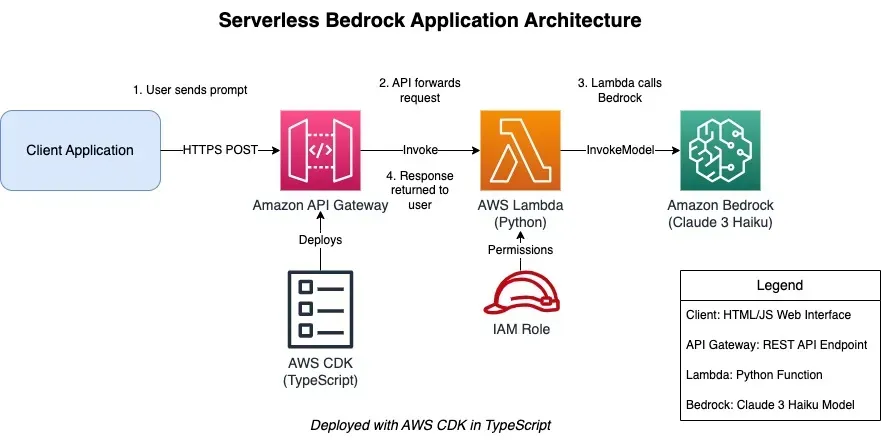
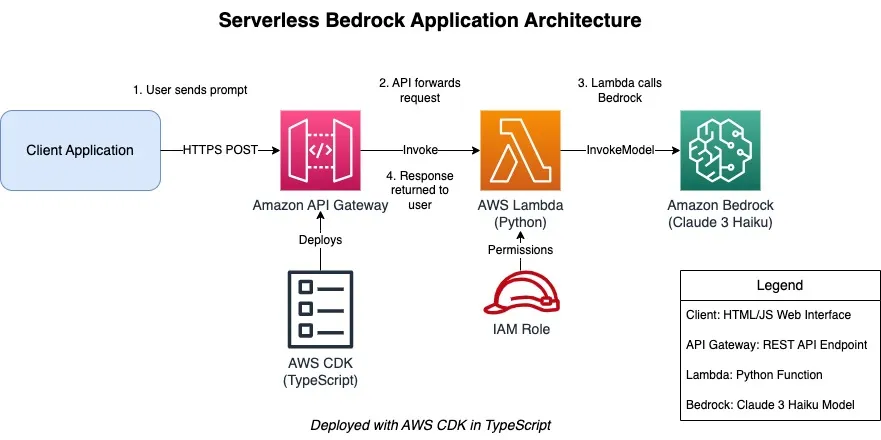
Architecture Diagram
The architecture diagram Amazon Q created shows the flow of data through the application:
XML
> please generate an architecture diagram for this application that I can load on drawioI'll create an architecture diagram for your serverless application that you can load in draw.io. Let me generate the XML content for a draw.io diagram.Write to filesystem▔▔▔▔▔▔▔▔▔▔▔▔▔▔▔▔▔▔▔▔▔▔▔▔▔▔▔▔▔▔▔▔▔▔▔▔▔▔▔▔▔▔▔▔▔▔▔▔▔▔▔▔▔▔▔▔▔▔▔▔▔▔▔▔▔▔▔▔▔▔▔▔▔▔▔▔▔▔▔▔▔▔▔▔▔▔▔▔▔▔▔▔▔▔▔▔▔▔▔▔▔▔▔▔▔▔▔▔▔▔▔▔▔▔▔▔▔▔▔▔▔▔▔▔▔▔▔▔▔▔▔▔▔▔▔▔▔▔▔▔▔▔▔▔▔▔▔▔▔▔▔▔▔▔▔▔▔▔▔▔▔▔▔▔▔▔▔▔▔▔▔▔▔▔▔▔▔▔▔▔▔▔▔▔▔▔▔▔Path: /private/tmp/project/QDeveloperBuildOnAWS/bedrock-api/architecture-diagram.drawio+ 1: <mxfile host="app.diagrams.net" modified="2025-03-18T04:50:39.000Z" agent="Mozilla/5.0" etag="diagram_etag" version="21.7.5">+ 2: <diagram id="serverless-bedrock-app" name="Serverless Bedrock Application">+ 3: <mxGraphModel dx="1422" dy="762" grid="1" gridSize="10" guides="1" tooltips="1" connect="1" arrows="1" fold="1" page="1" pageScale="1" pageWidth="1100" pageHeight="850" math="0" shadow="0">+ 4: <root>+ 5: <mxCell id="0" />+ 6: <mxCell id="1" parent="0" />+ 7:+ 8: <!-- Title -->+ 9: <mxCell id="title" value="Serverless Bedrock Application Architecture" style="text;html=1;strokeColor=none;fillColor=none;align=center;verticalAlign=middle;whiteSpace=wrap;rounded=0;fontSize=20;fontStyle=1" vertex="1" parent="1">+ 10: <mxGeometry x="250" y="20" width="600" height="40" as="geometry" />+ 11: </mxCell>+ 12:+ 13: <!-- Client -->+ 14: <mxCell id="client" value="Client Application" style="rounded=1;whiteSpace=wrap;html=1;fillColor=#dae8fc;strokeColor=#6c8ebf;fontSize=14;" vertex="1" parent="1">+ 15: <mxGeometry x="120" y="200" width="160" height="80" as="geometry" />+ 16: </mxCell>+ 17:+ 18: <!-- API Gateway -->+ 19: <mxCell id="apiGateway" value="Amazon API Gateway" style="sketch=0;points=[[0,0,0],[0.25,0,0],[0.5,0,0],[0.75,0,0],[1,0,0],[0,1,0],[0.25,1,0],[0.5,1,0],[0.75,1,0],[1,1,0],[0,0.25,0],[0,0.5,0],[0,0.75,0],[1,0.25,0],[1,0.5,0],[1,0.75,0]];outlineConnect=0;fontColor=#232F3E;gradientColor=#FF4F8B;gradientDirection=north;fillColor=#BC1356;strokeColor=#ffffff;dashed=0;verticalLabelPosition=bottom;verticalAlign=top;align=center;html=1;fontSize=14;fontStyle=0;aspect=fixed;shape=mxgraph.aws4.resourceIcon;resIcon=mxgraph.aws4.api_gateway;" vertex="1" parent="1">+ 20: <mxGeometry x="400" y="200" width="80" height="80" as="geometry" />+ 21: </mxCell>+ 22:+ 23: <!-- Lambda -->+ 24: <mxCell id="lambda" value="AWS Lambda
(Python)" style="sketch=0;points=[[0,0,0],[0.25,0,0],[0.5,0,0],[0.75,0,0],[1,0,0],[0,1,0],[0.25,1,0],[0.5,1,0],[0.75,1,0],[1,1,0],[0,0.25,0],[0,0.5,0],[0,0.75,0],[1,0.25,0],[1,0.5,0],[1,0.75,0]];outlineConnect=0;fontColor=#232F3E;gradientColor=#F78E04;gradientDirection=north;fillColor=#D05C17;strokeColor=#ffffff;dashed=0;verticalLabelPosition=bottom;verticalAlign=top;align=center;html=1;fontSize=14;fontStyle=0;aspect=fixed;shape=mxgraph.aws4.resourceIcon;resIcon=mxgraph.aws4.lambda;" vertex="1" parent="1">+ 25: <mxGeometry x="600" y="200" width="80" height="80" as="geometry" />+ 26: </mxCell>+ 27:+ 28: <!-- Bedrock -->+ 29: <mxCell id="bedrock" value="Amazon Bedrock
(Claude 3 Haiku)" style="sketch=0;points=[[0,0,0],[0.25,0,0],[0.5,0,0],[0.75,0,0],[1,0,0],[0,1,0],[0.25,1,0],[0.5,1,0],[0.75,1,0],[1,1,0],[0,0.25,0],[0,0.5,0],[0,0.75,0],[1,0.25,0],[1,0.5,0],[1,0.75,0]];outlineConnect=0;fontColor=#232F3E;gradientColor=#4AB29A;gradientDirection=north;fillColor=#116D5B;strokeColor=#ffffff;dashed=0;verticalLabelPosition=bottom;verticalAlign=top;align=center;html=1;fontSize=14;fontStyle=0;aspect=fixed;shape=mxgraph.aws4.resourceIcon;resIcon=mxgraph.aws4.sagemaker;" vertex="1" parent="1">+ 30: <mxGeometry x="800" y="200" width="80" height="80" as="geometry" />+ 31: </mxCell>+ 32:+ 33: <!-- IAM Role -->+ 34: <mxCell id="iamRole" value="IAM Role" style="sketch=0;outlineConnect=0;fontColor=#232F3E;gradientColor=none;fillColor=#BF0816;strokeColor=none;dashed=0;verticalLabelPosition=bottom;verticalAlign=top;align=center;html=1;fontSize=14;fontStyle=0;aspect=fixed;pointerEvents=1;shape=mxgraph.aws4.role;" vertex="1" parent="1">+ 35: <mxGeometry x="602" y="360" width="78" height="44" as="geometry" />+ 36: </mxCell>+ 37:+ 38: <!-- CDK -->+ 39: <mxCell id="cdk" value="AWS CDK
(TypeScript)" style="sketch=0;outlineConnect=0;fontColor=#232F3E;gradientColor=none;fillColor=#232F3D;strokeColor=none;dashed=0;verticalLabelPosition=bottom;verticalAlign=top;align=center;html=1;fontSize=14;fontStyle=0;aspect=fixed;pointerEvents=1;shape=mxgraph.aws4.template;" vertex="1" parent="1">+ 40: <mxGeometry x="400" y="360" width="80" height="78" as="geometry" />+ 41: </mxCell>+ 42:+ 43: <!-- Connections -->+ 44: <mxCell id="clientToApi" value="HTTPS POST" style="edgeStyle=orthogonalEdgeStyle;rounded=0;orthogonalLoop=1;jettySize=auto;html=1;fontSize=12;" edge="1" parent="1" source="client" target="apiGateway">+ 45: <mxGeometry relative="1" as="geometry" />+ 46: </mxCell>+ 47:+ 48: <mxCell id="apiToLambda" value="Invoke" style="edgeStyle=orthogonalEdgeStyle;rounded=0;orthogonalLoop=1;jettySize=auto;html=1;fontSize=12;" edge="1" parent="1" source="apiGateway" target="lambda">+ 49: <mxGeometry relative="1" as="geometry" />+ 50: </mxCell>+ 51:+ 52: <mxCell id="lambdaToBedrock" value="InvokeModel" style="edgeStyle=orthogonalEdgeStyle;rounded=0;orthogonalLoop=1;jettySize=auto;html=1;fontSize=12;" edge="1" parent="1" source="lambda" target="bedrock">+ 53: <mxGeometry relative="1" as="geometry" />+ 54: </mxCell>+ 55:+ 56: <mxCell id="iamToLambda" value="Permissions" style="edgeStyle=orthogonalEdgeStyle;rounded=0;orthogonalLoop=1;jettySize=auto;html=1;fontSize=12;" edge="1" parent="1" source="iamRole" target="lambda">+ 57: <mxGeometry relative="1" as="geometry">+ 58: <Array as="points">+ 59: <mxPoint x="640" y="320" />+ 60: <mxPoint x="640" y="320" />+ 61: </Array>+ 62: </mxGeometry>+ 63: </mxCell>+ 64:+ 65: <mxCell id="cdkToResources" value="Deploys" style="edgeStyle=orthogonalEdgeStyle;rounded=0;orthogonalLoop=1;jettySize=auto;html=1;fontSize=12;entryX=0.5;entryY=1;entryDx=0;entryDy=0;entryPerimeter=0;" edge="1" parent="1" source="cdk" target="apiGateway">+ 66: <mxGeometry relative="1" as="geometry">+ 67: <Array as="points">+ 68: <mxPoint x="440" y="320" />+ 69: <mxPoint x="440" y="320" />+ 70: </Array>+ 71: </mxGeometry>+ 72: </mxCell>+ 73:+ 74: <!-- Data Flow -->+ 75: <mxCell id="dataFlow1" value="1. User sends prompt" style="text;html=1;strokeColor=none;fillColor=none;align=center;verticalAlign=middle;whiteSpace=wrap;rounded=0;fontSize=12;" vertex="1" parent="1">+ 76: <mxGeometry x="250" y="170" width="120" height="20" as="geometry" />+ 77: </mxCell>+ 78:+ 79: <mxCell id="dataFlow2" value="2. API forwards request" style="text;html=1;strokeColor=none;fillColor=none;align=center;verticalAlign=middle;whiteSpace=wrap;rounded=0;fontSize=12;" vertex="1" parent="1">+ 80: <mxGeometry x="480" y="170" width="120" height="20" as="geometry" />+ 81: </mxCell>+ 82:+ 83: <mxCell id="dataFlow3" value="3. Lambda calls Bedrock" style="text;html=1;strokeColor=none;fillColor=none;align=center;verticalAlign=middle;whiteSpace=wrap;rounded=0;fontSize=12;" vertex="1" parent="1">+ 84: <mxGeometry x="680" y="170" width="120" height="20" as="geometry" />+ 85: </mxCell>+ 86:+ 87: <mxCell id="dataFlow4" value="4. Response returned to user" style="text;html=1;strokeColor=none;fillColor=none;align=center;verticalAlign=middle;whiteSpace=wrap;rounded=0;fontSize=12;" vertex="1" parent="1">+ 88: <mxGeometry x="480" y="300" width="160" height="20" as="geometry" />+ 89: </mxCell>+ 90:+ 91: <!-- Legend -->+ 92: <mxCell id="legend" value="Legend" style="swimlane;fontStyle=0;childLayout=stackLayout;horizontal=1;startSize=30;horizontalStack=0;resizeParent=1;resizeParentMax=0;resizeLast=0;collapsible=1;marginBottom=0;whiteSpace=wrap;html=1;fontSize=14;" vertex="1" parent="1">+ 93: <mxGeometry x="800" y="360" width="200" height="150" as="geometry" />+ 94: </mxCell>+ 95:+ 96: <mxCell id="legendItem1" value="Client: HTML/JS Web Interface" style="text;strokeColor=none;fillColor=none;align=left;verticalAlign=middle;spacingLeft=4;spacingRight=4;overflow=hidden;points=[[0,0.5],[1,0.5]];portConstraint=eastwest;rotatable=0;whiteSpace=wrap;html=1;fontSize=12;" vertex="1" parent="legend">+ 97: <mxGeometry y="30" width="200" height="30" as="geometry" />+ 98: </mxCell>+ 99:+ 100: <mxCell id="legendItem2" value="API Gateway: REST API Endpoint" style="text;strokeColor=none;fillColor=none;align=left;verticalAlign=middle;spacingLeft=4;spacingRight=4;overflow=hidden;points=[[0,0.5],[1,0.5]];portConstraint=eastwest;rotatable=0;whiteSpace=wrap;html=1;fontSize=12;" vertex="1" parent="legend">+ 101: <mxGeometry y="60" width="200" height="30" as="geometry" />+ 102: </mxCell>+ 103:+ 104: <mxCell id="legendItem3" value="Lambda: Python Function" style="text;strokeColor=none;fillColor=none;align=left;verticalAlign=middle;spacingLeft=4;spacingRight=4;overflow=hidden;points=[[0,0.5],[1,0.5]];portConstraint=eastwest;rotatable=0;whiteSpace=wrap;html=1;fontSize=12;" vertex="1" parent="legend">+ 105: <mxGeometry y="90" width="200" height="30" as="geometry" />+ 106: </mxCell>+ 107:+ 108: <mxCell id="legendItem4" value="Bedrock: Claude 3 Haiku Model" style="text;strokeColor=none;fillColor=none;align=left;verticalAlign=middle;spacingLeft=4;spacingRight=4;overflow=hidden;points=[[0,0.5],[1,0.5]];portConstraint=eastwest;rotatable=0;whiteSpace=wrap;html=1;fontSize=12;" vertex="1" parent="legend">+ 109: <mxGeometry y="120" width="200" height="30" as="geometry" />+ 110: </mxCell>+ 111:+ 112: <!-- Footer -->+ 113: <mxCell id="footer" value="Deployed with AWS CDK in TypeScript" style="text;html=1;strokeColor=none;fillColor=none;align=center;verticalAlign=middle;whiteSpace=wrap;rounded=0;fontSize=14;fontStyle=2" vertex="1" parent="1">+ 114: <mxGeometry x="350" y="500" width="400" height="30" as="geometry" />+ 115: </mxCell>+ 116: </root>+ 117: </mxGraphModel>+ 118: </diagram>+ 119: </mxfile>Enter y to run this tool, otherwise continue chatting.> yWriting to filesystem...▔▔▔▔▔▔▔▔▔▔▔▔▔▔▔▔▔▔▔▔▔▔▔▔▔▔▔▔▔▔▔▔▔▔▔▔▔▔▔▔▔▔▔▔▔▔▔▔▔▔▔▔▔▔▔▔▔▔▔▔▔▔▔▔▔▔▔▔▔▔▔▔▔▔▔▔▔▔▔▔▔▔▔▔▔▔▔▔▔▔▔▔▔▔▔▔▔▔▔▔▔▔▔▔▔▔▔▔▔▔▔▔▔▔▔▔▔▔▔▔▔▔▔▔▔▔▔▔▔▔▔▔▔▔▔▔▔▔▔▔▔▔▔▔▔▔▔▔▔▔▔▔▔▔▔▔▔▔▔▔▔▔▔▔▔▔▔▔▔▔▔▔▔▔▔▔▔▔▔▔▔▔▔▔▔▔▔▔Creating: /private/tmp/project/QDeveloperBuildOnAWS/bedrock-api/architecture-diagram.drawio🟢 Completed in 0.0s
To my surprise, I rendered the architecture diagram on drawio and it was perfect as you see in the following screenshot:
Later I asked Q Developer CLI agent to "render this diagram as ASCII representation"
Bash
> render this diagram as ASCII representation.
and it responded as follows:
plaintext
For those who prefer text-based diagrams, here's an ASCII representation:SERVERLESS BEDROCK APPLICATION ARCHITECTURE┌─────────────────┐ HTTP POST ┌─────────────────┐ Invoke ┌─────────────────┐ InvokeModel ┌─────────────────┐│ │ ───────────────► │ │ ───────────────► │ │ ───────────────► │ ││ Client │ │ API Gateway │ │ Lambda │ │ Bedrock ││ Application │ ◄─────────────── │ REST API │ ◄─────────────── │ Function │ ◄─────────────── │ Claude 3 Haiku ││ (HTML/JS) │ Response │ │ Response │ (Python) │ Response │ ││ │ │ │ │ │ │ │└─────────────────┘ └─────────────────┘ └─────────────────┘ └─────────────────┘▲ ▲│ ││ │Deploys│ Grants │Permissions│ ││ │┌─────────────────┐ ┌─────────────────┐│ │ │ ││ AWS CDK │ │ IAM Role ││ (TypeScript) │ │ ││ │ │ │└─────────────────┘ └─────────────────┘DATA FLOW:1. User sends prompt from client application to API Gateway2. API Gateway forwards the request to Lambda function3. Lambda function calls Bedrock with the prompt4. Bedrock generates response and returns to Lambda5. Lambda formats response and returns via API Gateway6. Client displays the response to the userCOMPONENTS:• Client Application: HTML/JS web interface for user interaction• API Gateway: REST API endpoint (/generate) accepting POST requests• Lambda Function: Python code that processes requests and calls Bedrock• Bedrock: Claude 3 Haiku model for generating AI responses• IAM Role: Provides necessary permissions for Lambda to call Bedrock• CDK: Infrastructure as code using TypeScript to deploy all resources
The Final Result
Starting from just a conceptual description, I used Amazon Q Developer CLI Agent to:
- Create a complete serverless GenAI application with AWS CDK
- Integrate with Amazon Bedrock's Claude 3 Haiku model
- Successfully deploy all resources to AWS
- Test the functionality
- Create comprehensive architecture documentation
The application now allows users to send prompts through an API and receive AI-generated responses from Claude 3 Haiku , all running in a serverless architecture on AWS.
Conclusion: The Power of Amazon Q Developer CLI Agent
- Understanding Requirements: It translated my high-level description into a complete application architecture
- Full-Stack Development: It generated both infrastructure code and application code
- Problem Solving: It identified and resolved deployment issues
- AWS Knowledge: It executed exactly the right AWS commands for deployment and testing
- Documentation Skills: It created comprehensive architecture diagrams and documentation
I completed the entire process - from initial concept to a fully deployed, working application - with just a handful of simple prompts. This represents a fundamental shift in how developers can work with cloud technologies, making complex architectures accessible and dramatically reducing the time from idea to implementation.
Amazon Q Developer CLI Agent truly transforms the developer experience by handling complex tasks with minimal guidance, allowing me to focus on innovation rather than implementation details.
Enjoyed reading this content? Let the author know!
Your likes, comments, shares, and saves help creators reach more builders.

Loading recommendations
Loading article