

Model Context Protocol (MCP) and Amazon Bedrock
Getting started with Anthropic's LLM protocol on AWS

What is this article about?
This tutorial is based on a two-part quickstart published by Anthropic ( part one , part two ). In this post we're going to highlight how to make Model Context Protocol work with Amazon Bedrock as model provider.
We'll then extend our toolbox to solve a real-world business problem: we want to build an agentic system that will summarize blog posts and check all links included are available for our readers.
What's Anthropic Model Context Protocol (MCP)?
Quoting from the official documentation
MCP is an open protocol released by Anthropic that standardizes how applications provide context to LLMs. Think of MCP like a USB-C port for AI applications. Just as USB-C provides a standardized way to connect your devices to various peripherals and accessories, MCP provides a standardized way to connect AI models to different data sources and tools.
At a high level, MCP implements a client/server architecture with bi-directional communication. Its communication protocol can be served via two transport mechanisms:
- Stdio transport
- Uses standard input/output for communication
- Ideal for local processes
- HTTP with SSE transport
- Uses Server-Sent Events for server-to-client messages
- HTTP POST for client-to-server messages
All transports use JSON-RPC 2.0 to exchange messages. See the specification for detailed information about the Model Context Protocol message format.
In this sample we're going to explore stdio. This means that we'll host both the MCP client and server on the same machine.
Let us know in the comments if you'd like to see how to implement and deploy an MCP server that communicates over HTTP. We're thinking Fargate or maybe even Lambda...!
Why we think MCP is great
A key benefit of MCP is how it makes it easier for different teams to work together on AI powered applications. Similar to how microservice architecture allows different teams to work independently, MCP creates clear boundaries between different organizational functions.
Tool developers can freely create and update capabilities without disrupting the core AI system, while AI teams can concentrate on improving conversation quality without getting entangled in tool implementation details. The clear interfaces between components mean each team can work at their own pace, following their own development cycles.
Perhaps most importantly, organizations can incrementally add new capabilities without requiring system-wide changes, making it easier to evolve the AI system over time. This modular approach to AI development mirrors the successful patterns seen in modern software architecture, where loose coupling between components leads to more maintainable and scalable systems.
Additionally, thinking about SaaS providers for example, customers can focus on building features for their own products, rather than worrying about interfaces and undifferentiated heavy-lifting. With this standard in place, they can easily plug in their offering without time-consuming integration work.
Finally, from a technical perspective, you get all the benefits (and the burdens!) of a fully distributed architecture. This means you'll be able to scale and manage the lifecycle of components independently, you'll be able to A/B test tools and models for performance improvement, cost optimisation, and easy experimentation, you'll be able to allocate resources in a granular way and respond quickly to demand, fully benefitting from the elasticity of building in the cloud.
Architecture & Flows
Here's a breakdown of the architecture and conversation flow we'll implement.
We'll follow the journey of the simple prompt
get me a summary of the blog post at this $URL depicted in the two pictures below step by step, so it's easy to follow along.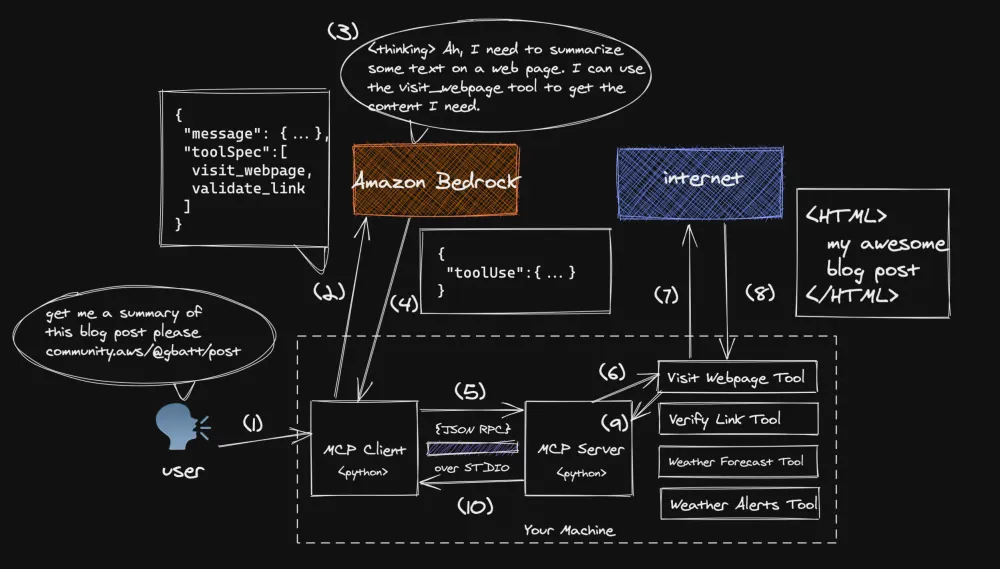
- For a human the task of reading a web page and provide its summary is trivial, but LLMs are not normally able to visit web pages and fetch context outside of their parametric memory. This is why we need a tool.
- We provide the user prompt and a list of available tools brokered by our MCP server to Amazon Bedrock via Converse API . In this case, Amazon Bedrock is acting as our unified interface to many models.
- Based on the user prompt and the tool inventory the chosen model plans a proper response.
- In this case the model correctly plans to use the
visit_webpagetool to download the content at the URL provided. Bedrock returns atoolUsemessage to the client, including thenameof the selected tool, theinputfor the tool request, and a uniquetoolUseIdwhich can be used in subsequent messages. Read these docs for more information about the syntax and usage oftoolUsein Bedrock Converse API .
- The client is programmed to forward any
toolUsemessage to the MCP server. In our implementation, communication happens viaJSON-RPCoverstdioon the same machine
- The MCP server dispatches the
toolUserequest to the appropriate tool
-
visit_webpagetool is invoked and an HTTP request is made to the provided URL
- The tool is programmed to download the content located at the provided URL and return its content in markdown format
- The content is then forwarded to the MCP server
- Flow control is returned to the MCP client. We complete the journey with steps 11-14 depicted in the following picture.
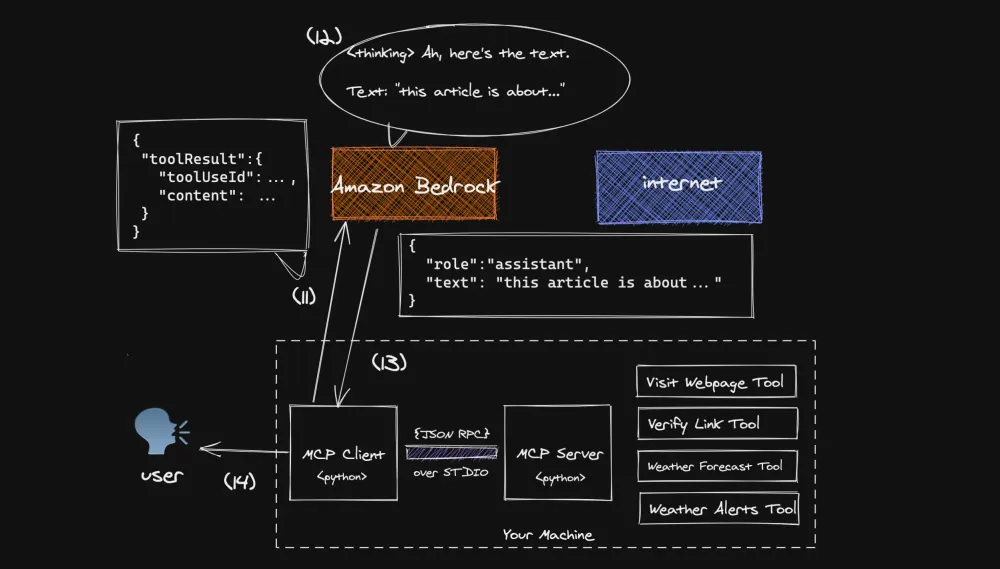
-
- The MCP client adds a
toolResultmessage to the conversation history inclding thetoolUseIdprovided at step 4 and forwards it to Bedrock. Read these docs for more information abouttoolResultsyntax.
- Bedrock now plans to use the result of the tool to compose its final response
- The response is sent back to the client which is programmed to yield back the control of the conversation flow to the user
- the user receives the response from the MCP client and the user is free to initiate a new flow
Prerequisites
Before you can get started, you'll need to complete the following tasks:
- Complete this tutorial showing how to create an MCP server in Python. At the end of the tutorial you should have a working MCP server providing two tools:
get_alertsandget_weather. This also includes installinguv, a fast and secure Python runtime and package manager.
- make sure you've exported your AWS credentials in your environment , so that they're available to
boto3
💡 For more information on how to do this, please refer to the AWS Boto3 documentation (Developer Guide > Credentials).
Creating an MCP Client for Bedrock
Ok, time to get our hands dirty with MCP and Amazon Bedrock. Make sure you have completed the tutorial linked in the Prerequisites section above before building your new client!
Setting up the project
Your project tree should look something like this (minus the
mcp-client folder we're going to create now)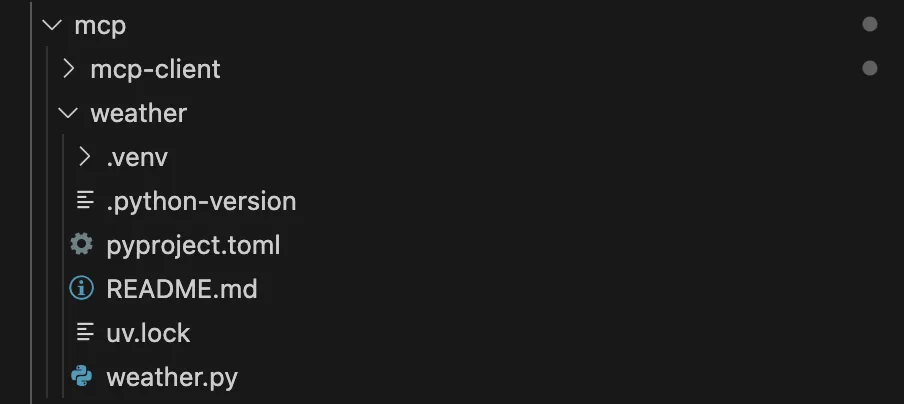
jump one level above if you're currently in
weather/ and create a new python projectBash
cd ..uv init mcp-client
You can get rid of
main.py and create a new file called client.py byBash
cd mcp-clientrm main.pytouch client.py
You'll need to install the following packages via
uv Bash
uv add mcp boto3
Imports
We're making use of
mcp package to manage access to the MCP server session and of course a sprinkle of boto3 to add the Bedrock goodness.Python
# client.pyimport asyncioimport sysfrom typing import Optional, List, Dict, Anyfrom contextlib import AsyncExitStackfrom dataclasses import dataclass# to interact with MCPfrom mcp import ClientSession, StdioServerParametersfrom mcp.client.stdio import stdio_client# to interact with Amazon Bedrockimport boto3
Mapping Bedrock Messages
With this helper class we're mapping messages coming from the Bedrock Converse API to objects we can use in our business logic. We're also defining a utility method to map the definition of a tool in the MCP server to Bedrock Converse API syntax. Just massaging the data a bit, nothing too fancy.
Python
# client.py@dataclassclass Message:role: strcontent: List[Dict[str, Any]]@classmethoddef user(cls, text: str) -> 'Message':return cls(role="user", content=[{"text": text}])@classmethoddef assistant(cls, text: str) -> 'Message':return cls(role="assistant", content=[{"text": text}])@classmethoddef tool_result(cls, tool_use_id: str, content: dict) -> 'Message':return cls(role="user",content=[{"toolResult": {"toolUseId": tool_use_id,"content": [{"json": {"text": content[0].text}}]}}])@classmethoddef tool_request(cls, tool_use_id: str, name: str, input_data: dict) -> 'Message':return cls(role="assistant",content=[{"toolUse": {"toolUseId": tool_use_id,"name": name,"input": input_data}}])@staticmethoddef to_bedrock_format(tools_list: List[Dict]) -> List[Dict]:return [{"toolSpec": {"name": tool["name"],"description": tool["description"],"inputSchema": {"json": {"type": "object","properties": tool["input_schema"]["properties"],"required": tool["input_schema"]["required"]}}}} for tool in tools_list]
Defining the Client
For simplicity, we're packaging all the business logic of our client in one class,
MCPClient Python
# client.pyclass MCPClient:MODEL_ID = "anthropic.claude-3-sonnet-20240229-v1:0"def __init__(self):self.session: Optional[ClientSession] = Noneself.exit_stack = AsyncExitStack()self.bedrock = boto3.client(service_name='bedrock-runtime', region_name='us-east-1')async def connect_to_server(self, server_script_path: str):if not server_script_path.endswith(('.py', '.js')):raise ValueError("Server script must be a .py or .js file")command = "python" if server_script_path.endswith('.py') else "node"server_params = StdioServerParameters(command=command, args=[server_script_path], env=None)stdio_transport = await self.exit_stack.enter_async_context(stdio_client(server_params))self.stdio, self.write = stdio_transportself.session = await self.exit_stack.enter_async_context(ClientSession(self.stdio, self.write))await self.session.initialize()response = await self.session.list_tools()print("\nConnected to server with tools:", [tool.name for tool in response.tools])async def cleanup(self):await self.exit_stack.aclose()
-
self.sessionis the object mapping to the MCP session we're establishing. In this case we'll be usingstdio, as we'll be using tools hosted on the same machine
-
self.bedrockcreates an AWS SDK client that provides methods to interact with Amazon Bedrock's runtime APIs, allowing you to make API calls like converse to communicate with foundation models.
-
self.exit_stack = AsyncExitStack()creates a context manager that helps manage multiple async resources (like network connections and file handles) by automatically cleaning them up in reverse order when the program exits, similar to a stack of nestedasync withstatements but more flexible and programmatic. We're making use ofself.exit_stackin the publiccleanupmethod to cut loose ends.
- The
connect_to_servermethod establishes a bidirectional communication channel with a Python or Node.js script that implements MCP tools, using standard input/output (stdio) for message passing, and initializes a session that allows the client to discover and call the tools exposed by the server script.
Processing Queries
Getting closer to the core of our business-logic.
Python
# client.pydef _make_bedrock_request(self, messages: List[Dict], tools: List[Dict]) -> Dict:return self.bedrock.converse(modelId=self.MODEL_ID,messages=messages,inferenceConfig={"maxTokens": 1000, "temperature": 0},toolConfig={"tools": tools})async def process_query(self, query: str) -> str:# (1)messages = [Message.user(query).__dict__]# (2)response = await self.session.list_tools()# (3)available_tools = [{"name": tool.name,"description": tool.description,"input_schema": tool.inputSchema} for tool in response.tools]bedrock_tools = Message.to_bedrock_format(available_tools)# (4)response = self._make_bedrock_request(messages, bedrock_tools)# (6)return await self._process_response( # (5)response, messages, bedrock_tools)
-
_make_bedrock_requestmethod is a private helper that sends a request to Amazon Bedrock's Converse API, passing in the conversation history ( messages), available tools, and model configuration parameters (like token limit and temperature), to get a response from the foundation model for the next turn of conversation. We'll use this in a couple of different methods
-
process_querymethod orchestrates the entire query processing flow:
- Creates a message from the user's query
- Fetches available tools from the connected server
- Formats the tools into Bedrock's expected structure
- Makes a request to Bedrock with the query and tools
- Processes the response through potentially multiple turns of conversation (if tool use is needed)
- Returns the final response
This is the main entry point for handling user queries and managing the conversation flow between the user, tools, and the foundation model. Let's double-click on how the conversation is actually handled.
Taking Turns
This is a conversation loop in which we handle all sorts of requests from both user and Bedrock. Let's dive in!
Python
# client.pyasync def _process_response(self, response: Dict, messages: List[Dict], bedrock_tools: List[Dict]) -> str:# (1)final_text = []MAX_TURNS=10turn_count = 0while True:# (2)if response['stopReason'] == 'tool_use':final_text.append("received toolUse request")for item in response['output']['message']['content']:if 'text' in item:final_text.append(f"[Thinking: {item['text']}]")messages.append(Message.assistant(item['text']).__dict__)elif 'toolUse' in item:# (3)tool_info = item['toolUse']result = await self._handle_tool_call(tool_info, messages)final_text.extend(result)response = self._make_bedrock_request(messages, bedrock_tools)# (4)elif response['stopReason'] == 'max_tokens':final_text.append("[Max tokens reached, ending conversation.]")breakelif response['stopReason'] == 'stop_sequence':final_text.append("[Stop sequence reached, ending conversation.]")breakelif response['stopReason'] == 'content_filtered':final_text.append("[Content filtered, ending conversation.]")breakelif response['stopReason'] == 'end_turn':final_text.append(response['output']['message']['content'][0]['text'])breakturn_count += 1if turn_count >= MAX_TURNS:final_text.append("\n[Max turns reached, ending conversation.]")break# (5)return "\n\n".join(final_text)
-
_process_responsemethod initializes a conversation loop with a maximum of 10 turns (MAX_TURNS), tracking responses infinal_text.
- When the model requests to use a tool, it processes the request by handling both thinking steps (text) and tool execution steps (toolUse).
- For tool usage, it calls the tool handler and makes a new request to Bedrock with the tool's results. Remember, we're hosting the tools locally in our MCP server.
- We also handle various stop conditions (max tokens, content filtering, stop sequence, end turn) by appending appropriate messages and breaking the loop.
- Finally, it joins all accumulated text with newlines and returns the complete conversation history.
Handling Tools requests
Python
# client.pyasync def _handle_tool_call(self, tool_info: Dict, messages: List[Dict]) -> List[str]:# (1)tool_name = tool_info['name']tool_args = tool_info['input']tool_use_id = tool_info['toolUseId']# (2)result = await self.session.call_tool(tool_name, tool_args)# (3)messages.append(Message.tool_request(tool_use_id, tool_name, tool_args).__dict__)messages.append(Message.tool_result(tool_use_id, result.content).__dict__)# (4)return [f"[Calling tool {tool_name} with args {tool_args}]"]
-
_handle_tool_callmethod executes a tool request by extracting the tool's name, arguments, and ID from the provided info.
- It calls the tool through the
sessioninterface and awaits its result.
- The method records both the tool request and its result in the conversation history. This is to let Bedrock know that we have had a conversation with somebody else, somewhere else (the tool running on your machine, I mean!)
- Finally, it returns a formatted message indicating which tool was called with what arguments.
This method essentially serves as the bridge between the model's tool use requests (coming from Bedrock) and the actual tool execution system (running on your machine).
Let's get chattin'
The
chat_loop method implements a simple interactive command-line interface that continuously accepts user input, processes queries through the system, and displays responses until the user types 'quit' or an error occurs.Python
# client.pyasync def chat_loop(self):print("\nMCP Client Started!\nType your queries or 'quit' to exit.")while True:try:query = input("\nQuery: ").strip()if query.lower() == 'quit':breakresponse = await self.process_query(query)print("\n" + response)except Exception as e:print(f"\nError: {str(e)}")
And here's the main entry point. Finally!
Python
# client.pyasync def main():if len(sys.argv) < 2:print("Usage: python client.py <path_to_server_script>")sys.exit(1)client = MCPClient()try:await client.connect_to_server(sys.argv[1])await client.chat_loop()finally:await client.cleanup()if __name__ == "__main__":asyncio.run(main())
Here we validate command-line arguments and initialize an MCP client to connect to a specified server script. We then run the chat loop in an async context with proper cleanup handling, using Python's asyncio to manage the asynchronous execution flow.
Let's see it in action!
Here's a video demo of what we built so far: we're goin to test this client with the weather tools we've built as part of this tutorial released by Anthropic.
We'll demo the two tools in isolation:
- The weather alert tool will help us fetching alerts for a state in the US
- prompt: "get me a summary of the weather alerts in California"
- The weather forecast tool will help us getting the forecast for a city in the US
- prompt: "get me a summary of the weather forecast for Buffalo, NY"
Run it yourself!
Use uv to run
client.py and don't forget to pass the path to where you're stored your tool.Bash
uv run client.py ../weather/weather.py
Automating the review of Blog Posts with MCP
Now that we have a client and a server set up, we're ready to start solving real-world use cases. In this sample, we're going to build custom tools to provide web browsing capabilities for our LLMs.
Extending your MCP server is as easy as adding new functions to your server file or creating a new server file. For the scope of this demo, we're going to add a couple of very powerful functions to our existing server file and we'll show how Claude is smart enough to use them together in a plan and properly distinguish them.
Before we write more code, make sure you switch to the MCP server folder and install some extra dependencies
Bash
cd ../weatheruv add requests markdownify
Visit a Web Page
We're providing our LLMs with an HTTP client to visit web pages and extract markdown from it.
Python
# wheather.py (I know, I know...)import reimport requestsfrom markdownify import markdownifyfrom requests.exceptions import RequestException@mcp.tool()def visit_webpage(url: str) -> str:"""Visits a webpage at the given URL and returns its content as a markdown string.Args:url: The URL of the webpage to visit.Returns:The content of the webpage converted to Markdown, or an error message if the request fails."""try:# Send a GET request to the URLresponse = requests.get(url, timeout=30)response.raise_for_status() # Raise an exception for bad status codes# Convert the HTML content to Markdownmarkdown_content = markdownify(response.text).strip()# Remove multiple line breaksmarkdown_content = re.sub(r"\n{3,}", "\n\n", markdown_content)return markdown_contentexcept RequestException as e:return f"Error fetching the webpage: {str(e)}"except Exception as e:return f"An unexpected error occurred: {str(e)}"
The
visit_webpage function is a tool that fetches content from a given URL using HTTP GET requests. It converts the retrieved HTML content into a cleaner Markdown format, removing excessive line breaks and handling edge cases. The function includes comprehensive error handling for both network-related issues and unexpected errors, returning appropriate error messages when something goes wrong.Validate links
Python
# weather.py@mcp.tool()def validate_links(urls: list[str]) -> list[str, bool]:"""Validates that the links are valid webpages.Args:urls: The URLs of the webpages to visit.Returns:A list of the url and boolean of whether or not the link is valid."""output = []for url in urls:try:# Send a GET request to the URLresponse = requests.get(url, timeout=30)response.raise_for_status() # Raise an exception for bad status codesprint('validateResponse',response)# Check if the response content is not emptyif response.text.strip():output.append([url, True])else:output.append([url, False])except RequestException as e:output.append([url, False])print(f"Error fetching the webpage: {str(e)}")except Exception as e:output.append([url, False])print(f"An unexpected error occurred: {str(e)}")return output
The
validate_links function takes a list of URLs and checks each one to verify if it's a valid, accessible webpage. It attempts to make HTTP GET requests to each URL, considering a link valid if the request succeeds and returns non-empty content. The function returns a list of URL-validity pairs, where each pair contains the URL and a boolean indicating whether the link is valid, with error handling for both network and general exceptions.Once again, with more tools
(also make sure you check the article we're using in this demo, so you know we're not cheating - Serverless Retrieval Augmented (RAG) on AWS )
It's impressive how even without explicit orchestration Claude is able to plan and combine the usage of tools to achieve a complex goal. In this demo we've seen how our system is able to first download the content of a web page, then extract all the links, validate all of them, and finally returning a summary to the end user.
So what now?
You can now extend your tool library and explore new ways to manage the conversation independently.
We're eager to explore new use cases and getting this architecture to the next level by going fully distributed. Please let us know in the comments what features or tools you'd like to see next.
Do you want to get in touch?
Are you building tools or agentic systems? Are you a startup founder and want to discuss your startup with AWS startup experts and the authors of this article? Book your 1:1 meeting here !
Authors
Giuseppe Battista is a Senior Solutions Architect at Amazon Web Services. He leads soultions architecture for Early Stage Startups in UK and Ireland. He hosts the Twitch Show "Let's Build a Startup" on twitch.tv/aws
Kevin Shaffer-Morrison is a Senior Solutions Architect at Amazon Web Services. He's helped hundreds of startups get off the ground quickly and up into the cloud. Kevin focuses on helping the earliest stage of founders with code samples and Twitch live streams.
Acknowledgements
Giuse and Kevin would like to thank the following colleagues and friends for their contribution to this article
- Dheeraj Mudgil - Sr. Solutions Architect, AWS Startups UKIR. Thank you for continuously providing kind and patient guidance on security and inspiring the architectural and flow diagrams in this article
- Heikki Tunkelo - Manager, Solutions Architecture, AWS Startups Nordics. Thanks for your bright remarks on organisational and business benefits in adopting MCP, and overall peer review of the article.
- João Galego - Head of AI at Critical Software and many other superimpositions. Thanks for your kind peer review. You keep insisting on the highest standards, even outside of Amazon.
Legal & Security Disclaimers
Security Awareness Disclaimer For any considerations of adopting these services in a production environment, it is imperative to consult with your company-specific security policies and requirements. Each production environment demands a uniquely tailored security assessment that comprehensively addresses its particular risks and regulatory standards. If in doubt, reach out to your AWS Account team.
Open-source disclaimer - This blog post and related code samples make use of third party open-source technologies. If you want to make use of these code samples, make sure you check the licensing implications of all the packages involved. All code in this sample is released under Apache 2.0 licensing terms .
Housekeeping Note After completing the experiment, it’s crucial to promptly remove or disable any keys or credentials generated for the PoC. Additionally, it’s advisable to remove the associated services to avoid incurring unnecessary costs. Make sure your MCP client is not stuck in an infinite loop. We made sure every conversation could only have 10 turns, but make sure you've killed all processes.
Generative AI Disclaimer. The cover image for this article was generated with Amazon Nova Canvas.
Relevant Security Resources
Enjoyed reading this content? Let the author know!
Your likes, comments, shares, and saves help creators reach more builders.

Loading recommendations
Loading article