In today's rapidly evolving digital landscape, workflow automation has become essential for businesses looking to streamline operations and reduce manual overhead. While the AWS ecosystem already provides excellent tools like AWS Step Functions for serverless workflow orchestration and Amazon Bedrock Flow for native service integrations, there are scenarios where you might need the flexibility and visual interface that specialized workflow tools offer.
If you'd like to check out n8n and try deploying it on AWS using Amazon Elastic Container Service, this comprehensive guide will walk you through the entire process. N8N stands out as a powerful, open-source workflow automation tool that provides an intuitive visual interface for creating complex workflows without extensive coding knowledge.
Recently, I started experimenting with n8n by running it locally using Docker Compose, which launched the core service along with Amazon RDS Postgres and Amazon ElastiCache Redis. The local setup was straightforward and gave me a good understanding of the tool's capabilities. Not long after, I decided to move it to AWS for better scalability, reliability, and integration with other AWS services. While n8n supports deployment on Amazon EC2 instances and Amazon EKS, I built a proof of concept using CDK to deploy it on Amazon Elastic Container Service, which offers a good balance between simplicity and scalability.
Why Choose N8N for Workflow Automation?
N8N offers several compelling advantages that make it an attractive choice for workflow automation:
Visual Workflow Builder: The drag-and-drop interface makes it easy to create complex workflows without writing extensive code. This visual approach significantly reduces the learning curve and enables non-technical team members to contribute to automation efforts.
Extensive Integration Library: With over 400 pre-built nodes, n8n can connect to virtually any service or API. From popular SaaS applications like Slack, Salesforce to databases, file systems, and custom APIs, the integration possibilities are vast.
Self-Hosted Control: Unlike many SaaS automation platforms, n8n can be self-hosted, giving you complete control over your data, workflows, and infrastructure. This is particularly important for organizations with strict compliance requirements or sensitive data handling needs.
Open Source Flexibility: Being open source means you can customize the platform to meet your specific needs, contribute to its development, or simply have confidence in the long-term availability of the tool.
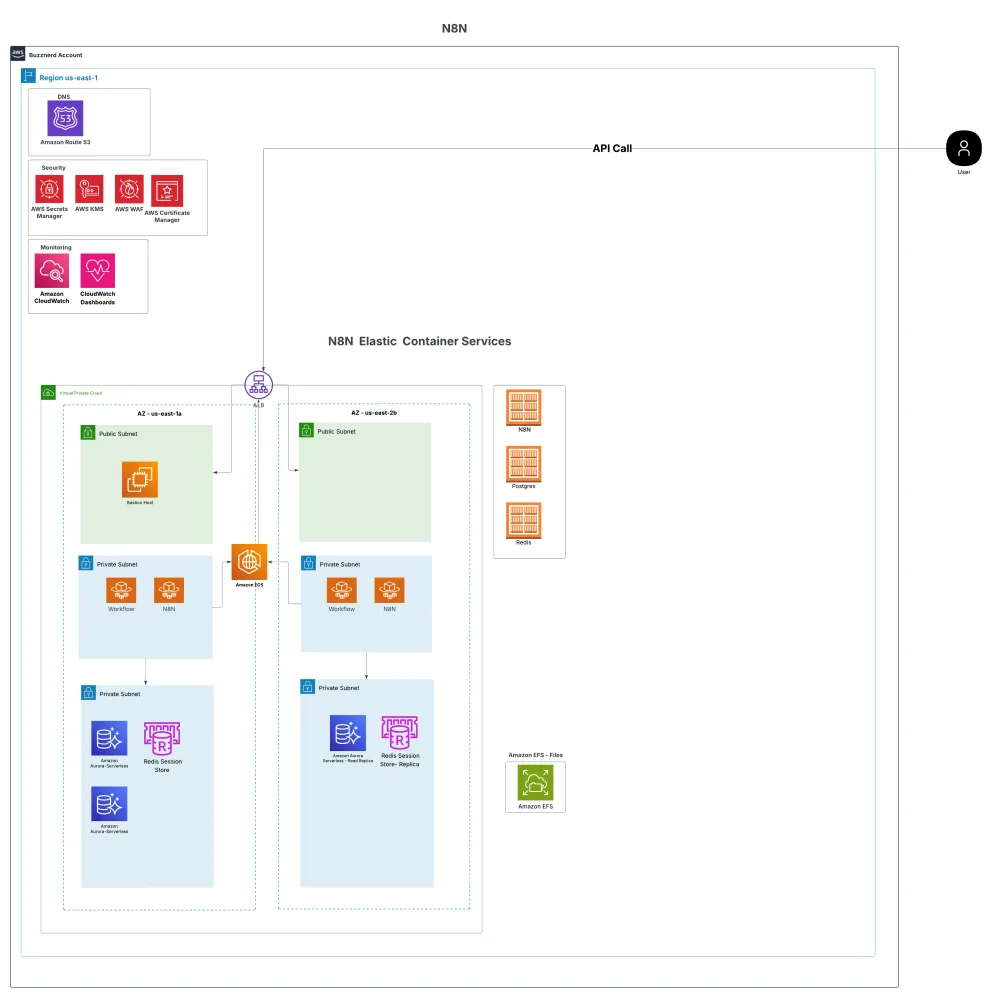
Architecture Digram
Deployment process Architecture Overview
The deployment process is simple—just clone the repository from my ******** GitHub**** and launch the stacks. However, understanding the underlying architecture is crucial for successful implementation and future maintenance.
The architecture is built using modular AWS CDK stacks deployed within a custom AWS VPC. This modular approach provides several benefits: easier maintenance, selective deployment of components, and better separation of concerns. Each component is decoupled using AWS Systems Manager Parameter Store, allowing for flexible configuration and easier maintenance. This decoupling means you can modify one component without affecting others, making the system more resilient and maintainable.
Sensitive information is securely managed through AWS Secrets Manager, ensuring that database passwords, API keys, and other sensitive configuration data are encrypted at rest and in transit. This security-first approach is essential for production deployments or any deployments following security-first approach.
The deployment provisions several key components:
Amazon RDS PostgreSQL: Serves as the primary database for storing workflow definitions, execution history, and user data. PostgreSQL was chosen for its reliability, performance, and excellent support for JSON data types, which n8n uses extensively.
Amazon ElastiCache (Redis): Provides high-performance caching and session storage. Redis is particularly important for n8n's queue management and real-time features.
Amazon Elastic File System (EFS): Offers persistent, shared storage for workflow files, custom nodes, and other assets that need to persist across container restarts and scaling events.
All core N8N services and workers: Run as Amazon Elastic Container Services, providing automatic scaling, health monitoring, and seamless deployment capabilities.
For production environments, it's strongly recommended to move the database layer outside of containers. While containerized databases work well for development and testing, managed services like AWS RDS provide better durability and performance, automated backups, and professional support. An optional RDS stack for PostgreSQL is included in the deployment (but not deployed by default), and using Amazon ElastiCache for Redis offers improved performance and resilience compared to containerized Redis instances.
Detailed CDK Stack Architecture
A step-by-step deployment guide is available in the README.md file within the repository. The CDK implementation consists of several interconnected stacks, each serving a specific purpose:
CDK Stacks
N8nDevNetworkStack: Establishes the foundational networking infrastructure including AWS VPC, subnets, security groups, and internet gateway. This stack creates isolated network segments for different components, ensuring proper security boundaries while enabling necessary communication paths.
N8nDevEfsStack: Provisions the Amazon Elastic File System that provides persistent storage for n8n workflows, custom nodes, and configuration files. EFS ensures that data persists even when containers are restarted or replaced during scaling operations.
N8nDevRdsStack (optional): Creates a managed Amazon RDS PostgreSQL database instance with automated backups, monitoring, and maintenance windows. This stack is optional because you can choose to run PostgreSQL in a container for development environments, but it's highly recommended for production use.
N8nDevEcsClusterStack: Sets up the Amazon ECS cluster that will host all containerized services. This includes the cluster configuration, capacity providers, and basic monitoring setup.
N8nDevBastionHostStack: Deploys a bastion host for secure access to private resources within the Amazon VPC. This is essential for troubleshooting and maintenance tasks that require direct access to the infrastructure.
N8nDevServiceDatabaseStack: Handles the containerized PostgreSQL service when the optional Amazon RDS stack is not used. This stack includes volume management, backup strategies, and performance tuning for the containerized database.
N8nDevServiceRedisStack: Manages the Redis container service with appropriate memory allocation, persistence configuration, and networking setup for optimal performance.
N8nDevN8NServiceStack: The core stack that deploys the n8n application itself, including the web interface, workflow engine, and worker processes. This stack also handles load balancing, auto-scaling policies, and health checks.
Container Services and Orchestration
Once the solution is deployed, you'll find several Amazon Elastic Container Services up and running within your cluster. These include the core N8N service, background workers, and supporting services like Postgres and Redis. Each component is containerized and orchestrated via Amazon Elastic Container Services, ensuring scalability and ease of management.
The containerized approach provides several advantages:
Scalability: Individual components can be scaled independently based on demand. For example, you can scale worker processes during peak workflow execution times without affecting the web interface.
Isolation: Each service runs in its own container, preventing issues in one component from affecting others. This isolation also makes it easier to update or troubleshoot individual services.
Resource Efficiency: Containers share the host OS kernel, making more efficient use of system resources compared to traditional virtual machines.
Consistency: The same container images work across development, testing, and production environments, reducing deployment-related issues.
The architecture also integrates AWS Cloud Map for service discovery, allowing the different containers and services to communicate seamlessly within the Amazon VPC without hardcoding IP addresses or hostnames. This simplifies inter-service communication and improves flexibility in scaling or updating components. Cloud Map automatically updates service endpoints when containers are moved or scaled, ensuring reliable communication even in dynamic environments.
Additionally, the setup includes persistent storage with Amazon Elastic File System (EFS) and an optional RDS stack for those who prefer a managed database outside the containerized environment. It's a solid foundation for running N8N in a robust, cloud-native manner on AWS.
N8N Services Configuration
The N8N editor is exposed via an Application Load Balancer (ALB) and is currently accessible over HTTP. While this configuration works for development and testing, production deployments require additional security measures.
To enable secure access, SSL termination and an HTTPS listener should be configured. The necessary code is already included but commented out in the CDK stack. To enable HTTPS, simply uncomment the relevant sections, create or import an SSL certificate through AWS Certificate Manager, and redeploy the service. The SSL certificate can be obtained for free through ACM and will automatically renew, ensuring your deployment remains secure without manual intervention.
The load balancer configuration includes health checks, connection draining, and sticky sessions to ensure optimal performance and reliability. Health checks monitor the n8n service and automatically remove unhealthy instances from the load balancer rotation, while connection draining ensures that in-flight requests are completed before instances are terminated during scaling or deployment operations.
Workflow Integration Possibilities
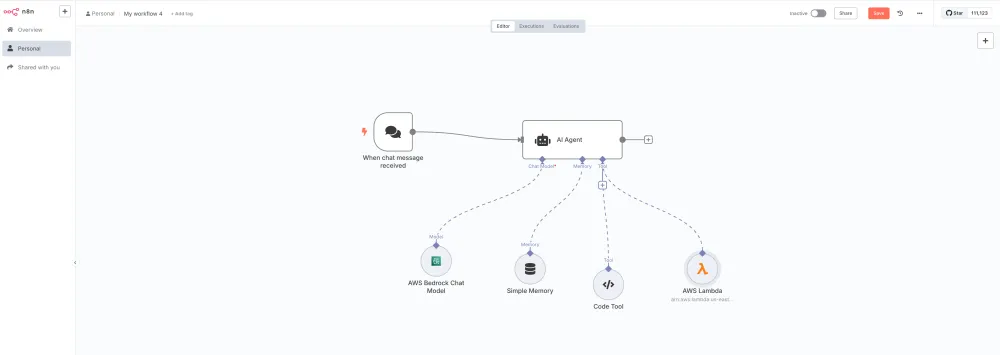
In this workflow environment, you can orchestrate agents and services using AWS Bedrock for AI-powered automation, AWS Lambda for serverless compute functions, or any other AWS service of your choice. The flexibility of n8n means you can easily integrate with:
AWS Services: Lambda functions, Amazon S3 buckets, Amazon DynamoDB, Amazon SQS queues, Amazon SNS topics, and more through the AWS SDK or REST APIs.
Third-Party APIs: CRM systems, marketing platforms, communication tools, and business applications through HTTP requests or dedicated nodes.
Database Operations: Direct connections to various database systems for data extraction, transformation, and loading operations.
File Processing: Automated file handling, format conversion, and content processing workflows.
Production Readiness Considerations
The N8N workflow tool can be deployed on Amazon Elastic Container Services, and I've set up a proof of concept (POC) to demonstrate this capability. While the current implementation works well for development and testing, additional steps are needed to make it production-ready:
SSL Implementation: Enable HTTPS with proper SSL certificates for secure communication.
Worker Testing: Thoroughly test the worker processes under various load conditions to ensure reliable workflow execution.
Security Hardening: Implement AWS WAF (Web Application Firewall) to protect the ALB endpoint from common web attacks, configure proper security groups, and implement least-privilege access policies.
Monitoring and Alerting: Set up CloudWatch dashboards, alarms, and logging to monitor system health and performance.
Backup and Disaster Recovery: Implement automated backup strategies for both the database and Amazon Elastic File System (EFS) storage, and establish disaster recovery procedures.
Performance Optimization: Fine-tune container resources, implement caching strategies, and optimize database queries for production workloads.
Conclusion
If you're considering a self-hosted N8N instance, Amazon Elastic Container Services is definitely worth exploring. The combination of n8n's powerful workflow capabilities with AWS's robust infrastructure provides a solid foundation for enterprise-grade automation solutions.
The modular CDK approach makes it easy to customize the deployment for your specific needs, whether you're running a small development environment or a large-scale production system. The architecture provides room for growth and can be easily extended with additional AWS services as your automation needs evolve.
Let me know what you think about this approach and if you have any questions about implementing n8n on AWS ECS!
Any opinions in this article are those of the individual author and may not reflect the opinions of AWS.
Enjoyed reading this content? Let the author know!
Your likes, comments, shares, and saves help creators reach more builders.




Loading article