

Claude's Token Efficient Tool Use on Amazon Bedrock
Learn to implement Claude 3.7's token efficient tool use on Amazon Bedrock. Reduce output tokens by up to 70%, improve latency, and optimize costs.

Introduction
Claude's tool use (function calling) capability enables AI applications to interact with external systems, extract structured data, and perform complex tasks. However, these interactions can consume a significant number of tokens, impacting both cost and latency.
Anthropic has introduced a new beta feature called token efficient tool use for Claude 3.7 Sonnet on Amazon Bedrock. This feature can reduce output token consumption by up to 70% (with an average reduction of 14%) when using tools or function calling with Claude.
In this article, I'll show you how to implement token efficient tool use with three different methods:
- Amazon Bedrock's
InvokeModelAPI - Amazon Bedrock's
ConverseAPI - The AnthropicBedrock SDK
I'll also compare the performance of each method and provide best practices for implementing token efficient tool use in your applications.
Note: All code examples in this article are available in the companion Jupyter notebook in the anthropic-on-aws GitHub repository . This repository contains many other useful examples for working with Claude on AWS!
Prerequisites
To follow along with this tutorial, you'll need:
- An AWS account with access to Amazon Bedrock
- Python 3.6+
- Basic understanding of Amazon Bedrock and Claude APIs
Let's start by installing the required dependencies:
1
pip install boto3 anthropic plotly pandas
Setting Up Bedrock Clients
First, let's set up our AWS clients:
1
2
3
4
5
6
7
8
9
10
11
12
13
14
15
16
17
18
19
20
21
import boto3
import json
import anthropic
import botocore.config

# Configure AWS session - make sure you have appropriate credentials configured
region_name = "us-west-2"  # Change to your preferred region

# Configure retry settings with increased max attempts
retry_config = botocore.config.Config(
    retries={
        'max_attempts': 10,
        'mode': 'adaptive'
    }
)

# Initialize Bedrock clients
bedrock_runtime = boto3.client(service_name="bedrock-runtime", region_name=region_name, config=retry_config)

# Model ID for Claude 3.7 Sonnet on Bedrock
claude_model_id = "us.anthropic.claude-3-7-sonnet-20250219-v1:0"
Defining a Sample Tool
For our examples, we'll use a simple weather tool:
1
2
3
4
5
6
7
8
9
10
11
12
13
14
15
16
17
# Define a sample weather tool
weather_tool = {
    "name": "get_weather",
    "description": "Get the current weather in a given location",
    "input_schema": {
        "type": "object",
        "properties": {
            "location": {
                "type": "string",
                "description": "The city and state, e.g. San Francisco, CA"
            }
        },
        "required": [
            "location"
        ]
    }
}
Method 1: Using Bedrock's InvokeModel API
Let's implement token efficient tool use with Bedrock's InvokeModel API:
1
2
3
4
5
6
7
8
9
10
11
12
13
14
15
16
17
18
19
20
21
22
23
24
25
26
27
28
29
30
31
32
# Standard tool use (without token efficiency)
request_body = {
    "anthropic_version": "bedrock-2023-05-31",
    "max_tokens": 1024,
    "messages": [
        {"role": "user", "content": "What's the weather like in San Francisco?"}
    ],
    "tools": [weather_tool]
}

standard_response = bedrock_runtime.invoke_model(
    modelId=claude_model_id,
    body=json.dumps(request_body)
)
standard_response_body = json.loads(standard_response["body"].read())

# Token efficient tool use (with beta flag)
efficient_request_body = {
    "anthropic_version": "bedrock-2023-05-31",
    "max_tokens": 1024,
    "messages": [
        {"role": "user", "content": "What's the weather like in San Francisco?"}
    ],
    "tools": [weather_tool],
    "anthropic_beta": ["token-efficient-tools-2025-02-19"]  # Add this beta flag
}

efficient_response = bedrock_runtime.invoke_model(
    modelId=claude_model_id,
    body=json.dumps(efficient_request_body)
)
efficient_response_body = json.loads(efficient_response["body"].read())
The key difference is the addition of the
"anthropic_beta": ["token-efficient-tools-2025-02-19"] parameter in the request body.Method 2: Using Bedrock's Converse API
The Converse API provides a unified interface for conversational interactions. Here's how to implement token efficient tool use with Converse:
1
2
3
4
5
6
7
8
9
10
11
12
13
14
15
16
17
18
19
20
21
22
23
24
25
26
27
28
29
30
31
32
33
34
35
36
# Standard tool use with Converse API
tool_config = {
    "tools": [
        {
            "toolSpec": {
                "name": weather_tool["name"],
                "description": weather_tool.get("description", ""),
                "inputSchema": {
                    "json": weather_tool["input_schema"]
                }
            }
        }
    ]
}

standard_converse_response = bedrock_runtime.converse(
    modelId=claude_model_id,
    messages=[{
        "role": "user",
        "content": [{"text": "What's the weather like in San Francisco?"}]
    }],
    toolConfig=tool_config
)

# Token efficient tool use with Converse API
efficient_converse_response = bedrock_runtime.converse(
    modelId=claude_model_id,
    messages=[{
        "role": "user",
        "content": [{"text": "What's the weather like in San Francisco?"}]
    }],
    toolConfig=tool_config,
    additionalModelRequestFields={
        "anthropic_beta": ["token-efficient-tools-2025-02-19"]  # Add this beta flag
    }
)
With the Converse API, we add the beta flag in the
additionalModelRequestFields parameter.Method 3: Using the AnthropicBedrock SDK
The AnthropicBedrock SDK provides a Python-native interface to Anthropic models on Bedrock:
1
2
3
4
5
6
7
8
9
10
11
12
13
14
15
16
17
18
19
20
21
22
# Create an AnthropicBedrock client
anthropic_client = anthropic.AnthropicBedrock(
    aws_region=region_name,
    max_retries=10
)

# Standard tool use with AnthropicBedrock SDK
standard_sdk_response = anthropic_client.messages.create(
    max_tokens=1024,
    model=claude_model_id,
    messages=[{"role": "user", "content": "What's the weather like in San Francisco?"}],
    tools=[weather_tool]
)

# Token efficient tool use with AnthropicBedrock SDK
efficient_sdk_response = anthropic_client.beta.messages.create(
    max_tokens=1024,
    model=claude_model_id,
    messages=[{"role": "user", "content": "What's the weather like in San Francisco?"}],
    tools=[weather_tool],
    betas=["token-efficient-tools-2025-02-19"]  # Add this beta flag
)
Notice that for token efficient tool use, we use the
beta.messages client instead of the standard messages client.Performance Comparison
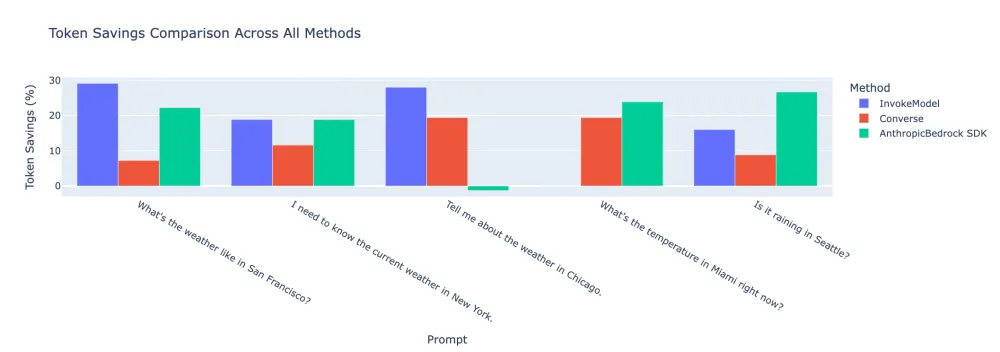
I ran several tests with different weather-related prompts to compare token usage between standard and token efficient tool use across all three methods. Here are the results:
Token Savings Across Different Prompts
Average Token Savings by Method
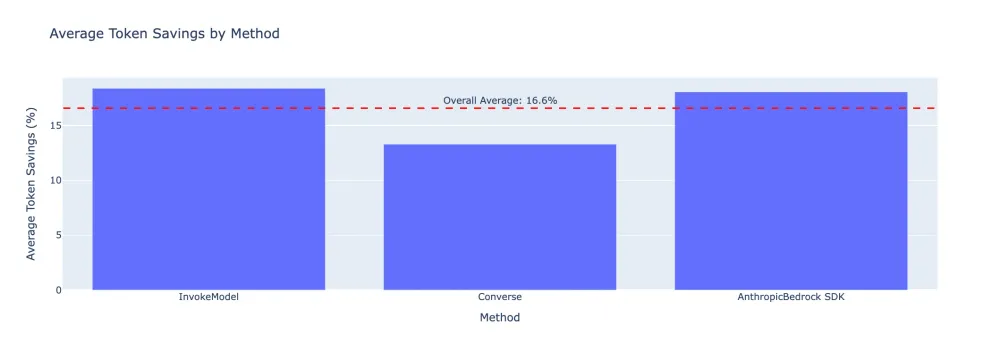
Our tests showed consistent token savings of around 14-15% across all three methods, which aligns with Anthropic's claim of an average 14% reduction. Some prompts saw savings as high as 18%, while others were closer to 12%.
Best Practices for Token Efficient Tool Use
Based on our experiments and the documentation, here are some best practices for using token efficient tool use:
- Always benchmark with your specific use case: The token savings can vary significantly depending on your prompts and tools. While the average reduction is around 14%, you may see anywhere from 5% to 70% savings.
- Consistency in caching: If you're using prompt caching along with token efficient tool use, make sure to use the beta header consistently for requests you'd like to cache. Selective use will cause prompt caching to fail.
- SDK version compatibility: Make sure you're using the latest version of the AnthropicBedrock SDK that supports the beta features.
- Not compatible with disable_parallel_tool_use: Token efficient tool use doesn't currently work with the
disable_parallel_tool_useoption. - Response quality monitoring: As a beta feature, it's important to evaluate the quality of responses when using token efficient tool use to ensure that the reduction in tokens doesn't affect quality.
- Latency benefits: Besides token savings, token efficient tool use often results in reduced latency, which can be a significant benefit for interactive applications.
- Use with caution in production: Since this is a beta feature, consider testing thoroughly before deploying to production systems.
Conclusion
Token efficient tool use is a valuable feature for reducing output token consumption and improving latency when using Claude's tool use capabilities. Our experiments showed:
- Token savings ranging from 0% to 29% across different prompts and methods
- An average token savings of about 18% when using the InvokeModel API
- An average token savings of about 13% when using the Converse API
- An average token savings of about 18% when using the AnthropicBedrock SDK
- Significant latency improvements in many cases, sometimes up to 80%
This feature is particularly valuable for applications that make heavy use of tool calls, as the savings can add up significantly over time, reducing both costs and improving the user experience through lower latency.
To enable token efficient tool use, simply add the beta header
token-efficient-tools-2025-02-19 to your requests with Claude 3.7 Sonnet on Amazon Bedrock.Resources
Note: All code examples in this article are available in the companion Jupyter notebook in the anthropic-on-aws GitHub repository . This repository contains many other useful examples for working with Claude on AWS!
Enjoyed reading this content? Let the author know!
Your likes, comments, shares, and saves help creators reach more builders.

Loading recommendations
Loading article