
WhatsApp Integration with Amazon Connect (with voice notes)
Use WABA as chat channel for your contact center.
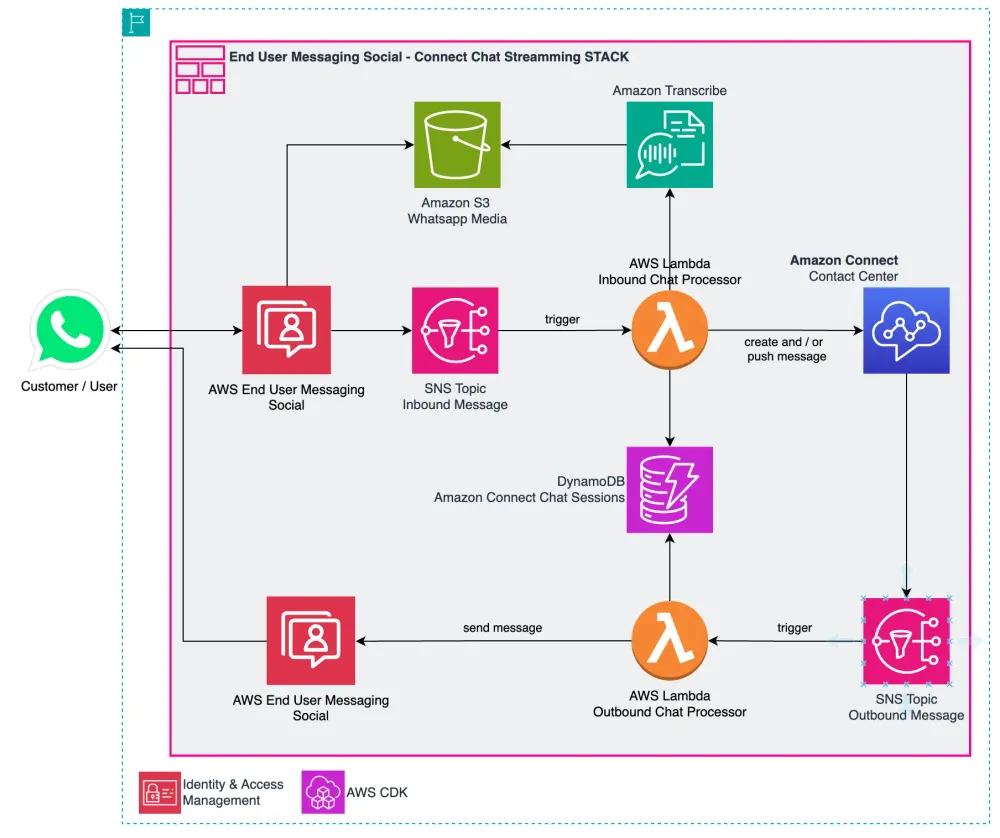
This project shows how to integrate WhatsApp messages through AWS End User Messaging with Amazon Connect to create a seamless customer service experience. While Amazon Connect has native WhatsApp integration, it has some limitations regarding message types and attachments (see WhatsApp Business messaging capabilities and limitations with Amazon Connect ). This project uses SNS integration to provide more flexibility in handling different message types. When a WhatsApp message is received, it automatically creates or continues a chat in Amazon Connect, and responses from agents are sent back to the WhatsApp user. If the user sends a voice note, that will be transcribed and used in the dialog using Amazon Transcribe
Architecture
The solution uses several AWS services to enable WhatsApp communication through Amazon Connect:
- AWS End User Messaging (EUM) for WhatsApp channel management
- Amazon Connect for chat functionality
- AWS Lambda for message processing and integration
- Amazon DynamoDB for conversation state management
- Amazon S3 for media file storage
- Amazon SNS Topic for event pub/sub
Flow
- User sends a WhatsApp message
- AWS End User Messaging Social (EUM-Social) receives the message send it to SNS Topic for inbound messages.
- AWS Lambda function:
- Creates or continues a chat in Amazon Connect
- Stores message metadata in DynamoDB (Not message content)
- Handles media files by uploading them to S3
- Optionally if voice note is received, it will be downloaded to s3 bucket and transcribed before sending to amazon connect chat.
- Amazon Connect agent receives and responds to the message
- Lambda function receives Connect response (via another SNS Topic) and sends it back to WhatsApp user via EUM API
- User receives the response in WhatsApp
Prerequisites
1) WhatsApp Business Account
To get started, businesses need to either create a new WhatsApp Business Account (WABA) or migrate an existing one to AWS. The main steps are described here . In summary:
- Have or create a Meta Business Account
- Access AWS End User Messaging Social console and and link business account through Facebook embedded portal.
- Ensure you have a phone number that can receive SMS/voice verification and add it to Whatsapp.
2) An Amazon Connect instance
You need a Amazon Connect Instance. If you don't have one already you can follow this guide .
3) CDK Setup
Note: If you you don't know what CDK is, please start here and install cdk and dependencies, configure environment and boostrap your account and region.
Deployment
This project uses AWS CDK for infrastructure deployment. Follow these steps:
Clone the repo:
git clone https://github.com/aws-samples/generative-ai-ml-latam-samples
Set up environment:
cd samples/whatsapp-eum-connect-chat
python3 -m venv .venv
source .venv/bin/activate # On Windows use: .venv\Scripts\activate.bat
pip install -r requirements.txt
python3 -m venv .venv
source .venv/bin/activate # On Windows use: .venv\Scripts\activate.bat
pip install -r requirements.txt
Deploy the stack:
cdk deploy
⚠️Important: Deploy in the same region as your AWS End User Messaging configuration
Post-deployment setup
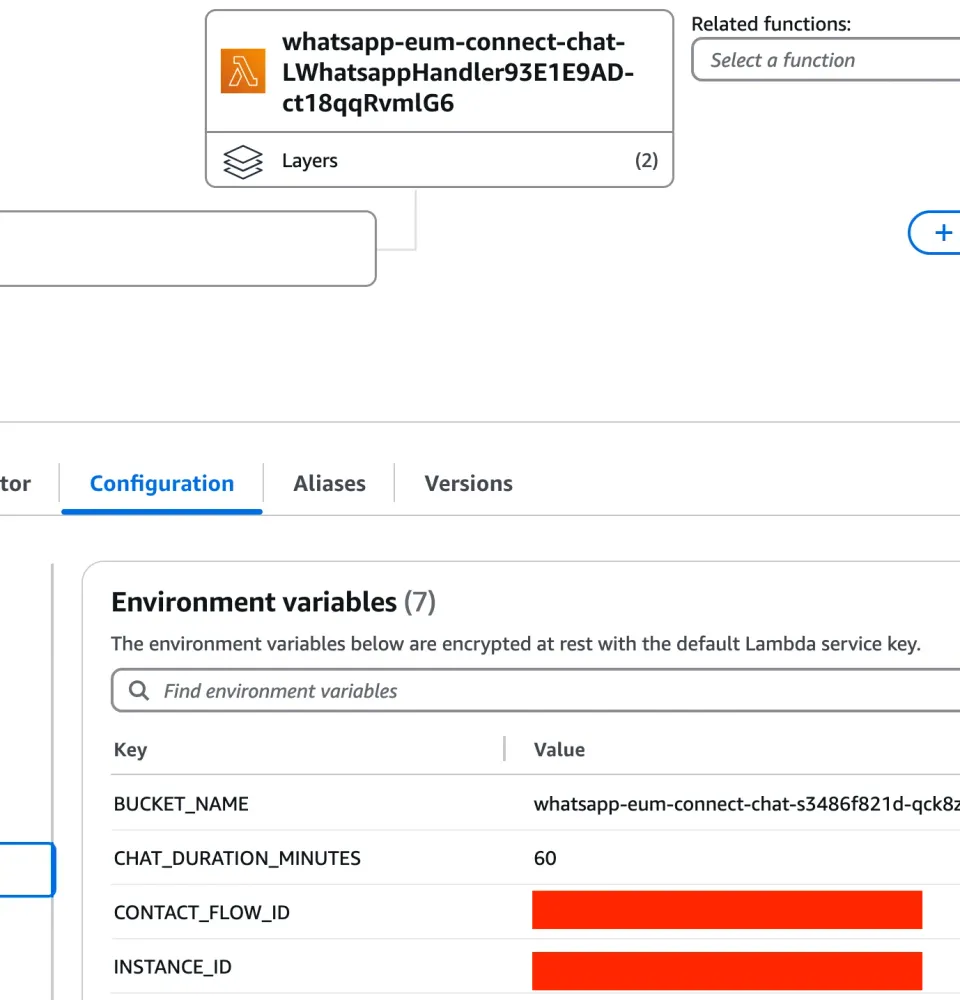
1) AWS Lambda Environment Variables
After deployed, go to the
WhatsappHandler Lambda function and update the INSTANCE_ID (your instance id) CONTACT_FLOW_ID (the contact flow used for chat session) and CHAT_DURATION_MINUTES (how long the chat will be active in connect) environment variables.Here you can find the Amazon Connect Instance Id and Contact Flow ID
2) Add the event destination
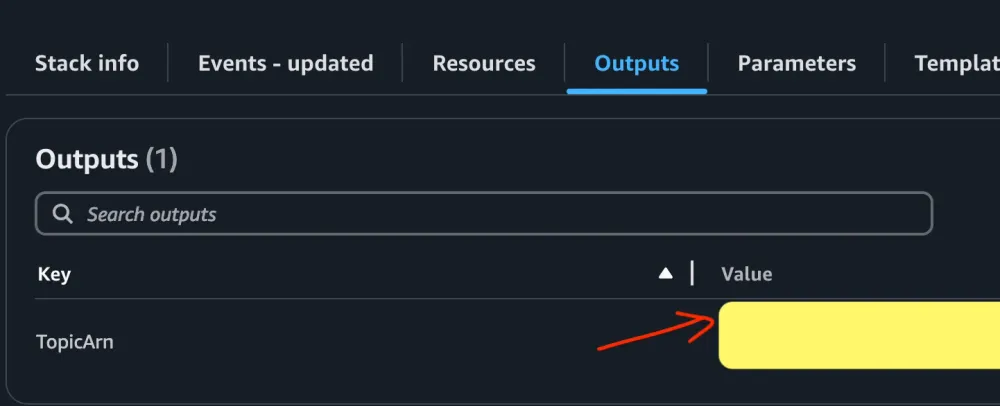
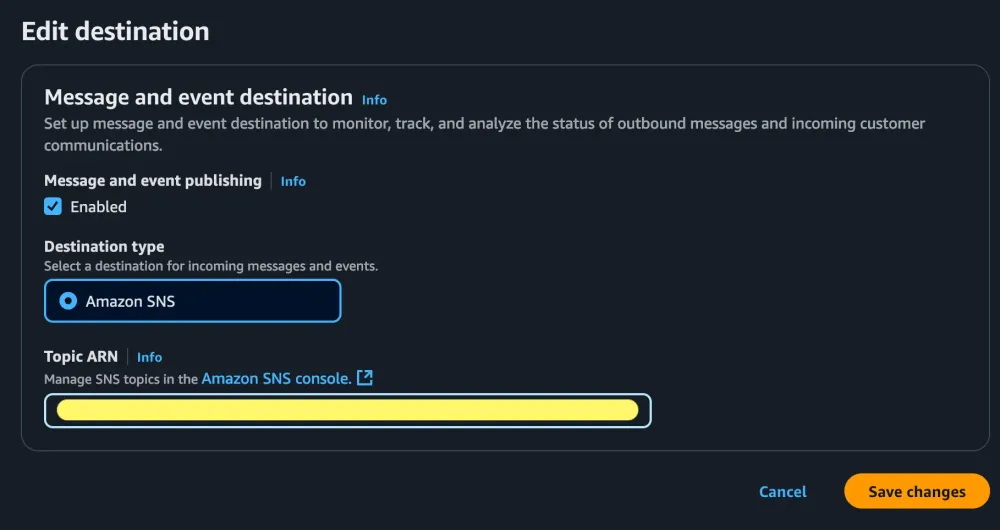
After deploying the stack, use the created SNS topic as your event destination in AWS End user messaging social console. The specific arn will be in the cloudformation output (or cdk deploy output).
cloudformation stack outputs:
AWS End user messaging social console:
The WhatsappHandler Lambda function
The SNS topics basically invokes AWS Lambda with a list of records that follow this structure . After parsing each record there is a provided
WhatsappService class to easily save, react, read, and reply whatsapp messages:1
2
3
4
5
6
7
8
9
10
11
12
13
14
15
16
17
18
19
20
21
22
23
...
for message in whatsapp.messages:
audio = message.get_audio(download=True) # Check if there is audio
transcription = None
if audio.get("location"): # it's been downloaded
print("TRANSCRIBE IT")
# transcribe using Amazon Transcribe
transcription = transcribe_service.transcribe(audio.get("location"))
message.add_transcription(transcription)
#An existing conversation with Amazon Connect Chat
contact = connections.get_contact(message.phone_number)
# Get message text content
text = message.get_text()
if transcription:
# Reply the transcription to the user
message.text_reply(f"🔊_{transcription}_")
text = transcription
...From here, just follow Meta's messages structure and invoke
send_whatsapp_message method from End User Social Service. For a complete list of the different messages you can send and examples, please refer to this documentation . In this code you can implemente custom logic to handle reactions, images, videos, etc.There is a boilerplate python code in whatsapp.py that provides mark as read, reply, and reaction to user's messages.
Using Amazon Transcribe Streaming to understand Voice Audios
Messages can contain media (audio, images, etc). To leverage that audio it need to be downloaded and transcribed first. Code details in transcribe.py
Creating or using Amazon Connect Chat
This code block handles the chat connection logic:
- If a contact exists, it tries to send the message using the existing connection. If the connection is invalid, it removes the old contact and creates a new chat connection
- If no contact exists, it creates a new chat connection from scratch. In all cases it stores/updates the connection details in the connections database
1
2
3
4
5
6
7
8
9
10
11
12
13
14
15
16
17
18
19
20
if(contact):
    try:
        send_message_response = chat.send_message(text, contact['connectionToken'])
    except:
        print('Invalid Connection Token')
        connections.remove_contactId(contact['contactId'])
        print('Initiating connection')
        contactId, participantToken, connectionToken = chat.start_chat_and_stream(
            text, message.phone_number, "Whatsapp", customer_name, message.phone_number_id)

        connections.update_contact(
            message.phone_number, "Whatsapp", contactId, participantToken, connectionToken, customer_name,
            message.phone_number_id)
else:
    print("Creating new contact")
    contactId, participantToken, connectionToken = chat.start_chat_and_stream(
            text, message.phone_number, "Whatsapp", customer_name, message.phone_number_id)

    connections.insert_contact(message.phone_number, "Whatsapp", contactId, participantToken, connectionToken, customer_name,
            message.phone_number_id)
The ConnectHandler Lambda function
This function handles Amazon Connect responses to user. Basically retrieves connection tokens for that specific contact id and send the message back to user:
1
2
3
4
5
6
7
8
9
10
11
12
13
14
15
16
17
18
19
20
21
22
23
24
25
...
customer = connections.get_customer(contactId)
if(customer):
    phone = customer['customerId']
    systemNumber = customer['systemNumber']
    send_whatsapp_text(message_body,phone, systemNumber)
...

def send_whatsapp_text(text_message, to, phone_number_id, meta_api_version="v20.0" ):
        message_object = {
            "messaging_product": "whatsapp",
            "recipient_type": "individual",
            "to": f"+{to}",
            "type": "text",
            "text": {"preview_url": False, "body": text_message},
        }

        kwargs = dict(
            originationPhoneNumberId=phone_number_id,
            metaApiVersion=meta_api_version,
            message=bytes(json.dumps(message_object), "utf-8"),
        )
        response = boto3.client("socialmessaging").send_whatsapp_message(**kwargs)
        print("replied to message:", response)
...
Test your Aplication
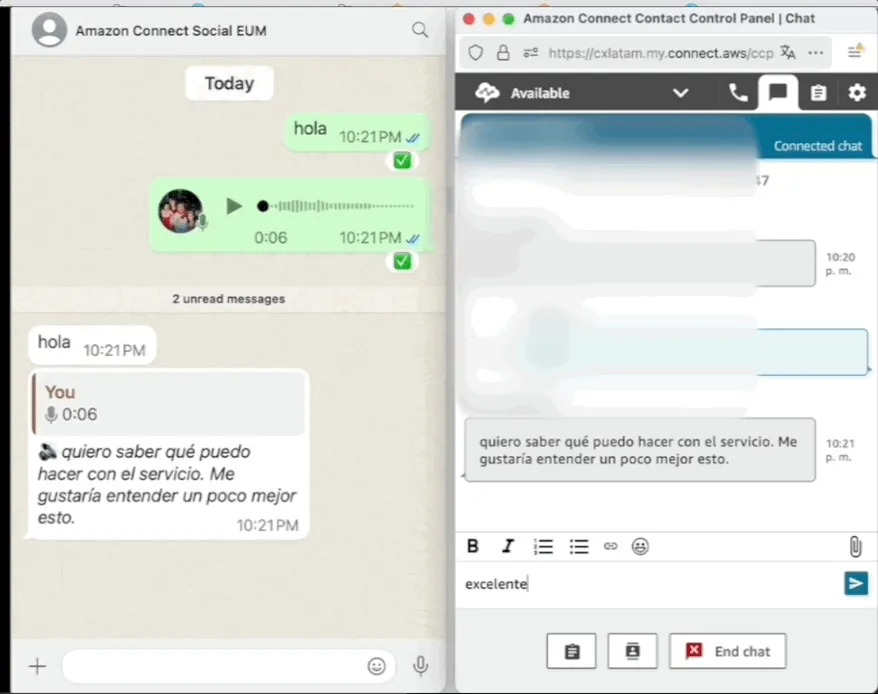
In order to test the chatbot, go to your Amazon Connect Instance and Open Contact control Panel (CCP) and send a Whatsapp Message to the EUM Social number.
(personal phone number blurred)
Cost Considerations
The main cost components for this solution are:
- AWS End User Messaging
- Pay per message sent/received 0.005 USD
- Conversation rate (24 thread) depends of conversartion categories.
- AWS Lambda
- Amazon SNS (no charges for lambda delivery)
- Amazon Connect Chat : 0,004 USD per message
- Amazon DynamoDB storing chat metadata
Optional costs:
- Amazon Transcribe for audio transcription
- Amazon S3 for media storage
All serverless and pay as you go (no cost if no used)
For detailed pricing, refer to AWS End User Messaging pricing .
Decomission
In order to delete resources, ust
cdk destroy if using cdk cli. Alternately go to cloudformation console an hit DeleteEnjoy!
Enjoyed reading this content? Let the author know!
Your likes, comments, shares, and saves help creators reach more builders.

Loading recommendations
Loading article