
Scaling with Amazon Bedrock: A practical guide on managing service quotas and throughput
In this post, you will learn about essential service quotas in Amazon Bedrock. You'll discover how to effectively manage Tokens per Minute (TPM) and Requests per Minute (RPM) for your AI applications. We'll guide you through the process of monitoring, requesting increases, and optimizing your quota usage.

Amazon Bedrock provides builders with a powerful building block for generative AI capabilities. But like all AWS services, it operates within specific service quotas . These quotas, which are typically region and account-specific, ensure reliable service performance and resource allocation.
Awareness of service quotas is pivotal for operations and when designing your application architecture. If your business needs aren't met by the default quota that apply to an AWS account, resource, or an AWS Region, you might need to increase your service quota.
Key service quotas for Amazon Bedrock
Some of the critical quotas for accessing foundation models in Amazon Bedrock are:
- Tokens Per Minute (TPM): Controls the total token throughput
- Requests Per Minute (RPM): Limits the number of API calls
Note: These quotas apply to on-demand inference. They refer to the combined sum of Converse, ConverseStream, InvokeModel and InvokeModelWithResponseStream APIs applicable to the foundation model, the AWS Region and the AWS account. Batch inference operates under separate service quotas.
How do I manage service quotas in the AWS Console?
To check your current quotas:
- Navigate to AWS Service Quotas in the AWS Console
- Select Amazon Bedrock from the services list
- Ensure you're viewing the correct region
- Search for the appropriate quota such as TPM or RPM your specific foundation models (e.g. "Tokens per minute for Anthropic Claude 3.5 Sonnet v2")
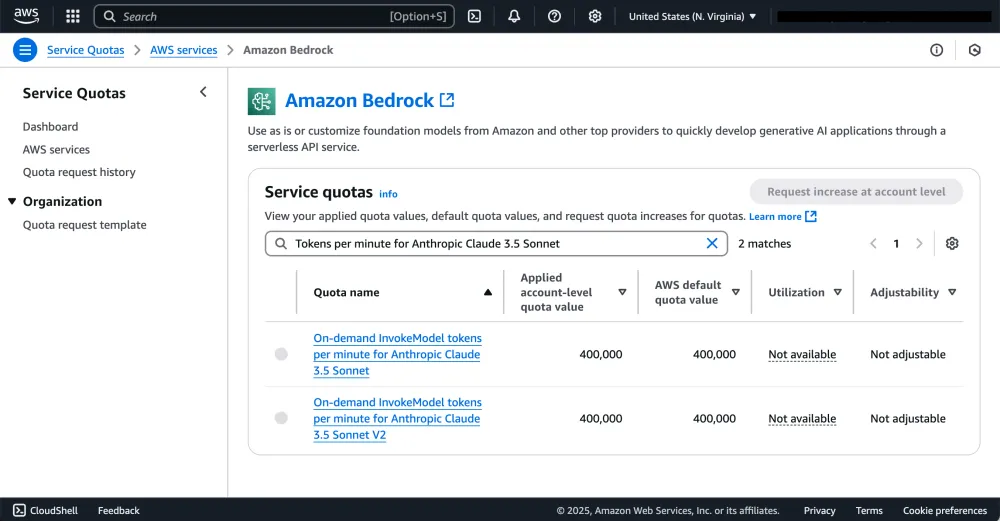
Figure 1: Managing Service Quotas for Amazon Bedrock on the AWS console
My applied limit is below the default quota. Why is this?
For reliable service performance, AWS may leverage multiple factors (such as historical usage) to determine your applied quota. If you require additional quota, please follow the steps below.
How do I increase my quota?
TPM and RPM quota adjustments require:
- Engagement with your AWS account team with notification of support case ID
What makes a good service quota increase request?
Your request should be descriptive of your usage requirements to enable efficient processing. For TPM and RPM quotas, include:
Basic information
- Use case description:
- Name of AWS Account Manager:
- Model ID(s):
- Region(s):
- Cross-region inference profile ID(s):
- For most use cases, consider cross-region inference , a seamless solution for getting higher throughput and performance, while managing incoming traffic spikes. See inference profile IDs .
Quota requirements
Anticipated TPM (Tokens per Minute)
- Steady State (p50):
- Peak (p90):
Anticipated RPM (Requests per Minute)
- Steady State (p50):
- Peak (p90):
Usage patterns
- Average Input Tokens per Request:
- Average Output Tokens per Request:
- Percentage of Requests with Input Tokens greater than 25k:
Usage growth
- Usage growth projections:
- Monitoring and alarms:
- Describe how you implemented monitoring for usage patterns.
If migrating from another provider:
- Previous provider:
- Historical usage and billing:
For high growth and migration use cases, please contact your AWS account team.
How do I easily monitor support cases?
Once the support case is created, you can monitor its status in AWS Support Center . For Slack users, you can use the AWS Support App for Slack , a convenient way to check the status of your support cases directly on Slack.
How do I proactively monitor quotas?
Consider setting up dashboards and alarms on Amazon CloudWatch for key quotas. In addition, you can leverage the Quota Monitor for AWS which provides a ready-made solution and CloudFormation template to deploy in your AWS account.
How do I design a resilient application that can handle traffic spikes and optimize throughput?
When building applications with Amazon Bedrock, it's crucial to design for both sudden traffic spikes and sustained high throughput. Here are key strategies to consider:
- Retry the request: It's a best practice to use retries with exponential backoff and random jitter . If you use AWS SDKs, then see Retry behavior .
- Use cross-region inference: Implementing cross-region inference is as simple as replacing
modelIdwith an inference profile . This capability allows you to seamlessly leverage capacity across multiple AWS regions via the AWS backbone network, ensuring optimal latency while maintaining data security by keeping all traffic within AWS.
- Set realistic
max_tokens: Implementingmax_tokenswill enable you to specify the maximum output tokens that are generated. You should configuremax_tokenswith a value close to your expected output tokens, bearing in mind that the tokens are reserved for the request duration. Learn more .
- Queue management or load balancing: Implement queuing to smooth out request spikes. For example, you can use Amazon SQS to buffer model invocation requests or utilize open-source frameworks, such as LiteLLM to handle load balancing and fallbacks . This approach helps maintain consistent performance within quota limits.
- Provisioned throughput: For high-volume use cases, purchasing provisioned throughput allows you to provision a higher level of throughput for a model at a fixed cost, increasing model invocation capacity.
- Multi-model and agentic architectures: Break down complex tasks into subtasks handled by multiple, smaller models. Leverage orchestration frameworks such as LangGraph , CrewAI or Multi-Agent-Orchestrator Framework for coordinating model interactions. This strategy can reduce the load on any single model, optimizing quota usage across multiple resources. It may also help you improve accuracy by leveraging the right model for the right task.
- Asynchronous and event-driven batch processing: For non-urgent tasks, consider incorporating asynchronous and batch processes in your application. AWS provides various services to build event-driven architectures . For example, you can build a scalable and efficient pipeline for Amazon Bedrock batch inference . Bedrock batch inference are charged at a 50% discount to on-demand pricing. This strategy can reduce costs, while increasing overall throughput by smoothing out spikes in usage.
Conclusion
Effectively managing service quotas is crucial for optimizing your Amazon Bedrock applications and ensuring uninterrupted service. By understanding your quota limits, monitoring usage, and proactively requesting increases when needed, you can fully leverage the power of generative AI while maintaining a smooth and reliable user experience.
To learn more, please see key resources below:
Enjoyed reading this content? Let the author know!
Your likes, comments, shares, and saves help creators reach more builders.

Loading recommendations
Loading article