

Q-Bits: Serverless API with AWS SAM and Amazon Q Developer
Amazon Q Developer streamlines AWS SAM template creation and accelerates serverless application development


Welcome to another installment of Q-Bits , our regular series showcasing cool ways Amazon employees are leveraging Amazon Q Developer. Today, we're diving into how Amazon Q Developer can assist with building serverless API with AWS SAM.
The AWS Serverless Application Model (AWS SAM) is an open-source framework for building serverless applications. Using concise YAML, you can define functions, APIs, databases, and event source mappings. With just a few lines per resource, you can define the application you want and model it using YAML.
Now with Amazon Q Developer , you can accelerate your serverless developement further. By combining AWS SAM’s powerful abstractions with Amazon Q Developer’s generative AI-powered assistant, you can build production-ready serverless APIs more efficiently while maintaining AWS architecture best practices.
I recently explored this powerful combination by building a product catalog API from scratch, and the experience demonstrated the significant advantages of using Amazon Q Developer alongside AWS SAM. My goal was to create a RESTful API that creates product information in a DynamoDB table. While this would traditionally require writing substantial boilerplate code and carefully configuring multiple AWS services, Amazon Q Developer streamlined the entire process.
Getting started was straightforward. I asked Amazon Q Developer to generate a SAM template for product catalog API, and it immediately provided a well-structured template that included all the necessary components. The generated code included proper resource definitions for Amazon DynamoDB , AWS Lambda , and Amazon API Gateway configurations, saving me from consulting multiple documentation pages or searching for correct syntax.
YAML
AWSTemplateFormatVersion: '2010-09-09'Transform: AWS::Serverless-2016-10-31Description: Product Catalog API with API Gateway, Lambda, and DynamoDBResources:ProductsTable:Type: AWS::DynamoDB::TableProperties:TableName: ProductsAttributeDefinitions:- AttributeName: product_idAttributeType: SKeySchema:- AttributeName: product_idKeyType: HASHProvisionedThroughput:ReadCapacityUnits: 5WriteCapacityUnits: 5CreateProductFunction:Type: AWS::Serverless::FunctionProperties:CodeUri: ./src/Handler: app.lambda_handlerRuntime: python3.9Architectures:- x86_64Timeout: 30Environment:Variables:PRODUCTS_TABLE: !Ref ProductsTablePolicies:- DynamoDBCrudPolicy:TableName: !Ref ProductsTableEvents:CreateProduct:Type: ApiProperties:Path: /productsMethod: POSTOutputs:ApiEndpoint:Description: API Gateway endpoint URLValue: !Sub "https://${ServerlessRestApi}.execute-api.${AWS::Region}.amazonaws.com/Prod/products"
Alongside the infrastructure code, Amazon Q Developer generated a Lambda function. The function included a custom JSON encoder for Decimal types, proper environment variable usage for the DynamoDB table name, input validation, and structured error handling. This saved me significant development time as I didn't need to research DynamoDB's specific requirements, such as handling Decimal types or implementing proper JSON serialization—it was all handled automatically in the generated code.
Python
import jsonimport osimport uuidimport boto3from decimal import Decimal# Initialize DynamoDB clientdynamodb = boto3.resource('dynamodb')table = dynamodb.Table(os.environ['PRODUCTS_TABLE'])class DecimalEncoder(json.JSONEncoder):def default(self, obj):if isinstance(obj, Decimal):return str(obj)return super(DecimalEncoder, self).default(obj)def lambda_handler(event, context):try:# Parse request bodybody = json.loads(event['body'])# Validate required fieldsrequired_fields = ['name', 'description', 'sku', 'price', 'category']for field in required_fields:if field not in body:return {'statusCode': 400,'body': json.dumps({'error': f'Missing required field: {field}'})}# Create product itemproduct = {'product_id': str(uuid.uuid4()),'name': body['name'],'description': body['description'],'sku': body['sku'],'price': Decimal(str(body['price'])),'category': body['category']}# Save to DynamoDBtable.put_item(Item=product)return {'statusCode': 201,'body': json.dumps(product, cls=DecimalEncoder)}except Exception as e:return {'statusCode': 500,'body': json.dumps({'error': str(e)})}
To enhance security, I requested Amazon Q Developer to add API key protection. It seamlessly integrated API Gateway usage plans and API key configurations into the existing template.
YAML
ApiKey:Type: AWS::ApiGateway::ApiKeyDependsOn: ProductsApiProdStageProperties:Name: ProductCatalogApiKeyDescription: API Key for Product Catalog APIEnabled: trueStageKeys:- RestApiId: !Ref ProductsApiStageName: ProdUsagePlan:Type: AWS::ApiGateway::UsagePlanDependsOn: ProductsApiProdStageProperties:UsagePlanName: ProductCatalogUsagePlanDescription: Usage plan for Product Catalog APIApiStages:- ApiId: !Ref ProductsApiStage: ProdQuota:Limit: 1000Period: MONTHThrottle:BurstLimit: 10RateLimit: 5UsagePlanKey:Type: AWS::ApiGateway::UsagePlanKeyProperties:KeyId: !Ref ApiKeyKeyType: API_KEYUsagePlanId: !Ref UsagePlan
When I needed clarification about the generated code, Amazon Q Developer provided detailed explanations about each component, helping me understand the security features of API Gateway.
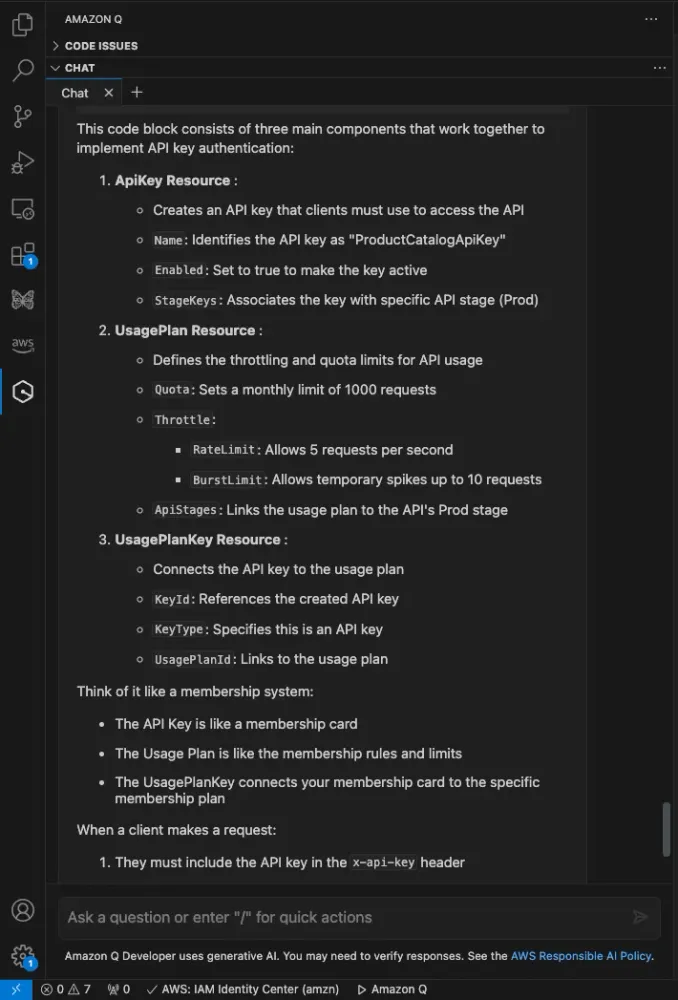
The next step involved implementing request payload validation. Amazon Q Developer added comprehensive validation rules, ensuring data integrity through well-defined models and validation constraints. This included setting up proper string lengths, pattern matching, and required fields for the product catalog entries.
YAML
Resources:ProductsApi:Type: AWS::Serverless::ApiProperties:StageName: ProdAuth:ApiKeyRequired: trueOpenApiVersion: '3.0.1'Models:ProductModel:type: objectproperties:name:type: stringminLength: 1maxLength: 100description:type: stringminLength: 1maxLength: 500sku:type: stringpattern: "^[A-Za-z0-9-]+$"minLength: 3maxLength: 20price:type: numberminimum: 0.01category:type: stringenum: ["Electronics", "Books", "Clothing", "Food", "Toys"]required:- name- description- sku- price- category
Here is my final SAM template entirely generated by Amazon Q Developer.
YAML
AWSTemplateFormatVersion: '2010-09-09'Transform: AWS::Serverless-2016-10-31Description: Product Catalog API with API Gateway, Lambda, and DynamoDBGlobals:Api:OpenApiVersion: 3.0.1Resources:ProductsApi:Type: AWS::Serverless::ApiProperties:StageName: ProdAuth:ApiKeyRequired: trueOpenApiVersion: '3.0.1'Models:ProductModel:type: objectproperties:name:type: stringminLength: 1maxLength: 100description:type: stringminLength: 1maxLength: 500sku:type: stringpattern: "^[A-Za-z0-9-]+$"minLength: 3maxLength: 20price:type: numberminimum: 0.01category:type: stringenum: ["Electronics", "Books", "Clothing", "Food", "Toys"]required:- name- description- sku- price- categoryApiKey:Type: AWS::ApiGateway::ApiKeyDependsOn: ProductsApiProdStageProperties:Name: ProductCatalogApiKeyDescription: API Key for Product Catalog APIEnabled: trueStageKeys:- RestApiId: !Ref ProductsApiStageName: ProdUsagePlan:Type: AWS::ApiGateway::UsagePlanDependsOn: ProductsApiProdStageProperties:UsagePlanName: ProductCatalogUsagePlanDescription: Usage plan for Product Catalog APIApiStages:- ApiId: !Ref ProductsApiStage: ProdQuota:Limit: 1000Period: MONTHThrottle:BurstLimit: 10RateLimit: 5UsagePlanKey:Type: AWS::ApiGateway::UsagePlanKeyProperties:KeyId: !Ref ApiKeyKeyType: API_KEYUsagePlanId: !Ref UsagePlanProductsTable:Type: AWS::DynamoDB::TableProperties:TableName: ProductsAttributeDefinitions:- AttributeName: product_idAttributeType: SKeySchema:- AttributeName: product_idKeyType: HASHProvisionedThroughput:ReadCapacityUnits: 5WriteCapacityUnits: 5CreateProductFunction:Type: AWS::Serverless::FunctionProperties:CodeUri: ./src/Handler: app.lambda_handlerRuntime: python3.9Architectures:- x86_64Timeout: 30Environment:Variables:PRODUCTS_TABLE: !Ref ProductsTablePolicies:- DynamoDBCrudPolicy:TableName: !Ref ProductsTableEvents:CreateProduct:Type: ApiProperties:RestApiId: !Ref ProductsApiPath: /productsMethod: POSTAuth:ApiKeyRequired: trueRequestModel:Model: ProductModelValidateBody: trueOutputs:ApiEndpoint:Description: API Gateway endpoint URLValue: !Sub "https://${ProductsApi}.execute-api.${AWS::Region}.amazonaws.com/Prod/products"ApiKeyId:Description: API Key IDValue: !Ref ApiKey
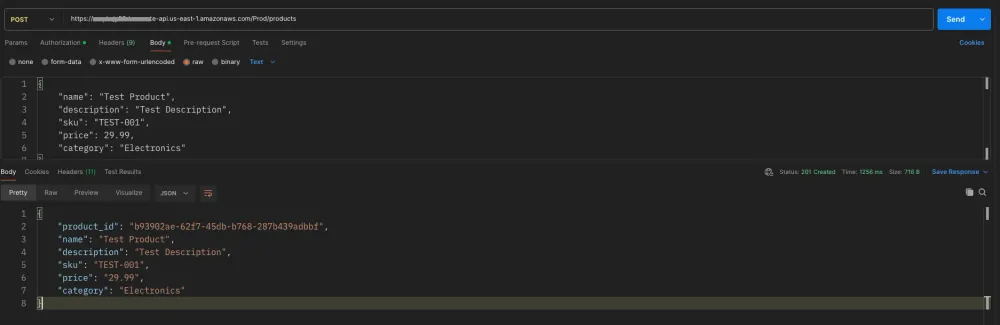
After deploying the application using SAM CLI commands, I tested the API using Postman to verify the implementation. The results confirmed proper API key authentication, request validation, and create operations functionality, all working as intended.
Conclusion
Amazon Q Developer significantly streamlines the development process by eliminating the need to constantly reference documentation or search for correct syntax. Its ability to generate infrastructure-as-code while providing clear explanations makes it an invaluable tool for serverless development.
By combining AWS SAM's streamlined infrastructure definitions with Amazon Q Developer's code generation capabilities, I was able to create a production-ready API in a fraction of the time it would typically take. Amazon Q Developer not only generated well-structured SAM templates but also provided production-ready Lambda functions complete with proper error handling, DynamoDB integration, and security best practices. Amazon Q Developer's ability to generate comprehensive solutions—from API key authentication to request validation and proper type handling—while explaining the generated code, significantly reduced the need to consult documentation or write boilerplate code. This experience has shown that Amazon Q Developer is more than just a code generator; it's a knowledgeable companion that helps developers maintain AWS best practices while accelerating the development process
Enjoyed reading this content? Let the author know!
Your likes, comments, shares, and saves help creators reach more builders.

Loading recommendations
Loading article