

Q-Bits: Creating CloudFormation Templates
My first foray into authoring Cloud Formation Templates using Amazon Q Developer

Welcome to another installment of Q-Bits, our regular series showcasing cool ways Amazon employees are leveraging Amazon Q Developer. Today, I'm diving in to how Amazon Q Developer helped me use CloudFormation to quickly build a redundant, offsite repository for local weather data.
Introduction
I regularly encourage customers to adopt Infrastructure as Code (IaC). It's a pillar of operational excellence. But as a builder, I often find myself clicking through the console creating infrastructure to test a design or proof of concept. Now was the time to practice what I preach and give CloudFormation a try.
In this post I'll share the beginning of my IaC journey with CloudFormation. How Amazon Q Developer guided me through creating a basic template, demonstrated parameters and outputs, answered my questions, and provided CLI examples for stack creation and updates.
What If...
CloudFormation has in depth documentation and I will use it in the future. But what would happen if, as someone who has never authored a template before (only deployed them), I just asked Q?
Keeping an Offsite Copy of Weather Data
I've kept weather records for years. What started as a simple data logging project on a Raspberry Pi, grew into a collection of historical weather data worth preserving. Continuously updating an offsite copy is a good solution, and offered this opportunity to improve my Infrastructure as Code skills.
There are multiple ways to approach this, including serverless. I chose EC2 to mirror my local setup. This project can be separate from other things in my AWS account. I opened my IDE and asked Q:
Help me create a simple cloudformation template to deploy an ec2 instance in a vpc with one subnet and an internet gateway. This will be used for storing weather data. Q answered with a nearly complete CloudFormation template and explained what was included. Q also noted that the EC2 key pair would need adjusting, along with choices for instance type, region, and ID for the AMI. I inserted this code into my previously empty file.
YAML
AWSTemplateFormatVersion: '2010-09-09'Description: 'Simple EC2 instance in a VPC with one subnet and an Internet Gateway for storing weather data'Resources:WeatherVPC:Type: AWS::EC2::VPCProperties:CidrBlock: 10.0.0.0/16EnableDnsHostnames: trueEnableDnsSupport: trueTags:- Key: NameValue: Weather-VPCWeatherSubnet:Type: AWS::EC2::SubnetProperties:VpcId: !Ref WeatherVPCCidrBlock: 10.0.1.0/24MapPublicIpOnLaunch: trueAvailabilityZone: !Select- 0- !GetAZs ''Tags:- Key: NameValue: Weather-SubnetWeatherInternetGateway:Type: AWS::EC2::InternetGatewayProperties:Tags:- Key: NameValue: Weather-IGWAttachGateway:Type: AWS::EC2::VPCGatewayAttachmentProperties:VpcId: !Ref WeatherVPCInternetGatewayId: !Ref WeatherInternetGatewayWeatherRouteTable:Type: AWS::EC2::RouteTableProperties:VpcId: !Ref WeatherVPCTags:- Key: NameValue: Weather-Route-TableWeatherRoute:Type: AWS::EC2::RouteDependsOn: AttachGatewayProperties:RouteTableId: !Ref WeatherRouteTableDestinationCidrBlock: 0.0.0.0/0GatewayId: !Ref WeatherInternetGatewayWeatherSubnetRouteTableAssociation:Type: AWS::EC2::SubnetRouteTableAssociationProperties:SubnetId: !Ref WeatherSubnetRouteTableId: !Ref WeatherRouteTableWeatherSecurityGroup:Type: AWS::EC2::SecurityGroupProperties:GroupDescription: Allow SSH and HTTPSVpcId: !Ref WeatherVPCSecurityGroupIngress:- IpProtocol: tcpFromPort: 22ToPort: 22CidrIp: 0.0.0.0/0- IpProtocol: tcpFromPort: 443ToPort: 443CidrIp: 0.0.0.0/0WeatherEC2Instance:Type: AWS::EC2::InstanceProperties:InstanceType: t2.microImageId: ami-0aa7d40eeae50c9a9 # Amazon Linux 2 AMI in us-east-1, replace with appropriate AMI for your regionKeyName: your-key-pair-name # Replace with your EC2 key pair nameNetworkInterfaces:- AssociatePublicIpAddress: "true"DeviceIndex: "0"GroupSet:- !Ref WeatherSecurityGroupSubnetId: !Ref WeatherSubnetTags:- Key: NameValue: Weather-Data-ServerOutputs:InstanceId:Description: ID of the EC2 instanceValue: !Ref WeatherEC2InstancePublicIP:Description: Public IP address of the EC2 instanceValue: !GetAtt WeatherEC2Instance.PublicIpPublicDNS:Description: Public DNS name of the EC2 instanceValue: !GetAtt WeatherEC2Instance.PublicDnsName
I appreciated that Q used weather oriented resource names.
I have an EC2 key pair, but I was curious about Q's breadth of assistance. I asked, "Can I create a keypair from the command line?"
Q confirmed, provided a command line, and reminded me to chmod the resulting key:
aws ec2 create-key-pair --key-name MyWeatherKeyPair --query 'KeyMaterial' --output text > MyWeatherKeyPair.pem This cloud based instance will run InfluxDB (like my Rasperry Pi). I asked Q, "What is the smallest EC2 instance type that can run a light duty InfluxDB v1.8?"
Q's reply was thorough and correctly identified that 1GB of RAM would be needed and suggested both the t3.micro and the t3a.micro. When I asked which of those was cheapest, Q couldn't provide pricing so I browsed EC2 On Demand pricing which confirmed that the t3a.micro is the lowest priced EC2 instance with 1GB of RAM in us-east-1.
Next I prompted:
Change this template to use t3a.micro by default Followed by:
I named my key Q-Bits-Example-Key please update the template to use it Q Developer made these changes. I also asked what I should name the file. The response included background on common conventions and suggested a few options including weather-server-infrastructure.yaml or weather-data-stack.yaml. I chose the former and said:
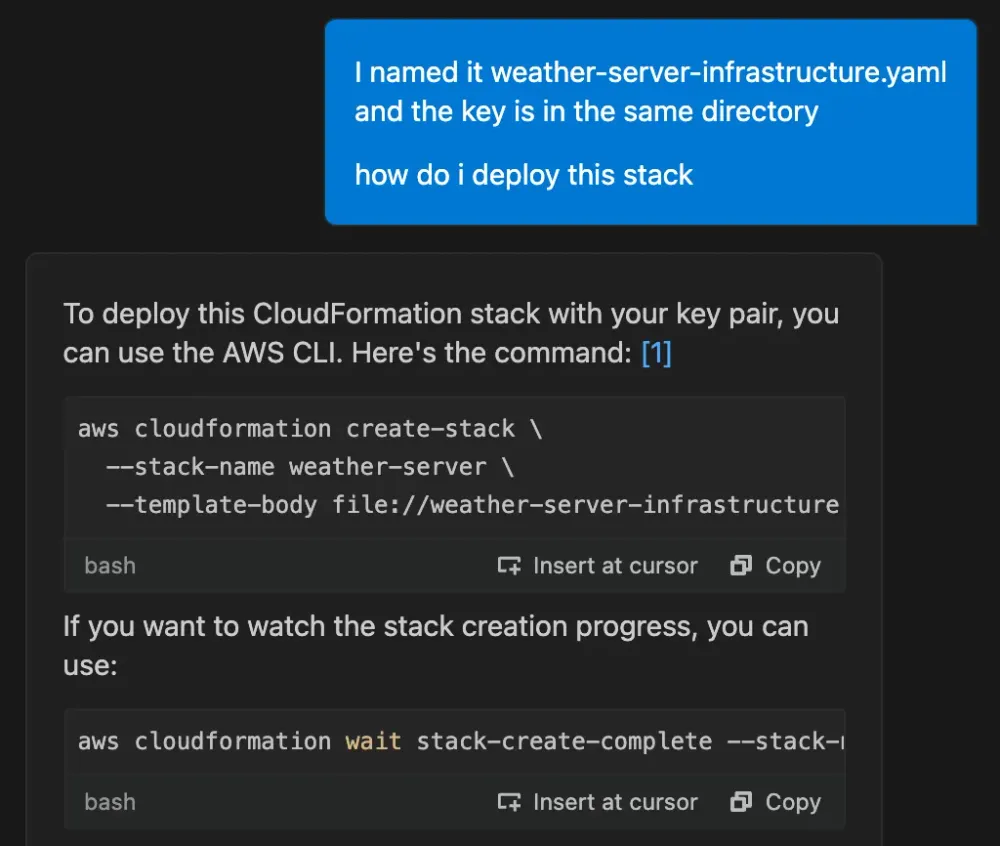
In addition to providing the CloudFormation template deployment command, Q explained how to get the instance's public IP address via command line afterwards. The deployment completed.
Continuing to use this as a learning opportunity, I asked Q:
What is the purpose of the template outputs? Q responded with a 300+ word answer that was informative. TL;DR, they help with providing access, resource identification, can be consumed by other CloudFormation stacks, and serve as documentation of important attributes. Their specific use in this case was also highlighted -- InfluxDB clients and monitoring tools will need the PublicIP address.
Next I asked Q: "How can I connect to the stack? It deployed with public IP 192.0.2.1" [Note: This IP address is used for documentation purposes only and is not routable.]
Q responded:
Since you have the Q-Bits-Example-Key.pem in the same directory and the instance is running Amazon Linux 2, you can connect using SSH with the following command: ssh -i Q-Bits-Example-Key.pem ec2-user@192.0.2.1 That worked! At this point I had a t3a.micro EC2 instance up and running in my AWS account which I could connect to over the internet. I installed InfluxDB.
A security group rule is needed to allow incoming InfluxDB connections. I asked Q, "Update my template to allow incoming InfluxDB connections" and Q obliged by adding a security group rule to allow inbound traffic on port 8086, the default HTTP API port for InfluxDB and explained, "for production environments, you might want to restrict the CIDR range for the InfluxDB port."
Finally, I chatted with Q about how I might want to use parameters in this CloudFormation template, and what command line I should use to update the stack to put the new security group rule into effect. I made a one line change to my local data logging script and my weather records are now being stored offsite in the cloud too.
Conclusion
Amazon Q Developer is a knowledgeable partner that accelerated me along the IaC learning curve. At each step of the way, it felt like a I had an expert by my side providing not just answers, but also the reasons and conventions behind them.
The completeness and breadth of Q's replies and suggestions surprised me. I quickly gained familiarity CloudFormation. Infrastructure-wise, an EC2 instance, VPC, and internet gateway were needed for this project. I found it was faster to deploy these with Q and CloudFormation than going by memory in the console. If it's been a minute since you tried Amazon Q Developer, or if you're embarking on learning something new, give it a whirl!
Enjoyed reading this content? Let the author know!
Your likes, comments, shares, and saves help creators reach more builders.

Loading recommendations
Loading article