
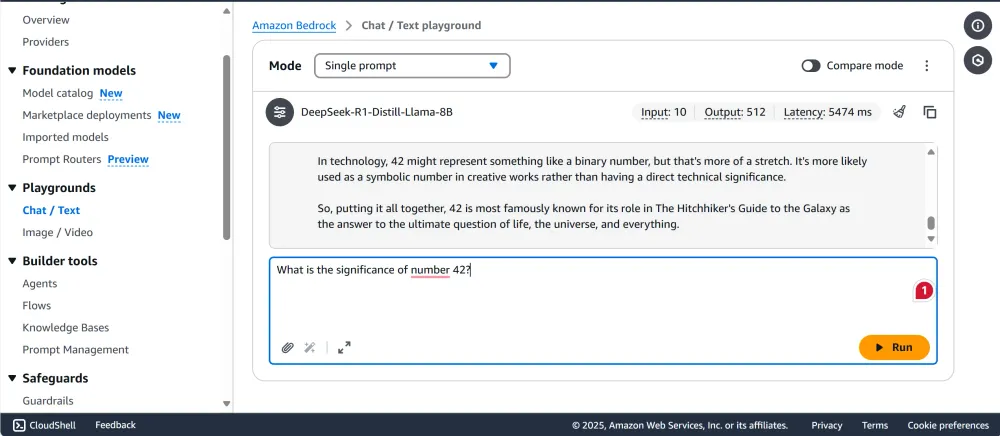
Deploying DeepSeek-R1 Distill Llama Models on Amazon Bedrock
Deploying the DeepSeek-R1 Distill Llama models on Amazon Bedrock involves utilizing the Custom Model Import feature, which allows you to integrate your externally fine-tuned models into the Bedrock environment seamlessly. This process enables you to leverage Bedrock's serverless infrastructure and unified API for efficient model deployment.

Prerequisites
- Model Compatibility:
Ensure your DeepSeek R1 Distill model is based on a supported architecture, such as Llama 2, Llama 3, Llama 3.1, Llama 3.2, or Llama 3.3. Amazon Bedrock supports these architectures for custom model imports. - Model Files Preparation:
Prepare the necessary model files in the Hugging Face format, including:These files should be stored in an Amazon S3 bucket accessible to your AWS account.> Important: The model is already available in safe tensor format, so we dont need to prepare files seperately.- Model weights in
.safetensorsformat. - Configuration file (
config.json). - Tokenizer files (
tokenizer_config.json,tokenizer.json,tokenizer.model).
- Model weights in
Try out the interactive Jupyter Notebook
Step-by-Step Deployment Guide
1. Install Required Dependencies
Begin by installing the necessary Python packages:
1
pip install huggingface_hub boto3
2. Download the DeepSeek R1 Model
Use the Hugging Face Hub to download your specific DeepSeek R1 model. For example, to download the
DeepSeek-R1-Distill-Llama-8B model:1
2
3
4
from huggingface_hub import snapshot_download
model_id = "deepseek-ai/DeepSeek-R1-Distill-Llama-8B"
local_dir = snapshot_download(repo_id=model_id, local_dir="DeepSeek-R1-Distill-Llama-8B")3. Upload Model Files to Amazon S3
Upload the downloaded model files to an S3 bucket in your AWS account. Ensure that the bucket is in a region supported by Amazon Bedrock, such as
us-east-1 or us-west-2.1
2
3
4
5
6
7
8
9
10
11
12
import boto3
import os
s3_client = boto3.client('s3', region_name='us-east-1')
bucket_name = 'your-s3-bucket-name'
local_directory = 'DeepSeek-R1-Distill-Llama-8B'
for root, dirs, files in os.walk(local_directory):
for file in files:
local_path = os.path.join(root, file)
s3_key = os.path.relpath(local_path, local_directory)
s3_client.upload_file(local_path, bucket_name, s3_key)4. Import the Model into Amazon Bedrock
Navigate to the Amazon Bedrock console and initiate a new model import job:
- In the Bedrock console, select "Custom models" and choose "Import model."
- Provide the S3 URI where your model files are stored (e.g.,
s3://your-s3-bucket-name/DeepSeek-R1-Distill-Llama-8B/). - Follow the prompts to complete the import process.
For detailed instructions, refer to the AWS documentation on importing customized models.
5. Invoke the Model
You can now invoke your model using the Bedrock API:
1
2
3
4
5
6
7
8
9
10
11
12
13
14
15
16
import boto3
import json

client = boto3.client('bedrock-runtime', region_name='us-east-1')
model_id = 'arn:aws:bedrock:us-east-1:your-account-id:imported-model/your-model-id'
prompt = "Your input prompt here"

response = client.invoke_model(
    modelId=model_id,
    body=json.dumps({'prompt': prompt}),
    accept='application/json',
    contentType='application/json'
)

result = json.loads(response['body'].read().decode('utf-8'))
print(result)
Replace
'your-account-id' and 'your-model-id' with your specific AWS account ID and model ID, respectively.Conclusion
By following these steps, you can effectively deploy the DeepSeek R1 DIstill Llama model on Amazon Bedrock, leveraging its serverless infrastructure and unified API for scalable and efficient model inference.
For a visual walk-through and additional insights, you might find the following Git repository and video helpful:
Enjoyed reading this content? Let the author know!
Your likes, comments, shares, and saves help creators reach more builders.

Loading recommendations
Loading article