

Cross-Region Replication for ElastiCache Redis in Hyderabad Using RIOT
Setting up cross-region replication for Amazon ElastiCache Redis using RIOT, focusing on Hyderabad.

Amazon ElastiCache for Redis is a popular choice for caching and session management in high-performance applications. However, as per AWS documentation Global datastores or cross-region replication for ElastiCache Redis in the Hyderabad (
ap-south-2) region is not available yet. This limitation poses a challenge for Indian financial services institutions (FSI) that require a disaster recovery (DR) setup with real-time replication across regions to meet compliance and business continuity requirements.Workaround Solution
As a workaround solution, we can use Redis Input/Output Tools (RIOT) , an open-source tool designed for Redis replication across different regions. RIOT can be used to replicate ElastiCache Redis data from one AWS region to another region where cross-region replication is available.
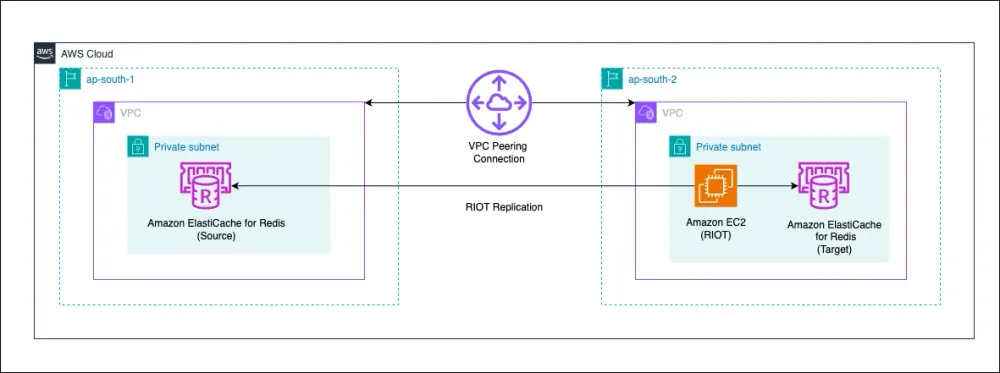
You can perform migration in two different ways:
- One-time (snapshot) migration
- Online (live) migration
Steps to Set Up RIOT for Cross-Region Replication
The replication process involves the following steps:
- Identify Source Keys: Use scan and/or keyspace notifications to identify keys for replication, depending on the chosen replication mode.
- Read Key Data: Retrieve data associated with each key using dump or type-specific commands.
- Write to Target: Write each key to the target database using restore or type-specific commands.
Replication Mode begins by identifying the keys to be replicated from the source Redis database. The
--mode option lets you specify how RIOT identifies these keys:- Scan Mode: Iterate over keys using a key scan (
--mode scan) - Live Only Mode: Receive keys via a keyspace notification subscriber (
--mode liveonly) - Live Mode: Use both methods (
--mode live)
Prerequisites
- AWS ElastiCache
- An Amazon EC2 instance to run RIOT
Step 1: Setup ElastiCache Redis Clusters
- Deploy an Amazon ElastiCache for Redis cluster in the Mumbai (
ap-south-1) region. - Deploy a destination Redis cluster in Hyderabad (
ap-south-2) region where DR setup is required.
Step 2: Deploy an EC2 Instance for RIOT
- Launch an Amazon EC2 instance in Mumbai region that will act as the RIOT replication server.
- Ensure that the instance has access to both the source and destination Redis clusters.
Step 3: Configure Migration Host
- Connect to the EC2 instance and install
redis-cli sudo apt updatesudo apt install -y redis-tools- Test the connectivity with ElastiCache
redis-cli -h <elasticache primary endpoint> -p 6379
Step 4: Install and Configure RIOT
- On EC2, download the pre-compiled binary from RIOT Releases .
- After download, uncompress it and copy to the desired location.
Step 5: Start RIOT Replication
- Run the following command to start replication:
riot replicate source:port target:port --source-clusterStep 6: Verification
- RIOT validates the replication by matching keys from the source to the target database.
- Verification step happens automatically or can also be run on-demand
riot compare SOURCE TARGET [OPTIONS]
Challenges and Considerations
1.Latency and Performance
- Cross-region replication introduces network latency, which may impact real-time workloads.
- Performance tuning is required to optimize replication speed.
2.Data Consistency
- RIOT performs asynchronous replication, which may lead to minor delays in data propagation.
- Ensure periodic consistency checks between source and destination Redis clusters.
3.Security and Compliance
- Enable VPC peering or use AWS Transit Gateway for secure connectivity between regions.
- Use TLS encryption for Redis endpoints to secure data in transit.
- Regularly audit logs and replication metrics for compliance requirements.
4.Failover and Recovery Strategy
- Implement monitoring with CloudWatch to detect replication failures.
- Define an automated failover strategy in case of primary region failure.
Recommended Best Practices
- Automate RIOT deployment using AWS Systems Manager or any IaC.
- Monitor replication metrics using AWS CloudWatch and set up alerts.
- Evaluate AWS Global Datastore for ElastiCache once available in Hyderabad.
- Consider using Amazon ElastiCache for Valkey if a fully managed cross-region replication is a priority.
Improve RIOT performance
- Increase Parallelism - Use the
--threadsoption to increase the number of parallel threads for data processing. - Batch Processing - Use the
--batchoption to group operations into batches, reducing network overhead. - Pipelining - Enable pipelining with the
--pipelineoption to send multiple commands in a single request. - Cluster Mode - Enable
--clustermode to distribute data across multiple nodes for parallel processing.
Conclusion
While Global datastore or cross-region replication for ElastiCache Redis is not available in Hyderabad, RIOT can provides a viable alternative for setting up DR replication. However, organizations should carefully evaluate latency, security, and failover strategies before deploying this solution.
References:
Enjoyed reading this content? Let the author know!
Your likes, comments, shares, and saves help creators reach more builders.

Loading recommendations
Loading article