
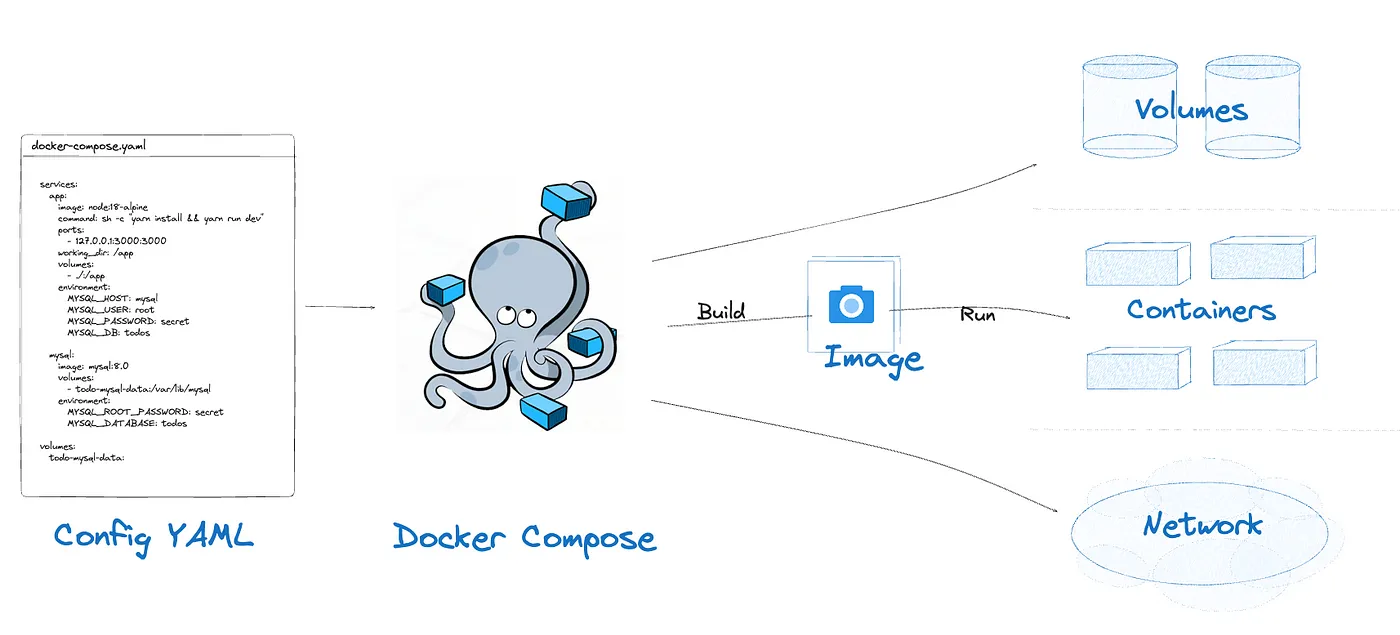
File Structure of docker-compose.yml File
Explore the file structure of docker-compose.yml: Learn how to define services, networks, and volumes for efficient multi-container setups.


Cloud and DevOps Engineer | Technical Writer✍️| AWS Cloud Specialist | Open Source | Cloud Native
The structure of a
docker-compose.yml file typically follows a hierarchical format using YAML syntax. Here's a breakdown of the common sections and their respective components:👉 Version: This is the version of the Docker Compose file format you’re using. It’s typically at the top of the file and specifies which features and syntax are available for use.
For example:
plaintext
version: '3.8'
👉 Services: This section defines the various services or containers that make up your application. Each service is listed under the
services keyword and has its own configuration.Here's an example:
plaintext
services:web:image: nginx:latestports:- "8080:80"database:image: postgres:latestenvironment:POSTGRES_USER: myuserPOSTGRES_PASSWORD: mypassword
👉 Networks: This section allows you to define custom networks for your services. Networks enable containers to communicate with each other over isolated networks. You can specify network configurations such as aliases, IP addresses, and external connectivity.
For example:
plaintext
networks:my_network:driver: bridge
👉 Volumes: The
volumes section allows you to define volumes for persisting data or sharing data between containers. You can specify volume configurations such as source paths, target paths within containers, and read-only settings.For example:
plaintext
volumes:my_volume:driver: localdriver_opts:type: 'none'o: 'bind'device: '/path/on/host'
👉 Configs: This section allows you to define configurations for your services using external files. Configurations can include environment variables, file paths, and other settings.
For example:
plaintext
configs:my_config:file: ./config_file.txt
👉 Secrets: The
secrets section allows you to manage sensitive data securely. Secrets are encrypted and stored on the Docker host, and they can be accessed by services within your Docker Compose setup.For example:
plaintext
secrets:my_secret:file: ./secret_file.txt
👉 Extensions: Docker Compose supports extending and overriding configurations using the
extends keyword. This allows you to reuse common configurations across multiple services or environments.For example:
plaintext
services:web:extends:file: common-services.ymlservice: nginx
👉 Environment Variables: You can define environment variables for each service using the
environment key. This is useful for passing configuration settings to your containers.For example:
plaintext
services:web:image: nginx:latestports:- "8080:80"environment:ENV_VAR1: value1ENV_VAR2: value2
👉 Restart Policies: Docker Compose allows you to specify restart policies for your services, defining how they should behave in case of failures or when restarting. Options include
no , always , on-failure , and unless-stopped .For example:
plaintext
services:web:image: nginx:latestrestart: always
👉 Depends On: You can define dependencies between services using the
depends_on key. This ensures that one service starts only after its dependent services are up and running.For example:
plaintext
services:web:image: nginx:latestdepends_on:- databasedatabase:image: postgres:latest
👉 Logging: Docker Compose allows you to configure logging options for your services. You can specify logging drivers, log paths, and other logging-related settings.
For example:
plaintext
services:web:image: nginx:latestlogging:driver: "json-file"options:max-size: "10m"max-file: "3"
👉 Healthchecks: You can define health check configurations for your services using the
healthcheck key. Health checks monitor the status of containers and can be used to determine if a service is healthy or not.For example:
plaintext
services:web:image: nginx:latesthealthcheck:test: ["CMD", "curl", "-f", "http://localhost"]interval: 30stimeout: 10sretries: 3
👉 Build: If you need to build a custom Docker image for a service, you can use the
build configuration to specify the Dockerfile and build context. This is useful when you have custom requirements or need to add dependencies during the build process.For example:
plaintext
services:web:build:context: ./myappdockerfile: Dockerfile.prod
👉 Command: You can override the default command for a container using the
command key. This allows you to specify a custom command or arguments when starting the container.For example:
plaintext
services:web:image: nginx:latestcommand: ["nginx", "-g", "daemon off;"]
👉 Labels: Docker Compose supports adding labels to your services and containers using the
labels key. Labels provide metadata and can be used for organizing and identifying resources.For example:
plaintext
services:web:image: nginx:latestlabels:myapp.version: "1.0"myapp.environment: "production"
👉 User and Group: You can specify the user and group that a container should run as using the
user key. This allows you to control permissions and access within the container.For example:
plaintext
services:web:image: nginx:latestuser: "1000:1000"
👉 Extra Hosts: If your container needs to resolve hostnames to IP addresses outside of DNS, you can specify additional hosts using the
extra_hosts key. This is useful for development or testing environments.For example:
plaintext
services:web:image: nginx:latestextra_hosts:- "host1:192.168.1.1"- "host2:192.168.1.2"
👉 Container Names: By default, Docker Compose generates container names based on the service names. However, you can override this behavior and specify custom container names using the
container_name key.For example:
plaintext
services:web:image: nginx:latestcontainer_name: my-nginx-container
👉 Ports Mapping with Protocol: In addition to specifying ports for container-to-host mapping, you can also define the protocol (TCP or UDP) for each port. This is useful when your service requires a specific protocol for communication.
For example:
plaintext
services:web:image: nginx:latestports:- "8080:80/tcp"- "53:53/udp"
👉 Resource Limits: You can set resource limits such as CPU shares, memory constraints, and CPU quotas for your containers using the
deploy.resources key. This is particularly useful for managing resource usage and performance.For example:
plaintext
services:web:image: nginx:latestdeploy:resources:limits:cpus: '0.5'memory: '512M'
👉 Container Restart Policy: Docker Compose allows you to specify the restart policy for individual containers using the
restart_policy key. This overrides the global restart policy set in the services section.For example:
plaintext
services:web:image: nginx:latestrestart_policy:condition: on-failuredelay: 5smax_attempts: 3
This structure provides a comprehensive way to define and configure Docker services, networks, volumes, configurations, and secrets within a single
docker-compose.yml file for your application.
Enjoyed reading this content? Let the author know!
Your likes, comments, shares, and saves help creators reach more builders.

Loading recommendations
Loading article