
The Top 3 Portfolio Projects for Junior Developers in 2026 (And How to Build Them in Minutes on AWS)
To-do apps won't get you hired in 2026. Here's what junior developers actually need in their portfolios to get noticed and how to deploy them on AWS in minutes, not weeks.

As a developer advocate, I review a ton of junior developer portfolios.
And I need to be honest with you: a to-do app isn't going to cut it in 2026.
Hiring managers are drowning in candidates who can build CRUD apps. What makes them stop scrolling is seeing someone who has actually shipped something that demonstrates they understand modern architecture, cloud deployment, and yes, AI.
The good news is that the barrier to building impressive portfolio projects has never been lower.
The bad news…is that the barrier to building impressive portfolio projects has never been lower.
Meaning it’s now a much more crowded market for those trying to stand out.
But you don't need to have a PHD in every AWS service or spend weeks on infrastructure. You just need to build the right things, deploy them properly and show that you have practical experience beyond the theoretical.
Based on countless conversations with candidates and hiring managers, here are 3 portfolio projects that will actually get you noticed this year and how to build each one faster than you'd expect.
1. Conversational AI Agent with Tool Use
Why it stands out: Chatbots are table stakes. Agents that can actually DO things (call APIs, query databases, trigger workflows) are what companies are trying to build right now. Showing you understand agentic patterns puts you ahead of 90% of applicants.
What to build: An AI agent that can answer questions AND take actions. For example: a personal assistant that can check your calendar, add events, search the web, and summarize emails. Or a customer service agent that can look up orders and process returns.
The technical bits that impress: Function calling, tool definitions, RAG, conversation memory, and graceful error handling when tools fail. If you can implement MCP (Model Context Protocol), even better as it's the emerging standard for interconnecting agents and tools.
AWS services involved: Amazon Bedrock AgentCore for the agent runtime, Lambda for tool implementations and MCP servers, DynamoDB for conversation memory, API Gateway and Cognito for secure access.
2. Workflow Automation with AI Decision-Making
Why it stands out: Every company has manual processes they wish were automated. Showing you can build intelligent automation where AI makes decisions within a workflow demonstrates business value, not just technical skill.
What to build: An automated pipeline that involves AI judgment. Examples: a content moderation system that reviews uploads and flags issues, a lead scoring system that enriches CRM data and prioritizes follow-ups, or an expense approval workflow that categorizes receipts and routes based on amount and type.
The technical bits that impress: Event-driven architecture, state machines, AI classification with confidence thresholds, and human-in-the-loop fallbacks for edge cases. The last part is crucial: knowing when NOT to trust the AI is as important as using it. Showing that you understand how to set up these guardrails and fallbacks is a huge bonus rather than overhyping a solution.
AWS services involved: Step Functions for orchestration or an n8n deployment hosted on an EC2 instance, Lambda for serverless processing, Bedrock for AI decisions, S3 for file handling, SNS/SQS for notifications and queuing.
3. Multi-Model Orchestration
Why it stands out: Most tutorials teach you to call one model. Production systems often use multiple models for different tasks—a fast model for classification, a powerful model for generation, a specialized model for code. Showing you understand when to use which model (and why) signals senior-level thinking.
What to build: An application that intelligently routes between models based on task type. For example: a coding assistant that uses a lightweight model for syntax questions but escalates to Claude or GPT-4 for complex architecture discussions. Or a content pipeline that uses different models for ideation, drafting, and editing.
The technical bits that impress: Model routing logic, cost tracking per model, latency comparison, and graceful degradation when a model is unavailable (fallbacks and 'human in the loop' logic). If you can show cost-per-query and ROI tracking metrics in your demo, whether by human rating or ‘LLM as a judge’, hiring managers will love you.
AWS services involved: Amazon Bedrock Agentcore for runtime environment and Strands for orchestration logic, Amazon Bedrock (which gives you access to Claude, Llama, Amazon Nova, and others through one API), Lambda for routing logic, CloudWatch for metrics, DynamoDB for logging.
Why Deployment Is Essential Now
Here's something I wish someone told me earlier: a project on your GitHub is worth half as much as a project I can actually use.
When I review portfolios, I click the demo link first. If there isn't one, I'm already less interested. If the link is broken, I move on. Harsh? Maybe. But it reflects reality: in a job, you'll need to deploy and maintain things, not just write them.
This is where AWS can be both your best friend and biggest obstacle. The services are powerful, but the configuration overhead is real.
A short-cut:
Setting this up from scratch (configuring IAM roles, wiring up the vector database, getting the chunking pipeline right) typically takes a weekend at minimum.
Agent architecture has a lot of moving pieces. The official AWS tutorials walk through 79 distinct configuration steps for basic GenAI applications.
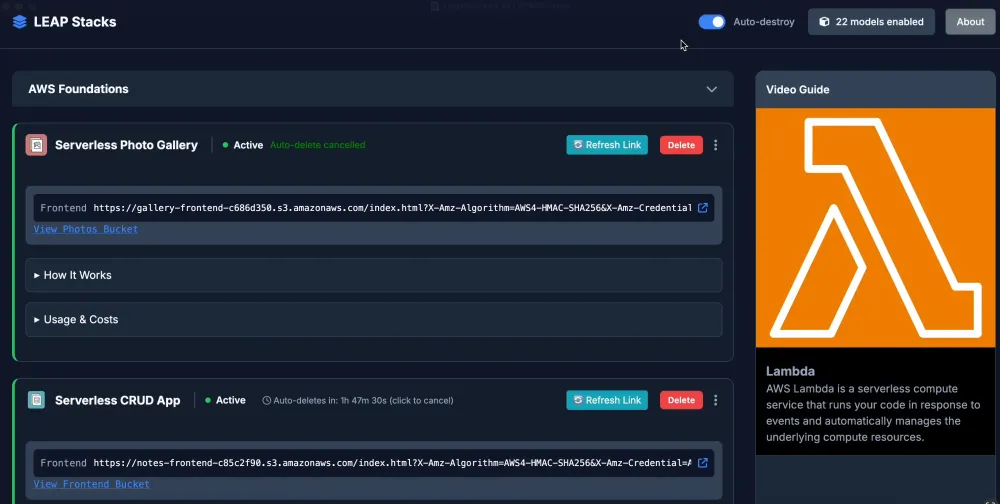
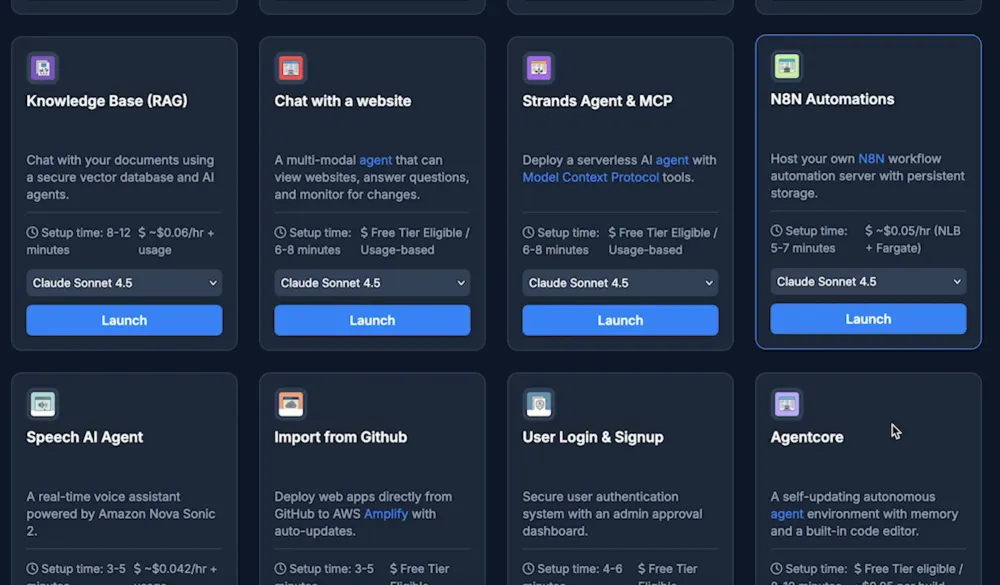
However, using a ready-made stacks you can instantly launch on LEAP Stacks (a free and open source project I created) , including stacks for the above portfolio projects, you can have the infrastructure deployed in minutes and spend your time on what actually matters: customizing the logic, connecting the right dots, tracking ROI and making the UX great.
This free tool is currently being used by hundreds of cloud architects and web developers around the world to accelerate their AI app deployments.
It includes embedded short explainer videos for technical concepts and AWS services, so it also works as a learning tool for new AWS users.
A Note on Costs
"But AWS is expensive" is the most common excuse I hear for not deploying portfolio projects. Let's address it:
For a portfolio project with occasional demo traffic, you're likely looking at single-digit dollars per month, often less. Bedrock charges per token, and a demo that gets 100 queries costs pennies. Lambda's free tier covers 1 million requests. DynamoDB's free tier is generous.
The real cost risk is forgetting to clean up. A test cluster you left running can lead to a $400 surprise at the end of the month. However, with auto-cleanup enabled by default (LEAP Stacks deletes resources after 2 hours by default, for exactly this reason), you can avoid this nightmare scenario.
Remember: a deployed project that costs $5/month is worth infinitely more than an undeployed project that costs $0.
Pick One and Start Today
You don't need 10 portfolio projects. You need one or two great ones.
Pick the project from this list that genuinely interests you and tailor it to a real problem you have discovered. Reddit is a goldmine for discovering real problems users are comlaining about that need solving, in every industry. Your enthusiasm for solving this problem will show in the final product, and you'll actually finish it.
If you're new to AWS GenAI services, start with the basic chatbot or RAG system. It's the most transferable skill and the clearest "before and after" demo.
If you already have some cloud experience, the AI agent with tool use will differentiate you more.
Whatever you choose...deploy it! A live URL beats a GitHub README every time.
Now go build something awesome.
Enjoyed reading this content? Let the author know!
Your likes, comments, shares, and saves help creators reach more builders.

Loading recommendations
Loading article