

Leveraging Llama 3.2 90B Instruct model for Multimodal Diabetes Prevalence Analysis on Amazon Bedrock
Discover how leveraging the Llama 3.2 90B Instruct model's multimodal capabilities on Amazon Bedrock allowed analyzing diabetes prevalence trends worldwide. This blog explores combining state-of-the-art language models with visualizations to derive insights from diverse data sources, showcasing the potential for impactful healthcare analytics solutions.

In the field of large language models, multimodal capabilities have opened up new possibilities for tackling complex problems. One such problem is the analysis of diabetes prevalence, a critical health issue affecting hundreds of millions of people worldwide. In this blog post, I will explore how I leveraged the power of the Llama 3.2 90B Instruct model on Amazon Bedrock to gain insights into diabetes prevalence.
The Llama 3.2 90B Instruct model, developed by Meta, is a state-of-the-art language model with multimodal capabilities, allowing it to process and analyze both text and images. This makes it an ideal choice for our analysis.
To facilitate our analysis, we utilized Amazon Bedrock, a secure and scalable platform for running large language models like the Llama 3.2 90B Instruct model. Amazon Bedrock provides seamless integration with popular state-of-the-art large language models, empowering developers to create their own generative AI applications effectively.
Multimodal Capabilities & Benchmarks
Meta’s paper “The Llama 3 Herd of Models” illustrated the compositional approach to adding multimodal capabilities to Llama 3. This approach leads to a multimodal model trained in five stages:
(1) Language model pre-training
(2) Multi-modal encoder pre-training
(3) Vision adapter training
(4) Model fine-tuning
(5) Speech adapter training
The figure from the paper illustrates this process.

The official llama.com website compares the performance of different AI models across various benchmarks and tasks. The table shown as follows is divided into "College-level Problems and Mathematical Reasoning" and "Charts and Diagram Understanding," with several subcategories under each.
Llama 3.2 90B model generally outperforms other models across most of the benchmarks. The highest score is seen in the “AI2 Diagram” benchmark, with Llama 3.2 90B model scoring 92.3%!

Next, we will use a specific case study to demonstrate how to conveniently and efficiently utilize the multimodal capabilities of the Llama 3.2 90B Instruct model on Amazon Bedrock. We will use this model to analyze the prevalence trends of diabetes across different countries and regions worldwide.
Prerequisites
Our analysis focused on a dataset containing information about diabetes prevalence, including relevant images. However, before we could leverage the Llama 3.2 90B Instruct model, we needed to ensure that our image data was compatible with its requirements.
To address this, I developed utility functions in Python (available at https://github.com/hanyun2019/bedrock-in-practice/blob/main/utils.py ) to resize the images and ensure compliance with the model's specifications.
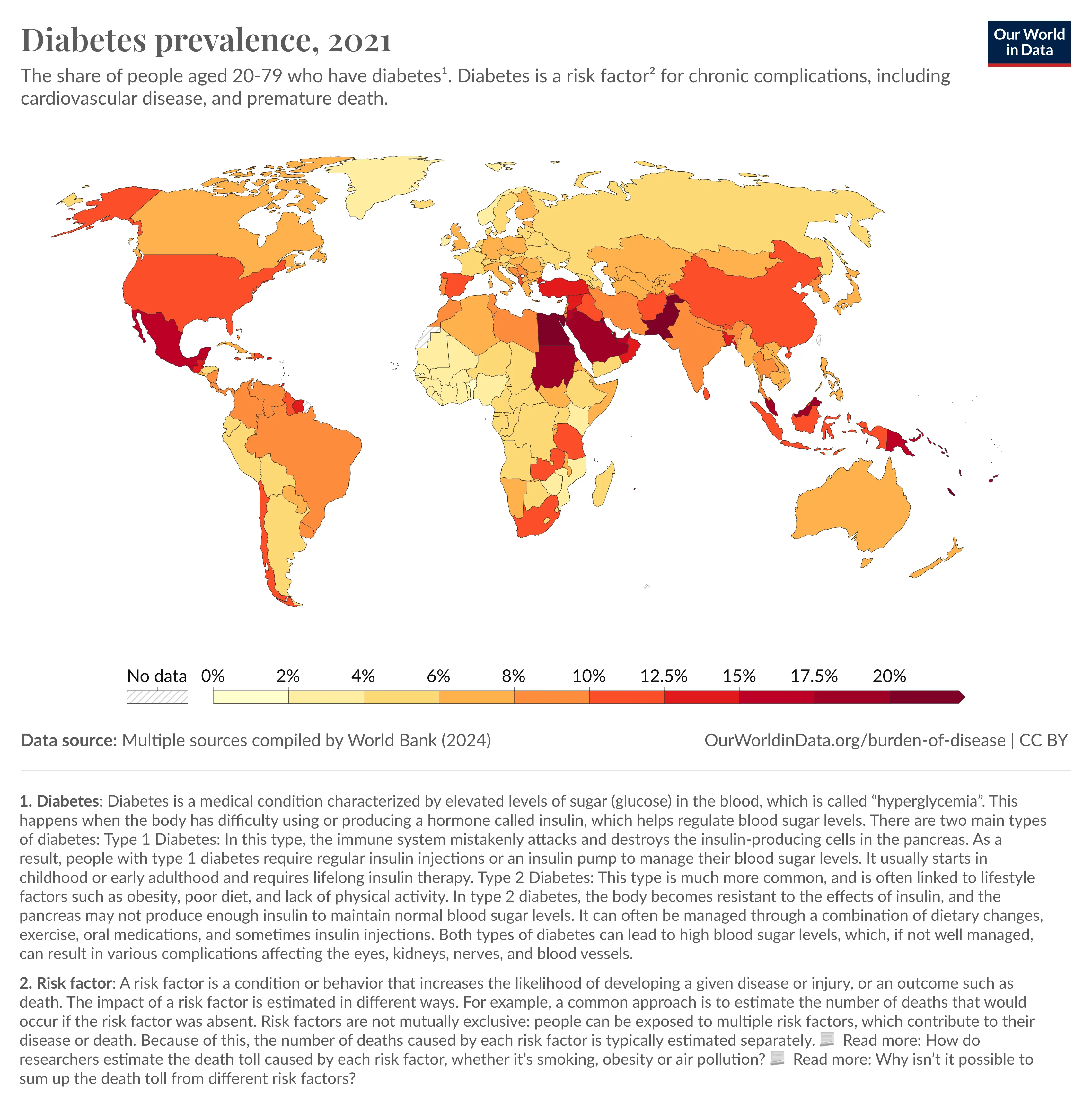
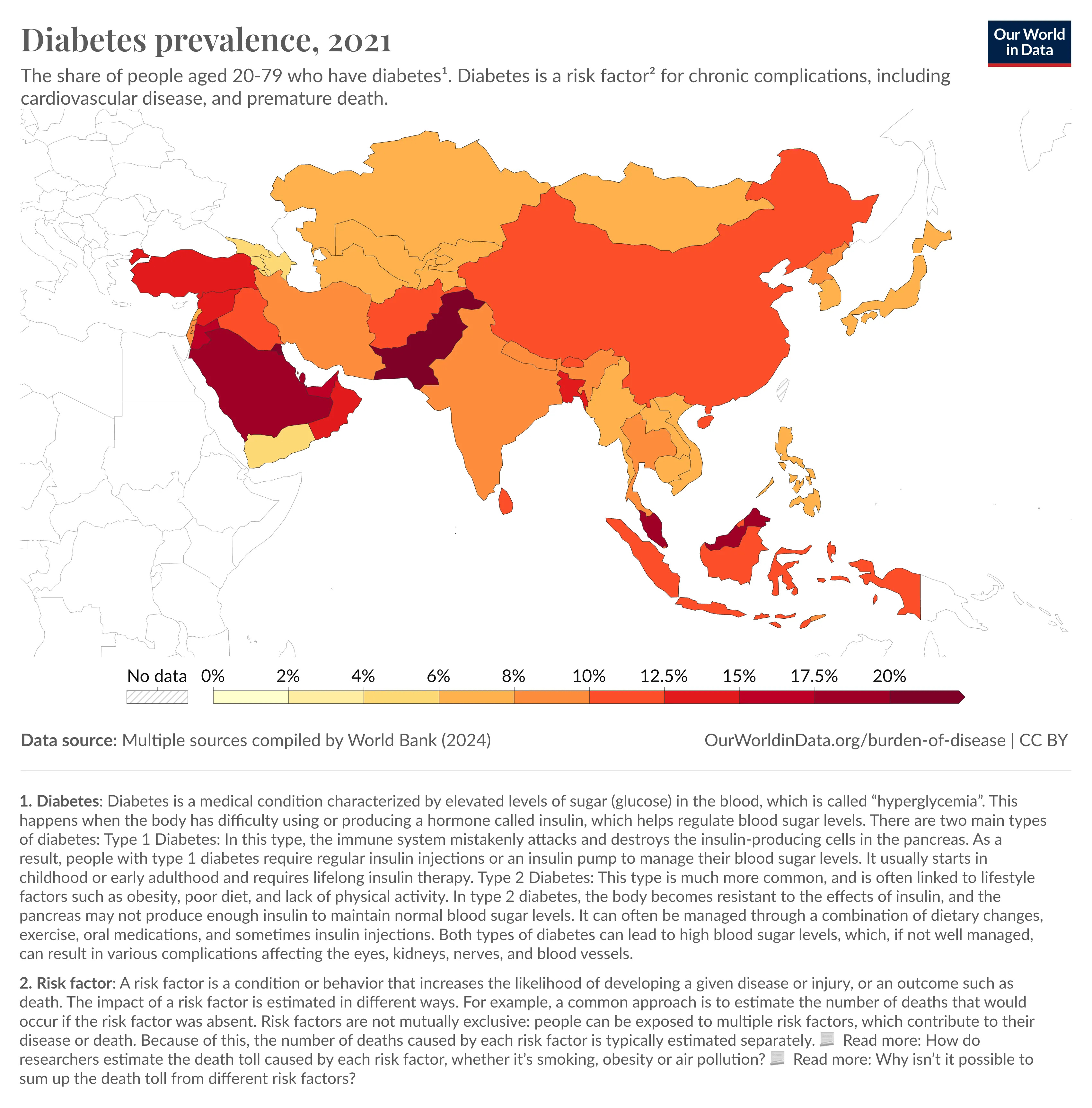
The source for the two images of the diabetes epidemic trends analyzed comes from the images published on the following website, which compiles data from multiple sources by the World Bank (2024) : https://ourworldindata.org/grapher/diabetes-prevalence
Setup
First, let’s import the necessary libraries and printing boto3 version. The following code imports the `boto3` library, which is a Python SDK for AWS services, and then prints the version of `boto3` to ensure it's up-to-date:
Python
import boto3print('boto3 version')print(boto3.__version__)!pip install --upgrade boto3
Next, we define the model ID and load the images that need to be analyzed. `MODEL_ID` is set to a specific model ID for the Llama 3.2 90B Instruct model on Amazon Bedrock. `ORIGIN_IMAGE` is set to the path of the original image file.
Python
MODEL_ID = "us.meta.llama3-2-90b-instruct-v1:0"ORIGIN_IMAGE = "images/diabetes-prevalence.png"
This following code imports two functions, `disp_image` and `resize_image`, from a custom `utils` module that I wrote.
The reason for resizing the images is that the Meta Llama 90B Instruct model has certain restrictions on the size of the input image, so we need to meet its image size requirements.
Python
from utils import disp_imagefrom utils import resize_imagedisp_image(ORIGIN_IMAGE)# Image processingfrom PIL import Imageimg1 = Image.open(ORIGIN_IMAGE)img1.sizeRESIZED_IMG = resize_image(img1)# Open the JPG imagejpg_image = Image.open("images/resized_image.jpg")# Convert the image to PNG formatpng_image = jpg_image.convert("RGB")# Save the converted PNG imagepng_image.save("images/resized_image.png")RESIZED_IMAGE = "images/resized_image.png"disp_image(RESIZED_IMAGE)
After the image processing was completed, I used the image display function `disp_image ()` defined by myself to display the first image to be input to the Llama model. This is a worldwide diabetes trend map. The depth of the color indicates the severity of diabetes prevalence. The darker the color, the more serious the situation is. As shown in the figure below:
Interaction with the model
Now you can use the resized image as input and provide it to the Llama 3.2 90B Instruct model. First, Let’s create a client object for the Amazon Bedrock Runtime service using `boto3`:
Python
bedrock_runtime = boto3.client("bedrock-runtime")
Then, open the resized image file in binary read mode (`"rb"`). The contents of the file are read into the `image` variable:
Python
with open(RESIZED_IMAGE, "rb") as f:image = f.read()
Next, define a user message asking the model to identify the top 10 countries worldwide with the highest diabetes prevalence:
Python
user_message = "According to this chart, which are the top 10 countries with the highest prevalence of diabetes?"
Create a list of messages containing a single message with the user's role, the image, and the user's message:
Python
messages = [{"role": "user","content": [{"image": {"format": "png", "source": {"bytes": image}}},{"text": user_message},],}]
Call the `converse` method of the Amazon Bedrock Runtime client, passing the `MODEL_ID` and the list of messages. The response from the model is stored in the `response` variable:
Python
response = bedrock_runtime.converse(modelId=MODEL_ID,messages=messages,)
Extracted the response text from the response object and stored in the `response_text` variable. Then, print the response text to the console:
Python
response_text = response["output"]["message"]["content"][0]["text"]print(response_text)
The response text from my testing is as follows (for your information as well):
plaintext
According to the chart, the top 10 countries with the highest prevalence of diabetes are:1. **Saudi Arabia**: 17.5%2. **Egypt**: 17.5%3. **United Arab Emirates**: 17.5%4. **Bahrain**: 17.5%5. **Kuwait**: 17.5%6. **Qatar**: 17.5%7. **Oman**: 17.5%8. **Yemen**: 17.5%9. **Libya**: 17.5%10. **Papua New Guinea**: 17.5%These countries have the highest percentage of their population aged 20-79 with diabetes, according to the chart.
If you are inspired by this sample and want to explore more, you can refer to the following GitHub repo to go through the entire code:
In the complete code provided above, I also uploaded the second image for analysis by the Llama 3.2 90B Instruct model. The second image is a data chart showing the prevalence trend of diabetes in Asia. As illustrated below:
Attentive developers can find data charts for their respective continents to further explore this topic.
Summary
In this blog post, we demonstrated how to leverage the powerful multimodal capabilities of the Llama 3.2 90B Instruct model on Amazon Bedrock to gain insights into the global prevalence of diabetes. By harnessing this state-of-the-art language model, we were able to analyze both textual data and visualizations to identify the top 10 countries with the highest diabetes rates worldwide according to the provided chart.
The Llama 3.2 90B Instruct model's strong performance across various benchmarks, especially in areas like diagram understanding, made it well-suited for this multimodal analysis task. Running the model on Amazon Bedrock allowed us to efficiently process the data and generate accurate insights.
Through this practical example, we showcased the potential of combining advanced language models with multimodal data to tackle complex real-world problems in fields like healthcare analytics. As large language models continue evolving with enhanced multimodal capabilities, new opportunities will emerge to derive deeper insights from diverse data sources, driving impactful solutions across industries.
References
1/ The Llama 3 Herd of Models
2/ Introducing Llama 3.2 models from Meta in Amazon Bedrock
3/ Vision use cases with Llama 3.2 11B and 90B models from Meta
Note: The cover image for this blog post was generated using the SDXL 1.0 model on Amazon Bedrock. The prompt given was:
”A developer with a laptop and a diabetes scientist, sitting in a café, developer with a laptop, excitedly discussing Leveraging generative AI for diabetes prevalence analysis, comic, graphic illustration, comic art, graphic novel art, vibrant, highly detailed, colored, 2d”
Enjoyed reading this content? Let the author know!
Your likes, comments, shares, and saves help creators reach more builders.

Loading recommendations
Loading article