

Connecting to a Private RDS Instance via an EC2 Proxy
This solution provides a way to set up a proxy that forwards traffic from your client to the private RDS instance using an EC2 proxy instance.

Context
To enhance security, RDS instances are typically placed in a private subnet within a VPC, making them inaccessible from outside the VPC.
In dev/test environment, this can pose a challenge when you need to connect to the database from your local machine to test your application.
About this solution
This solution provides a way to set up a proxy that forwards traffic from your client to the private RDS instance using an EC2 proxy instance.
- You will setup an EC2 instance, at public subnet that it can receive request from developer.
- The EC2 instance will forward traffic to RDS instance at private subnet
Setup
1. Create EC2 Instance
Create an EC2 instance with following setting:
- AMI:
Amazon Linux 2 Kernel 5.10
- Instance type:
t2.micro
- Key pair:
process without a key pair
- Network
- VPC: choose the
VPC that same with VPC you are using with RDS instance
- Subnet: choose
public subnet
- Security Group:
allow all inboundtraffic
Then click
Launch instance to create proxy server.2. Collect RDS instance information
To forward traffic to RDS instance, you need to know:
-
DB Endpoint: example.XXXXXXXXXXXX.ap-southeast-1.rds.amazonaws.com
-
DB Port: 3306 or 5432,...
3. Config Firewall
- For proxy server security group:
- Inbound: allow
Anywhere-Ipv4(MYSQL/Aurora, PostgreSQL,... depend on your database engine) on port (3306, 5432,... depend on your database port)
- Outbound:
security group of RDS instance.
- For security group of database instance:
- Inbound: add additional rule to
allow traffic from security group of proxy server. Don't remove any existing rule.
- Outbound: add additional rule to
allow traffic to security group of proxy server. Don't remove any existing rule.
4. Setup Proxy
SSH to the EC2 instance and run following commands:
yum install haproxy -yReplace content of
/etc/haproxy/haproxy.cfg with following values:global log /dev/log local0 log /dev/log local1 notice chroot /var/lib/haproxy stats socket /var/run/haproxy.sock mode 660 level admin user haproxy group haproxy daemondefaults log global option dontlognull option httplog timeout connect 5000ms timeout client 50000ms timeout server 50000msfrontend mysql_front bind *:<YOUR_DB_PORT> mode tcp default_backend mysql_backbackend mysql_back mode tcp server db_server <YOUR_DB_ENDPOINT>:<YOUR_DB_PORT> check-
<YOUR_DB_ENDPOINT>: RDS Endpoint
-
<YOUR_DB_PORT>: Database port
Reset service if needed
sudo systemctl restart haproxy5. Test Connection
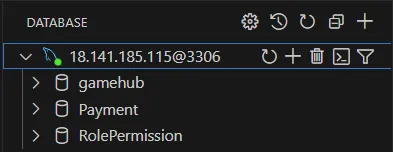
Now you can connect to RDS instance in private subnet by replace the RDS Endpoint with Public IP of EC2 proxy server.
6. Cleanup Resources
Delete EC2 proxy server if you no longer need it to reduce cost.
Disclaimer
This solution is prefer using for dev/test environment. For production workload, be careful when manage firewall to ensure secure connection.
🚀 BE HAPPY ON CLOUD 🚀
Enjoyed reading this content? Let the author know!
Your likes, comments, shares, and saves help creators reach more builders.

Loading recommendations
Loading article