


Estimating the cost of running a workload on AWS is one of the most common things I do as a Solutions Architect. Once I help a customer scope out how to design a workload, "how much will it cost" is the natural next question.
Estimating cost often requires judgement and prior experience. Often the inputs are not completely defined up front; we may not know for sure what the actual production volume will be, or exactly which instance type to pick for a database. Frequently we need to evaluate several different options for building a workload, each of which has a different cost structure. And finally, we need to translate the workload inputs into the pricing levers that AWS services use. For example, if a web site has 1,000 visitors per day, we need to translate that into the number of calls to the Lambda function that implements the site's serving logic.
There are a number of online calculators, including the AWS calculator , but I prefer to build a spreadsheet. With a spreadsheet, or some similar tool like a Jupyter notebook, I can easily run and compare different scenarios. I can clearly identify the key inputs and assumptions, and show how they affect all the AWS services used. I have a standard spreadsheet template I use, with one tab for each service, plus a summary tab, and a chart showing the cost grouped by functional area.
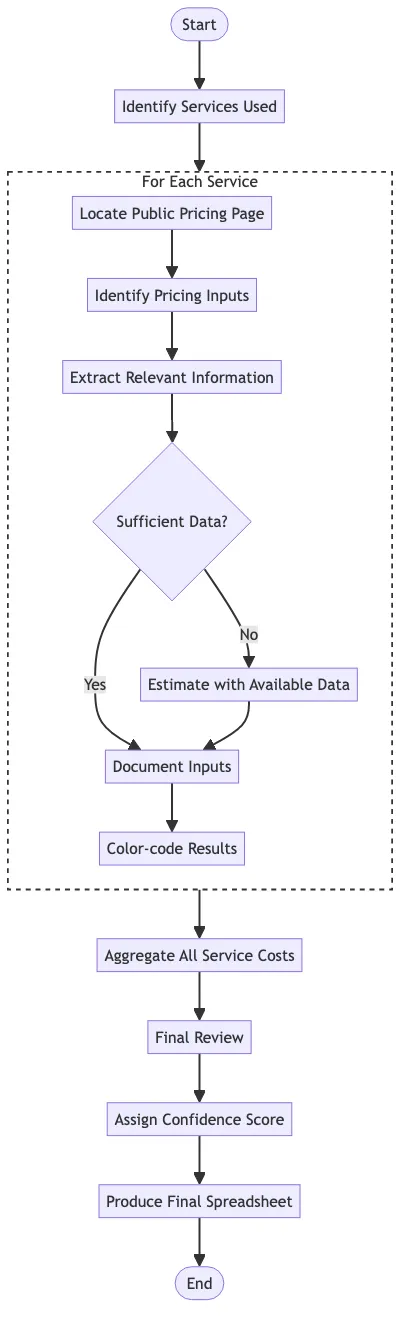
In order to make creating the spreadsheet a little bit easier and more consistent, I built a GenAI workflow that uses an LLM to help me build the spreadsheet. The input to the workflow is just some description of the workload architecture, with as much detail as we have, including any information about the projected usage. Then the workflow continues as shown in the flowchart below, with most steps representing one call to an LLM.
Identifying specific services
The first step is to identify the specific AWS services used. In order to do this, I made a call to the Claude 3 Sonnet model in Amazon Bedrock, using this prompt:
plaintext
The attached document is a workload proposal for migrating an application from a customer'sdata center to AWS. I need to develop a cost estimate for running this workload on AWS.To begin, identify the AWS services we need to use. Be specific - for example,instead of saying 'EMR', say 'EMR Serverless', 'EMR on EKS', or 'EMR on EC2'.Answer in JSON format like this:<example>{"services": [{"service": "EFS"},{"service": "S3"}]}</example>
Locating public pricing
The next step is finding the public pricing page for each AWS service. We do this with a simple call to a web search tool. Once we identify the URL, we just programmatically grab the text from the pricing page.
Conversation about each service
The next steps are performed in a conversation loop with Claude 3 Sonnet, where we keep extending the conversation by adding new messages using the Converse API. That preserves the context of the conversation flow about a specific service.
We ask the LLM to identify the specific inputs we need to estimate the cost for a specific AWS service, using the information from the public pricing page.
plaintext
The attached document is a workload proposal for migrating an application from a customer'sdata center to AWS. I need to develop a cost estimate for running this workload on AWS.For the AWS service <SERVICE>, list the inputs necessary to estimate monthly cost.The service's pricing information is below:<PRICING_INFO><PRICING_HERE></PRICING_INFO>
Next, we add a new message to the conversation, asking Claude to pull out any information from the workload description that we can use to fill in those pricing inputs.
plaintext
Now, for <SERVICE>, pull out the relevant information from the document that we can useto provide the inputs for cost calculations.
Now we ask Claude to see if it can estimate any inputs for which we don't have direct data, by using other information in the workload description. This proved to be a key step in having the model do the translation from the workload description to specific pricing levers.
plaintext
For <SERVICE>, can you estimate any missing inputs using other information in the document?
The final step in this conversation has the LLM start creating the output spreadsheet. We don't really want to ask the LLM to do math; Excel can do that for us. Rather, we want it to list very discrete pieces of information, like the unit cost and quantity. We also want to indicate the level of confidence we have in the estimate, so we know where we need to dig deeper to get more precision in our estimate.
plaintext
Now use that infomration to compute the projected monthly cost for <SERVICE>.Your answer should be a list of pricing line itemsEach line item should include the following:* A description of the line item* The unit cost* The price dimension (e.g., price per hour)* The quantity* The total cost* The confidence level (e.g., high, medium, low)* The input type (e.g., assumption, input directly from the proposal, calculation)Use only final answers, not intermediate calculations. When giving numbers, use validfloating point format; do not use currency symbols or commas.
Review
At this point we have a list of cost line items. We are ready to do an initial review; we ask Claude to score the output along four dimensions.
plaintext
The attached document is a workload proposal for migrating an application from a customer'sdata center to AWS. I need to develop a cost estimate for running this workload on AWS.In previus steps, you identified the AWS services used in this workload, and generated a listof pricing line items for each service.In this step, revied the workload and all the pricing line items using this scoring rubric. Score each item on arange of 1-5 with 5 being the highest. Give the final score as a total of the scores for each item.Completeness - does it adequately capture all the aspects of an AWS workload, including security, logging, and monitoring services?Accuracy - Does it provide a logical summary of the expected cost?Assumptions - Does it make unreasonable assumptions about the cost inputs or outputs?Statistical sense - Does it assume that we know some inputs to an overly precise level?<COST_INFO><SERVICE_LINES></COST_INFO>
Sample output
At this point we have data that we can store into a spreadsheet using a python library. It is not a finished product, but ideally it has done about 80% of the work. Then we can look at the areas where the estimate is low confidence, or just seems off somehow, and dig a little deeper.
Here's an example of the line items for using EFS in one example workload.

And here's the example score:
plaintext
Scoring rubric:1. Completeness (4/5): The cost estimate covers the major AWS services needed for the proposed architecture, including databases, compute instances, file storage, and data transfer services. However, it does not include costs for security services (e.g., VPC, security groups), logging, or monitoring, which could be important components of a production workload.2. Accuracy (3/5): The cost estimate provides a logical breakdown of pricing for the different services and resources required. However, there are several assumptions made without clear justification, such as the storage and throughput requirements for EFS, FSx, and DataSync, which could significantly impact the overall cost.3. Assumptions (3/5): While some assumptions are reasonable, such as the instance types and database storage requirements based on the source document, others seem arbitrary or lack clear explanations, like the assumptions around EFS storage, FSx throughput, and DataSync data transfer volumes.4. Statistical sense (4/5): The cost estimate generally avoids overly precise inputs, with most quantities being rounded or estimated. However, some inputs, like the number of requests for S3, seem unnecessarily precise without justification.Total score: 14/20Overall, the cost estimate covers the major components of the proposed architecture and provides a logical breakdown of pricing. However, it could be improved by including additional services for security, logging, and monitoring, as well as providing clearer justifications for some of the assumptions made around storage and throughput requirements.
Lessons learned
You'll note that I used very granular steps in the workflow. Rather than asking Claude to estimate the cost all at once, I tackle on service at a time. For each service, I go step-by-step, identifying the pricing inputs, reviewing for missing data, and so on.
Telling Claude to specifically try to estimate missing data is also a key step. There's often a lot of ambiguity in a workload description, and we want to make some logical assumptions to make progress.
Finally, the output clearly identifies where we don't have high confidence in the estimate. That's important for the sake of transparency: we want the ultimate consumer of this spreadsheet to be aware that it's just an estimate, and some areas need more refinement.
For the examples I tried, compared to estimates I had built manually, I found that this approach got me into the right ballpark. It didn't match what I did exactly; it sometimes made different assumptions, and more helpfully, it identified some things that I overlooked the first time.
More generally, I think this is an interesting example of a manually-intensive workflow that GenAI can help automate, even in the face of considerable ambiguity and complexity.
Enjoyed reading this content? Let the author know!
Your likes, comments, shares, and saves help creators reach more builders.

Loading recommendations
Loading article