
Generative AI for suspicious transaction report compliance
Divyajeet Singh, Parag Srivastava, Sangeetha Kamatkar, Vineet Kachhawaha explore Amazon Bedrock's Foundation Models for STR drafts, boosting compliance.

In the rapidly evolving world of financial regulations and compliance, automation of compliance reporting has emerged as a game-changer in the financial industry. AWS generative AI solutions offer a seamless and efficient approach to automate this reporting process. The integration of AWS generative AI into the compliance framework not only enhances efficiency but also instills a greater sense of confidence and trust in the financial sector by ensuring precision and timely delivery of compliance reports. These solutions help financial institutions avoid the costly and reputational consequences of non-compliance. This, in turn, contributes to the overall stability and integrity of the financial ecosystem, benefiting both the industry and the consumers it serves.
Amazon Bedrock , is a managed generative AI service that provides access to a wide array of advanced foundation models (FMs). It includes features that facilitate the efficient creation of generative AI applications with a strong focus on privacy and security. Getting good response from an FM relies heavily on using efficient techniques for providing prompts to the FM. Retrieval Augmented Generation (RAG) is a pivotal approach to augment FM prompts with contextually relevant information from external sources. It uses vector databases such as Amazon OpenSearch Service to enable semantic searching of the contextual information.
Amazon Bedrock Knowledge Bases feature powered by vector databases such as Amazon OpenSearch Serverless to enhance prompt engineering to minimize inaccuracies and ensure that responses are anchored to information from factual resources.
Amazon Bedrock Agents enable generative AI applications to execute multistep tasks and enable interaction with knowledge bases and FMs. Using agents, you can design intuitive and adaptable generative AI applications capable of understanding natural language queries and creating engaging dialogues to gather details required for using the FMs effectively.
Suspicious Transaction Report (STR) or Suspicious Activity Report (SAR) are types of reports that a financial organization must submit to a financial regulator if they have reasonable grounds to suspect any financial transaction that has occurred or was attempted in the course of their activities. There are stipulated timelines for filing these reports and it typically takes several hours of manual effort to create one report for one customer account.
In this post, we explore a solution that uses FMs available in Amazon Bedrock to create a draft of an STR. We will cover how generative AI can be used to automate the manual process of draft generation using account information, transaction details, and correspondence summaries as well as creating a knowledge base of information about fraudulent entities involved in such transactions.
Prerequisites
To implement the solution provided in this post, you should have the following:
- Enable model access in Amazon Bedrock for the following models:
- Amazon Titan Embeddings V2
- Claude 3 Haiku
Solution overview
The solution uses Amazon Bedrock with Knowledge Base and Agents, AWS Lambda, Amazon S3, and Amazon OpenSearch. The following diagram illustrates the solution architecture and workflow.
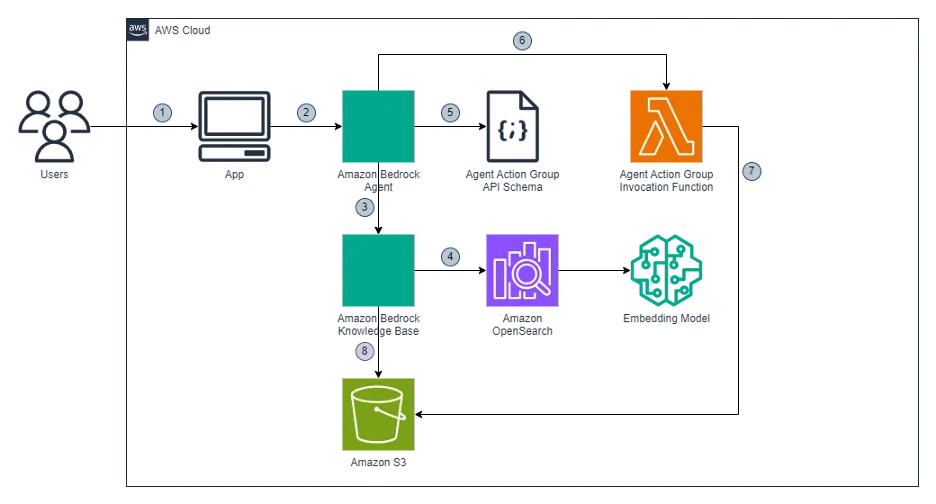
1. The user requests for creation of a draft STR report through the business application.
2. The application calls Amazon Bedrock Agent which has been pre-configured with detailed instructions to engage in a conversational flow with the user. The agent follows these instructions to gather the required information from the user, complete the missing information by using actions groups to invoke Lambda function and generate the report in the specified format.
3. Following its instructions, the agent invokes Amazon Bedrock Knowledge Base to find details about fraudulent entities involved in the suspicious transactions.
4. Amazon Bedrock Knowledge Base queries Amazon OpenSearch Service to search for the entities required for the report. If the information about fraudulent entities is available in Amazon Knowledge Base, the agent follows its instructions to generate a report for the user.
5. If the information is not found in the knowledge base, the agent uses the chat interface to prompt the user to provide the website URL which contains the relevant information. Alternatively, the user can provide a description about the fraudulent entity in the chat interface.
6. If the user provides a website URL, the agent follows its instructions to call the action group to invoke a lambda function to crawl the website URL. The lambda function scraps the information from the website and returns it to the agent for using in the report.
7. The lambda function also stores the scraped content in an Amazon S3 bucket for future use by the search index.
8. Amazon Bedrock Knowledge Base periodically scans the Amazon S3 bucket to index the new content in Amazon OpenSearch Service.
Set up the solution
When the prerequisite steps are complete, you’re ready to set up the solution.
To implement the solution, we will complete the following steps:
- Setup an Amazon S3 bucket .
- Create a Lambda function.
- Setup Amazon Bedrock Knowledge base.
- Setup Amazon Bedrock Agent.
Visual layouts in some screenshots in this post may look different than those on your AWS Management Console .
Setup an Amazon S3 bucket
Create an S3 bucket with a unique
S3 Bucket Name for the document repository. This will be a data source for the Amazon Bedrock Knowledge base.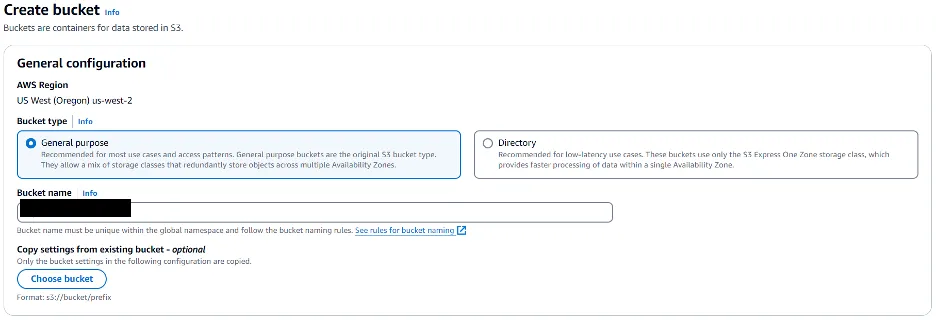
Create the website scrapper Lambda function
Next, let’s create a new Lambda function Url-Scapper using the Python runtime to crawl and scrape the website URL provided by Amazon Bedrock Agent. The function will scrape the content and send the information to the agent as well store the contents in the S3 bucket for future references.
Error handling has been skipped in this code snippet for brevity.
Create a new file
“search-suspicious-party.py” with the following code snippet:1
2
3
4
5
6
7
8
9
10
11
12
13
14
15
16
17
18
19
20
21
22
23
24
25
26
27
28
29
30
31
32
33
34
35
36
37
38
39
40
41
42
43
44
45
46
47
48
49
50
51
52
53
54
55
56
57
58
59
60
61
62
63
64
65
66
67
68
69
70
import boto3
from bs4 import BeautifulSoup
import os
import re
import urllib.request
BUCKET_NAME = os.getenv('S3_BUCKET')
s3 = boto3.client('s3')
def get_receiving_entity_from_url(start_url):
response = urllib.request.urlopen(
urllib.request.Request(url=start_url, method='GET'),
timeout=5)
soup = BeautifulSoup(response.read(), 'html.parser')
# Extract page title
title = soup.title.string if soup.title else 'Untitled'
# Extract page content for specific HTML elements
content = ' '.join(p.get_text() for p in soup.find_all(['p', 'h1', 'h2', 'h3', 'h4', 'h5', 'h6']))
content = re.sub(r'\s+', ' ', content).strip()
s3.put_object(Body=content, Bucket=BUCKET_NAME, Key=f"docs/{title}.txt")
return content
Replace the default generated code in lambda_function.py with the following code:
import json
from search-suspicious-party import *
def lambda_handler(event, context):
# apiPath should match the path specified in action group schema
if event['apiPath'] == '/get-receiving-entity-details':
# Extract the property from request data
start_url = get_named_property(event, 'start_url')
scraped_text = get_receiving_entity_from_url(start_url)
action_response = {
'actionGroup': event['actionGroup'],
'apiPath': event['apiPath'],
'httpMethod': event['httpMethod'],
'httpStatusCode': 200,
'responseBody': {
'application/json': {
'body': json.dumps({'scraped_text': scraped_text})
}
}
}
return {'response': action_response}
# Return an error if apiPath is not recognized
return {
'statusCode': 400,
'body': json.dumps({'error': 'Invalid API path'})
}
def get_named_property(event, name):
return next(
item for item in
event['requestBody']['content']['application/json']['properties']
if item['name'] == name
)['value']Replace the default generated code in lambda_function.py with the following code:
1
2
3
4
5
6
7
8
9
10
11
12
13
14
15
16
17
18
19
20
21
22
23
24
25
26
27
28
29
30
31
32
33
34
35
36
37
38
import json
from search-suspicious-party import *

def lambda_handler(event, context):

    # apiPath should match the path specified in action group schema
    if event['apiPath'] == '/get-receiving-entity-details':
        # Extract the property from request data
        start_url = get_named_property(event, 'start_url')

        scraped_text = get_receiving_entity_from_url(start_url)

        action_response = {
            'actionGroup': event['actionGroup'],
            'apiPath': event['apiPath'],
            'httpMethod': event['httpMethod'],
            'httpStatusCode': 200,
            'responseBody': {
                'application/json': {
                    'body': json.dumps({'scraped_text': scraped_text})
                }
            }
        }

        return {'response': action_response}

    # Return an error if apiPath is not recognized
    return {
        'statusCode': 400,
        'body': json.dumps({'error': 'Invalid API path'})
    }

def get_named_property(event, name):
    return next(
        item for item in
        event['requestBody']['content']['application/json']['properties']
        if item['name'] == name
    )['value']
Setup Amazon Bedrock Knowledge base.
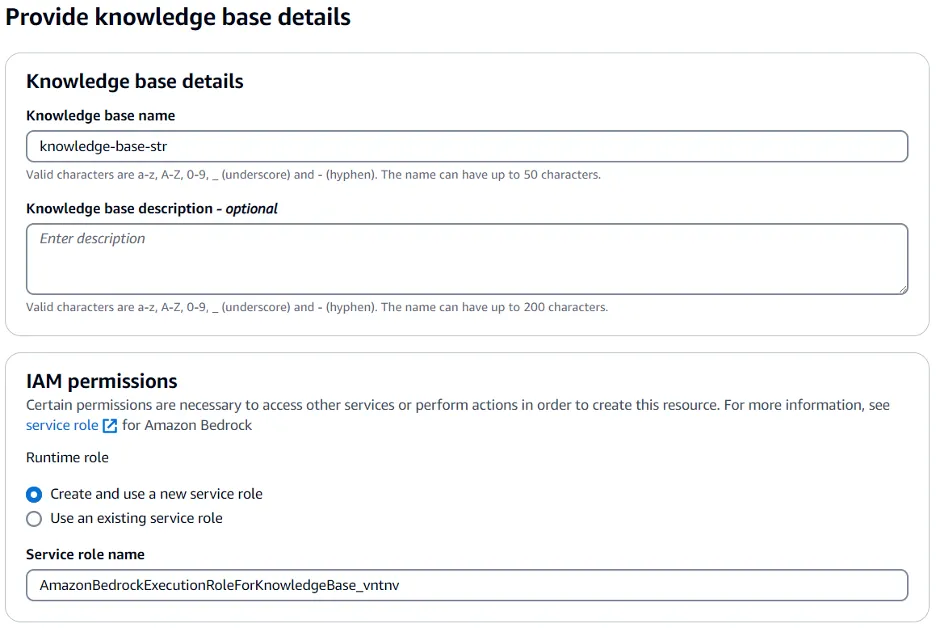
Complete the following steps to create a new knowledge base in Amazon Bedrock. This knowledge base will use OpenSearch Serverless to index the fraudulent entity data stored in S3. For more information, refer to create an Amazon Bedrock knowledge base .
1. On the Amazon Bedrock console, choose Knowledge bases in the navigation pane and choose Create knowledge base.
2. For Knowledge base name, enter a name (for example,
str-knowledge-base).3. For Service role name, keep the default system generated value.
4. Select Amazon S3 as the data source.
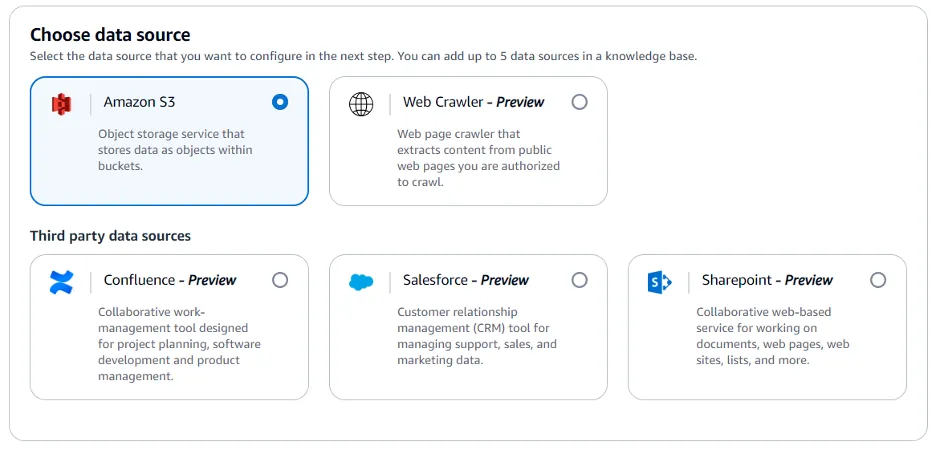
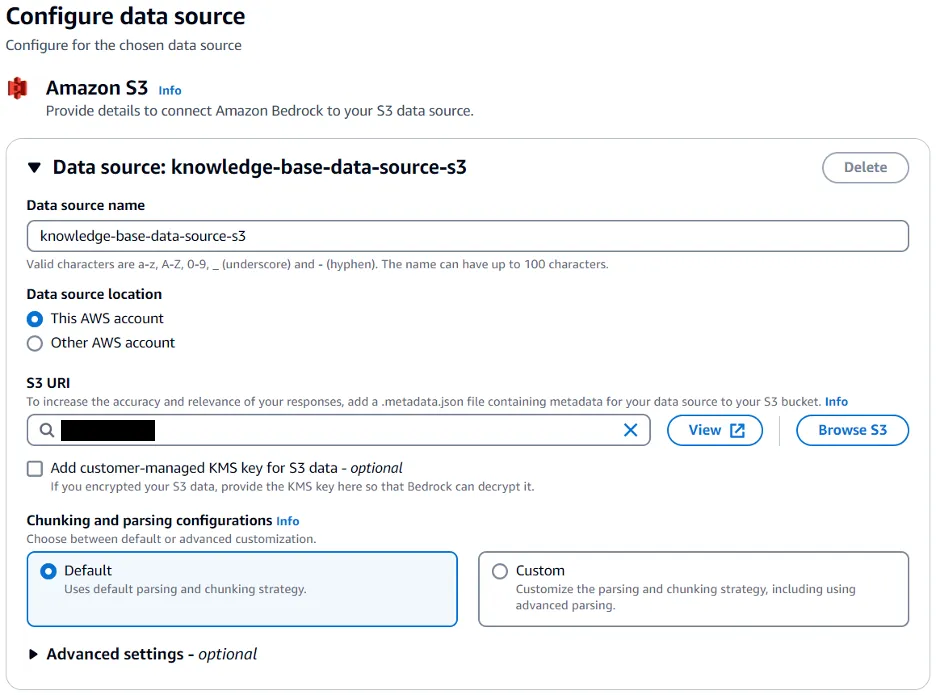
5. Configure the Amazon S3 data source.
6. For Data source name, enter a name (for example,
knowledge-base-data-source-s3).7. For S3 URI, choose Browse S3 and select the bucket where information about fraudulent entities is available for the knowledge base to use.
8. Keep all other default values.
9. For Embeddings model, select
Embed Multilingual v3.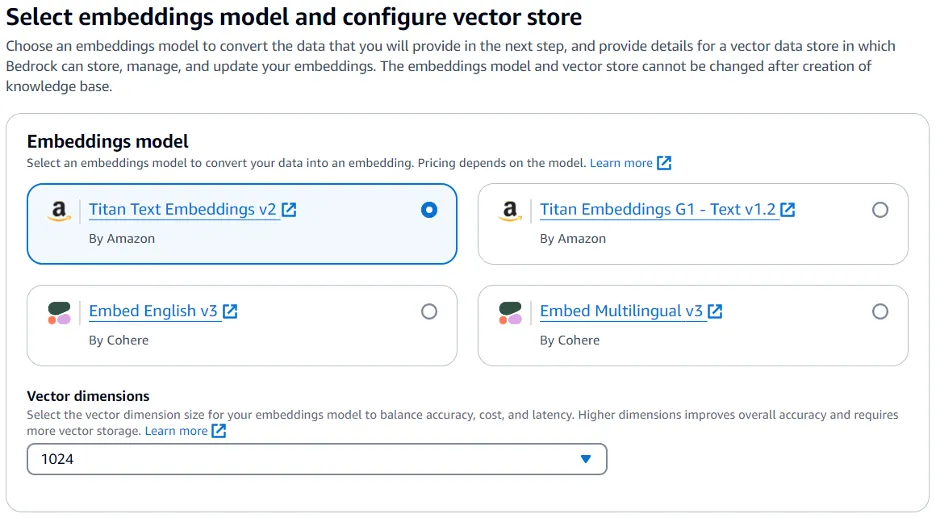
10. For Vector database, select
Quick create a new vector store to create a default vector store with OpenSearch Serverless.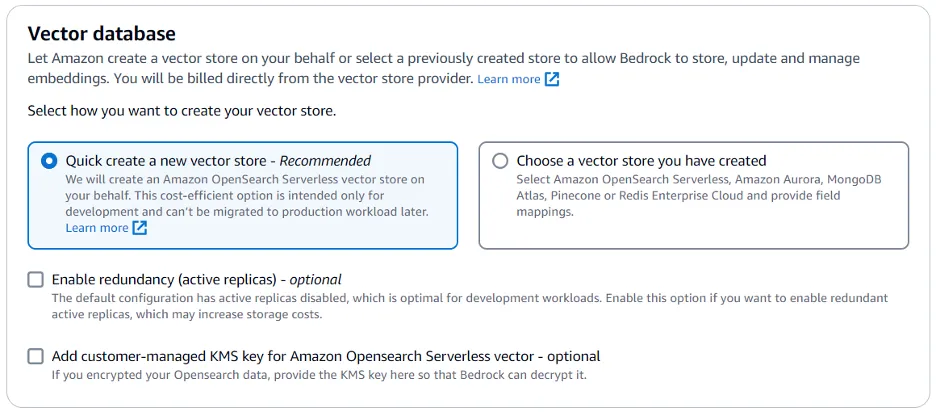
11. Review the configurations and select Create knowledge base.
12. After the knowledge base is successfully created, you should see a knowledge base ID, which you will need when creating the Amazon Bedrock Agent.
13. Select
knowledge-base-data-source-s3 from the list of data sources and choose Sync to index the documents.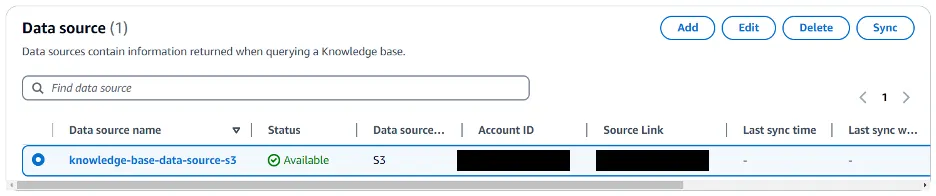
Setup Amazon Bedrock Agent.
To create a new agent in Amazon Bedrock, complete the following steps. For more information, refer to Create an agent for your application .
1. On the Amazon Bedrock console, choose Agents in the navigation pane and choose Create Agent.
2. For Name, enter a name (for example,
agent-str).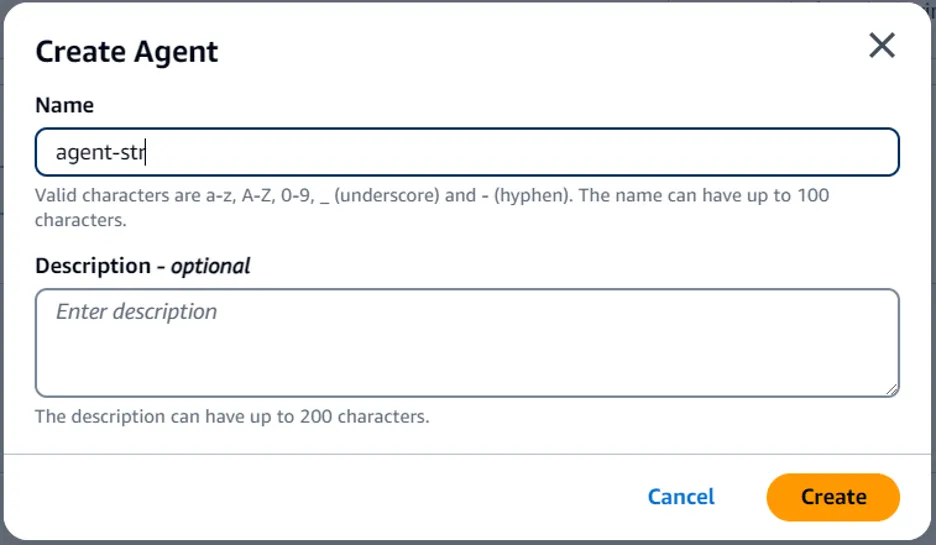
3. Select Create to create a new agent.
4. For Agent resource role, keep the default value (Create and use a new service role).
5. For Select model, choose a model provider and model name (for example,
Anthropic Claude3 Haiku)6. For Instructions for the Agent, provide the instructions that allows the agent to invoke the LLM. See the Agent Instructions section below to understand how to write the instructions.
7. Keep all other default values.
8. Choose Save.
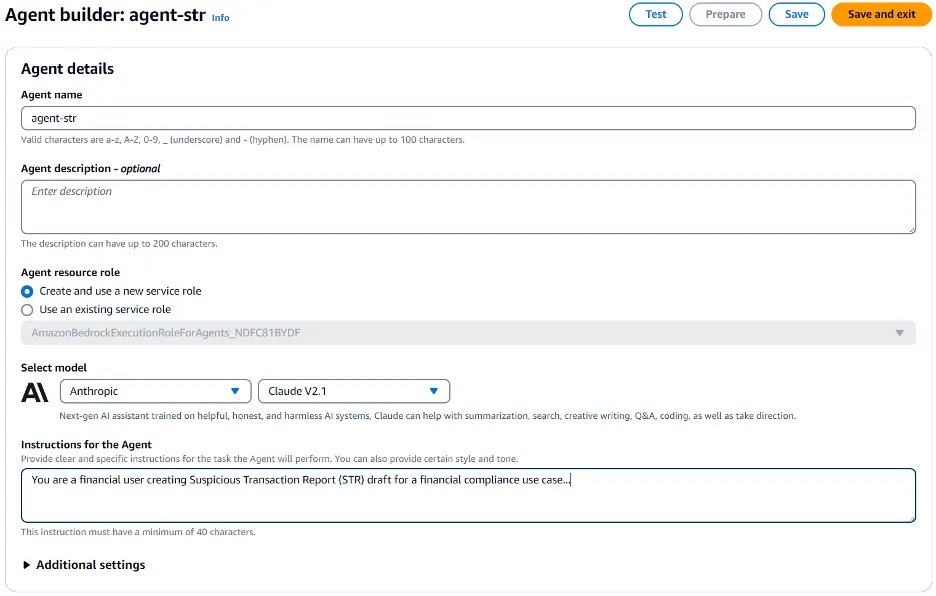
9. For Action groups, select Add to create a new action group.
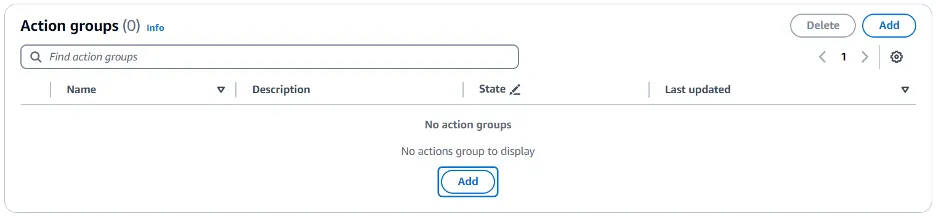
10. An action is a task the agent can perform by making API calls. A set of actions comprise an action group. You provide an API schema that defines all the APIs in the action group.
11. For Action group details, enter an action group name (for example,
agent-group-str-url-scrapper).12. For Action group type, choose
Define with API schemas.13. For Action group invocation, choose
lambda_function Lambda function that we created earlier.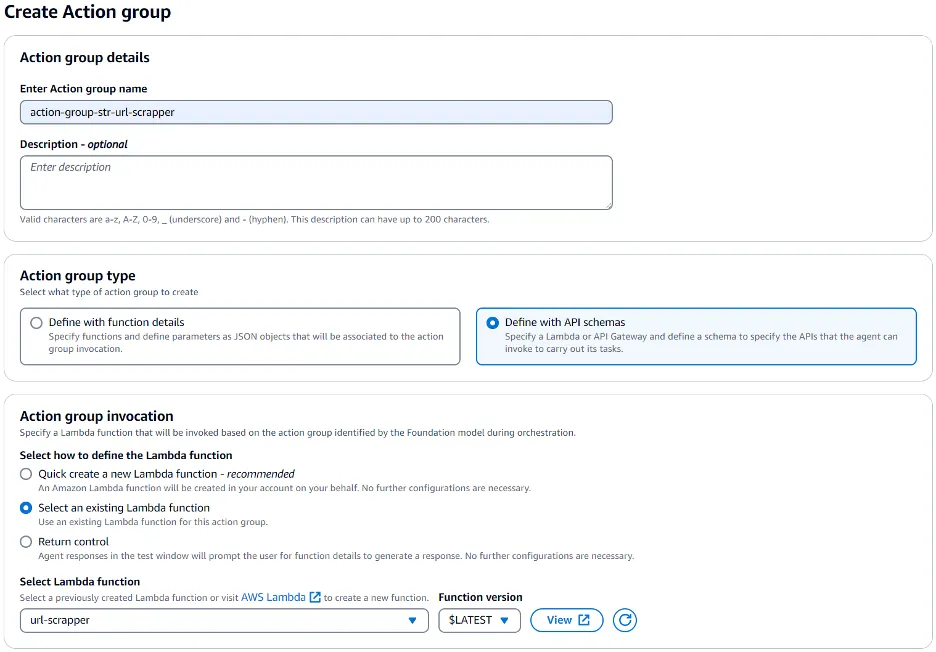
14. For Action group schema, choose
Define via in-line schema editor. Replace the default sample code with the following to define the schema to specify the input parameters with default and mandatory values.1
2
3
4
5
6
7
8
9
10
11
12
13
14
15
16
17
18
19
20
21
22
23
24
25
26
27
openapi: 3.0.0
info:
title: Gather suspicious receiving entity details from website
version: 1.0.0
paths:
/get-suspicious-entity-details:
post:
description: Get details about suspicious receiving entity from the URL
requestBody:
required: true
content:
application/json:
schema:
$ref: "#/components/schemas/ScrapeRequest"
responses:
"200":
description: Suspicious entity details gathered successfully
components:
schemas:
ScrapeRequest:
type: object
properties:
start_url:
type: string
description: The URL to start scraping from
required:
- start_url15. Select Create.
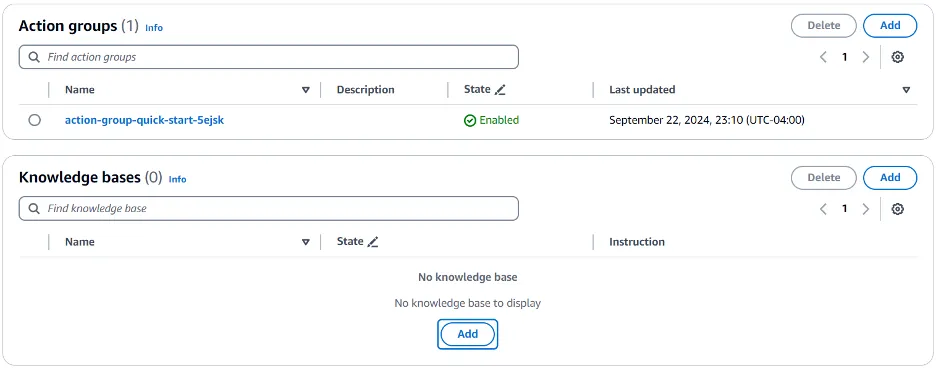
16. For Knowledge bases, select Add.
17. For Select knowledge base, choose the
knowledge-base-str that we created earlier.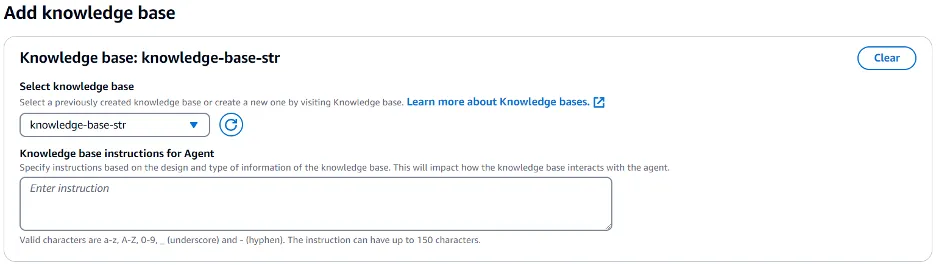
18. Finally, select Prepare to prepare this agent to get it ready for testing.
Agent Instructions
Agent instructions are the heart of Amazon Bedrock Agents which provide the mechanism for a multi-step user interaction to gather all required inputs to enable the agent to invoke the LLM with a rich prompt to provide the response in the required format. Provide the instructions in plain English in a logical manner. There are no pre-defined formats for these instructions.
Provide an overview of the task including the role:
1
You are a financial user creating Suspicious Transaction Report (STR) draft for a financial compliance use case.
Provide the message that the agent can use for initiating the user interaction:
1
2
Greet the user with the message “Hi <name>. Welcome to STR report drafting. How can I help?”
Ask the user to provide the transactions details. From the transaction details, capture the response in the <answer> tag and include the <thinking> tag to understand the rationale behind the response.
Specify the processing that needs to be done on the output received from the LLM:
1
2
3
For the transaction input provided by user, create a narrative description for financial risk reporting of the provided bank account and transaction details.
1. Add a summary of correspondence logs that includes title, summary, correspondence history, and analysis in the narrative description.
2. Add the details about the receiving entity in the narrative description. You can get details about receiving entities from the agent action group.
Provide the optional messages that the agent can use for multi-step interaction to gather the missing inputs if required:
1
If you don't have knowledge about Receiving entity, you should ask the Human for more details about it with a message “Unfortunately I do not have enough context or details about the receiving entity <entity name> to provide an accurate risk assessment or summary. Can you please provide some additional background information about <entity name>? What is the URL of the <entity name> or the description?”
Specify the actions that the agent can take to process the user input using action groups:
1
If user provides the URL of <entity name>, call the action group <add action group name> to get the details. If user provides the description of <entity name>, then summarize and add it to the narrative description as a receiving entity.
Specify how the agent should provide the response include the format details:
1
2
3
4
5
Once you have all the necessary input (financial transaction details and receiving entity details), create a detailed well-formatted draft report for financial risk reporting of the provided bank account and transaction details containing the following sections:
1. Title
2. Summary of transactions
3. Correspondence History & Analysis
4. Receiving entity summary
Test the solution
1. Select Test to start testing the agent.
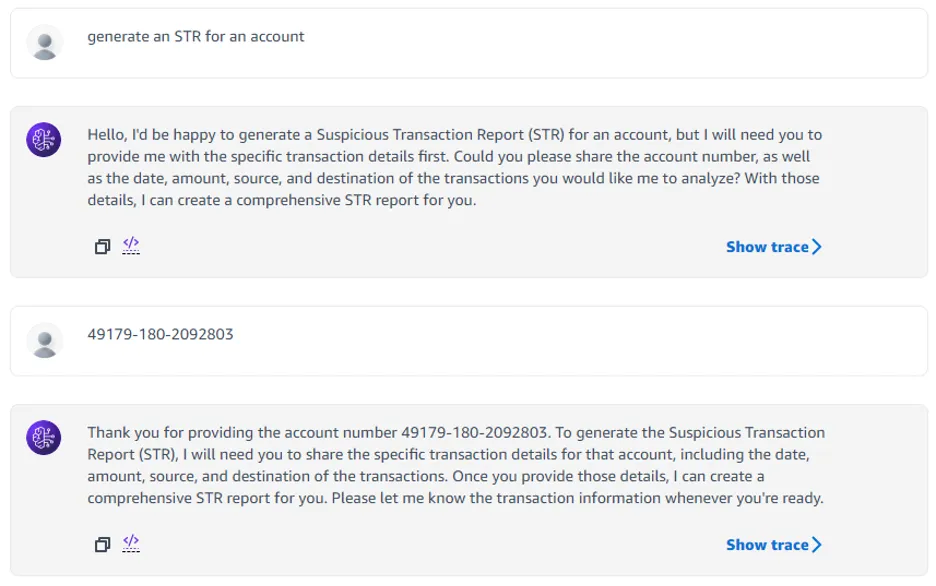
2. Initiate the chat conversation and observe how the agent uses the instructions that we provided in the configuration step to ask for required details for generating the report.
3. Try different prompts like – “Generate an STR for an account”
4. Or – “Generate an STR for account number 12345-999-7654321”
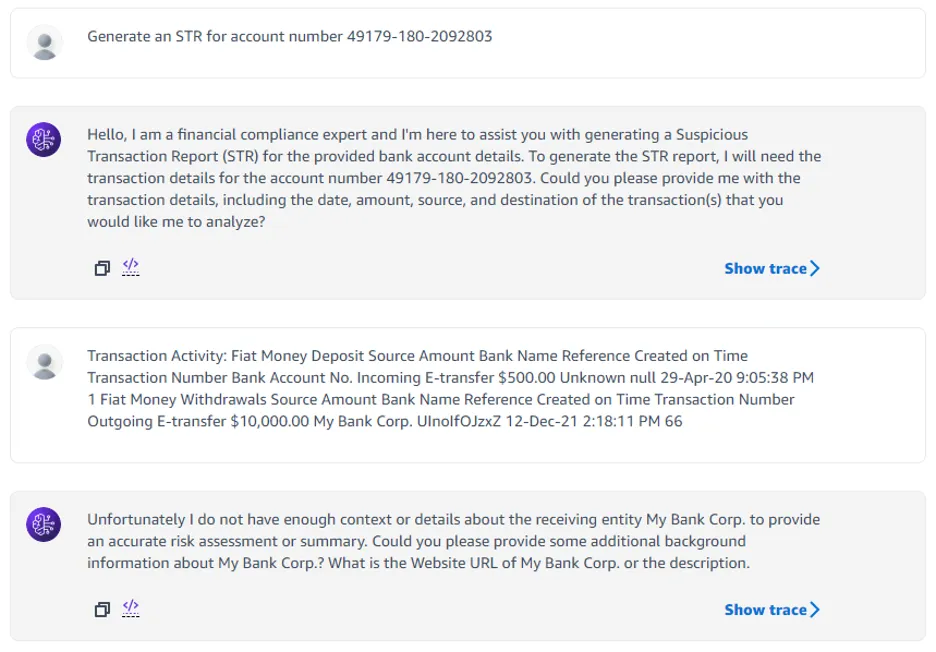
5. Or even providing all details at once – “Generate an STR for account number 12345-999-7654321 with the following transactions”
Copy/paste the sample transactions from the sample_transactions.txt file.
6. Notice how the agent keeps asking for missing information such as account number, transaction details, correspondence history etc. Once it has all the details, it will generate a draft STR document.
Clean up
To avoid incurring unnecessary future charges, clean up the resources you created as part of this solution:
- Delete the Amazon Bedrock Agent.
- Delete the Amazon Bedrock Knowledge Base.
- Empty and delete the S3 bucket if you created one specifically for this solution.
- Delete the AWS Lambda function.
Conclusion
In this post you saw how Amazon Bedrock offers a robust platform for building generative AI applications, featuring a range of advanced foundation models. This fully managed service prioritizes privacy and security while enabling developers to create AI-driven applications efficiently. A standout feature, Retrieval Augmented Generation (RAG), uses external knowledge bases to enrich AI-generated content with relevant information, backed by an Amazon OpenSearch Service as its vector database.
With careful prompt engineering, Amazon Bedrock minimizes inaccuracies and ensures AI responses are grounded in factual documentation. This combination of advanced technology and data integrity makes Amazon Bedrock an ideal choice for anyone looking to develop reliable generative AI solutions.
About the Authors

Enjoyed reading this content? Let the author know!
Your likes, comments, shares, and saves help creators reach more builders.

Loading recommendations
Loading article