
Create Custom Visual Novels in 5 Minutes with Generative AI
Learn how to transform simple text prompts into fully illustrated visual novels using Claude 3.5 and Stable Diffusion—no artistic skills required.

Have you ever wanted to create your own visual novel but felt overwhelmed by the need to write engaging stories, create compelling artwork, and manage complex game development? As a builder who loves both gaming and AI, I faced this challenge head-on. While tools like Ren'Py make visual novel development more accessible, creating original content still requires significant time and artistic skill.
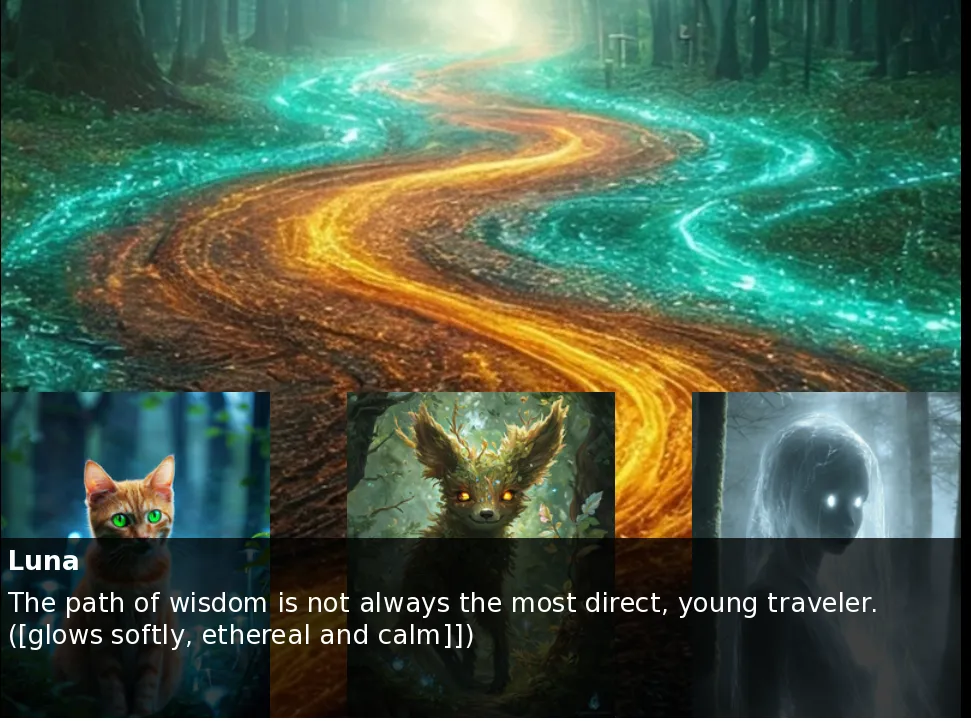
That's why I built VisualNovelLM - a tool that leverages the latest in generative AI to transform simple prompts and background lore into fully realized visual novels. In this post, I'll show you how I combined AWS services, Claude 3.5 , Stable Diffusion 3, and Ren'Py to create an end-to-end story generation pipeline that anyone can use.
The Architecture Behind the Magic
While generating a visual novel in 5 minutes might seem like magic, the real innovation lies in how multiple AI services work together seamlessly. Let's peek behind the curtain to see how VisualNovelLM transforms your ideas into playable stories:
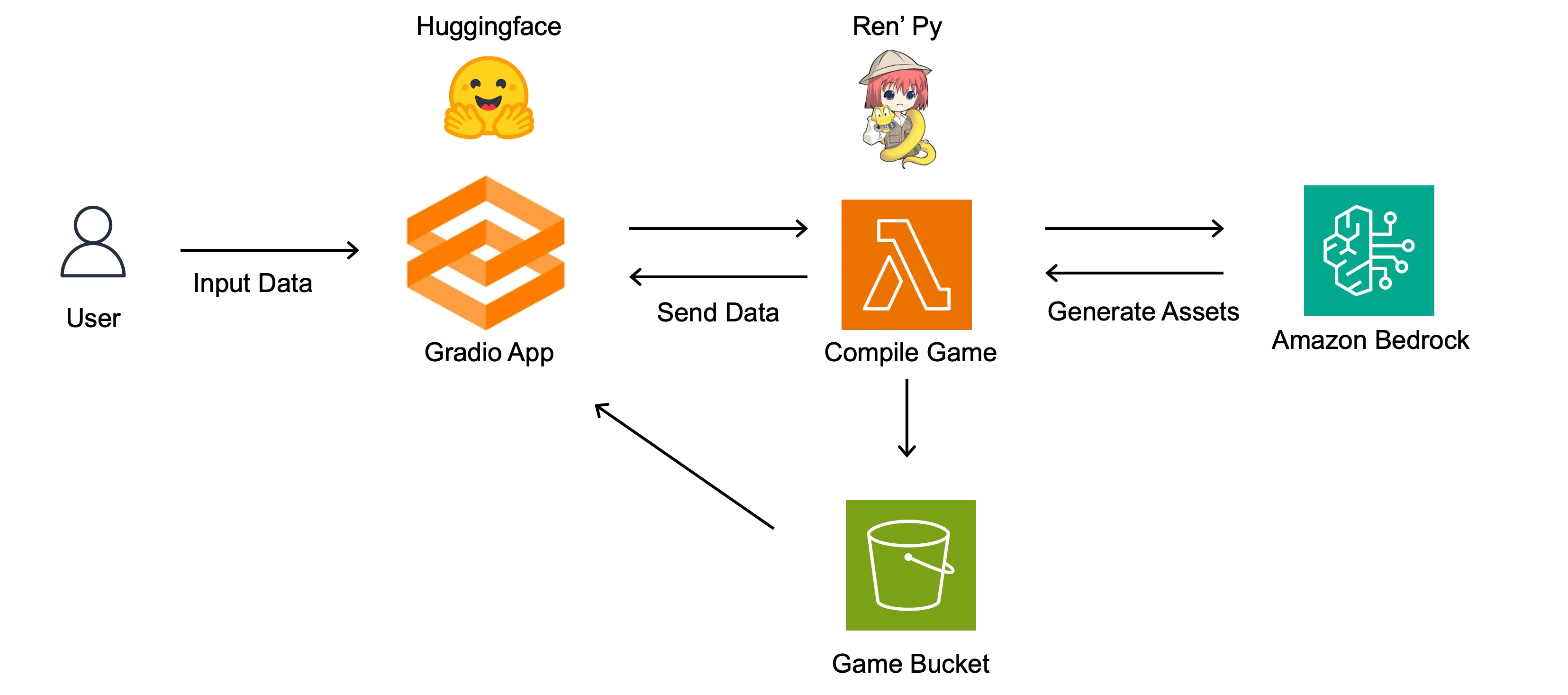
- Users provide a story prompt and optional lore file through a Gradio interface hosted on Hugging Face
- AWS Lambda processes the input and orchestrates the generation pipeline
- Claude 3.5 (via Amazon Bedrock) transforms the input into a structured story
- Stable Diffusion 3 generates character artwork and backgrounds
- A custom Docker container compiles everything into a Ren'Py game
- The final visual novel is served through the web interface
The Generation Pipeline: From Prompt to Playable Game
Let's dive into how each piece of this pipeline works together to create a seamless experience.
Story Generation with Claude 3.5
The heart of VisualNovelLM is its ability to generate compelling narratives. Here's how we use Claude 3.5 Haiku through Amazon Bedrock to create stories that feel hand-crafted:
1. Story Structure Generation
First, we use Claude to break down the user's prompt and lore into a structured story outline. This requires careful prompt engineering to ensure Claude:
- Creates a coherent narrative arc
- Maintains consistent world rules from the provided lore
- Generates an appropriate number of scenes and branches
- Outputs in a parseable JSON format for the next steps
Python
story_prompt = f"""You are a creative writing AI tasked with generating a short visual novel story for a Ren'Py game. Your goal is to create a compelling narrative based on the following user input:<user_input>{user_input}</user_input>Using this input as inspiration, generate a story that includes the following elements:1. A brief introduction to the setting and main character(s)2. An inciting incident that kicks off the main plot..."""story_outline = llm_call(haiku_35, story_prompt)pretty_save_json(story_outline, output_dir, "story")
2. Character Development Chain
With our story structure in place, we generate detailed character profiles that will remain consistent throughout the narrative:
- Physical descriptions (used later for Stable Diffusion)
- Personality traits and speech patterns
- Character relationships and motivations
- Background stories that align with the lore
These profiles are then used to inform both the dialogue generation and image generation steps.
Python
character_prompt = f"""You are tasked with creating detailed descriptions for the main characters in a visual novel based on a given story outline. Your goal is to develop rich, well-rounded characters that fit the narrative and can be easily visualized.First, carefully read and analyze the following story outline:<story_outline>{story_outline}</story_outline>Based on this outline, follow these steps to create detailed character descriptions:1. Identify ALL characters in the story (for any character that will talk we need info for them).2. For each main character, create a detailed description using the following structure:a. Nameb. Agec. Genderd. Physical appearance:- Height and build- Hair color and style- Eye color- Distinctive featurese. Personality traitsf. Background/backstoryg. Role in the storyh. Typical outfit..."""characters = llm_call(haiku_35, character_prompt)pretty_save_json(characters, output_dir, "characters")
3. Scene and Background Planning
Before generating any visuals or dialogue, we create a detailed scene-by-scene breakdown:
- Location descriptions for background generation
- Emotional tone and atmosphere
- Time of day and lighting conditions
- Character positions and interactions
Python
background_prompt = f"""You are tasked with creating detailed descriptions for the main locations or scenes in a visual novel based on a given story outline. Your goal is to provide rich, vivid descriptions that can be used to create visual representations of these locations.Here is the story outline you will be working with:<story_outline>{story_outline}</story_outline>For each main location mentioned in or implied by the story outline, provide the following information:1. Name of the location2. Type of environment (e.g., indoor, outdoor, urban, rural)3. Time of day and lighting conditions4. Key features and elements of the scene5. Mood or atmosphere of the location6. Any important objects or details relevant to the storyAfter describing each location, create a concise prompt for an image generation model to create a visual representation of this location. This prompt should capture the essence of the location and its most important visual elements.Output your location descriptions as a JSON array with the following structure:[{{"name": "Name of the location","environment": "Type of environment","time_of_day": "Time of day and lighting conditions","features": "Key features and elements of the scene","mood": "Mood or atmosphere of the location","objects": "Important objects or details relevant to the story","image_prompt": "Prompt for image generation"}},...]Repeat this process for each main location in the story. Ensure that your response can be parsed as valid JSON. Do not include any text outside of the JSON structure in your answer."""backgrounds = llm_call(haiku_35, background_prompt)pretty_save_json(backgrounds, output_dir, "backgrounds")
4. Dialogue Generation
Using the character profiles and scene breakdown, we prompt Claude to generate natural-sounding dialogue that:
- Matches each character's established personality
- Advances the story meaningfully
- Creates appropriate emotional responses
- Maintains consistent character voices
- Includes stage directions and expressions
Python
dialogue_prompt = f"""You are tasked with generating dialogue for key scenes in a visual novel based on a provided story outline and character descriptions. Follow these instructions carefully to create engaging and dynamic scenes.First, review the story outline:<story_outline>{story_outline}</story_outline>Next, familiarize yourself with the character descriptions:<characters>{characters}</characters>And, finally review the background locations for the story:<backgrounds>{backgrounds}</backgrounds>Your task is to generate dialogue for 5-7 key scenes in the story. For each scene, provide the following components:1. Scene setting: A brief description of the location and atmosphere.2. Characters present: A list of characters involved in the scene.3. Context or purpose of the scene: Explain how this scene fits into the overall story.4. Dialogue exchange:- Include character names before each line of dialogue.- Incorporate character personalities and backgrounds into their speech patterns.- Include brief action or emotion descriptors where appropriate (e.g., [laughs], [angrily]).5. Player choice points:- At appropriate moments, provide 2-3 dialogue options for the player character.- Briefly describe how each choice might affect the scene or story...."""scenes = llm_call(haiku_35, dialogue_prompt)pretty_save_json(scenes, output_dir, "scenes")
5. Asset Compilation Pipeline
This is where the real magic happens - turning all these generated elements into a playable visual novel:
Visual Creation with Stable Diffusion 3
With our story structure and dialogue in place, we need to bring our characters and world to life. Stable Diffusion 3 has proven remarkably capable at maintaining visual consistency across scenes:
Python
def generate_image_definitions(characters_list, backgrounds_list, output_dir="output"):"""Generates Ren'Py image definitions for characters and backgrounds."""image_definitions = []images_dir = os.path.join(output_dir, "images")if not os.path.exists(images_dir):os.makedirs(images_dir)# Process charactersfor character in characters_list:extra = {"aspect_ratio": "4:5"}image_file, image_path = generate_image(character["image_prompt"], extra, output_dir=images_dir)# make image 50% smaller for characters, to fit in the game windowresize_image(image_path, -75)image_definitions.append(f'image {sanitize_identifier(character["name"])} = "{image_file}"')# Process backgroundsfor background in backgrounds_list:extra = {"aspect_ratio": "16:9"}image_file, image_path = generate_image(background["image_prompt"], extra, output_dir=images_dir)# resize image to fit the game windowresize_image(image_path, 50)image_definitions.append(f'image bg {sanitize_identifier(background["name"])} = "{image_file}"')return "\n".join(image_definitions)
Building the Compilation Pipeline
The most challenging aspect of VisualNovelLM was creating a reliable pipeline to turn our generated content into playable games. This involved several key components:
1. Custom Docker Container for Ren'Py
To compile games in a serverless environment, we needed a specialized container. I created a custom Docker container that had the Ren'py binary and lambda code to handle the user input and story generation.
plaintext
FROM amazon/aws-lambda-python:3.12# Install system dependenciesRUN dnf update -y && dnf install -y \mesa-libGL \libX11 \zip \unzip \tar \bzip2 \&& dnf clean all# Set up work directoryWORKDIR /var/task# Copy application filesCOPY . .# Install Python dependenciesRUN pip install -r requirements.txt# Run the applicationCMD ["lambda_function.lambda_handler"]
2. Script Validation with Amazon Q Developer
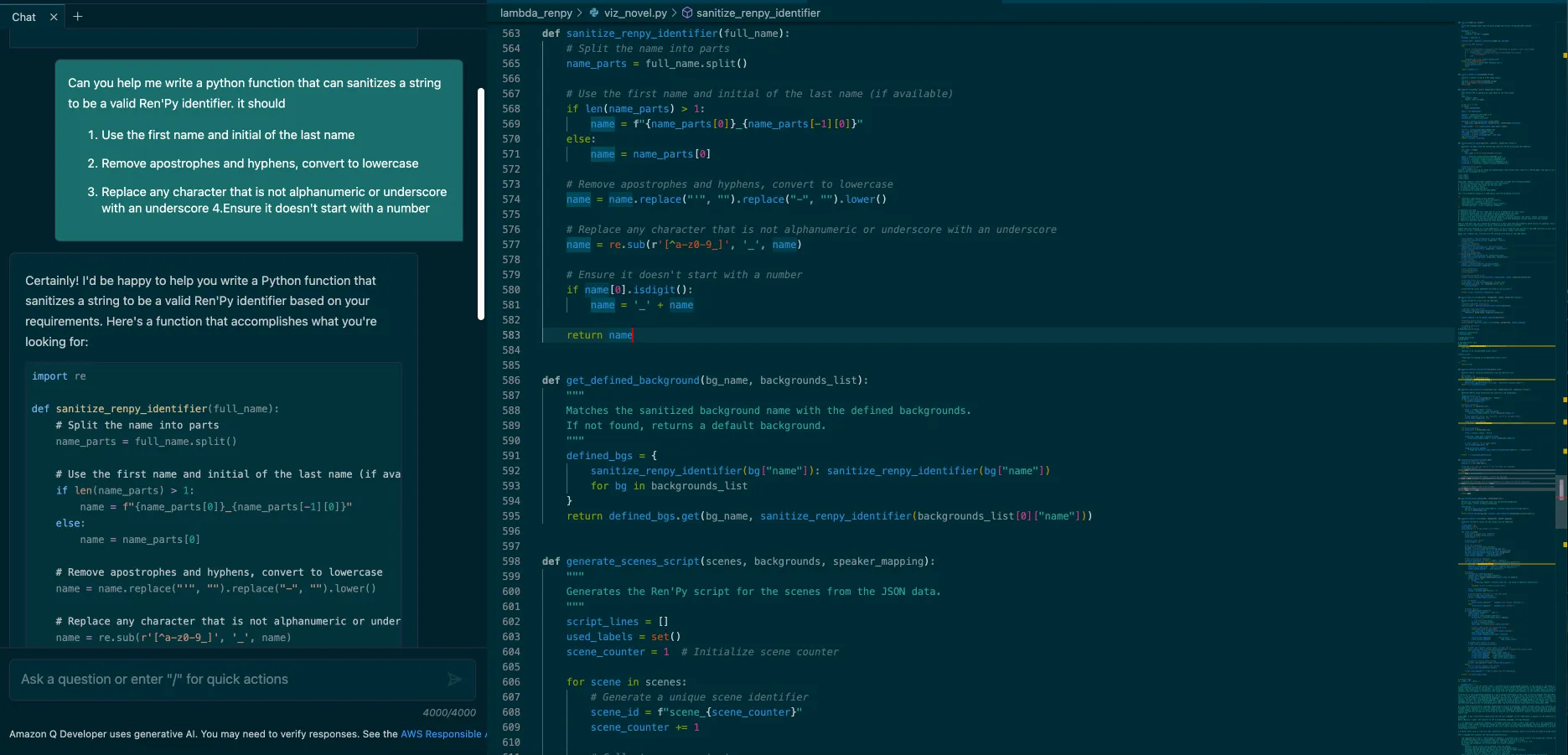
With our compilation environment ready, we needed to ensure our generated scripts wouldn't crash during gameplay. One of the issues I faced that i had make sure all character names in the scripts were valid for the Ren'py engine. Rather than writing validation logic from scratch, I leveraged Amazon Q Developer (which you can use for free with BuilderID ) to create validation functions. You can ask the prompt right in the IDE, and add in the code. Here is the prompt i used:
Can you help me write a python function that can sanitizes a string to be a valid Ren'Py identifier. it should
- Use the first name and initial of the last name
- Remove apostrophes and hyphens, convert to lowercase
- Replace any character that is not alphanumeric or underscore with an underscore
- 4.Ensure it doesn't start with a number
Deploying VisualNovelLM
With all our components working individually, the final challenge was orchestrating everything into a seamless, serverless experience. Using Hugging Face to host a Gradio app is free, and I'm able to provide access to my Lambda function to invoke the pipeline.
Here's what the interface looks like:
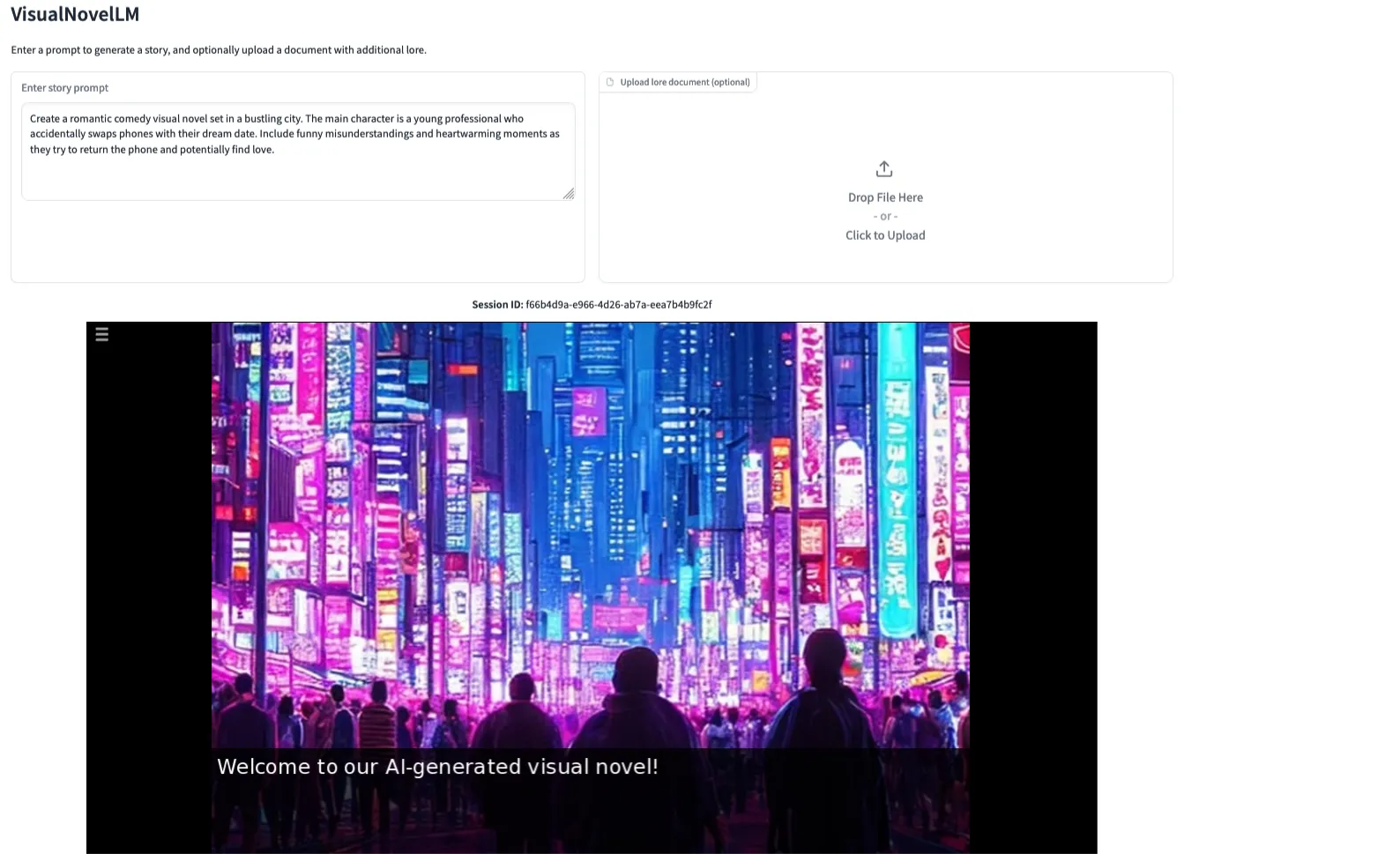
The Gradio app provides a clean, intuitive way for users to:
- Enter their story prompt
- Upload optional lore files
- Generate their visual novel
- Play the finished game
What I love about this setup is its simplicity - there's no need to manage servers or worry about scaling. The Lambda function handles all the heavy lifting, while Hugging Face takes care of serving the interface to users.
Try It Yourself!
Want to build something similar? There's an ongoing game development hackathon where you can showcase your own games: Learn more here .
Have you built something interesting with generative AI? I'd love to hear about it in the comments below!
Enjoyed reading this content? Let the author know!
Your likes, comments, shares, and saves help creators reach more builders.

Loading recommendations
Loading article