

Leveraging on-premises APIs in cloud-based event-driven architectures
Your company owns important, and sometimes critical, private APIs that reside on-premises and you would like to leverage them in workloads deployed on AWS. More precisely, you would like to make them part of your event-driven architecture, triggered by events or part of complex workflows. This blog post explains how you can leverage new capabilities from Amazon EventBridge and AWS Step Functions to easily trigger/call on-premises APIs without compromising on security.

Requirements
- You’re building an event-driven architecture on AWS, leveraging services like Step Functions to build complex workflows and orchestrate different operations, and EventBridge for the event management and to improve the resilience of your system with asynchrony.
- You want to leverage some critical APIs which are not in the cloud but in your datacenter, by choice or because of regulatory or compliance reasons.
- You already have the connection between AWS and your datacenter, be it an AWS site-to-site VPN connection or AWS Direct Connect .
The following figure depicts this situation:
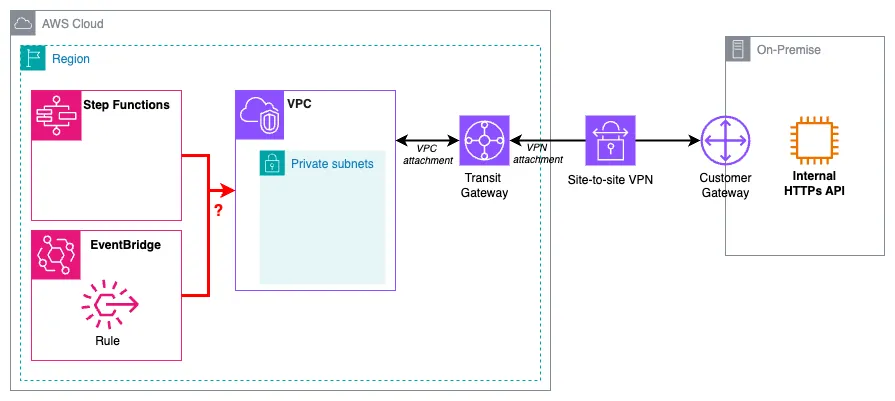
The main question is how to connect these two world securely and efficiently: How the state machine can retrieve information from the API? How events can flow through on premises APIs and notify internal applications?
Naive solution
The first approach, and the most straightforward solution until 2025, was to use a Lambda function in the private subnet of the VPC, as described in the following picture:
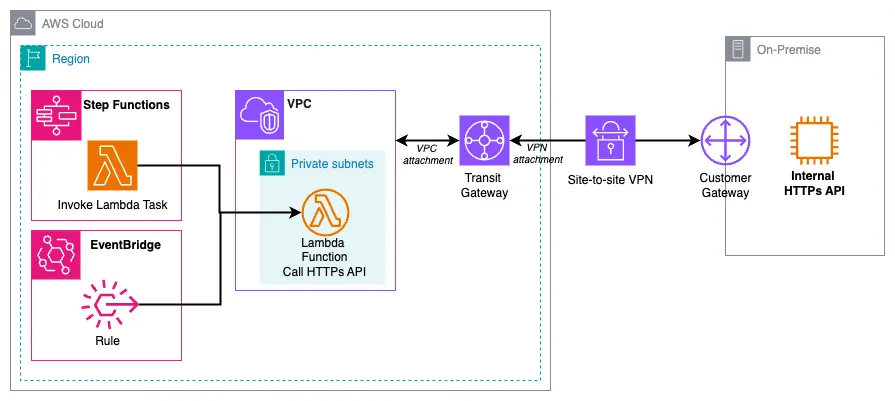
The state machine would use a standard Lambda invocation task and EventBridge would have a rule with a Lambda function as a target. And this Lambda would actually perform the call to the API. Being in the private subnet of the VPC connected to your datacenter ensures there is a route between the function and the internal API.
Pros
As a developper, this is probably the easiest way to achieve such a requirement. You can use any HTTP method to GET data or POST/PUT information, you control the code so you can do what you want.
Cons
There are some drawbacks with this solution:
- Writing custom code adds an additional burden for developers who could focus on business logic rather than integration logic.
- Adding code means you need to maintain it in the long run. Some bugs can be introduced, reducing the resilience of your system. And we speak about one Lambda function in this article but there would be potentially tens or hundreds of them to develop and maintain in your company.
- In some case, if there's no constant load on the API (and the Lambda function), it can introduce some latency due to the cold start of the function.
- Finally, the Lambda function doesn't bring any business value, it's just a passthrough. And we generally say: "Use Lambda to transform data, not to transport data". See this article or this one on direct integration if you want to know more.
Direct integration
EventBridge and Step Functions both have features to call HTTPs endpoints:
- EventBridge API Destinations permit to use an HTTPs endpoint as a target for an EventBridge rule.
- Step Functions provides a dedicated state (HTTP task ) to call HTTP endpoints.
Both are leveraging EventBridge connections to configure the connection (mainly the authentication aspects) to a target HTTP endpoint:
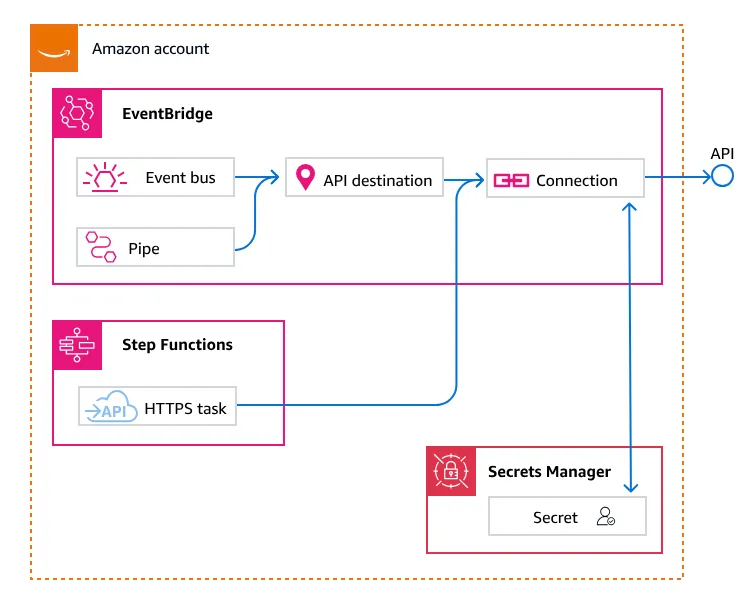
Until recently, connections were only possible to public endpoints (SaaS applications, public webhooks or "open" APIs). The ability to connect to private endpoints was announced at re:Invent 2024. With this feature, you can now call any private API (within a VPC) or internal API (on premises), without a Lambda in between.
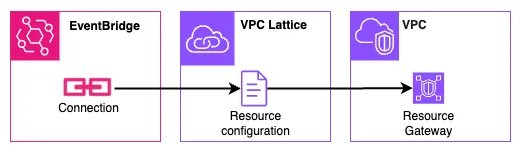
This integration is possible thanks to Amazon VPC Lattice and two new components:
- Resource gateway , which acts as a secured entry point into the VPC to access a ressource: an EC2 instance, an RDS database, a DNS target or a simple IP address
- Resource configuration , which defines a resource (or group of resources), how and who can access it (them). Resource configuration is associated with a resource gateway through which it receives traffic.
When creating an EventBridge Connection, you can now select if you need to connect to a public or private endpoint. When choosing private, you can select the resource configuration. Concretely, this is how it looks like:
Coming back to our initial requirement, we would get the following big picture:
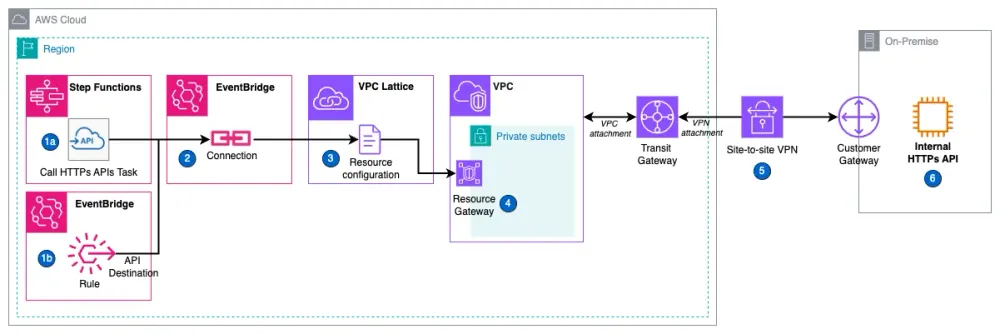
- The HTTP task in Step Functions and the rule with an API destination in EventBridge are leveraging an EventBridge Connection. Each one defines the target endpoint (e.g.
https://my-internal-api.company.com/customer) and HTTP method (e.g.GET) as well as eventual HTTP headers. - The EventBridge Connection defines the authentication mechanism (OAuth, Basic or API Key) for the target endpoint as well as the resource configuration to use for a private/internal endpoint.
- The resource configuration defines the target endpoint itself, generally an on-premise IP address or DNS name (e.g.
my-internal-api.company.com). Resource configuration is associated to a resource gateway. - The resource gateway "opens a door" to the VPC and allow ingress. It is linked to the chosen subnets (generally private) and is also protected by a security group to further protect your backend API. Note: You could stop here at the VPC with a private API deployed in a private subnet.
- The site-to-site VPN or Direct Connect connection establishes the connection between the AWS cloud (generally with a VPN Gateway or a Transit Gateway) and your datacenter (through a Customer Gateway).
- Finally the internal API that resides in your datacenter can be accessed via this "route".
Pros
The direct integration approach offers several advantages over the Lambda function solution:
- Operational Efficiency: There's no need to write and maintain custom code to interact with the on-premises APIs. Developers can focus on building core business functionality instead of integration logic.
- Resilience: By eliminating the custom code, the risk of introducing bugs is minimised.
- Performance: This solution leverages networking components rather than a compute node, which can help reduce latency by avoiding potential cold starts associated with Lambda functions.
Cons
The direct integration approach may appear more complex than the Lambda function solution, as it involves configuring networking components. Developers might find this setup more complex than writing a few lines of Python code. As a software engineer myself, I personally don't like to deal with network configuration and could understand the reluctancy to apply this pattern, as it may require different skillset.
Implementation
This blog post will focus on the left part of the VPC. I assume the network setup (VPN / Direct Connect) is already implemented and you also have a VPC and private subnets connected to your datacenter, with proper route configuration. If this is what you're looking for, I encourage you to look at this documentation .
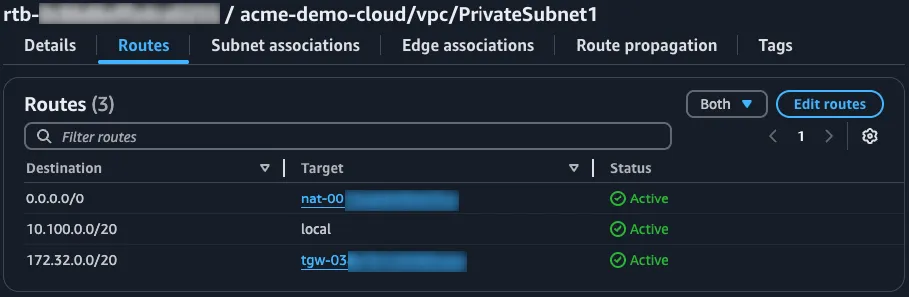
I will provide the terraform code to create the required resources. If you prefer CDK, have a look at this blog post .
Resource Gateway
1
2
3
4
5
6
7
8
9
10
11
12
13
14
15
16
17
18
19
20
21
resource "aws_security_group" "resource_gateway_sg" {
  name_prefix = "resource-gateway-sg"
  description = "Security group for resource gateway to on-premises"
  vpc_id      = var.vpc_id

  egress {
    from_port   = 443
    to_port     = 443
    protocol    = "tcp"
    cidr_blocks = [var.on_premises_cidr]
    description = "Allow HTTPS traffic to on-premises"
  }
}

resource "aws_vpclattice_resource_gateway" "on_premise_resource_gateway" {
  name                = "resource-gateway"
  ip_address_type     = "IPV4"
  vpc_id              = var.vpc_id
  security_group_ids  = [aws_security_group.resource_gateway_sg.id]
  subnet_ids          = var.private_subnet_ids
}
We first need to define the security group used by the resource gateway. Here, we allow HTTP and HTTPS egress. Then we create the resource gateway itself, linked to the VPC, private subnets and security group created before.
Resource configuration
1
2
3
4
5
6
7
8
9
10
11
12
13
14
15
16
17
18
19
20
resource "aws_vpclattice_resource_configuration" "on_premise_resource_configuration" {
  name                          = "resource-config"
  port_ranges                   = ["443"]
  protocol                      = "TCP"
  resource_gateway_identifier   = aws_vpclattice_resource_gateway.on_premise_resource_gateway.id
  type                          = "SINGLE"

  resource_configuration_definition {
    # uncomment if using ip address
    # ip_resource {
    #   ip_address = var.api_ip_address
    # }

    # remove if using ip address
    dns_resource {
      domain_name      = var.api_domain_name
      ip_address_type  = "IPV4"
    }
  }
}
Now comes the definition of the "resource" you want to communicate with, via the gateway created before, and thanks to a resource configuration . In the example above, we use a
dns_resource, specifying the domaine name (e.g. my-internal-api.company.com). If you don't have it configured, you can directly use an ip_resource (IP address) from your on-premise network.Nota bene: When using a domain name, this one must be public for VPC Lattice, the target API must use HTTPS and the certificate must be trusted/valid publicly (root CA).
EventBridge Connection
1
2
3
4
5
6
7
8
9
10
11
12
13
14
15
16
17
18
19
20
21
22
23
data "aws_secretsmanager_secret_version" "api_key" {
  secret_id = var.api_key_secret_arn
}

resource "aws_cloudwatch_event_connection" "on_premise_connection" {
  name               = "on-premise-connection"
  description        = "Connection to on premises API"
  authorization_type = "API_KEY"

  auth_parameters {
    # configure basic or oauth instead of api_key, depending on your authorization mechanism
    api_key {
      key   = "x-api-key"
      value = data.aws_secretsmanager_secret_version.api_key.secret_string
    }
  }

  invocation_connectivity_parameters {
    resource_parameters {
      resource_configuration_arn = aws_vpclattice_resource_configuration.on_premise_resource_configuration.arn
    }
  }
}
We can now create the EventBridge connection . In this case, we have an API key protecting the internal API. This key has been made available in AWS Secrets Manager , it is retrieved in the first 3 lines and used in the
auth_parameters of the connection. The link to the resource configuration, and thus to the on-premises API, is done on lines 18-22. Once deployed, it can take a minute or two for the connection to be "Active" (more on connection states ).And that's it! That's really just it. With this connection established, you can securely call your on-premises API from Step Functions (with an HTTP Task) or EventBridge (with API Destination).
Step Function call
Here is a very basic state machine definition that leverages the connection created before (line 13):
1
2
3
4
5
6
7
8
9
10
11
12
13
14
15
16
17
18
19
20
21
22
23
24
25
26
27
28
29
30
31
32
33
34
{
    "QueryLanguage": "JSONata",
    "Comment": "Call On-Premises API",
    "StartAt": "DirectHTTPCall",
    "States": {
        "DirectHTTPCall": {
            "Type": "Task",
            "Resource": "arn:aws:states:::http:invoke",
            "Arguments": {
                "ApiEndpoint": "${GetHelloEndpoint}",
                "Method": "GET",
                "InvocationConfig": {
                    "ConnectionArn": "${EventBridgeConnectionArn}"
                }
            },
            "Catch": [
                {
                    "ErrorEquals": [
                        "States.ALL"
                    ],
                    "Next": "HandleError"
                }
            ],
            "Next": "Success"
        },
        "HandleError": {
            "Type": "Fail",
            "Cause": "Direct API call failed"
        },
        "Success": {
            "Type": "Succeed"
        }
    }
}
And the terraform code that provision it. You can notice how we define the endpoint, using the api domain name, and adding the target endpoint (line 7) :
1
2
3
4
5
6
7
8
9
10
11
12
13
14
15
16
17
18
19
20
21
resource "aws_sfn_state_machine" "state_machine" {
  name     = "state-machine-call-onprem"
  role_arn = aws_iam_role.state_machine.arn

  definition = templatefile("${path.module}/state-machine.asl.json", {
    EventBridgeConnectionArn = var.connection_arn
    GetHelloEndpoint         = "https://${var.api_domain_name}/hello"
  })

  logging_configuration {
    log_destination        = "${aws_cloudwatch_log_group.state_machine.arn}:*"
    include_execution_data = true
    level                 = "ALL"
  }

  tracing_configuration {
    enabled = true
  }

  type = "EXPRESS"
}
Note that the state machine needs some specific permissions:
- The ability to invoke the HTTP endpoint (lines 8-18). Here we restrict this permission to our api domain name only, further enhancing the security.
- The ability to retrieve the EventBridge connection (lines 19-24) and leverage it.
- The ability to retrieve the secrets associated with the connection (lines 25-33). Note this is not the secret I mentioned above. This one is created and managed by EventBridge to store the authorization information.
1
2
3
4
5
6
7
8
9
10
11
12
13
14
15
16
17
18
19
20
21
22
23
24
25
26
27
28
29
30
31
32
33
34
35
36
resource "aws_iam_role_policy" "state_machine" {
  name = "state-machine-policy"
  role = aws_iam_role.state_machine.id

  policy = jsonencode({
    Version = "2012-10-17"
    Statement = [
      {
        Sid      = "invokeHTTP"
        Effect   = "Allow"
        Action   = "states:InvokeHTTPEndpoint"
        Resource = "*"
        Condition = {
          StringLike = {
            "states:HTTPEndpoint" = "https://${var.api_domain_name}/*"
          }
        }
      },
      {
        Sid    = "retrieveEBConnection"
        Effect = "Allow"
        Action = "events:RetrieveConnectionCredentials"
        Resource = var.connection_arn
      },
      {
        Sid    = "retrieveEBSecretForConnection"
        Effect = "Allow"
        Action = [
          "secretsmanager:GetSecretValue",
          "secretsmanager:DescribeSecret"
        ]
        Resource = var.connection_secret_arn
      }
    ]
  })
}
Executing the Step Functions, you should retrieve the result of the API call to your on premises API:
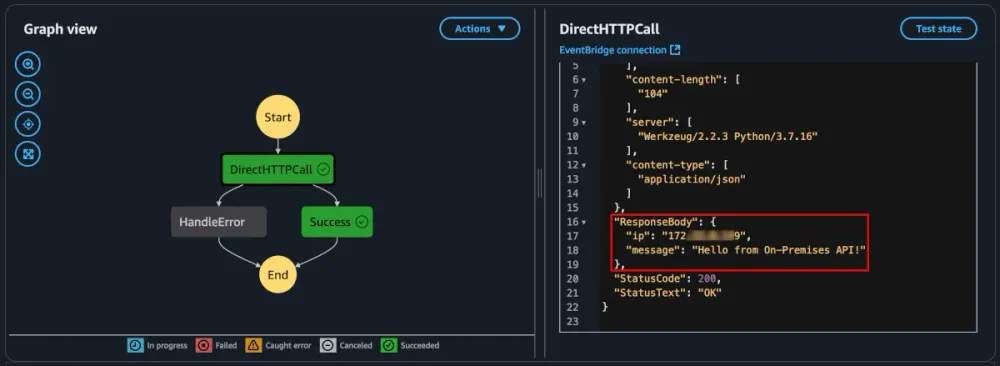
You can find the full code source of this example on GitHub . A CDK version is also available. (Note that these links are referring to pull requests for serverlessland patterns and are currently in review).
Conclusion
In this blog post, we've seen how to securely connect to on premises API from Step Functions and EventBridge, leveraging VPC Lattice new components. It was already possible to have workloads in the cloud interacting with on premises API, through Lambda functions. But this new mechanism provides a more consistant, secure and resilient integration, by removing integration code. It enables companies to further improve and modernise their event-driven architecture by integrating seamlessly with public and private APIs.
Enjoyed reading this content? Let the author know!
Your likes, comments, shares, and saves help creators reach more builders.

Loading recommendations
Loading article