
Chat with your AWS Bill
Get details about your AWS bill and recommendation on cost saving using Amazon Q and Cost optimisation best practices


In this blog post, I’ll walk you through a simple demo to chat with your AWS bill—break it down, analyze it, and get cost optimization recommendations based on the AWS Well-Architected best practices. This uses the latest MCP support recently added to the Amazon Q CLI.
What can you ask?
With this setup, you can ask Amazon Q natural language questions like:
- What is my storage cost across all regions?
- What is my total spend in the last month?
- Based on my S3 usage, can you recommend ways to reduce costs?
- …and much more.
Amazon Q will understand your question using one MCP server, then route it to another server that can fetch and calculate the data. In some cases, it may even generate and run scripts on your behalf to get the answer. For example, if you ask for the total cost of EBS storage across all regions, it may need to gather and compute data that’s not directly available from the Cost Explorer API.
The architecture is a standard MCP server architecture
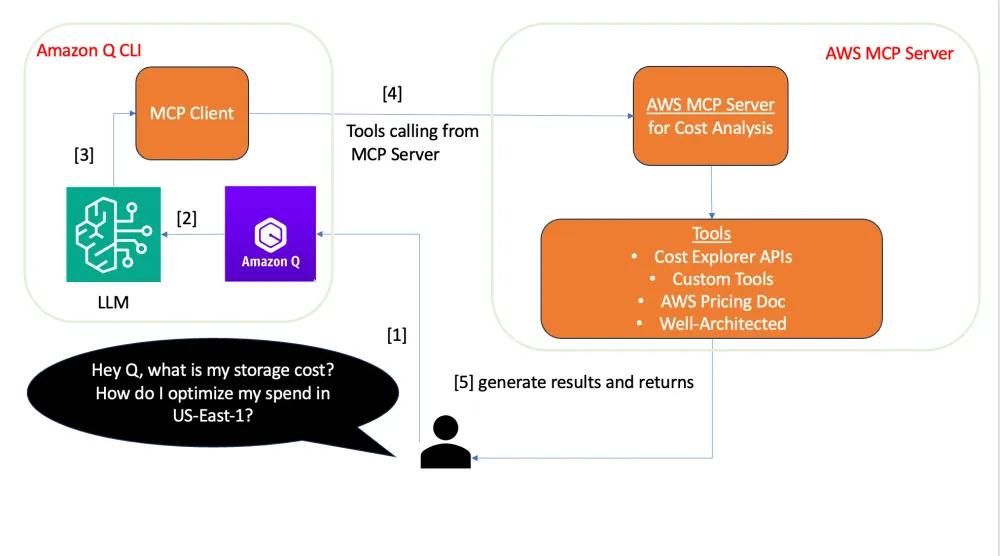
The setup is simple
Here’s how to do it on macOS:
🧱 Step 1: Set up Amazon Q CLI
- Install the Amazon Q CLI
- Run
q login
- Run
q chat
⚙️ Step 2: Configure MCP servers
To enable cost optimization queries, you need to link Amazon Q with the correct MCP servers. Do this by editing (or creating) the following file:
~/.aws/amazonq/mcp.json Paste the following configuration:
{ "mcpServers": { "awslabs.core-mcp-server": { "command": "/Users/ekhiyami/.local/bin/uvx", "args": ["awslabs.core-mcp-server@latest"], "env": { "FASTMCP_LOG_LEVEL": "ERROR" }, "autoApprove": ["prompt_understanding"], "disabled": false }, "awslabs.cost-analysis-mcp-server": { "command": "/Users/ekhiyami/.local/bin/uvx", "args": ["awslabs.cost-analysis-mcp-server@latest"], "env": { "FASTMCP_LOG_LEVEL": "ERROR", "AWS_PROFILE": "default" }, "autoApprove": ["analyze_cdk_project"], "disabled": false } }}
restart your session and start asking questions about your AWS spend. Check the video above for examples.
🔗 Helpful Resources
Enjoyed reading this content? Let the author know!
Your likes, comments, shares, and saves help creators reach more builders.

Loading recommendations
Loading article