AWS Builder Center

Reduce ETL Time by Converting Sequential Code to Parallel AWS Lambda Execution

Using the AWS Lambda functions to reduce the ETL time and make the execution parallel

Bridging Data and AI ✨
Few years back, when I was quite fresh in the cloud world, I was given an ETL problem that the current code is written in Java that executes on linux server and the whole ETL time was more than 8 hours minimum. As a cloud enthusiastic, my challenge was to reduce the ETL time.
So, the code as using Google Adwords API to extract the data and store on servers where the data was send to a data warehouse. The whole process used Pentaho tool to perform the ETL.
For quick resolution, I had 2 options: either to use AWS Lambda or AWS Glue. I choose AWS Lambda because the ETL time per Google Adwords account would never exceed 10 min in worst case.
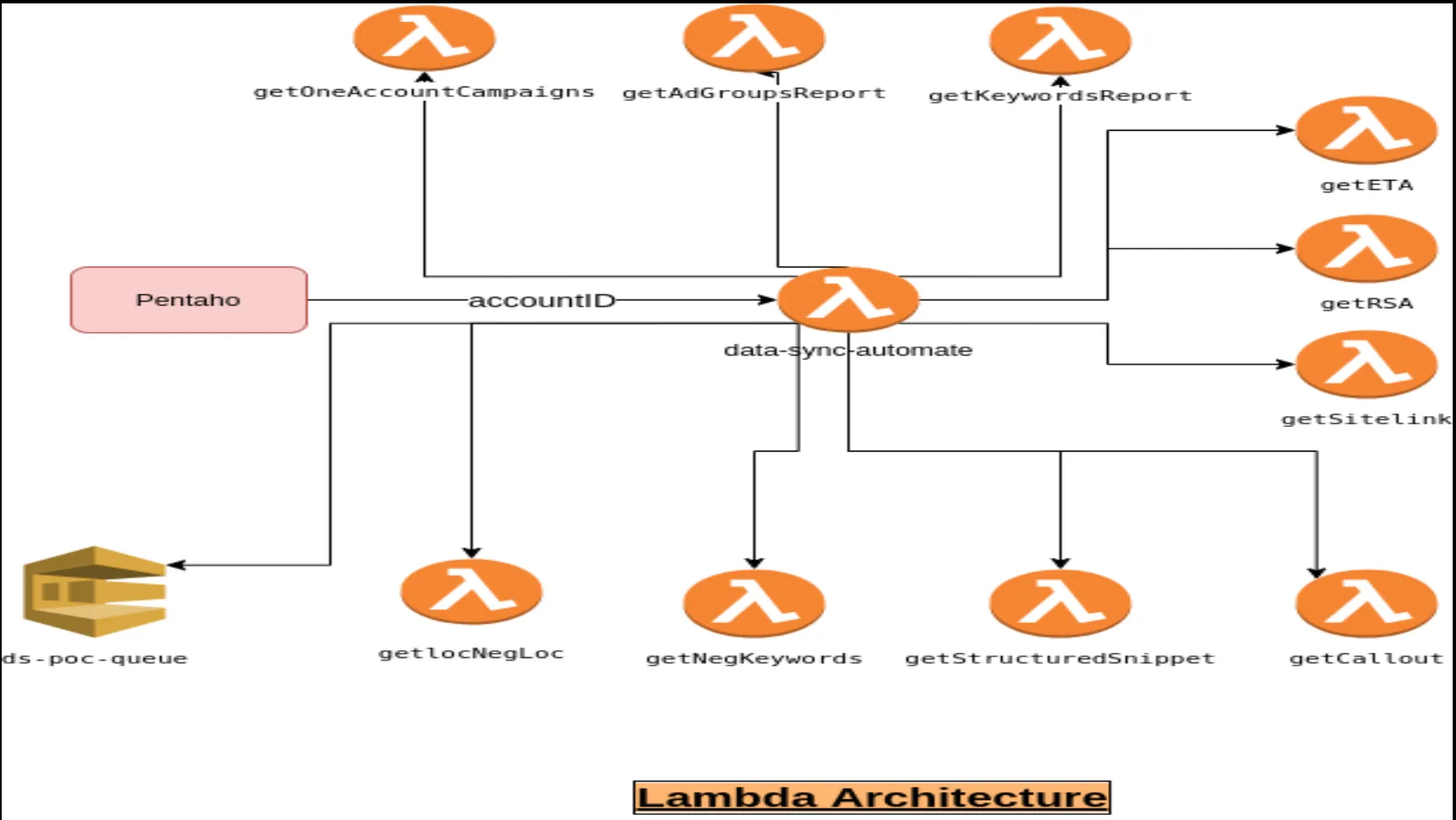
I made an architecture as below:
Lambda Architecture
  1. The Pentaho tool would invoke the AWS Lambda function named 'data-sync-automate' with accountID as payload.
  2. The function will execute the 10 other AWS Lambdas, each associated with a metrics of Google-Ads, fetch the records and store in S3.
  3. Once fetched, the AWS Lambda function 'data-sync-automate' will send a message in SQS.
  4. Pentaho will fetch the message and download the data from S3 for that particular accountID.
The whole ETL time was reduced from 8 hours to less than 50 minutes.
Below is an example how to fetch Google Adwords Keyword Report:
1
2
3
4
5
6
7
8
9
10
11
12
13
14
15
16
17
18
19
20
21
22
23
24
25
26
27
28
29
30
31
32
33
34
35
36
37
38
39
40
41
42
43
44
45
46
47
48
49
50
51
52
53
54
55
56
57
58
59
60
61
62
63
64
65
66
67
68
69
70
71
72
73
74
75
76
77
78
79
80
81
82
83
84
85
86
87
88
89
90
91
import os
import boto3
import json
from google.ads.google_ads.client import GoogleAdsClient
from google.ads.google_ads.errors import GoogleAdsException

# Initialize S3 client
s3_client = boto3.client('s3')

def lambda_handler(event, context):
# Environment variables for configuration
developer_token = os.environ['GOOGLE_ADS_DEVELOPER_TOKEN']
client_id = os.environ['GOOGLE_ADS_CLIENT_ID']
client_secret = os.environ['GOOGLE_ADS_CLIENT_SECRET']
refresh_token = os.environ['GOOGLE_ADS_REFRESH_TOKEN']
login_customer_id = os.environ['GOOGLE_ADS_LOGIN_CUSTOMER_ID']
s3_bucket_name = os.environ['S3_BUCKET_NAME']

# Initialize Google Ads client
client = GoogleAdsClient.load_from_dict({
'developer_token': developer_token,
'client_id': client_id,
'client_secret': client_secret,
'refresh_token': refresh_token,
'login_customer_id': login_customer_id,
'use_proto_plus': True
})

# Define the customer ID
customer_id = 'YOUR_CUSTOMER_ID'

# Define the Google Ads Query Language (GAQL) query for keywords report
query = """
SELECT
campaign.id,
ad_group.id,
ad_group_criterion.keyword.text,
ad_group_criterion.keyword.match_type,
metrics.impressions,
metrics.clicks,
metrics.cost_micros
FROM
keyword_view
WHERE
segments.date DURING LAST_30_DAYS
LIMIT 100
"""


try:
# Fetch the keywords report data
response_data = fetch_keywords_report(client, customer_id, query)

# Upload the data to S3
upload_to_s3(s3_bucket_name, 'google_ads_keywords_report.json', json.dumps(response_data))

return {
'statusCode': 200,
'body': json.dumps('Keywords report fetched and stored in S3 successfully!')
}
except GoogleAdsException as ex:
return {
'statusCode': 500,
'body': f"An error occurred: {ex}"
}

def fetch_keywords_report(client, customer_id, query):
ga_service = client.get_service("GoogleAdsService")
response = ga_service.search(customer_id=customer_id, query=query)
results = []

# Process the response
for row in response:
results.append({
'campaign_id': row.campaign.id,
'ad_group_id': row.ad_group.id,
'keyword_text': row.ad_group_criterion.keyword.text,
'match_type': row.ad_group_criterion.keyword.match_type.name,
'impressions': row.metrics.impressions,
'clicks': row.metrics.clicks,
'cost_micros': row.metrics.cost_micros
})

return results

def upload_to_s3(bucket_name, file_name, data):
s3_client.put_object(
Bucket=bucket_name,
Key=file_name,
Body=data
)
The code is short and simple and it added a great value in the whole ETL process and made the clients happy.
 
Any opinions in this article are those of the individual author and may not reflect the opinions of AWS.
Enjoyed reading this content? Let the author know!

Your likes, comments, shares, and saves help creators reach more builders.

Loading recommendations

Loading article