
AWS Lambda Deployment using CodePipeline and CodeBuild
Streamline your serverless deployment with AWS CodePipeline and CodeBuild. This blog will walk you through creating a fully automated pipeline that builds, tests, and deploys your Lambda functions with ease. Say goodbye to manual deployment headaches and embrace the power of continuous integration and delivery.

Introduction
Setting up a robust Continuous Integration and Continuous Deployment (CI/CD) pipeline is essential for automating code deployments, ensuring consistent delivery, and minimizing manual intervention. This blog outlines the process of setting up a CI/CD pipeline using AWS CodePipeline and AWS CodeBuild to deploy code from a Bitbucket repository to an AWS Lambda function.
Prerequisites
Before setting up the CI/CD pipeline, ensure that the following prerequisites are met:
- AWS Account: Ensure you have access to an AWS account with the necessary permissions to create and manage AWS CodePipeline, CodeBuild, and Lambda functions.
- Bitbucket Repository: Your application's source code should be stored in a Bitbucket repository.
- Service Account: A service account with Bitbucket Administrator Access is required for connecting to the Bitbucket repository and enabling webhook functionality.
Setting up AWS CodePipeline
Before creating a CodePipeline project, confirm that the AWS account has the following user roles and permissions:
AWS User Role Permissions:
AWSCodeBuildAdminAccessAWSCodeDeployFullAccessAWSCodeStarFullAccessIAMReadOnlyAccessSystemAdministrator
InlinePolicy:
1
2
3
4
5
6
7
8
9
10
11
12
13
14
15
16
17
18
19
20
21
22
23
24
25
26
27
28
29
30
{
"Version": "2012-10-17",
"Statement": [
{
"Sid": "DeveloperIntuitiveAccess",
"Effect": "Allow",
"Action": [
"codestar-connections:*",
"codestar-notifications:*",
"codebuild:ListProjects",
"iam:GetRole",
"iam:PassRole",
"iam:CreateRole",
"iam:CreatePolicy",
"iam:DeletePolicyVersion",
"iam:AttachRolePolicy",
"iam:AddRoleToInstanceProfile",
"iam:CreateInstanceProfile",
"iam:ListAttachedRolePolicies",
"iam:ListPolicies",
"iam:ListRoles",
"iam:CreatePolicyVersion",
"iam:PutRolePolicy",
"iam:UpdateAssumeRolePolicy",
"iam:CreateServiceLinkedRole"
],
"Resource": "*"
}
]
}
Steps to Create the CI/CD Pipeline
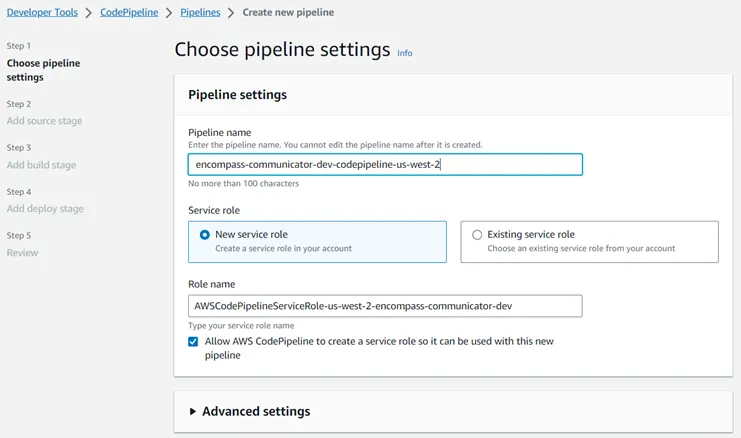
1. Create a CodePipeline:
- Open the AWS Management Console and navigate to AWS CodePipeline.
- Click "Create pipeline" and follow the setup wizard.
- Choose a pipeline name and select Bitbucket as the source provider.
2. Configuring the Source Stage
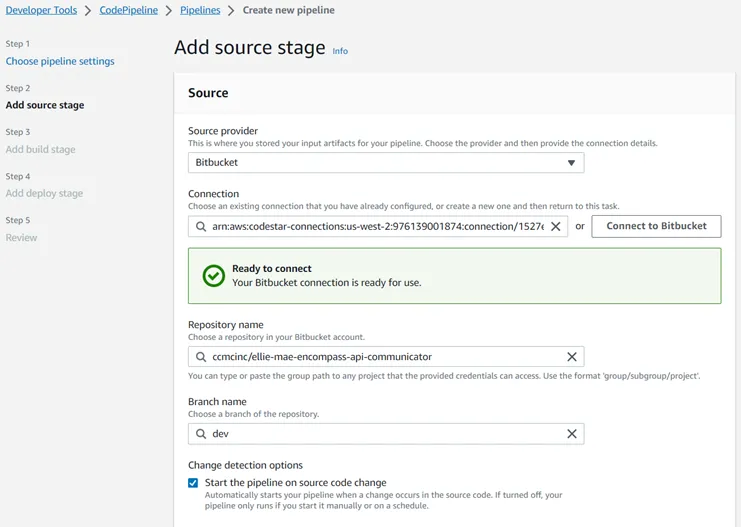
- Connect your Bitbucket repository.
- Select the branch you want the pipeline to monitor for changes.
- Ensure the service account connected to Bitbucket has administrative rights to allow webhook configuration.
3. Adding the Build Stage
- In the pipeline settings, add a build stage.
- Configure the build project by setting up the environment to build and deploy the application onto AWS Lambda using the
buildspec.ymlfile in your repository.
Configuring the CodeBuild Project
During the build stage setup, AWS CodeBuild will generate a default service role. The following policy must be attached to this role, specifying the Lambda function ARN in the
Resource block:CodeBuild Default Service Role Policy:
1
2
3
4
5
6
7
8
9
10
11
12
13
14
15
16
17
18
19
20
21
22
23
24
25
{
    "Version": "2012-10-17",
    "Statement": [
        {
            "Sid": "Statement1",
            "Effect": "Allow",
            "Action": [
                "lambda:AddPermission",
                "lambda:RemovePermission",
                "lambda:CreateAlias",
                "lambda:UpdateAlias",
                "lambda:DeleteAlias",
                "lambda:UpdateFunctionCode",
                "lambda:UpdateFunctionConfiguration",
                "lambda:PutFunctionConcurrency",
                "lambda:DeleteFunctionConcurrency",
                "lambda:PublishVersion",
                "iam:PassRole"
            ],
            "Resource": [
                "<<function arn>>"
            ]
        }
    ]
}
• Create a CodeBuild project that specifies the build environment.
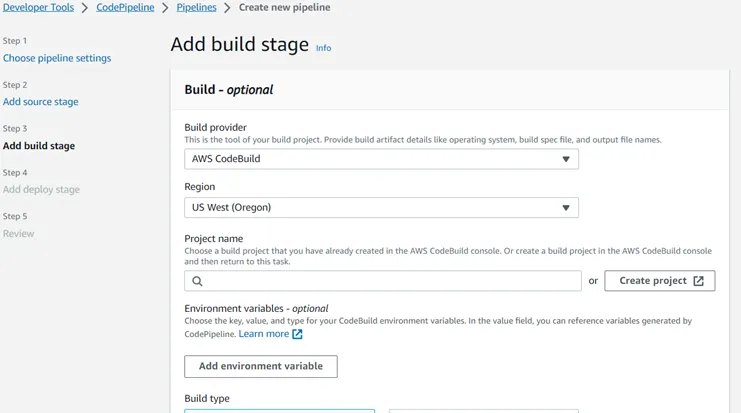
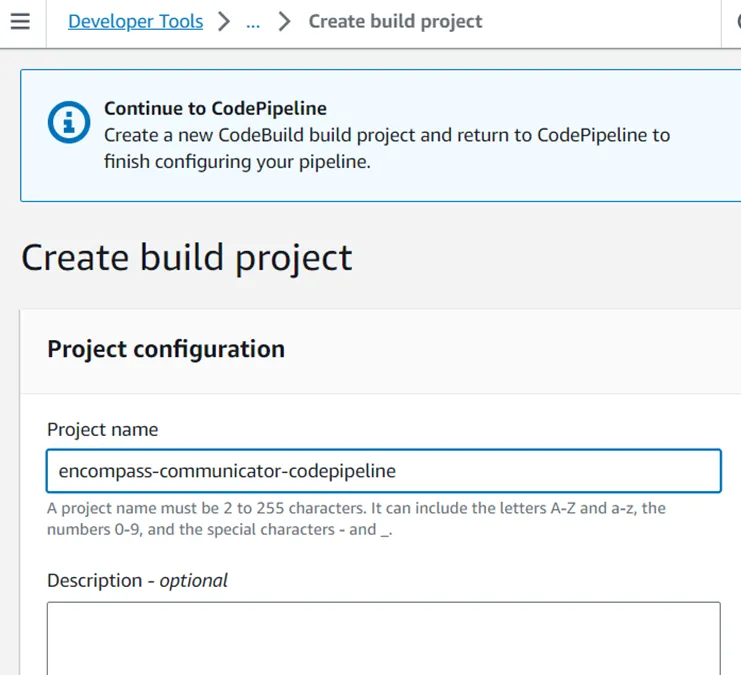
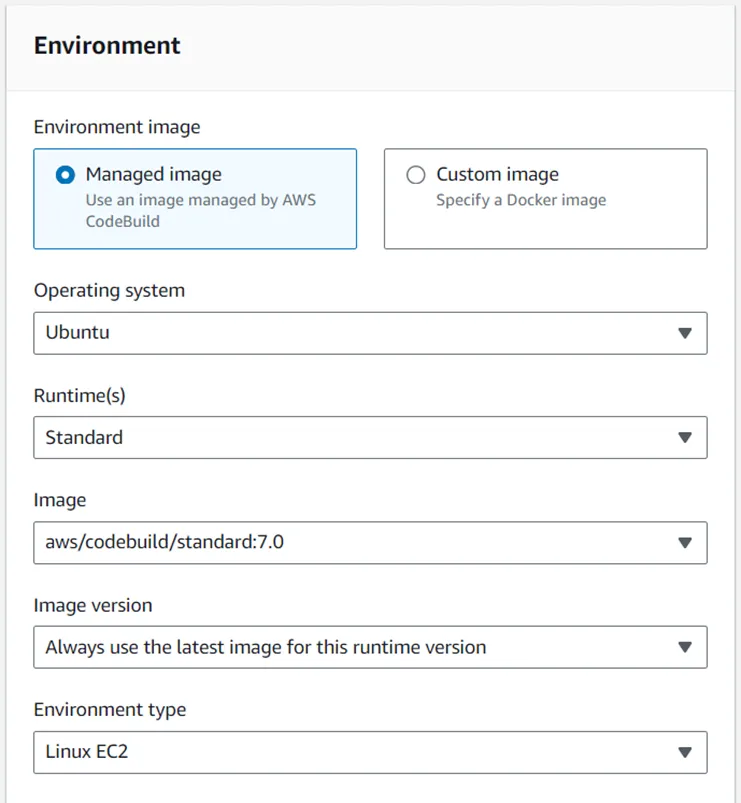
The above Environment specifies the code build agent configuration, selecting the operating system to build the application and deploy it onto the AWS Lambda using buildspec.yml file available inside the application repository.
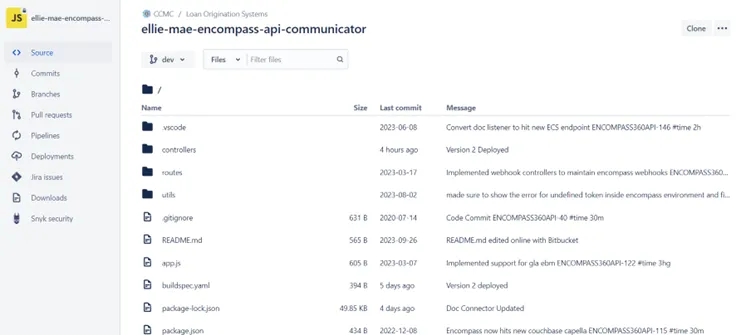
Configuring the Build Stage with buildspec.yml
The build process is defined in the
buildspec.yml file. Below is an example configuration:1
2
3
4
5
6
7
8
9
10
11
12
13
14
15
version: 0.2
phases:
install:
commands:
pre_build:
commands:
build:
commands:
- npm install
- npm test
- zip -r lambda-package.zip ./ -x buildspec.yml
post_build:
commands:
- aws lambda update-function-code --function-name ellie-mae-encompass-api-communicator --zip-file fileb://lambda-package.zip
- (sleep: 10; aws lambda update-function-configuration --handler app.server --function-name ellie-mae-encompass-api-communicator)Network Isolation
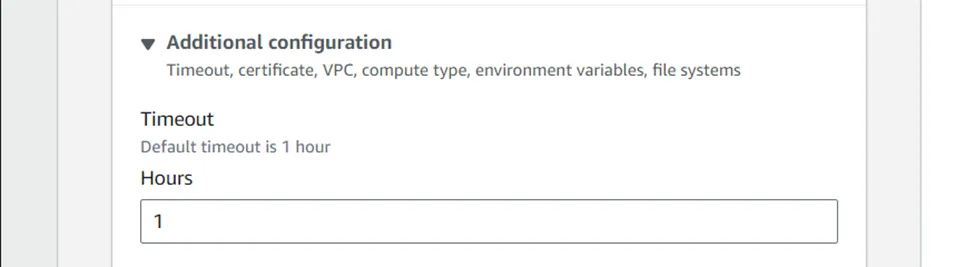
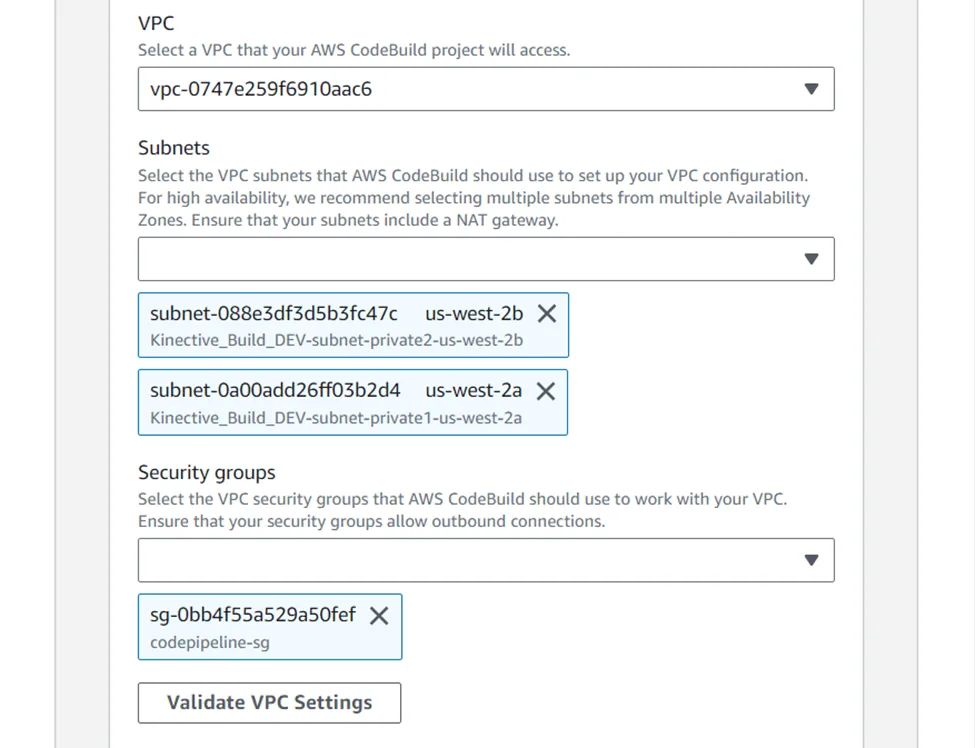
For additional security, configure the AWS build agent to be isolated within the same VPC as the Lambda function.
Pipeline Execution
Once the pipeline is set up, it will automatically trigger whenever changes are pushed or merged into the specified Bitbucket branch. The pipeline will execute the following steps:
- Source Stage: Detects changes in the Bitbucket repository.
- Build Stage (CodeBuild): Executes the build process defined in the
buildspec.ymlfile, including installing dependencies, packaging the Lambda function code, and uploading it to AWS Lambda.
Monitoring and Troubleshooting
- Monitor pipeline executions through the AWS CodePipeline console.
- Check build logs in the AWS CodeBuild console for troubleshooting issues.
- Ensure that IAM permissions are properly configured for the roles used by AWS Lambda, CodeBuild, and CodePipeline.
Bitbucket PR Best Practices
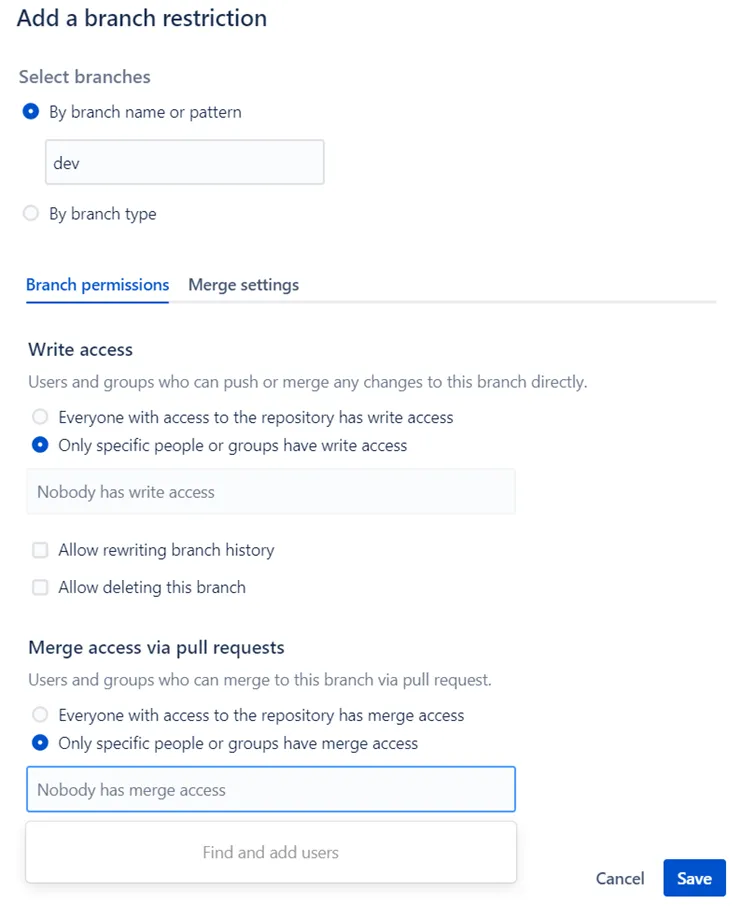
Apply branching restrictions to the repository and set up a designated approver or group to validate and merge pull requests.
- Select any repository where we need to apply branching restrictions.
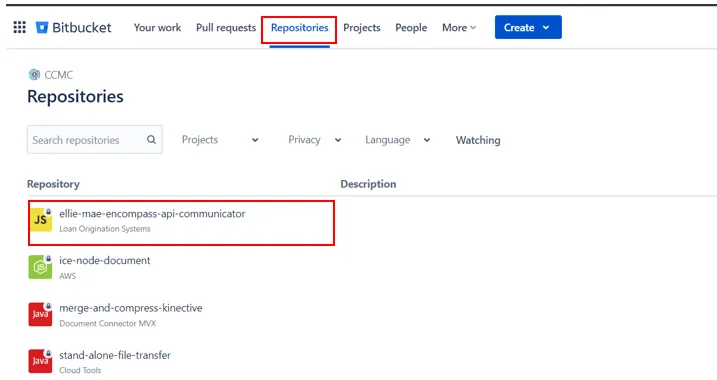
- Go to “Repository settings”
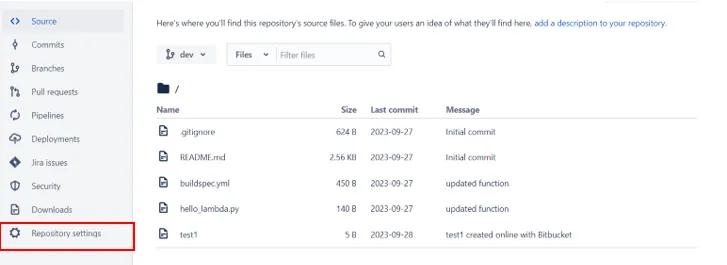
- Click on “Branch Restrictions” and then “Add a branch restriction”.
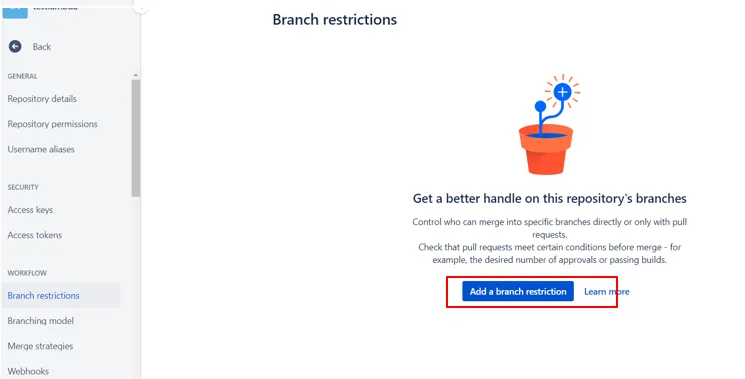
- Add the name of “Approver” who should have the access. The approver user or group will validate the PR and merge it.
Conclusion
Following this blog, you can efficiently set up a CI/CD pipeline that automates the deployment of your Bitbucket-hosted code to an AWS Lambda function using AWS CodePipeline and CodeBuild.
Enjoyed reading this content? Let the author know!
Your likes, comments, shares, and saves help creators reach more builders.

Loading recommendations
Loading article