
Deploying a Private Application on AWS
Deploy a secure, private AWS application using Site-to-Site VPN with multi-region VPCs, load balancing, and Terraform IaC for an enterprise-level setup.


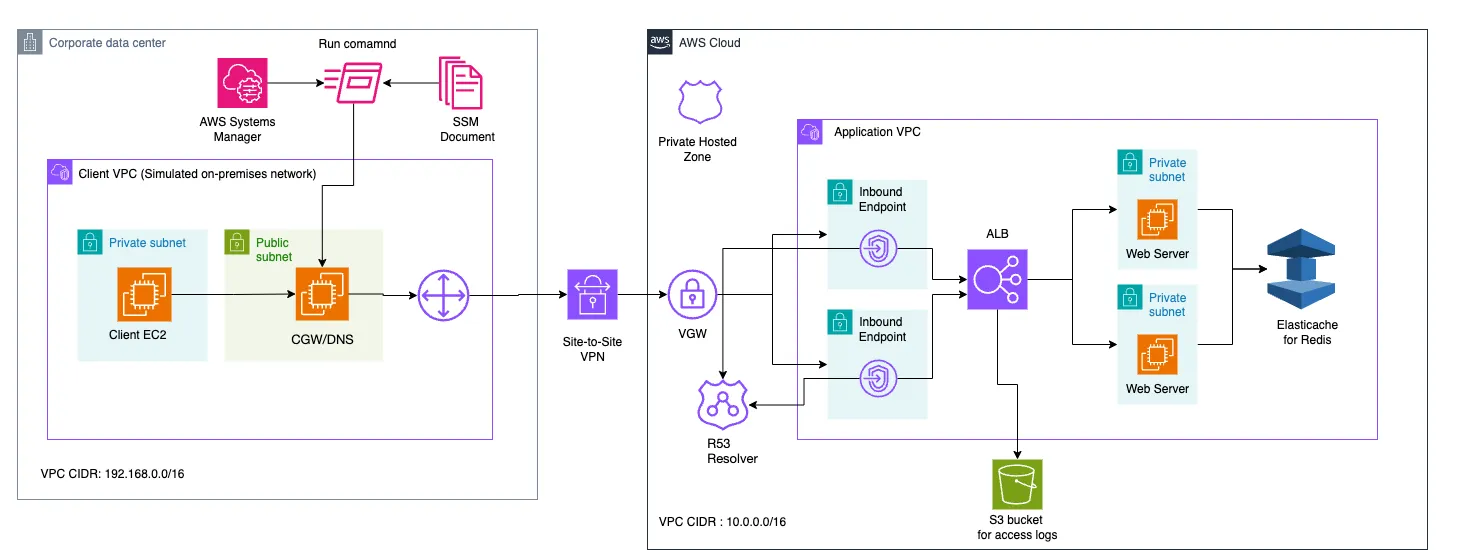
This project showcases an advanced cloud architecture that deploys a private application on AWS, accessible only through a secure Site-to-Site VPN connection. The setup simulates an enterprise environment with the following key components:
- Client Network Simulation: A VPC in the us-east-2 region acts as the on-premises network.
- Application Hosting: A separate VPC in us-east-1 hosts the private application.
- Secure Connectivity: An AWS Site-to-Site VPN bridges the two VPCs, ensuring encrypted communication.
Project Architecture
Infrastructure Components
- Client VPC :
- Consists of two subnets: a private subnet hosting a client EC2 instance, and a public subnet hosting a Customer Gateway (CGW) instance.
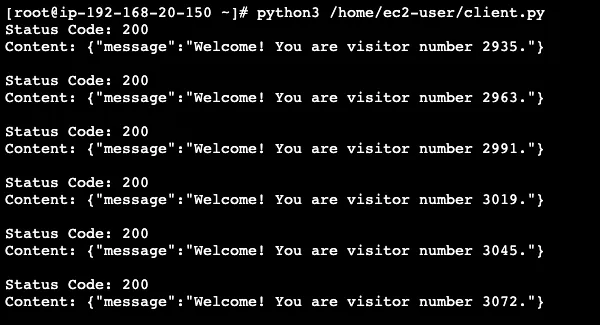
- The client EC2 instance connects to the application using the DNS name access.myapp.internal through a Python script that sends GET requests every 5 seconds.
- The CGW instance serves as the gateway for the Client VPC, handling VPN termination with OpenSwan and DNS functionalities with dnsmasq.
- Application VPC :
- Includes an Amazon Route 53 (R53) inbound resolver endpoint to allow inbound traffic from the DNS server located in the on-premises network.
- An Application Load Balancer (ALB) forwards traffic to two EC2 instances running the web application, with access logs enabled.
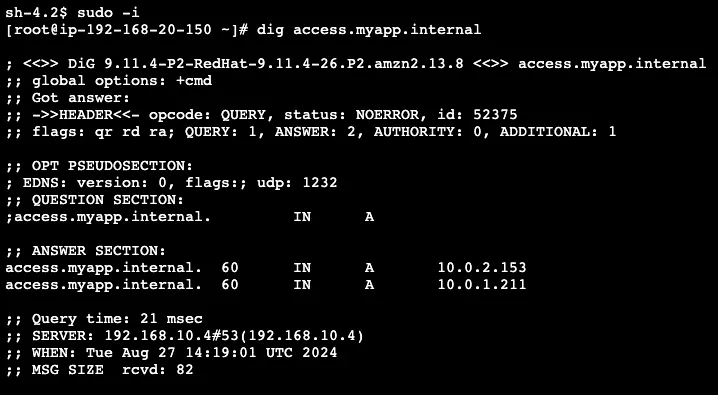
- A Private Hosted Zone in Route 53 with an alias record matching access.myapp.internal to the ALB's FQDN.
- The web application is a Flask application with the following functionality:
- Connects to an ElastiCache Redis instance using the REDIS_HOST environment variable.
- Defines two routes: /health (returns a JSON response with the status "healthy") and / (the root route for visitor counting).
- When the root route is accessed, the application retrieves the current visitor count from Redis, increments it, stores the new count, generates a welcome message, and returns a JSON response with the message.
- Logs any exceptions and returns a JSON response with the error message and a 500 HTTP status code.
- Runs on 0.0.0.0 (all available interfaces) and listens on port 5000.
Implementation
The project is implemented using Terraform, an Infrastructure as Code (IaC) tool that enables easy deployment and management of AWS resources. The Terraform configuration is organized into modules for better code organization and reusability. The main components of the project structure include:
main.tf: The main Terraform file that orchestrates the deployment of the entire infrastructure across the two AWS regions.modules/: A directory containing various Terraform modules responsible for creating and configuring specific resources, such as VPCs, EC2 instances, ALB, ElastiCache, Route53, and more.user_data_scripts/: Directory containing user data scripts (app_user_data.shandclient_user_data.sh) executed on the respective EC2 instances during launch for tasks like installing Docker, building the Flask application Docker image, running the application container, and configuring the client instance for DNS resolution.variables.tf: File defining the input variables required for the Terraform configuration, allowing customization of the deployment based on specific requirements.
Deployment Process
The main Terraform file (
main.tf) orchestrates the deployment of the entire infrastructure by following these steps:- Provider Configuration :
1
2
3
4
5
6
7
8
9
10
11
12
13
14
15
16
17
18
terraform {
  required_providers {
    aws = {
      source  = "hashicorp/aws"
      version = "~> 4.67.0"
    }
  }
}

provider "aws" {
  alias  = "us-east-1"
  region = "us-east-1"
}

provider "aws" {
  alias  = "us-east-2"
  region = "us-east-2"
}- VPC and Networking Setup
1
2
3
4
5
6
7
8
9
10
11
12
13
14
15
16
17
18
19
20
21
22
23
module "app_vpc" {
  source               = "./modules/app_vpc"
  vpc_cidr             = var.app_vpc_cidr
  vpc_name             = var.app_vpc_name
  private_subnet_count = var.app_vpc_private_subnet_count
  public_subnet_count  = 1
  client_vpc_cidr      = var.client_vpc_cidr
  providers = {
    aws = aws.us-east-1
  }
}

module "client_vpc" {
  source               = "./modules/client_vpc"
  vpc_cidr             = var.client_vpc_cidr
  vpc_name             = var.client_vpc_name
  private_subnet_count = 1
  public_subnet_count  = 1
  app_vpc_cidr         = var.app_vpc_cidr
  providers = {
    aws = aws.us-east-2
  }
}- Security Groups
1
2
3
4
5
6
7
8
9
10
11
12
module "security_groups" {
  source          = "./modules/security_groups"
  app_vpc_id      = module.app_vpc.vpc_id
  client_vpc_id   = module.client_vpc.vpc_id
  app_vpc_cidr    = var.app_vpc_cidr
  client_vpc_cidr = var.client_vpc_cidr

  providers = {
    aws.us-east-1 = aws.us-east-1
    aws.us-east-2 = aws.us-east-2
  }
}- VPN and VGW Setup
1
2
3
4
5
6
7
8
9
10
11
12
13
14
15
16
17
18
19
resource "aws_eip" "cgw_eip" {
  provider = aws.us-east-2
  vpc      = true
  tags     = { Name = "CGW-EIP" }
}

module "vpn" {
  source          = "./modules/vpn"
  vpc_id          = module.app_vpc.vpc_id
  vpc_name        = var.app_vpc_name
  bgp_asn         = 65000
  cgw_eip         = aws_eip.cgw_eip.public_ip
  client_vpc_cidr = var.client_vpc_cidr
  route_table_id  = module.app_vpc.private_route_table_id

  providers = {
    aws = aws.us-east-1
  }
}- ElastiCache Setup
1
2
3
4
5
6
7
8
9
module "elasticache" {
  source            = "./modules/elasticache"
  subnet_ids        = module.app_vpc.elasticache_subnet_ids
  security_group_id = module.security_groups.elasticache_sg_id
  node_type         = "cache.t3.micro"
  providers = {
    aws = aws.us-east-1
  }
}- IAM and S3 Setup
1
2
3
4
5
6
7
8
9
10
11
12
13
14
module "iam" {
  source = "./modules/iam"
  providers = {
    aws = aws.us-east-1
  }
}

module "s3" {
  source      = "./modules/s3"
  bucket_name = data.external.s3_bucket_name.result.bucket_name
  providers = {
    aws = aws.us-east-1
  }
}- EC2 Instances for the Application
1
2
3
4
5
6
7
8
9
10
11
12
13
14
15
16
17
18
19
20
21
22
module "ec2_app1" {
  source               = "./modules/ec2-app"
  instance_count       = 1
  ami_id               = data.external.ami_us_east_1.result.ami_id
  instance_type        = "t2.micro"
  subnet_id            = module.app_vpc.private_subnet_ids[0]
  tags                 = { Name = "AppInstance1" }
  iam_instance_profile = module.iam.instance_profile_name
  user_data = templatefile("${path.module}/user_data_scripts/app_user_data.sh", {
    elasticache_endpoint = module.elasticache.redis_endpoint
  })
  security_group_id    = module.security_groups.app_vpc_sg_id
  elasticache_endpoint = module.elasticache.redis_endpoint
  providers = {
    aws = aws.us-east-1
  }
  depends_on = [module.elasticache, module.vpn]
}

module "ec2_app2" {
  # Similar configuration to ec2_app1
}- Application Load Balancer (ALB)
1
2
3
4
5
6
7
8
9
10
module "alb" {
  source             = "./modules/alb"
  vpc_id             = module.app_vpc.vpc_id
  private_subnet_ids = [module.app_vpc.private_subnet_ids[0], module.app_vpc.private_subnet_ids[1]]
  alb_sg_id          = module.security_groups.alb_sg_id
  access_logs_bucket = module.s3.bucket_name
  providers = {
    aws = aws.us-east-1
  }
}- Customer Gateway (CGW) Setup
1
2
3
4
5
6
7
8
9
10
11
12
13
14
15
16
17
18
module "ec2_cgw" {
  source                      = "./modules/ec2-client"
  ami_id                      = data.external.ami_us_east_2.result.ami_id
  instance_type               = "t2.micro"
  subnet_id                   = module.client_vpc.public_subnet_id
  security_group_id           = module.security_groups.cgw_sg_id
  iam_instance_profile        = module.iam.instance_profile_name
  name                        = "CGW"
  tags                        = { Name = "CGW" }
  associate_public_ip_address = true
  create_eip                  = false
  region                      = "us-east-2"
  disable_source_dest_check   = true
  private_ip                  = cidrhost(module.client_vpc.public_subnet_cidr, 4)
  providers = {
    aws = aws.us-east-2
  }
}- DNS and Route53 Setup
1
2
3
4
5
6
7
8
9
10
11
12
13
14
15
16
17
18
19
20
21
module "route53" {
  source       = "./modules/route53"
  domain_name  = "myapp.internal"
  record_name  = "access.myapp.internal"
  vpc_id       = module.app_vpc.vpc_id
  alb_dns_name = module.alb.alb_dns_name
  alb_zone_id  = module.alb.alb_zone_id
  providers = {
    aws = aws.us-east-1
  }
}

module "resolver" {
  source         = "./modules/resolver"
  resolver_sg_id = module.security_groups.resolver_endpoint_sg_id
  subnet_id_1    = module.app_vpc.private_subnet_ids[2]
  subnet_id_2    = module.app_vpc.private_subnet_ids[3]
  providers = {
    aws = aws.us-east-1
  }
}- Client EC2 Instance
1
2
3
4
5
6
7
8
9
10
11
12
13
14
15
16
17
18
19
20
21
module "ec2_client" {
  source               = "./modules/ec2-client"
  ami_id               = data.external.ami_us_east_2.result.ami_id
  instance_type        = "t2.micro"
  subnet_id            = module.client_vpc.private_subnet_id
  security_group_id    = module.security_groups.client_sg_id
  iam_instance_profile = module.iam.instance_profile_name
  user_data = templatefile("${path.module}/user_data_scripts/client_user_data.sh", {
    cgw_private_ip = module.ec2_cgw.private_ip
  })
  name   = "Client"
  tags   = { Name = "Client" }
  region = "us-east-2"
  providers = {
    aws = aws.us-east-2
  }
  depends_on = [
    aws_vpc_dhcp_options_association.client_vpc_dhcp_assoc,
    aws_route.to_app_vpc
  ]
}
Deployment Guide
Prerequisites
- Terraform: Ensure that Terraform is installed on your system.
- AWS CLI: Configure the AWS CLI with the appropriate credentials to manage your AWS resources.
Deployment Steps
Step 1: Repository Cloning :
1
2
git clone https://github.com/PsychoHm/Deploying-a-Private-Application-on-AWS
cd Deploying-a-Private-Application-on-AWS/
Step 2: AMI Configuration / S3 bucket name suggestion / S3 deletion (later)
1
2
3
chmod +x scripts/suggest_bucket_name.sh
chmod +x scripts/get_latest_ami.sh
chmod +x scripts/empty_s3_bucket.sh
Step 3: S3 Module Configuration
Update
./modules/s3/main.tf:1
2
3
4
5
6
7
8
9
10
11
12
13
14
15
16
resource "aws_s3_bucket_policy" "alb_logs_policy" {
bucket = aws_s3_bucket.alb_logs.id
policy = jsonencode({
Version = "2012-10-17",
Statement = [
{
Effect = "Allow",
Principal = {
AWS = "arn:aws:iam::127311923021:root" # Replace with ELB account ID
},
Action = "s3:PutObject",
Resource = "arn:aws:s3:::${var.bucket_name}/AWSLogs/123456789/*" # Replace with your AWS Account ID
}
]
})
}Step 4: Initialize and Validate Terraform Configuration
1
terraform init && terraform fmt -recursive && terraform validate
Step 5: Apply Terraform Configuration
1
terraform apply
Step 6: Deployment Verification
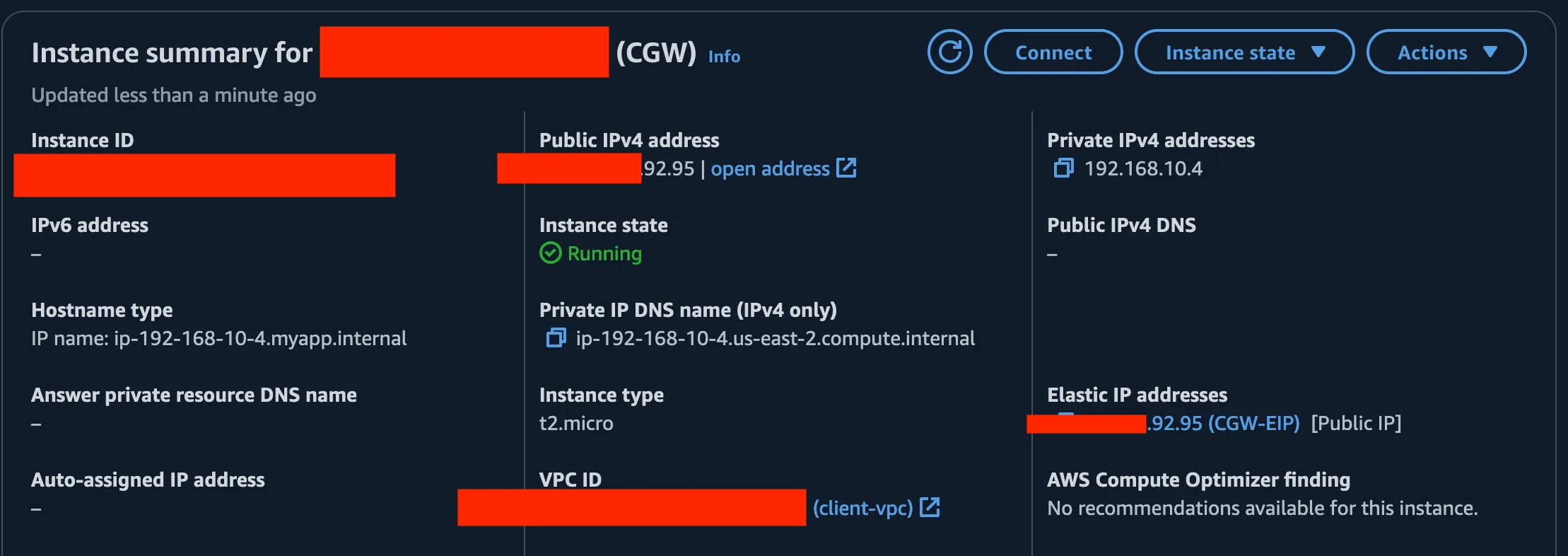
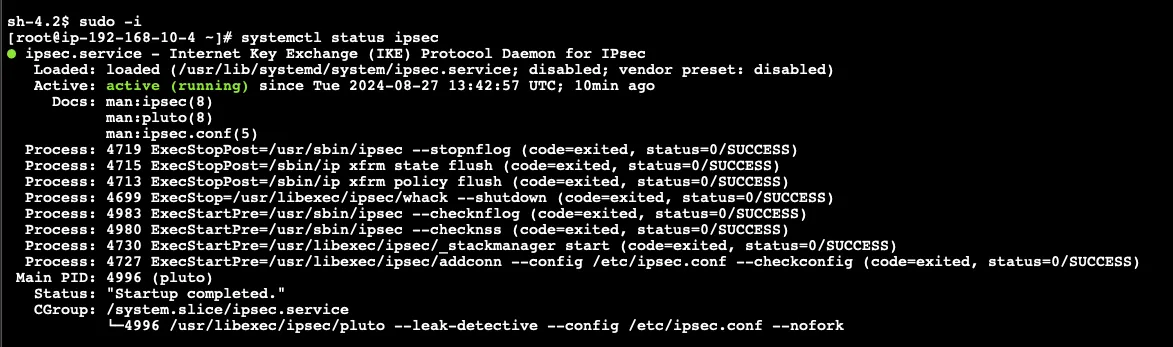
- Verify IPsec status in the CGW EC2 instance.
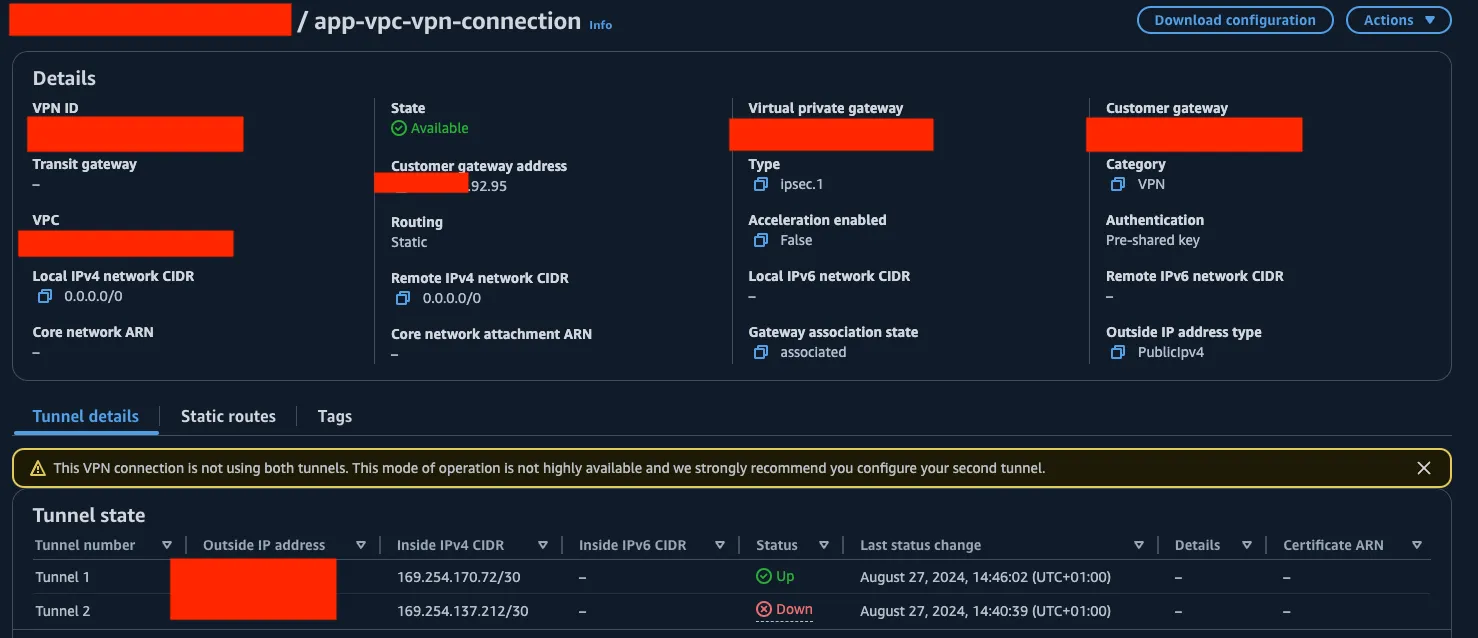
- Confirm VPN connection status in the App VPC region is "UP".
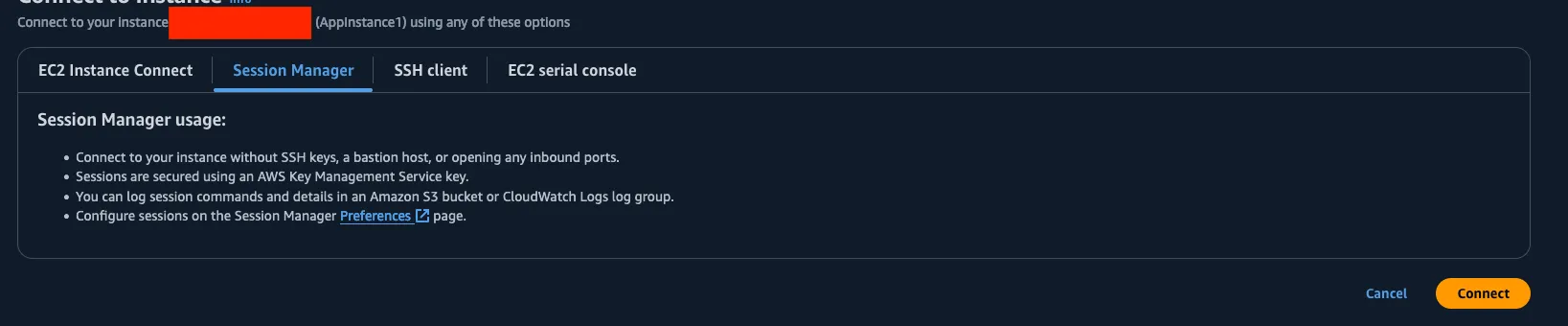
- Use AWS Systems Manager Session Manager to log into one of the App VPC instances.
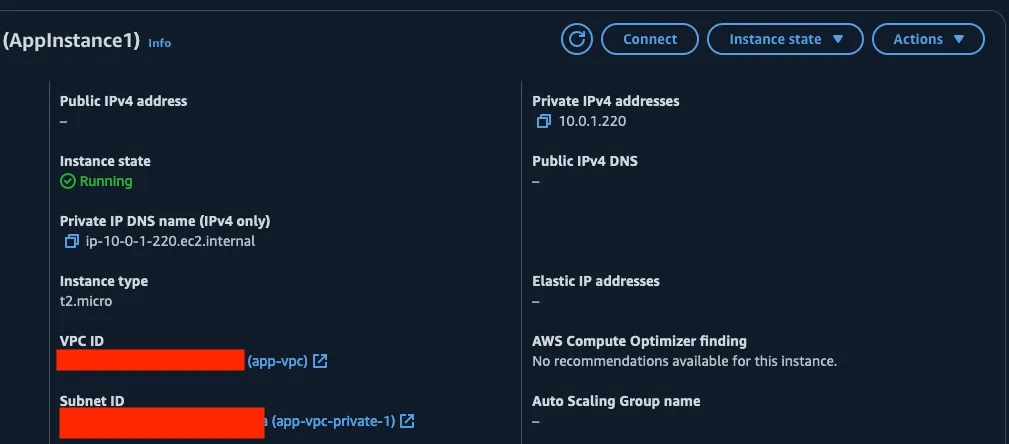
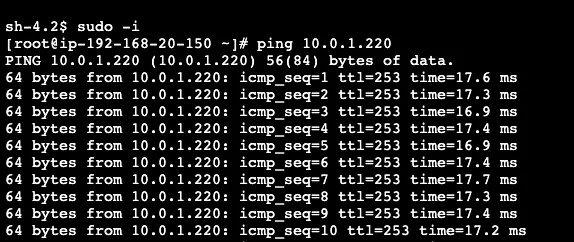
- Test connectivity by pinging the Client EC2 instance's private IP from the App VPC instance.
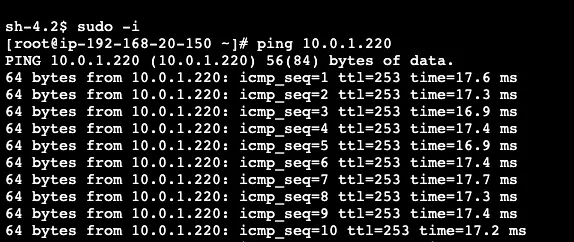
- From the Client EC2 instance, ping AppInstance1 to confirm bi-directional connectivity.
Step 7: Test Web Application Access
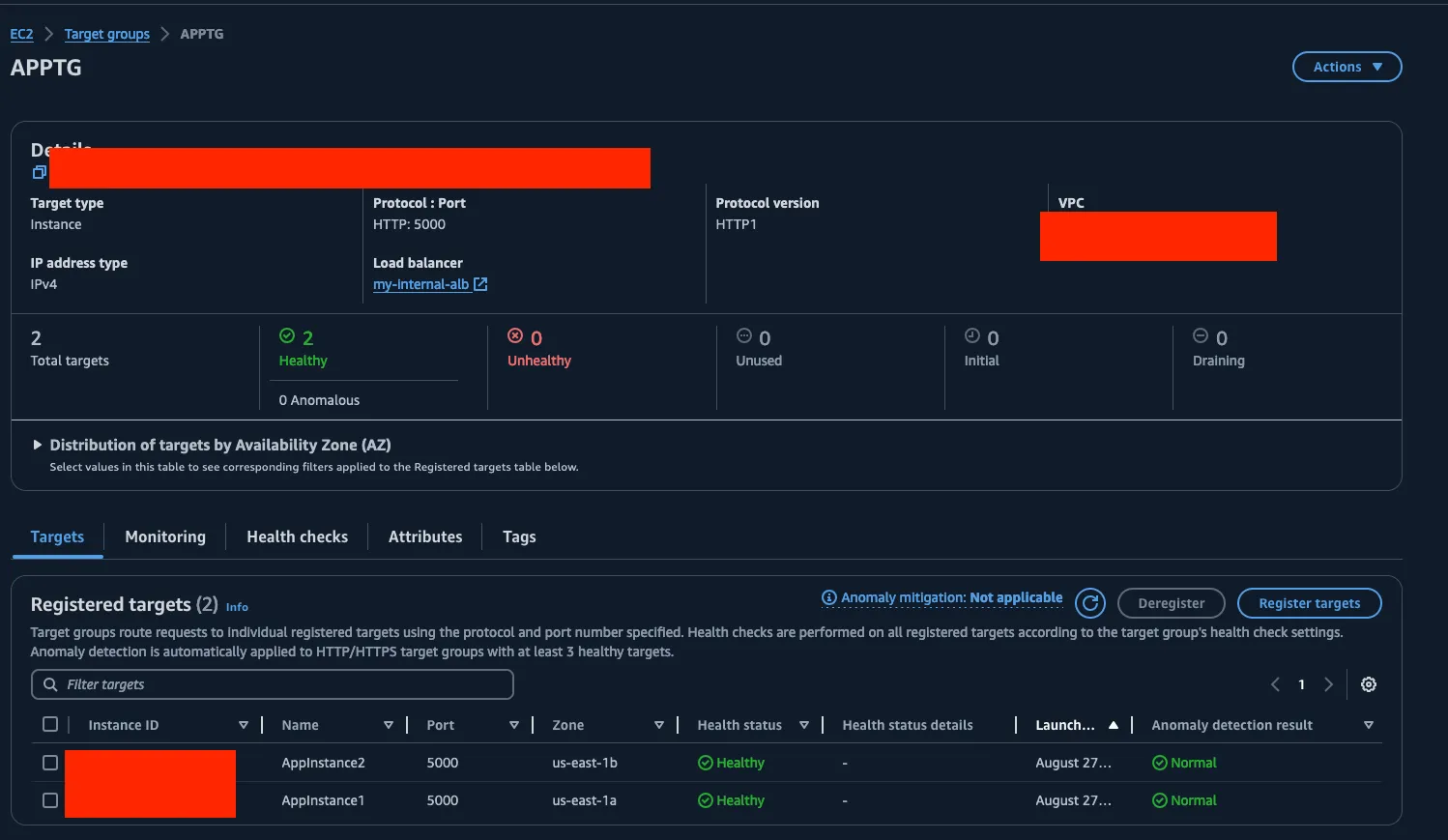
- Verify the health status of targets in the ALB Target Group :
- Confirm the DNSmasq service is operational in the CGW EC2 instance. :

- Test DNS resolution of "access.myapp.internal" from the Client EC2 instance. :
- Execute the provided script on the client instance to verify web application accessibility.
Project Teardown
Execute the following command :
1
terraform destroy
Confirm the destruction when prompted.
Notes
- The deployment process typically takes around 15 minutes to complete.
- Always review and understand the changes before applying or destroying infrastructure.
- Ensure you have the necessary permissions in your AWS account to create and manage the resources defined in the Terraform configuration.
Enjoyed reading this content? Let the author know!
Your likes, comments, shares, and saves help creators reach more builders.

Loading recommendations
Loading article