
Build an Enterprise-Grade AI Chatbot using Bedrock Knowledge Base, PostgreSQL, and Containers
The ai-chat-accelerator project offers a modular, scalable chatbot solution with semantic search, LLM integration, and deployment guidance.

Introduction
Businesses are increasingly adopting AI-powered chatbots for internal knowledge management, customer engagement, support operations, and business growth. However, building an enterprise-grade chatbot on AWS can be challenging, requiring the implementation of well-architected patterns, Retrieval Augmented Generation (RAG) patterns, and the selection of code libraries to interact with Large Language Models (LLMs).
This post introduces the ai-chat-accelerator project, a reference implementation that offers a simple, modular, and well-architected solution for building your AI chatbot or agent. It delves into the key features, design considerations, and walks through the deployment process. It also provides suggestions on customizing the solution to meet your specific needs.
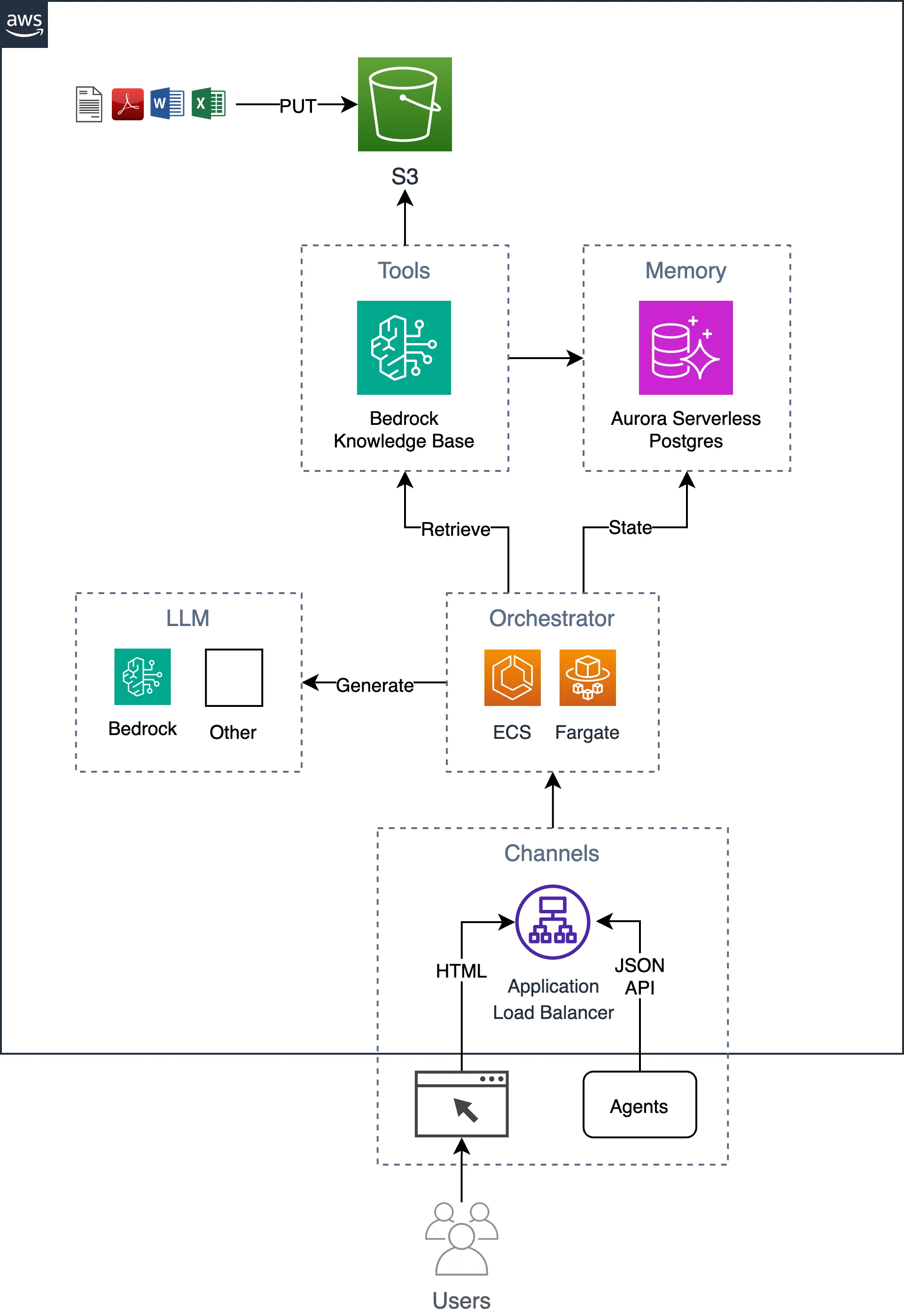
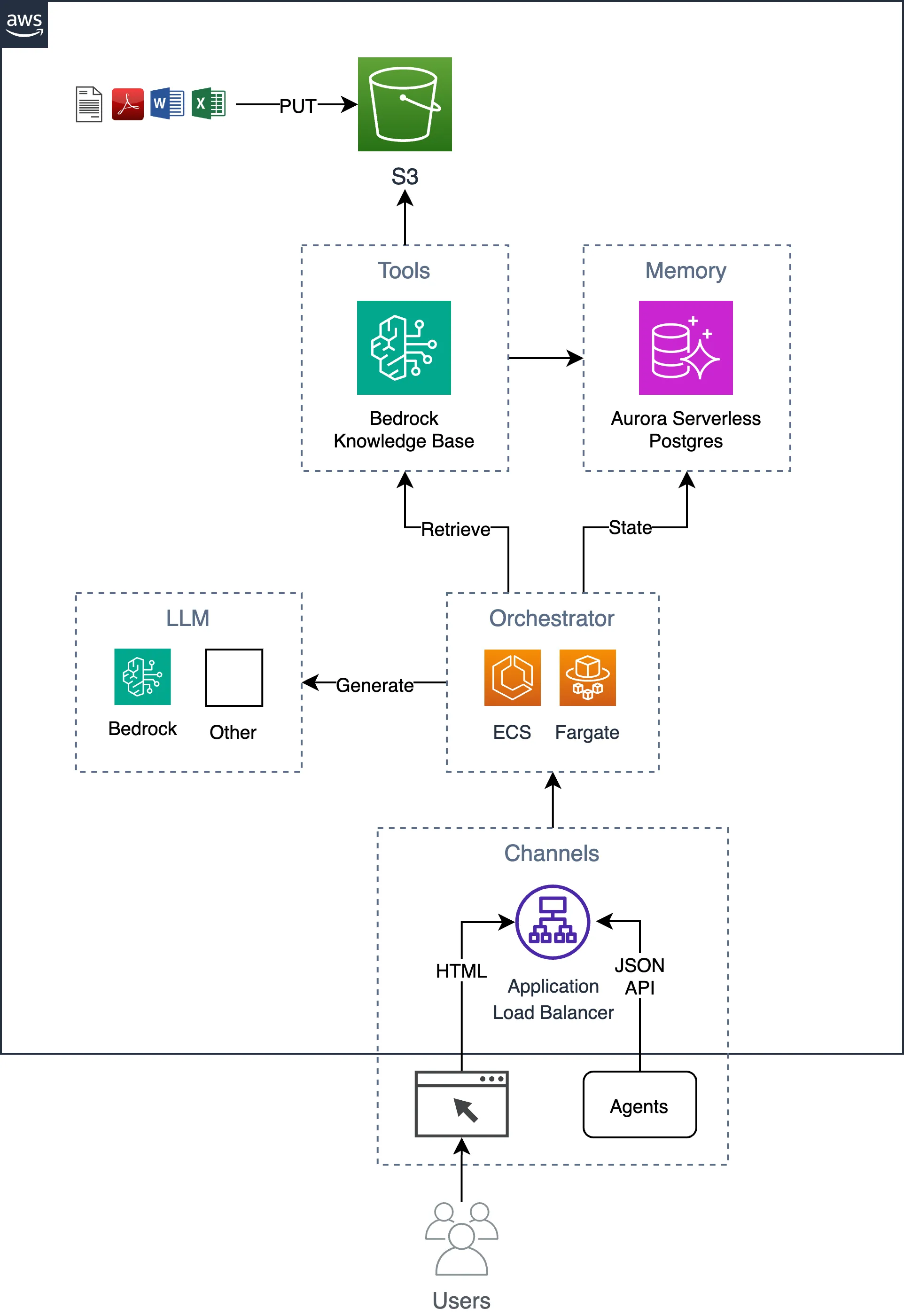
The following diagram shows the high-level logical architecture:
Key Features of an Enterprise-grade AI Chatbot
An enterprise-grade AI chatbot should possess the following key capabilities:
- Semantic Search: The RAG-based chatbot should have a high-quality knowledge base that can provide accurate and semantically relevant information to generate helpful responses. The knowledge base should be designed to automatically scale its compute resources based on usage demands.
- LLM (Large Language Model): The chatbot should understand user intent, extract relevant information from document chunks, and generate accurate and natural-sounding responses without hallucinating.
- Extensibility: The chatbot platform should be flexible and extensible, allowing for easy integration of new features, custom workflows, and specialized domain knowledge. It should be easily runnable on a local workstation to add new features and custom workflows.
- Scalability and Reliability: The chatbot solution should handle high volumes of concurrent user interactions while maintaining consistent performance, even under heavy load. It should implement failover mechanisms to maintain a high level of service availability.
- Security and Compliance: The chatbot solution should adhere to enterprise-grade security and compliance standards, ensuring the protection of sensitive customer data and the integrity of the overall system, including access controls, data encryption, and audit logging.
Design Considerations
To build an enterprise-grade AI chatbot, the sample ai-chat-accelerator project leverages the following key technologies:
- Knowledge Bases for Amazon Bedrock: The Knowledge Bases for Amazon Bedrock service automates ingestion and retrieval, eliminating the need to write undifferentiated code to integrate your data sources with LLM embedding models and manage vector queries. While the service can manage the complete RAG pipeline, encompassing prompt management and LLM integration, the sample accelerator will utilize only the ingestion and search capabilities. This approach allows greater flexibility in selecting LLMs and crafting prompts. To enable the chatbot's knowledge, a collection of unstructured documents will be uploaded to an Amazon S3 bucket. The Bedrock Knowledge Bases service provides sophisticated chunking and parsing methods during the ingestion of source documents.
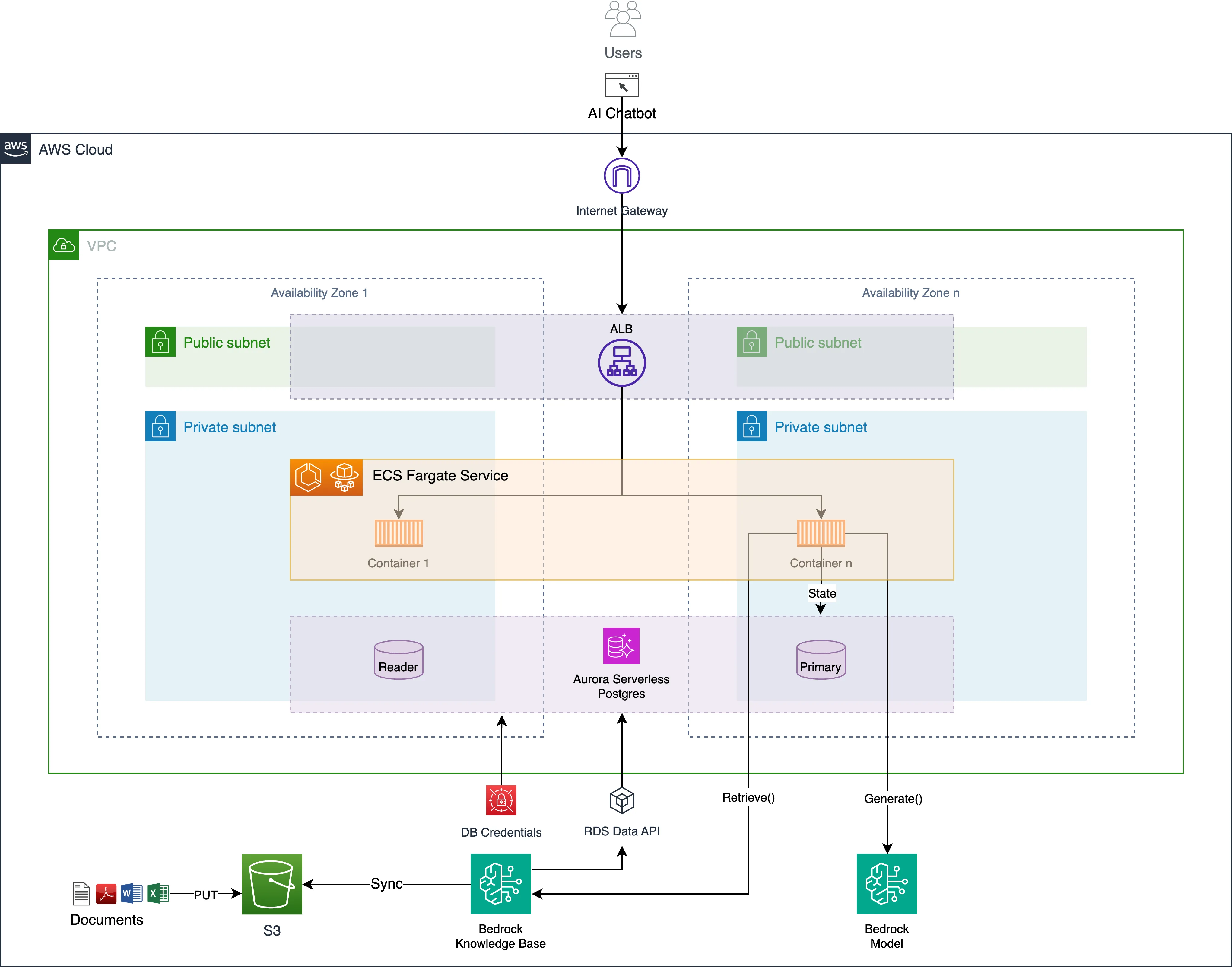
- PostgreSQL: PostgreSQL , a robust and feature-rich open-source database, will be used to store and manage the chatbot's knowledge base vector data along with application state, which includes the user's conversation history. Having all the application's data in a single database simplifies the overall architecture and makes it easier to maintain and support. We will leverage Amazon Aurora Serverless to run a PostgreSQL-compatible database on AWS. Amazon Aurora Serverless automatically starts up, shuts down, and scales database capacity up or down based on traffic patterns. Amazon Aurora also protects against data loss using distributed, fault-tolerant, self-healing Aurora storage, making the data durable across three Availability Zones (AZs) in a Region. From a security perspective, the database runs inside a private subnet and is only accessible to the application. Bedrock Knowledge Base accesses the database using the RDS Data API . We can also use this API if we want to access the database from outside AWS.
- Containers: The chatbot application, written in Python, will be packaged and deployed as a container, leveraging the flexibility and scalability of container-based orchestrators. The container will run a Python Flask HTTP server that serves a simple, lightweight web application written using HTMX , a JavaScript library for simplifying web development. The container will also expose an HTTP JSON API that can be used for building alternative web frontends, higher-level AI agents, or other automations. We will run the container on AWS Fargate for Amazon ECS to simplify container orchestration and avoid managing virtual machines and capacity. We will use an Application Load Balancer to direct HTTP traffic to the containers, which run in multiple AZs for high availability.
- Infrastructure as Code (IaC): The sample project uses Terraform as an IaC tool to declare the AWS infrastructure. We should be able to deploy the entire stack in about 15 minutes.
Overall, this architecture aims to strike a balance between being easy to reason about and easy to run and test locally, while choosing AWS-managed services to ease operational burden, achieve high availability, and provide a secure environment.
The following diagram shows the physical architecture:
Deployment
The deployment process involves the following six steps:
1. Set up and install prerequisites
2. Deploy cloud infrastructure
3. Deploy application code
4. Upload your documents to the generated S3 bucket
5. Start a Bedrock Knowledge Base sync job
6. Start chatting with your documents in the app
Detailed instructions can be found in the README.md of the project.
Customization
The heart of the reference implementation is the orchestrator.py file, which implements the RAG workflow. The code is kept simple, using only Boto3 , the AWS Python SDK, to maintain flexibility and ease of customization. The code involves three basic steps:
1. Retrieve relevant document chunks that are semantically relevant to the user's question
2. Build a text prompt based on the document chunks
3. Invoke an LLM with the multi-turn conversation history and a new prompt
You can change this code if you wish to customize the RAG algorithm, leverage LLM Function Calling (i.e. Tool Use), or leverage Agents for Amazon Bedrock .
1
2
3
4
5
6
7
8
9
10
11
12
13
14
15
16
17
18
19
20
21
22
23
24
25
26
27
28
29
30
31
32
33
34
35
36
37
import json
import bedrock_kb
import claude3_haiku_v1

def orchestrate(conversation_history, new_question):
    """Orchestrates RAG workflow based on conversation history
    and a new question. Returns an answer and a list of
    source documents."""

    # Retrieve data from vector database based on the question
    docs = bedrock_kb.get_relevant_docs(new_question, 6)

    # Normalize source documents
    sources = bedrock_kb.format_sources(docs)

    # Get model-specific prompts
    system_prompt, user_prompt = claude3_haiku_v1.get_prompts()

    # Build prompt based on the new question and search results
    context = json.dumps(docs)
    prompt = user_prompt.format(context=context, question=new_question)

    # Translate conversation history to messages
    messages = []
    for question in conversation_history["questions"]:
        messages.append(
            {"role": "user", "content": [{"text": question["q"]}]})
        messages.append(
            {"role": "assistant", "content": [{"text": question["a"]}]})

    # Add the new question message
    messages.append({"role": "user", "content": [{"text": prompt}]})

    # Invoke LLM
    response = claude3_haiku_v1.generate_message(system_prompt, messages)

    return response, sources
Enhancements
The following enhancement ideas can be considered to make the AI chatbot even more useful and intelligent:
- User authentication
- Semantic Hybrid Search
- Reranking and filtering
- GraphRAG
- Function Calling
- Agents
- Bedrock Model evaluation testing
- Guardrails for Amazon Bedrock
Conclusion
The ai-chat-accelerator reference implementation provides a well-architected, modular, and extensible chatbot solution using Bedrock Knowledge Base, PostgreSQL, and containers. By following the practices and design considerations outlined in this post, you can create a chatbot that delivers a personalized and efficient user experience while maintaining the necessary enterprise-grade security and compliance standards.
Key Takeaways
- The ai-chat-accelerator project provides a well-architected, modular, and extensible chatbot solution.
- Bedrock Knowledge Base, Aurora Serverless PostgreSQL, and AWS Fargate for Amazon ECS are leveraged to provide enterprise-grade capabilities.
- Detailed deployment instructions and customization suggestions are provided to help you get started.
- Try out the project! https://github.com/aws-samples/ai-chat-accelerator
Enjoyed reading this content? Let the author know!
Your likes, comments, shares, and saves help creators reach more builders.

Loading recommendations
Loading article