

Amazon Q custom connector to Amazon Q Business
A quick overview on how to implement Amazon Q custom connector

Amazon Q Business is a generative AI–powered assistant that can answer questions, provide summaries, generate content, and securely complete tasks based on data and information in your enterprise systems. It empowers employees to be more creative, data-driven, efficient, prepared, and productive.
Connecting Amazon Q custom connector to Amazon Q Business
You can use a custom data source when you have a repository that Amazon Q Business doesn’t yet provide a data source connector for. When you create a custom data source, you have complete control over how the documents to index are selected. Amazon Q only provides metric information that you can use to monitor your data source sync jobs. You must create and run the crawler that determines the documents your data source indexes.
We can also use Amazon Q Business Amazon S3 connector to export your content to Amazon S3 as an alternative.
Lets take a look at a sample on how to use custom data source. Here we will index some of the public websites info for user to ask questions. As you can see below that when you set up Amazon Biz Q for your enterprise data only, it may not be able to answer questions which are outside your data.
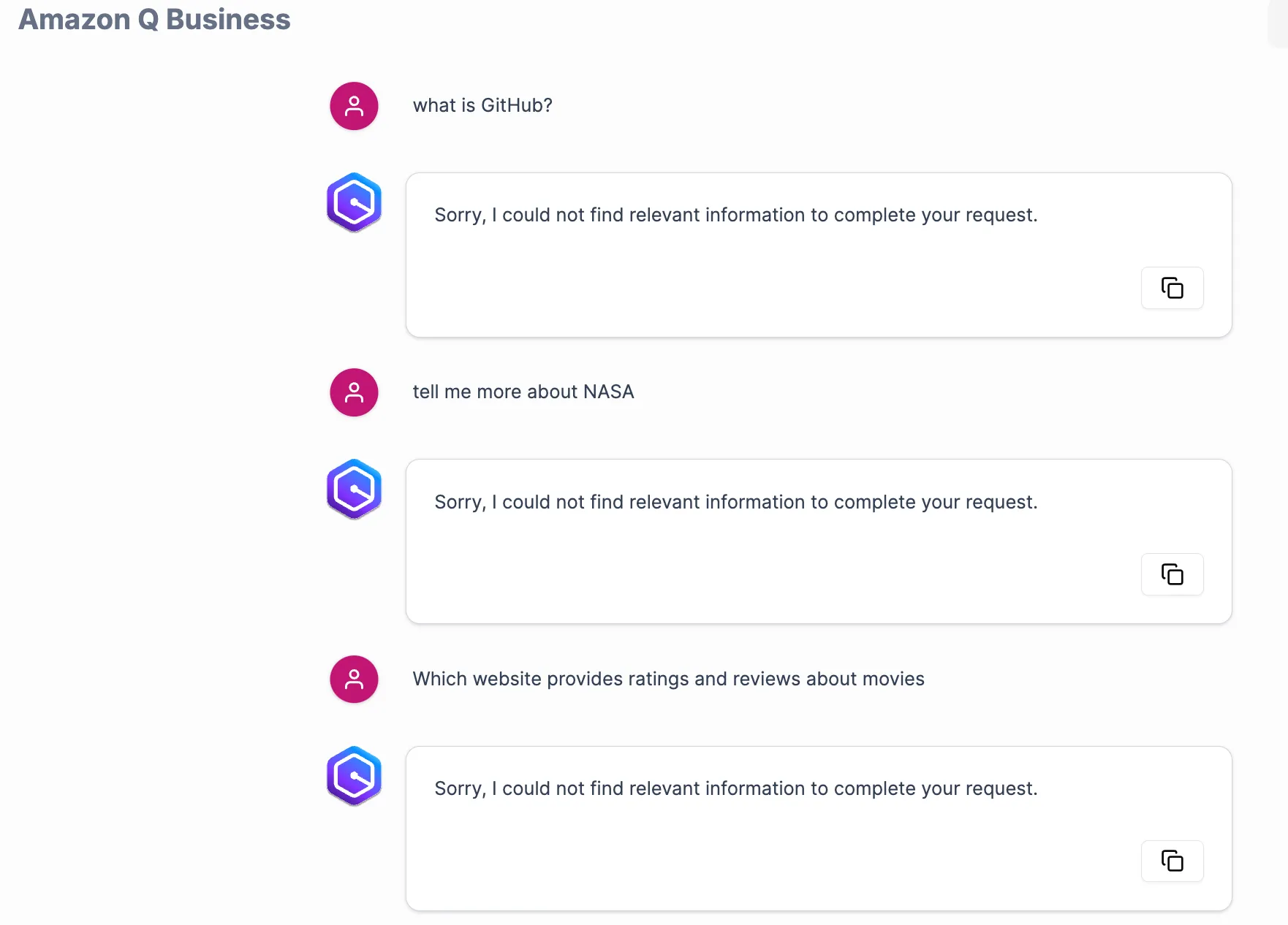
Note: This is demo code for illustrative purposes only. Not intended for production use.
Prerequisites
Before we get started, we need to have the following prerequisites in place
- A valid working AWS account with required resource access and CLI configuration
- Latest boto3 version
- Amazon Q Business set up, please visit getting started guide
- Complete the steps to create your Amazon Q application .
- Complete the steps for selecting an Amazon Q retriever .
Getting Started
Now lets quickly set up the custom connector. The below functions are created to help collect and create sample data. You can view the required attributes info here
Python
def generate_document(doc_id, title, content, content_type, source_uri, data_source_id, sync_job_id):return {'id': doc_id,'attributes': [{'name': '_data_source_id','value': {'stringValue': data_source_id}},{'name': '_data_source_sync_job_execution_id','value': {'stringValue': sync_job_id}},{'name': '_source_uri','value': {'stringValue': source_uri}}],'content': {'blob': content.encode('utf-8')},'contentType': 'PLAIN_TEXT','title': title}def create_documents(data_source_id, sync_job_id):documents = []sample_websites = [{"id": "doc_001","title": "TechCrunch - Startup and Technology News","content": "TechCrunch is a leading technology media property, dedicated to obsessively profiling startups, reviewing new Internet products, and breaking tech news.","content_type": "PLAIN_TEXT","source_uri": "https://techcrunch.com"},{"id": "doc_002","title": "National Geographic - Explore the world's beauty","content": "National Geographic is the world's premium destination for science, exploration, and adventure.","content_type": "PLAIN_TEXT","source_uri": "https://www.nationalgeographic.com"},{"id": "doc_003","title": "Wikipedia - The Free Encyclopedia","content": "Wikipedia is a free online encyclopedia, created and edited by volunteers around the world and hosted by the Wikimedia Foundation.","content_type": "PLAIN_TEXT","source_uri": "https://www.wikipedia.org"},{"id": "doc_004","title": "NASA - National Aeronautics and Space Administration","content": "NASA is America's civil space program and the global leader in space exploration.","content_type": "PLAIN_TEXT","source_uri": "https://www.nasa.gov"},{"id": "doc_005","title": "The New York Times - Breaking News, US News, World News","content": "The New York Times provides breaking news, multimedia, reviews & opinion on Washington, business, sports, movies, travel, books, jobs, education, real estate, cars & more.","content_type": "PLAIN_TEXT","source_uri": "https://www.nytimes.com"},{"id": "doc_006","title": "GitHub - Where the world builds software","content": "GitHub is where over 65 million developers shape the future of software, together. Contribute to the open source community, manage your Git repositories, review code like a pro, track bugs and features, power your CI/CD and DevOps workflows, and secure code before you commit it.","content_type": "PLAIN_TEXT","source_uri": "https://github.com"},{"id": "doc_007","title": "Stack Overflow - Where Developers Learn, Share, & Build Careers","content": "Stack Overflow is the largest, most trusted online community for developers to learn, share their programming knowledge, and build their careers.","content_type": "PLAIN_TEXT","source_uri": "https://stackoverflow.com"},{"id": "doc_008","title": "IMDb - Ratings, Reviews, and Where to Watch the Best Movies & TV Shows","content": "IMDb is the world's most popular and authoritative source for movie, TV and celebrity content. Find ratings and reviews for the newest movie and TV shows.","content_type": "PLAIN_TEXT","source_uri": "https://www.imdb.com"},{"id": "doc_009","title": "LinkedIn - Professional Network and Job Finder","content": "LinkedIn is the world's largest professional network on the internet. You can use LinkedIn to find the right job or internship, connect and strengthen professional relationships, and learn the skills you need to succeed in your career.","content_type": "PLAIN_TEXT","source_uri": "https://www.linkedin.com"},{"id": "doc_010","title": "Coursera - Learn Without Limits","content": "Coursera provides universal access to the world's best education, partnering with top universities and organizations to offer courses online.","content_type": "PLAIN_TEXT","source_uri": "https://www.coursera.org"}]for website in sample_websites:document = generate_document(website['id'],website['title'],website['content'],website['content_type'],website['source_uri'],data_source_id,sync_job_id)documents.append(document)return documents
Next we will set up required configuration values. These values are present in your created application
Python
# AWS Configurationindex_id = "Your Index ID"data_source_id = "Data Source ID"app_id = "Application ID"role_arn = "AWS Service Role For QBusiness"
Now start the data source sync job and save the returned job execution id which will be used further.
Python
client = boto3.client('qbusiness')# Start a data source sync jobresult = client.start_data_source_sync_job(dataSourceId=data_source_id,applicationId=app_id,indexId=index_id)print("Start data source sync operation: ")print(json.dumps(result, indent=2, default=str))job_execution_id = result['executionId']print("Job execution ID: " + job_execution_id)
Now we will create the sample documents passing in the datasource id and job execution id to be included in the json document as mentioned in the documentation before.
The sample document to be pushed looks like below
JSON
Document 1:{"id": "doc_001","attributes": [{"name": "_data_source_id","value": {"stringValue": "data source id value"}},{"name": "_data_source_sync_job_execution_id","value": {"stringValue": "job execution id"}},{"name": "_source_uri","value": {"stringValue": "https://techcrunch.com"}}],"content": {"blob": "b'TechCrunch is a leading technology media property, dedicated to obsessively profiling startups, reviewing new Internet products, and breaking tech news.'"},"contentType": "PLAIN_TEXT","title": "TechCrunch - Startup and Technology News"}
Then we will call batch_put_document passing in the documents including application id, index id and role arn
Python
try:# Create documentsdocs = create_documents(data_source_id, job_execution_id)# Print each document structurefor i, doc in enumerate(docs):print(f"\nDocument {i + 1}:")print(json.dumps(doc, indent=2, default=str))# batch_put_documentresult = client.batch_put_document(applicationId=app_id,indexId=index_id,documents=docs,roleArn = role_arn)print("\nResponse from batch_put_document:")print(json.dumps(result, indent=2, default=str))response = client.list_data_source_sync_jobs(dataSourceId=data_source_id,applicationId=app_id,indexId=index_id)print(response)finally:# Stop data source syncresult = client.stop_data_source_sync_job(dataSourceId=data_source_id,applicationId=app_id,indexId=index_id)print("Stop data source sync operation:")print(json.dumps(result, indent=2, default=str))
Once the sync is completed you can retry the previous queries. As you can see now we are able to get our synced data and also able to verify the custom source_uri as well.
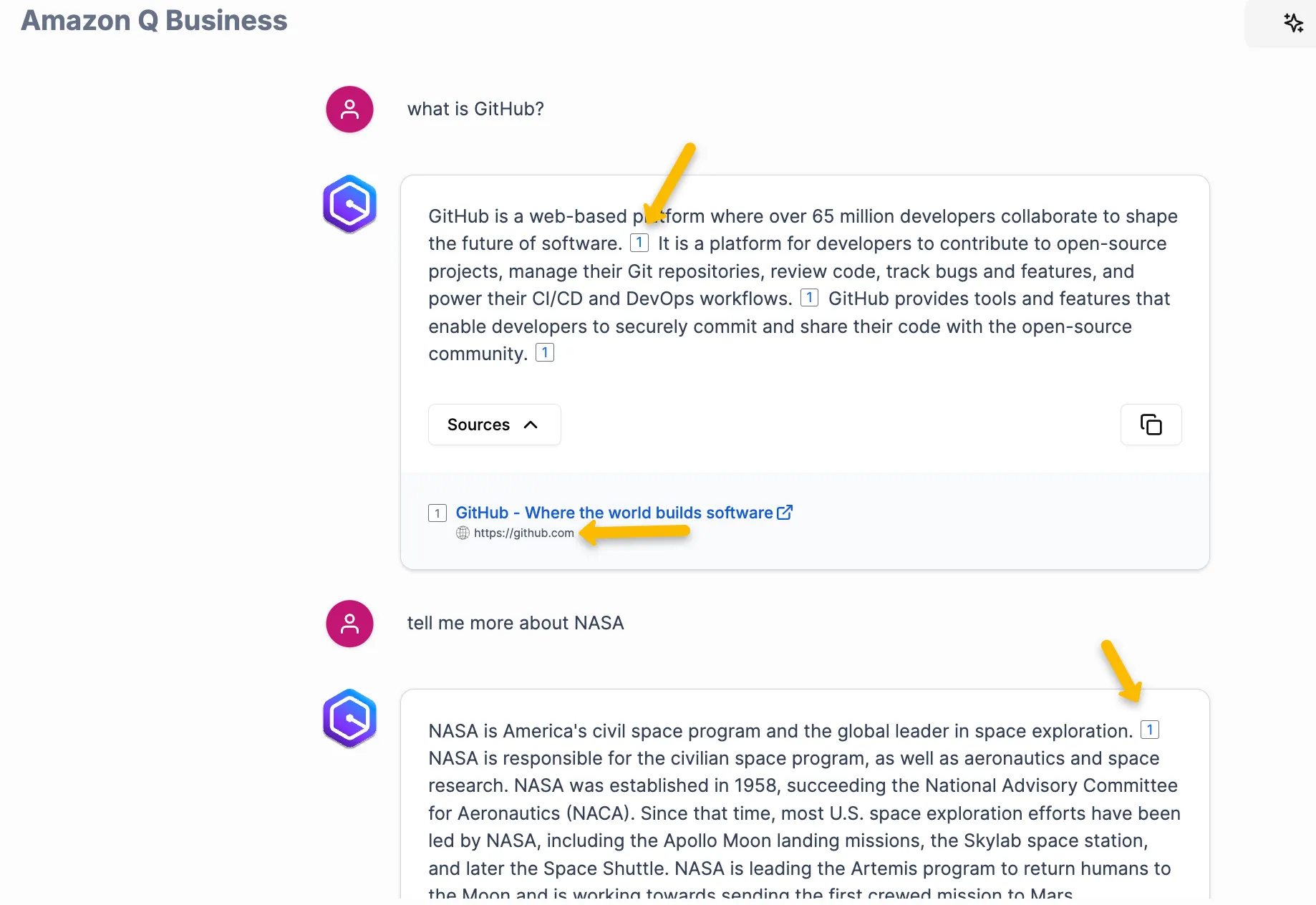
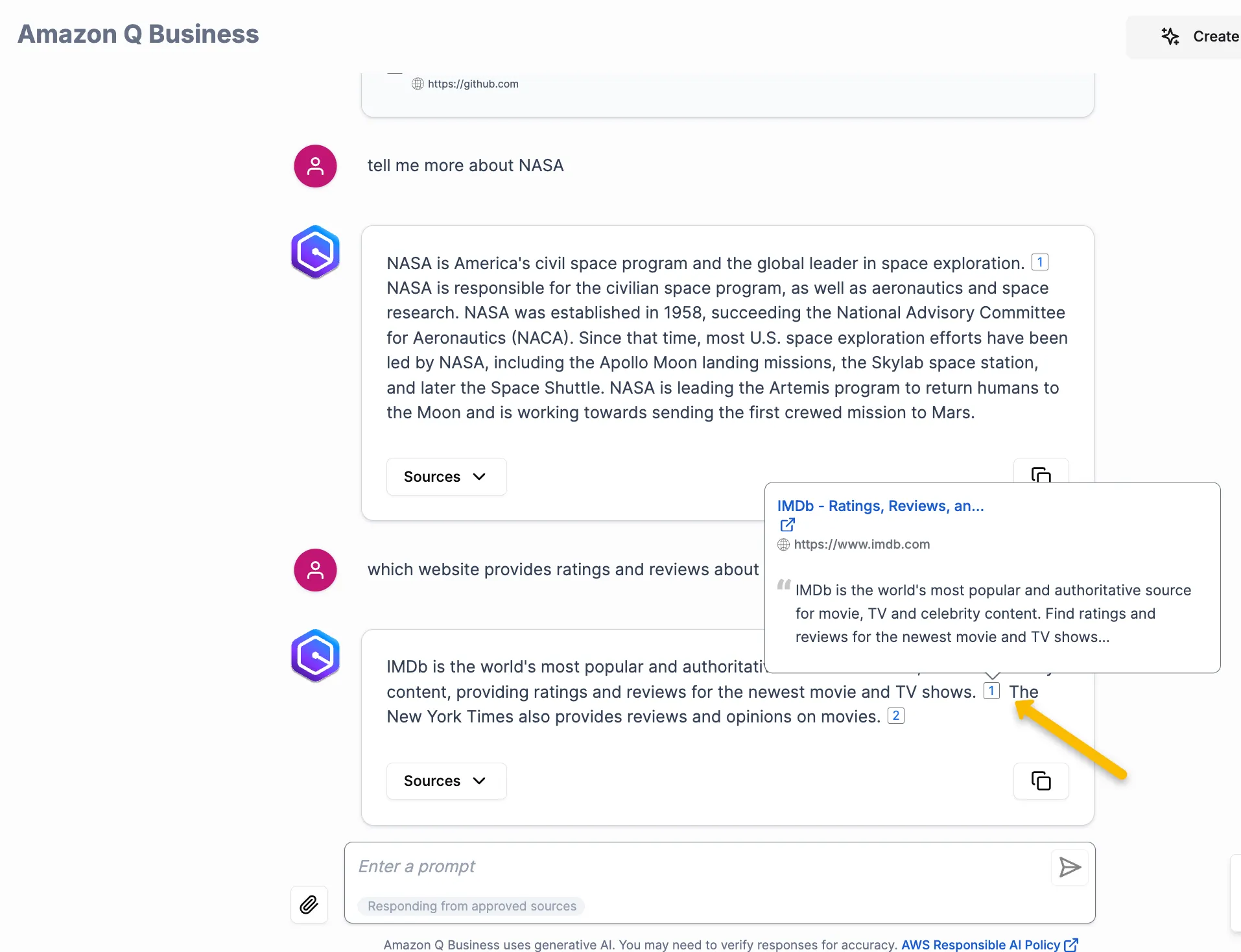
In this post we saw how we can leverage the AWS Enterprise Q APIs to create their own custom connectors and push content directly into Amazon Q Business from any content repository.
Happy Building!
Enjoyed reading this content? Let the author know!
Your likes, comments, shares, and saves help creators reach more builders.

Loading recommendations
Loading article