
Customize CDK L1 construct props from L2
In this article, we'll dive into some real-world use cases to override L1 props from L2 constructs using different tips

One of the advantages using AWS CDK L2 or L3 constructs is that it allows you to synthesize cloudformation templates using its L2/L3 constructs without literally specify all L1 props. For example, when you:
1
new ec2.Vpc(scope, 'Vpc');
You essentially get a new VPC with subnets, routing tables, routes, NAT gateways and even EIPs. But there could be a chance that some L1 props are not exposed to the surface of L2 props or you simply need to override the L1 props synthesized by the L2 constructs.
In this article, I am sharing some real-world use cases and how you could address them using different skills:
Construct Tree
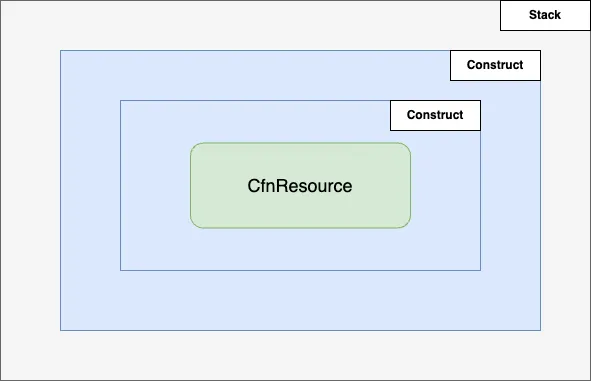
AWS CDK uses Constructs as the containers of other constructs or CfnResources . For example, if we are creating a ec2 Instance in a stack:
1
2
3
4
5
6
7
8
9
10
11
12
13
14
15
// define stack envs
const env = { region: process.env.CDK_DEFAULT_REGION, account: process.env.CDK_DEFAULT_ACCOUNT };

// create a dummy stack
const stack = new cdk.Stack(app, 'dummy-stack', { env });

// create a ref of my default VPC
const vpc = ec2.Vpc.fromLookup(stack, 'Vpc', { isDefault: true });

// create an `Instance` in the `dummy-stack`
new ec2.Instance(stack, 'MyInstance', {
    vpc,
    instanceType: new ec2.InstanceType('t3.large'),
    machineImage: ec2.MachineImage.latestAmazonLinux2023(),
})
Now, if we run
npx cdk diff, we see Resources to be created like this:1
2
3
4
[+] AWS::EC2::SecurityGroup MyInstance/InstanceSecurityGroup InstanceInstanceSecurityGroupF0E2D5BE
[+] AWS::IAM::Role MyInstance/InstanceRole InstanceInstanceRoleE9785DE5
[+] AWS::IAM::InstanceProfile MyInstance/InstanceProfile InstanceInstanceProfileAB5AEF02
[+] AWS::EC2::Instance MyInstance InstanceC1063A87 In this list,
MyInstance is the L2 construct ID, which creates AWS::EC2::Instance while InstanceProfile, InstanceRole and InstanceSecurityGroup are the child constructs of MyInstance construct.Use Case #1 - Add or update L1 props from L2
OK. Let's look closer to this example. If we need to add or update a new L1 prop to the AWS::EC2::Instance L1 resource, what should we do? The general pattern is:
- Find the path of its L1 resource.
- Use
addPropertyOverridefrom that L1 node.
option 1:
1
2
const cfninstance = instance.node.tryFindChild('Resource') as ec2.CfnInstance
cfninstance.addPropertyOverride('Foo', 'Bar')
option 2:
1
2
const cfninstance = instance.node.defaultChild as ec2.CfnInstance
cfninstance.addPropertyOverride('Foo', 'Bar')
In CDK, we have a convention that the construct ID of the L1 resource in a L2 construct to be called as
Resource. Check out the source code here for ec2.CfnInstance. This is a generally true but not all L1 resources follow this convention.Another option is to use
defaultChild as the L1 resource as option 2 above if that is explicitly defined in the L2 construct like this .On
npx cdk synth, you should see Foo: Bar in the properties of the instance:1
2
3
4
5
6
7
8
9
10
11
12
13
14
15
16
17
18
19
20
InstanceC1063A87:
Type: AWS::EC2::Instance
Properties:
AvailabilityZone: us-east-1a
IamInstanceProfile:
Ref: InstanceInstanceProfileAB5AEF02
ImageId:
Ref: SsmParameterValueawsserviceamiamazonlinuxlatestal2023amikernel61x8664C96584B6F00A464EAD1953AFF4B05118Parameter
InstanceType: t3.large
SecurityGroupIds:
- Fn::GetAtt:
- InstanceInstanceSecurityGroupF0E2D5BE
- GroupId
SubnetId: subnet-071c85610846aa9c0
Tags:
- Key: Name
Value: dummy-stack/Instance
UserData:
Fn::Base64: "#!/bin/bash"
Foo: BaraddPropertyOverride() allows you to add a new property that does not exist or just override an existing property with a new value.
To specify a map as the override value:
1
cfninstance.addPropertyOverride('Foo', { Value: 'bar'})
You get:
1
2
Foo:
  Value: bar
To specify an array of values to override:
1
cfninstance.addPropertyOverride('Foo', [ { 'ABC': 123 }, {'DEF': 456 }  ])
You get:
1
2
3
Foo:
  - ABC: 123
  - DEF: 456
Use Case #2 - Delete L1 props from L2
In some cases, you would like to leave some optional L1 props
undefined but L2 is generating values for you and you have no option to turn it off from L2. Use addPropertyDeletionOverride() to override and delete that property.1
cfninstance.addPropertyDeletionOverride('PropertyToRemove')
Use Case #3 - Delete a L1 resource from L2
In some cases, L2 constructs may generate unwanted L1 resources. Use
tryRemoveChild() from a L2 construct to get it removed.The pattern is like:
1
2
3
4
5
// create a foo using its L2 construct
const foo = new Foo();

// remove the child with the id `Bar`
foo.node.tryRemoveChild('Bar')
For example, in issue #30981 , we can use
tryRemoveChild() to remove the unwanted CfnEgressOnlyInternetGateway resource from a new VPC.Use Case #4 - Scan the whole construct tree and update values
Now you probably would ask, what if I have a very complex construct tree and I need to update or replace a L1 prop of a specific resource and that resource could be anywhere in this construct tree. Can I have get all of them replaced?
I got you covered. This is a very common use case and we generally have two options to address that.
Option 1: Use a private stack method to scan current construct tree
For example, you need to customize the
RemovalPolicy when you create a rds.Cluster which applies not only the cluster itself but also all the rds instances. Check out this example: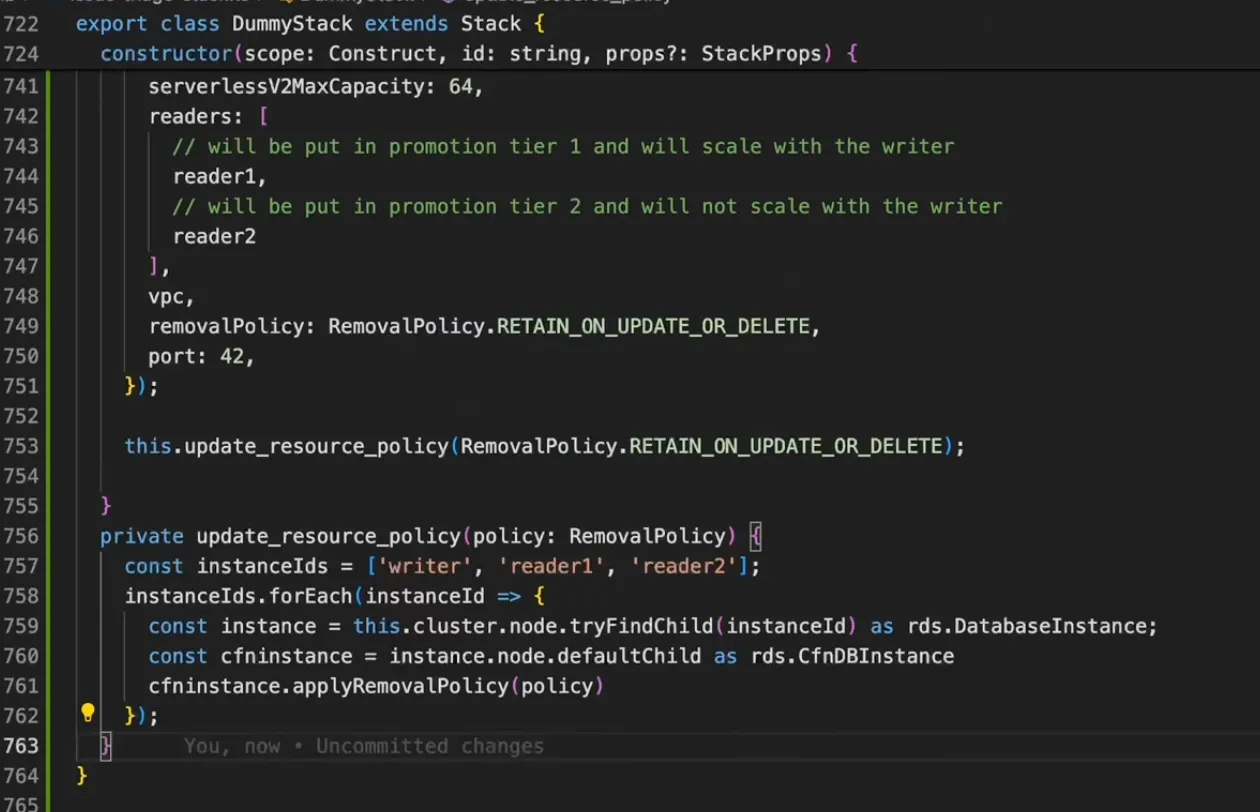
Watch the full walkthrough video to learn how to build a private method like this using Amazon Q Developer:
Option 2: Use Aspects
Aspects are a way to apply an operation to all constructs in a given scope. The aspect could modify the constructs, such as by adding tags. Or it could verify something about the state of the constructs, such as making sure that all buckets are encrypted.
We'll dive into the Aspects in another article. Before that, read Aspects and the AWS CDK from CDK Developer Guild for more details.
Wrapping ups and key take-aways
- Use
cdk diffto view the hierarchy of the construct tree of your deploying stacks - Use
tryFindChildordefaultChildto locate the path of the child of the construct - The child of a L2 construct is not always an L1 CfnResource, it could be yet another L2 construct.
- Use
addPropertyDeletionOverride()to remove unwanted L1 resources. - Define private stack methods to scan your construct tree and customize the L1 values with your own customization logic.
- Use Aspects as an alternative option.
I hope you find this article useful. Bear in mind that instead of using the escape hatches like this to customize the L1 property values. If you think it deserve a fix or feature request for the aws-cdk repository, the best way to get it permanently fixed without using the workaround is always submitting a pull request for it. If you are interested to know more about contributing to AWS CDK through pull requests, check out this blog post Contributing to AWS CDK to learn how to get it started.
Let me know if you'd like to learn more CDK tips. Don't hesitate to hit the like button and leave your comments below. I'll share more CDK tips next time.
Enjoyed reading this content? Let the author know!
Your likes, comments, shares, and saves help creators reach more builders.

Loading recommendations
Loading article