

AI running it’s own code! : Agentic Code Interpreter
Public Preview: Code Interpreter for Agents for Amazon Bedrock - With sample code.

In the world of AI and large language models (LLMs), one limitation has been their struggle with complex mathematical operations and data analysis. While LLMs excel at natural language understanding and generation, they often fall short when it comes to precise calculations or handling large datasets. Today, we're exploring an exciting new feature for Agents for Amazon Bedrock that addresses this limitation: the Code Interpreter.
The Power of Code Execution in AI Agents
Large language models are incredibly versatile, but they're not designed for complex mathematical computations or data analysis. However, they excel at writing code. By combining an LLM's code-writing abilities with a secure execution environment, we can create AI agents capable of performing sophisticated analytical tasks.
Let's dive into how we can implement this powerful feature using Agents for Amazon Bedrock.
Setting Up an Agent with Code Interpreter
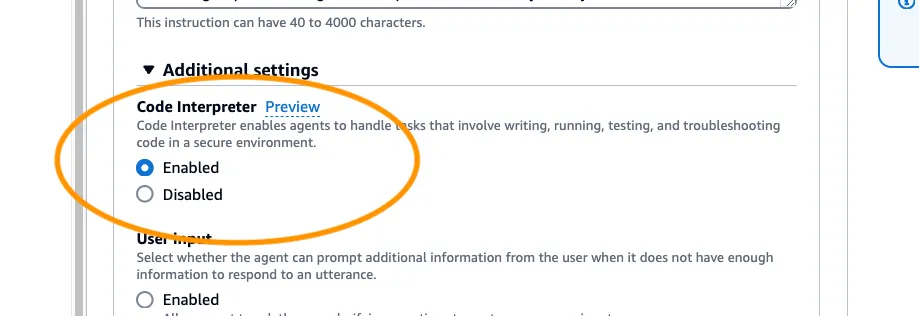
To get started, we'll create an agent with Code Interpreter capabilities. Here's a quick step-by-step guide in the AWS console, before we dive in to some code:
- Choose Your Model: We'll use the Claude 3 Sonnet model for this example.
- Set Agent Instructions: Provide detailed instructions for your agent, focusing on problem-solving, data analysis, and utilizing the Code Interpreter tool. (See example in the code below)
- Configure the Agent: In the Amazon Bedrock console, create a new agent and select the Claude 3 Sonnet model.
- Enable Code Interpreter: In the agent's settings, enable the Code Interpreter feature. This connects a Python execution sandbox to your agent.
Implementing Code Interpreter Programmatically
While you can set up the agent through the console, let's look at how to do this programmatically using Python and the AWS SDK (boto3). This approach allows for easier integration into your applications.
You can find the full code used for this demo here: https://github.com/build-on-aws/agents-for-amazon-bedrock-sample-feature-notebooks/
First, import the necessary libraries:
Python
import boto3 # pip install boto3==1.34.144# The following are just use for our demo.import jsonimport timeimport randomimport uuidimport stringimport matplotlib.pyplot as pltimport io
Next, set up your AWS region and create the Bedrock Agent:
Python
region_name = 'us-east-1'bedrock_agent = boto3.client(service_name='bedrock-agent', region_name=region_name)iam = boto3.client('iam')# Create IAM role and policy (code omitted for brevity)response = bedrock_agent.create_agent(agentName=f"{agentName}-{randomSuffix}",foundationModel=foundationModel,instruction=instruction,agentResourceRoleArn=roleArn,)agentId = response['agent']['agentId']
After creating the agent, we need to add the Code Interpreter action group:
Python
response = bedrock_agent.create_agent_action_group(actionGroupName='CodeInterpreterAction',actionGroupState='ENABLED',agentId=agentId,agentVersion='DRAFT',parentActionGroupSignature='AMAZON.CodeInterpreter')actionGroupId = response['agentActionGroup']['actionGroupId']
Finally, prepare the agent and create an alias:
Python
bedrock_agent.prepare_agent(agentId=agentId)response = bedrock_agent.create_agent_alias(agentAliasName='test',agentId=agentId)agentAliasId = response['agentAlias']['agentAliasId']
Interacting with the Code Interpreter Agent
Now that our agent is set up, let's create a function to interact with it:
Python
def invoke(inputText, showTrace=False, endSession=False):# Invoke the Bedrock agent with the given input textresponse = bedrock_agent_runtime.invoke_agent(agentAliasId=agentAliasId,agentId=agentId,sessionId=sessionId,inputText=inputText,endSession=endSession,enableTrace=True,)# Get the event stream from the responseevent_stream = response["completion"]# Process each event in the streamfor event in event_stream:# Handle text chunksif 'chunk' in event:chunk = event['chunk']if 'bytes' in chunk:text = chunk['bytes'].decode('utf-8')print(f"Chunk: {text}")# Handle file outputsif 'files' in event:files = event['files']['files']for file in files:name = file['name']type = file['type']bytes_data = file['bytes']# Display PNG images using matplotlibif type == 'image/png':img = plt.imread(io.BytesIO(bytes_data))plt.figure(figsize=(10, 10))plt.imshow(img)plt.axis('off')plt.title(name)plt.show()plt.close()# Save other file types to diskelse:with open(name, 'wb') as f:f.write(bytes_data)print(f"File '{name}' saved to disk.")
This function handles sending requests to the agent, processing its responses, and handling any files (like graphs) that the agent generates.
Putting It All Together: Complex Data Analysis
Let's test our Code Interpreter agent with a complex data analysis task. We'll ask it to analyze some billing data and create a visualization:
Python
invoke("""Using the billing data provided below, create a bargraph that shows the total spend by product category (cat).The graph should have the category names on the x-axis andthe total spend amount on the y-axis.Billing Data:date,cat,id,product_name,cost2023-01-15,Electronics,E001,Smartphone,799.992023-01-20,Home,H001,Vacuum Cleaner,199.992023-02-03,Electronics,E002,Laptop,1299.992023-02-10,Clothing,C001,Winter Jacket,129.992023-02-25,Home,H002,Coffee Maker,89.992023-03-05,Electronics,E003,Wireless Earbuds,159.992023-03-12,Clothing,C002,Running Shoes,99.992023-03-30,Home,H003,Blender,79.992023-04-08,Electronics,E004,Smart Watch,299.992023-04-15,Clothing,C003,Jeans,59.992023-04-28,Home,H004,Toaster Oven,129.992023-05-10,Electronics,E005,Tablet,499.992023-05-18,Clothing,C004,Dress Shirt,49.992023-05-25,Home,H005,Air Purifier,199.992023-06-02,Electronics,E006,Gaming Console,399.99Ensure that the graph is clearly labeled and easy to read.After generating the graph, provide a brief interpretationof the results, highlighting which category has the highesttotal spend and any other notable observations.""")
The agent will process this request by:
- Parsing the provided data
- Writing Python code to analyze the data and create a bar graph
- Executing the code in its sandbox environment
- Generating the graph as an image file
- Providing an interpretation of the results
The output will includes the generated graph and a textual analysis of the spending patterns across different product categories.
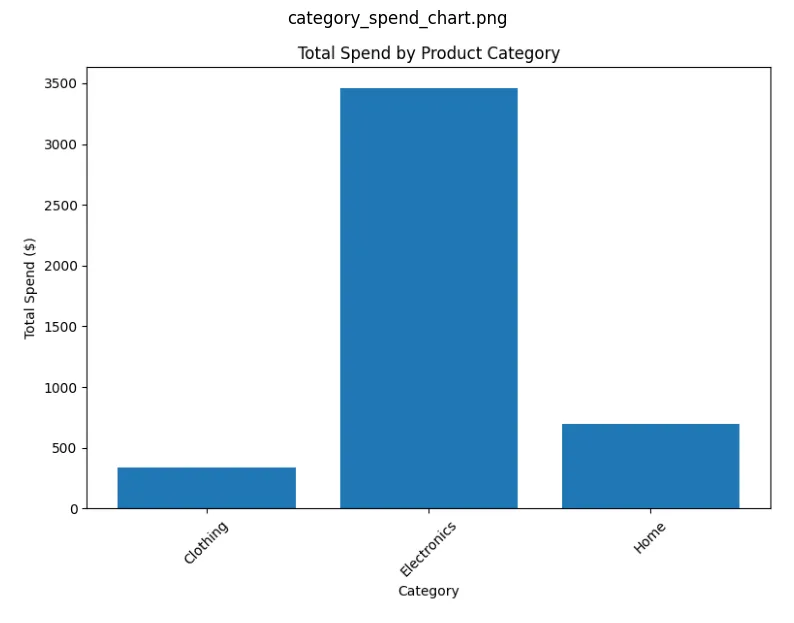
And the text output from the agent:
The bar chart shows the total spend amount for each product category based on the provided billing data. The x-axis displays the category names (Electronics, Home, and Clothing), and the y-axis represents the total spend amount in dollars.From the chart, we can observe that the Electronics category has the highest total spend at around $4,360. This is significantly higher than the other two categories, Home and Clothing, which have total spends of around $700 and $340, respectively.One notable observation is the large difference in spend between the Electronics category and the other two categories. This could indicate that the customer or business has a higher demand or preference for electronic products compared to home and clothing items during the given time period.Overall, the chart provides a clear visual representation of the spending patterns across different product categories, highlighting the dominance of the Electronics category in terms of total spend.
Extending the Capabilities
The Code Interpreter isn't limited creating graphs, during my experiments I have used it to perform a wide variety of data processing tasks, including training ML models and performing ML inference. We can also use it for other data manipulation tasks. For instance, we can ask it to format our data into JSON:
Python
invoke("Format the sales data into a JSON format. And save to a file.")
This command will create a JSON file with our structured data, which can be easily used in subsequent processing steps or other applications.
Conclusion
The addition of Code Interpreter to Agents for Amazon Bedrock represents a significant step forward in the capabilities of the service. By combining the natural language understanding of large language models with the ability to execute code, we can create powerful tools for data analysis, visualization, and complex problem-solving.
This feature opens up a world of possibilities for businesses and developers. From financial analysis to scientific computing, the ability to seamlessly integrate code execution with natural language interactions can streamline workflows and unlock new insights from data.
As this feature is currently in public preview, now is the perfect time to experiment with it and provide feedback. The potential applications are vast, and your input can help shape the future of this technology.
Remember, when implementing Code Interpreter in your own projects, consider the following:
- Security: While the execution environment is sandboxed, always be mindful of the data you're processing.
- Performance: Complex computations may take some time, so plan your application architecture accordingly.
- User Experience: Think about how to present the results of code execution in a way that's meaningful to your end-users.
The Code Interpreter feature in Amazon Bedrock Agents is a powerful tool that bridges the gap between natural language AI and computational capabilities. As we continue to explore and develop these technologies, we're moving closer to creating truly intelligent and versatile AI assistants.
Enjoyed reading this content? Let the author know!
Your likes, comments, shares, and saves help creators reach more builders.

Loading recommendations
Loading article