

Fixing... err... I mean "implementing" my Amazon DynamoDB approach with Gen-AI [Part 2]
Second part of the series where I build a serverless app to track my Green Card priority date and implement storing the data in DynamoDB.
Series: Using Amazon Q Developer to build a tracker for my green card priority date (3 articles)
- 2Fixing... err... I mean "implementing" my Amazon DynamoDB approach with Gen-AI [Part 2] This article

In the previous article , I started building a serverless app to scrape the USCIS priority dates from their website. I was able to extract the dates from the website, but the schema for my DynamoDB table needed a change to store the data. Today, I'm going to tackle this using Amazon Q Developer .
The issue I ran into was how I was storing my data. I had the primary key as
pk = f"{filing_type}#{category}" and the secondary key as sk = f"{country}" . The data that I'm trying to store has a date for when the Visa Bulletin was published ( bulletin_date ), and each bulletin has two tables I'm interested in for the priority date ( filing_type for Final Date and Application Date ). Each of those tables has a row per visa category ( category ), and column for the country groupings. The date for each combination of country and category is what I'm trying to store. This will allow me to query the historic data specific to me, with category='3rd' , filing_type='Final Date' , and country='All Chargeability Areas Except Those Listed' .Table Schema
First item on my list today is to ensure I have a table schema to store my data without overwriting entries like I had in my previous attempt. First, I update the schema using the current data structure, update the
store_data function with structure below (and also implement handling table request throttling ), with a quick detour to dig into PROVISIONED vs PAY_PER_REQUEST for my table access. Now we can update our Terraform with the new table definition:Terraform
resource "aws_dynamodb_table" "visa_bulletin_data" {name = "VisaBulletinData"billing_mode = "PAY_PER_REQUEST"hash_key = "pk"range_key = "sk"attribute {name = "pk"type = "S"}attribute {name = "sk"type = "S"}}
The
bulletin_date will be used for the primary key ( pk ), and a composite secondary key ( sk ) using the filing_type , country , and category to group the data. Our pk and sk will be defined in our code as:Python
pk = f"BULLETIN_DATE#{bulletin_date.strftime('%Y-%m')}"sk = f"FILING_TYPE#{filing_type}#COUNTRY#{country}#CATEGORY#{category}"
I went back and forth between using provisioned capacity vs on-demand, I do like the idea of using the retry logic, but in the end, I settled on going for a simpler approach. I know that once I have everything working, I will do another pass to improve the code for the app. Ensuring that I combine the database write / retry logic with how I currently handle getting the data will cause issues. In the
scrape_visa_bulletin function, I'm looping over each of the bulletins to extract the data, and adding that URL to the ProcessedURLs table so I don't process it again, but if writing to the database fails, it won't reprocess the pages that weren't saved. We now have the following for our store_data function:Python
def store_data(data):try:print("Storing data")for item in data:filing_type = item['filing_type']country = item['country']category = item['category']bulletin_date = datetime.strptime(item['bulletin_date'], "%Y-%m-%d")date = datetime.strptime(item['date'], "%Y-%m-%d")pk = f"BULLETIN_DATE#{bulletin_date.strftime('%Y-%m')}"sk = f"FILING_TYPE#{filing_type}#COUNTRY#{country}#CATEGORY#{category}"table.put_item(Item={'pk': pk,'sk': sk,'filing_type': filing_type,'country': country,'category': category,'bulletin_date': bulletin_date.strftime("%Y-%m-%d"),'date': date.strftime("%Y-%m-%d")})print("Done storing data")except Exception as e:print(f"Unable to store the data, error: {e}")
After running
terraform apply , grabbing some fresh coffee, finishing it, and cleaning my keyboard, I can test the updated code.
TIL: it takes time to change a DynamoDB table's access mode.
plaintext
aws_dynamodb_table.visa_bulletin_data: Modifications complete after 17m41s [id=VisaBulletinData]aws_lambda_function.visa_bulletin_scraper: Modifying... [id=visa-bulletin-scraper]aws_lambda_function.visa_bulletin_scraper: Still modifying... [id=visa-bulletin-scraper, 10s elapsed]aws_lambda_function.visa_bulletin_scraper: Still modifying... [id=visa-bulletin-scraper, 20s elapsed]aws_lambda_function.visa_bulletin_scraper: Modifications complete after 25s [id=visa-bulletin-scraper]Apply complete! Resources: 1 added, 3 changed, 1 destroyed.(package) ➜ uscis-priority-date-tracker git:(main) ✗
Commented out the lines that handle checking if the URL was previously processed, and I can run the app again. Woohoo!! I can see my data in my table! It looks like what I need, but now I need to update the
read_data method to retrieve it.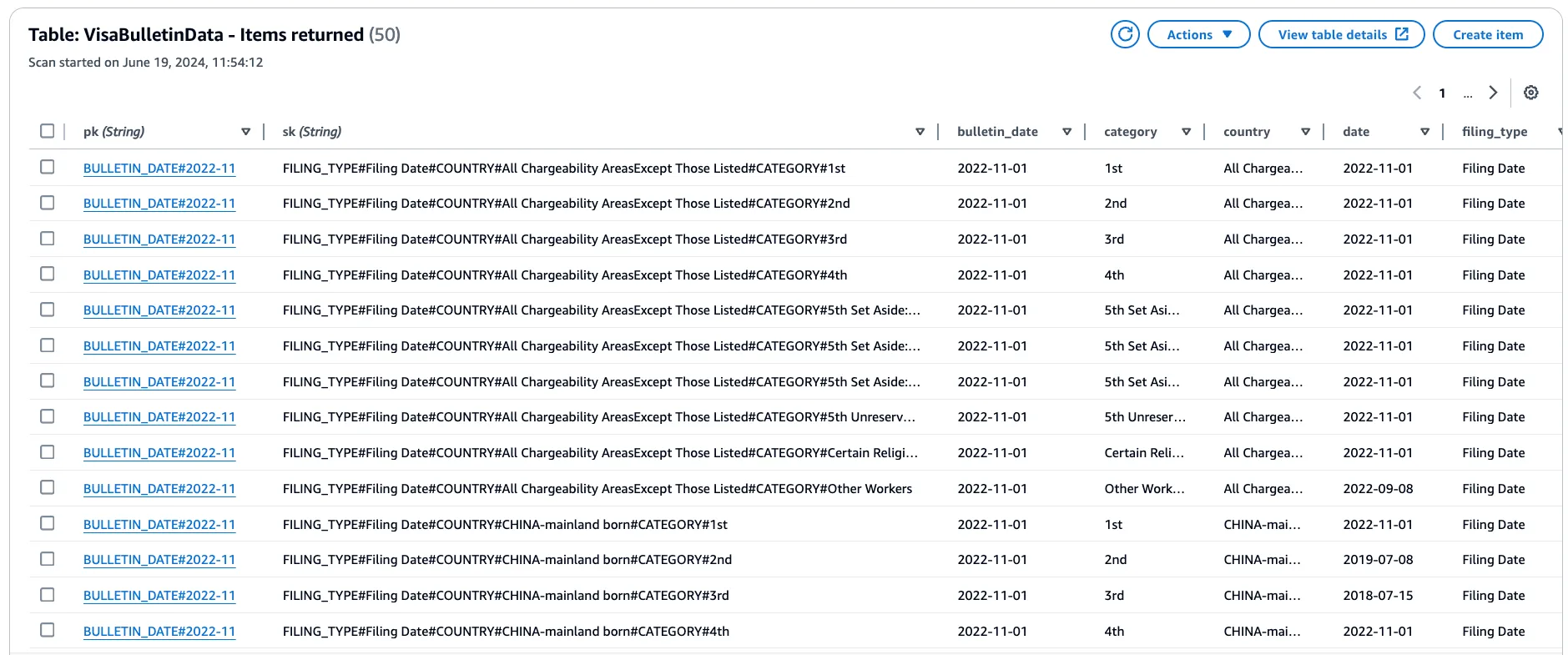
Reading the Data
Updating
read_data to use the new structure, and printing the output provides the following code (I'm using defaults for now) after needing to query using the wrong pk and sk :Python
def read_data(filing_type='Final Date', category='3rd', country='All Chargeability Areas Except Those Listed'):pk_prefix = "BULLETIN_DATE#"sk_prefix = f"FILING_TYPE#{filing_type}#COUNTRY#{country}#CATEGORY#{category}"response = table.query(KeyConditionExpression=Key('pk').begins_with(pk_prefix) & Key('sk').begins_with(sk_prefix),ScanIndexForward=False)items = response['Items']# Sort the items by bulletin_date in descending ordersorted_items = sorted(items, key=lambda x: x['bulletin_date'], reverse=True)# Print the headerprint(f"Retrieved the [{filing_type}] data for [{category}] for [{country}]:")# Print each itemfor item in sorted_items:bulletin_date = item['bulletin_date']date = item['date']print(f"Bulletin {bulletin_date}: {date}")return sorted_items
And 💥. It does not work!!!
Bash
Traceback (most recent call last):File "/Users/cobusb/projects/uscis-priority-date-tracker/src/local_test.py", line 21, in <module>result = lambda_handler(mock_event, mock_context)^^^^^^^^^^^^^^^^^^^^^^^^^^^^^^^^^^^^^^^^File "/Users/cobusb/projects/uscis-priority-date-tracker/src/handler.py", line 190, in lambda_handlereb3_data = read_data()^^^^^^^^^^^File "/Users/cobusb/projects/uscis-priority-date-tracker/src/handler.py", line 123, in read_dataresponse = table.query(^^^^^^^^^^^^File "/Users/cobusb/projects/terraform-samples/us-visa-dates-checker/src/package/lib/python3.12/site-packages/boto3/resources/factory.py", line 581, in do_actionresponse = action(self, *args, **kwargs)^^^^^^^^^^^^^^^^^^^^^^^^^^^^^File "/Users/cobusb/projects/terraform-samples/us-visa-dates-checker/src/package/lib/python3.12/site-packages/boto3/resources/action.py", line 88, in __call__response = getattr(parent.meta.client, operation_name)(*args, **params)^^^^^^^^^^^^^^^^^^^^^^^^^^^^^^^^^^^^^^^^^^^^^^^^^^^^^^^^^^^^File "/Users/cobusb/projects/terraform-samples/us-visa-dates-checker/src/package/lib/python3.12/site-packages/botocore/client.py", line 565, in _api_callreturn self._make_api_call(operation_name, kwargs)^^^^^^^^^^^^^^^^^^^^^^^^^^^^^^^^^^^^^^^^^^^File "/Users/cobusb/projects/terraform-samples/us-visa-dates-checker/src/package/lib/python3.12/site-packages/botocore/client.py", line 1021, in _make_api_callraise error_class(parsed_response, operation_name)botocore.exceptions.ClientError: An error occurred (ValidationException) when calling the Query operation: Query key condition not supported
Turns out that the primary key needs to be an "equality condition" . I also notice that the files referenced are from a different directory than where I moved my code to. Initially this was going to be part of a larger repo with Terraform examples, but decided to split it out. I think this is due to using
venv from that folder, but as long as my code runs, I'm going to ignore it for now. Let's fix the database first.Redoing the Table Again
After checking if a schema change would fix it, I update both the
store_data and read_data methods to use the new schema:Python
def store_data(data):try:for item in data:filing_type = item['filing_type']country = item['country']category = item['category']bulletin_date = datetime.strptime(item['bulletin_date'], "%Y-%m-%d")date = datetime.strptime(item['date'], "%Y-%m-%d")pk = f"FILING_TYPE#{filing_type}#CATEGORY#{category}#COUNTRY#{country}"sk = f"BULLETIN_DATE#{bulletin_date.strftime('%Y-%m-%d')}"table.put_item(Item={'pk': pk,'sk': sk,'filing_type': filing_type,'country': country,'category': category,'bulletin_date': bulletin_date.strftime("%Y-%m-%d"),'date': date.strftime("%Y-%m-%d")})except Exception as e:print(f"Unable to store the data, error: {e}")def read_data(filing_type='Final Date', category='3rd', country='All Chargeability Areas Except Those Listed'):pk = f"FILING_TYPE#{filing_type}#CATEGORY#{category}#COUNTRY#{country}"response = table.query(KeyConditionExpression=Key('pk').eq(pk),ScanIndexForward=False # Reverse the order to get the latest bulletin_date first)items = response['Items']# Sort the items by bulletin_date in descending ordersorted_items = sorted(items, key=lambda x: x['sk'], reverse=True)# Print the headerprint(f"Retrieved the [{filing_type}] data for [{category}] for [{country}]:")# Print each itemfor item in sorted_items:date = item['date']print(f"Bulletin {bulletin_date}: {date}")return sorted_items
While I've used DynamoDB quite a bit in the past, I haven't had to deal with data when doing a schema migration. I'm going to save that for another day, for now I just want a way to delete all the data with the AWS CLI . Looking at the list of methods, I don't see an equivalent to SQL's
TRUNCATE TABLE statement, and it doesn't look like it exists . I'm now very curious what will happen to the data, so I'm going to update the table definition in Terraform and YOLO it.Oh.
The table schema isn't changing, only how I store the data.
💡!!!
Ok, this makes sense. We aren't changing the table schema, only the data we are storing in it. I feel like I need to generate on of those 300 memes with "THIS IS NOSQL!!!!!". To clear out the "old" data, I can either manually click to delete them in batches via the AWS Console, write some extra code, or drop and recreate the table - dropping the table since this is Sparta!!! :P
After another
terraform apply , the code works! Here's the first few lines of output:plaintext
Retrieved the [Final Date] data for [3rd] for [All Chargeability Areas Except Those Listed]:Bulletin 2024-07-01: 2021-12-01Bulletin 2024-06-01: 2022-11-22Bulletin 2024-05-01: 2022-11-22Bulletin 2024-04-01: 2022-11-22Bulletin 2024-03-01: 2022-09-08Bulletin 2024-02-01: 2022-09-01Bulletin 2024-01-01: 2022-08-01Bulletin 2023-12-01: 2021-12-01
What I Learnt
After the back and forth to get the table structure to store my data, and then that last change of the values of the
pk and sk for the data that didn't change the table schema, I think I'm starting to think about the data structures in the right way. And repeating the recap from the first piece, the overall process of trial and error by patching different solutions together is different. Instead of the searching and multiple tabs, I now rarely leave my IDE.I've added a todo for myself to read up on how to handle migrating existing data with DynamoDB, think that will be very interesting. In the past, I've done many large SQL based data migrations, and I honestly have no idea how I would do it for this app other than code to handle it. Probably would need to have that in a function, call it from the main method, and do another deployment to delete it. Looks like I have my next article topic after this series is done.
While generative-ai has helped speed up creating applications, you do need to take into account that it is very literal. Looking at the response when I asked it for the AWS CLI command to delete all items in a DynamoDB table , it still provided a technically accurate and feasible solution, just not one you would really use.
Final Code
As for the previous piece, I've tagged this with
article-2 , and pushed the tag. Source code for this article. Conclusion
I've been adding the prompts at the bottom of each piece so far, and I'll keep doing it for the rest of this series as I'm trying to simulate watching and listening to someone live code, but in written form. The intent is to share the thought process instead of just the final, polished solution. This will still be turned into a single solution of how to do it from start to finish without the back and forth, but for that, I first need to finish up all the parts still waiting for me. Next up, I'll update the function so I can pass the parameters that are currently hard-coded via defaults for the
read_data function. At least, that is the plan, right after I double check the message I had after pushing this code:plaintext
remote: Resolving deltas: 100% (4/4), completed with 4 local objects.remote:remote: GitHub found 1 vulnerability on build-on-aws/uscis-priority-date-tracker's default branch (1 moderate). To find out more, visit:remote: https://github.com/build-on-aws/uscis-priority-date-tracker/security/dependabot/1
Stay tuned for the next installment of this series...
Using Provisioned Capacity
Initially I used provisioned capacity for my DynamoDB table, along with logic to handle the retries for me, here is the code that was removed with this logic:
Prompts used in this article
Prompt 1
Can you help me define the table structure for DynamoDB using Terraform, I'm trying to store the following data? My data consists of a collection of objects, each with a BulletinDate for the month/year the data is from, and then split into 2 categories for the filing type called "priority date" and "filing date". For each of these filings, I will have a collection of data defined by 2 dimensions: Country, and Category. So for a single BulletinDate, I would have a collection of data using Country and Category as the key, with PriorityDate as the value, and the collection needs to be grouped by FilingType for "priority date" and "filing date". Can you please show me how to create this table?
Response:
Sure, I can help you define the table structure for DynamoDB using Terraform. Based on your data structure, we can create a single table with a composite primary key consisting of a partition key and a sort key. [1]
Here's how you can define the table structure in your Terraform code:
Terraform
resource "aws_dynamodb_table" "visa_bulletin_data" {name = "VisaBulletinData"billing_mode = "PROVISIONED" # or "PAY_PER_REQUEST"read_capacity = 5 # Set appropriate read/write capacity units for provisioned modewrite_capacity = 5hash_key = "pk" # Partition keyrange_key = "sk" # Sort keyattribute {name = "pk"type = "S" # String type}attribute {name = "sk"type = "S" # String type}# Additional settings, global secondary indexes, etc.}
In this structure, we're using a composite primary key with a partition key (
pk ) and a sort key ( sk ). Both keys are defined as strings ( S ).To store your data, you can use the following format for the primary key:
Python
pk = "BULLETIN_DATE#<BulletinDate>"sk = "FILING_TYPE#<FilingType>#COUNTRY#<Country>#CATEGORY#<Category>"
For example, if you have a
BulletinDate of "2023-05", a FilingType of "priority_date", a Country of "India", and a Category of "EB3", the primary key would be: [2]Python
pk = "BULLETIN_DATE#2023-05"sk = "FILING_TYPE#priority_date#COUNTRY#India#CATEGORY#EB3"
With this structure, you can store the
PriorityDate value as an attribute in the DynamoDB item.You can also consider creating a Global Secondary Index (GSI) on the
pk and sk attributes to allow efficient querying based on different combinations of the primary key attributes.Note: Make sure to replace the placeholders (
<BulletinDate> , <FilingType> , <Country> , and <Category> ) with your actual values when constructing the primary key.Sources:
Prompt 2
Thanks, given that I have my source data added to a flat collection with the code below, can you please provide the python code to store this data into the table above? Here's how I store the data in my collection:
Python
employment_based_data.append({'filing_type': filing_type,'country': countries[cell_id - 1],'category': category_value,'bulletin_date': bulletin_date.strftime("%Y-%m-%d"),'date': cell_date.strftime("%Y-%m-%d")})
Response:
Sure, I can provide you with the Python code to store the data in the DynamoDB table using the structure we defined earlier. Here's an example: [1]
Python
import boto3from datetime import datetime# Initialize DynamoDB resourcedynamodb = boto3.resource('dynamodb')table = dynamodb.Table('VisaBulletinData')def store_data(data):for item in data:filing_type = item['filing_type']country = item['country']category = item['category']bulletin_date = datetime.strptime(item['bulletin_date'], "%Y-%m-%d")date = datetime.strptime(item['date'], "%Y-%m-%d")pk = f"BULLETIN_DATE#{bulletin_date.strftime('%Y-%m')}"sk = f"FILING_TYPE#{filing_type}#COUNTRY#{country}#CATEGORY#{category}"table.put_item(Item={'pk': pk,'sk': sk,'filing_type': filing_type,'country': country,'category': category,'bulletin_date': bulletin_date.strftime("%Y-%m-%d"),'date': date.strftime("%Y-%m-%d")})# Assuming you have the employment_based_data list populatedstore_data(employment_based_data)
Here's how the
store_data function works:- We iterate over each item in the
employment_based_datalist.
- For each item, we extract the
filing_type,country,category,bulletin_date, anddatevalues.
- We construct the partition key (
pk) using theBULLETIN_DATEprefix and thebulletin_datein the formatYYYY-MM.
- We construct the sort key (
sk) using theFILING_TYPE,filing_type,COUNTRY,country, andCATEGORY,categoryvalues.
- We use the
put_itemmethod of the DynamoDB table to store the item with the constructed primary key (pkandsk) and the other attributes (filing_type,country,category,bulletin_date, anddate). [2]
Note that we're using the
datetime module to convert the bulletin_date and date strings to datetime objects, and then back to strings in the desired format ( YYYY-MM for bulletin_date and YYYY-MM-DD for date ).After running this code, your data should be stored in the DynamoDB table with the defined structure. [3]
Sources:
Prompt 3
Can you update this code to be able to handle exceeding the write capacity for my table with some kind of graceful backoff and retry logic?
Response:
Sure, I can update the code to handle exceeding the write capacity for your DynamoDB table by implementing a backoff and retry logic. Here's an example of how you can modify the
store_data function to achieve this:Python
import boto3from datetime import datetimeimport timeimport randomimport math# Initialize DynamoDB resourcedynamodb = boto3.resource('dynamodb')table = dynamodb.Table('VisaBulletinData')def store_data(data):for item in data:filing_type = item['filing_type']country = item['country']category = item['category']bulletin_date = datetime.strptime(item['bulletin_date'], "%Y-%m-%d")date = datetime.strptime(item['date'], "%Y-%m-%d")pk = f"BULLETIN_DATE#{bulletin_date.strftime('%Y-%m')}"sk = f"FILING_TYPE#{filing_type}#COUNTRY#{country}#CATEGORY#{category}"max_retries = 5 # Maximum number of retriesretry_delay = 1 # Initial retry delay in secondsmax_delay = 60 # Maximum retry delay in secondsfor attempt in range(max_retries):try:table.put_item(Item={'pk': pk,'sk': sk,'filing_type': filing_type,'country': country,'category': category,'bulletin_date': bulletin_date.strftime("%Y-%m-%d"),'date': date.strftime("%Y-%m-%d")})break # Exit the retry loop if the write succeedsexcept table.meta.client.exceptions.ProvisionedThroughputExceededException as e:if attempt == max_retries - 1:raise e # Raise the exception if the maximum number of retries is reachedelse:# Apply exponential backoff with jitterdelay = retry_delay * (2 ** attempt) + random.uniform(0, 1)delay = min(delay, max_delay)print(f"Write capacity exceeded, retrying in {delay} seconds...")time.sleep(delay)except Exception as e:print(f"Error writing item to DynamoDB: {e}")break# Assuming you have the employment_based_data list populatedstore_data(employment_based_data)
Here's what we've added to the
store_data function:- We define the maximum number of retries (
max_retries) and the initial retry delay (retry_delay) in seconds.
- We also define the maximum retry delay (
max_delay) in seconds to prevent excessive delays.
- We wrap the
put_itemoperation in aforloop that runs up tomax_retriestimes.
- If the
ProvisionedThroughputExceededExceptionis raised, indicating that the write capacity has been exceeded, we apply an exponential backoff with jitter before retrying the write operation.
- The exponential backoff delay is calculated as
retry_delay * (2 ** attempt) + random.uniform(0, 1), whereattemptis the current retry attempt. This introduces a random jitter to prevent multiple clients from retrying at the same time.
- The calculated delay is capped at
max_delayto prevent excessive delays.
- If the maximum number of retries is reached, the
ProvisionedThroughputExceededExceptionis raised, allowing you to handle it as needed.
- For any other exceptions, we print an error message and break out of the retry loop.
With this implementation, the code will retry writing to the DynamoDB table if the write capacity is exceeded, with an exponential backoff and jitter to avoid overwhelming the table with retries. If the maximum number of retries is reached, the exception is raised, allowing you to handle it appropriately (e.g., logging, retrying later, etc.).
Note that this implementation assumes that you're using the provisioned capacity mode for your DynamoDB table. If you're using the on-demand capacity mode, you don't need to handle the
ProvisionedThroughputExceededException specifically, as DynamoDB will automatically handle the scaling for you.
Prompt 4
Can you explain the difference between the provisioned capacity and on-demand for DynamoDB, and include how it would affect accessing my data?
Response:
Certainly! Amazon DynamoDB offers two capacity modes: provisioned capacity and on-demand. The choice between these modes affects the way you manage capacity and pay for the service. Here's an explanation of the differences and how they impact costs: [1]
Provisioned Capacity Mode:
- In this mode, you specify the number of read and write capacity units you expect your application to require.
- You are billed for the provisioned capacity, regardless of whether you consume it or not.
- Provisioned capacity is suitable for workloads with predictable or consistent traffic patterns, where you can forecast your capacity requirements. [2]
- You can enable auto scaling to automatically adjust the provisioned capacity based on your utilization, helping to optimize costs and performance.
- If your application exceeds the provisioned capacity, you may experience throttling, which can be mitigated by increasing the provisioned capacity or enabling auto scaling.
On-Demand Capacity Mode:
- In this mode, you don't need to provision any capacity upfront.
- You pay for the data reads and writes your application performs, based on the number of read and write request units consumed.
- On-demand capacity is ideal for workloads with unpredictable or [3]
Sources:
Prompt 5
Thanks, can you show me how to update the read_data function using this new table schema so that I can pass filing_type, category, and country to return a sorted list? It should use the date bulletin_date for the sort.
Response:
Sure, here's how you can update the
read_data function to retrieve and sort the data based on the filing_type , category , and country parameters, using the bulletin_date for sorting:Python
from boto3.dynamodb.conditions import Keydef read_data(filing_type='Final Date', category='3rd', country='All Chargeability Areas Except Those Listed'):pk = f"FILING_TYPE#{filing_type}#CATEGORY#{category}"sk_prefix = f"COUNTRY#{country}"response = table.query(KeyConditionExpression=Key('pk').eq(pk) & Key('sk').begins_with(sk_prefix),ScanIndexForward=False # Reverse the order to get the latest bulletin_date first)items = response['Items']# Sort the items by bulletin_date in descending ordersorted_items = sorted(items, key=lambda x: x['bulletin_date'], reverse=True)return sorted_items
Here's how the
read_data function works:- We construct the partition key (
pk) using theFILING_TYPE,filing_type, andCATEGORY,categoryvalues.
- We construct the sort key prefix (
sk_prefix) using theCOUNTRYandcountryvalues.
- We use the
querymethod of the DynamoDB table to retrieve items where the partition key (pk) matches the constructed value, and the sort key (sk) begins with the constructed prefix (sk_prefix).
- We set the
ScanIndexForwardparameter toFalseto reverse the order of the results, so that the latestbulletin_dateis returned first.
- We store the retrieved items in the
itemsvariable.
- We sort the
itemslist in descending order based on thebulletin_dateattribute using thesortedfunction and a lambda function as thekey.
- We return the sorted list of items.
To use the
read_data function, you can call it with the desired filing_type , category , and country parameters:Python
# Retrieve and sort data for 'Final Date', '3rd' category, and 'All Chargeability Areas Except Those Listed' countrysorted_data = read_data()# Retrieve and sort data for 'Filing Date', 'EB2' category, and 'India' countrysorted_data = read_data(filing_type='Filing Date', category='EB2', country='India')
The
sorted_data variable will contain a list of items sorted in descending order by bulletin_date , filtered by the specified filing_type , category , and country .Note that the
query operation in DynamoDB is efficient for retrieving data based on the primary key (partition key and sort key). If you need to filter the data based on other attributes, you may need to consider using a Global Secondary Index (GSI) or performing a scan operation, which can be less efficient for large datasets.
Prompt 6
Thanks, can you now show me how I would use the returned data to print out a line per entry, with the values from the input parameters? It should have the following first (with the [] around the values for the variables): Retrieved the [Final Date] data for [EB3] for [All Chargeability Areas Except Those Listed]:
And then a line per entry with this format: Bulletin 2024-07-01: 2021-11-01
The code provided by this response isn't quite correct, it is using the previous table schema for thepkandsk, so I just copied the lines fromstore_datato replace them.
Response: Certainly! Here's how you can modify the
read_data function to print the desired output format:Python
from boto3.dynamodb.conditions import Keydef read_data(filing_type='Final Date', category='3rd', country='All Chargeability Areas Except Those Listed'):pk = f"FILING_TYPE#{filing_type}#CATEGORY#{category}"sk_prefix = f"COUNTRY#{country}"response = table.query(KeyConditionExpression=Key('pk').eq(pk) & Key('sk').begins_with(sk_prefix),ScanIndexForward=False # Reverse the order to get the latest bulletin_date first)items = response['Items']# Sort the items by bulletin_date in descending ordersorted_items = sorted(items, key=lambda x: x['bulletin_date'], reverse=True)# Print the headerprint(f"Retrieved the [{filing_type}] data for [{category}] for [{country}]:")# Print each itemfor item in sorted_items:bulletin_date = item['bulletin_date']date = item['date']print(f"Bulletin {bulletin_date}: {date}")return sorted_items
In this updated version of the
read_data function, we've added the following changes:- After sorting the items, we print the header line using the
printfunction and an f-string. The header line will be in the format:Retrieved the [Final Date] data for [EB3] for [All Chargeability Areas Except Those Listed]:
- We then iterate over the
sorted_itemslist using aforloop.
- For each item, we extract the
bulletin_dateanddatevalues.
- We print a line for each item using the
printfunction and an f-string. The line will be in the format:Bulletin 2024-07-01: 2021-11-01
To use the updated
read_data function, you can call it with the desired filing_type , category , and country parameters:Python
# Retrieve and print data for 'Final Date', '3rd' category, and 'All Chargeability Areas Except Those Listed' countryread_data()# Retrieve and print data for 'Filing Date', 'EB2' category, and 'India' countryread_data(filing_type='Filing Date', category='EB2', country='India')
The output will be printed to the console, with the header line followed by a line for each item in the sorted list, displaying the
bulletin_date and date values.Note that this implementation assumes that you have the necessary data in your DynamoDB table with the expected attributes (
bulletin_date and date ). If the data structure or attribute names are different, you'll need to adjust the code accordingly.
Prompt 7
This doesn't look correct, can you please recheck as earlier in the conversation we defined pk and sk for the table when storing data using this:
Python
pk = f"BULLETIN_DATE#{bulletin_date.strftime('%Y-%m')}"sk = f"FILING_TYPE#{filing_type}#COUNTRY#{country}#CATEGORY#{category}"
Response:
You're absolutely right, my apologies. I should have used the correct primary key structure that we defined earlier. Here's the updated
read_data function with the correct primary key construction:Python
from boto3.dynamodb.conditions import Keydef read_data(filing_type='Final Date', category='3rd', country='All Chargeability Areas Except Those Listed'):pk_prefix = "BULLETIN_DATE#"sk_prefix = f"FILING_TYPE#{filing_type}#COUNTRY#{country}#CATEGORY#{category}"response = table.query(KeyConditionExpression=Key('pk').begins_with(pk_prefix) & Key('sk').begins_with(sk_prefix),ScanIndexForward=False # Reverse the order to get the latest bulletin_date first)items = response['Items']# Sort the items by bulletin_date in descending ordersorted_items = sorted(items, key=lambda x: x['bulletin_date'], reverse=True)# Print the headerprint(f"Retrieved the [{filing_type}] data for [{category}] for [{country}]:")# Print each itemfor item in sorted_items:bulletin_date = item['bulletin_date']date = item['date']print(f"Bulletin {bulletin_date}: {date}")return sorted_items
Here are the changes:
- We define the
pk_prefixas"BULLETIN_DATE#"to match the partition key structure we defined earlier.
- We construct the
sk_prefixusing thefiling_type,country, andcategoryvalues, following the sort key structure we defined earlier.
- In the
KeyConditionExpressionof thequerymethod, we use thebegins_withcondition for both the partition key (pk) and the sort key (sk) to retrieve items where thepkbegins with"BULLETIN_DATE#"and theskbegins with the constructedsk_prefix.
With these changes, the
read_data function should now correctly retrieve and print the data based on the primary key structure we defined earlier.Thank you for catching my mistake. Please let me know if this updated version looks correct.
Prompt 8
When I use this code, it errors with:
plaintext
botocore.exceptions.ClientError: An error occurred (ValidationException) when calling the Query operation: Query key condition not supported
Response:
Ah, I see the issue now. The
ValidationException is occurring because the KeyConditionExpression we're using is not supported for the query operation in DynamoDB. [1]The
query operation in DynamoDB requires the partition key to be an equality condition, and the sort key can either be an equality condition or a range condition (using comparison operators or the begins_with function).To fix this issue, we need to modify the
read_data function to use the partition key as an equality condition and the sort key as a range condition. Here's the updated code:plaintext
from boto3.dynamodb.conditions import Keydef read_data(filing_type='Final Date', category='3rd', country='All Chargeability Areas Except Those Listed'):pk = f"BULLETIN_DATE#{bulletin_date.strftime('%Y-%m')}"sk_prefix = f"FILING_TYPE#{filing_type}#COUNTRY#{country}#CATEGORY#{category}"response = table.query(KeyConditionExpression=Key('pk').eq(pk) & Key('sk').begins_with(sk_prefix),ScanIndexForward=False # Reverse the order to get the latest bulletin_date first)items = response['Items']# Sort the items by bulletin_date in descending ordersorted_items = sorted(items, key=lambda x: x['bulletin_date'], reverse=True)# Print the headerprint(f"Retrieved the [{filing_type}] data for [{category}] for [{country}]:")# Print each itemfor item in sorted_items:bulletin_date = item['bulletin_date']date = item['date']print(f"Bulletin {bulletin_date}: {date}")return sorted_items
Here are the changes:
- We construct the partition key (
pk) using theBULLETIN_DATEprefix and thebulletin_datein the formatYYYY-MM.
- In the
KeyConditionExpressionof thequerymethod, we use theeqcondition for the partition key (pk) to match the constructedpkvalue exactly.
- For the sort key (
sk), we use thebegins_withcondition with the constructedsk_prefix.
By using the
eq condition for the partition key and the begins_with condition for the sort key, we should be able to query the data correctly without encountering the ValidationException .Note that you'll need to pass the
bulletin_date parameter to the read_data function, or you can use a default value if you want to retrieve the latest data by default.Please let me know if this updated code works for you or if you have any further questions.
Sources:
Prompt 9
Ok, given the requirement for an equality condition on the primary key, can you suggest what data we should use for the primary key given this constraint? I want to be able to retrieve the data for a specific filing_type, category, and country.
Response:
Given the requirement for an equality condition on the partition key, we can modify the primary key structure to accommodate retrieving data for a specific
filing_type , category , and country .Here's a suggested primary key structure:
Python
pk = "FILING_TYPE#<filing_type>#CATEGORY#<category>#COUNTRY#<country>"sk = "BULLETIN_DATE#<bulletin_date>"
With this structure, the partition key (
pk ) will be a composite key consisting of the filing_type , category , and country values, separated by a delimiter ( # ). The sort key ( sk ) will be the bulletin_date .Here's how you can update the
store_data and read_data functions to use this new primary key structure:Python
def store_data(data):for item in data:filing_type = item['filing_type']country = item['country']category = item['category']bulletin_date = datetime.strptime(item['bulletin_date'], "%Y-%m-%d")date = datetime.strptime(item['date'], "%Y-%m-%d")pk = f"FILING_TYPE#{filing_type}#CATEGORY#{category}#COUNTRY#{country}"sk = f"BULLETIN_DATE#{bulletin_date.strftime('%Y-%m-%d')}"table.put_item(Item={'pk': pk,'sk': sk,'filing_type': filing_type,'country': country,'category': category,'bulletin_date': bulletin_date.strftime("%Y-%m-%d"),'date': date.strftime("%Y-%m-%d")})def read_data(filing_type, category, country):pk = f"FILING_TYPE#{filing_type}#CATEGORY#{category}#COUNTRY#{country}"response = table.query(KeyConditionExpression=Key('pk').eq(pk),ScanIndexForward=False # Reverse the order to get the latest bulletin_date first)items = response['Items']# Sort the items by bulletin_date in descending ordersorted_items = sorted(items, key=lambda x: x['sk'], reverse=True)# Print the headerprint(f"Retrieved the [{filing_type}] data for [{category}] for [{country}]:")# Print each itemfor item in sorted_items:date = item['date']print(f"Bulletin {bulletin_date}: {date}")return sorted_items
In the
store_data function:- We construct the partition key (
pk) using theFILING_TYPE,filing_type,CATEGORY,category, andCOUNTRY,countryvalues.
- We construct the sort key (
sk) using theBULLETIN_DATEprefix and thebulletin_datevalue in the formatYYYY-MM-DD.
In the
read_data function:- We construct the partition key (
pk) using thefiling_type,category, andcountryvalues passed as arguments.
- We use the
querymethod with theKeyConditionExpressionset toKey('pk').eq(pk)to retrieve items where the partition key matches the constructedpkvalue exactly.
- We sort the retrieved items by the sort key (
sk) in descending order.
- When printing the data, we extract the
bulletin_datefrom the sort key (sk) by splitting it on the#delimiter and taking the second part.
With this primary key structure, you can retrieve data for a specific
filing_type , category , and country combination by passing those values to the read_data function:Python
# Retrieve data for 'Final Date', 'EB3', and 'All Chargeability Areas Except Those Listed'read_data('Final Date', 'EB3', 'All Chargeability Areas Except Those Listed')# Retrieve data for 'Filing Date', 'EB2', and 'India'read_data('Filing Date', 'EB2', 'India')
This approach ensures that you can query the data efficiently using the partition key equality condition, while still being able to retrieve data for specific combinations of
filing_type , category , and country .Please note that if you need to query the data based on different combinations of these attributes, you may need to consider creating additional Global Secondary Indexes (GSIs) to optimize those queries.
Prompt 10
Thanks, what is the easiest way to delete all my data from my DynamoDB table since the schema has changed? If I can do it with the AWS CLI, can you show me the command please?
Response:
To delete all data from your DynamoDB table using the AWS CLI, you can use the
scan operation to retrieve all items in the table, and then use the batch-write-item operation to delete them in batches[1].Here's the command to scan and retrieve all items from the table:
Bash
aws dynamodb scan --table-name VisaBulletinData --output json > items.json
This command will scan the
VisaBulletinData table and store the retrieved items in a JSON file named items.json .Next, you can use the following Python script to delete the items in batches using the
batch-write-item operation:Python
import jsonimport boto3dynamodb = boto3.resource('dynamodb')table = dynamodb.Table('VisaBulletinData')# Load the items from the JSON filewith open('items.json', 'r') as f:items = json.load(f)['Items']# Batch size for the write operationbatch_size = 25# Delete items in batchesfor i in range(0, len(items), batch_size):batch = items[i:i+batch_size]with table.batch_writer() as batch_writer:for item in batch:print(f"Deleted batch {i//batch_size+1}")print("All items deleted from the table.")
Here's how the script works:
- It loads the items from the
items.jsonfile created by thescanoperation.
- It defines a
batch_sizefor thebatch-write-itemoperation. In this example, it's set to 25, but you can adjust it based on your requirements.
- It iterates over the items in batches of
batch_size.
- For each batch, it uses the
batch_writercontext manager to perform thebatch-write-itemoperation.
- Inside the
batch_writercontext, it iterates over the items in the batch and calls thedelete_itemmethod with the primary key (pkandsk) of each item.
- After each batch is processed, it prints a message indicating the batch number.
- Finally, it prints a message indicating that all items have been deleted from the table.
Make sure to replace
'VisaBulletinData' with the name of your DynamoDB table.Note: This approach assumes that your table doesn't have any Global Secondary Indexes (GSIs). If you have GSIs, you'll need to delete the data from the GSIs as well, or consider recreating the table if it's more convenient.
Sources:
Prompt 11
Does DynamoDB have the equivalent of SQL's "Truncate table"?
Response:
Yes, DynamoDB does have an equivalent of SQL's "TRUNCATE TABLE" operation. It's called the
DeleteTable operation, which deletes the entire table and all its data. [1]Here's how you can use the AWS CLI to delete (truncate) a DynamoDB table:
Bash
aws dynamodb delete-table --table-name VisaBulletinData
Replace
VisaBulletinData with the name of your DynamoDB table.This command will delete the entire table, including all its data and any Global Secondary Indexes (GSIs) associated with the table.
After running this command, the table will be in the
DELETING state for a short period, and then it will be completely removed from DynamoDB.If you want to recreate the table with the same name and structure after deleting it, you'll need to wait for the
DeleteTable operation to complete before creating a new table with the same name.Alternatively, you can use the AWS Management Console, AWS SDKs, or the DynamoDB API to perform the
DeleteTable operation. [2]It's important to note that the
DeleteTable operation is an irreversible operation, and all data in the table will be permanently deleted. If you need to keep a backup of the data, you should export it before running the DeleteTable operation.Sources:
Prompt 12
Thanks, can you provide me with the updated Terraform to create this table please? Also change it to use on-demand pricing instead of provisioned.
Interesting thatttlandtagssuddenly pop up in this response, I'm going to strip that out as I don't need or want that.
Response:
Sure, here's the updated Terraform code to create the DynamoDB table with the new schema and using on-demand pricing: [1]
Terraform
resource "aws_dynamodb_table" "visa_bulletin_data" {name = "VisaBulletinData"billing_mode = "PAY_PER_REQUEST"hash_key = "pk"range_key = "sk"attribute {name = "pk"type = "S"}attribute {name = "sk"type = "S"}ttl {attribute_name = "TimeToExist"enabled = false}tags = {Name = "VisaBulletinData"Environment = "production"}}
Here's what the code does:
- It defines an
aws_dynamodb_tableresource with the namevisa_bulletin_data.
- The
nameattribute sets the name of the DynamoDB table toVisaBulletinData.
- The
billing_modeis set toPAY_PER_REQUEST, which enables on-demand pricing for the table. [2]
- The
hash_keyandrange_keyattributes define the partition key (pk) and sort key (sk) for the table, respectively.
- The
attributeblocks define the attributes for the partition key (pk) and sort key (sk), both of which are strings (S).
- The
ttlblock is used to configure the Time to Live (TTL) feature for the table. In this case, it's disabled by settingenabledtofalse.
- The
tagsblock defines two tags for the DynamoDB table:NameandEnvironment.
After applying this Terraform code, it will create a new DynamoDB table named
VisaBulletinData with the specified primary key structure ( pk and sk ) and using on-demand pricing.Note that you'll need to have the AWS provider configured in your Terraform code, and you'll need to run
terraform init and terraform apply to create the DynamoDB table.Also, keep in mind that with on-demand pricing, you'll be charged for the read and write requests made to the table, rather than provisioning read and write capacity units upfront. You can refer to the AWS DynamoDB pricing documentation for more details on the on-demand pricing model.
Sources:
Series: Using Amazon Q Developer to build a tracker for my green card priority date (3 articles)
- 2Fixing... err... I mean "implementing" my Amazon DynamoDB approach with Gen-AI [Part 2] This article
Enjoyed reading this content? Let the author know!
Your likes, comments, shares, and saves help creators reach more builders.

Loading recommendations
Loading article