

Leaving no language behind with Amazon SageMaker Serverless Inference 🌍💬
Host a high-quality translation model at scale using Amazon SageMaker Serverless Inference.

💬 “Language was just difference. A thousand different ways of seeing, of moving through the world. No; a thousand worlds within one. And translation – a necessary endeavour, however futile, to move between them.” ― R. F. Kuang, Babel, or the Necessity of Violence: An Arcane History of the Oxford Translators' Revolution
In this blog post, I'm going to show you how to deploy a
translation model from 🤗 Hub with Amazon SageMaker using Serverless Inference (SI).The model in question is No Language Left Behind (NLLB for short), a high-quality translation model from Meta AI with support for over
200 languages, from Acehnese to Zulu .One of the things that immediately stands out about NLLB is its human-centered approach and its inclusion of underrepresented languages like Asturian (~100000 native speakers) or Minangkabau .

🧐 Did you know: According to the Ethnologue , there are
7164 languages in use today. However, this number is rapidly declining: 40% of all living languages are endangered , while the top 25 by number of speakers accounts for more than half (!) of the world population.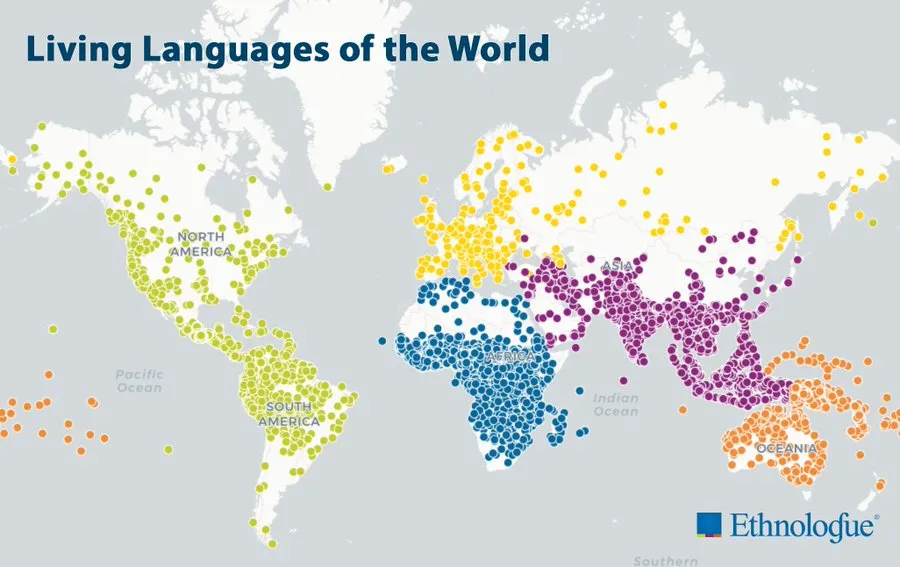
Given its focus on underrepresented languages, some of which I'd never heard before, my relationship with NLLB was really love at first sight. I've been meaning to write something about it for a very long time: using it to push the limits of SI feels like a great excuse. This post is my love letter (love sticky note? 🗒) to the intricacies of language and the fact, which still amazes me, that we can even think about translating between languages spread all over the globe.
❗ A word of caution before we proceed: please keep in mind that SI is not for everyone.
If your workload tolerates cold starts and idle periods between traffic spurts, or if you're just testing a new model inside a non-
prod environment then, by all means, go for it; otherwise, you'll find that alternative deployment options like Real-Time Inference (RTI) are probably a better fit. If you're looking for guidance, the diagram below from the Model Hosting FAQs is a good place to start.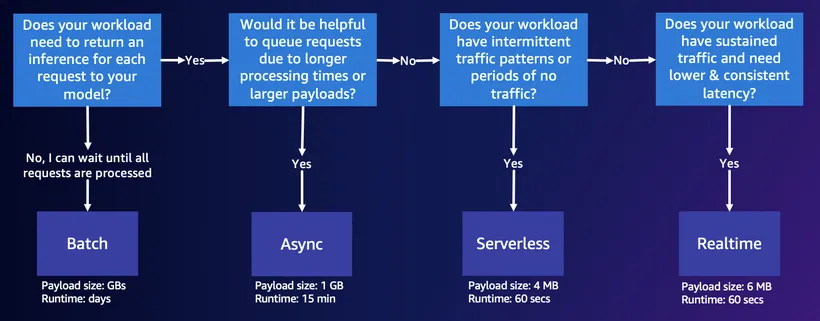
Demo: NLLB on Serverless Inference 🚀
If there's one thing I'd like you to take from this demo, especially if it's your first time using the service, is that the effort involved in deploying a model using Amazon SageMaker is essentially invariant to the choice of deployment method.
As you'll see in this section, to use SI as opposed to, say, RTI is really just a matter of injecting the right set of attributes into the endpoint configuration: for RTI, it's things like
instance_type and instance count, while for SI we work with attributes like memory size or the number of concurrent requests the model should be able to handle. Near the end of this article, I'll have more to say about how to find their optimal values, so stay tuned... but first things first.
Let's start by updating the Amazon SageMaker Python SDK
1
2
pip install -U sagemaker
pip show sagemaker
1
2
3
4
5
6
7
8
9
10
Name: sagemaker
Version: 2.224.2
Summary: Open source library for training and deploying models on Amazon SageMaker.
Home-page: https://github.com/aws/sagemaker-python-sdk/
Author: Amazon Web Services
Author-email:
License: Apache License 2.0
Location: /opt/conda/lib/python3.10/site-packages
Requires: attrs, boto3, cloudpickle, docker, google-pasta, importlib-metadata, jsonschema, numpy, packaging, pandas, pathos, platformdirs, protobuf, psutil, PyYAML, requests, schema, smdebug-rulesconfig, tblib, tqdm, urllib3
Required-by:and importing some useful classes
1
2
from sagemaker.huggingface.model import HuggingFaceModel
from sagemaker.serverless import ServerlessInferenceConfig
If you're running this demo on a SageMaker Studio environment (preferred) or a SageMaker Notebook Instance , you can retrieve the attached IAM role with the help of
get_execution_role (we'll need it in a second to create the model endpoint).1
2
3
4
import sagemaker
role = sagemaker.get_execution_role()
print(f"Role 👷: {role}")Next, we define the 🤗 Hub model configuration, which allows us to select the model as well as the task we're going to use it for
1
2
3
4
env = {
    'HF_MODEL_ID': "facebook/nllb-200-distilled-600M",
    'HF_TASK': "translation"
}
I chose the distilled 600M variant of the NLLB-200 model, which is small enough to run on SI, but I strongly encourage you to try a different version or a different model altogether.
We now have everything we need to initialize the model using the
HuggingFace estimator class.1
2
3
4
5
6
7
model = HuggingFaceModel(
transformers_version="4.37.0", # Transformers version used
pytorch_version="2.1.0", # PyTorch version used
py_version='py310', # Python version used
env=env,
role=role,
)Lastly, in order to use SI endpoints, we need to create an SI configuration with our memory and concurrency requirements
🚩 Memory size for SI endpoints ranges between1024MB/1Gand6144/6GBin1GBincrements. SageMaker will automatically assign compute resources aligned to the memory requirements.
1
2
3
4
serverless_inference_config = ServerlessInferenceConfig(
    memory_size_in_mb=6144,  # Memory size of the endpoint
    max_concurrency=10       # Max number of concurrent invocations the endpoint can handle
)
and pass it along for
.deployment1
2
3
nllb = model.deploy(
serverless_inference_config=serverless_inference_config
)Depending on the model size, the deployment process should take at least a couple of minutes ⏱️
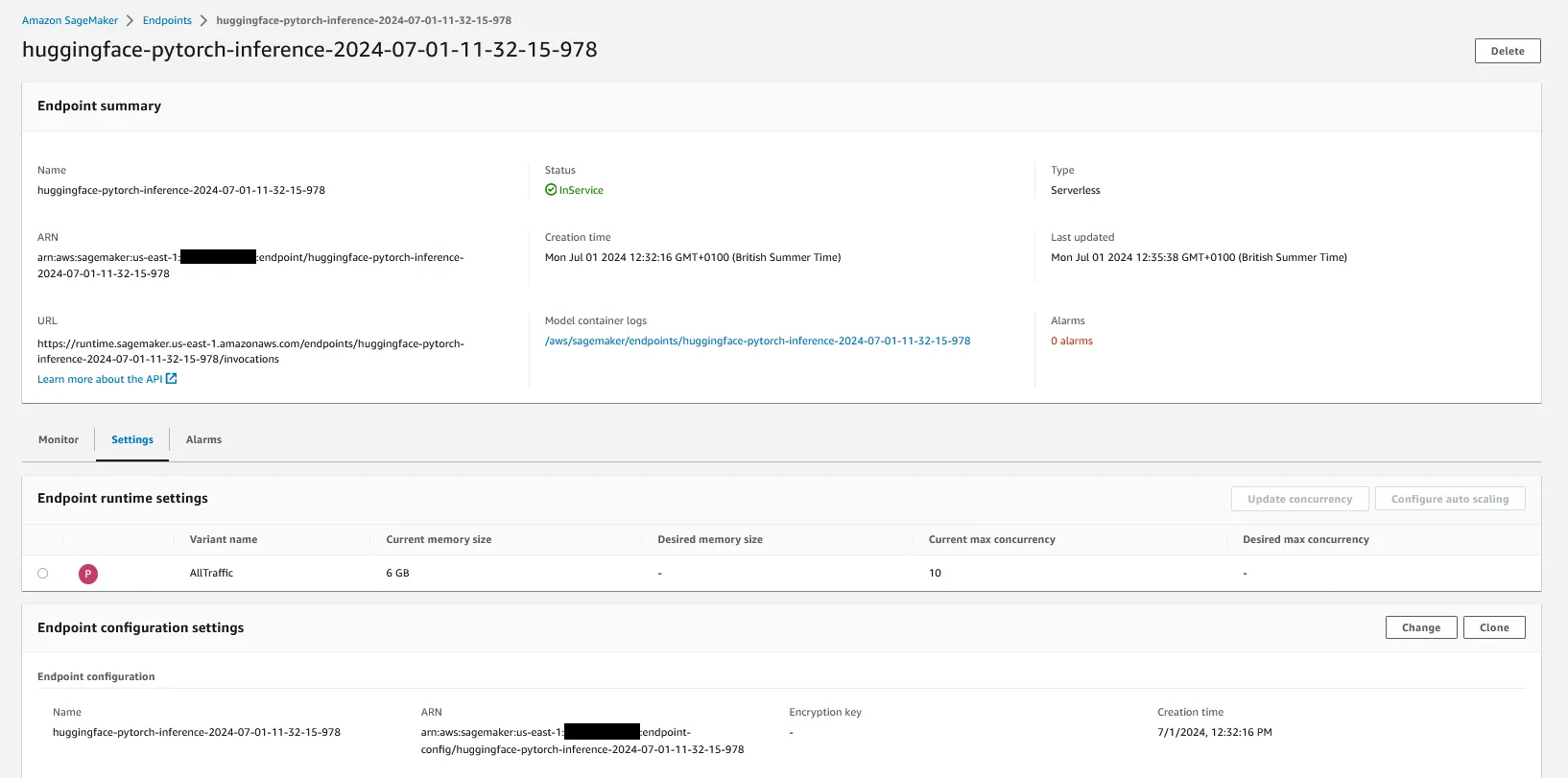
Let's run a quick test to see if it's working (if there are any Hindi speakers reading this, please let me know if the translated text is correct)
🎯 The full list of supported languages and their codes is available in the special tokens map and in the model card metadata (language_details).
1
2
3
4
5
6
7
8
9
predictor.predict({
    'inputs': "La vie est belle.",
    'parameters': {
        'src_lang': "fra_Latn",  # French (Latin Script)
        'tgt_lang': "hin_Deva"   # Hindi (Devanagari Script)
    }
})

# Output: [{'translation_text': 'जीवन सुंदर है।'}]
As an alternative, you can also invoke the endpoint with Boto3
1
2
3
4
5
6
7
8
9
10
11
12
13
14
15
16
17
18
19
20
21
22
23
24
25
26
import json
import boto3

# Initialize client
# https://docs.aws.amazon.com/sagemaker/latest/APIReference/API_Operations_Amazon_SageMaker_Runtime.html
sm_runtime = boto3.client("runtime.sagemaker")

# Create payload
payload = {
    'inputs': "La vie est belle.",
    'parameters': {
        'src_lang': "fra_Latn",
        'tgt_lang': "hin_Deva"
    }
}
payload = json.dumps(payload)

# Call endpoint and process response
response = sm_runtime.invoke_endpoint(
    EndpointName=predictor.endpoint_name,
    ContentType="application/json",
    Body=payload
)
json.loads(response["Body"].read().decode())

# Output: [{"translation_text":"जीवन सुंदर है।"}]
or call the endpoint URL directly with cURL
1
2
3
4
5
6
curl --aws-sigv4 "aws:amz:$AWS_REGION:sagemaker" \
     --user "$AWS_ACCESS_KEY_ID:$AWS_SECRET_ACCESS_KEY" \
     -H "x-amz-security-token: $AWS_SESSION_TOKEN" \
     -H "content-type: application/json" \
     -d '{"inputs": "La vie est belle.", "parameters": {"src_lang": "fra_Latn", "tgt_lang": "hin_Deva"}}' \
     https://runtime.sagemaker.$AWS_REGION.amazonaws.com/endpoints/$ENDPOINT_NAME/invocations
💡 Pro Tip: you can turn the Python snippet above into a locustfile and call it a stress test. If you didn't understand a bit of what I just said, then check the AWS ML Blog post Best practices for load testing Amazon SageMaker real-time inference endpoints which, despite the name, also works with SI endpoints.
Bonus: Serverless Inference Benchmarking Toolkit ✨
If you're the observant type, you may have noticed that I maxed out the memory size of the endpoint (
6GB) in the SI configuration without so much as a "how do you do". Do we really need all this RAM? Is this the optimal choice? How can we tell?There are several different ways to tackle these questions. Today, as a token of my appreciation for following along, I'd like to show you one specifically tailored to SI, the Amazon SageMaker Serverless Inference Benchmarking Toolkit (SIBT).
1
2
# See https://github.com/aws-samples/sagemaker-serverless-inference-benchmarking
pip install sm-serverless-benchmarking
SIBT works by collecting cost and performance data to help you assess whether SI is the right option for your workloads.
We start by creating a set of representative samples
1
2
3
4
5
6
7
8
9
10
11
12
13
14
15
16
17
18
19
20
21
22
23
24
25
26
27
28
29
30
31
32
33
34
35
36
37
example_invoke_args = [
    {
        'Body': {
            'inputs': "No language should be left behind!",
            'parameters': {
                'src_lang': "eng_Latn",
                'tgt_lang': "por_Latn"
            }
        },
        'ContentType': "application/json"
    },
    {
        'Body': {
            'inputs': "La vie est belle.",
            'parameters': {
                'src_lang': "fra_Latn",
                'tgt_lang': "hin_Deva"
            }
        },
        'ContentType': "application/json"
    },
    {
        'Body': {
            'inputs': "Доверяй, но проверяй.",
            'parameters': {
                'src_lang': "rus_Cyrl",
                'tgt_lang': "mri_Latn"
            }
        },
        'ContentType': "application/json"
    },
]

for i in range(len(example_invoke_args)):
    example_invoke_args[i]['Body'] = json.dumps(example_invoke_args[i]['Body'])

example_invoke_file = convert_invoke_args_to_jsonl(example_invoke_args)
which are converted into a JSONLines file
1
2
3
{"Body": "{\"inputs\": \"No language should be left behind!\", \"parameters\": {\"src_lang\": \"eng_Latn\", \"tgt_lang\": \"por_Latn\"}}", "ContentType": "application/json"}
{"Body": "{\"inputs\": \"La vie est belle.\", \"parameters\": {\"src_lang\": \"fra_Latn\", \"tgt_lang\": \"hin_Deva\"}}", "ContentType": "application/json"}
{"Body": "{\"inputs\": \"\\u0414\\u043e\\u0432\\u0435\\u0440\\u044f\\u0439, \\u043d\\u043e \\u043f\\u0440\\u043e\\u0432\\u0435\\u0440\\u044f\\u0439.\", \"parameters\": {\"src_lang\": \"rus_Cyrl\", \"tgt_lang\": \"mri_Latn\"}}", "ContentType": "application/json"}
We then feed these examples into the benchmark, which you can run either locally or as a SageMaker Processing Job
1
2
3
4
5
6
7
8
from sm_serverless_benchmarking.sagemaker_runner import run_as_sagemaker_job

benchmark = run_as_sagemaker_job(
    role=role,
    model_name=nllb.name,
    invoke_args_examples_file=example_invoke_file,
    memory_sizes=[4096, 5120, 6144]
)
In the configuration above, we're restricting the memory size coverage to the
4-6GB range to save time.You can keep tabs on the benchmark progress by checking the status of the processing job status (as a reference, the whole thing took about
1 hour ⌛)1
2
3
4
5
6
7
8
9
10
11
import time
# Initialize SageMaker client
sm = boto3.client('sagemaker')
# Wait for the benchmark run to finish
while (status := sm.describe_processing_job(ProcessingJobName=benchmark.latest_job.name)['ProcessingJobStatus']) and status == "InProgress":
print(".", end="")
time.sleep(60)
print(f"{status}!")Once it finishes, the tool generates multiple reports on performance (concurrency, endpoint stability) and spend (cost analysis) that are stored in the location specified by
result_save_path.1
2
# Where the reports are stored
print(f"Results: {processor.latest_job.outputs[0].destination}")Looking inside the consolidated report, which includes a cross-analysis of performance and cost for each endpoint configuration (picture below), it becomes clear from the hockey-stick curve that lowering the memory size to
5GB offers essentially the same level of performance (average latency +18 ms) at a fraction of the price (-20% when compared to 6GB).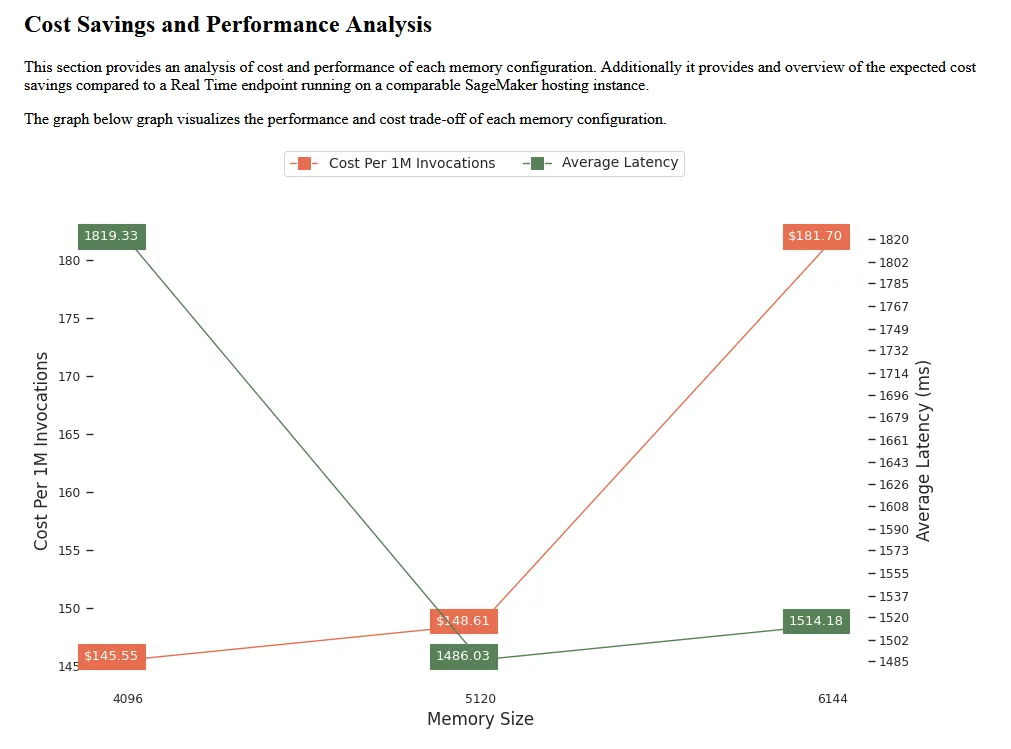
That's all folks! See you next time... 🖖
References 📚
Articles
- (NLLB Team et al., 2022) No Language Left Behind: Scaling Human-Centered Machine Translation
Blogs
- Host Hugging Face transformer models using Amazon SageMaker Serverless Inference
- Introducing the Amazon SageMaker Serverless Inference Benchmarking Toolkit
Code
- Amazon SageMaker Examples - includes a section on Serverless Inference
- SageMaker Serverless Inference Toolkit - tool to benchmark SageMaker serverless endpoint configurations and help find the most optimal one

Enjoyed reading this content? Let the author know!
Your likes, comments, shares, and saves help creators reach more builders.

Loading recommendations
Loading article