
Deploy an Amazon CloudFront distribution for a web application with static and dynamic content
Leverage Amazon CloudFront as Content Delivery Network for a web application with static (Amazon S3) and dynamic content (REST API)


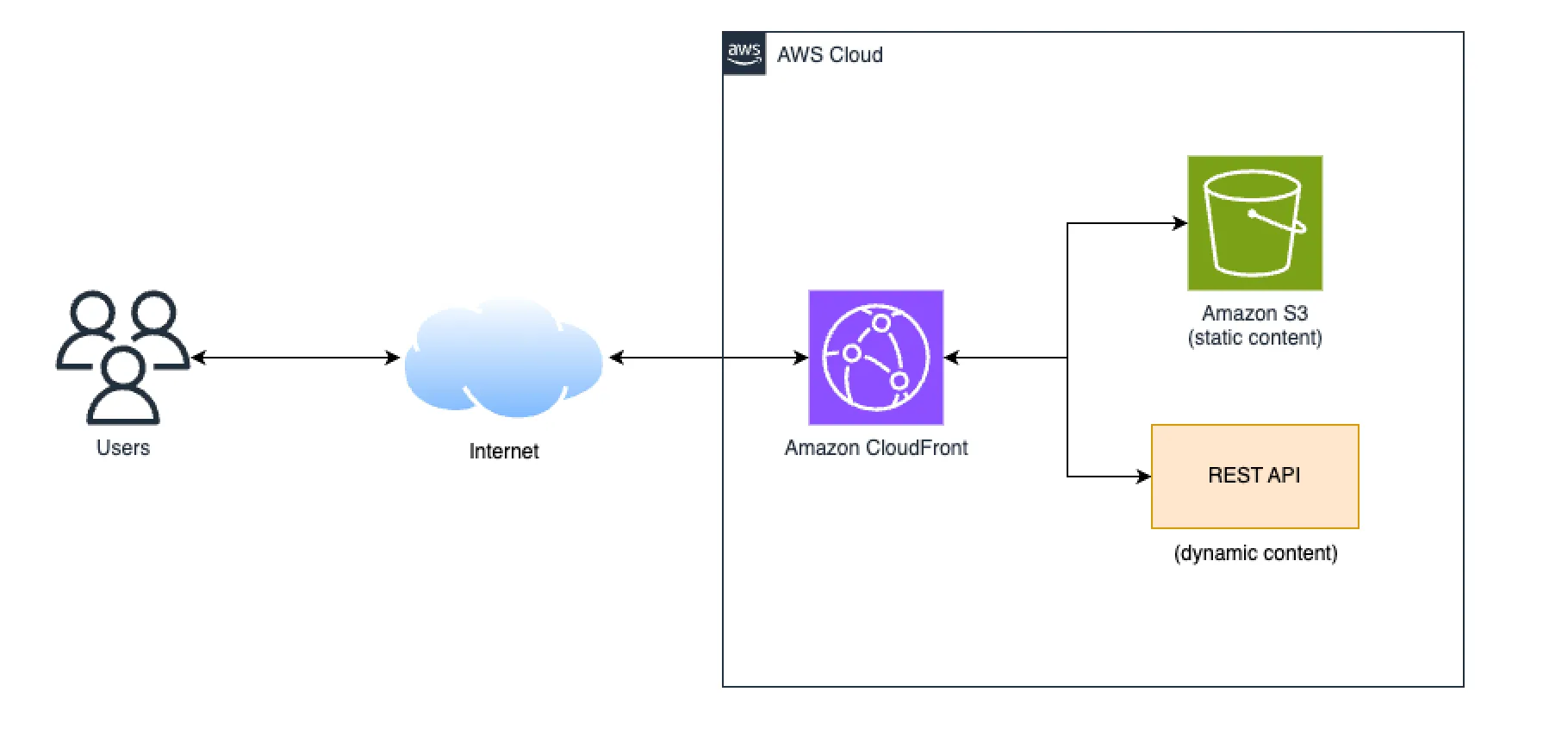
This CDK application deploys a CloudFront distribution with two origins, one for static content stored in Amazon S3 and another for dynamic content available though a REST API. It deploys also a sample web page that loads data from a public rest API available though the Amazon CloudFront distribution.
This pattern demonstrates how to build a seamless integration of Amazon CloudFront as Content Delivery Network (CDN) with a web application that provides a static website (like a Progressive Web Application) and backend server. It provides an easy setup process based on configuration best practices.
How it works
Amazon CloudFront is a highly scalable and secure content delivery network (CDN) service that helps improve the performance and availability of web applications by caching content at edge locations close to users, reducing latency and improving the user experience. In this scenario, the web application consist of a web page that loads data, though an AJAX request , to a REST API.
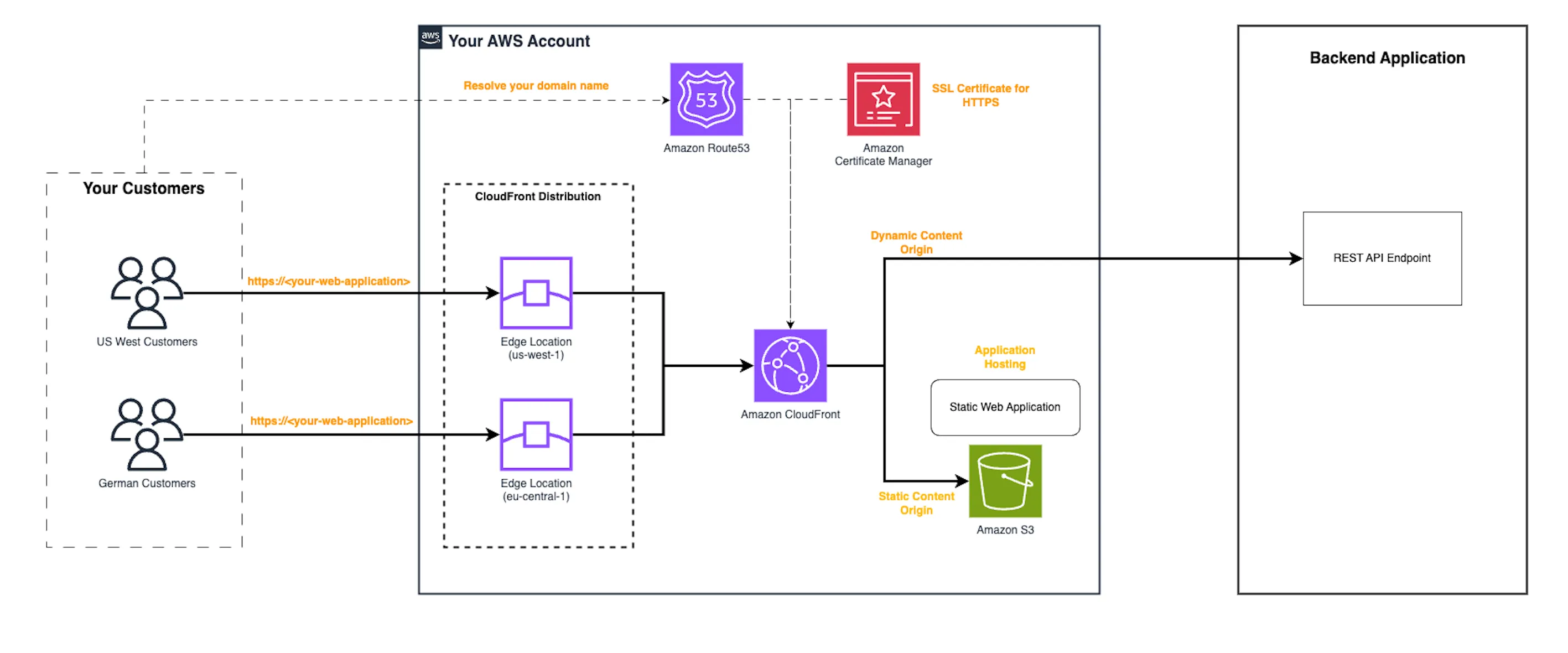
The Amazon CloudFront distribution is configured with two origins:
- The static content origin is the web page hosted in an Amazon S3 bucket. The S3 bucket is private and only accessible by the Amazon CloudFront distribution using Origin Access Control (OAC)
- The dynamic content origin is a backend application that exposes a REST API.
Requirements
- Create an AWS account if you do not already have one and log in. The IAM user that you use must have sufficient permissions to make necessary AWS service calls and manage AWS resources.
- AWS CLI installed and configured
- Node and NPM installed
- AWS Cloud Development Kit (AWS CDK) installed
Deployment Instructions
- Create a new directory, navigate to that directory in a terminal and clone the GitHub repository:
git clone git clone git@github.com:bersanf/amazon-cloudfront-s3-restapi-cdk.gitcd amazon-cloudfront-s3-restapi-cdk- From the command line, use npm to install the development dependencies:
npm install- To deploy from the command line use the following:
npx cdk bootstrapnpx cdk deploy --parameters hostedZoneIdParam=<HOSTED-ZONE-ID> --parameters domainNameParam=<YOUR-ROOT-DOMAIN> --parameters websitePrefixParam=webappwithcloudfront --parameters websiteBucketNameParam=<THE-BUCKET-NAME> --allExpected result:
Outputs:WebApplicationWithCloudfrontStack.CloudFrontDistributionDomainName = aaabbbcccddd.cloudfront.netWebApplicationWithCloudfrontStack.CloudFrontDistributionID = XXXXXXXXXXXXXXWebApplicationWithCloudfrontStack.WebApplicationDomainName = https://webappwithcloudfront.yourdomain.comTesting
Open the browser to: https://webappwithcloudfront.yourdomain.com You will get the page result though the Amazon CloudFront distribution.
Cleanup
To cleanup you need to execute the following commands in the CDK project:
aws s3 rm —recursive s3://<THE-BUCKET-NAME>/websitenpx cdk destroy Enjoyed reading this content? Let the author know!
Your likes, comments, shares, and saves help creators reach more builders.

Loading recommendations
Loading article