
Maintain chat history in generative AI apps with Valkey
Integrate Valkey with LangChain

A while back I wrote up a blog post on how to use Redis as a chat history component with LangChain . Since LangChain already had Redis chat history available as a component, it was quite convenient to write a client application.
But, thats not the same with langchaingo which is a Go port of LangChain. I am going to walk through how do to do the same, but for Valkey (not Redis). Valkey is an open source alternative to Redis. It's a community-driven, Linux Foundation project created to keep the project available for use and distribution under the open source Berkeley Software Distribution (BSD) 3-clause license after the Redis license changes .
I also wrote about a similar approach for DynamoDB as well as how to use Valkey with JavaScript
Refer to Before You Begin section in this blog post to complete the prerequisites for running the examples. This includes installing Go, configuring Amazon Bedrock access and providing necessary IAM permissions. The application uses the Anthropic Claude 3 Sonnet model on Amazon Bedrock .
Run the chat application
The chatbot is a simple CLI application. Before we run it, let's start a Valkey instance using the Valkey Docker image :
1
docker run --rm -p 6379:637 valkey/valkey
Also, head over to https://valkey.io/download to get OS specific distribution, or use Homebrew (on Mac) -
brew install valkey. You should now be able to use the Valkey CLI (valkey-cli).Clone the app form GitHub and run the chat application:
1
2
3
4
git clone https://github.com/abhirockzz/langchain-valkey-chat-history
cd langchain-valkey-chat-history

go run *.go
Start a conversation - as you do that, all the conversation history will be stored in Valkey.

If you peek into Valkey, notice that the conversations are saved in a
List:1
2
valkey-cli keys *
valkey-cli LRANGE <enter list name> 0 -1Don't run
keys * in production - its just for demo purposes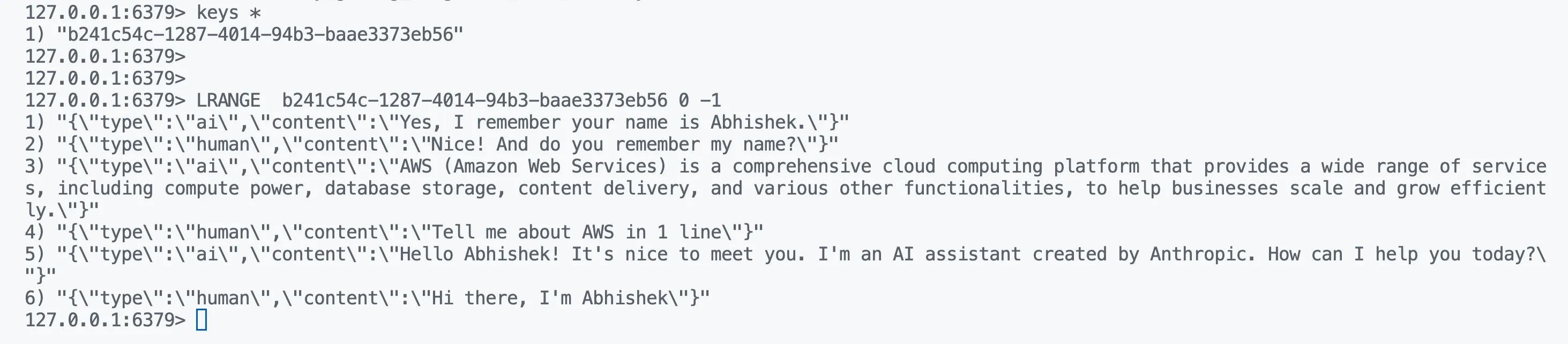
Chat history component implementation
You can refer to the complete implementation here . The component implements the
schema.ChatMessageHistory interface methods in langchaingo and uses List data structure behind the scenes. Starting the application creates a new "chat session" is associated with a List - each new instance will be backed by a separate List.Key methods that were implemented:
AddMessage- Stores a conversation message, using LPUSHMessages- Retrieves all the messages in a conversation using LRANGEClear- Deletes all messages in a conversation using DEL
Conclusion
It's important to note that it's possible to use any Redis-compatible client with Valkey. I used the go-redis client, but (at the time of writing) there is work underway to build Valkey specific client libraries. Check the Valkey GitHub org to take look at the forks of existing Redis client libraries such as valkey-go (corresponding to rueidis ), iovalkey (corresponding to ioredis ), Jackey (corresponding to jedis ) etc. These are very early days (at the time of writing), and it will be interesting to see the progress!
Happy building!
Enjoyed reading this content? Let the author know!
Your likes, comments, shares, and saves help creators reach more builders.

Loading recommendations
Loading article