
Claude 3 function calling for Intelligent Document Processing
Advancing prompts with Claude's function calling
Series: Intelligent Document Processing with Anthropic Claude 3 (2 articles)
- 2Claude 3 function calling for Intelligent Document Processing This article

Introduction
In the previous post , we explored techniques to leverage a multi-document XML format for efficient document processing. Last month Anthropic released a new feature called function calling (also known as tool use ) across the entire Claude 3 model family. This capability provides another powerful tool to extract document data in an elegant way.
This article explains how we can elevate document processing tasks by leveraging the multi-modality capabilities in Claude 3, combined with the function calling feature, to ensure deterministic output with maximum accuracy.
Function calling explained
The function calling feature allows the Claude 3 Large Language Model (LLM) to recognize function definition with the corresponding input parameters following JSON schema, and construct function callout with the parameters it deems relevant to fulfill the user's prompt query.
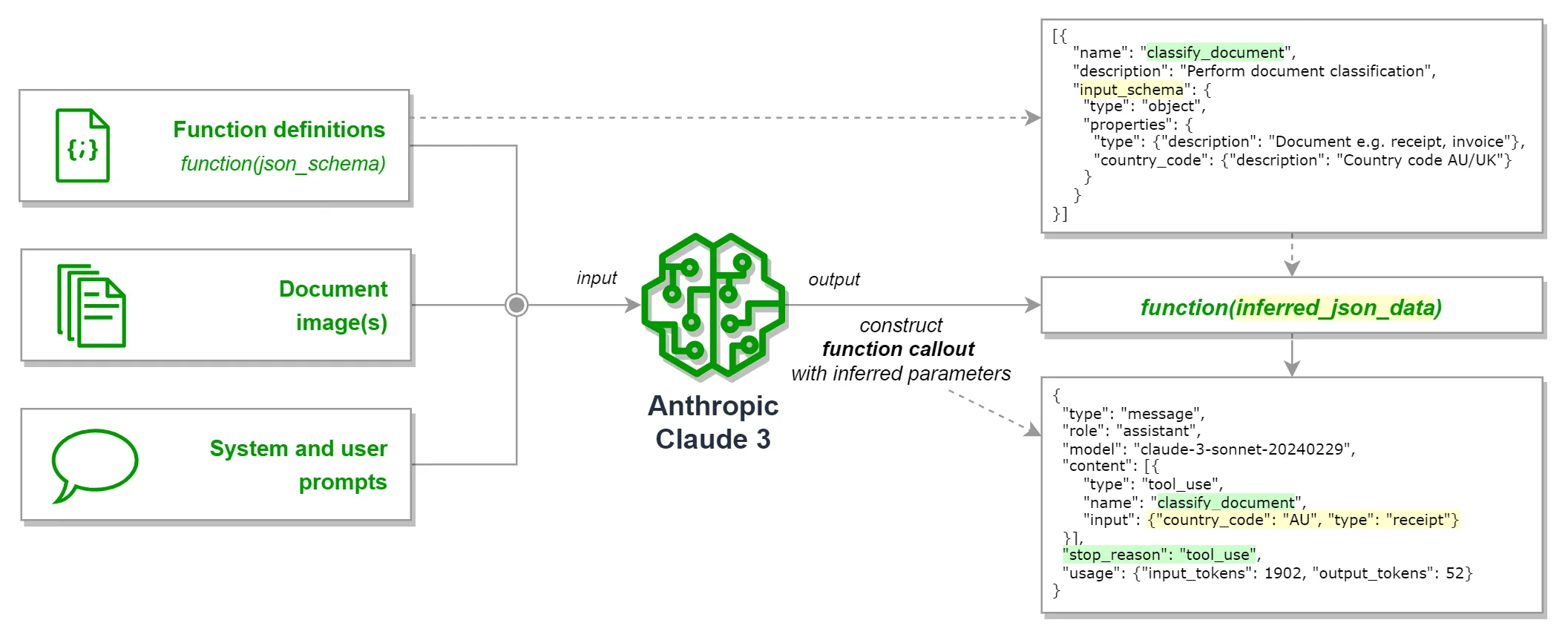
Function calling consists of the following components:
- in the API request:
- A set of function definitions (tools) with well-structured
input_schemafollowing the JSON Schema specification
- A declaration to treat function callout as either optional or compulsory :
tool_choice = {"type": "tool", "name": "classify_document"}
- A user prompt to trigger the function's use
- in the API response:
- When Claude decides to use one of the provided/enforced tools in response to the user's query, it will return a response with
"stop_reason": "tool_use"and the suggested function with the inferred JSON input conforming to the function’sinput_schema
Function calling is just an advanced prompting technique that allows Claude to suggest potential function callout, along with inferred parameters, for the user to execute in order to fulfill user's query. However, Claude itself does not execute any code or make direct function calls.
Now, let's consider our scenario where we need to automate the processing of receipts and extract all relevant details, producing JSON snapshot of the receipt documents.
Function calling best practices for IDP
The image below illustrates how we can structure the inputs for the Claude 3 model, leveraging the function calling feature specifically for the image document processing (IDP) use case. This approach is intended to extract all interested document fields together with inference analysis properties. Our goal is to achieve accurate document recognition with deterministic output, avoiding any preamble or drifting responses from Claude.
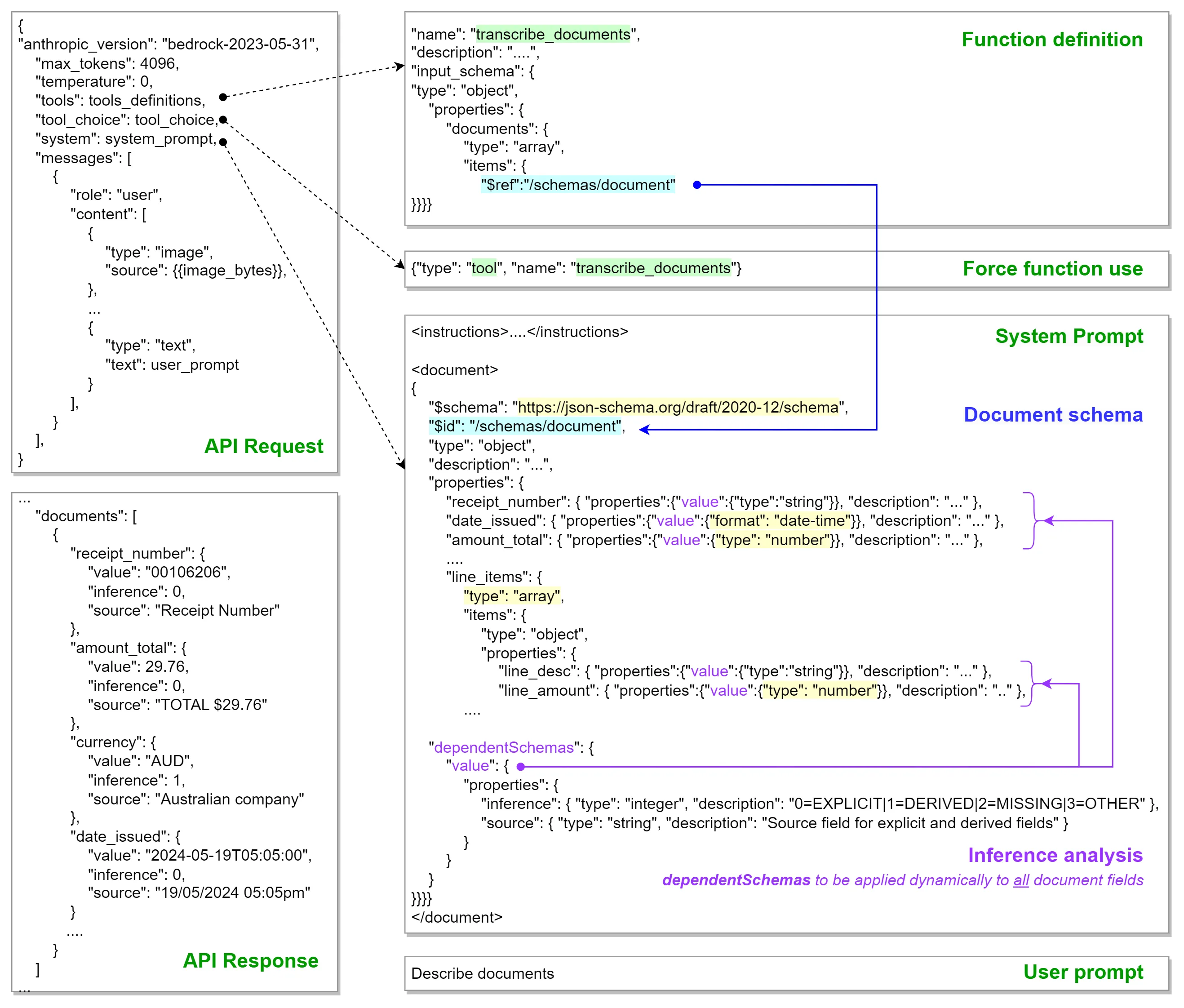
Lets go through each technique:
- The document schema should be defined using the J SON Schema specification . When processing lengthy documents, it is crucial to eliminate ambiguity and prevent unexpected schema drifts in the output, which could lead to inconsistent or incorrect data extraction, impacting downstream processes. The JSON Schema provides a set of powerful constructs that are intuitive and highly productive for efficient document recognition. Here are some key constructs:
- use
typekeyword to specify explicit data types like integer, number, string.
- use
formatkeyword with a value of"date-time"to specify the date format and indicate that the string value should be interpreted as a date in the format YYYY-MM-DDT00:00:00. Alternatively,"format": "YYYY-MM-DDThh:mm:ss"is a working option as well.
- use default keyword to specify a
defaultvalue if a value is missing. Alternatively, you can populate such values as part of a post-processing task.
- use
requiredkeyword to indicate required fields and enforce the presence of target JSON properties in the output. By default, JSON properties are considered optional.
- use
enumkeyword to restrict a value to a fixed set of values . For example, this can be used as part of document classification to choose among supported types of documents in order to route to a subsequent workflow with the corresponding document template.
- Use a system prompt to encapsulate the task objectives, instructions and document JSON schema.
- 💡 Based on the experiments, defining the document JSON schema in the system prompt results in more stable responses, where Claude outputs all fields consistently, even if they are not marked as required.
- Additionally, it is recommended to leverage the function's description to accommodate relevant instructions and expectations. Providing a concise yet comprehensive explanation of the tool's purpose in the
'description'field, while also clarifying the essential context or intent of the'input_schema'properties within their respective'description'attributes, is crucial for achieving the desired efficiency.
- Examining the quality of fields recognized by Claude, including those potentially missed or implicitly derived from other document details, can provide valuable insights to facilitate subsequent decision-making about the quality of document processing.
- We can accomplish this by augmenting our document schema with additional properties that will indicate the
'inference'type (0=EXPLICIT, 1=DERIVED, 2=MISSING or 3=OTHER) and'source'for each field. We want to keep the inference analysis generic and decoupled to avoid complex, or noisy schema and to simplify document schema maintenance in case if we want to incorporate additional fields in the future.
- As an idea, we can leverage dependentSchemas construct to apply
'inference'and'source'dynamically when'value'property is present. This approach, combined with the function calling, yields the expected JSON structure representing the transcribed document in the Claude output:
{ "documents": [ { "receipt_number": { "value": "00106206", "inference": 0, "source": "Receipt Number" }, "doc_amount_total": { "value": 29.76, "inference": 0, "source": "TOTAL" }, "currency": { "value": "AUD", "inference": 1, "source": "Australian company" }, "date_issued": { "value": "2024-05-19T05:05:00", "inference": 0, "source": "19/05/2024 05:05pm" } }, "line_items": [ { "line_description": { "value": "PEARS RED PIGAROO KG", "inference": 0, "source": "Line description" }, "line_amount": { "value": 4.39, "inference": 0, "source": "$4.39" } }, ... ] .... ]}- Using deeply nested JSON schema or advanced JSON schema constructs with special characters may lead to low-quality output or impact performance. It is recommended to simplify complex or highly nested documents, or to split them into multiple functions or iterations.
- For example, you could have one function to classify documents and another function to transcribe documents, based on the template chosen according to the document classification instead of universal document template (e.g., document template for invoices is different from the one of receipts).
- If Claude is struggling to correctly use your tool, try to flatten the input schema, as explained in the Claude function calling best practices .
- Sometimes when you use complex schema to generate output, you may encounter read timeout errors from Amazon Bedrock's Claude 3 model. To resolve these read timeout errors, you can increase the read timeout as described in this article .
- Repeated usage of the same text in the input to Claude does not contribute to an increase in token usage. Claude's tokenizer is designed to handle duplicate text efficiently. When the same text is encountered multiple times within the input, it is tokenized only once. This optimization ensures that the token count and, consequently, the cost associated with the API call are not affected by repeated occurrences of the same text within the input.
- This fact for handling repeated text proves beneficial when defining document JSON schemas, as you can reuse certain keywords like
"type": "string"or include multiple instances of thedescriptionattribute without unnecessarily inflating the token count and cost.
For a full example on how to transcribe receipts using the function calling feature , please refer to this Amazon Sagemaker notebook and follow Quick Start notes here .
Conclusion
The function calling feature in the Claude 3 model provides a powerful approach to efficiently recognize and extract data from documents in a deterministic and accurate manner. By following the best practices outlined in this article, such as defining clear document schemas, leveraging JSON Schema constructs, and incorporating inference analysis properties, you can streamline your document processing tasks and ensure high-quality output.
As language models and their capabilities continue to evolve, it is essential to stay updated with the latest advancements like tool use and leverage them effectively to unlock new possibilities in document processing and beyond.
Resources
Series: Intelligent Document Processing with Anthropic Claude 3 (2 articles)
- 2Claude 3 function calling for Intelligent Document Processing This article
Enjoyed reading this content? Let the author know!
Your likes, comments, shares, and saves help creators reach more builders.

Loading recommendations
Loading article