

Amazon Location Service Plugin for QGIS released in OSS
I released the QGIS plugin as OSS, utilizing Amazon Location Service, which is probably the world's first!

Although I have written a QGIS plugin book and released several QGIS plugins in the past, I enjoyed developing QGIS for the first time in a long time.
This is probably the first attempt in the world to develop a QGIS plugin using Amazon Location Service , and I have decided to release this plugin as OSS. This plugin has not yet implemented all the features, but I plan to add more.
Location information technology is being used in a variety of fields. I hope that through this plugin, more people will discover the convenience and potential of the Amazon Location Service. Please give it a try!
In this article, I will introduce how to use this plugin.
dayjournal / qgis-amazonlocationservice-plugin

Advance Preparation
Building an Amazon Location Service Resources
In advance, build Amazon Location Service resources.
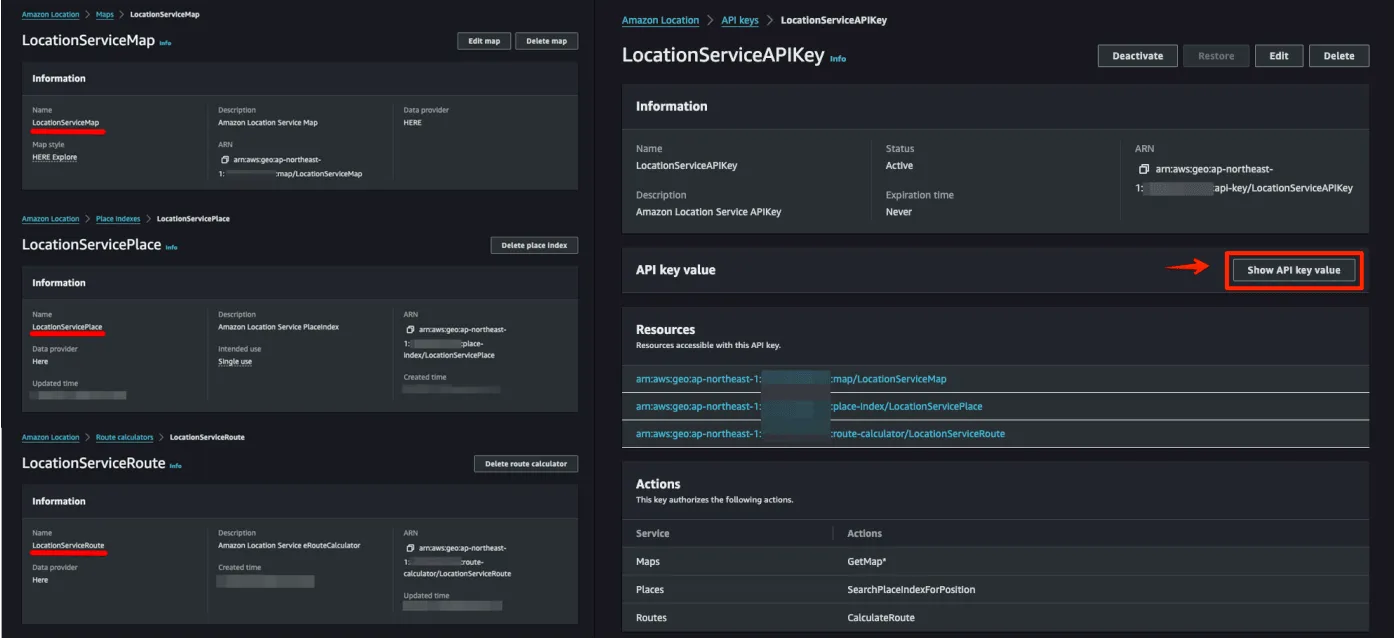
Select from the following to build your resources.
- AWS Management Console: Manually configure the resource using the GUI.
- AWS CDK: Automate your infrastructure with code.
- AWS CloudFormation: Automatically build resources using templates.
How to use plugins
Install QGIS Plugin
Install QGIS plugins. Plugins are registered in the official repositories and can be installed directly from QGIS.
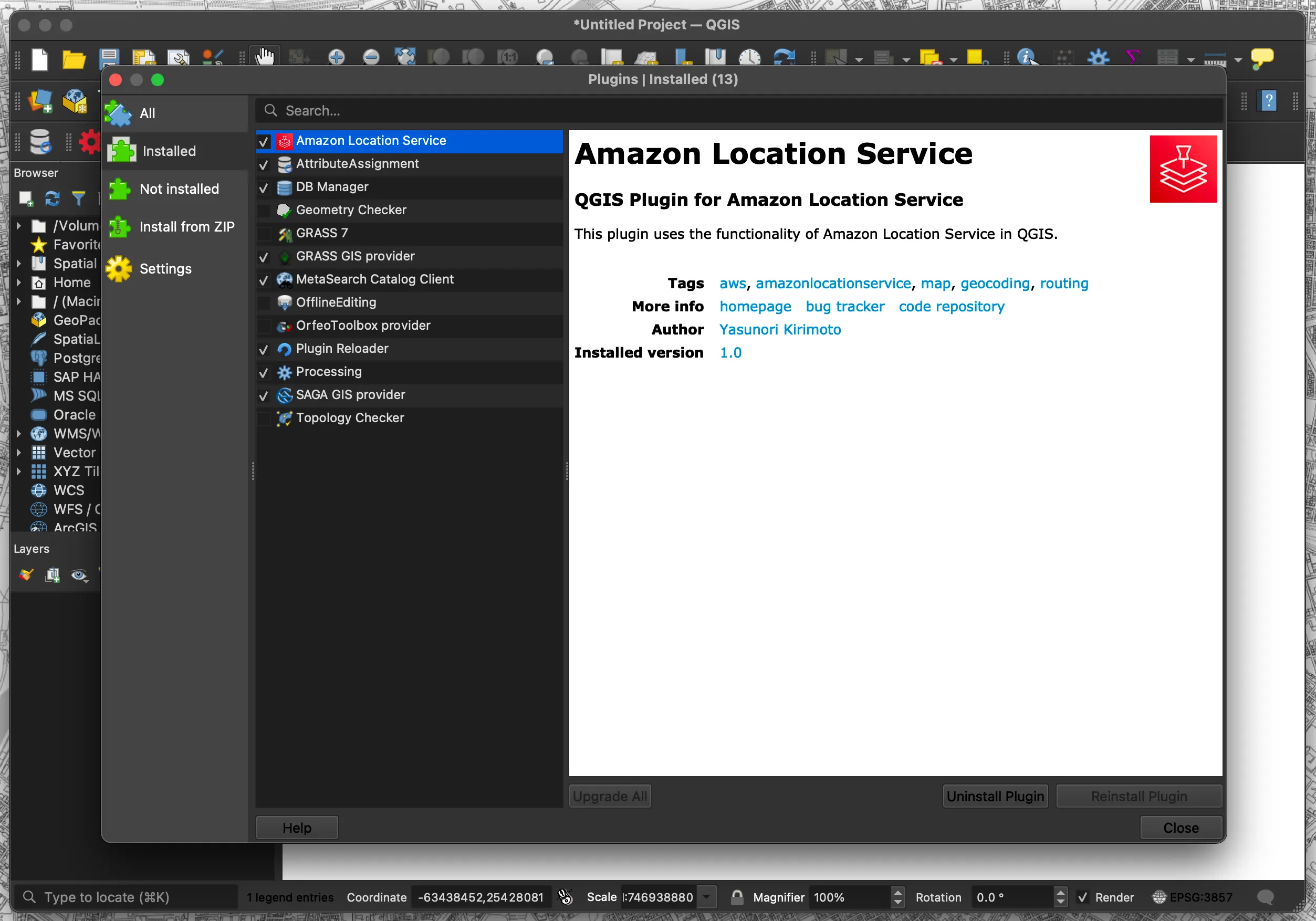
- Select "Plugins" → "Manage and Install Plugins..."
- Search for "Amazon Location Service"
Menu
Once the plugin is installed, a menu will appear. There are five types of menus: Config, Map, Place, Routes, and Terms.
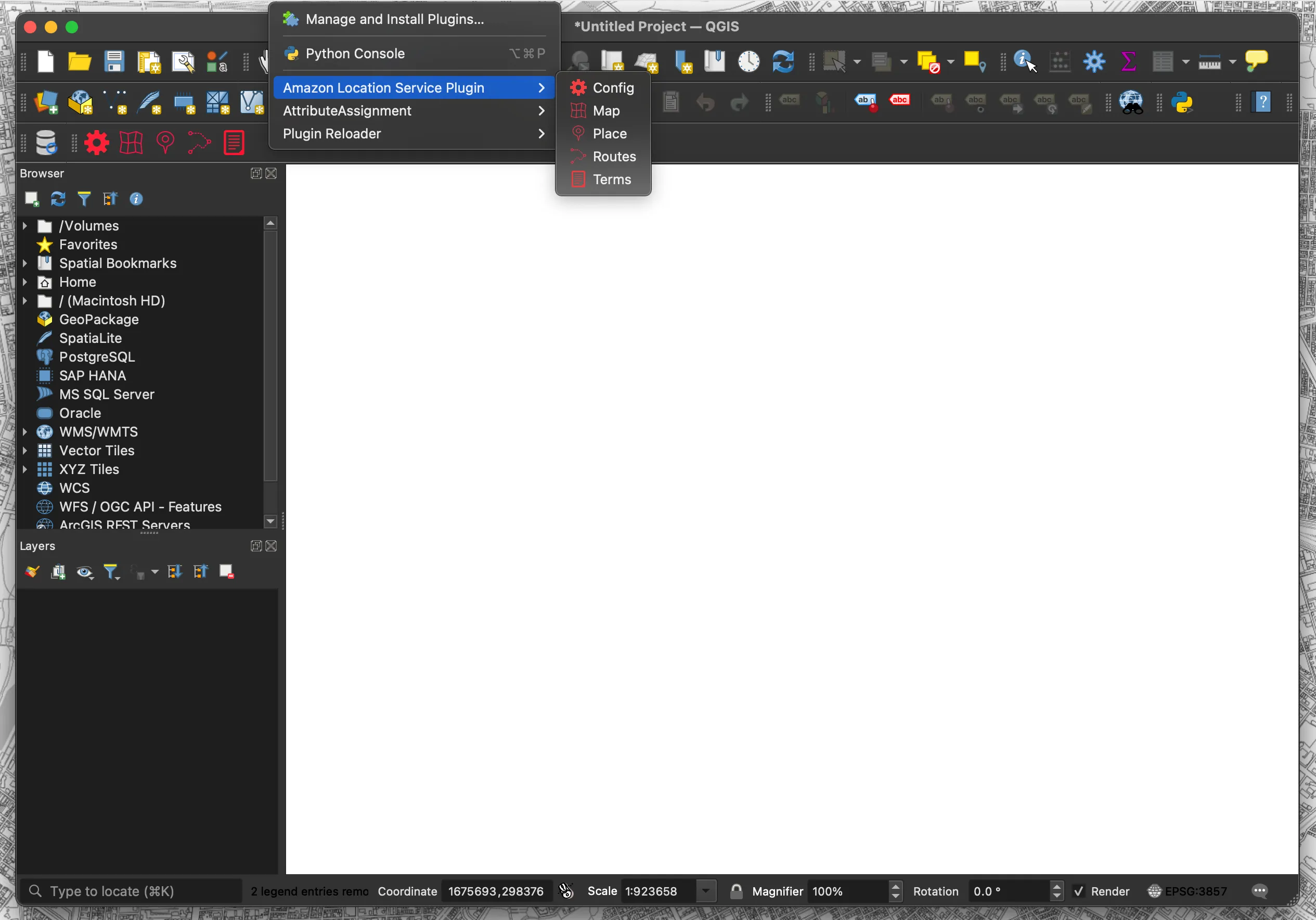
- Config: Set each resource name and API key
- Map: Map display function
- Place: Geocoding function
- Routes: Routing function
- Terms: Display Terms of Use page
Config Function
Configure various settings. Configure region name, API key, Map name, Place name, and Routes name.
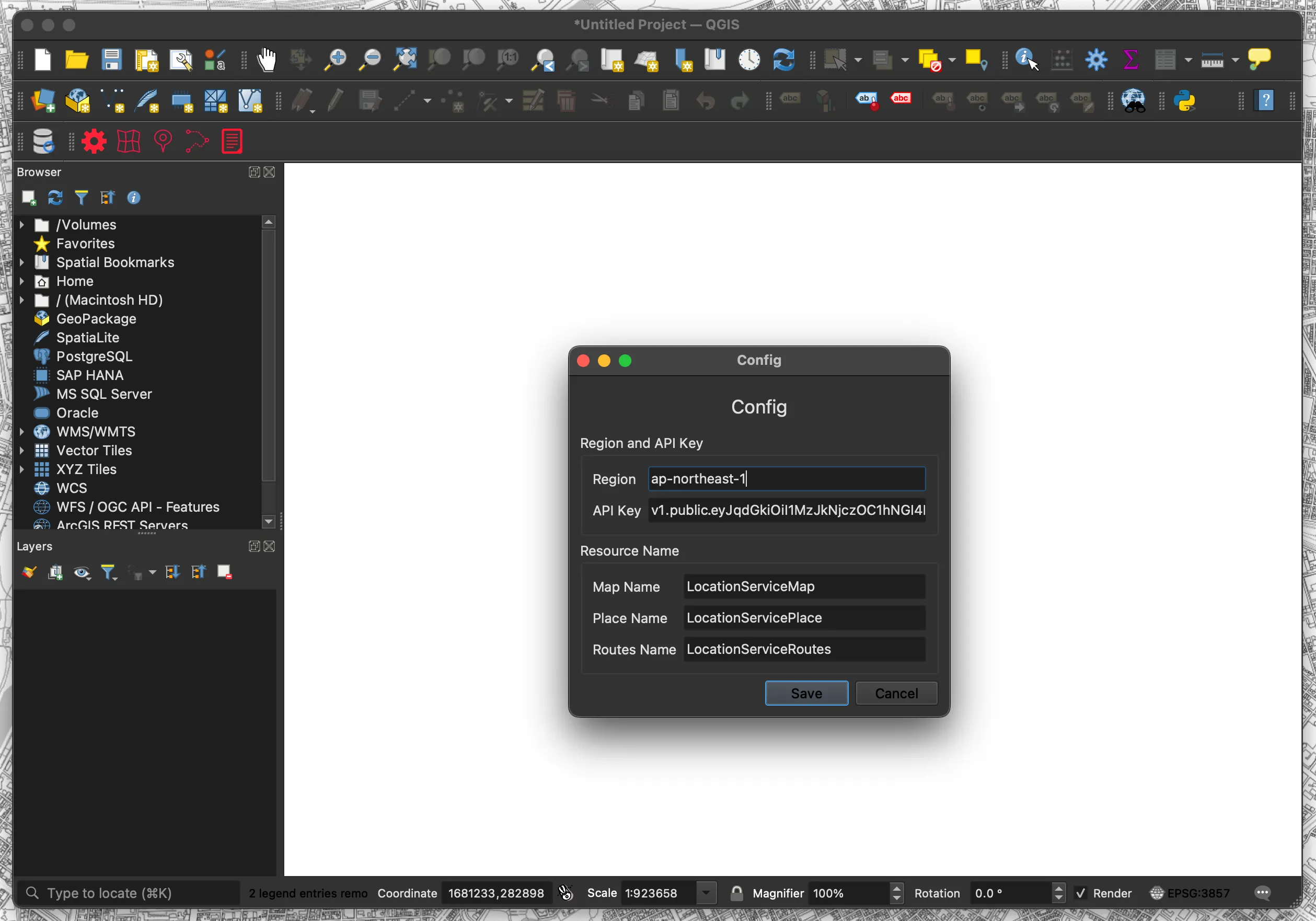
- Click the “Config” menu
- Set each resource name and API key
- Region: ap-xxxxx
- API Key: v1.public.xxxxx
- Map Name: Mapxxxxx
- Place Name: Placexxxxx
- Routes Name: Routesxxxxx
- Click “Save“
Map Function
This is a map display function. Creates a vector tile layer in QGIS using the acquired vector tiles.
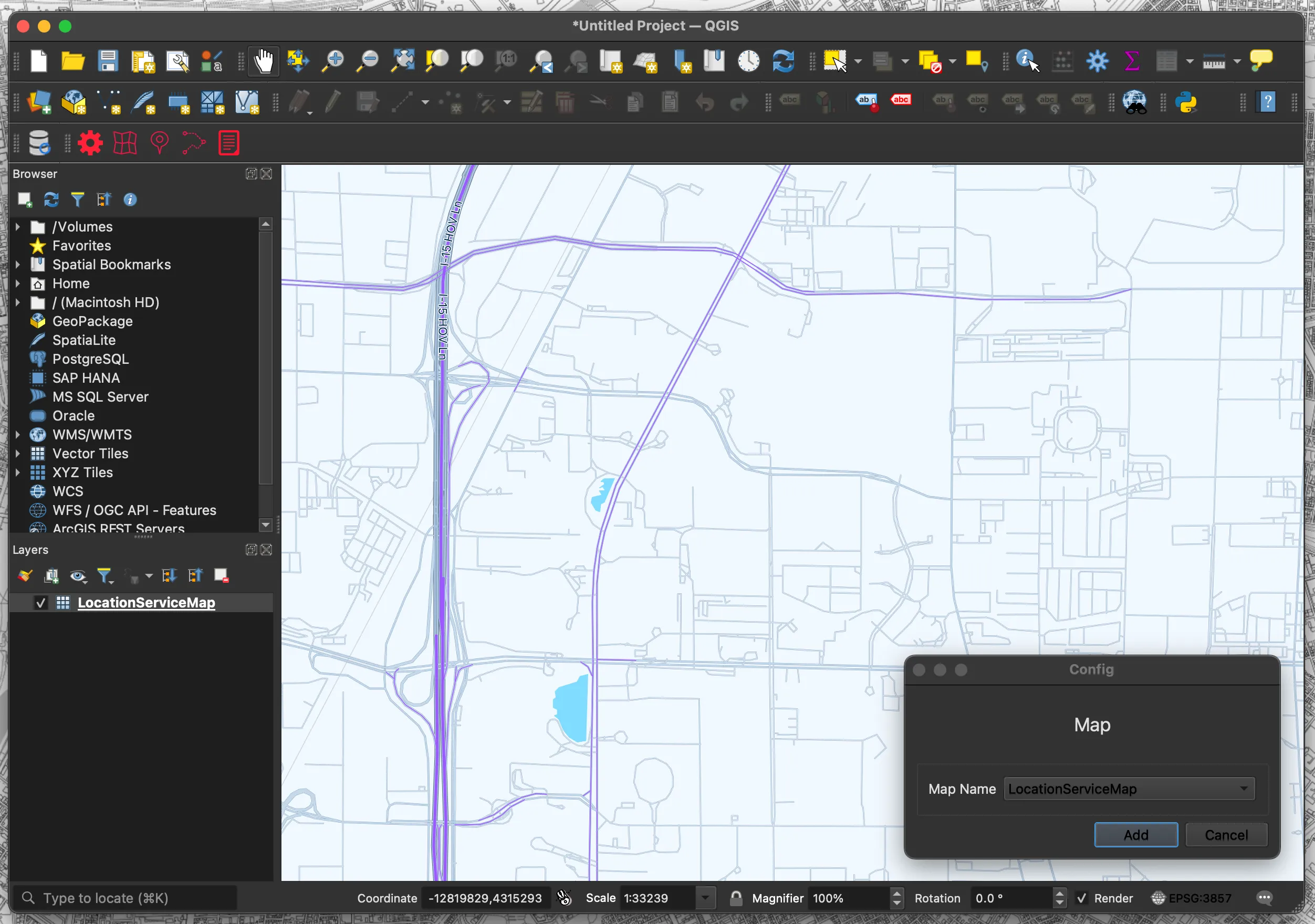
- Click the “Map” menu
- Select “Map Name“
- Click “Add“
- The map is displayed as a layer
QGIS does not support all vector tile styles, so some styles may not be displayed.
Place Function
This is a geocoding function. Creates a point layer in QGIS using the acquired address data.
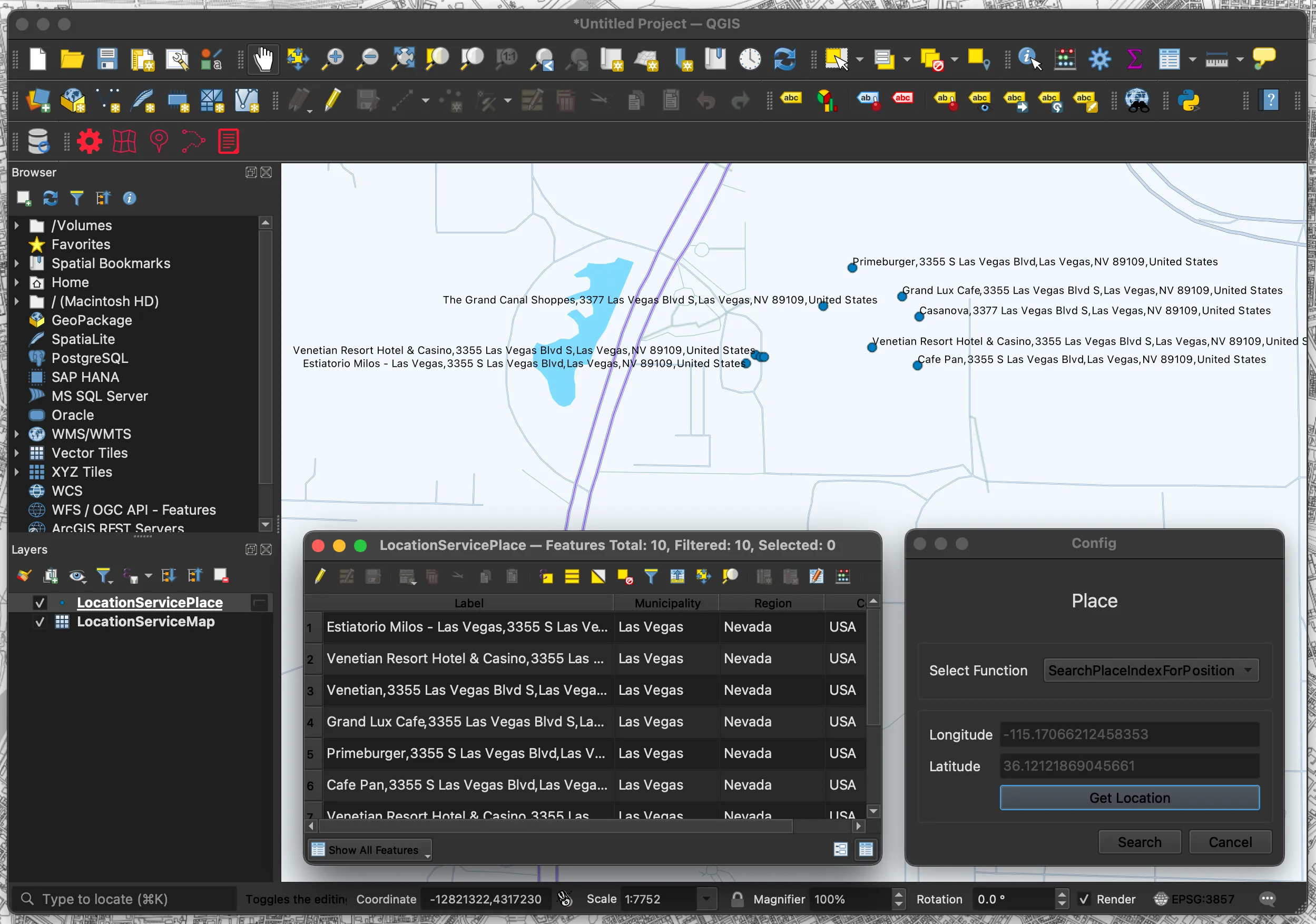
- Click the “Place” menu
- Select “Select Function“
- Click “Get Location“
- Click on the location you wish to search
- Click “Search”
- Search results are displayed in layers
Routes Function
This is a routing function. Create a line layer in QGIS using the acquired route data.
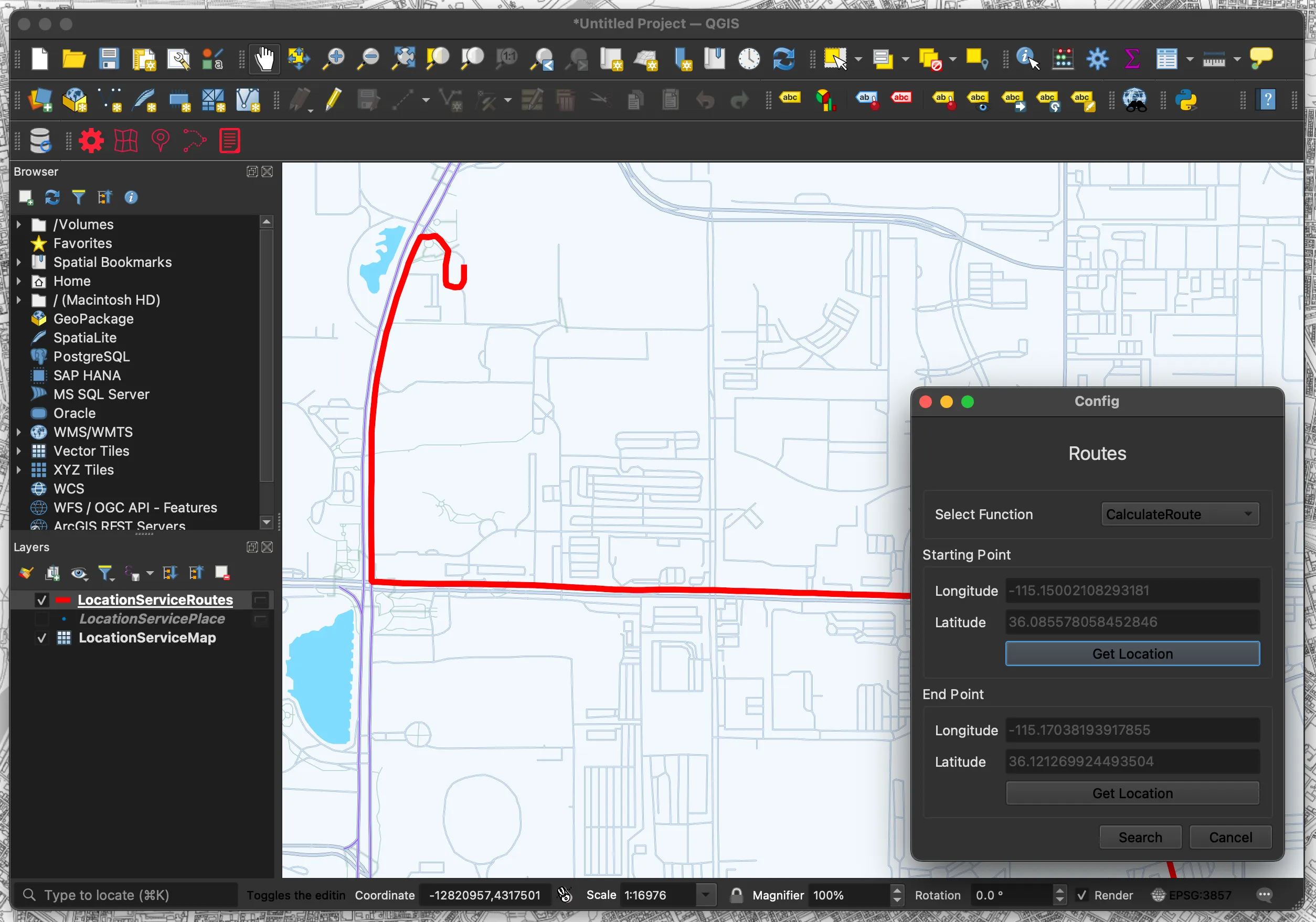
- Click the “Routes” menu
- Select “Select Function“
- Click “Get Location(Starting Point)“
- Click the starting point
- Click “Get Location(End Point)“
- Click on the endpoint
- Click “Search”
- Search results are displayed in layers
Terms Function
This function displays the Terms of Use.
- Click the “Terms” menu
- The Terms of Use page will be displayed in your browser.
Plugin Code
The following is a partial code of the plugin.
Overall Configuration
Bash
location_service/├── LICENSE├── __init__.py├── location_service.py├── metadata.txt├── ui/│ ├── __init__.py│ ├── icon.png│ ├── config/│ │ ├── __init__.py│ │ ├── config.py│ │ ├── config.ui│ │ ├── config.png│ └── terms/│ ├── __init__.py│ ├── terms.py│ ├── terms.png│ ├── terms.ui│ └── map/│ ├── __init__.py│ ├── map.py│ ├── map.ui│ ├── map.png│ └── place/│ ├── __init__.py│ ├── place.py│ ├── place.ui│ ├── place.png│ └── routes/│ ├── __init__.py│ ├── routes.py│ ├── routes.ui│ ├── routes.png├── utils/│ ├── __init__.py│ ├── click_handler.py│ ├── configuration_handler.py│ ├── external_api_handler.py└── functions/├── __init__.py├── map.py├── place.py├── routes.py
metadata.txt
This is the configuration file for the QGIS plugin. It contains metadata such as plugin name, version, icon path, etc.
plaintext
[general]name=Amazon Location Servicedescription=QGIS Plugin for Amazon Location Serviceabout=This plugin uses the functionality of Amazon Location Service in QGIS.qgisMinimumVersion=3.0version=1.1#Plugin main iconicon=ui/icon.pngauthor=Yasunori Kirimotoemail=info@dayjournal.devhomepage=https://github.com/dayjournal/qgis-amazonlocationservice-plugintracker=https://github.com/dayjournal/qgis-amazonlocationservice-plugin/issuesrepository=https://github.com/dayjournal/qgis-amazonlocationservice-plugintags=aws,amazonlocationservice,map,geocoding,routingcategory=
location_service.py
This is the main process. It initializes the plugin UI and configures various functions.
Python
import osfrom typing import Optional, Callablefrom PyQt5.QtGui import QIconfrom PyQt5.QtWidgets import QAction, QWidgetfrom PyQt5.QtCore import Qtfrom .ui.config.config import ConfigUifrom .ui.map.map import MapUifrom .ui.place.place import PlaceUifrom .ui.routes.routes import RoutesUifrom .ui.terms.terms import TermsUiclass LocationService:"""Manages the Amazon Location Service interface within a QGIS environment."""MAIN_NAME = "Amazon Location Service"def __init__(self, iface) -> None:"""Initializes the plugin interface, setting up UI componentsand internal variables.Args:iface (QgsInterface): Reference to the QGIS app interface."""self.iface = ifaceself.main_window = self.iface.mainWindow()self.plugin_directory = os.path.dirname(__file__)self.actions = []self.toolbar = self.iface.addToolBar(self.MAIN_NAME)self.toolbar.setObjectName(self.MAIN_NAME)self.config = ConfigUi()self.map = MapUi()self.place = PlaceUi()self.routes = RoutesUi()self.terms = TermsUi()for component in [self.config, self.map, self.place, self.routes]:component.hide()def add_action(self,icon_path: str,text: str,callback: Callable,enabled_flag: bool = True,add_to_menu: bool = True,add_to_toolbar: bool = True,status_tip: Optional[str] = None,whats_this: Optional[str] = None,parent: Optional[QWidget] = None,) -> QAction:"""Adds an action to the plugin menu and toolbar.Args:icon_path (str): Path to the icon.text (str): Display text.callback (Callable): Function to call on trigger.enabled_flag (bool): Is the action enabled by default.add_to_menu (bool): Should the action be added to the menu.add_to_toolbar (bool): Should the action be added to the toolbar.status_tip (Optional[str]): Text for status bar on hover.whats_this (Optional[str]): Longer description of the action.parent (Optional[QWidget]): Parent widget.Returns:QAction: The created action."""icon = QIcon(icon_path)action = QAction(icon, text, parent)action.triggered.connect(callback)action.setEnabled(enabled_flag)if status_tip is not None:action.setStatusTip(status_tip)if whats_this is not None:action.setWhatsThis(whats_this)if add_to_menu:self.iface.addPluginToMenu(self.MAIN_NAME, action)if add_to_toolbar:self.toolbar.addAction(action)self.actions.append(action)return actiondef initGui(self) -> None:"""Initializes the GUI components, adding actions to the interface."""components = ["config", "map", "place", "routes", "terms"]for component_name in components:icon_path = os.path.join(self.plugin_directory, f"ui/{component_name}/{component_name}.png")self.add_action(icon_path=icon_path,text=component_name.capitalize(),callback=getattr(self, f"show_{component_name}"),parent=self.main_window,)def unload(self) -> None:"""Cleans up the plugin interface by removing actions and toolbar."""for action in self.actions:self.iface.removePluginMenu(self.MAIN_NAME, action)self.iface.removeToolBarIcon(action)del self.toolbardef show_config(self) -> None:"""Displays the configuration dialog window."""self.config.setWindowFlags(Qt.WindowStaysOnTopHint) # type: ignoreself.config.show()def show_map(self) -> None:"""Displays the map dialog window."""self.map.setWindowFlags(Qt.WindowStaysOnTopHint) # type: ignoreself.map.show()def show_place(self) -> None:"""Displays the place dialog window."""self.place.setWindowFlags(Qt.WindowStaysOnTopHint) # type: ignoreself.place.show()def show_routes(self) -> None:"""Displays the routes dialog window."""self.routes.setWindowFlags(Qt.WindowStaysOnTopHint) # type: ignoreself.routes.show()def show_terms(self) -> None:"""Opens the service terms URL in the default web browser."""self.terms.open_service_terms_url()
ui/map/map.ui
This is the UI file, which defines labels, combo boxes, and buttons in the dialog created by Qt Designer.
XML
<?xml version="1.0" encoding="UTF-8"?><ui version="4.0"><class>Dialog</class><widget class="QDialog" name="Dialog"><property name="geometry"><rect><x>0</x><y>0</y><width>358</width><height>166</height></rect></property><property name="minimumSize"><size><width>240</width><height>0</height></size></property><property name="windowTitle"><string>Map</string></property><layout class="QVBoxLayout" name="verticalLayout"><item><widget class="QLabel" name="main_label"><property name="text"><string><html><head/><body><p><span style=" font-size:18pt;">Map</span></p></body></html></string></property><property name="alignment"><set>Qt::AlignCenter</set></property><property name="openExternalLinks"><bool>true</bool></property></widget></item><item><widget class="QGroupBox" name="groupBox_2"><property name="title"><string/></property><layout class="QGridLayout" name="gridLayout_3"><item row="0" column="0"><widget class="QLabel" name="map_label"><property name="text"><string>Map Name</string></property></widget></item><item row="0" column="1"><widget class="QComboBox" name="map_comboBox"><property name="sizePolicy"><sizepolicy hsizetype="Expanding" vsizetype="Fixed"><horstretch>0</horstretch><verstretch>0</verstretch></sizepolicy></property></widget></item></layout></widget></item><item><layout class="QHBoxLayout" name="horizontalLayout"><item><spacer name="horizontalSpacer"><property name="orientation"><enum>Qt::Horizontal</enum></property><property name="sizeHint" stdset="0"><size><width>40</width><height>20</height></size></property></spacer></item><item><widget class="QPushButton" name="button_add"><property name="sizePolicy"><sizepolicy hsizetype="Minimum" vsizetype="Fixed"><horstretch>0</horstretch><verstretch>0</verstretch></sizepolicy></property><property name="text"><string>Add</string></property></widget></item><item><widget class="QPushButton" name="button_cancel"><property name="sizePolicy"><sizepolicy hsizetype="Minimum" vsizetype="Fixed"><horstretch>0</horstretch><verstretch>0</verstretch></sizepolicy></property><property name="text"><string>Cancel</string></property></widget></item></layout></item></layout></widget><resources/><connections/></ui>
ui/map/map.py
This is the UI processing; it loads UI components and displays configuration options.
Python
import osfrom PyQt5.QtWidgets import QDialog, QMessageBoxfrom qgis.PyQt import uicfrom ...utils.configuration_handler import ConfigurationHandlerfrom ...functions.map import MapFunctionsclass MapUi(QDialog):"""A dialog for managing map configurations and adding vector tile layers to aQGIS project."""UI_PATH = os.path.join(os.path.dirname(__file__), "map.ui")KEY_MAP = "map_value"def __init__(self) -> None:"""Initializes the Map dialog, loads UI components, and populates the map options."""super().__init__()self.ui = uic.loadUi(self.UI_PATH, self)self.button_add.clicked.connect(self._add)self.button_cancel.clicked.connect(self._cancel)self.map = MapFunctions()self.configuration_handler = ConfigurationHandler()self._populate_map_options()def _populate_map_options(self) -> None:"""Populates the map options dropdown with available configurations."""map = self.configuration_handler.get_setting(self.KEY_MAP)self.map_comboBox.addItem(map)def _add(self) -> None:"""Adds the selected vector tile layer to the QGIS project and closes the dialog."""try:self.map.add_vector_tile_layer()self.close()except Exception as e:QMessageBox.critical(self, "Error", f"Failed to add vector tile layer: {str(e)}")def _cancel(self) -> None:"""Cancels the operation and closes the dialog without making changes."""self.close()
utils/click_handler.py
This is the map click process. It retrieves the coordinates of the clicked position on the map and reflects them in the specified UI.
Python
from typing import Anyfrom qgis.gui import QgsMapTool, QgsMapCanvas, QgsMapMouseEventfrom qgis.core import (QgsCoordinateReferenceSystem,QgsProject,QgsCoordinateTransform,QgsPointXY,)class MapClickCoordinateUpdater(QgsMapTool):"""A tool for updating UI fields with geographic coordinates based on map clicks."""WGS84_CRS = "EPSG:4326"PLACE_LONGITUDE = "lon_lineEdit"PLACE_LATITUDE = "lat_lineEdit"ST_ROUTES_LONGITUDE = "st_lon_lineEdit"ST_ROUTES_LATITUDE = "st_lat_lineEdit"ED_ROUTES_LONGITUDE = "ed_lon_lineEdit"ED_ROUTES_LATITUDE = "ed_lat_lineEdit"def __init__(self, canvas: QgsMapCanvas, active_ui: Any, active_type: str) -> None:"""Initializes the MapClickCoordinateUpdater with a map canvas, UI references,and the type of coordinates to update."""super().__init__(canvas)self.active_ui = active_uiself.active_type = active_typedef canvasPressEvent(self, e: QgsMapMouseEvent) -> None:"""Processes mouse press events on the map canvas, converting the click locationto WGS84 coordinates and updating the UI."""map_point = self.toMapCoordinates(e.pos())wgs84_point = self.transform_to_wgs84(map_point)self.update_ui(wgs84_point)def update_ui(self, wgs84_point: QgsPointXY) -> None:"""Dynamically updates UI fields designated for longitude and latitude withnew coordinates from map interactions."""field_mapping = {"st_routes": (self.ST_ROUTES_LONGITUDE, self.ST_ROUTES_LATITUDE),"ed_routes": (self.ED_ROUTES_LONGITUDE, self.ED_ROUTES_LATITUDE),"place": (self.PLACE_LONGITUDE, self.PLACE_LATITUDE),}if self.active_type in field_mapping:lon_field, lat_field = field_mapping[self.active_type]self.set_text_fields(lon_field, lat_field, wgs84_point)def set_text_fields(self, lon_field: str, lat_field: str, wgs84_point: QgsPointXY) -> None:"""Helper method to set the text of UI fields designated for longitude andlatitude."""getattr(self.active_ui, lon_field).setText(str(wgs84_point.x()))getattr(self.active_ui, lat_field).setText(str(wgs84_point.y()))def transform_to_wgs84(self, map_point: QgsPointXY) -> QgsPointXY:"""Converts map coordinates to the WGS84 coordinate system, ensuring globalstandardization of the location data.Args:map_point (QgsPointXY): A point in the current map's coordinate systemthat needs to be standardized.Returns:QgsPointXY: The transformed point in WGS84 coordinates, suitable forglobal mapping applications."""canvas_crs = QgsProject.instance().crs()wgs84_crs = QgsCoordinateReferenceSystem(self.WGS84_CRS)transform = QgsCoordinateTransform(canvas_crs, wgs84_crs, QgsProject.instance())return transform.transform(map_point)
functions/routes.py
This is the routing function. It creates a line layer in QGIS using the acquired route data.
Python
from typing import Dict, Tuple, Anyfrom PyQt5.QtCore import QVariantfrom PyQt5.QtGui import QColorfrom qgis.core import (QgsProject,QgsVectorLayer,QgsFields,QgsField,QgsPointXY,QgsFeature,QgsGeometry,QgsSimpleLineSymbolLayer,QgsSymbol,QgsSingleSymbolRenderer,)from ..utils.configuration_handler import ConfigurationHandlerfrom ..utils.external_api_handler import ExternalApiHandlerclass RoutesFunctions:"""Manages the calculation and visualization of routes between two points on a map."""KEY_REGION = "region_value"KEY_ROUTES = "routes_value"KEY_APIKEY = "apikey_value"WGS84_CRS = "EPSG:4326"LAYER_TYPE = "LineString"FIELD_DISTANCE = "Distance"FIELD_DURATION = "DurationSec"LINE_COLOR = QColor(255, 0, 0)LINE_WIDTH = 2.0def __init__(self) -> None:"""Initializes the RoutesFunctions class with configuration and API handlers."""self.configuration_handler = ConfigurationHandler()self.api_handler = ExternalApiHandler()def get_configuration_settings(self) -> Tuple[str, str, str]:"""Fetches necessary configuration settings from the settings manager.Returns:Tuple[str, str, str]: A tuple containing the region,route calculator name, and API key."""region = self.configuration_handler.get_setting(self.KEY_REGION)routes = self.configuration_handler.get_setting(self.KEY_ROUTES)apikey = self.configuration_handler.get_setting(self.KEY_APIKEY)return region, routes, apikeydef calculate_route(self, st_lon: float, st_lat: float, ed_lon: float, ed_lat: float) -> Dict[str, Any]:"""Calculates a route from start to end coordinates using an external API.Args:st_lon (float): Longitude of the start position.st_lat (float): Latitude of the start position.ed_lon (float): Longitude of the end position.ed_lat (float): Latitude of the end position.Returns:A dictionary containing the calculated route data."""region, routes, apikey = self.get_configuration_settings()routes_url = (f"https://routes.geo.{region}.amazonaws.com/routes/v0/calculators/"f"{routes}/calculate/route?key={apikey}")data = {"DeparturePosition": [st_lon, st_lat],"DestinationPosition": [ed_lon, ed_lat],"IncludeLegGeometry": "true",}result = self.api_handler.send_json_post_request(routes_url, data)if result is None:raise ValueError("Failed to receive a valid response from the API.")return resultdef add_line_layer(self, data: Dict[str, Any]) -> None:"""Adds a line layer to the QGIS project based on route data provided.Args:data (Dict): Route data including the route legs and geometry."""routes = self.configuration_handler.get_setting(self.KEY_ROUTES)layer = QgsVectorLayer(f"{self.LAYER_TYPE}?crs={self.WGS84_CRS}", routes, "memory")self.setup_layer(layer, data)def setup_layer(self, layer: QgsVectorLayer, data: Dict[str, Any]) -> None:"""Configures the given layer with attributes, features,and styling based on route data.Args:layer (QgsVectorLayer): The vector layer to be configured.data (Dict): Route data used to populate the layer."""self.add_attributes(layer)self.add_features(layer, data)self.apply_layer_style(layer)layer.triggerRepaint()QgsProject.instance().addMapLayer(layer)def add_attributes(self, layer: QgsVectorLayer) -> None:"""Adds necessary fields to the vector layer.Args:layer (QgsVectorLayer): The layer to which fields are added."""fields = QgsFields()fields.append(QgsField(self.FIELD_DISTANCE, QVariant.Double))fields.append(QgsField(self.FIELD_DURATION, QVariant.Int))layer.dataProvider().addAttributes(fields)layer.updateFields()def add_features(self, layer: QgsVectorLayer, data: Dict[str, Any]) -> None:"""Adds features to the layer based on the route data.Args:layer (QgsVectorLayer): The layer to which features are added.data (Dict): The route data containing legs and geometry."""features = []for leg in data["Legs"]:line_points = [QgsPointXY(coord[0], coord[1])for coord in leg["Geometry"]["LineString"]]geometry = QgsGeometry.fromPolylineXY(line_points)feature = QgsFeature(layer.fields())feature.setGeometry(geometry)feature.setAttributes([leg["Distance"], leg["DurationSeconds"]])features.append(feature)layer.dataProvider().addFeatures(features)def apply_layer_style(self, layer: QgsVectorLayer) -> None:"""Applies styling to the layer to visually differentiate it.Args:layer (QgsVectorLayer): The layer to be styled."""symbol_layer = QgsSimpleLineSymbolLayer()symbol_layer.setColor(self.LINE_COLOR)symbol_layer.setWidth(self.LINE_WIDTH)symbol = QgsSymbol.defaultSymbol(layer.geometryType())symbol.changeSymbolLayer(0, symbol_layer)layer.setRenderer(QgsSingleSymbolRenderer(symbol))
Terms
Amazon Location Service has terms of use for data usage. Please check the section “82. Amazon Location Service” and use the service at your own risk.
When using HERE as a provider, in addition to the basic terms and conditions, you may not.
a. Store or cache any Location Data for Japan, including any geocoding or reverse-geocoding results.
b. Layer routes from HERE on top of a map from another third-party provider, or layer routes from another third-party provider on top of maps from HERE.
Enjoyed reading this content? Let the author know!
Your likes, comments, shares, and saves help creators reach more builders.

Loading recommendations
Loading article