
Vector Embeddings and RAG Demystified: Leveraging Amazon Bedrock, Aurora, and LangChain - Part 2
Explore the transformative world of vector embeddings in AI, and learn how Amazon Bedrock, Amazon Aurora, and LangChain revolutionize data handling and machine learning applications.

Welcome to the second part of our enlightening journey in the world of vector embeddings. In the first part of this series, we laid the groundwork by exploring the essentials of vector embeddings, from their fundamental concepts to their storage and indexing methods. We learned about the transformative role these embeddings play in AI and machine learning, and we started to scratch the surface of how tools like Amazon Bedrock and LangChain can be utilized to harness the power of these embeddings.
As we continue our exploration, we will dive deeper into the practical aspects of vector embeddings. We're shifting our focus to few of the vector storage solutions available on AWS and how they can be used effectively to store and manage your embeddings.
We'll discuss how services like Amazon Aurora can be optimized for vector storage, providing you with the know-how to make the most of AWS's robust infrastructure. Moreover, we'll see how LangChain , an innovative tool introduced in Part 1 , plays a pivotal role in bridging the gap between vector embeddings and LLMs, making the integration process seamless and straightforward.
By the end, you will have a comprehensive understanding of the practical applications of vector embeddings in AWS environments.
Vector Databases on AWS
AWS offers various services for selecting the right vector database, such as Amazon Kendra for low-code solutions, Amazon OpenSearch Service for NoSQL enthusiasts, and Amazon RDS/Aurora PostgreSQL for SQL users.

For the purpose of this blog, we will explore using Amazon Aurora/RDS with
pgvector as a vector store.Amazon RDS/Aurora With pgvector and LangChain
Imagine stepping into the world of PostgreSQL databases, where managing high-dimensional vector data just got a whole lot easier, thanks to Amazon Aurora and Amazon RDS for PostgreSQL , and their integration with
pgvector . This isn't just another technical add-on; it's a community-driven extension that transforms the way we handle vectors in databases. Think of pgvector as a bridge connecting the robustness of relational databases with the dynamic world of vector data.Let's say you're working with vectors that have up to 16,000 dimensions. Sounds daunting, right? But here's where
pgvector shines, making it practical by optimizing indexing for up to 2,000 dimensions, thus tailoring your similarity search performance to be both efficient and effective. It's like having a superpower in your database toolkit, especially if you're already a fan of PostgreSQL and have your data neatly structured.Now, let's talk about speed and accuracy, the two pillars of modern data searches.
pgvector introduces approximate nearest neighbor (ANN) indexing methods, including the cutting-edge IVFFLAT and HNSW (hierarchical navigable small worlds), which we discussed earlier. It’s like navigating a complex maze with a highly detailed map. These methods help you zip through massive datasets, finding those near-perfect matches swiftly, without compromising much on the quality of your results. It's all about striking that sweet balance, crucial for applications in generative AI. For more details check this detailed blog on Performance benchmarking and data ingestion with pgvector and HNSW on Amazon RDS for PostgreSQL .Before running the code, ensure an 'Aurora instance' is configured and all details are added to the '.env file'. Create the pgvector extension on your Aurora PostgreSQL database cluster:SQLCREATE EXTENSION vector;
Python
from langchain.embeddings import BedrockEmbeddingsfrom langchain.llms import Bedrockfrom langchain.vectorstores.pgvector import PGVector, DistanceStrategyfrom dotenv import load_dotenvimport os# Load environment variables from a .env fileload_dotenv()# Define the collection name for storing vectorsCOLLECTION_NAME = "my_collection"# Construct the connection string to the PostgreSQL databaseCONNECTION_STRING = PGVector.connection_string_from_db_param(driver=os.getenv("PGVECTOR_DRIVER"),user=os.getenv("PGVECTOR_USER"),password=os.getenv("PGVECTOR_PASSWORD"),host=os.getenv("PGVECTOR_HOST"),port=os.getenv("PGVECTOR_PORT"),database=os.getenv("PGVECTOR_DATABASE"),)# Initialize the text embedding modelembeddings = BedrockEmbeddings()# Create a PGVector instance for the vector databasestore = PGVector(collection_name=COLLECTION_NAME,connection_string=CONNECTION_STRING,embedding_function=embeddings,distance_strategy=DistanceStrategy.EUCLIDEAN)
- Import Statements: We import classes from
langchainfor handling embeddings, connecting to Bedrock LLM, and interfacing with a PostgreSQL database.
- Collection Name: We define the table in the database where vector embeddings will be stored.
- Connection String: We construct a connection string using environment variables.
- Text Embedding Model: We initialize
BedrockEmbeddings, likely a pre-trained model for generating vector embeddings from text.
- Vector Database Store Instance: We create an instance of
PGVector, configured with the collection name, connection string, embedding function, and distance strategy.
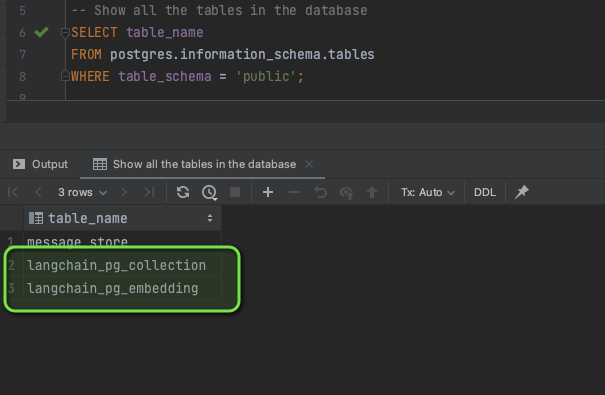
LangChain creates two tables in the Aurora database: langchain_pg_collection and langchain_pg_embedding .We connect to the Aurora database using any SQL client/IDE.
We can see the collection we created,
my_collection .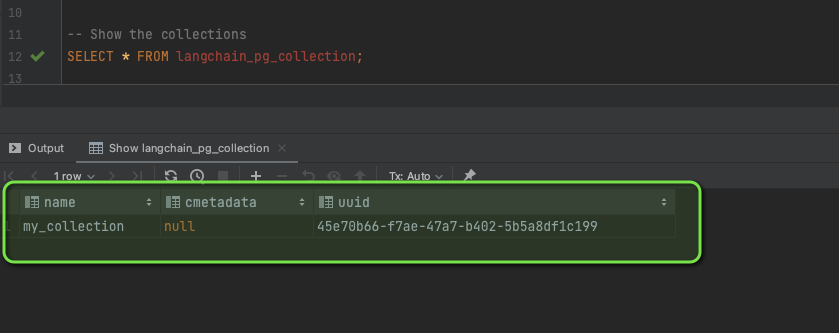
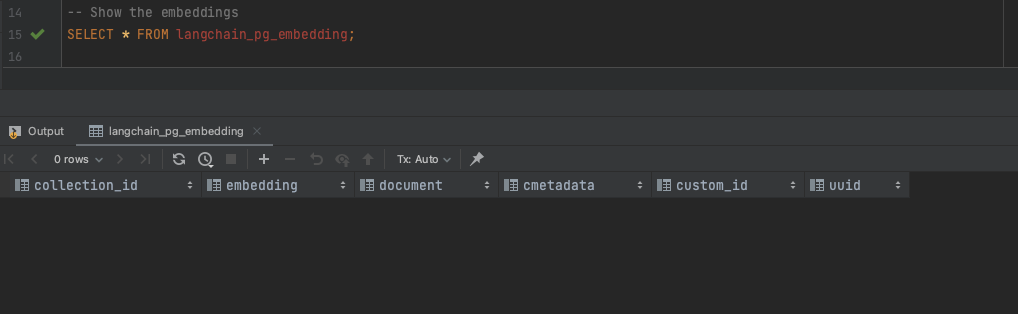
We expect the embeddings table to be empty, since we haven't stored any embeddings yet.
Now let's create some vectors and store their embeddings in the Aurora database.
Python
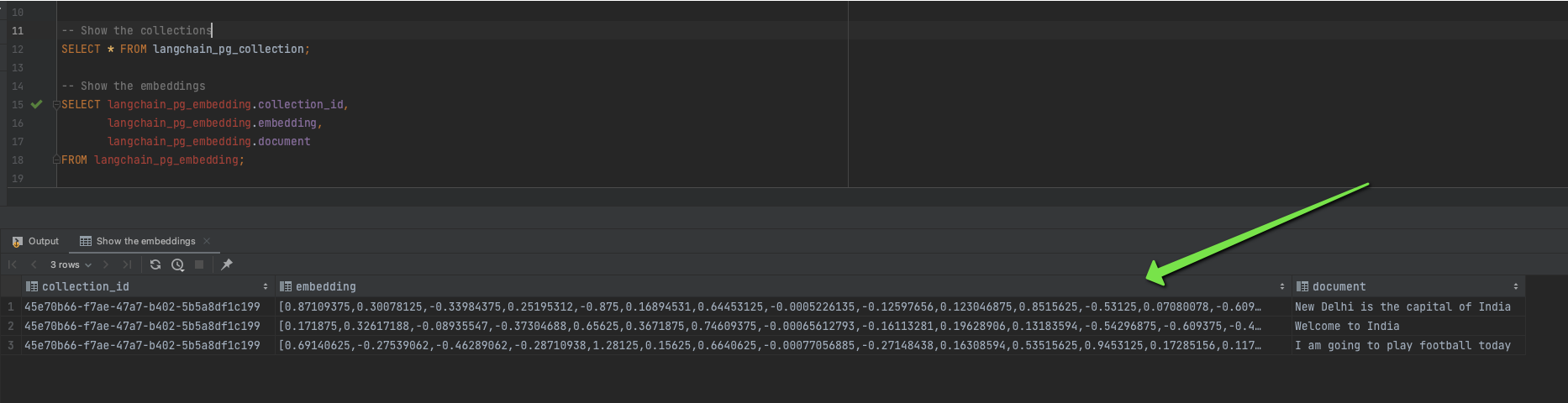
# List of textual data for vector embedding conversiontexts = ["New Delhi is the capital of India", "Welcome to India", "I am going to play football today"]# Create a PGVector database instance and populate it with vector embeddingsstore.from_texts(texts=texts,collection_name=COLLECTION_NAME,connection_string=CONNECTION_STRING,embedding=embeddings)
We can verify these newly added vectors in our database.
Document Loading Using LangChain
Now that we know how to create embeddings and store them in a vector store, let's see how to load an entire document. In the real world, data often comes in document form, and we need to store it in a vector store before any downstream operations like similarity search.
LangChain provides document loaders for various data formats, such as PDFs, text files, HTML documents, and more.
We'll download the book, " The Elements of Statistical Learning " by Trevor Hastie, Robert Tibshirani, and Jerome Friedman, embed it using
BedrockEmbeddings , and store the entire book in the Aurora database using LangChain's document_loaders module.Python
# Import necessary modules and classes for document loading, text splitting, embedding, and vector storagefrom langchain.document_loaders import PyPDFLoaderfrom langchain.text_splitter import RecursiveCharacterTextSplitterfrom langchain.embeddings import BedrockEmbeddingsfrom langchain.vectorstores.pgvector import PGVectorfrom dotenv import load_dotenvimport os# Load environment variables from a .env fileload_dotenv()# Define the file path for the PDF documentfile_path = 'ESL.pdf'# Initialize a loader for PDF documentsloader = PyPDFLoader(file_path=file_path)# Initialize a text splitter for dividing text into chunkstext_splitter = RecursiveCharacterTextSplitter(chunk_size=2000, chunk_overlap=100)# Load and split the documentdata = loader.load_and_split(text_splitter=text_splitter)# Define the collection name for storing embeddingsCOLLECTION_NAME = "eslbook"# Construct the connection string to the PostgreSQL databaseCONNECTION_STRING = PGVector.connection_string_from_db_params(driver=os.getenv("PGVECTOR_DRIVER"),user=os.getenv("PGVECTOR_USER"),password=os.getenv("PGVECTOR_PASSWORD"),host=os.getenv("PGVECTOR_HOST"),port=os.getenv("PGVECTOR_PORT"),database=os.getenv("PGVECTOR_DATABASE"),)# Initialize the text embedding modelembeddings = BedrockEmbeddings()# Create a vector database store instance and populate it with document data and embeddingsdb = PGVector.from_documents(documents=data,embedding=embeddings,collection_name=COLLECTION_NAME,connection_string=CONNECTION_STRING)
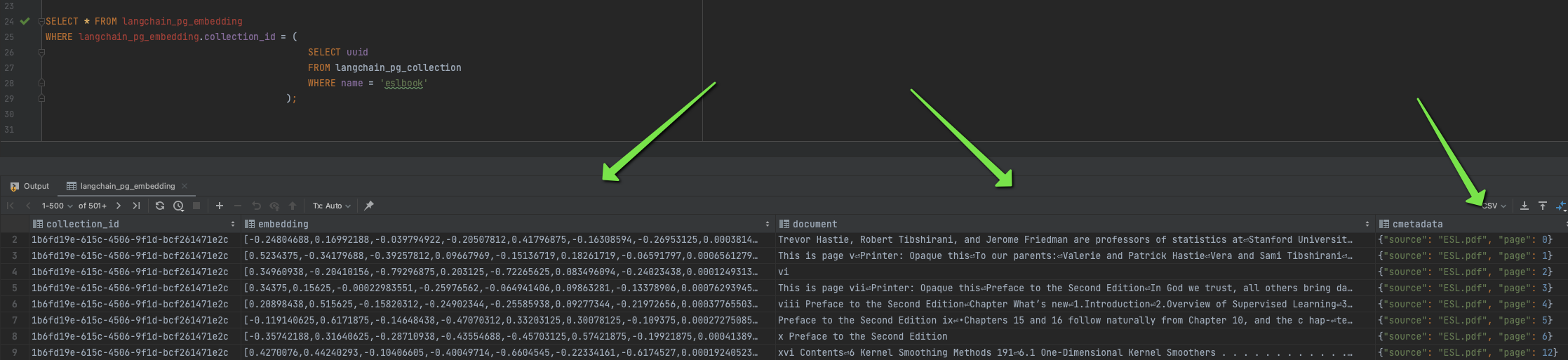
We can then check the embeddings and raw data in Aurora.
SQL
SELECT * FROM langchain_pg_embeddingWHERE langchain_pg_embedding.collection_id = (SELECT uuidFROM langchain_pg_collectionWHERE name = 'eslbook');
Embedding Vector Store and Retrieval
After setting up the vector store and populating it with embeddings, we can leverage those embeddings to retrieve information based on similarity using
LangChain .Before proceeding, let's discuss Retrieval-Augmented Generation (RAG) , a methodology combining information retrieval with new content generation. In machine learning, RAG systems first retrieve relevant documents based on a query, then use a language model to generate responses that synthesize the retrieved data, particularly useful in question-answering systems.
Now, let's utilize Amazon Aurora/RDS with
pgvector and LangChain for storage and retrieval of vector embeddings.Python
from langchain.llms import Bedrockfrom langchain.chains import RetrievalQAfrom langchain.callbacks import StdOutCallbackHandler# Initialize the language modelllm = Bedrock(model_id='anthropic.claude-v2',model_kwargs={'max_tokens_to_sample': 4096})# Set up the retrieval chain with the language model and database retrieverchain = RetrievalQA.from_chain_type(llm=llm,retriever=db.as_retriever(),verbose=True)# Initialize the output callback handlerhandler = StdOutCallbackHandler()# Run the retrieval chain with a querychain.run('What is machine learning?',callbacks=[handler])
In this code snippet:
- We first import the necessary components from
LangChain.
- We initialize a
Bedrocklanguage model with specific parameters.
- We then create a
RetrievalQAchain that incorporates our vector store retriever and the language model.
- We define a
StdOutCallbackHandlerto handle the output.
- Finally, we execute the
runmethod on our chain with a query about machine learning.
The
RetrievalQA chain conducts a two-step process:- Retrieval: It uses the
db.as_retriever()function to query the vector store for embeddings that are similar to the query.
- Question Answering: The retrieved embeddings are then provided to the language model to help it generate a relevant and informed response.
By executing the
chain.run method with a question, we are effectively using our vector store to enhance the context available to the language model, leading to more accurate and contextually relevant answers.This powerful combination of vector storage and retrieval facilitated by
LangChain and pgvector can be applied to numerous applications, from customer service bots to complex analytical tools. It is a testament to how vector search and AI language models are being integrated to deliver advanced solutions in the realm of natural language processing and beyond.As we continue to push the boundaries of what's possible with machine learning and data retrieval, tools like
LangChain and extensions like pgvector will become increasingly valuable in building intelligent, context-aware systems. Whether you are a developer, data scientist, or product manager, understanding and utilizing these tools can significantly enhance the capabilities of your applications and services.With the embedded vectors now at our disposal, the potential use cases are vast and exciting. From enhancing search functionality within applications to creating dynamic recommendation systems, the integration of vector stores into our data strategies is an important step in harnessing the full potential of AI and machine learning technologies.
Summary
In this second part of our series , we dove into the practical applications of vector embeddings using AWS services. We focused on Amazon Aurora and Amazon RDS , integrated with
pgvector , showcasing how these tools can effectively manage high-dimensional vector data. By exploring the setup and use of vector stores in Amazon Aurora and employing LangChain , we demonstrated how to create, store, and utilize vector embeddings for complex data retrieval and processing tasks.We highlighted the innovative use of Retrieval-Augmented Generation (RAG) in enhancing language model responses, demonstrating the power of combining vector storage with AI models for more accurate and contextually relevant results.
For further exploration and to deepen your understanding, you are encouraged to check out this GitHub page which includes, sample applications, and tutorials showcasing the capabilities of Amazon Bedrock with Python. These will guide you in integrating Bedrock with databases, utilizing RAG techniques, and experimenting with LangChain and Streamlit.
Enjoyed reading this content? Let the author know!
Your likes, comments, shares, and saves help creators reach more builders.

Loading recommendations
Loading article