

Use Mistral AI to build generative AI applications with Go
Learn how to use Mistral AI on Amazon Bedrock with AWS SDK for Go

Mistral AI offers models with varying characteristics across performance, and cost:
- Mistral 7B - The first dense model released by Mistral AI, perfect for experimentation, customization, and quick iteration.
- Mixtral 8x7B - A sparse mixture of experts model.
- Mistral Large - ideal for complex tasks that require large reasoning capabilities or are highly specialized (Synthetic Text Generation, Code Generation, RAG, or Agents).
Let's walk through how to use these Mistral AI models on Amazon Bedrock with Go, and in the process, also get a better understanding of it's prompt tokens.
Getting started with Mistral AI
Lets start off with a simple example using Mistral 7B.
Refer to Before You Begin section in this blog post to complete the prerequisites for running the examples. This includes installing Go, configuring Amazon Bedrock access and providing necessary IAM permissions.
To run the example:
git clone https://github.com/abhirockzz/mistral-bedrock-gocd mistral-bedrock-go
go run basic/main.go
The response may (or may not) be slightly different in your case:
request payload: {"prompt":"\u003cs\u003e[INST] Hello, what's your name? [/INST]"}response payload: {"outputs":[{"text":" Hello! I don't have a name. I'm just an artificial intelligence designed to help answer questions and provide information. How can I assist you today?","stop_reason":"stop"}]}response string: Hello! I don't have a name. I'm just an artificial intelligence designed to help answer questions and provide information. How can I assist you today?We start by creating the JSON payload - it's modeled as a
struct ( MistralRequest ). Also, notice the model ID mistral.mistral-7b-instruct-v0:2 const modelID7BInstruct = "mistral.mistral-7b-instruct-v0:2"const promptFormat = "<s>[INST] %s [/INST]"
func main() { msg := "Hello, what's your name?" payload := MistralRequest{ Prompt: fmt.Sprintf(promptFormat, msg), }//...}Mistral prompt format:
-
<s>refers to the beginning of string token
- text for the user role is inside the
[INST]...[/INST]tokens
- text outside is the assistant role
In the output logs above, see how the
<s> token is interpretedHere is the
MistralRequest struct with the attributes:type MistralRequest struct { Prompt string `json:"prompt"` MaxTokens int `json:"max_tokens,omitempty"` Temperature float64 `json:"temperature,omitempty"` TopP float64 `json:"top_p,omitempty"` TopK int `json:"top_k,omitempty"` StopSequences []string `json:"stop,omitempty"`} InvokeModel is used to call the model. The JSON response is converted to a struct (
MistralResponse ) and the text response is extracted from it. output, err := brc.InvokeModel(context.Background(), &bedrockruntime.InvokeModelInput{ Body: payloadBytes, ModelId: aws.String(modelID7BInstruct), ContentType: aws.String("application/json"), }) ``var resp MistralResponse err = json.Unmarshal(output.Body, &resp) fmt.Println("response string:\n", resp.Outputs[0].Text)Chat example
Moving on to a simple conversational interaction. This is what Mistral refers to as a multi-turn prompt and we will add the
</s> which is the end of string token.To run the example:
go run chat/main.goHere is my chat interaction:
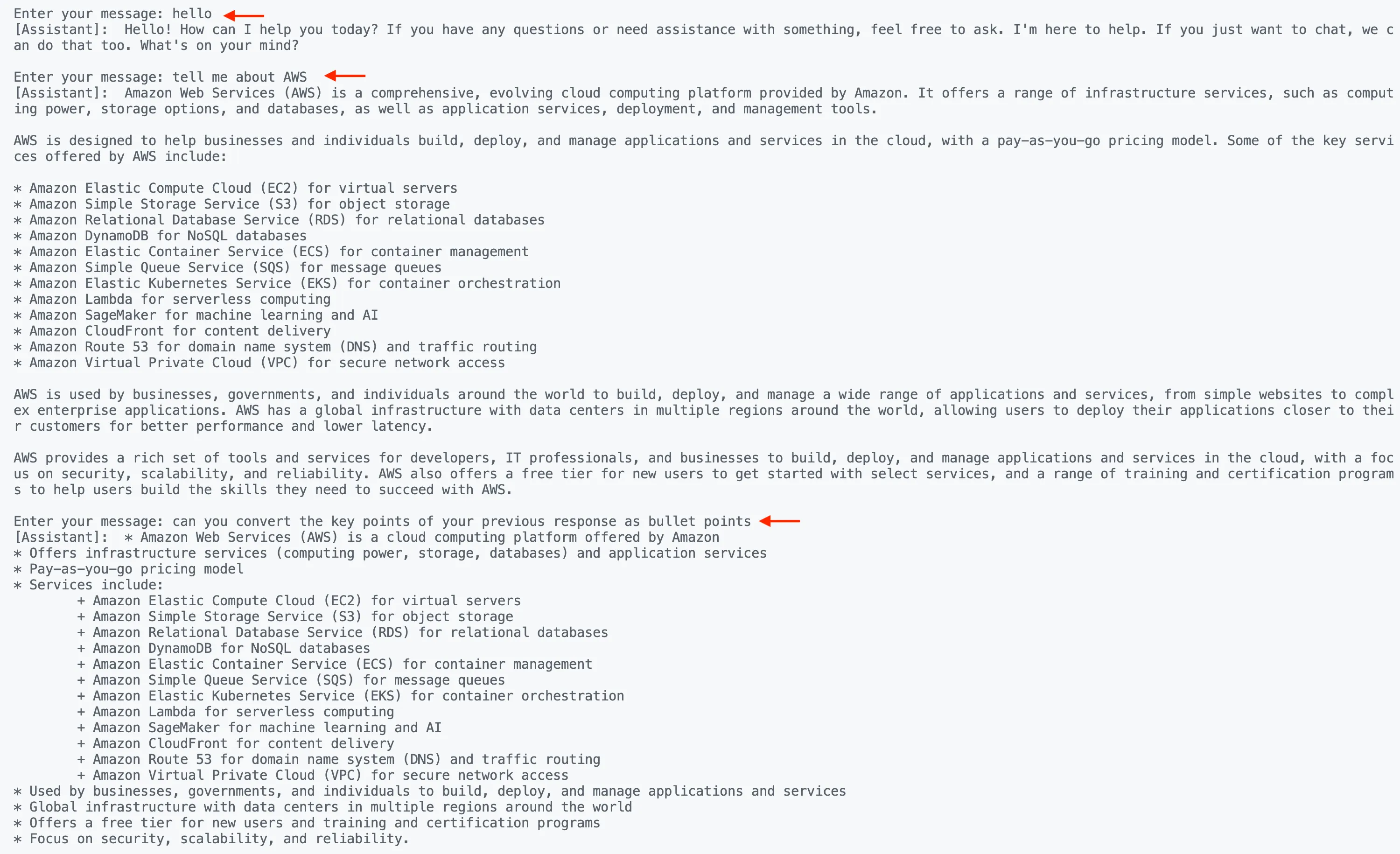
The code itself is overly simplified for the purposes of this example. But, important part is the how the tokens are used to format the prompt. Note that we are using Mixtral 8X7B (
mistral.mixtral-8x7b-instruct-v0:1 ) in this example.const userMessageFormat = "[INST] %s [/INST]"const modelID8X7BInstruct = "mistral.mixtral-8x7b-instruct-v0:1"const bos = "<s>" const eos = "</s>"var verbose *boolfunc main() { reader := bufio.NewReader(os.Stdin) first := true ``var msg string ``for { fmt.Print("\nEnter your message: ") input, _ := reader.ReadString('\n') input = strings.TrimSpace(input) ``if first { msg = bos + fmt.Sprintf(userMessageFormat, input) } else { msg = msg + fmt.Sprintf(userMessageFormat, input) } payload := MistralRequest{ Prompt: msg, } response, err := send(payload) fmt.Println("[Assistant]:", response) msg = msg + response + eos + " " first = false }}The beginning of string (
bos ) token is only needed once at the start of the conversation, while eos (end of string) marks the end of a single conversation exchange (user and assistant).Chat with streaming
If you've read my previous blogs, I always like to include a "streaming" example because:
- It provides a better experience from a client application point of view
- It's a common mistake to overlook the
InvokeModelWithResponseStreamfunction (the async counterpart ofInvokeModel)
- The partial model payload response can be interesting (and tricky at times)
Lets try this out. This example uses Mistral Large - simply change the model ID to
mistral.mistral-large-2402-v1:0 . To run the example:
go run chat-streaming/main.goNotice the usage of
InvokeModelWithResponseStream (instead of Invoke ): output, err := brc.InvokeModelWithResponseStream(context.Background(), &bedrockruntime.InvokeModelWithResponseStreamInput{ Body: payloadBytes, ModelId: aws.String(modelID7BInstruct), ContentType: aws.String("application/json"), }) ``//...To process it's output, we use:
//...resp, err := processStreamingOutput(output, func(ctx context.Context, part []byte) error { fmt.Print(string(part)) return nil})Here are a parts of the
processStreamingOutput function - you can check the code here . The important thing to understand is how the partial responses are collected together to produce the final output ( MistralResponse ).func processStreamingOutput(output *bedrockruntime.InvokeModelWithResponseStreamOutput, handler StreamingOutputHandler) (MistralResponse, error) { var combinedResult string resp := MistralResponse{} op := Outputs{} for event := range output.GetStream().Events() { switch v := event.(type) { case *types.ResponseStreamMemberChunk: var pr MistralResponse err := json.NewDecoder(bytes.NewReader(v.Value.Bytes)).Decode(&pr) if err != nil { return resp, err } handler(context.Background(), []byte(pr.Outputs[0].Text)) combinedResult += pr.Outputs[0].Text op.StopReason = pr.Outputs[0].StopReason //... } op.Text = combinedResult resp.Outputs = []Outputs{op} return resp, nil}Conclusion
Remember - building AI/ML applications using Large Language Models (like Mistral, Meta Llama, Claude, etc.) does not imply that you have to use Python. Managed platforms like Amazon Bedrock provide access to these powerful models using flexible APIs in a variety of programming languages, including Go! Thanks to AWS SDK support, you can use the programming language of your choice to integrate with Amazon Bedrock, and build generative AI solutions.
You can learn more by exploring the official Mistral documentation as well the Amazon Bedrock user guide . Happy building!
Enjoyed reading this content? Let the author know!
Your likes, comments, shares, and saves help creators reach more builders.

Loading recommendations
Loading article