

Add Generative AI to a JavaScript Web App 2.0
Get ready to embark on an exciting journey as we combine the power of Amazon Bedrock, ReactJS and the AWS JavaScript SDK to create a generative AI application with minimal integration code.

Integrating generative AI into existing applications presents challenges. Many developers have limited experience in training foundations models, but the aim is to integrate generative AI capabilities with minimal code changes.
To solve this, we created an application that integrates the power of generative AI with a call to the Amazon Bedrock API from a web application such SPA built with JavaScript and react framework. With no middleware, lowering the barrier for incorporating AI generation through minimal code integration.
Throughout this tutorial, you'll learn how to utilize Amazon Cognito credentials and IAM Roles to securely access the Amazon Bedrock API within your ReactJS application built with the CloudScape design system. We'll guide you through the process of deploying all the necessary resources and hosting the app using AWS Amplify , streamlining the setup and deployment process.
To enhance the flexibility and customization of the foundation model (FM), we'll demonstrate how to assign different roles using System Prompt . By creating an Amazon DynamoDB table, you can store and retrieve various roles, enabling you to manage and access distinct System Prompts associated with each role you wish to assign to the FM. This centralized repository approach allows for dynamic role assignment and tailored AI responses based on the selected role.
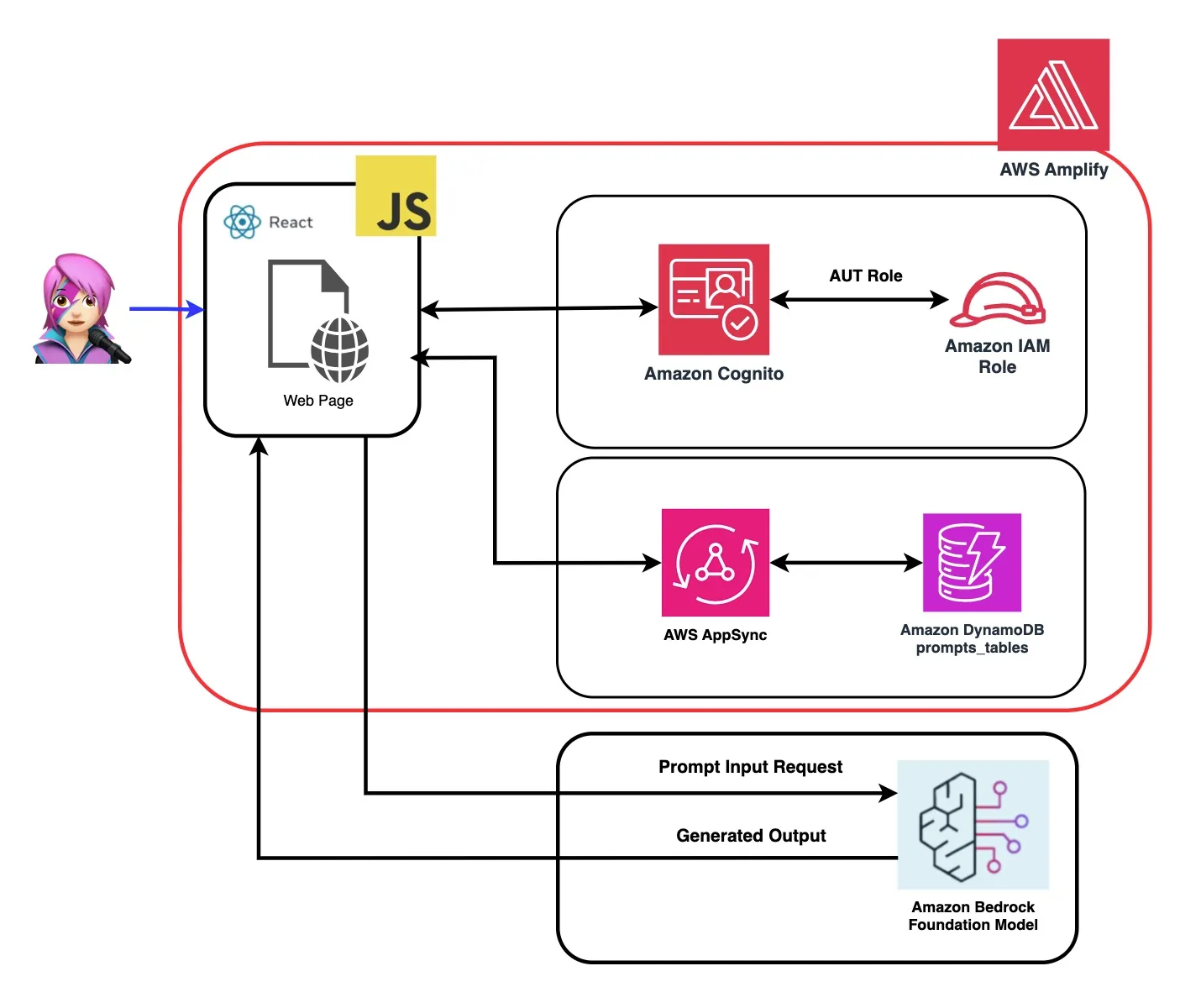
How Does This Application Work?
In the repository of this application , you will find the code ready to deploy the backend and frontend.
✅ Backend: An Amazon Cognito User Pool and Identity Pool, with an AWs Identity and Access Managemen Role (IAM Role) that contains the policy with the permissions to invoke Amazon Bedrock.
plaintext
{ policyName: "amplify-permissions-custom-resources",policyDocument: {Version: "2012-10-17",Statement: [{Resource: "*",Action: ["bedrock:InvokeModel*", "bedrock:List*", "bedrock:Retrieve*"],Effect: "Allow",}]}}
Check "Integrating Amazon Cognito authentication and authorization with web and mobile apps" guide for invoking AWS API operations by users authenticated with Amazon Cognito.
This application comprises 4 demos:
- Chat with Amazon Bedrock Multimodal.
- System Prompts.
- Knowledge Bases for Amazon Bedrock.
- Agents for Amazon Bedrock.
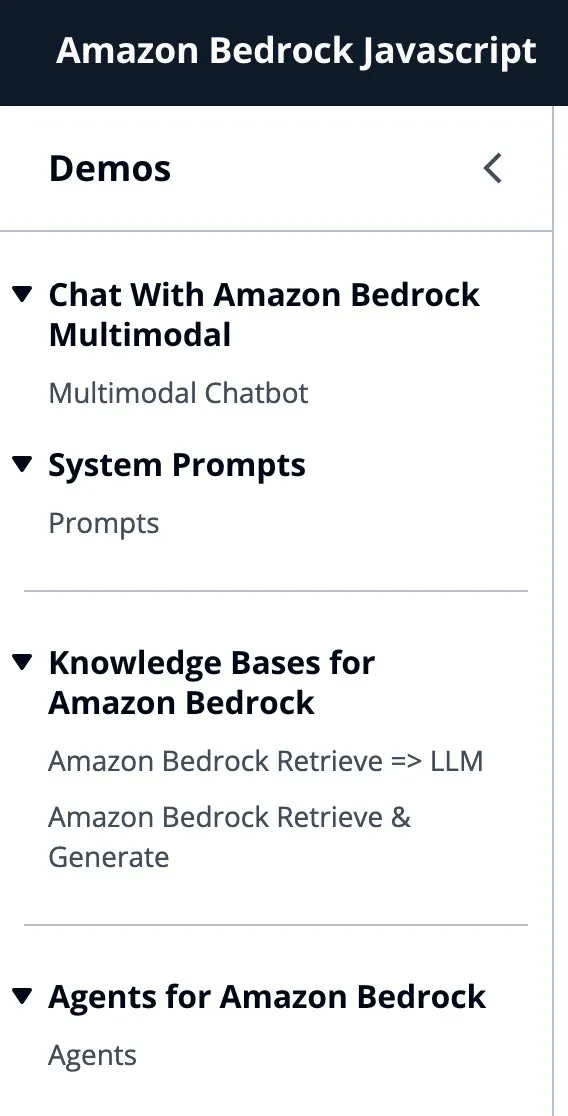
All demos have in common the use of the BedrockRuntimeClient or BedrockAgentRuntimeClient to invoke the Bedrock or BedrockAgent service for a conversational interaction. The BedrockAgentClient is also used to list current Bedrock KnowledgeBases deployed in the same account.
JavaScript
import { BedrockAgentClient} from "@aws-sdk/client-bedrock-agent"import { BedrockAgentRuntimeClient} from "@aws-sdk/client-bedrock-agent-runtime"
Amazon Bedrock is a fully managed service that offers a choice of high-performing foundation models (FMs) along with a broad set of capabilities that you need to build and scale generative AI applications.
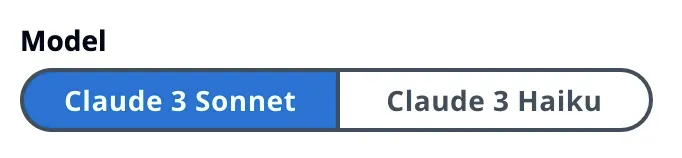
To select Large Language Model
To invoke a FM you need to specify the region, streaming responses, and API credentials from the user pool authentication . For model arguments, you specify the model to sample up to 1000 tokens and for more creative and freedom of generation use a temperature of 1. We do it with the
getModel function of llmLib.js JavaScript
export const getModel = async (modelId = "anthropic.claude-instant-v1") => {const session = await fetchAuthSession(); //Amplify helper to fetch current logged in userlet region = session.identityId.split(":")[0] //const model = new Bedrock({model: modelId, // model-id you can try others if you wantregion: region, // app regionstreaming: true, // this enables to get the response in streaming mannercredentials: session.credentials, // the user credentials that allows to invoke bedrock service// try to limit to 1000 tokens for generation// temperature = 1 means more creative and freedommodelKwargs: { max_tokens_to_sample: 1000, temperature: 1 },});return model;};
To select the modelID first you list Amazon Bedrock foundation models using ListFoundationModels on
getFMs function ( llmLib.js ). Each FM has its own way of invoking the model, and this blog is only focusing on the multimodal models of Anthropic.JavaScript
export const getFMs = async () => {const session = await fetchAuthSession()let region = session.identityId.split(":")[0]const client = new BedrockClient({ region: region, credentials: session.credentials })const input = { byProvider: "Anthropic", byOutputModality: "TEXT",byInferenceType: "ON_DEMAND"}const command = new ListFoundationModelsCommand(input)const response = await client.send(command)return response.modelSummaries}
We'll walk you through each demo group to highlight their differences.
Chat With Amazon Bedrock Multimodal

InvokeModelWithResponseStream is used to invoke the Amazon Bedrock model to run inference using the prompt and inference parameters provided in the request body.
JavaScript
const session = await fetchAuthSession()let region = session.identityId.split(":")[0]const client = new BedrockRuntimeClient({ region: region, credentials: session.credentials })const input = {body: JSON.stringify(body),contentType: "application/json",accept: "application/json",modelId: modelId}const command = new InvokeModelWithResponseStreamCommand(input)const response = await client.send(command)
In the previous blog , we referenced two approaches to invoking the model - one focused on simply asking questions and receiving answers, and another for engaging in full conversations with the model. With Anthropic Claude 3 the conversation is handled by the The Messages API :
messages=[{"role": "user", "content": content}] .Each input message must be an object with a
role (user or assistant) and content. The content can be in either a single string or an array of content blocks, each block having its own designated type (text or image).-
typeequaltext:
plaintext
{"role": "user", "content": [{"type": "text", "text": "Hello, Claude"}]}
-
typeequalimage:
plaintext
{"role": "user", "content": [{"type": "image","source": {"type": "base64","media_type": "image/jpeg","data": "/9j/4AAQSkZJRg...",}},{"type": "text", "text": "What is in this image?"}]}
- This is an example of a body:
plaintext
```content = [{"type": "image", "source": {"type": "base64","media_type": "image/jpeg", "data": content_image}},{"type":"text","text":text}]body = {"system": "You are an AI Assistant, always reply in the original user text language.","messages":content,"anthropic_version": anthropic_version,"max_tokens":max_tokens}```
🖼️ Anthropic currently support the base64 source type for images, and the image/jpeg, image/png, image/gif, and image/webp media types. You can see the conversion of images to base64 for this app inbuildContentfunction of messageHelpers.js . See more input examples .
Create and reuse prompt

The Messages API allows us to add context or instructions to the model through a System Prompt (system).
By utilizing the System Prompt, we can assign the FM a specific role or provide it with prior instructions before feeding it the input. To enable the FM to take on multiple roles, we created a react component that allows you to generate a System Prompt, store it in an Amazon DynamoDB table, and then select it when you want to assign that particular role to the FM.
All the API operations for managing prompts are handled by a AWS AppSync GraphQL API endpoint. AWS AppSync allows you to create and manage GraphQL APIs, which provide a flexible and efficient way to fetch and manipulate data from multiple sources through a single endpoint. ( AWS AppSync Tutorial: DynamoDB resolvers )
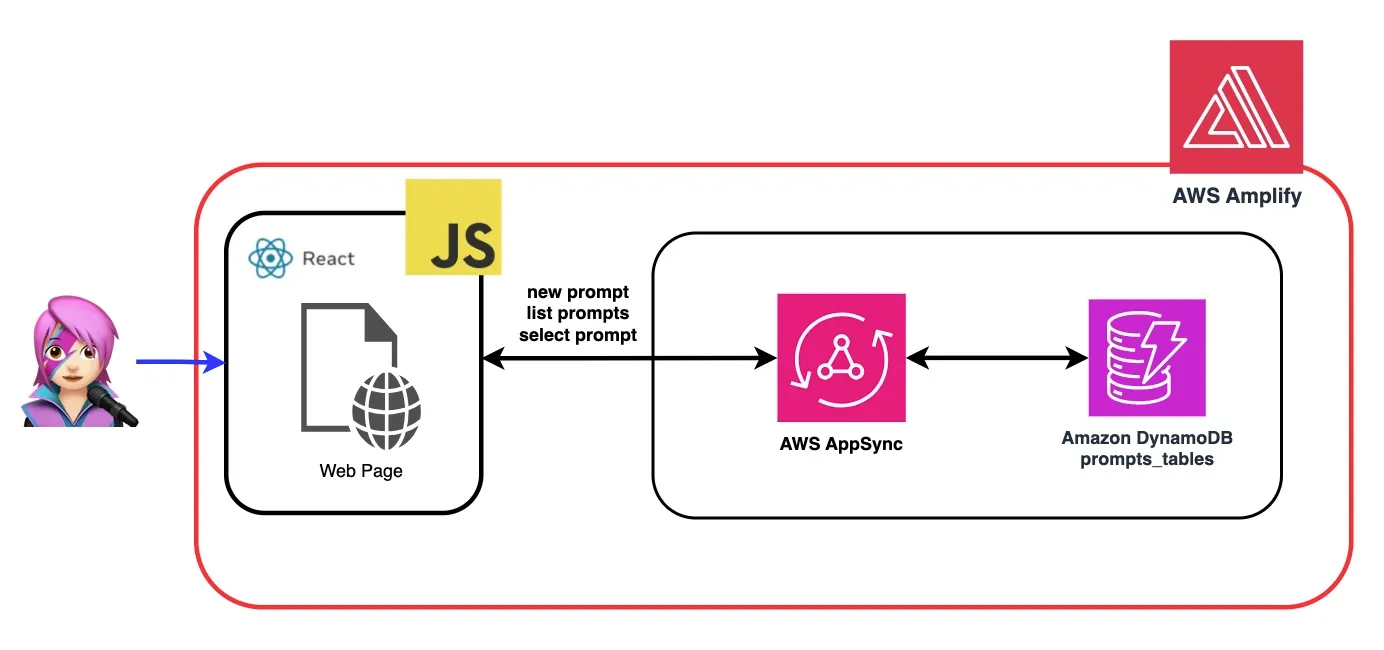
Let's review an example of a prompt where we tell the FM that he is an expert in JavaScript:
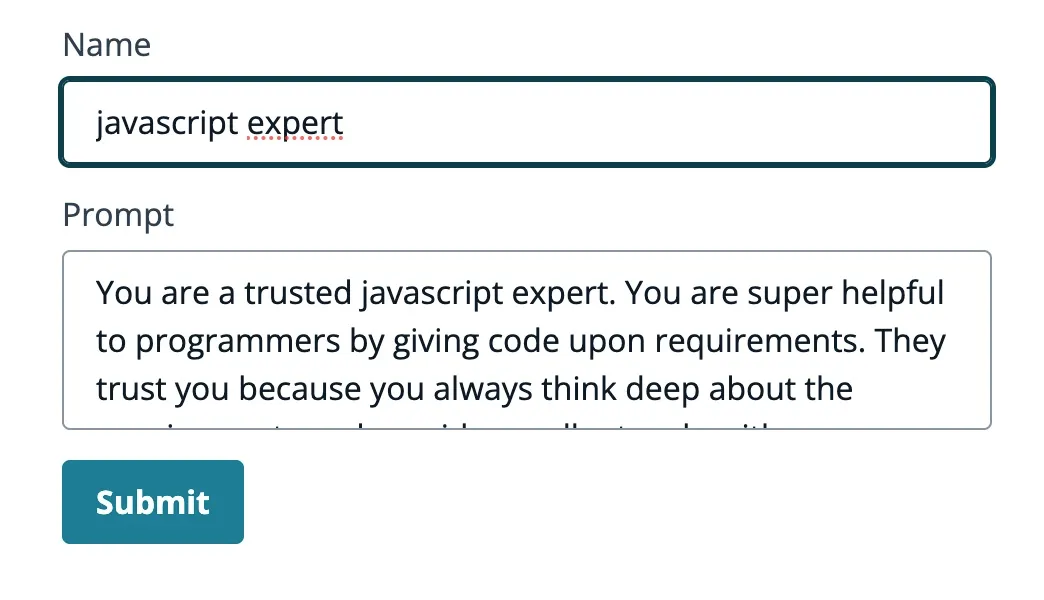
The model provides code and detailed explanation, like an expert.
Knowledge Bases for Amazon Bedrock
In this demo, you will ask questions to the Knowledge Bases for Amazon Bedrock taking advantage of retrieval augmented generation (RAG) . You must have at least one knowledge base created, do it by following Create a knowledge base guide .
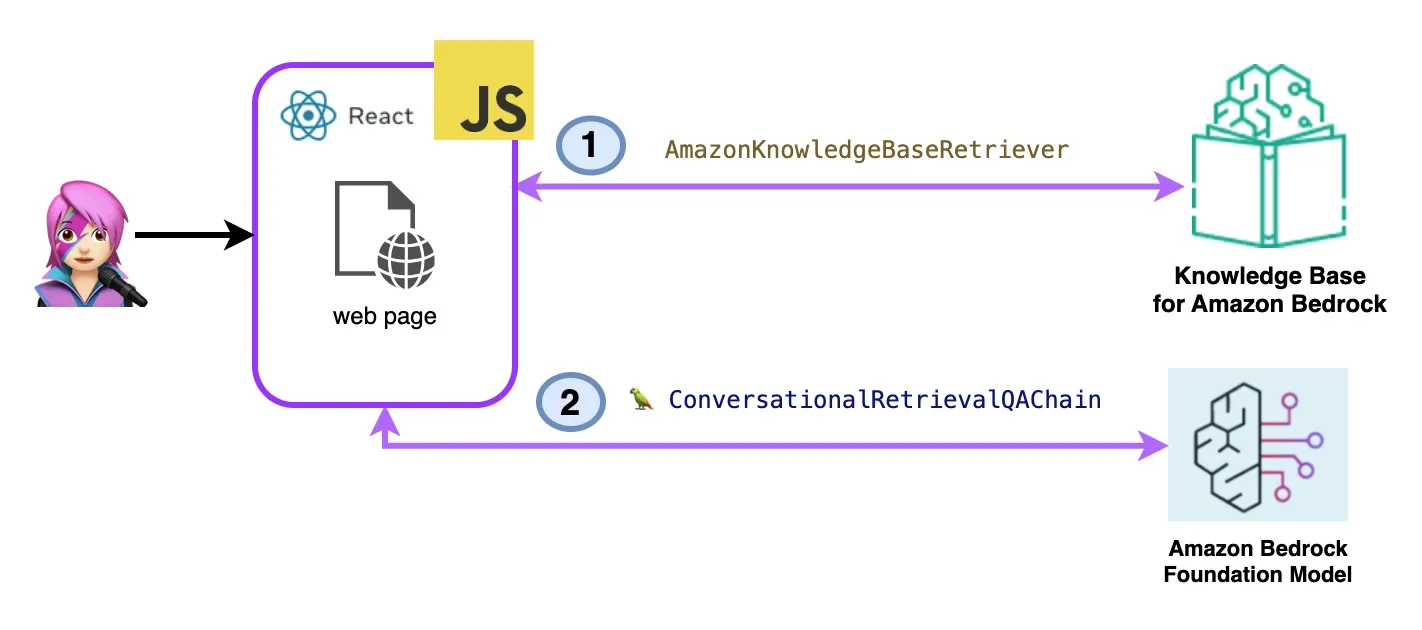
Questions to the Knowledge Bases for Amazon Bedrock will be asked in two ways:
- Amazon Bedrock Retrieve => LLM:
JavaScript
import { ListKnowledgeBasesCommand } from "@aws-sdk/client-bedrock-agent"export const getBedrockKnowledgeBases = async () => {const session = await fetchAuthSession()let region = session.identityId.split(":")[0]const client = new BedrockAgentClient({ region: region, credentials: session.credentials })const command = new ListKnowledgeBasesCommand({})const response = await client.send(command)return response.knowledgeBaseSummaries}
The AmazonKnowledgeBaseRetriever Langchain class creates a retriever, an object capable to retrieve documents similar to a query from a knowledge base (in this case is a Knowledge Base from Bedrock)
JavaScript
import { AmazonKnowledgeBaseRetriever } from "@langchain/community/retrievers/amazon_knowledge_base";export const getBedrockKnowledgeBaseRetriever = async (knowledgeBaseId) => {const session = await fetchAuthSession();let region = session.identityId.split(":")[0]const retriever = new AmazonKnowledgeBaseRetriever({topK: 10, // return top 10 documentsknowledgeBaseId: knowledgeBaseId,region: region,clientOptions: { credentials: session.credentials }})return retriever}
The ConversationalRetrievalQAChain is instantiated with the retriever and the memory. It takes care of the memory, query the retriever and formulate the answer (with the documents) using the llm instance.
- Amazon Bedrock Retrieve & Generate:
Here you will use a complete AWS Managed RAG service. There is no need for extra packages (Langchain) or increased complexity with prompts. You will use only one API Call to BedrockAgentRuntimeClient. Also the memory is managed by the service by using a sessionId.
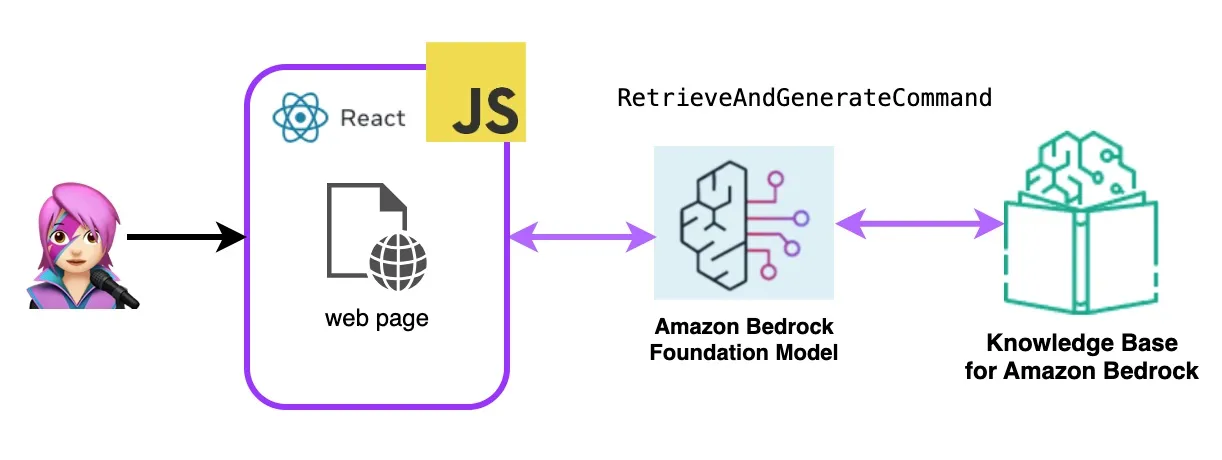
Bedrock is initialized with BedrockAgentRuntimeClient and with RetrieveAndGenerateCommand queries a knowledge base and a foundation model generates responses based on the retrieved results. In this demo Langchain is no needed.
JavaScript
import { BedrockAgentRuntimeClient, RetrieveAndGenerateCommand } from "@aws-sdk/client-bedrock-agent-runtime"export const ragBedrockKnowledgeBase = async (sessionId, knowledgeBaseId, query, modelId = "anthropic.claude-instant-v1") => {const session = await fetchAuthSession()let region = session.identityId.split(":")[0]const client = new BedrockAgentRuntimeClient({ region: region, credentials: session.credentials });const input = {input: { text: query }, // user questionretrieveAndGenerateConfiguration: {type: "KNOWLEDGE_BASE",knowledgeBaseConfiguration: {knowledgeBaseId: knowledgeBaseId,//your existing KnowledgeBase in the same region/ account// Arn of a Bedrock model, in this case we jump to claude 2.1, the latest. Feel free to use anothermodelArn: `arn:aws:bedrock:${region}::foundation-model/${modelId}`, // Arn of a Bedrock model},}}if (sessionId) {// you can pass the sessionId to continue a dialog.input.sessionId = sessionId}const command = new RetrieveAndGenerateCommand(input);const response = await client.send(command)return response}
Agents for Amazon Bedrock
An Amazon Bedrock agent is a software component that utilizes the AI models provided by the Amazon Bedrock service to deliver user-facing functionalities, such as chatbots, virtual assistants, or text generation tools. These agents can be customized and adapted to the specific needs of each application, providing a user interface for end-users to interact with the underlying AI capabilities. Bedrock agents handle the integration with the language models, processing user inputs, generating responses, and potentially other actions based on the output of the AI models.
To integrate Amazon Bedrock agents into this application you must create one, follow the steps Create an agent in Amazon Bedrock
In Amazon Bedrock, you can create a new version of your agent by creating an alias that points to the new version by default, aliases are listed with ListAgentAliasesCommand ( llmLib.js ) :
JavaScript
import { BedrockAgentClient, ListAgentAliasesCommand } from "@aws-sdk/client-bedrock-agent";const client = new BedrockAgentRuntimeClient({ region: region, credentials: session.credentials })export const getBedrockAgentAliases = async (client, agent) => {const agentCommand = new ListAgentAliasesCommand({ agentId: agent.agentId })const response = await client.send(agentCommand)return response.agentAliasSummaries}
JavaScript
export const invokeBedrockAgent = async (sessionId, agentId, agentAlias, query) => {const session = await fetchAuthSession()let region = session.identityId.split(":")[0]const client = new BedrockAgentRuntimeClient({ region: region, credentials: session.credentials })const input = {sessionId: sessionId,agentId: agentId,agentAliasId: agentAlias,inputText: query}console.log(input)const command = new InvokeAgentCommand(input)const response = await client.send(command,)console.log("response:", response)let completion = ""let decoder = new TextDecoder("utf-8")for await (const chunk of response.completion) {console.log("chunk:", chunk)const text = decoder.decode(chunk.chunk.bytes)completion += textconsole.log(text)}return completion}
In the following video, a user talks to the agent because they have a problem, the agent creates a support ticket and then the user asks about the status of the ticket.
Let's Deploy React Generative AI Application With Amazon Bedrock and AWS Javascript SDK
Step 1 - Enable AWS Amplify Hosting:
- first fork this repo:
plaintext
https://github.com/build-on-aws/building-reactjs-gen-ai-apps-with-amazon-bedrock-javascript-sdk/forks
- Create a New branch :
dev-branch.
- Then follow the steps in Getting started with existing code guide .
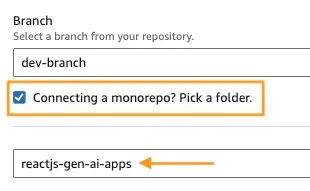
- In Step 1 Add repository branch, select main branch and Connecting a monorepo? Pick a folder and enter
reactjs-gen-ai-appsas a root directory.
-
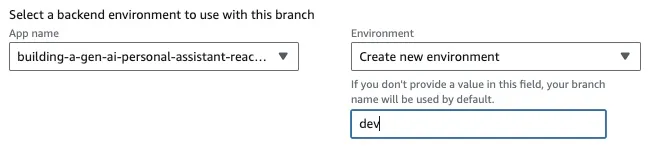
- For the next Step, Build settings, select
building-a-gen-ai-gen-ai-personal-assistant-reactjs-apps(this app)as App name, in Enviroment select Create a new envitoment and writedev.
- If there is no existing role, create a new one to service Amplify .
- Deploy your app.
Step 2 - Access to the App URL:
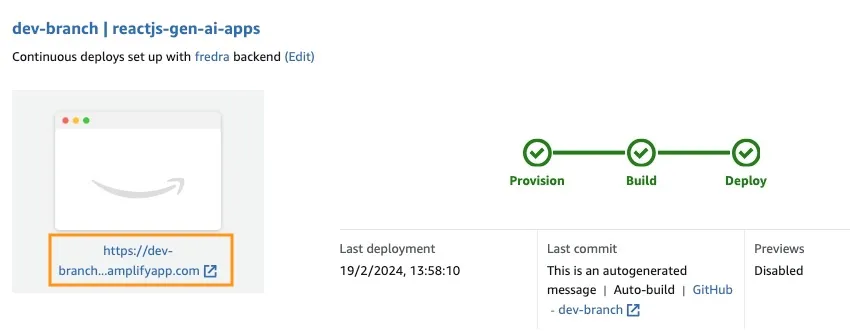
Once the application has been deployed, go to the link in the application, which is located under the white box.
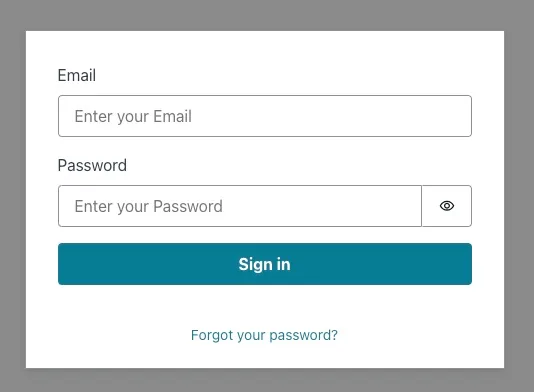
When you enter the link, the Sing In window will appear, so you must create a Amazon Cognito User Pool User.
✅ How To Create A User
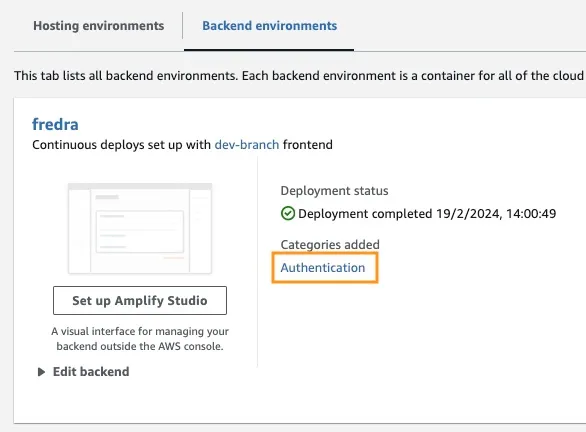
In the App go to Backend environments and click on Authentication.
Then, under Authentication, click View in Cognito:
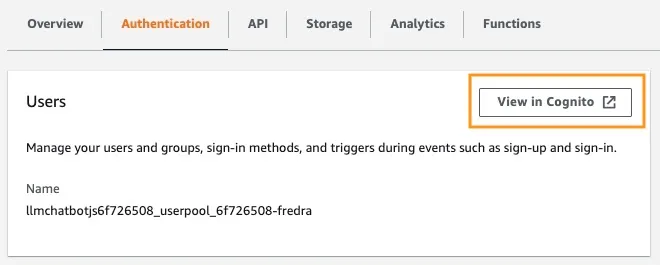
In the User Pool, click the name of your user pool and Create User.
Note: You can create the user directly from the application by changing False
hideSignUp: false in App.jsx , but this can introduce a security flaw by giving anyone access to it.Let's Try React Generative AI Application With Amazon Bedrock Javascript SDK
Before you can use a foundation model in Amazon Bedrock, you must request access to it. Follow the step in Add model access guide .
Go to the application link and sign in with the user you created.
🤖🚀 Try and test the app!
Conclusion
In this post, we demonstrated how you can build a React web application that directly accesses the Amazon Bedrock API using Amazon Cognito for secure authentication. By leveraging AWS managed services like Cognito and IAM, you can seamlessly integrate powerful generative AI capabilities into your javascript applications without the need for backend code.
This approach allows developers to focus on creating engaging conversational experiences while taking advantage of Amazon Bedrock's managed knowledge service. The streaming responses enhance the user experience by reducing wait times and enabling more natural interactions with conversational AI.
Furthermore, we showed how you can assign multiple roles to the foundation model using System Prompts stored in an Amazon DynamoDB table. This centralized repository provides flexibility and versatility, allowing you to efficiently retrieve and assign distinct roles to the model based on your specific use case.
By following the steps outlined in this post, you can unlock the potential of generative AI in your React applications. Whether you're building a new app from scratch or enhancing an existing one, Amazon Bedrock and the AWS JavaScript SDK make it easier than ever to incorporate cutting-edge AI capabilities.
We encourage you to explore the code samples and resources provided to start building your own generative AI applications. If you have any questions or feedback, please leave a comment below. Happy coding!
🚀 Some links for you to continue learning and building:
Enjoyed reading this content? Let the author know!
Your likes, comments, shares, and saves help creators reach more builders.

Loading recommendations
Loading article