
Build a GraphRAG proof of concept
A GraphRAG proof of concept built using LlamaIndex, Amazon Bedrock, and Amazon Neptune

Retrieval-Augmented Generation (RAG) is the process of optimizing the output of a large language model, so it references an authoritative knowledge base outside of its training data sources before generating a response. See this AWS post for more information about RAG.
The RAG process described above has challenges with answering questions using relationship information between entities present in the knowledge base documents. See this Microsoft blog for the challenges and the proposed Graph Retrieval-Augmented Generation (GraphRAG) solution approach to address these challenges.
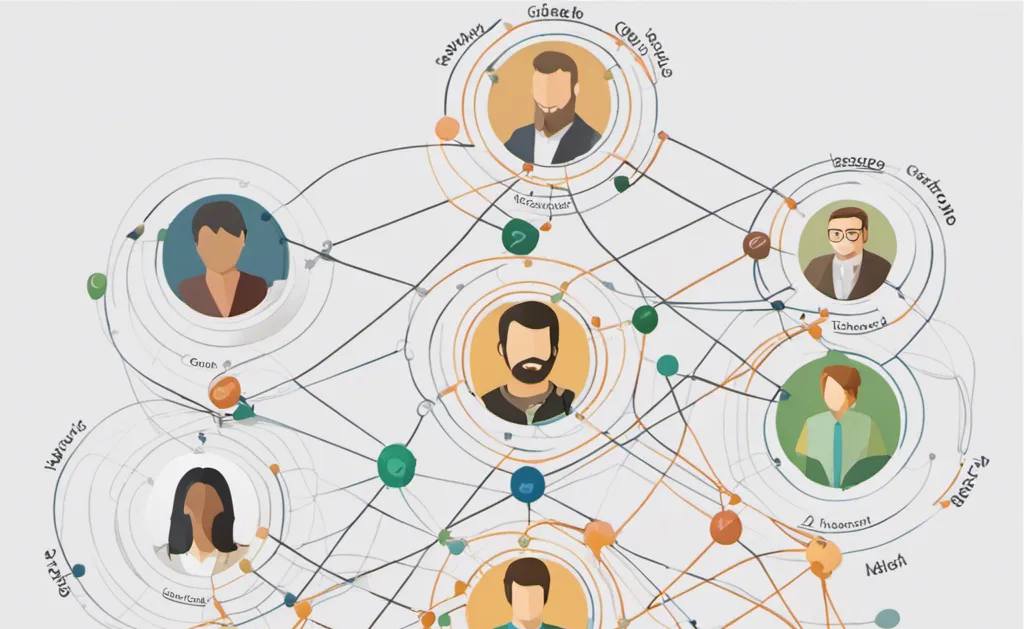
A GraphRAG process takes the unstructured data in the knowledge base and organizes it into a structured knowledge graph. The Large Language Model (LLM) will then use the relationship information from the knowledge graph to generate an answer.
This post will walk you through a GraphRAG proof of concept (POC) built using LlamaIndex framework , Amazon Bedrock , and Amazon Neptune . The POC implements and validates the idea proposed by a post titled " An Easy Way to Comprehend How GraphRAG Works ".
Prerequisite
1. Sign in to your AWS account.
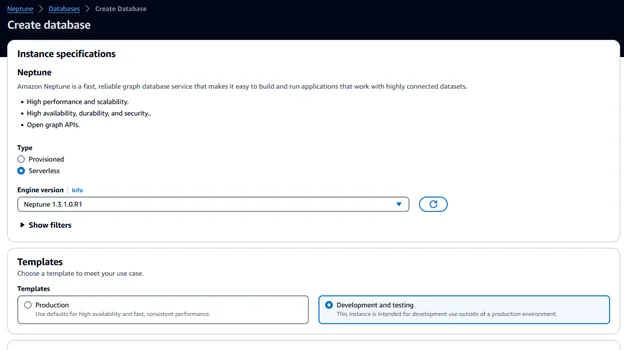
2. Create an Amazon Neptune Serverless database from the AWS Neptune console as shown below.

3. Pick “Serverless” for the instance type, the “Development and testing” option for the template, and leave everything else with the default option.
4. Make note of the cluster endpoint for the Neptune database cluster.
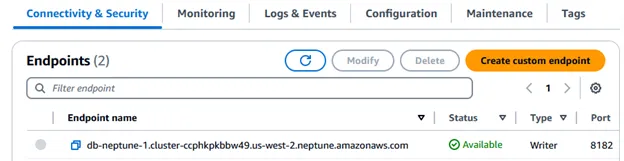
5. If you chose to skip creating a Jupyter notebook during the database creation, create a new Jupyter notebook from the Neptune Notebooks feature. Pick the database cluster name created in the previous step, provide a name suffix for the name and the IAM role. These Jupyter notebooks are fully managed and are hosted and billed through Amazon SageMaker’s notebook service.
POC steps
1. Use the AWS Neptune console to select the Jupyter notebook using the “Open JupyterLab” action. Select to launch a “Python 3” notebook from the “Launcher” screen.
2. Install the required packages
plaintext
# Install dependencies%pip install boto3%pip install llama-index-llms-bedrock%pip install llama-index-embeddings-bedrock%pip install llama-index-graph-stores-neptune%pip install llama-index
3. Add the required imports
plaintext
# Import featuresfrom llama_index.llms.bedrock import Bedrockfrom llama_index.embeddings.bedrock import BedrockEmbeddingfrom llama_index.core import (StorageContext,SimpleDirectoryReader,KnowledgeGraphIndex,Settings)from llama_index.core.query_engine import KnowledgeGraphQueryEnginefrom llama_index.graph_stores.neptune import NeptuneDatabaseGraphStorefrom IPython.display import Markdown, display
4. Update the variables for your deployment
plaintext
# For the variables that follow, update the region, give Neptune notebook instance IAM role permission to invoke Bedrock using the two models specified below, and update the neptune_endpoint based on your Neptune database endpoint; also, check on AWS Bedrock console and make sure you have access to the Bedrock modelsregion_name = "us-west-2"llmodel = "anthropic.claude-3-sonnet-20240229-v1:0"embed_model = "amazon.titan-embed-text-v1"neptune_endpoint = "db-neptune-1.cluster-cu4cwa2hwkdb.us-east-1.neptune.amazonaws.com"
5. Configure the LLM to use, Amazon Bedrock with Claude 3 Sonnet and Titan Text Embeddings
plaintext
# Define LLMllm = Bedrock(model=llmodel,region_name=region_name,)embed_model = BedrockEmbedding(model=embed_model)Settings.llm = llmSettings.chunk_size = 512Settings.embed_model = embed_model
6. Load the test data Newton and Edison using sample text about Newton and Edison
plaintext
# Load test data about Newton and Edison using sample text about Newton and Edisonimport osimport shutildata_path = './data'if os.path.isdir(data_path):shutil.rmtree(data_path)os.makedirs(data_path)about_newton = ['Isaac Newton, known for his laws of motion and universal gravitation, laid the groundwork for classical mechanics.','Newton’s work in the 17th century provided the foundation for much of modern physics.']with open(data_path + '/newton.txt', mode='w') as f:f.writelines(about_newton)about_edison = ['Albert Einstein developed the theory of relativity, which revolutionized theoretical physics and astronomy.','The theory of relativity was formulated in the early 20th century and has had a profound impact on our understanding of space and time.','In 1915, Einstein presented the general theory of relativity, expanding on his earlier work on special relativity.']with open(data_path + '/edison.txt', mode='w') as f:f.writelines(about_edison)documents = SimpleDirectoryReader(data_path).load_data()
7. Create a knowledge graph automatically using the unstructured documents
plaintext
# Create index in Neptune database using the test data - automated knowledge graph construction from unstructured textgraph_store = NeptuneDatabaseGraphStore(host=neptune_endpoint, port=8182)storage_context = StorageContext.from_defaults(graph_store=graph_store)index = KnowledgeGraphIndex.from_documents(documents,storage_context=storage_context)
If you get an AccessDeniedException on the Bedrock LLM, make sure to provide Bedrock “InvokeModel” permission to the Jupyter notebook IAM role on the 2 models you selected in step 4. You can add an inline policy using the JSON below
JSON
{"Version": "2012-10-17","Statement": [{"Sid": "VisualEditor0","Effect": "Allow","Action": "bedrock:InvokeModel","Resource": ["arn:aws:bedrock:us-west-2::foundation-model/anthropic.claude-3-sonnet-20240229-v1:0","arn:aws:bedrock:us-west-2::foundation-model/amazon.titan-embed-text-v1"]}]}
8. Query the knowledge graph
plaintext
# Queryresponse = index.as_query_engine().query("How did the scientific contributions of the 17th century influence early 20th-century physics?",)display(Markdown(f"<b>{response}</b>"))
The response from the query is
The scientific contributions of the 17th century, particularly the work of Isaac Newton, laid the foundation for classical mechanics and provided the groundwork for much of modern physics. Newton's laws of motion and his theory of universal gravitation established a framework for understanding the behavior of objects and the forces acting upon them. This classical understanding of mechanics and gravitation remained influential and formed the basis for early 20th-century physics, even as new discoveries and theories emerged to challenge and expand upon Newton's work. The advancements made during the 17th century set the stage for the revolutionary developments in physics that occurred in the early 20th century, such as the theories of relativity and quantum mechanics.
Cleanup
- From the AWS Neptune console, go to the Notebooks menu to stop and delete the Neptune Python notebook.
- From the AWS Neptune console, go to the Clusters menu to delete the Neptune database cluster.
Conclusion
By augmenting the LLM with a knowledge graph, the LLM was able to use the see the progression from Newton’s work to Einstein’s contribution. You can use the Neptune notebook’s graph explorer feature to see the knowledge graph created by this POC.
Try the POC on your GenAI Q&A use case, help it see the forest for the tree and share your thoughts 😊.
Enjoyed reading this content? Let the author know!
Your likes, comments, shares, and saves help creators reach more builders.

Loading recommendations
Loading article