
Using Flux to Implement GitOps on AWS
GitOps is an effective way to achieve continuous deployment based on Kubernetes clusters while meeting enterprise-level requirements such as security, separation of privileges, auditability, and agility. These are the best practices for GitOps based on AWS EKS.

While many enterprise companies have adopted Kubernetes in their production, they are often confused about how to achieve continuous deployment, high security, permission separation, and auditing - all while ensuring business agility with multiple Kubernetes clusters running at different stages simultaneously. Using GitOps can enable such continuous deployment based on Kubernetes clusters, while meeting enterprise-level requirements such as security and permission separation.
In this blog, we will implement GitOps in an Amazon EKS environment using AWS CodeCommit, AWS CodePipeline, and Flux. We will demonstrate in detail how to set up a GitOps workflow that meets production requirements in this Amazon EKS environment, and we'll show how microservice applications achieve continuous integration and continuous delivery in the GitOps-style CI/CD pipeline.
But before we get into the best practices and the tutorial itself, let's synchronize on what GitOps is and why GitOps best practices matter in the first place.
About | |
|---|---|
✅ AWS experience | 300 - Advanced |
⏱ Time to complete | 90 minutes to complete |
💰 Cost to complete | Free tier eligible |
🧩 Prerequisites | AWS Account |
📢 Feedback | Any feedback, issues, or just a 👍 / 👎 ? |
⏰ Last Updated | 2023-05-19 |
What is GitOps?
GitOps is a way of implementing Continuous Deployment for cloud native applications. It focuses on a developer-centric experience when operating infrastructure by using tools with which developers are already familiar - including Git and Continuous Deployment tools.
The core idea of GitOps is to have a Git repository that always contains declarative descriptions of the infrastructure currently desired in the production environment and an automated process to make the production environment match the described state in the repository. If you want to deploy a new application or update an existing one, you only need to update the repository. The automated process handles everything else. It’s like having cruise control for managing your applications in production.
GitOps has the following features compared to traditional continuous deployment.
Traditional CD | GitOps |
|---|---|
Triggered by push events, such as code commits, timed tasks, manual, etc. | System constantly polls for changes |
Deployment of changes only | Declare the entire system for any deployment |
System might drift between deployments | The system will correct any drift |
Access to the deployment environment is a requirement | Deployment pipeline is authorized to run within system |
Why use GitOps?
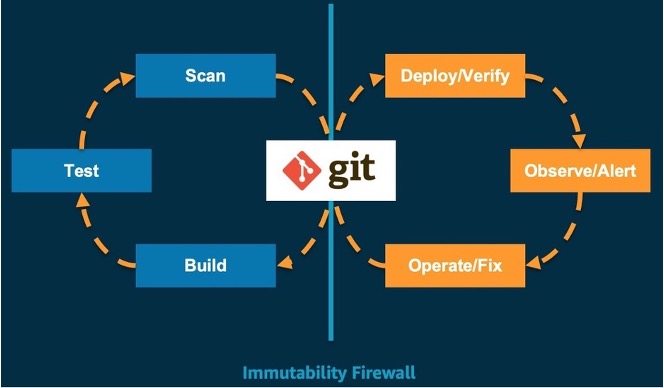
Git is the only actual source of the required state for the system. It supports repeatable and automated deployment, cluster management, and monitoring. Developers reuse Git workflows that are well-established in the enterprise for building, testing, scanning, and other continuous integration steps. Once the last state of the system is declared in the main Git repository branch, the GitOps tool chain is used to verify deployment, observe alerts, and fix operations. Based on the core foundational principles of GitOps, we believe GitOps is the best way to continuously deploy Kubernetes clusters. The process is like below:
Amazon EKS-based Best Practices for GitOps
The overall CI/CD pipeline, according to best practices, is shown in the figure below.

There are three code repositories under the AWS CodeCommit repository. One is
flux-repo , the configuration repository for Flux CD, which is used to define Flux-related resources. The other is microservices-repo , which saves microservice application configurations and deployment files. The third one is the source repository app-repo for business services. In this post, a front-end project will be used as an example. We used AWS CodePipeline for continuous integration in the CI/CD pipeline, built and stored the docker image in Amazon ECR , and deployed the CD engine Flux as a pod in the Amazon EKS environment.The basic workflow is:
- Coding engineers write code and push the final code to app-repo.
- Code changes in the app-repo trigger AWS CodePipeline.
- AWS CodePipeline edits and packages code, generates container images, and pushes them to the container image repository/Amazon ECR.
- The CD engine Flux, running in the EKS environment, regularly scans the ECR container image repository and pulls container image metadata for applications.
- The new container image address is automatically synced to the application deployment file stored in microservices-repo via git commit/push when a new version of the container image detected.
- Flux regularly pulls application configurations and deployment files from the Flux-repo. Since the Flux-repo repository references the microservices-repo, Flux checks the consistency of the workload running state of the cluster with the expectations described in the microservices-repo files. If there is any difference, Flux will automatically enable the EKS cluster to synchronize the differences to ensure that workloads run in the expected state.
Table of Best Practices
Since we have explained the GitOps concept and the architecture of the CI/CD pipeline, we will use a case to complete this practice by going through the four modules below:
- Deploy the cloud infrastructure using Infrastructure as Code (IaC)
- Deploy Flux CD on AWS EKS cluster
- Deploy GitOps workflow using Flux CD
- Implement automatic deployment based on images using GitOps workflow
1.Deploy Cloud Infrastructure with IaC
One of the fundamental principles of DevOps is that infrastructure gets equal status with code. Infrastructure as Code (IaC) uses code to enable cloud infrastructure deployment and governance of the cloud environment. Coding engineers use configuration files or code to define the infrastructure and create it by coding to ensure the consistency and repeatability. With IaC, coding engineers also manage the lifecycle of resources, such as hosting infrastructure definitions in version control repositories, and using Continuous Integration/Continuous Deployment (CI/CD) that is compatible with app coding for changing the definition of IaC, synchronizing the environments (e.g., development, testing, production) with the changes of the IaC codes. Additionally, automatic rollback is possible in case of failures, and drift detection helps to identify differences from the expected state.
In the cloud, coding engineers can use the AWS Cloud Development Kit (CDK) to build their infrastructure model with Python, Java, and Typescript. CDK provides advanced components called Constructs, which preconfigure cloud resources with validated default values. It also allows engineers to write and share their custom constructs according to their organization's requirements. All of these will accelerate projects.
1.1 Create a Project with CDK CLI
Create a TypeScript CDK project with
cdk init , which will create the folder structure and install the modules that TypeScript CDK project needs.shell
cdk init --language typescript
1.2 Create an EKS Cluster with EKS Blueprints
EKS Blueprints helps you compose complete EKS clusters that are fully bootstrapped with the operational software that is needed to deploy and operate workloads. With EKS Blueprints, you describe the configuration for the desired state of your EKS environment, such as the control plane, worker nodes, and Kubernetes add-ons, as an IaC blueprint. Once a blueprint is configured, you can use it to stamp out consistent environments across multiple AWS accounts and Regions using continuous deployment automation.
You can use EKS Blueprints to easily bootstrap an EKS cluster with Amazon EKS add-ons as well as a wide range of popular open-source add-ons, including Prometheus , Karpenter , Nginx , Traefik , AWS Load Balancer Controller, Fluent Bit , Keda , ArgoCD , and more. EKS Blueprints also helps you implement relevant security controls needed to operate workloads from multiple teams in the same cluster.
Create the
quickstart directory, and then run the following codes to install project dependencies.shell
mkdir quickstartcd quickstartnpm install @aws-quickstart/eks-blueprints
Open
lib/quickstart-stack.ts and add the following EKS Blueprints code.TypeScript
import * as cdk from 'aws-cdk-lib';import { Construct } from 'constructs';import * as blueprints from '@aws-quickstart/eks-blueprints';import { KubernetesVersion } from 'aws-cdk-lib/aws-eks';export class QuickstartStack extends cdk.Stack {constructor(scope: Construct, id: string, props?: cdk.StackProps) {super(scope, id, props);const account = props?.env?.account!;const region = props?.env?.region!;const clusterProvider = new blueprints.GenericClusterProvider({version: KubernetesVersion.V1_23,managedNodeGroups: [{id: "default-ng",desiredSize: 2,minSize: 1,maxSize: 2,}]});const cluster = blueprints.EksBlueprint.builder().clusterProvider(clusterProvider).account(account).region(region).addOns(new blueprints.AwsLoadBalancerControllerAddOn,).teams();}}
In the previous step, we created an EKS cluster, defined its NodeGroup, and added the AwsLoadBalancerController plugin.
NoteWe suggest to customize the cluster parameters via clusterProvider and add plugins through the built-in addOns in EKS Blueprints.
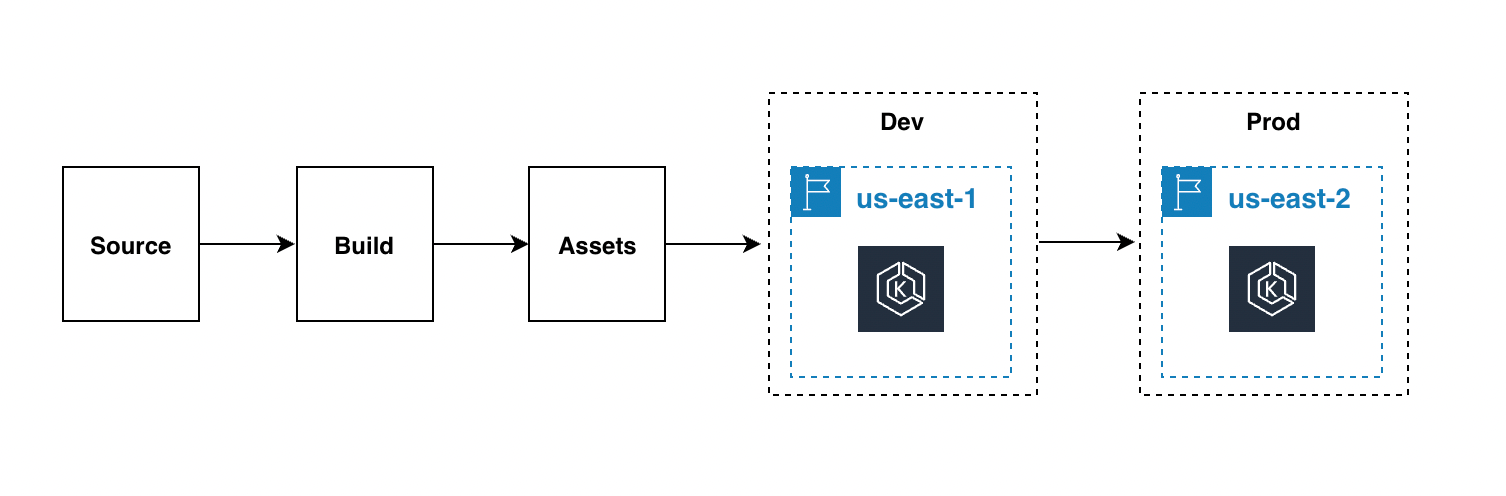
While deploying a stack with a CDK command-line tool is convenient, we recommend setting up an automated pipeline for deploying and updating the EKS infrastructure. This makes it easier to deploy development, testing, and production across regions.
CodePipelineStack is a structure for continuous delivery of AWS CDK applications. When the source code of an AWS CDK application is uploaded to Git, the stack automatically builds, tests, and deploys new versions. If any application stage or stack is added, it will automatically reconfigure itself to deploy these new stages or stacks.
NoteWe recommend defining infrastructure with CDK code and use pipelines to manage changes across multiple clusters that is also the best practice of GitOps.
Then, we execute the
cdk deploy command to deploy the stack.Finally, we used a command to verify the application load balancer has been installed successfully.
shell
$ kubectl get pod -n kube-systemNAME READY STATUS RESTARTS AGEaws-load-balancer-controller-6bd49cfb7-2cvlk 1/1 Running 0 5m31saws-load-balancer-controller-6bd49cfb7-7lcwd 1/1 Running 0 5m31saws-node-9hsvz 1/1 Running 0 99mcoredns-66cb55d4f4-gdcqg 1/1 Running 0 106mcoredns-66cb55d4f4-gmzjt 1/1 Running 0 106mkube-proxy-wr5jn 1/1 Running 0 99m
1.3 Summary
In this section, we introduced the concept of IaC, created a custom EKS cluster with CDK while installing the AWS Application Load Balancer plugin. It provides a prerequisite for accessing the web pages of microservices in the future. The following is a summary of this section:
- Initialized a CDK project using cdk init.
- Defined an EKS cluster quickly with EKS Blueprint while adding the AWS Application Load Balancer plugin.
2.Deploy Flux CD on Amazon EKS Cluster
Flux CD is a continuous delivery tool that was developed by Weaveworks and open sourced to CNCF. Today it is widely used because of its easy setup and its ability to sense Kubernetes changes. One important feature is also that it allows teams to manage their Kubernetes deployments in a declarative way. Flux CD synchronizes the Kubernetes manifest files stored in the source repository with the Kubernetes cluster by regularly polling the repository. Flux CD ensures that the Kubernetes cluster is always in sync with the configuration defined in the source repository, without having to worry about the operational status of the kube ctl or monitoring the workload with additional tools and services.
So let's install Flux.
2.1 Flux CLI Installation
The Flux CLI is a binary executable file for all platforms, which can be downloaded from the GitHub release page.
shell
curl -s https://fluxcd.io/install.sh | sudo bash
2.2 Prepare AWS CodeCommit Credentials
We should create a user and use CodeCommit as the Git source,as well as AWS CodeCommit required access by HTTPS Git credentials
2.3 Install Flux on the Cluster
Clone the prepared GitOps codes. The project structure is as follows:
shell
.├── apps // Define Application│ ├── base // Application Infrastructure Layer│ └── overlays // Application Overlays Layer├── clusters // Cluster configuration portal│ └── dev-cluster├── infrastructure // Infrastructure Shared Components│ ├── base // Infrastructure Infrastructure layer│ └── overlays // Infrastructure Overlays layer└── README.md
NoteWe recommend to dividing Flux-related resources into the infrastructure layer, cluster management layer, and application layer. We support multi-cluster deployment with Kustomization (base, overlays).
Install Flux on the Kubernetes cluster and configure it to manage itself from the Git repository with flux bootstrap. If there are Flux components on the cluster, the bootstrapping command will perform an upgrade as needed. The bootstrapper is idempotent, and the command can be safely run any number of times. Replace
username and password in the command below with the HTTPS Git credentials for AWS CodeCommit.shell
flux bootstrap git \--url=https://git-codecommit.us-west-2.amazonaws.com/v1/repos/gitops \--username=__replace_with_your_Git_credential_username__ \--password=__replace_with_your_Git_credential_password__ \--token-auth=true \--path="./clusters/dev-cluster" \--components-extra=image-reflector-controller,image-automation-controller
WarningEnable the image automatic update feature, add the--components-extra=image-reflector-controller,image-automation-controllerparameter when bootstrapping Flux. Otherwise, Flux will not install image-reflector-controller and image-automation-controller by default, and configurations such as automatic image updates will not take effect.
Use git pull to check the updates pushed by the bootstrapper. Three new files will appear in the clusters/dev-cluster/flux-system directory of the Git repository:
-
gotk-components.yaml: defined the six controllers of Flux: helm, Kustomize, source, notification, image-automation, and image-reflector.
-
gotk-sync.yaml: the Git source of Flux, the Source Controller in the cluster monitoring code changes in the GitOps repository and making the corresponding changes.
-
kustomization.yaml: multi-cluster configuration.
Check if Flux is installed successfully with flux get kustomizations --watch. The output will look similar to:
shell
$ flux get kustomizations --watchNAME REVISION SUSPENDED READY MESSAGEflux-system master/83b7e66 False True Applied revision: master/83b7e66infrastructure master/83b7e66 False True Applied revision: master/83b7e66
Check the components deployed by flux-system with kubectl -n flux-system get pod,services. The output will be as follows:
shell
$ kubectl -n flux-system get pod,servicesNAME READY STATUS RESTARTS AGEpod/helm-controller-88f6889c6-sblvd 1/1 Running 0 11mpod/image-automation-controller-6c5f7bbbd9-8xskk 1/1 Running 0 11mpod/image-reflector-controller-78949bb4b4-bqn4m 1/1 Running 0 11mpod/kustomize-controller-784bd54978-s82dq 1/1 Running 0 11mpod/notification-controller-648bbb9db7-627zs 1/1 Running 0 11mpod/source-controller-79f7866bc7-gdt95 1/1 Running 0 11mNAME TYPE CLUSTER-IP EXTERNAL-IP PORT(S) AGEservice/notification-controller ClusterIP 172.20.60.72 <none> 80/TCP 11mservice/source-controller ClusterIP 172.20.133.44 <none> 80/TCP 11mservice/webhook-receiver ClusterIP 172.20.196.178 <none> 80/TCP 11m
2.4 Summary
In this section, we used the flux bootstrap command to install Flux on the Kubernetes cluster and introduced the three most important configuration files:
gotk-components.yaml , gotk-sync.yaml , and kustomization.yaml . The following is a summary of this section:- Flux client installation
- Creating an IAM user and CodeCommit credentials
- Installing Flux on an Amazon EKS cluster and enabling the image automatic update feature
3.Deploy GitOps Workflow with Flux CD
For a GitOps CI/CD pipeline, configuration modifications and status changes to EKS clusters and workloads running on it stem from the code changes in Git (triggered by git push or pull requests. GitOps recommends pull request). The traditional CI/CD pipeline works by the CI engine triggering kubectl create/apply or helm install/upgrade to deploy the cluster. Therefore, GitOps builds a more efficient and concise CI/CD pipeline.
NoteFlux regularly pulls the configurations and deployment files from the repository, and compares the current application load status of the cluster with the expected state described in the files. When differences are detected, Flux will automatically synchronize the differences to the EKS cluster, ensuring that workloads always run as expected.
We will demonstrate a specific application - "sock shop" - and practical exercises to show how it achieves continuous integration and delivery on a GitOps CI/CD pipeline.
3.1 About Sock Shop
We will use the user-facing section of the sock shop online store as an sample. It is built with Spring Boot, Go Kit, and Node - and it is packaged in Docker containers. As a "Microservice Standard Demo", it will show:
- Best practices for microservices deployment (including examples of mistakes)
- Capabilities for Cross-platform deployment
- The advantages of continuous integration/deployment
- The complementary nature of DevOps and microservices
- A "real" testable application for various orchestration platforms
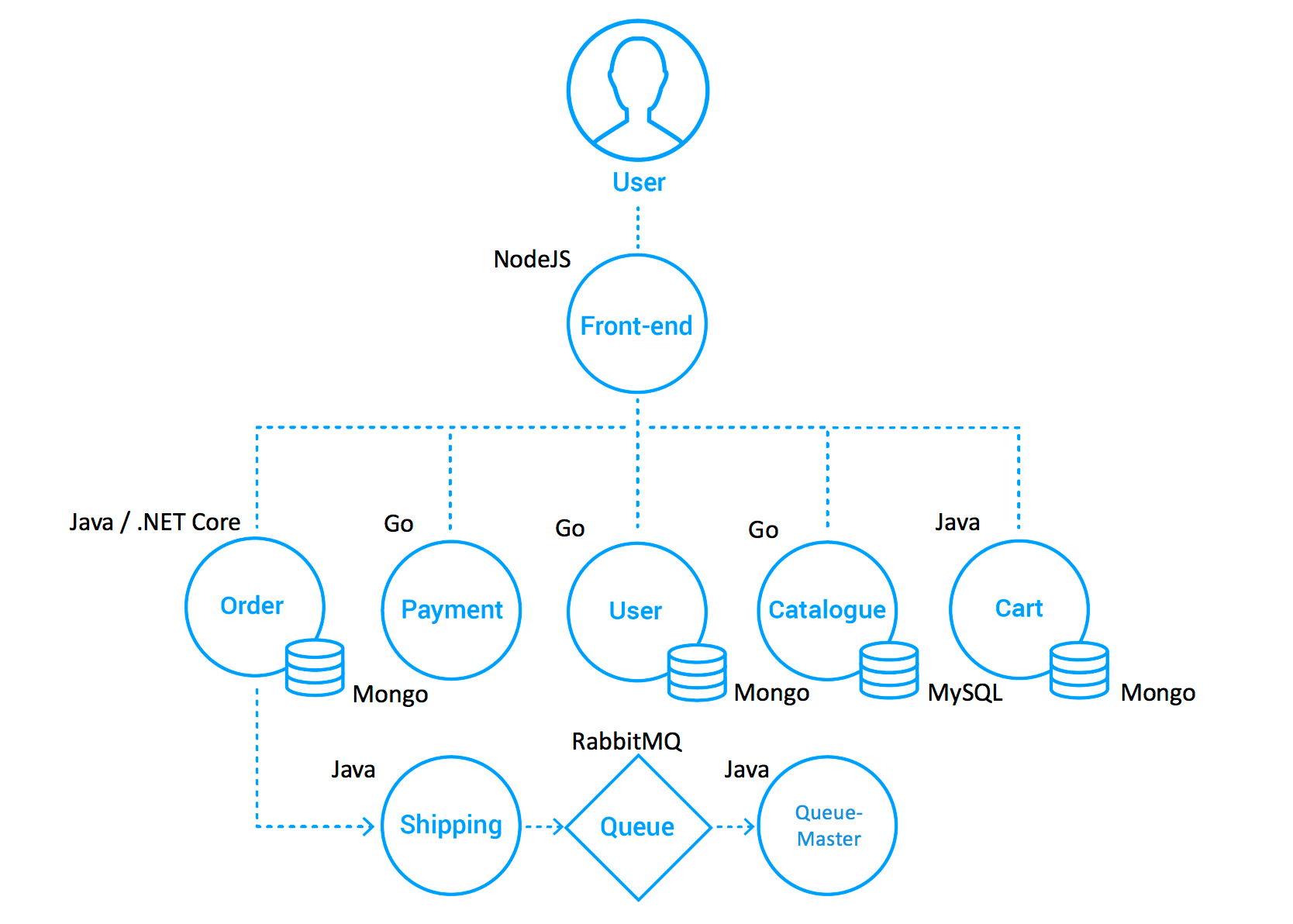
The sock shop project consists of 8 front-end and back-end microservices, where the front-end is a web page created by NodeJS. the project's name is: front-end in here. And it accesses several back-end services through http requests,which are order, payment, user management, product management and shopping cart, etc. The data of the back-end services are stored in MongoDB and MySQL
The reference architecture is as follows:
3.2 About Kustomize
In addition to setting up the GitOps workflow, we also need to understand how to configure Kubernetes. Traditional resource inventory-based management (yaml) becomes increasingly difficult to maintain as system complexity and environment complexity increase. Complex business use cases, multiple environments (development, testing, pre-release, production), and a large number of yaml resource inventories need to be maintained and managed. Although Helm can solve some pain points, such as unified management of scattered resource files, application distribution, upgrade, rollback, etc., Helm makes dealing with small differences between environments more difficult. It also requires mastering complex DSL (template syntax) syntax, which is a high barrier to start. Therefore, the declarative configuration management tool Kustomize was born. Kustomize helps teams manage large amounts of Kubernetes YAML resources across different environments and teams. It helps teams manage small differences across environments in a lightweight way, making resource configurations reusable, reducing copy and change effort, and also greatly reducing configuration errors. The entire application configuration process requires no additional learning of template syntax.
Kustomize solves the above problems in the following ways:
- Kustomize maintains application configuration across different environments through Base & Overlays.
- Kustomize uses Patch to reuse Base configuration and implementation, and resource reuse is achieved through the difference section between the Overlay description and the Base application configuration.
- Kustomize manages native Kubernetes YAML files, without requiring learning DSL syntax.
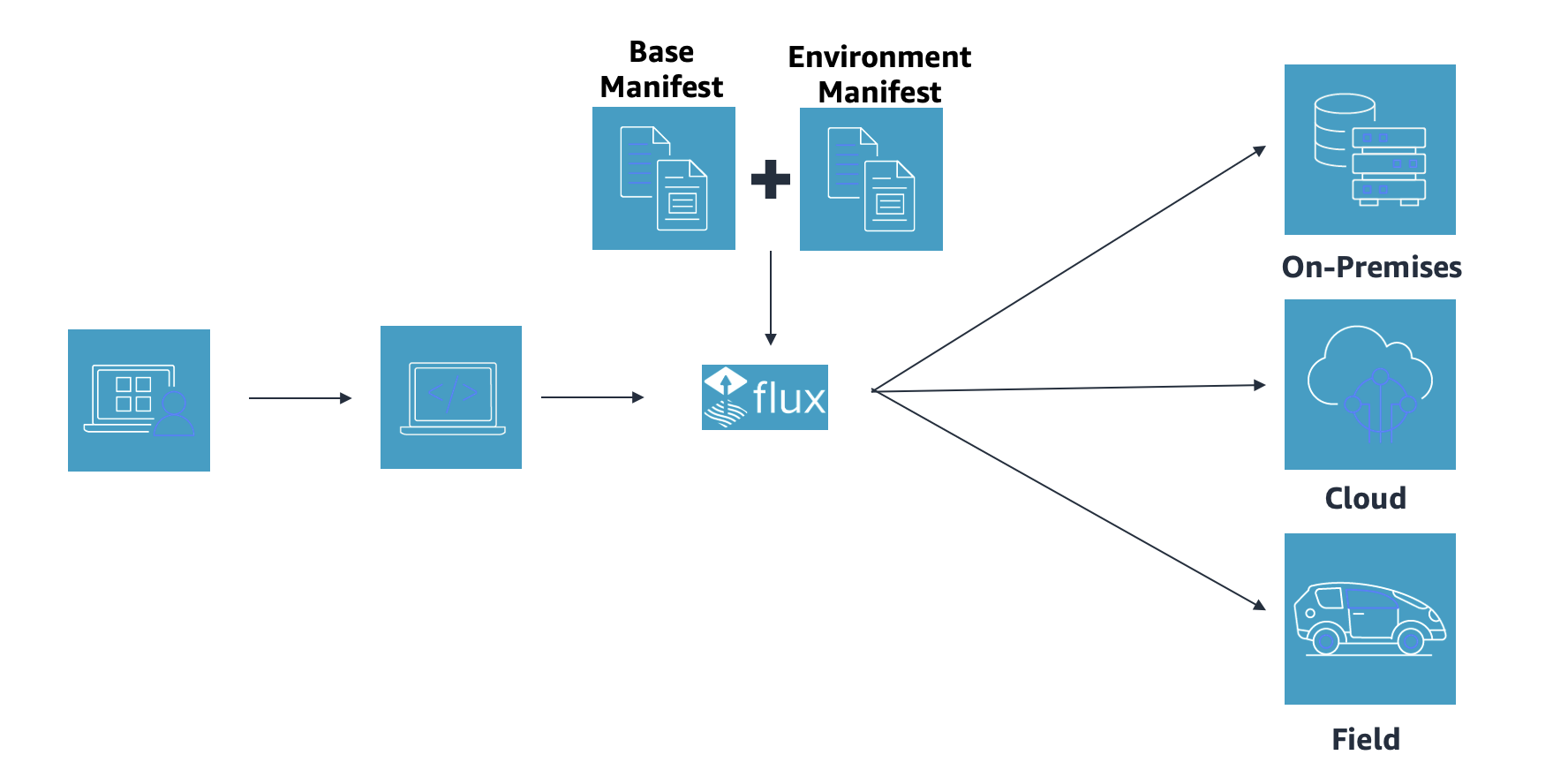
According to the official website, Kustomize has become a native configuration management tool for Kubernetes, allowing users to customize application configurations without templates. Kustomize uses native K8s concepts to help create and reuse resource configurations (YAML), allowing users to use an application description file (YAML) as the basis (Base YAML) and then generate the required description file for the final deployed application through Overlays.
3.3 Multi-Cluster Configuration
With the understanding of the configuration management tool Kustomize, we use Kustomization (base, overlays) to enable a multi-cluster deployment transformation.
We created two directories in the microservice project: the base directory to store the complete resource configuration (YAML) files, and the overlays directory to store the different environment or cluster's differential configuration.
For example, in this case, the complete configuration file for the microservice is complete-demo.yaml, and we copy it to the base directory.
shell
cp deploy/kubernetes/complete-demo.yaml deploy/kubernetes/base/complete-demo.yaml
Then we reference the file through
kustomization.yaml :YAML
# deploy/kubernetes/base/kustomization.yamlapiVersion: kustomize.config.k8s.io/v1beta1kind: Kustomizationresources:- ./complete-demo.yaml
For the development environment, if there are differential requirements, such as changing the number of service ports and replica, just configure the differential settings in the
overlays/development/kustomization.yaml file, without copying and modifying the existing complete-demo.yaml.NoteFlux will automatically merge base and overlays configurations according to the environment during service deployment. We recommend defining differential configurations across multiple environments, such as development, testing, and production. We do not favor the strategy of multi-repository and multi-branch strategy here, preferring instead to use different paths in a git repository to manage clusters in multiple environments. It helps simplify the process of code maintenance and merging, and which is also a Flux best practice.
3.4 Deploy Microservices with GitOps Workflow
After completing the multi-cluster support for microservices, we need Flux to be aware that microservices’ configuration has been changed, so we register the CodeCommit address of the microservices repository (microservices-repo) in the Flux repository (flux-repo).
3.4.1 Adding the Microservices Repository Address
We return to the Flux repository, under the application layer/apps directory:
shell
.├── base│ ├── kustomization.yaml│ └── sock-shop│ ├── kustomization.yaml│ ├── namespace.yaml│ ├── rbac.yaml│ └── tenant.yaml└── overlays└── development├── kustomization.yaml└── sock-shop└── kustomization.yaml
Open the tenant.yaml file under apps/base/sock-shop/, and replace MICRO_SERVICES_REPO with the microservices address:
https://git-codecommit.xxx.amazonaws.com/v1/repos/microservices-repo .shell
apiVersion: source.toolkit.fluxcd.io/v1beta1kind: GitRepositorymetadata:name: sock-shop-tenantnamespace: sock-shopspec:interval: 1murl: __MICRO_SERVICES_REPO__ref:branch: mainsecretRef:name: microservices-basic-access-auth......
3.4.2 Adding CodeCommit Credentials
Find the account and password for "Prepare AWS CodeCommit Credentials". Convert the value of the data to base64 encoding before executing the command.
Then open the file
base/sock-shop/basic-access-auth.yaml , and replace BASE64_USERNAME and BASE64_PASSWORD with the generated base64 encoding:shell
---apiVersion: v1kind: Secretmetadata:name: microservices-basic-access-authnamespace: sock-shoptype: Opaquedata:username: __BASE64_USERNAME__password: __BASE64_PASSWORD__
3.4.3 Deployment
With the microservice's Git address added in the Flux configuration repository, Flux will automatically scan for its configuration changes. Once codes are committed, Flux will check if there are any microservices deployed in the cluster and if they match the definition of the Git repository, otherwise, Flux automatically deploys the microservices in the cluster.
After committing the code, execute the command
flux get kustomizations -watch and wait for Flux to update. When the READY status of all kustomizations is True, the deployment is complete.Query the pods and services in the sock-shop namespace, shown as below:
shell
$ kubectl get pod,service -n sock-shopNAME READY STATUS RESTARTS AGEpod/carts-b4d4ffb5c-z4jrj 1/1 Running 0 5m28spod/carts-db-6c6c68b747-jl5pd 1/1 Running 0 5m28spod/catalogue-759cc6b86-qdmvc 1/1 Running 0 5m28spod/catalogue-db-96f6f6b4c-zgp5z 1/1 Running 0 5m28spod/front-end-5c89db9f57-cvbdl 1/1 Running 0 5m28spod/orders-7664c64d75-lqwbm 1/1 Running 0 5m28spod/orders-db-659949975f-qv7pl 1/1 Running 0 5m28spod/payment-7bcdbf45c9-szrfq 1/1 Running 0 5m28spod/queue-master-5f6d6d4796-nkktx 1/1 Running 0 5m28spod/rabbitmq-5bcbb547d7-gzhn4 2/2 Running 0 5m28spod/session-db-7cf97f8d4f-9mz6v 1/1 Running 0 5m28spod/shipping-7f7999ffb7-95rlc 1/1 Running 0 5m27spod/user-68df64db9c-kh247 1/1 Running 0 5m27spod/user-db-6df7444fc-jlkp9 1/1 Running 0 5m27sNAME TYPE CLUSTER-IP EXTERNAL-IP PORT(S) AGEservice/carts ClusterIP 172.20.33.124 <none> 80/TCP 5m29sservice/carts-db ClusterIP 172.20.75.163 <none> 27017/TCP 5m29sservice/catalogue ClusterIP 172.20.92.254 <none> 80/TCP 5m29sservice/catalogue-db ClusterIP 172.20.242.255 <none> 3306/TCP 5m29sservice/front-end LoadBalancer 172.20.55.188 k8s-sockshop-frontend-12345678910-012345678910abc.elb.us-east-1.amazonaws.com 80:30001/TCP 5m29sservice/orders ClusterIP 172.20.8.252 <none> 80/TCP 5m29sservice/orders-db ClusterIP 172.20.40.212 <none> 27017/TCP 5m29sservice/payment ClusterIP 172.20.6.218 <none> 80/TCP 5m29sservice/queue-master ClusterIP 172.20.153.80 <none> 80/TCP 5m29sservice/rabbitmq ClusterIP 172.20.99.37 <none> 5672/TCP,9090/TCP 5m29sservice/session-db ClusterIP 172.20.37.111 <none> 6379/TCP 5m29sservice/shipping ClusterIP 172.20.43.252 <none> 80/TCP 5m29sservice/user ClusterIP 172.20.220.174 <none> 80/TCP 5m29sservice/user-db ClusterIP 172.20.70.57 <none> 27017/TCP 5m29s
Access the DNS name of AWS Load Balancer.

3.5 Summary
In this section, we introduced a microservice business application, the Sock Shop online store, and completed its multi-cluster configuration. We also built a standard GitOps workflow based on Flux, which automatically synchronizes the target cluster with the changes in the configuration files to complete the microservice deployment in the EKS cluster. Meanwhile, we introduced a practical K8s configuration management tool-Kustomize, and how to manage the resource files of the application. Here is summary of this section:
- Sock Shop Introduction
- Learn a configuration management tool- Kustomize (base, overlays) and how to modify the microservice multi-cluster deployment
- Build a GitOps workflow and deploy microservices
4.Image-Based Automated Deployment with GitOps Workflow
We chose the front-end microservice of Sock Shop as an example to demonstrate the detailed process of code changes, image building, and customized release with GitOps workflow.
4.1 Defining the CodePipeline CI
Front-end is a pure front-end service of Node.js to support Docker image packaging(refer to the sock shop architect in the 3.1 chapter for details). Add a
buildspec.yml file to the front-end project source code to define the CI process executed in the CodePipeline:YAML
version: 0.2phases:pre_build:commands:- echo Logging in to Amazon ECR...- aws --version- AWS_ACCOUNT_ID=`echo $REPOSITORY_URI|cut -d"." -f1`- AWS_DEFAULT_REGION=`echo $REPOSITORY_URI|cut -d"." -f4`- echo $AWS_ACCOUNT_ID $AWS_DEFAULT_REGION- aws ecr get-login-password --region $AWS_DEFAULT_REGION | docker login --username AWS --password-stdin $REPOSITORY_HOST- COMMIT_HASH=$(echo $CODEBUILD_RESOLVED_SOURCE_VERSION | cut -c 1-7)- IMAGE_TAG=main-$COMMIT_HASH-$CODEBUILD_BUILD_NUMBER- echo $IMAGE_TAGbuild:commands:- echo Build started on `date`- echo Building the Docker image...- docker build -t $REPOSITORY_URI:latest .- docker tag $REPOSITORY_URI:latest $REPOSITORY_URI:$IMAGE_TAGpost_build:commands:- echo Build completed on `date`- echo Pushing the Docker images...- docker push $REPOSITORY_URI:latest- docker push $REPOSITORY_URI:$IMAGE_TAG
This CI process will automatically build an image and upload it to the ECR repository
weaveworksdemos/front-end if any front-end code changed. The format of the image tag is [branch]-[commit]-[build number].4.2 Image Auto-Updating
When you're working in an agile environment with continuous integration, like during development testing, updating a GitOps repository or using scripts to manage new service images can be a real hassle. Fortunately, Flux has an awesome automatic image upgrading feature that takes care of this for you. To use it, all you have to do is enable the image updating component in your configuration. If you haven't done that yet, no worries, just add the parameters
--components-extra=image-reflector-controller,image-automation-controller when you repeat the Flux bootstrap to enable it.To achieve image-based automatic updating, we need to take the following steps:
- Register the image repository of the front-end microservice to allow Flux to periodically scan the ECR image repository correspondent to the front-end project.
- Configure the credentials for accessing the image repository. Flux needs the credentials to access ECR image repository to read the image information.
- Set the image updating policy. In most cases, we do not want all the image versions changes to trigger CD every time. Instead, we only want the specified branch (main) code changes to trigger CD. A special update policy is needed to fulfill this need.
Next, we will complete the above operations one by one.
4.2.1 Adding an image policy to the front-end of Git repository
In the microservices-repo project, we will use Kustomization overlays in the DEV environment to replace the front-end microservice with a customized and updated version. Modify the file deploy/kubernetes/overlays/development/kustomization.yaml. (Note: replace
ACCOUNT_ID with your own ACCOUNT_ID).YAML
apiVersion: kustomize.config.k8s.io/v1beta1kind: Kustomizationresources:- ../../baseimages:- name: weaveworksdemos/front-endnewName: __ACCOUNT_ID__.dkr.ecr.us-west-2.amazonaws.com/weaveworksdemos/front-end # {"$imagepolicy": "sock-shop:sock-shop-front-end:name"}newTag: latest # {"$imagepolicy": "sock-shop:sock-shop-front-end:tag"}
Note Warning: The annotation$imagepolicy, which is for locating, is mandatory. If Flux discovers the image version is changed, it will locate and modify the file content according to this annotation.
4.2.2 Registering the Front-end of a Microservice Under Flux-repo
In the project flux-repo, create a new file
apps/overlays/development/sock-shop/registry.yaml , and replace ACCOUNT_ID with your own ACCOUNT_ID .YAML
---apiVersion: image.toolkit.fluxcd.io/v1beta1kind: ImageRepositorymetadata:name: sock-shop-front-endnamespace: sock-shopspec:image: __ACCOUNT_ID__.dkr.ecr.xxxx.amazonaws.com/weaveworksdemos/front-endinterval: 1m0s
4.2.3 Configuring the access credentials for Amazon ECR
There are two methods available for Amazon ECR credentials in Flux.
- Automatic authentication mechanism (image-reflector-controller retrieves credentials by itself, only applicable to: Amazon ECR, GCP GCR, Azure ACR)
- Regularly refreshing credentials (stored in the cluster through Secret) with CronJob
YAML
apiVersion: kustomize.config.k8s.io/v1beta1kind: Kustomizationresources:- gotk-components.yaml- gotk-sync.yamlpatches:- patch: |-- op: addpath: /spec/template/spec/containers/0/args/-value: --aws-autologin-for-ecrtarget:version: v1group: appskind: Deploymentname: image-reflector-controllernamespace: flux-system
NoteWe used Amazon ECR to choose the automatic authentication mechanism, modifyclusters/dev-cluster/flux-system/kustomization.yamland add the--aws-autologin-for-ecrparameter through patching. This approach is simpler and more efficient when compared to using CronJob to generate credentials regularly.
4.2.4 Setting image update policy
Add file
gitops/apps/overlays/development/sock-shop/policy.yaml . The following rules match image versions such as master-d480788-1 , master-d480788-2 , and master-d480788-3 .YAML
---apiVersion: image.toolkit.fluxcd.io/v1beta1kind: ImagePolicymetadata:name: sock-shop-front-endspec:imageRepositoryRef:name: sock-shop-front-endfilterTags:pattern: '^main-[a-fA-F0-9]+-(?P<buidnumber>.*)'extract: '$buidnumber'policy:numerical:order: asc
Add file
gitops/apps/overlays/development/sock-shop/image-automation.yaml . Flux's automatic image configuration will specify a Git repository for the application configuration, including branch, path, and other information.YAML
---apiVersion: image.toolkit.fluxcd.io/v1beta1kind: ImageUpdateAutomationmetadata:name: sock-shop-front-endspec:git:checkout:ref:branch: maincommit:author:email: fluxcdbot@users.noreply.github.comname: fluxcdbotmessageTemplate: '{{range .Updated.Images}}{{println .}}{{end}}'push:branch: maininterval: 5m0ssourceRef:kind: GitRepositoryname: sock-shop-tenantnamespace: sock-shopupdate:path: ./deploy/kubernetes/overlays/developmentstrategy: Setters
4.3 Release and Verify
We verify the entire process of automatic image updates by modifying the front-end source code.
4.3.1 Update the Front-end Code
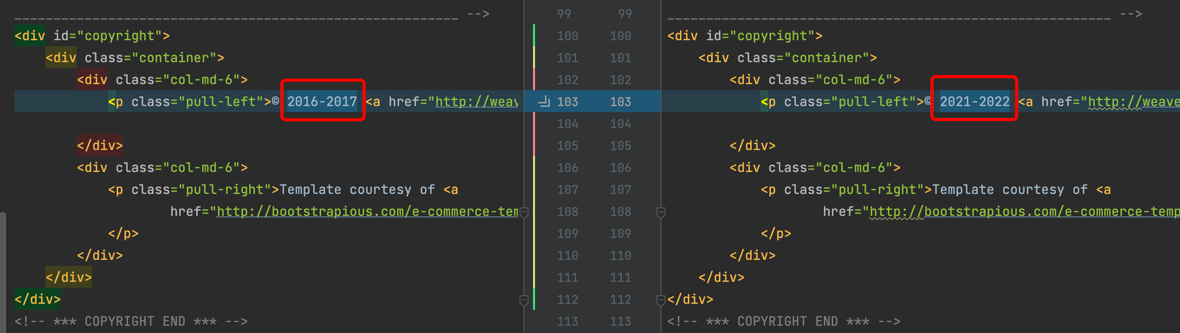
Change the footer of the front-end page, and modify the file: front-end/public/footer.html.
4.3.2 Check CodePipeline
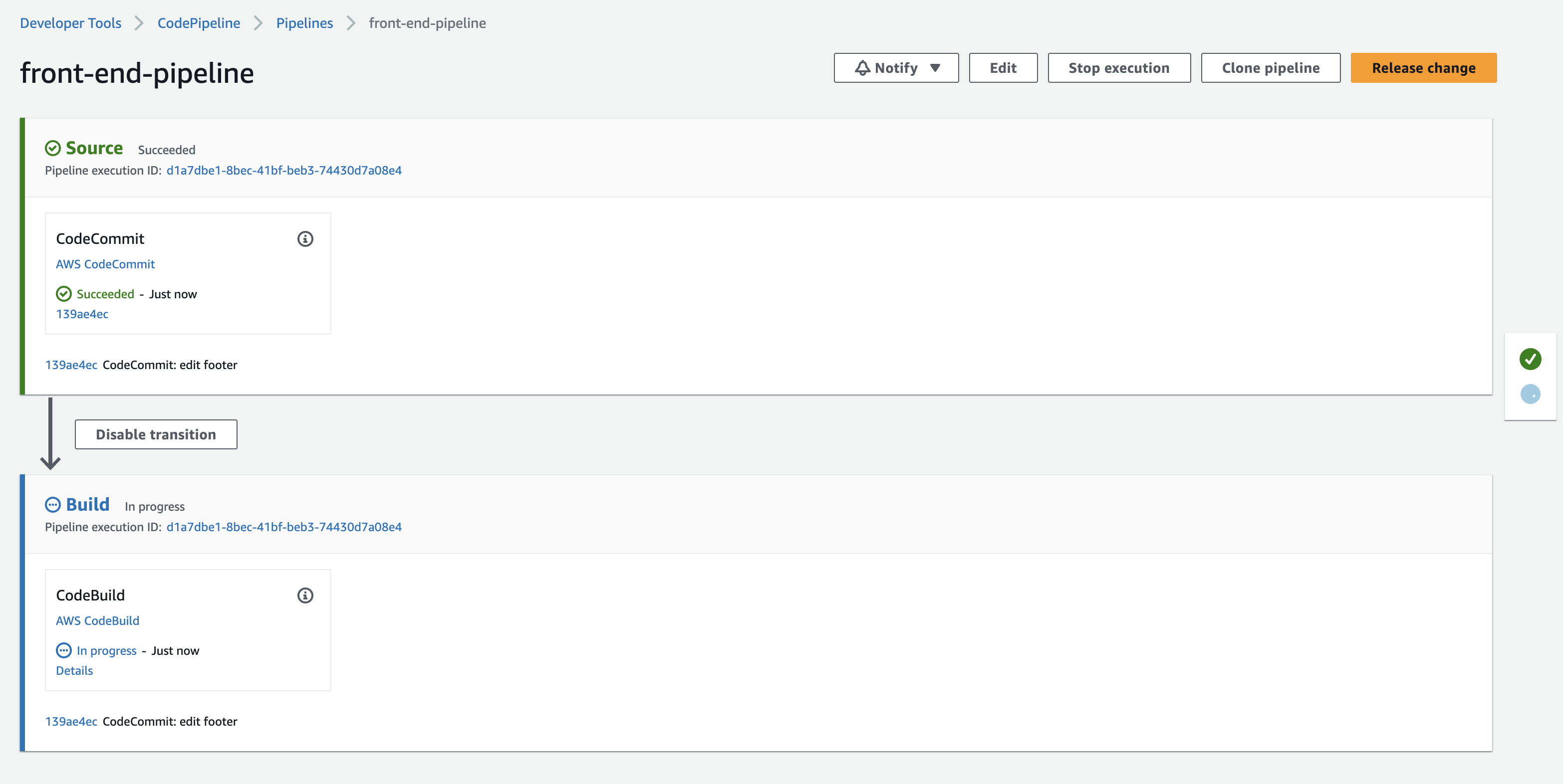
Code changes to the front-end will automatically get CodePipeline to run.
4.3.3 ECR Image Version Changing Confirmation
When the CodePipeline is completed, log in the Amazon ECR console to check the
weaveworksdemos/front-end image version:
4.3.4 Verify Flux Image Information
Through Flux CLI, check if the ImageRepository and ImagePolicy successfully retrieved the latest version.
shell
$ flux get images all --all-namespacesNAMESPACE NAME LAST SCAN SUSPENDED READY MESSAGEsock-shop imagerepository/sock-shop-front-end 2022-09-18T14:46:45Z False True successful scan, found 20 tagsNAMESPACE NAME LATEST IMAGE READYMESSAGEsock-shop imagepolicy/sock-shop-front-end 267314483271.dkr.ecr.us-west-2.amazonaws.com/weaveworksdemos/front-end:master-1f49071-24 True Latest image tag for '267314483271.dkr.ecr.us-west-2.amazonaws.com/weaveworksdemos/front-end' resolved to: master-1f49071-24NAMESPACE NAME LAST RUN SUSPENDED READY MESSAGEsock-shop imageupdateautomation/sock-shop-front-end 2022-09-18T14:43:51Z False True no updates made; last commit 1ff6d91 at 2022-09-18T14:34:40Z
4.3.5 Microservice Source Code Automatically Updates
Flux automatically updated the front-end image version. The latest commit was made by fluxcdbot, and the image tag was successfully modified to the latest version: master-1f49071-24.

4.3.6 Verify Pod Image Version
Verify the pod name with kubectl get pod -n sock-shop | grep front-end. Check the pod details with kubectl describe pod/front-end-759476784b-9r2rt -n sock-shop | grep Image: to confirm that the image version is updated. It shows as follows:
shell
$ kubectl describe pod/front-end-759476784b-9r2rt -n sock-shop | grep Image:Image: 267314483271.dkr.ecr.us-west-2.amazonaws.com/weaveworksdemos/front-end:master-1f49071-24
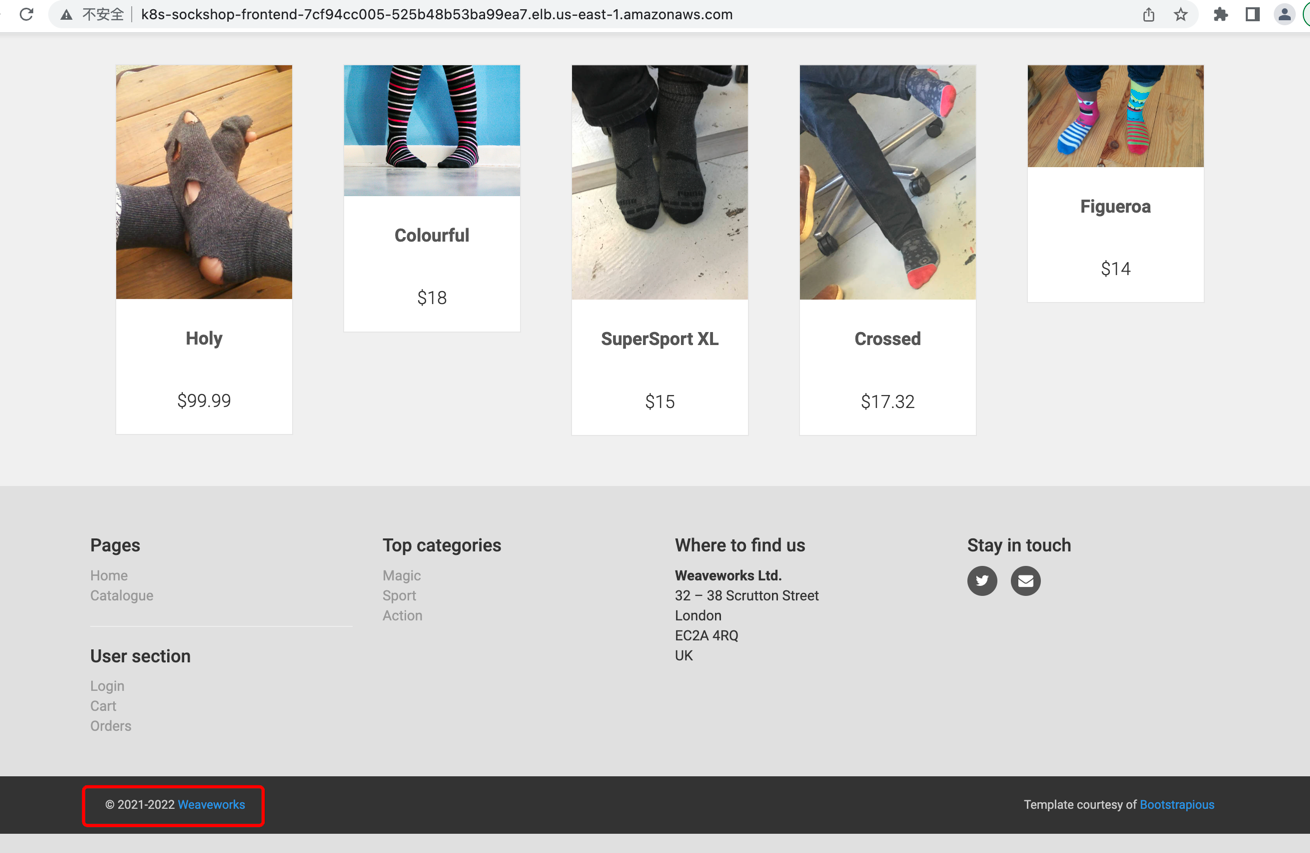
4.3.7 Confirm the Static Page has been Up-to-Date
4.4 Summary
In this section, we have detailed the entire process of automatic deployment based on images. To summarize it, we use Flux's continuous monitoring capability for image repositories. When a change in image version is detected, it automatically modifies the image configuration in the Git repository, and completes automatic deployment by connecting to the standard GitOps workflow in the previous section. To summarize this section:
- Implementing the CI process through CodePipeline to achieve continuous integration of front-end code.
- Locating and modifying business configuration file by annotating Flux.
- Configuring Flux's image update policy to enable Flux to monitor the specific versions of images and complete automatic deployment.
Conclusion
This article focuses on how to use FluxCD to automate the publishing of microservices in the Amazon EKS cluster on cloud, as well as best practices for GitOps pipelines. GitOps is a continuous delivery method that encompasses a series of best practices. There are no strict restrictions on building CI/CD tools if they conform to the basic principles of GitOps. I hope you take some things from this article to build your GitOps technology stack. For more diverse and complex production scenarios, we need to continuously optimize these practices, for example:
- How to Gray-Release with security and increments for critical online-production-systems?
- How to improve the GitOps Key Management on cloud when Sealed Secrets introduced additional private key management requirements.
- How to Coordinate manage for Coding of IaC and EKS GitOps
- How to develop Kubernetes manifests (YAML) more efficiently
We will explore each of these issues in subsequent blogs.
References
Enjoyed reading this content? Let the author know!
Your likes, comments, shares, and saves help creators reach more builders.

Loading recommendations
Loading article