
Building a WhatsApp genAI Assistant with Amazon Bedrock and Claude 3
The blog teaches deploying a WhatsApp app on Amazon Bedrock to chat in any language with an LLM. Send voice notes, get transcripts, and talk through them. Previously, you used Claude 1 or 2. Now, leverage Claude 3 for conversations and visual content like images, charts, and diagrams.
In the previous blog “ Building a WhatsApp genAI Assistant with Amazon Bedrock ”, you learned how to deploy a WhatsApp app that allows you to chat in any language using either Anthropic Claude 1 or 2 as large language model (LLM) on Amazon Bedrock. You can send voice notes and receive transcripts, and if you prefer, you can even dialog with the model using voice notes.
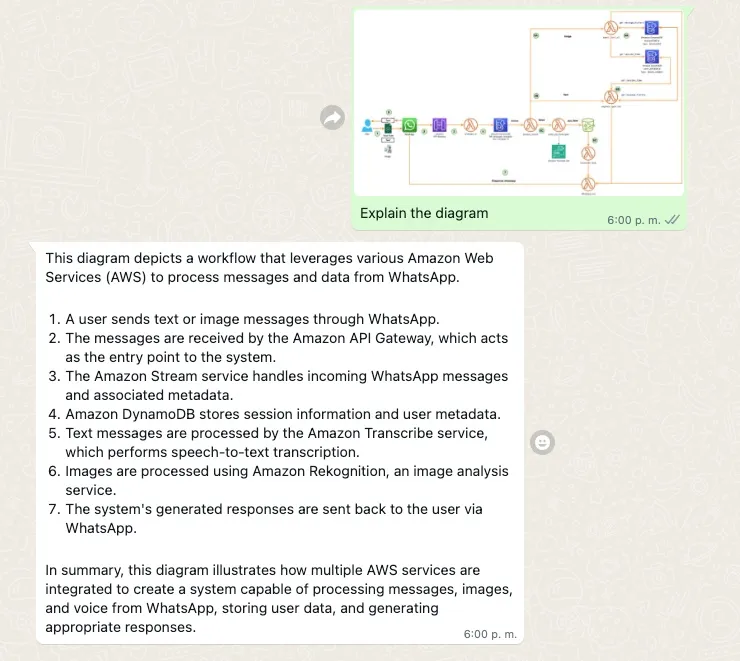
In this new blog, I'll show you how to harness the enhanced capabilities of Anthropic Claude 3 to handle conversations more effectively while seamlessly process visual content such as photos, charts, graphs, and technical diagrams.
Example Claude 3 handle visual content
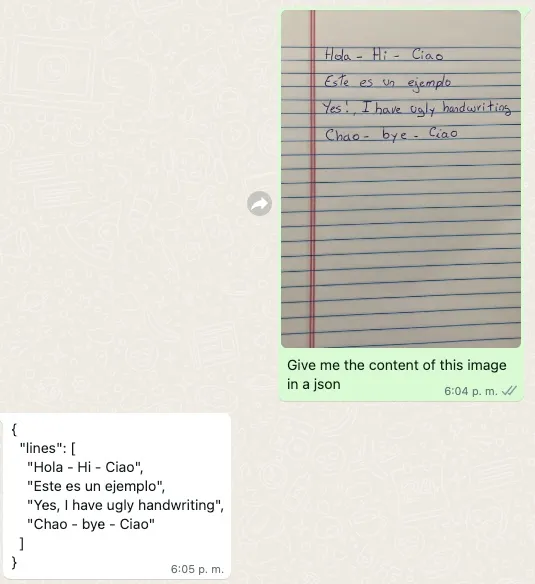
Example Claude 3 text generation
🔐 Your data remains securely stored within your AWS account and is never shared or used for model training purposes, ensuring complete privacy. However, it's advisable to avoid sharing sensitive personal information, as WhatsApp's data security cannot be guaranteed.
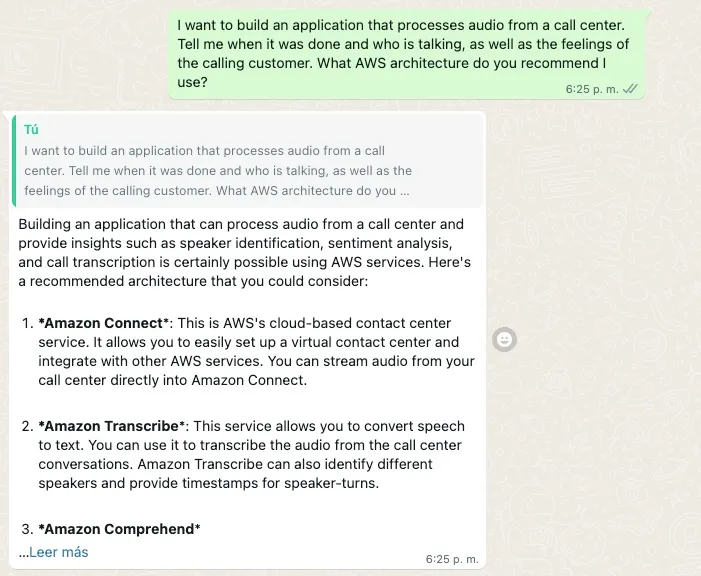
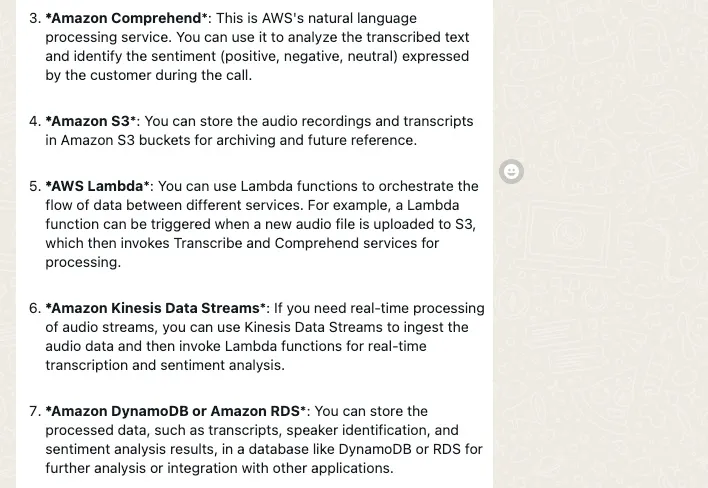
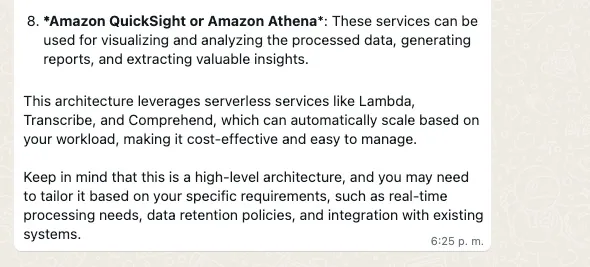
✅ AWS Level: 300
Prerequisites:
💰 Cost to complete:
What differentiates the API call of Claude 3 from its previous versions
In previous versions Create a Text Completion (now legacy API) is used, For proper response generation you will need to format your prompt using alternating
\n\nHuman: and \n\nAssistant: conversational turns.This is what the code looks like with Amazon Bedrock:
Python
import boto3import jsonbedrock = boto3.client(service_name='bedrock-runtime')body = json.dumps({"prompt": "\n\nHuman:explain black holes to 8th graders\n\nAssistant:","max_tokens_to_sample": 300,"temperature": 0.1,"top_p": 0.9,})modelId = 'anthropic.claude-v2'accept = 'application/json'contentType = 'application/json'response = bedrock.invoke_model(body=body, modelId=modelId, accept=accept, contentType=contentType)response_body = json.loads(response.get('body').read())# textprint(response_body.get('completion'))
With Anthropic Claude 3 the conversation is handle The Messages API :
messages=[{"role": "user", "content": content] .Each input message must be an object with a
role (user or assistant) and content . The content can be in either a single string or an array of content blocks, each block having its own designated type (text or image).type equal text :plaintext
{"role": "user", "content": [{"type": "text", "text": "Hello, Claude"}]}
type equal image :plaintext
{"role": "user", "content": [{"type": "image","source": {"type": "base64","media_type": "image/jpeg","data": "/9j/4AAQSkZJRg...",}},{"type": "text", "text": "What is in this image?"}]}
🖼️ Anthropic currently support the base64 source type for images, and the image/jpeg, image/png, image/gif, and image/webp media types. See more input examples .
plaintext
import boto3import jsonbedrock = boto3.client(service_name='bedrock-runtime')modelId = "anthropic.claude-3-sonnet-20240229-v1:0"anthropic_version = "bedrock-2023-05-31"accept = 'application/json'contentType = 'application/json'with open(image_path, "rb") as image_file:content_image = base64.b64encode(image_file.read()).decode('utf8')content = [{"type": "image", "source": {"type": "base64","media_type": "image/jpeg", "data": content_image}},{"type":"text","text":"Hello Claude"}]body = {"system": "You are an AI Assistant, always reply in the original user text language.","messages":content,"anthropic_version": anthropic_version,"max_tokens":max_tokens}response = bedrock.invoke_model(body=json.dumps(body), modelId=model_id, accept=accept, contentType=contentType)response_body = json.loads(response.get('body').read())
This Messages API allows us to add context or instructions to the model through a System Prompt (
system ).This is what the code looks like with Amazon Bedrock:
plaintext
import boto3import jsonbedrock = boto3.client(service_name='bedrock-runtime')modelId = "anthropic.claude-3-sonnet-20240229-v1:0"anthropic_version = "bedrock-2023-05-31"accept = 'application/json'contentType = 'application/json'with open(image_path, "rb") as image_file:content_image = base64.b64encode(image_file.read()).decode('utf8')content = [{"type": "image", "source": {"type": "base64","media_type": "image/jpeg", "data": content_image}},{"type":"text","text":text}]body = {"system": "You are an AI Assistant, always reply in the original user text language.","messages":content,"anthropic_version": anthropic_version,"max_tokens":max_tokens}response = bedrock.invoke_model(body=json.dumps(body), modelId=model_id, accept=accept, contentType=contentType)response_body = json.loads(response.get('body').read())
How The App Works
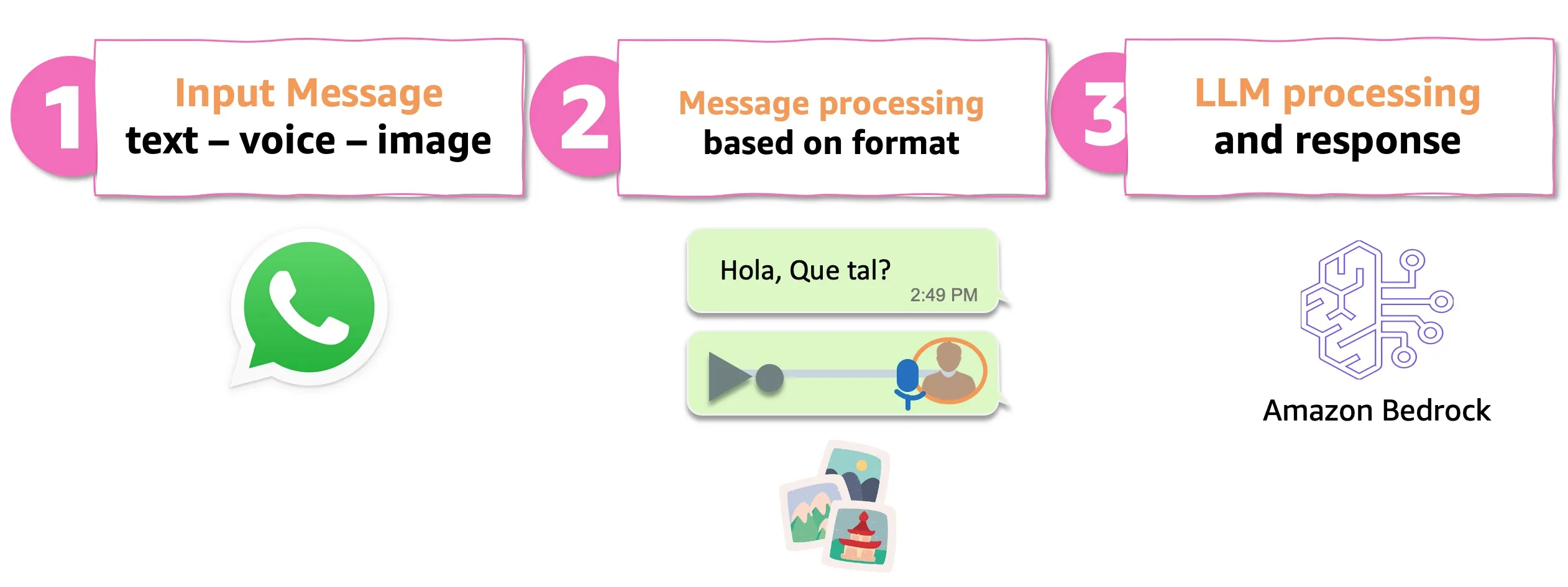
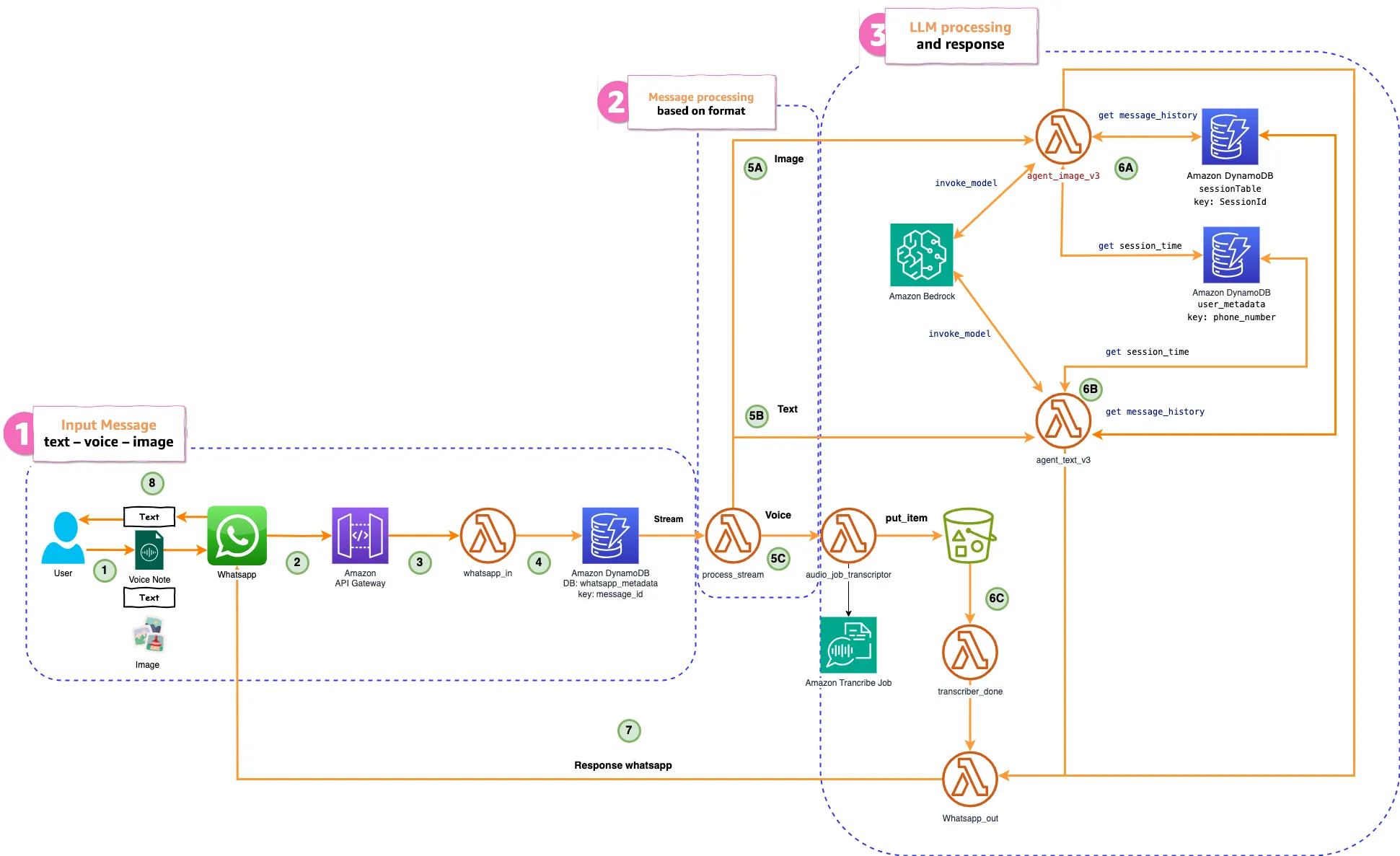
Let me break down the key components:
- The system receives user inputs in the form of text, voice, or images through WhatsApp.
- Message processing is performed based on the input format (text, voice, or image).
- For text processing, the process_stream Lambda function sends the message text to another Lambda Function that invokes a Large Language Model (LLM) through a call to the Amazon Bedrock API. The response from the LLM is then sent using the whatsapp_out Lambda function, which delivers it to the user via WhatsApp.
- For voice processing,the audio_job_transcriptor Lambda Function is triggered. This Lambda Function downloads the WhatsApp audio from the link in the message to an Amazon S3 bucket, using WhatsApp Token authentication. It then converts the audio to text using the Amazon Transcribe start_transcription_job API, which leaves the transcript file in an Output Amazon S3 bucket. The transcriber_done Lambda Function is triggered by an Amazon S3 Event Notification put item once the Transcribe Job is complete. It extracts the transcript from the Output S3 bucket and sends it to the whatsapp_out Lambda Function to respond to WhatsApp.
- For image processing, invokes a Claude 3 through a call to the Amazon Bedrock API.
- The system can access databases like Amazon DynamoDB to retrieve contextual information like message history and user sessions.
- After processing, the system generates a response that is sent back to the user via WhatsApp.
✅ You have the option to uncomment the code in the transcriber_done Lambda Function and send the voice note transcription to the agent_text_v3 Lambda Function.
The following system prompt is used:
plaintext
The following is a friendly conversation between a human and an AI.The AI is talkative and provides lots of specific details from its context.If the AI does not know the answer to a question, it truthfully says it does not know.Always reply in the original user language.
💡 The phrase "Always reply in the original user language" ensures that it always responds in the original language and the multilingual capacity is provided by Anthropic Claude .
🚀 Let's build!
Follow the steps in https://github.com/build-on-aws/building-gen-ai-whatsapp-assistant-with-amazon-bedrock-and-python
👾Enjoy the app! :
✅ Chat and ask follow-up questions. Test your multi-language skills.
✅ Send and transcribe voice notes. Test the app's capabilities for transcribing multiple languages.
✅ Send photos and test the app's capabilities to describe and identify what's in the images. Play with prompts
🚀 Keep testing the app, play with the prompt and adjust it to your need.
🧹Clean the house!:
If you finish testing and want to clean the application, you just have to follow these two steps:
- Delete the files from the Amazon S3 bucket created in the deployment.
- Run this command in your terminal:
plaintext
cdk destroy
Conclusion:
In this post, you explored how to build a WhatsApp app powered by Anthropic's Claude 3 language model using Amazon Bedrock. You leveraged the new Messages API to handle conversations and incorporate visual content like images, charts, and diagrams seamlessly.
With Claude 3's advanced capabilities, can engage in natural, context-aware conversations, understanding and responding to both text and visual inputs. Whether you're practicing a new language, transcribing voice notes, or seeking insights from technical diagrams, this WhatsApp assistant stands ready to assist.
The power of large language models combined with the scalability and ease of deployment offered by Amazon Bedrock opens up exciting possibilities for building intelligent, multimodal conversational interfaces.
If you're interested in exploring other use cases or diving deeper into the technical details, be sure to check out the AWS Samples repository for more projects and code samples. Additionally, the Anthropic and Amazon Bedrock documentation are excellent resources for staying up-to-date with the latest features and best practices.
We encourage you to experiment with this WhatsApp chatbot and share your feedback or ideas for improvements in the comments below. Happy coding!
🚀 Some links for you to continue learning and building:
Enjoyed reading this content? Let the author know!
Your likes, comments, shares, and saves help creators reach more builders.

Loading recommendations
Loading article