
How do I run existing Go applications on AWS Lambda - Part 2
Learn how to take a URL shortener application written using Gin and run it as a serverless AWS Lambda function.

The first part of this series introduced you to the AWS Lambda Go API Proxy , and how it's framework/package specific adapter implementations (for
gorilla/mux , echo and net/http ) allows you to run existing Go applications as AWS Lambda functions fronted by Amazon API Gateway . If you haven't already, I encourage you to take a look at it in order to get a basic understanding of the AWS Lambda Go API Proxy.The AWS Lambda Go API Proxy also supports Gin , is one of the most popular Go web frameworks! This follow-up blog post will demonstrate how take an existing URL shortener service written using the
Gin framework, and run it as a serverless AWS Lambda function. Instead of using AWS SAM, we will change things up a bit and use the AWS CDK to deploy the solution.How does the Gin adapter for AWS Lambda Go API Proxy work?
The
aws-lambda-go-api-proxy package makes it possible to run Go APIs written using Gin, thanks to the framework specific adapter implementations.
To understand this, let's look into the
main.go file of the Lambda function:Go
var ginLambda *ginadapter.GinLambdafunc init() {r := gin.Default()r.POST("/app", CreateShortURL)r.GET("/app/:shortcode", GetShortURL)r.DELETE("/app/:shortcode", DeleteShortURL)r.PUT("/app/:shortcode", UpdateStatus)ginLambda = ginadapter.New(r)}func Handler(ctx context.Context, req events.APIGatewayProxyRequest) (events.APIGatewayProxyResponse, error) {return ginLambda.ProxyWithContext(ctx, req)}func main() {lambda.Start(Handler)}
- In the
initfunction:
- We use
gin.Default()to create agin.Engineobject with theLoggerandRecoverymiddleware already attached.
- We create routes by associating a
gin.HandlerFuncwith eachHTTPmethod and path using thePOST,GET,DELETEandPUTmethods of thegin.Engineobject.
-
ginadapter.Newfunction takes this*gin.Engineobject and returns aginadapter.GinLambda.
- In the
Handlerimplementation:
- The
Proxy(orProxyWithContext) method of theginadapter.GinLambdaobject receives theevents.APIGatewayProxyRequest, converts it into ahttp.Requestobject, and sends it to thegin.Enginefor routing.
- It returns a proxy response object (
events.APIGatewayProxyResponse) generated from the data written to the response writer (http.ResponseWriter).
Application overview
The sample application presented in this blog is a trimmed down version of
bit.ly or other solutions you may have used. It uses Amazon DynamoDB for persistence and exposes HTTP endpoints to access the application (basic CRUD operations).Although we will not be discussing the application code in detail, it's important to understand the basic structure. Here is the package structure for the URL shortener application (in the function directory):
text
.├── db│ └── db.go├── go.mod├── go.sum├── handler.go├── main.go
- The
dbpackage contains code to interact withDynamoDB.
- The
handler.gofile has the implementation for theHTTPmethods.
- The
main.gofile creates the Gin engine with the routes andginadapter.GinLambdaobject to proxy requests and responses.
It's time to deploy the URL shortener application and give it a go!
Prerequisites
Before you proceed, make sure you have the Go programming language (v1.18 or higher) and AWS CDK installed.
Clone the GitHub repository and change to the right directory:
Bash
git clone https://github.com/build-on-aws/golang-gin-app-on-aws-lambdacd golang-gin-app-on-aws-lambda
Use AWS CDK to deploy the solution
AWS CDK is a framework that lets you define your cloud infrastructure as code in one of its supported programming and provision it through AWS CloudFormation . In this case, we will be using the Go bindings for AWS CDK
To start the deployment, invoke the
cdk deploy command. You will see a list of resources that will be created and will need to provide your confirmation to proceed.Bash
cd cdkcdk deploy# outputBundling asset LambdaGolangProxyAPIDemoStack/gin-go-lambda-function/Code/Stage...✨ Synthesis time: 5.94sThis deployment will make potentially sensitive changes according to your current security approval level (--require-approval broadening).Please confirm you intend to make the following modifications://.... omittedDo you wish to deploy these changes (y/n)? y
Enter
y to start creating the AWS resources required for the application. This will start creating the AWS resources required for our application.If you want to see the AWS CloudFormation template which will be used behind the scenes, runcdk synthand check thecdk.outfolder
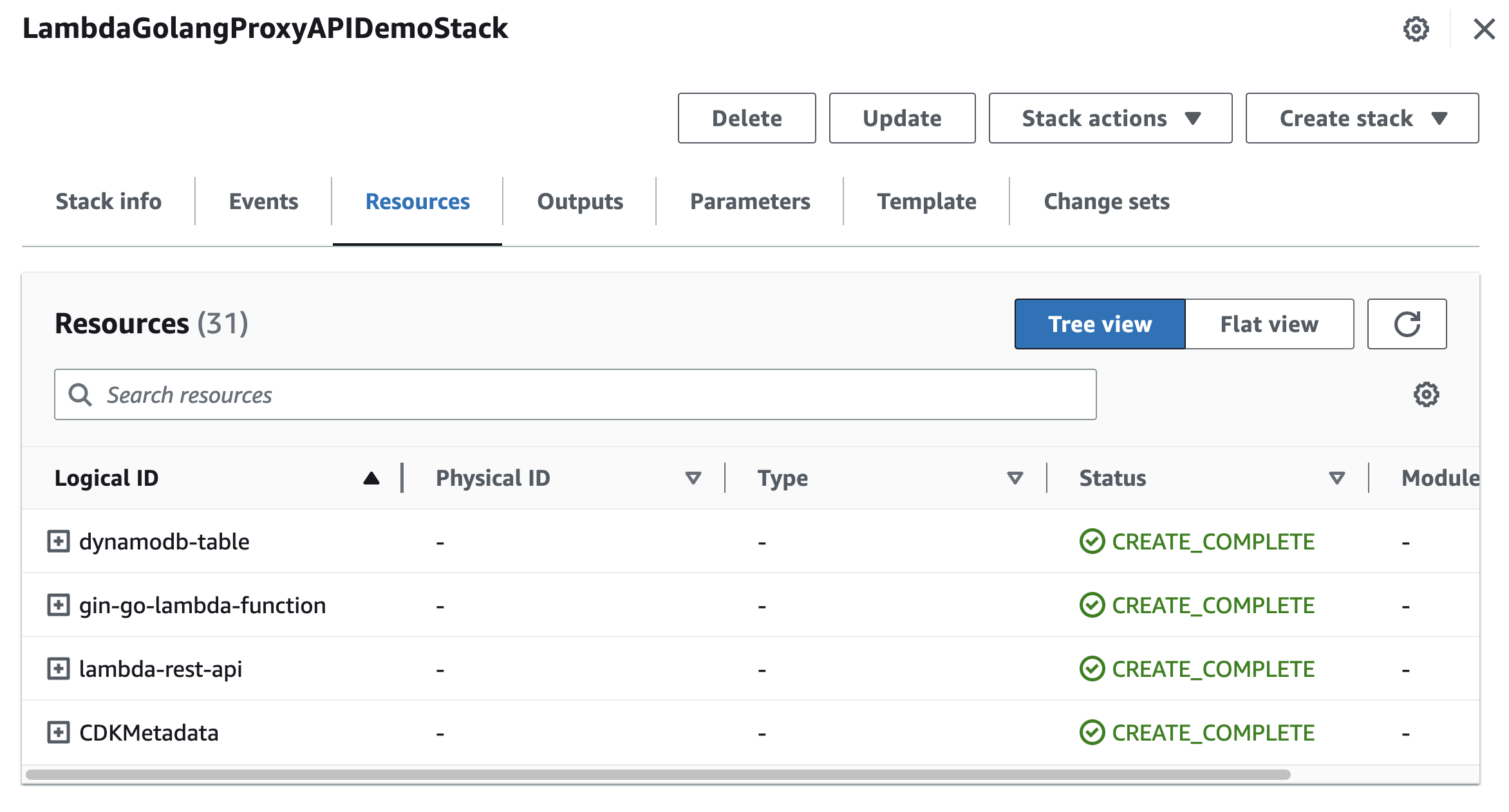
You can keep track of the progress in the terminal or navigate to AWS console:
CloudFormation > Stacks > LambdaGolangProxyAPIDemoStack Once all the resources are created, you can try out the application. You should have:
- An API Gateway REST API .
- A Lambda function.
- A DynamoDB table to store application data.
- And a few other components (like
IAMroles etc.).
Try the URL shortener application
You will need the API Gateway endpoint to invoke with the application - it's available as part of the stack output (in the terminal or the Outputs tab in the AWS
CloudFormation console for your stack). It should look something like this - https://foobarbazl.execute-api.us-east-1.amazonaws.com/prod/ 1. Start by generating a short code
To generate a short code, you need to pass the original URL in the payload body as part of a
HTTP POST request (for e.g. https://abhirockzz.github.io/ )Bash
# e.g. export URL_SHORTENER_APP_URL=https://foobarbazl.execute-api.us-east-1.amazonaws.com/prod/appexport URL_SHORTENER_APP_URL=<replace with API Gateway endpoint above>/app# invoke the endpoint to create short codecurl -i -X POST -d '{"url":"https://abhirockzz.github.io/"}' $URL_SHORTENER_APP_URLcurl -i -X POST -d '{"url":"https://abhishek1987.medium.com/"}' $URL_SHORTENER_APP_URLcurl -i -X POST -d '{"url":"https://dzone.com/users/456870/abhirockzz.html"}' $URL_SHORTENER_APP_URL
If all goes well, you should get a
HTTP 201 along with the short code in the HTTP response (as a JSON payload).Bash
HTTP/2 201content-type: text/plain; charset=utf-8content-length: 25apigw-requestid: VTzPsgmSoAMESdA={"short_code":"1ee3ad1b"}
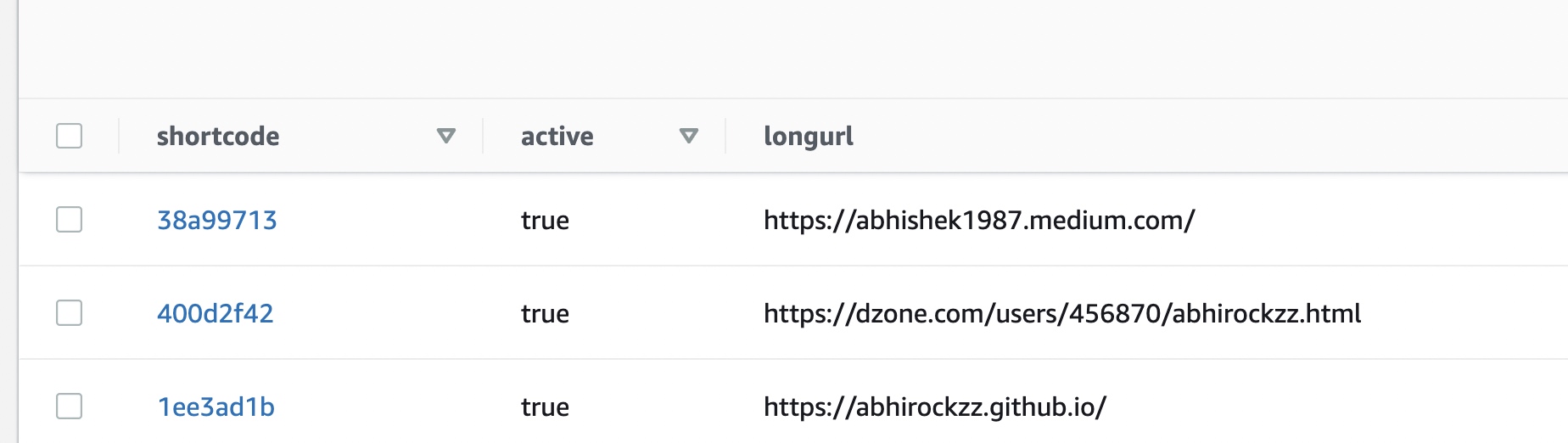
Check the DynamoDB table to verify records with the short code with the corresponding URL.
2. Access the URL using the short code
The access link will have the following format -
<URL_SHORTENER_APP_URL>/app/<generated short code> for e.g. https://8zbqx074rl.execute-api.us-east-1.amazonaws.com/prod/app/4b824fad Once you navigate to the link using a browser, you will be automatically redirected to the original URL that you had specified. To better understand what's going on behind the scenes, try accessing the same URL with
curl Bash
curl -i $URL_SHORTENER_APP_URL/app/1ee3ad1b
You should get a
HTTP 302 response ( Found ) and the URL redirection happens due to the Location HTTP header which has the original URL.Bash
# some of the headers omitted for brevityHTTP/2 302content-type: application/jsoncontent-length: 0location: https://abhirockzz.github.io....
3. Disable a short code
You can disable (and enable) the short codes. The original URL will only be accessible if the association is in active state.
To disable a short code:
Bash
export URL_SHORTENER_APP_URL=<replace with API Gateway endpoint above>/appcurl -i -X PUT -d '{"active": false}' -H 'Content-Type: application/json' $URL_SHORTENER_APP_URL/3626fb51
This is a
HTTP PUT request with a JSON payload that specifies the status ( false in this case refers to disable action) along with the short code which is a path parameter to the API Gateway endpoint. If all works well, you should see an HTTP 204 ( No Content ) response.Check the corresponding record in DynamoDB - the active attribute should have switched to
false .4. Delete a short code
Bash
export URL_SHORTENER_APP_URL=<replace with API Gateway endpoint above>/appcurl -i -X DELETE $URL_SHORTENER_APP_URL/<short code>
Just like in the case of update, you should get a
HTTP 204 response. But this time, the respective DynamoDB record will be deleted.We covered the basic operations for the URL shortener application. As an exercise, try out the following scenarios and check the response(s):
- Access a disabled URL.
- Enable a disabled URL (use
{"active": true}).
- Access an invalid short code (that does not exist).
Clean up
Once you're done, to delete all the services, simply use:
Bash
cdk destroy
Conclusion
In this blog post you took a URL shortener application built using the Gin framework and deployed it as a Lambda function. Although this was a simple example, the same approach can be used to deploy more complex applications. As long as you have reasonable separation of concerns and your application is modular, most of the work will involve refactoring parts of the logic (
main.go in this case) to wire up the Gin router ( gin.Engine ) to a Lambda function handler (entry point) by using the adapter implementation for Gin .Happy Building!
SeriesToc |
|---|
Enjoyed reading this content? Let the author know!
Your likes, comments, shares, and saves help creators reach more builders.

Loading recommendations
Loading article