
Building a WhatsApp genAI assistant with Amazon Bedrock
Chat in any language with an LLM on Bedrock. Send voice notes and receive transcripts. With a small tweak to the code, send the transcript to the model.
With this WhatsApp app, you can chat in any language with an LLM on Amazon Bedrock. Send voice notes and receive transcriptions. By making a minor change in the code, you can also send the transcription to the model.
Your data will be securely stored in your AWS account and will not be shared or used for model training. It is not recommended to share private information because the security of data with WhatsApp is not guaranteed.
✅ AWS Level: Intermediate - 200
Prerequisites:
💰 Cost to complete:
How The App Works

1- Message input:
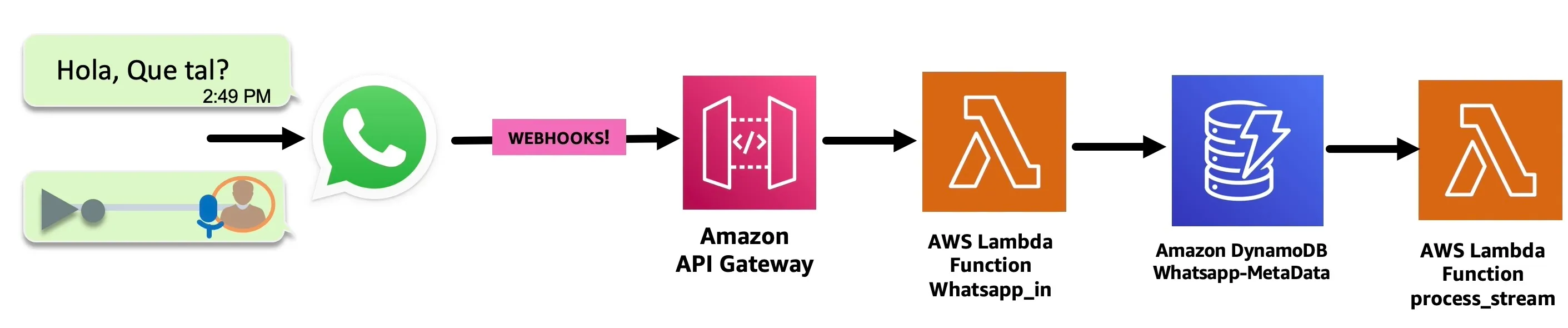
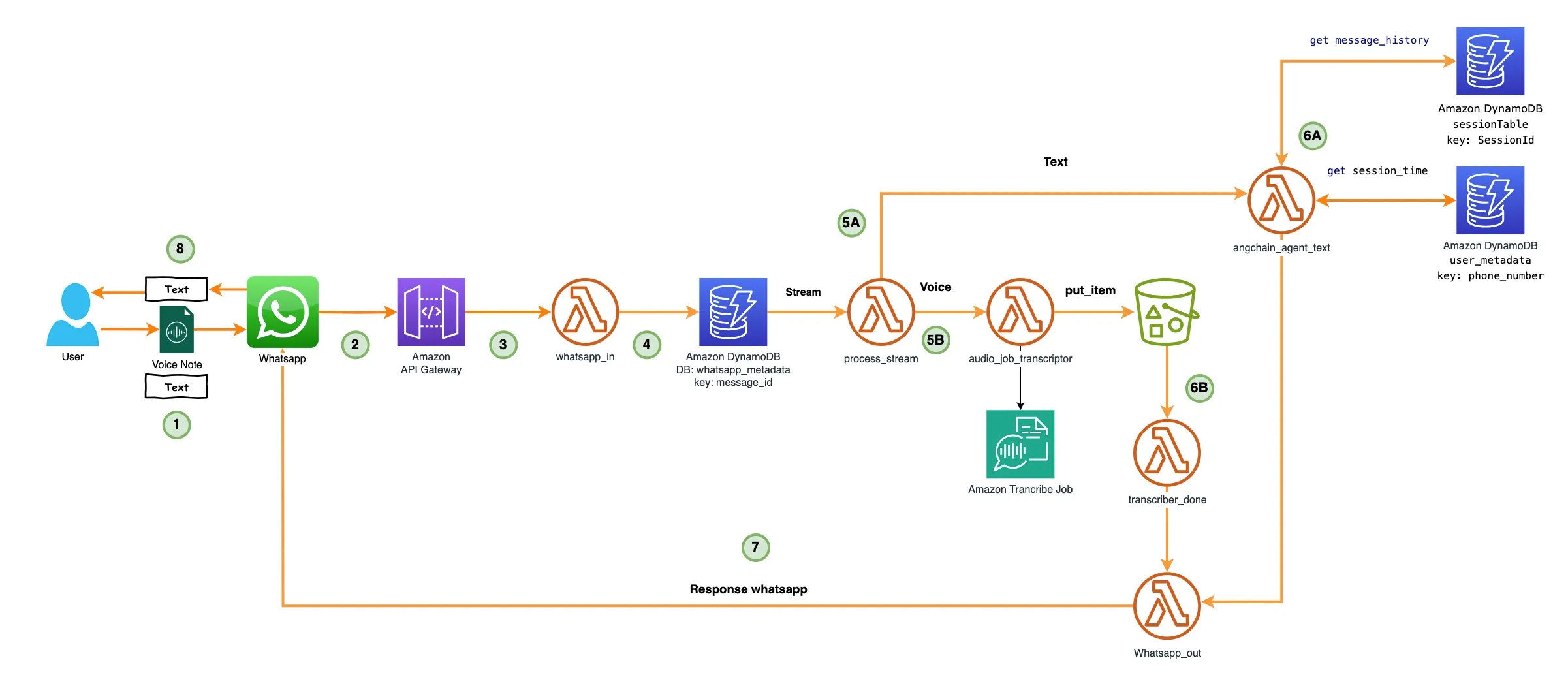
- WhatsApp receives the message: voice/text.
- Amazon API Gateway receives the message from the WhatsApp webhook (previously authenticated).
- Then, an AWS Lambda Functions named whatsapp_in processes the message and sends it to an Amazon DynamoDB table named whatsapp-metadata to store it.
- The DynamoDB table whtsapp-metadata has a DynamoDB streaming configured, which triggers the process_stream Lambda Function.
2 - Message processing:
Text Message:
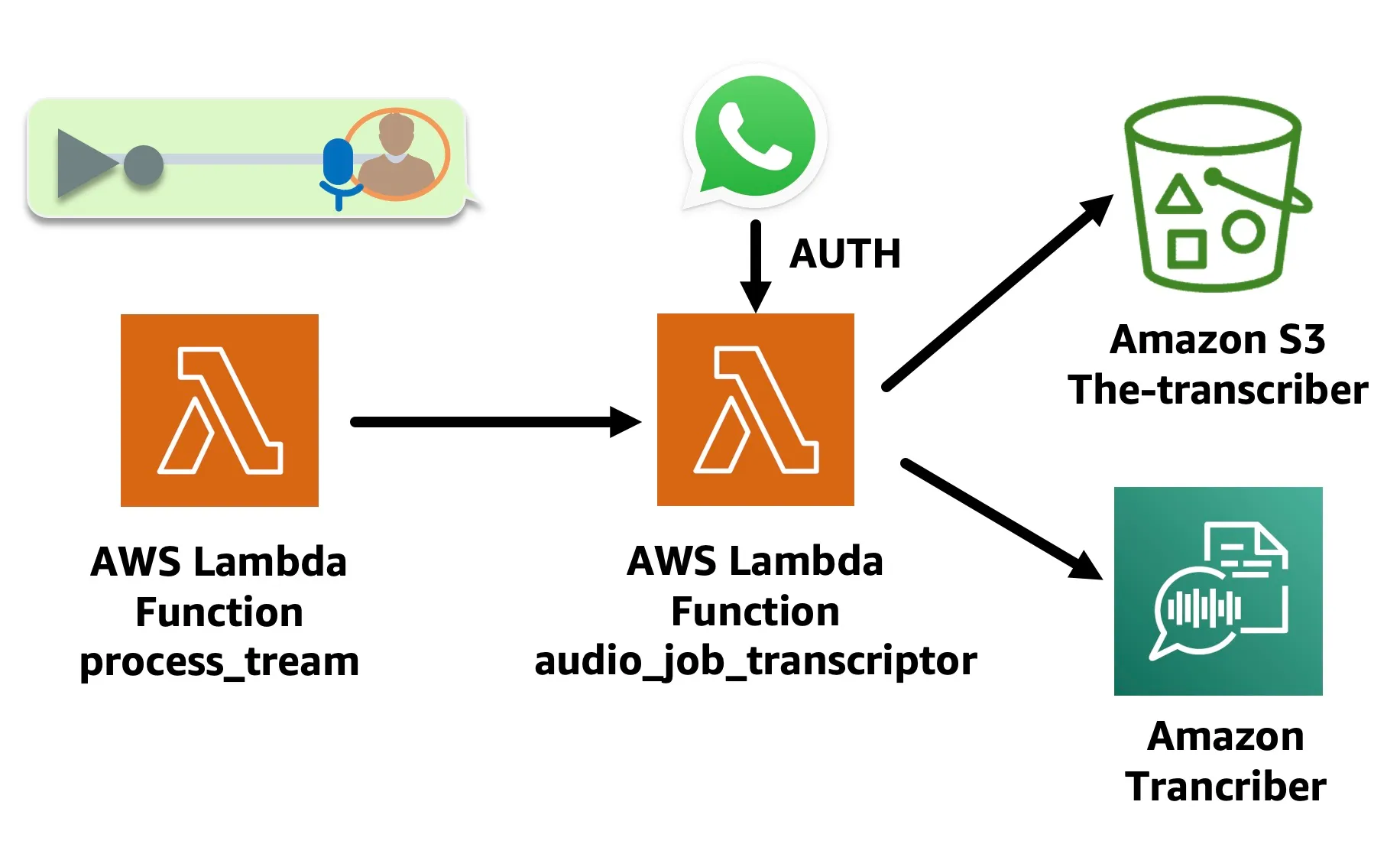
process_stream Lambda Function sends the text of the message to the lambda function named langchain_agent_text (in the next step we will explore it).
Voice Message:
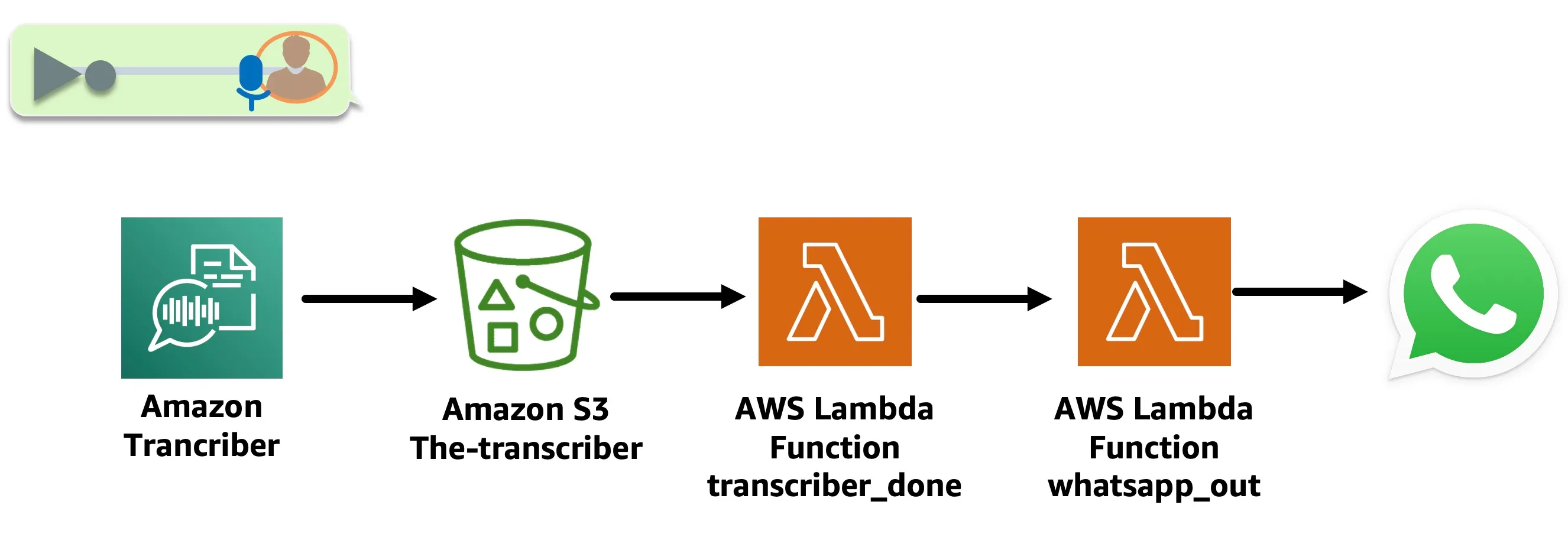
- The audio_job_transcriptor Lambda Function is triggered. This Lambda Function downloads the WhatsApp audio from the link in the message in an Amazon S3 bucket, using Whatsapp Token authentication, then converts the audio to text using the Amazon Transcribe start_transcription_job API, which leaves the transcript file in an Output Amazon S3 bucket.
Function that invokes audio_job_transcriptor looks like this:
Python
def start_job_transciptor (jobName,s3Path_in,OutputKey,codec):response = transcribe_client.start_transcription_job(TranscriptionJobName=jobName,IdentifyLanguage=True,MediaFormat=codec,Media={'MediaFileUri': s3Path_in},OutputBucketName = BucketName,OutputKey=OutputKey)
💡 Notice that the IdentifyLanguage parameter is configured to True. Amazon Transcribe can determine the primary language in the audio.
- The transcriber_done Lambda Function is triggered with an Amazon S3 Event Notification put item once the Transcribe Job is complete. It extracts the transcript from the Output S3 bucket and sends it to whatsapp_out Lambda Function to respond to WhatsApp.
✅ You have the option to uncomment the code in the transcriber_done Lambda Function and send the voice note transcription to langchain_agent_text Lambda Function.
Python
try:response_3 = lambda_client.invoke(FunctionName = LAMBDA_AGENT_TEXT,InvocationType = 'Event' ,#'RequestResponse',Payload = json.dumps({'whats_message': text,'whats_token': whats_token,'phone': phone,'phone_id': phone_id,'messages_id': messages_id}))print(f'\nRespuesta:{response_3}')return response_3except ClientError as e:err = e.responseerror = errprint(err.get("Error", {}).get("Code"))return f"Un error invocando {LAMBDA_AGENT_TEXT}
3- LLM Processing:
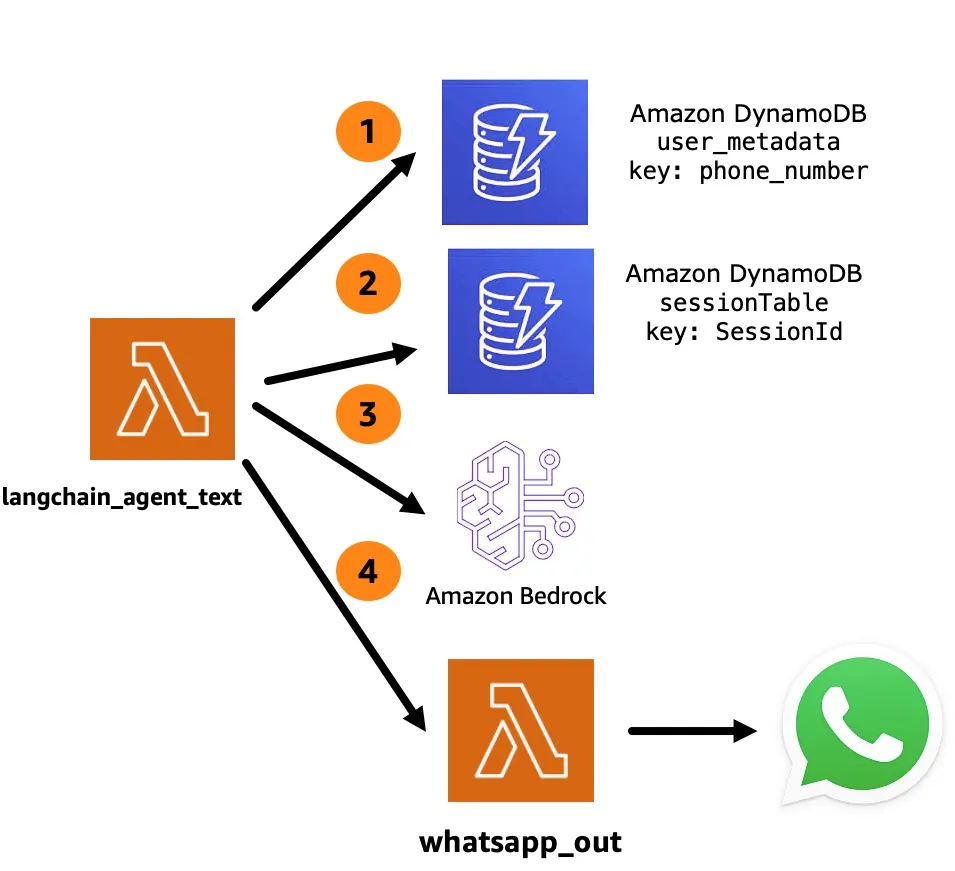
The agent receives the text and performs the following:
- Queries the Amazon DynamoDB table called
user_metadatato see if thesessionhas expired. If it is active, it recovers theSessionID, necessary for the next step, if it expires it creates a new session timer.
- Queries the Amazon DynamoDB table called session Table to see if there is any previous conversation history.
- Consult the LLM through Amazon Bedrock using the following prompt:
Python
The following is a friendly conversation between a human and an AI.The AI is talkative and provides lots of specific details from its context.If the AI does not know the answer to a question, it truthfully says it does not know.Always reply in the original user language.Current conversation:{history}Human:{input}Assistant:
- Send the response to WhatsApp through
whatsapp_outthe Lambda Function.
💡 The phrase "Always reply in the original user language" ensures that it always responds in the original language and the multilingual capacity is provided by Anthropic Claude , which is the model used in this application.
Let's build!
Step 0: Activate WhatsApp account Facebook Developers
Step 1: APP Set Up
✅ Clone the repo
git clone https://github.com/build-on-aws/building-gen-ai-whatsapp-assistant-with-amazon-bedrock-and-python
✅ Go to:
cd private-assistant
Step 2: Deploy architecture with CDK.
DISPLAY_PHONE_NUMBER = 'YOU-NUMBER' if diferencia > 240: #session time in seg Tip: Kenton Blacutt , an AWS Associate Cloud App Developer, collaborated with Langchain, creating the Amazon Dynamodb based memory class that allows us to store the history of a langchain agent in an Amazon DynamoDB .
- Configure the AWS Command Line Interface
- Deploy architecture with CDK Follow steps:
plaintext
python3 -m venv .venvsource .venv/bin/activate
for windows:
plaintext
.venv\Scripts\activate.bat
✅ Install The Requirements:
plaintext
pip install -r requirements.txt
✅ Synthesize The Cloudformation Template With The Following Command:
plaintext
cdk synth
✅🚀 The Deployment:
plaintext
cdk deploy
Step 3: WhatsApp Configuration
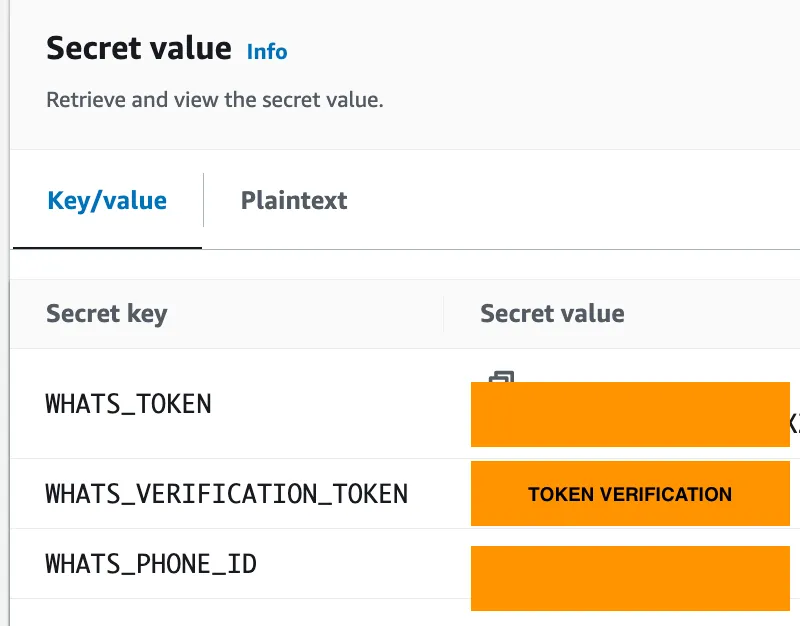
✅ The verification token is any value, but it must be the same in step 3 and 4.
Step 4: Webhook Configuration
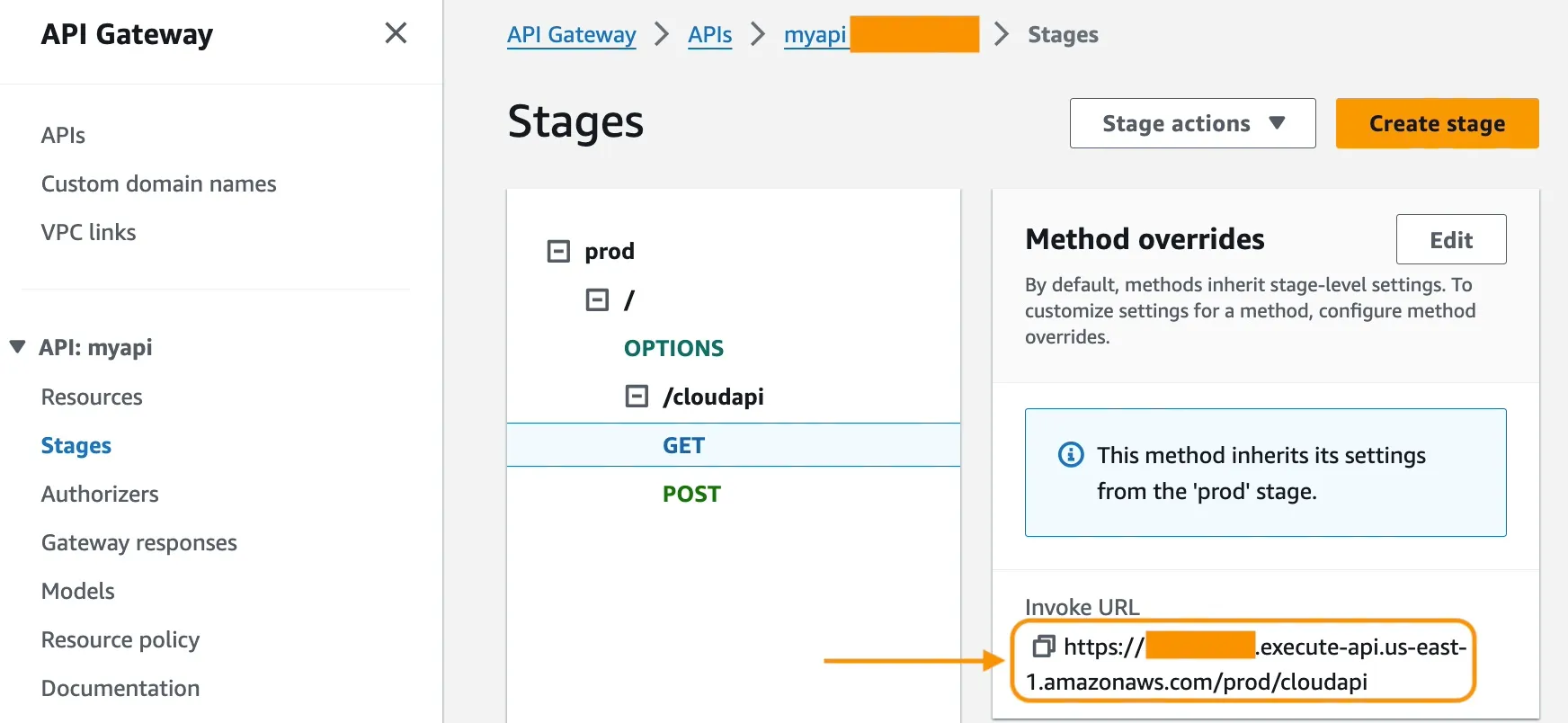
- Click on
myapi.
- Go to Stages -> prod -> /cloudapi -> GET, and copy Invoke URL.
- Configure Webhook in the Facebook developer application.
- Set Invoke URL.
- Set verification token.
Enjoy the app!:
✅ Chat and ask follow-up questions. Test the app's abilities to handle multiple languages.
✅ Send and transcribe voice notes. Test the app's capabilities for transcribing multiple languages.
🚀 Keep testing the app, play with the prompt langchain_agent_text Amazon Lambda function and adjust it to your need.
Conclusion:
In this tutorial, you deployed a serverless WhatsApp application that allows users to interact with an LLM through Amazon Bedrock. This architecture uses API Gateway as a connection between WhatsApp and the application. Amazon Lambda functions process code to handle conversations. Amazon DynamoDB tables manage and store message information, session details, and conversation history.
You now have the essential code to improve the application. One option moving forward is to incorporate Retrieval-Augmented Generation (RAG) to generate more sophisticated responses depending on the context.
To handle customer service scenarios, the application could connect to Amazon Connect and transfer calls to an agent if the LLM cannot resolve an issue.
With further development, this serverless architecture demonstrates how conversational AI can power engaging and useful chat experiences on popular messaging platforms.
🚀 Some links for you to continue learning and building:
Enjoyed reading this content? Let the author know!
Your likes, comments, shares, and saves help creators reach more builders.

Loading recommendations
Loading article