

Integrate Slack channel & CloudWatch alarm using AWS Chatbot
This post describes steps required to integrate a slack channel with cloud watch alarms using AWS chatbot service.

Integrate Slack channel and CloudWatch alarms using AWS Chatbot
Do you know that AWS ChatBot is one of the 227 services (as of 1/2/24) provided by AWS?
AWS ChatBot provides a quick and easy way to integrate your cloud watch alarms and other triggers with Slack channel.
Slack is a popular team tool for communication and collaboration. I will integrate Slack channel so that AWS Services event based on rules defined get posted to this slack channel directly. It will allow team members to get instant notification of these events and then take appropriate actions.
Integrating AWS Chatbot with Slack channels is like bringing your AWS alerts and updates directly to your team chat. This means you get instant notifications on Slack, making it easy for everyone to stay in the loop. Whether it's alerts or specific triggers, you can customize what you receive, making communication streamlined and efficient. With AWS Chatbot in Slack, your team can discuss, troubleshoot, and take action right where they're already collaborating. It's a simple way to enhance visibility, speed up decision-making, and create a more connected and responsive cloud management experience.
In our business use case, we aim to integrate a Slack channel based on the number of invocations for a Lambda function. This Lambda function can be triggered through various methods, such as Postman, APIs, or applications. By implementing this integration, we ensure that our team stays informed on Slack about the frequency of Lambda function invocations. This real-time notification system enhances visibility into our serverless operations, allowing for prompt awareness and collaboration among team members, whether the function is invoked manually through Postman or automatically via APIs or applications.
Here is the architecture diagram for our use case.

Let's see the steps to create this integration!
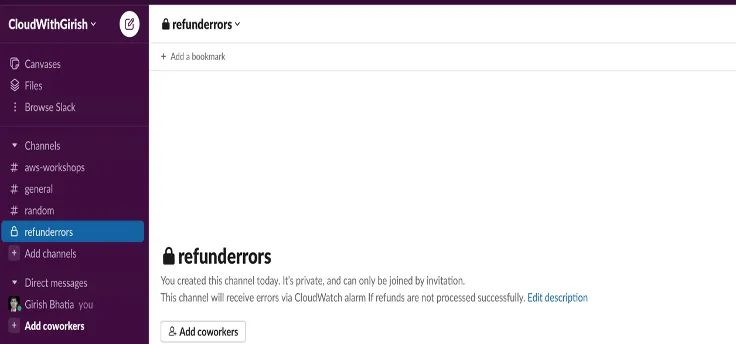
Create s slack channel
I have created a slack channel - refunderrors.
CloudWatch alarm notification will be posted in this channel.
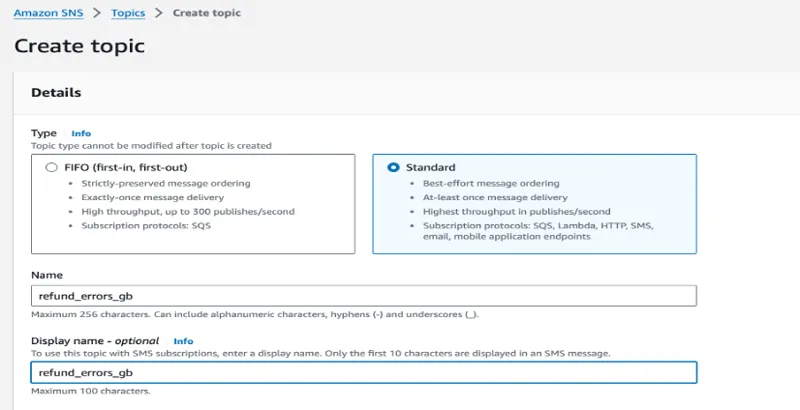
Create a SNS topic
I have created a SNS topic – refund_errors_gb
Configure AWS Slack Chatbot using AWS Console
Use AWS console to configure AWS Slack Chatbot.

Allow AWS service permission to integrate with Slack channel.

Select Notification
Select notification in the last step of this configuration
I will select the region and SNS topic. Remember, I have already created SNS topic, I am just selecting the topic from the drop down in this step.

Create a CloudWatch alarm
I am creating a CloudWatch alarm based on # of invocation for lambda function, however, you can create the alarm based on your specific use case.
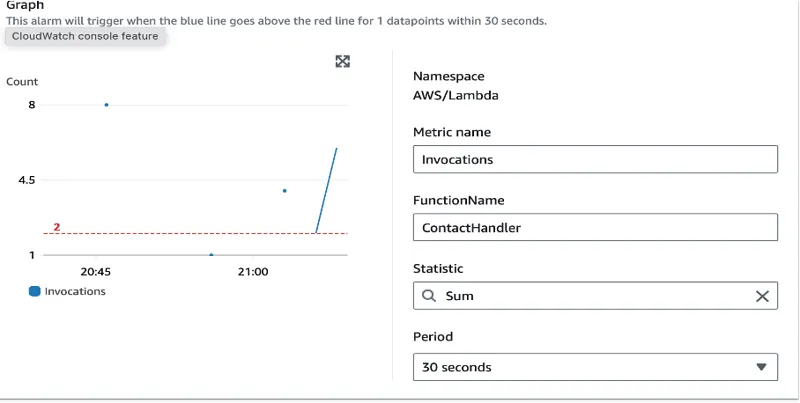
Invoke Lambda function few times
I am invoking the lambda function by calling the restful API using postman, however you can invoke it via your app integration or API integration. Once invoke few times, and metrics per the defined alarm rule meet the criteria, you will see that cloud watch alarm is In Alarm status.

Review Slack channel
Once alarm is in alarm status, a notification will be published to slack channel integrated via AWS chatbot. Review the notification below:


That's it! Integrating AWS with your Slack channel is a straightforward process. Once set up, all team members or operations teams subscribed to the Slack channel will receive notifications when the specified alarm is triggered. This example uses a basic alarm, but you have the flexibility to customize and trigger alarms based on any metrics that align with your unique business use case. This simplicity and adaptability make AWS and Slack integration a powerful combination for streamlined communication and effective management of your cloud operations.
Thanks for reading!
Click here to get to YouTube video for this solution.
𝒢𝒾𝓇𝒾𝓈𝒽 ℬ𝒽𝒶𝓉𝒾𝒶
𝘈𝘞𝘚 𝘊𝘦𝘳𝘵𝘪𝘧𝘪𝘦𝘥 𝘚𝘰𝘭𝘶𝘵𝘪𝘰𝘯 𝘈𝘳𝘤𝘩𝘪𝘵𝘦𝘤𝘵 & 𝘋𝘦𝘷𝘦𝘭𝘰𝘱𝘦𝘳 𝘈𝘴𝘴𝘰𝘤𝘪𝘢𝘵𝘦
𝘊𝘭𝘰𝘶𝘥 𝘛𝘦𝘤𝘩𝘯𝘰𝘭𝘰𝘨𝘺 𝘌𝘯𝘵𝘩𝘶𝘴𝘪𝘢𝘴𝘵
Enjoyed reading this content? Let the author know!
Your likes, comments, shares, and saves help creators reach more builders.

Loading recommendations
Loading article