

Create a devpod K8S custom provider for EKS
Learn to deploy a devpod in AWS EKS with this guide covering custom pod manifest setup, devcontainer integration, and essential configurations."

You are probably already familiar with devcontainers and how they significantly contribute to the development cycle. Until now, I have used them locally to standardize the technology stack versions within our platform engineering team.
However, what happens when we want to take this to a higher, collaborative level? Indeed, options like GitHub Codespaces can be useful in some scenarios. But what if you need to test APIs hosted in your AWS EKS cluster?
At this point, devpod.sh becomes an essential tool. Next, I will explain how you can deploy a devcontainer in your EKS cluster using devpod.
Prerequisites:
- Have an AWS EKS Cluster configured.
- Have access to your AWS EKS cluster.
Devpod Installation
shell
curl -L -o devpod "https://github.com/loft-sh/devpod/releases/latest/download/devpod-linux-amd64" && sudo install -c -m 0755 devpod /usr/local/bin && rm -f devpod
Provider Custom Configuration
YAML
name: kubernetes-ppr-singleversion: v0.1.2icon: https://devpod.sh/assets/kubernetes.svghome: https://github.com/occmundial/ppr-samplesdescription: |-DevPod on KubernetesoptionGroups:- options:- KUBERNETES_NAMESPACE- DISK_SIZEname: "Options"defaultVisible: true- options:- KUBERNETES_CONTEXT- KUBERNETES_CONFIG- POD_MANIFEST_TEMPLATEname: "Kubernetes Config"- options:- CLUSTER_ROLE- SERVICE_ACCOUNT- CREATE_NAMESPACE- KUBECTL_PATH- INACTIVITY_TIMEOUT- STORAGE_CLASS- PVC_ACCESS_MODE- RESOURCES- POD_MANIFEST_TEMPLATE- NODE_SELECTOR- HELPER_RESOURCES- HELPER_IMAGE- LABELS- DOCKERLESS_DISABLED- DOCKERLESS_IMAGEname: "Advanced Options"options:INJECT_GIT_CREDENTIALS:default: trueDISK_SIZE:description: The default size for the persistent volume to use.default: 10Giglobal: trueKUBERNETES_CONTEXT:description: The kubernetes context to use. E.g. my-kube-contextdefault: arn:aws:eks:us-west-2:936737784124:cluster/ubbeuserProvided: trueKUBERNETES_CONFIG:description: The kubernetes config to use. E.g. /path/to/my/kube/config.yamldefault: /Users/jparra/.kube/ubbeKUBERNETES_PULL_SECRETS_ENABLED:description: If true, DevPod will try to use the pull secrets from the current context.default: "true"type: booleanglobal: trueKUBERNETES_NAMESPACE:description: The kubernetes namespace to usecommand: |-NAMESPACE=$(${KUBECTL_PATH} config view --kubeconfig=${KUBERNETES_CONFIG} --context=${KUBERNETES_CONTEXT} --minify -o jsonpath='{..namespace}' 2>/dev/null || true)if [ -z "${NAMESPACE}" ]; thenNAMESPACE=devpodfiecho $NAMESPACECREATE_NAMESPACE:description: If true, DevPod will try to create the namespace.default: "true"type: booleanglobal: trueCLUSTER_ROLE:description: If defined, DevPod will create a role binding for the given cluster role.global: trueSERVICE_ACCOUNT:description: If defined, DevPod will use the given service account for the dev container.global: trueHELPER_IMAGE:description: The image DevPod will use to find out the cluster architecture. Defaults to alpine.global: trueHELPER_RESOURCES:description: The resources to use for the workspace init container. E.g. requests.cpu=100m,limits.memory=1Giglobal: trueKUBECTL_PATH:description: The path where to find the kubectl binary.default: kubectlglobal: trueINACTIVITY_TIMEOUT:description: "If defined, will automatically stop the pod after the inactivity period. Examples: 10m, 1h"STORAGE_CLASS:description: If defined, DevPod will use the given storage class to create the persistent volume claim. You will need to ensure the storage class exists in your cluster!global: truePVC_ACCESS_MODE:description: If defined, DevPod will use the given access mode to create the persistent volume claim. You will need to ensure the storage class support the given access mode!. E.g. RWO or ROX or RWX or RWOPglobal: trueNODE_SELECTOR:description: The node selector to use for the workspace pod. E.g. my-label=value,my-label-2=value-2global: trueRESOURCES:description: The resources to use for the workspace container. E.g. requests.cpu=500m,limits.memory=5Gi,limits.gpu-vendor.example/example-gpu=1global: truedefault: requests.cpu=2,request.memory=4POD_MANIFEST_TEMPLATE:description: Pod manifest template file path used as template to build the devpod pod. E.g. /path/pod_manifest.yamlglobal: falserequired: trueuserProvided: truedefault: /Users/jparra/workspaces/occ/ppr-examples/devpod/providers/single/pod.yamlLABELS:description: The labels to use for the workspace pod. E.g. devpod.sh/example=value,devpod.sh/example2=value2global: truedefault: ppr.occdeep.io/devenvironment=backstageDOCKERLESS_IMAGE:description: The dockerless image to use.global: trueDOCKERLESS_DISABLED:description: If dockerless should be disabled. Dockerless is the way DevPod uses to build images directly within Kubernetes. If dockerless is disabled and no image is specified, DevPod will fail instead.global: truedefault: "false"agent:containerInactivityTimeout: ${INACTIVITY_TIMEOUT}local: truedockerless:disabled: ${DOCKERLESS_DISABLED}image: ${DOCKERLESS_IMAGE}binaries:KUBERNETES_PROVIDER:- os: linuxarch: amd64path: https://github.com/loft-sh/devpod-provider-kubernetes/releases/download/v0.1.2/devpod-provider-kubernetes-linux-amd64checksum: 75e3e3a21c0659684d2ebd8ce6a5f56fe88237c5ea03725c98d992a8dec1dbe2- os: linuxarch: arm64path: https://github.com/loft-sh/devpod-provider-kubernetes/releases/download/v0.1.2/devpod-provider-kubernetes-linux-arm64checksum: c515d8e1f2600eeb6e6c9cff62b42211e28f2731305b747fbc0a9238ff855daa- os: darwinarch: amd64path: https://github.com/loft-sh/devpod-provider-kubernetes/releases/download/v0.1.2/devpod-provider-kubernetes-darwin-amd64checksum: 820c61001d77d16cc97dd67da8320d6d1c35675b53b665db4782e18b37a2f8eb- os: darwinarch: arm64path: https://github.com/loft-sh/devpod-provider-kubernetes/releases/download/v0.1.2/devpod-provider-kubernetes-darwin-arm64checksum: c022dea2479eaa1c07225d8ed1db39046b7155bf97ccdb8a0feb9ff0b20e6d4f- os: windowsarch: amd64path: https://github.com/loft-sh/devpod-provider-kubernetes/releases/download/v0.1.2/devpod-provider-kubernetes-windows-amd64.exechecksum: 2bacffc7c2bcb4c24501ffc351daadf6fe3854a81d669f793ae37644f8fb19a0driver: customcustom:findDevContainer: ${KUBERNETES_PROVIDER} findcommandDevContainer: ${KUBERNETES_PROVIDER} commandstartDevContainer: ${KUBERNETES_PROVIDER} startstopDevContainer: ${KUBERNETES_PROVIDER} stoprunDevContainer: ${KUBERNETES_PROVIDER} rundeleteDevContainer: ${KUBERNETES_PROVIDER} deletetargetArchitecture: ${KUBERNETES_PROVIDER} target-architectureexec:command: |-"${DEVPOD}" helper sh -c "${COMMAND}"
Inside that file, I want you to pay attention to INJECT_GIT_CREDENTIALS, KUBERNETES_CONTEXT, KUBERNETES_CONFIG, and POD_MANIFEST_TEMPLATE, where:
- INJECT_GIT_CREDENTIALS : Injects the local git credentials.
- KUBERNETES_CONTEXT: Configure the context you are using. Even if you only use the default, I recommend configuring the context name with
kubectl config get-contexts.
- KUBERNETES_CONFIG: The path to the Kubernetes configuration file. For some, like me, it's preferable to have a file per cluster (a matter of preference), but I still recommend this configuration.
- POD_MANIFEST_TEMPLATE: Going to the next level means you can also customize the pod deployed in your cluster. In my case, as I use Karpenter, I have some formerly called provisioners with specific computing specifications. Here is an example of that configuration:
YAML
apiVersion: v1kind: Podmetadata:namespace: devpodname: devpod-ppr-spec:tolerations:- key: "dedicated"operator: "Equal"effect: "NoSchedule"value: "devpod"affinity:nodeAffinity:requiredDuringSchedulingIgnoredDuringExecution:nodeSelectorTerms:- matchExpressions:- key: dedicatedoperator: Invalues:- devpod
With this, we force the creation of pods with the label value dedicated to devpod.
Now, let's put it all together.
- I have uploaded the files to a repository so you can clone the repo and use the manifests with the options that make sense to you.
shell
gh repo clone parraletz/devpod-manifests
- We create the provider.
sh
devpod provider add devpod-manifests/provider-k8s/provider.yaml

Confirm that it was added correctly with the command
devpod provider list .sh
NAME | VERSION | DEFAULT | INITIALIZED | DESCRIPTION------------------------+---------+---------+-------------+------------------------kubernetes-ppr-single | v0.1.2 | true | true | DevPod on Kubernetes
- We create our workspace
shell
devpod up git@github.com:parraletz/service-example.git --id service-test --provider kubernetes-ppr-single --devcontainer-path .devcontainer/devcontainer.json --debug

We will see how our container has been created. And remember, one of the customizations we made was to specify a NodeAffinity.

And automatically VSCode is open:
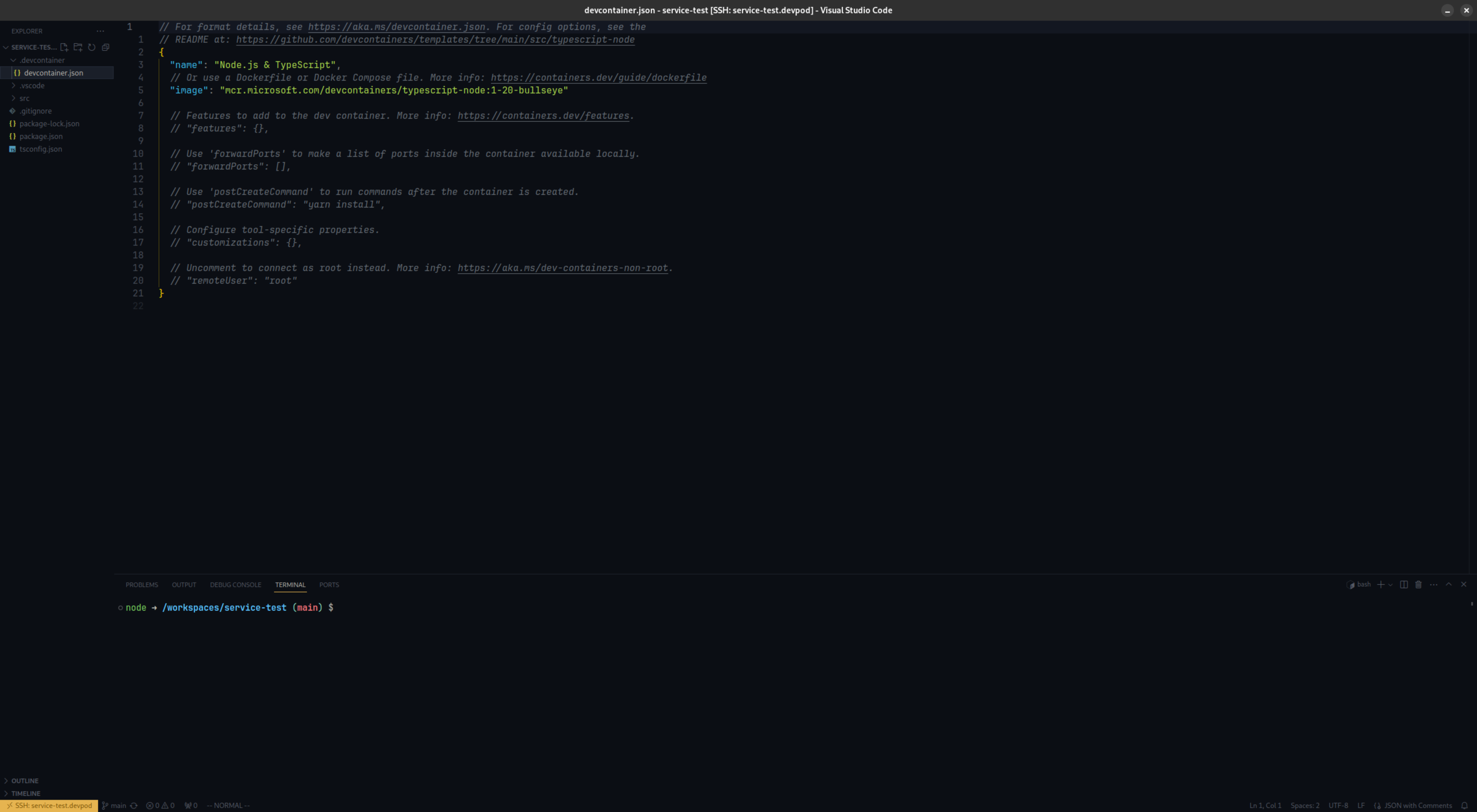
Excellent! We now have our devpod running within our EKS cluster.
Happy coding!!!
References:
Enjoyed reading this content? Let the author know!
Your likes, comments, shares, and saves help creators reach more builders.

Loading recommendations
Loading article