
Build a UGC Live Streaming App with Amazon IVS: Generating Stage Participant Tokens (Lesson 4.2)
Welcome to Lesson 4.2 in this series where we're looking at building a web based user-generated content live streaming application with Amazon IVS. This entire series is available in video format on the AWS Developers YouTube channel and all of the code related to the sample application used in this series can be viewed on GitHub. Refer to the links at the end of the post for more information.
Series: Build a UGC Live Streaming App with Amazon IVS (30 articles)
- …
- 16Build a UGC Live Streaming App with Amazon IVS: Generating Stage Participant Tokens (Lesson 4.2) This article

Intro
In this lesson, we will look at how the StreamCat application generates and issues stage participant tokens for real-time streams. If you're not familiar with these tokens, be sure to check out lesson 4.1 to learn what they are and why they are required.
Stage Schema Refresher
If you recall from lesson 1.5, each
User has a one-to-one relationship with a Stage entity. The Stage entity has a one-to-many relationship with the StageToken entity. 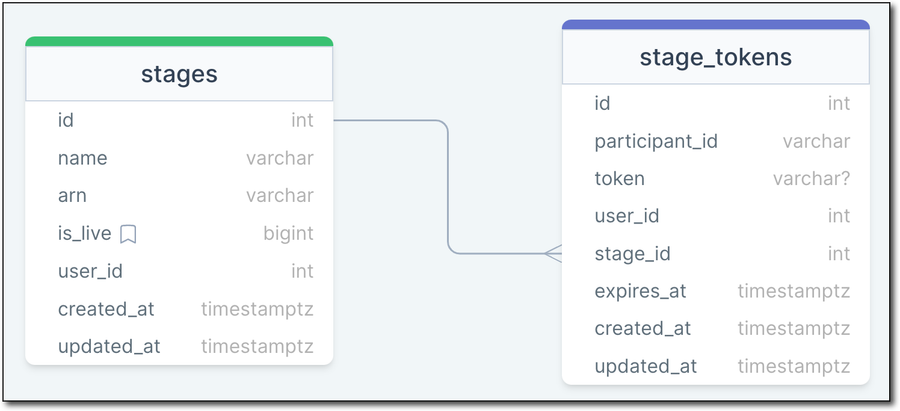
Stage Relationship Model
StreamCat uses the AWS SDK for JavaScript (v3) to generate stage participant tokens, and persists them to the database. This allows the application to retrieve a token for a given user when they are needed. For a host, this token is generated when they begin a broadcast session. Hosts are able to invite other users to broadcast with them on their real-time streams, and when this invite is extended, a stage participant token is generated for that user.
Generating a Stage Participant Token
To generate a stage participant token, we can use the use the
ivs-realtime module of the SDK for JavaScript. The StreamCat RealTimeService passes a CreateParticipantTokenCommandInput object to a new CreateParticipantTokenCommand, and sends that command with an instance of the IvsRealTimeClient (docs ). The CreateParticipantTokenCommandInput requires a userId (the StreamCat user's id), an attributes object that accepts any arbitrary key/value pairs that to associate with the token, and the stageArn.1
2
3
4
5
6
7
8
9
10
public async createStageToken(userId: string, username: string, stageArn: string): Promise <CreateParticipantTokenCommandOutput> {
const request: CreateParticipantTokenCommand = new CreateParticipantTokenCommand({
userId,
attributes: {
username,
},
stageArn,
});
return await this.ivsRealtimeClient.send(request);
};Persisting a Stage Participant Token
When a token is required, the
createStageToken() method of the RealTimeService is invoked, and the values returned from the CreateParticipantTokenCommandOutput are persisted to the database. For example, here's how StreamCat issues a token when a host invites a user to join their real-time stream.1
2
3
4
5
6
7
8
let token = await RealTimeService.createStageToken(userId, username, stageArn);
await StageToken.create({
participantId: token.participantToken?.participantId,
token: token.participantToken?.token,
userId: Number(token.participantToken?.userId),
expiresAt: DateTime.fromJSDate(token.participantToken?.expirationTime!),
stageId: auth.user?.stage.id,
});Summary
In this lesson, we learned how StreamCat generates stage participant tokens for real-time streams. In the next lesson, we'll see how to create a real-time conversation between a host and their invited co-hosts, and broadcast that conversation to their channel as a low-latency live stream.
Links
Series: Build a UGC Live Streaming App with Amazon IVS (30 articles)
- …
- 16Build a UGC Live Streaming App with Amazon IVS: Generating Stage Participant Tokens (Lesson 4.2) This article
Enjoyed reading this content? Let the author know!
Your likes, comments, shares, and saves help creators reach more builders.

Loading recommendations
Loading article