
Build a UGC Live Streaming App with Amazon IVS: Displaying Stream Credentials (Lesson 3.1)
Welcome to Lesson 3.1 in this series where we're looking at building a web based user-generated content live streaming application with Amazon IVS. This entire series is available in video format on the AWS Developers YouTube channel and all of the code related to the sample application used in this series can be viewed on GitHub. Refer to the links at the end of the post for more information.
Series: Build a UGC Live Streaming App with Amazon IVS (30 articles)
- …
- 10Build a UGC Live Streaming App with Amazon IVS: Displaying Stream Credentials (Lesson 3.1) This article

Intro
In this lesson, we will look at how StreamCat retrieves and displays a user's
Channel credentials. These credentials allow a user to live stream directly to their dedicated Amazon IVS channel from third-party streaming software.Channel Credentials
If you recall from lesson 2.3, each
Channel has a property called ingestEndpoint and another called streamKey. 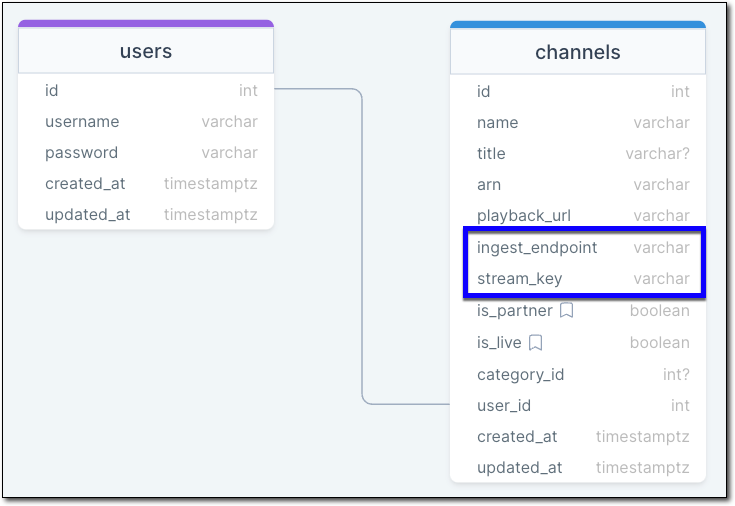
User - Channel Relationship
These two properties are used by third-party streaming software to broadcast a live stream. For example, here's a dialog from the popular program OBS showing the required inputs.
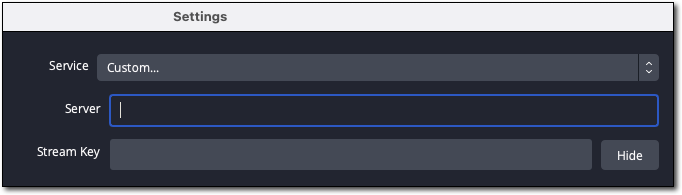
OBS Stream Settings
So in order to stream to this Amazon IVS channel, we have to retrieve and display these two values from the user's channel.
When we created the
Channel model, we persisted the ingestEndpoint directly into the database. Because this value represents the endpoint for both RTMP and WebRTC ingest, it lacks a protocol prefix. Here's an example of the value that is persisted for each channel: f99084460c35.global-contribute.live-video.net. To display an rtmps URL - the format most commonly accepted by third-party streaming software - we can add a computed property to the Channel.1
2
3
4
()
public get rtmpsEndpoint() {
return `rtmps://${this.ingestEndpoint}:443/app/`;
}Within the user's dashboard, we can retrieve the current user's channel information, and render it to the view.
1
2
3
4
5
6
7
8
9
10
11
12
13
14
<div>
  <label for="ingestEndpoint">Ingest Endpoint (Server)</label>
  <input type="text" id="ingestEndpoint" x-bind:value="channel.rtmpsEndpoint" disabled />
  <div id="ingestEndpointHelp">
    The RTMP endpoint for use with third-party streaming software.
  </div>
</div>
<div>
  <label for="streamKey">Stream Key</label>
  <input type="password" id="streamKey" x-bind:value="channel.streamKey" disabled />
  <div id="streamKeyHelp">
    Your unique stream key for use with third-party streaming software. Treat this key like a password.
  </div>
</div>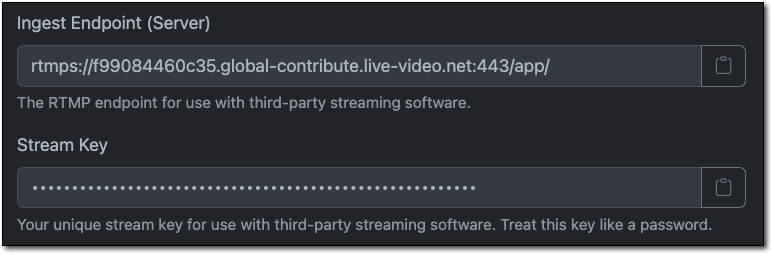
Channel Endpoint and Stream Key
At this point, a StreamCat user can copy and paste the ingest endpoint and stream key into third-party broadcasting software and start a live stream. We'll see how to create a playback experience (IE: the user's public facing "channel") in a future lesson in this course.
Summary
In this lesson, we learned how to retrieve and display a user's
ingestEndpoint and streamKeyLinks
Series: Build a UGC Live Streaming App with Amazon IVS (30 articles)
- …
- 10Build a UGC Live Streaming App with Amazon IVS: Displaying Stream Credentials (Lesson 3.1) This article
Enjoyed reading this content? Let the author know!
Your likes, comments, shares, and saves help creators reach more builders.

Loading recommendations
Loading article