

Ready. Set. Post! Community articles are live on community.aws!
I'm so excited to share the launch of the community.aws editor, a tool to empower you to write, share content, and connect with others in the AWS community — all right here on community.aws.

I've been blogging in some form since 1999. It wasn't always pretty, but it provided a place to share my thoughts and my technical learnings from school. Somewhere along the way, I fell in love with connecting with people all over the world — and eventually some of those people became colleagues, employers, and even friends. My history with blogging is why I'm so excited to share the launch of the community.aws editor, a tool to empower you (yes, you!) to write, share content, and connect with others in the AWS community — all right here on community.aws.
Okay, so you’ve got an editor now, but what are you going to write about? Well, it’s up to you! You can share your first impressions of PartyRock, hot takes about generative AI, questions for the community to spark discussion around a topic you're passionate about (emacs or vi?!), solutions you've just discovered, or whatever else you happen to be thinking about.
This is a community of like-minded folks who are just as passionate about tech as you are. You have knowledge and experience building in the cloud (or maybe you're just getting started), and by sharing it with others on community.aws, you can help others level up their skills, gain confidence to join the world of technology, and build in the cloud. Here you can connect with people about shared interests and even get virtual high-fives from new friends.
I’m so excited for the future of community.aws, and I can’t wait for y’all to show us what you’re building — and for you to see what we’re building for you!
Writing your first article
Before you can write your first article, you’ll need to set up your profile. Doing that is super simple.
Set up your profile
First things first. Head over to https://community.aws (oh hey, you're already there!) and select the Login button in the upper menu.
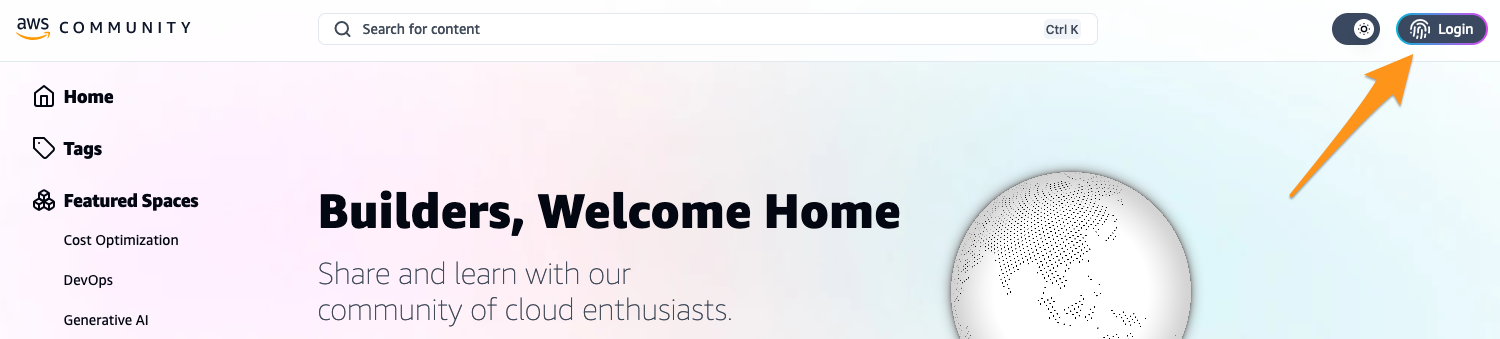
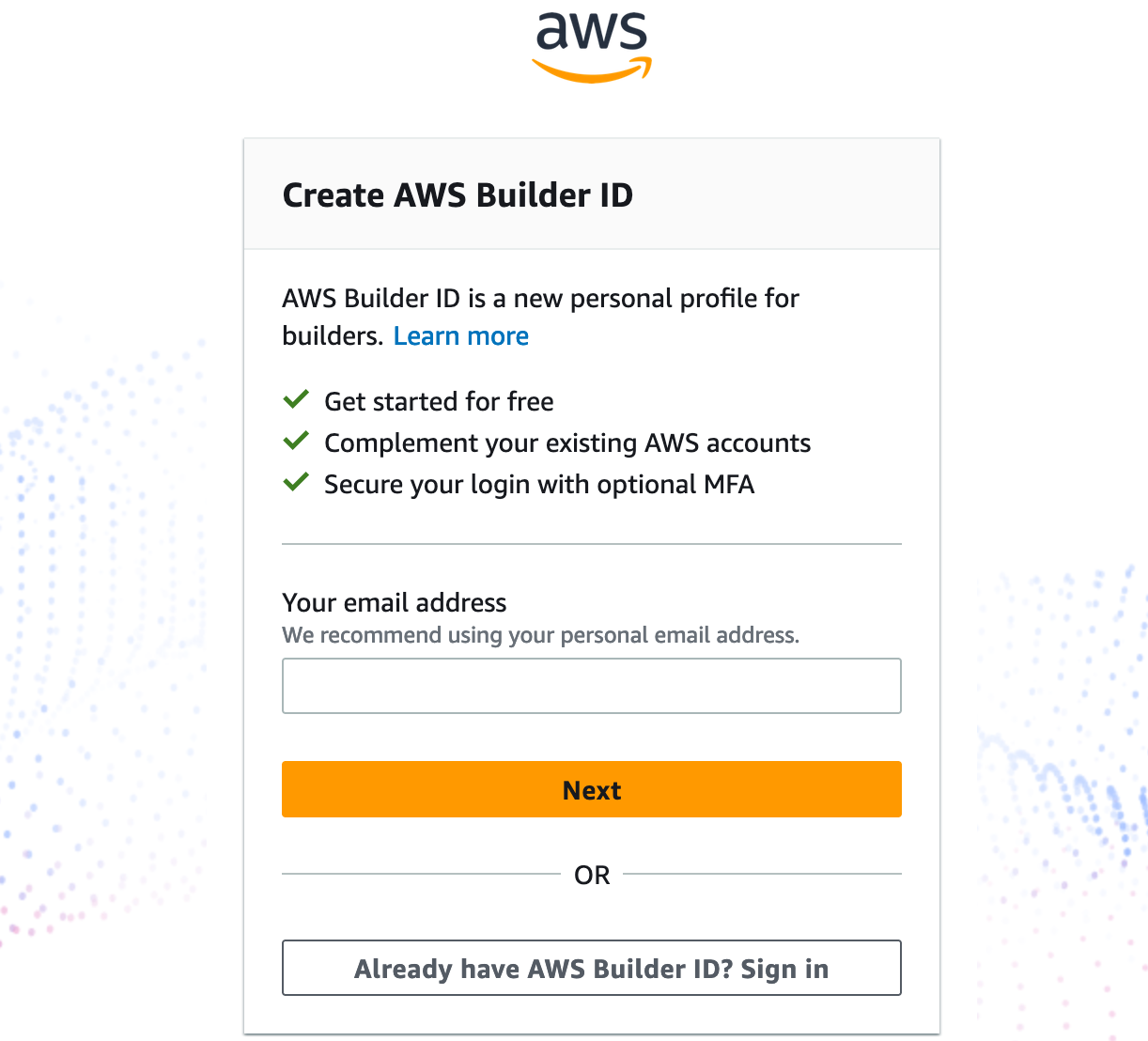
From here you'll be directed to either sign up for a new AWS Builder ID or sign in with an existing one.
Not sure if you have an existing Builder ID? If you use Amazon CodeCatalyst, Amazon CodeWhisperer, or AWS Training and Certification, you probably already have one. No need to keep multiple accounts around. Use that one!
Once you're logged in, you'll want to claim your alias and set up your profile to let the community know who you are. Alias is the way people find you via URL. For instance, my alias is
jennap and my profile can be found at https://community.aws/@jennap .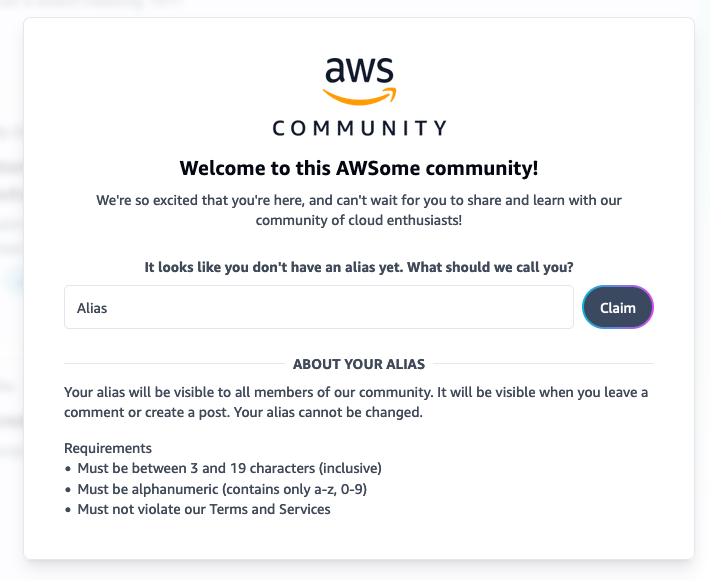
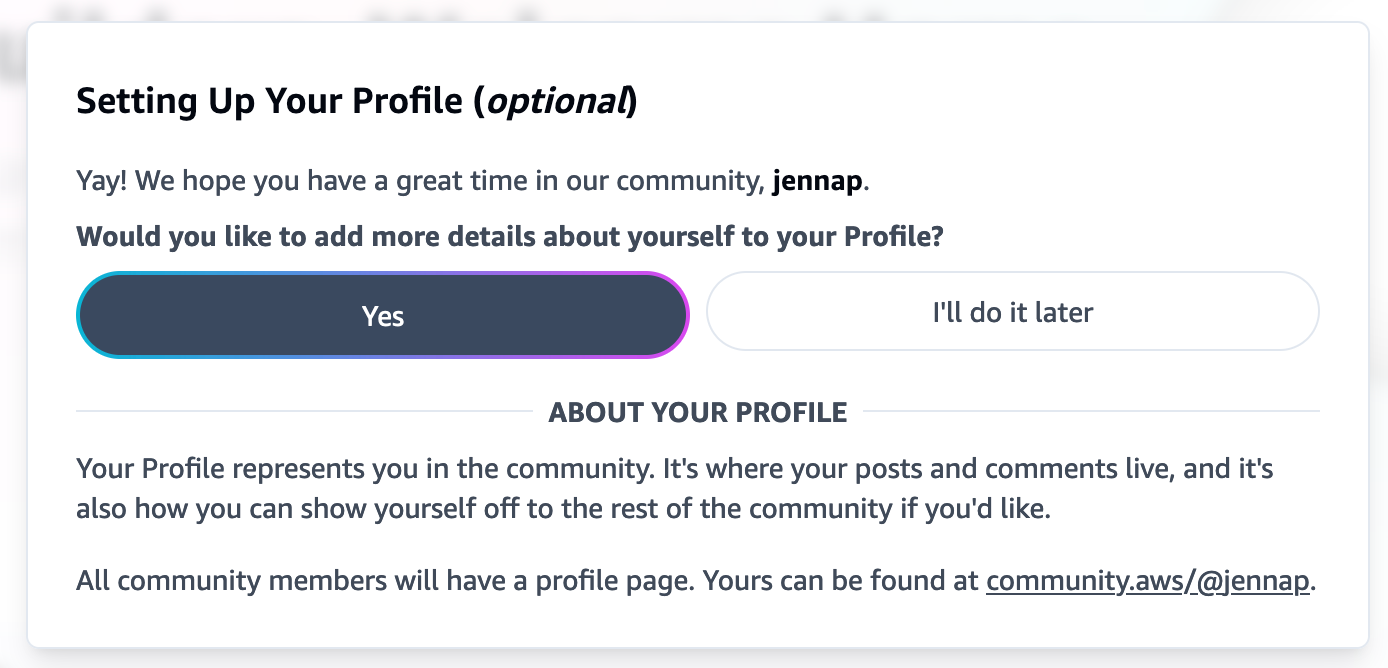
If you choose to set up your profile now, you can upload your profile image, share a short bio about yourself, and drop links to your favorite social accounts. Community.aws is a community of humans -- not robots -- so be sure to keep it updated so you can share all the cool stuff you create!
Create your article
Now that your profile is set up, let's get your article written and published! Select the paper and pencil icon in the upper menu to create your first draft.
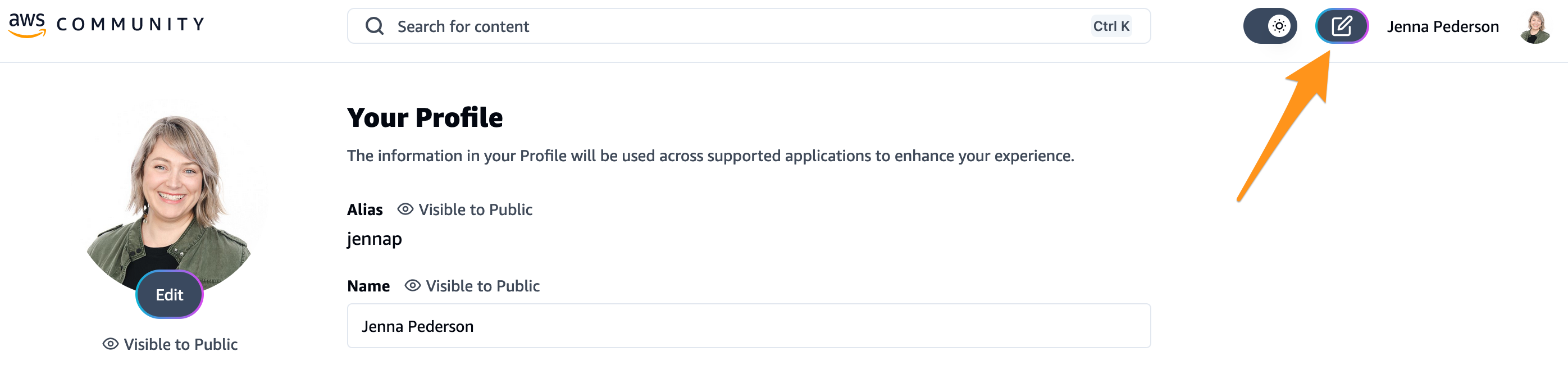
Give it a catchy title like I did, or if you’d rather avoid readers, make it long and boring. You do you. Next, provide a short description that helps readers understand what the content is about.
After that, add some tags so people can find your article, and drag and drop a cover image to make your article pop!
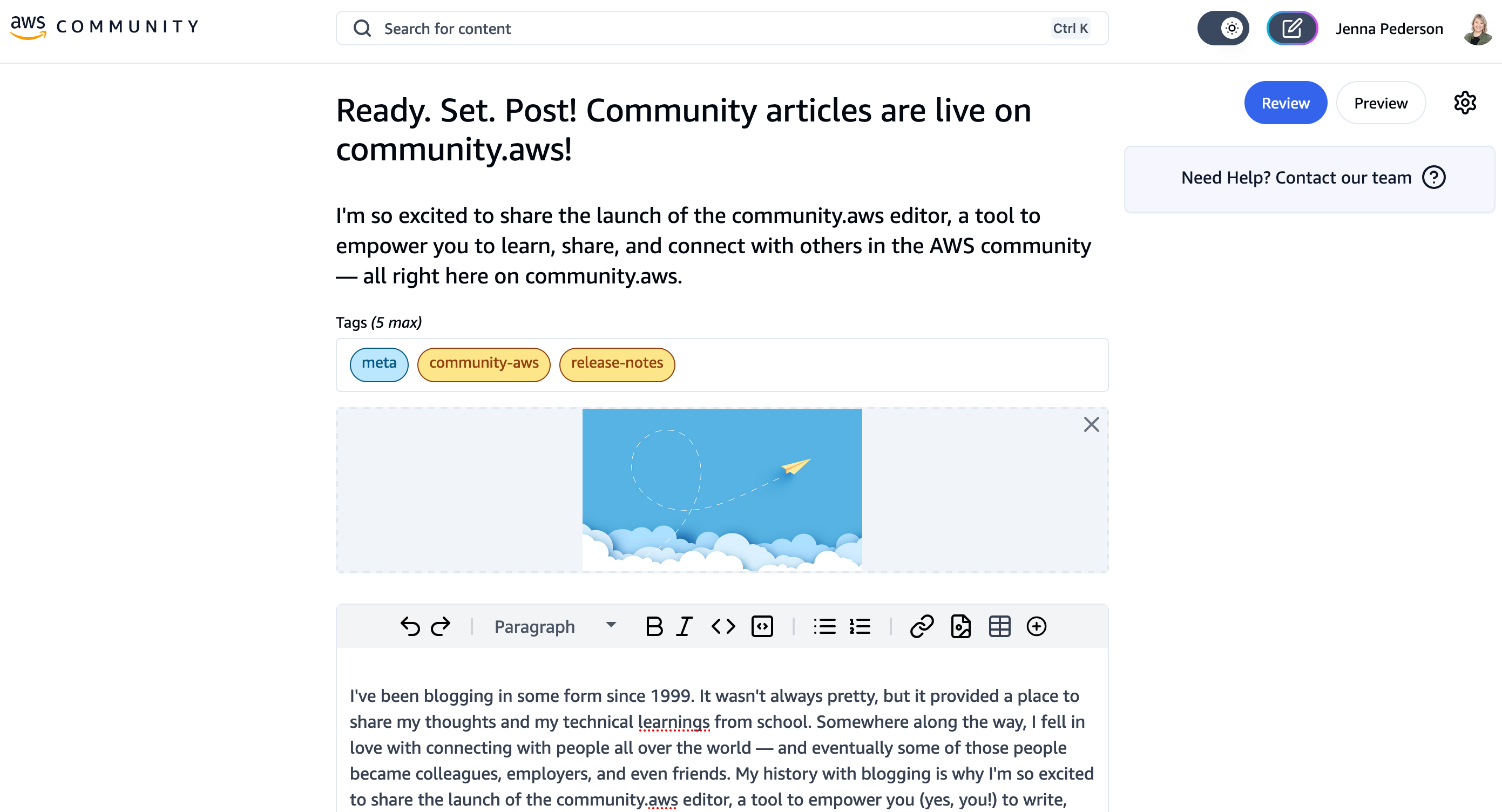
Then, write your article!
Once you've finished writing (or even periodically throughout), you can preview your content by selecting the Preview button. This opens up a super secret, hard to guess URL for you (or someone you trust) to preview your article before you publish it. Make sure it looks and reads the way you want and then you'll be ready to submit your article for review.
Submit your article for review
Once your article is written, you'll need to submit it for review. To make sure that the highest quality technical content is published on community.aws, we have some checks that we do on your article before you can publish it. This helps make sure that your content contributes to a safe, welcoming, and supportive environment for everyone — and it even helps you create high quality technical content that people will read.
When you're ready to submit your article for review, select the Review button.

If for some reason your review doesn't pass the first time, no worries! The Editor shows you what issues it found, whether they are blocking errors or warnings, and tells you how to fix them.
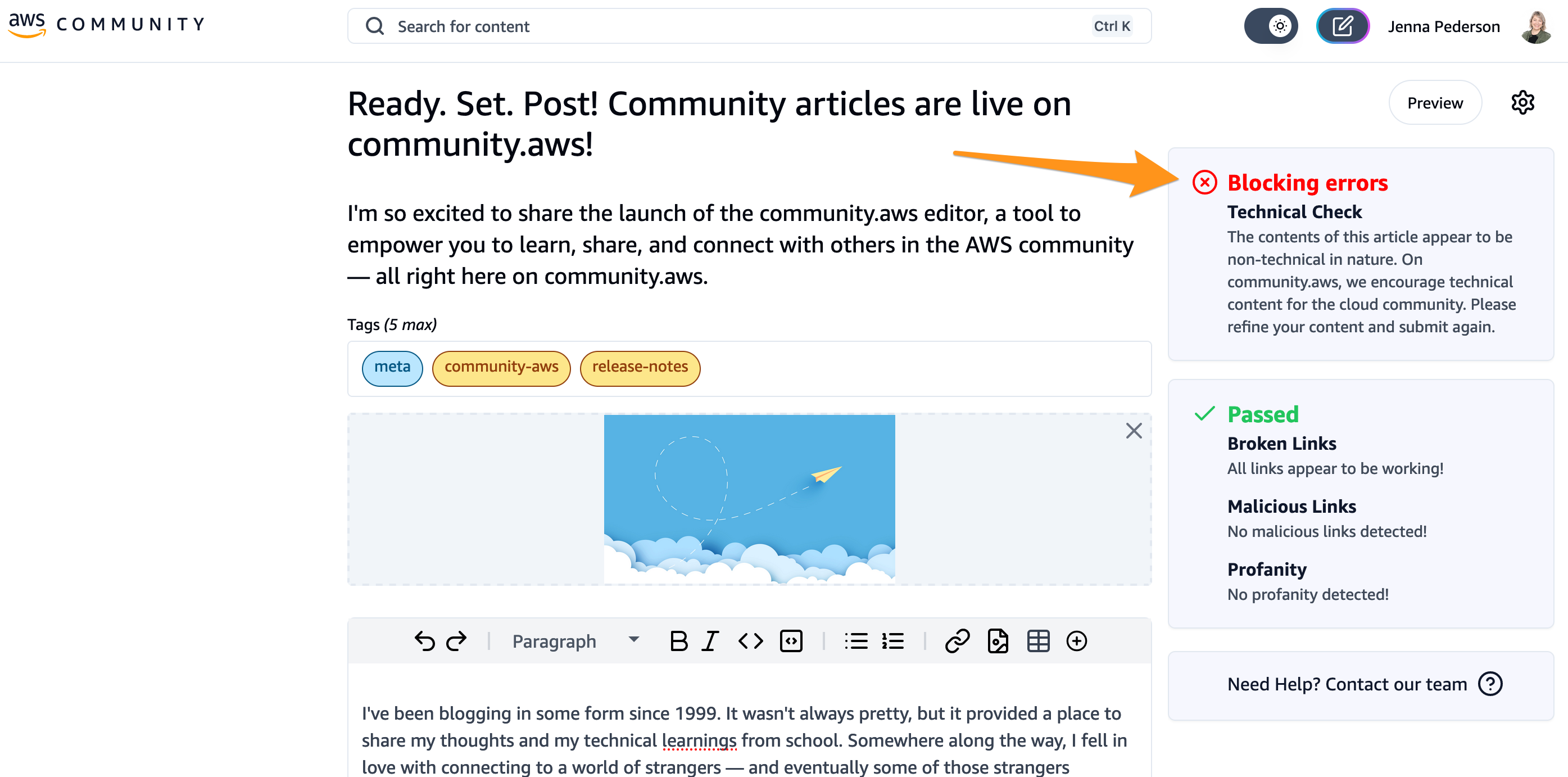
Is your article not passing review and you think we've made a mistake? Please report that to us here and we'll be in touch.
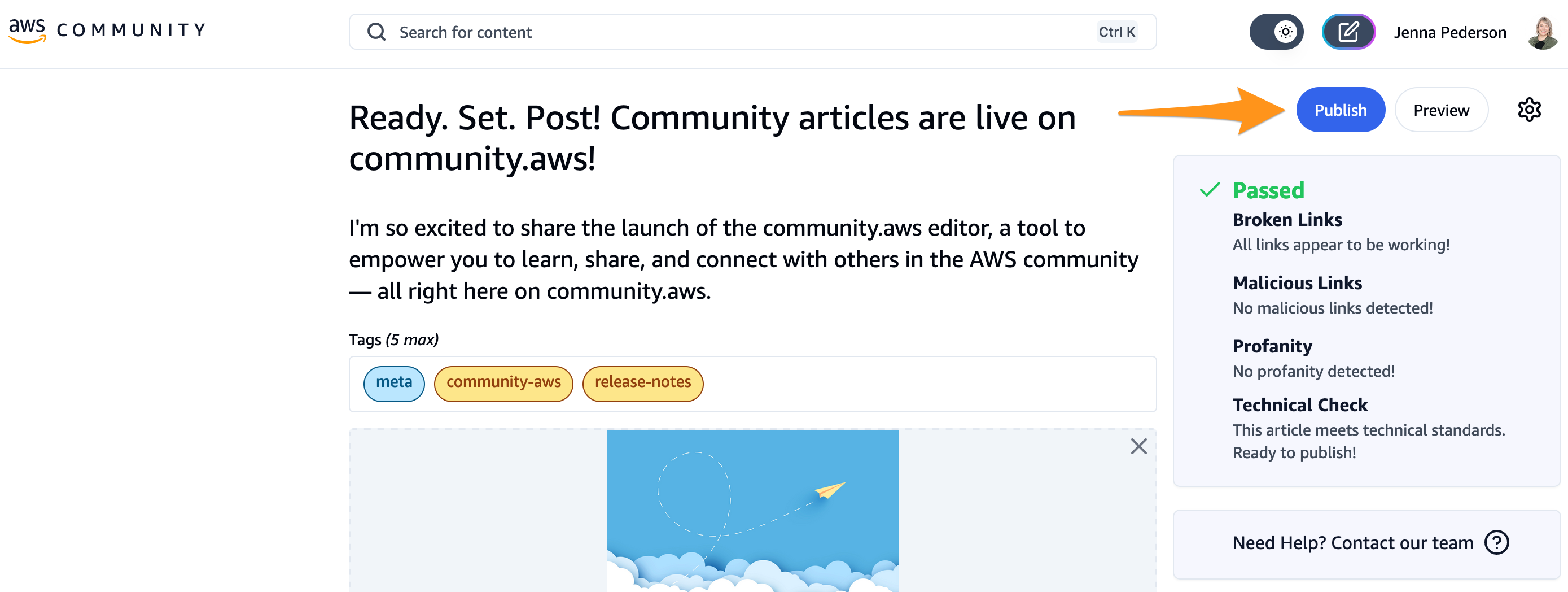
Once your article passes review, it's time to publish it.
Publish your article
Click that shiny Publish button and confirm that you want to make your article public.
Sit back and enjoy the fruits of your labor. Just kidding. Share that article with your friends! Tag #cloudcommunity on X, Instagram, or LinkedIn. I'd love to see what you wrote, too. You can find drop a link to your article in this thread on Threads or on this LinkedIn post and I'll help amplify it for you.
Wrapping up
In need of a little inspiration now that you know how to publish your first article? Community.aws is by builders, for builders. So if you've got an idea for an article that you would read, chances are, so would someone else. And if you've never published your own blog post before or you're just getting started in tech, that's cool too. Sharing your experiences learning a new framework or AWS service will give others the confidence to get started too. We welcome all technical content that the AWS community wants to read. Check out these articles from other community members and my AWS colleagues for some inspiration:
- I deployed Kubernetes with a 1986 Tandy 102 Portable Computer
- AWS re:Invent uncovered - TOP TIPS FOR FIRST-TIME ATTENDEES
- What the regex?! A Practical Guide to Regular Expressions
- Any Day Can Be Prime Day: How Amazon.com Search Uses Chaos Engineering to Handle Over 84K Requests Per Second
- The ABCs of Generative AI
What will you write about?
---
Frequently Asked Questions
What kind of content can I publish on community.aws?
Community.aws is by builders, for builders. We welcome all technical content that the AWS community wants to read. That means authentic, genuine, hands-on technical articles or thought-leadership pieces about cloud or cloud-adjacent technologies. That doesn't mean pitches for your product or company.
How can I see how many people have read my articles?
It's exciting seeing your content get traction, right?! We've got this on the roadmap and will share here when it's available using the #meta , #community-aws , and #release-notes tags.
Can I cross-post my article from my personal site or my company site?
Yes, as long as it meets the criteria above (by builders, for builders, authentic, genuine, hands-on). If you do cross-post an existing article, please make sure to set the canonical URL on your community.aws article so that search engines don't penalize us for publishing duplicate content. You can set the canonical URL by going to the Gear icon in the article editor and selecting More Settings.
Who owns my content?
You do. You can read the full terms here .
How do I report a bug or request a feature?
Select Need Help in the upper menu under your profile picture.
How do I create a series of articles?
An article series is used to tie sequential, related content together. An example is this tutorial series by Jose Yapur. You can create a series by going to the gear icon in the article editor and selecting More Settings. From there, you'll set a name for your series on each article in your series.
Do I need a Builder ID account to view content on community.aws?
You do not need a Builder ID account to view content on community.aws. All content is open to everyone. However, if you'd like to publish your own articles, like, comment, or engage in other ways, you will need a Builder ID.
Enjoyed reading this content? Let the author know!
Your likes, comments, shares, and saves help creators reach more builders.

Loading recommendations
Loading article